












Introduction

I look at the GTX 465 and see a real opportunity for NVIDIA to do something big; giving people the chance to use this card as a PhsyX card in ATI based systems would be a simply fantastic idea.
If you haven't heard already, the 257.15 Beta ForceWare driver set from NVIDIA accidently had the ability for ATI users to again use an NVIDIA card as a second to do PhysX. The whole ordeal created a bit of drama around the web; as soon as it was discovered by NVIDIA they yanked the driver and put another one up that disabled the ability.
After a bit of uproar, they put it back up but said that it wouldn't be included in future drivers; they kind of dribbled on about how it's expensive to maintain it for ATI cards. It sounds like a load of crap to be honest, because it's been disabled for ages. We're sure in the last few months they've done nothing and all of a sudden it was slipped in and working fine on ATI cards. I don't know what NVIDIA have against making money, but the whole thing sounds stupid.
Still, it's not my job to tell NVIDIA what to do. Instead I'm going to show you what you can do with the current Beta driver. We've tested a couple of high end ATI cards with a number of NVIDIA ones. Let's have a quick look at how we got it working before we get into the benchmarks themselves.
Setting up PhysX on ATI
Getting PhysX up and running is really quite an easy task; it's just that there's some misinformation out there which might make it a little confusing. The first thing we do is install both our cards, then we install the drivers, which in our case are the Catalyst 10.5 and the ForceWare 257.15 releases.
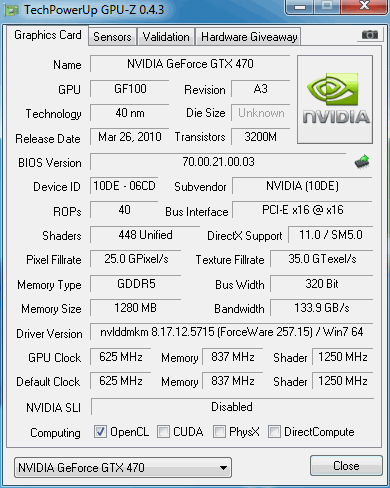
Once that's done, we fire up GPU-Z and have a look at the cards. If you look at the bottom you'll see PhysX isn't ticked. That means it's not working. Now, if you've read Windows 7 information regarding this you'll have heard that you don't need to set up a fake adapter and extend your desktop. Well, in this case that isn't true.
So what we do is right click our desktop and go to screen resolutions.

Once that's done we hit Detect, move over to the monitor that shows as connected to the NVIDIA card and force the monitor via VGA. Hit apply and you'll now see your two monitors. What you then do is head down to Multiple Displays and extend the desktop.
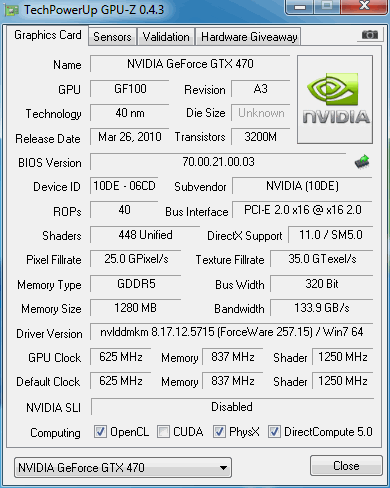
Once that's done we fire up GPU-Z and as you can now see, PhysX is ticked. Now that that's working, let's get stuck into the benchmarks.
Test System Setup and 3DMark Vantage
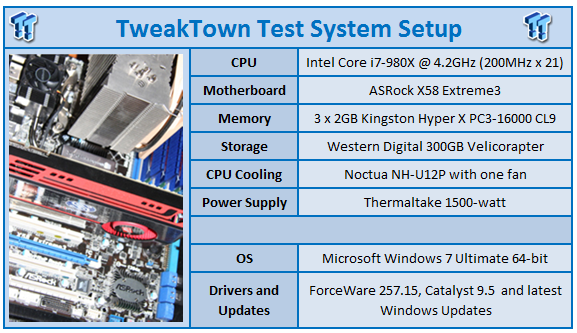
We would like to thank the following companies for supplying and supporting us with our test system hardware and equipment: Intel, ASRock, Kingston, Western Digital, Noctua and Thermaltake.
Today we've got the Sapphire HD 5870 and Sapphire HD 5970 from the ATI camp. From the NVIDIA camp we've got the trusty new GTX 465 and a couple of old school favorites in the GTX 285 from GIGABYTE and the Leadtek GTX 260+.
Let's get started!
3DMark Vantage
Version and / or Patch Used: 1.0.1
Developer Homepage: http://www.futuremark.com
Product Homepage: http://www.futuremark.com/products/3dmarkvantage/
Buy It Here

3DMark Vantage is the new industry standard PC gaming performance benchmark from Futuremark, newly designed for Windows Vista and DirectX10. It includes two new graphics tests, two new CPU tests, several new feature tests, and support for the latest hardware.
3DMark Vantage is based on a completely new rendering engine, developed specifically to take full advantage of DirectX10, the new graphics API from Microsoft.
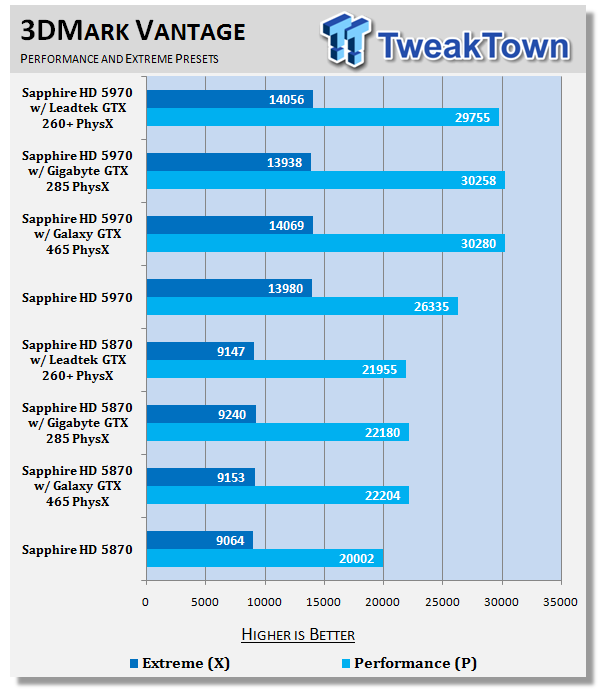
You can see the addition of a PhysX card bumps up our score under Vantage; only in the Performance preset, though. As for the different models, nothing really separates them across the board.
Benchmarks - Darkest of Days
Darkest of Days
Version and / or Patch Used: 1.4
Timedemo or Level Used: Built-in Test
Developer Homepage: http://www.darkestofdays.com/index.php
Product Homepage: http://www.darkestofdays.com/index.php
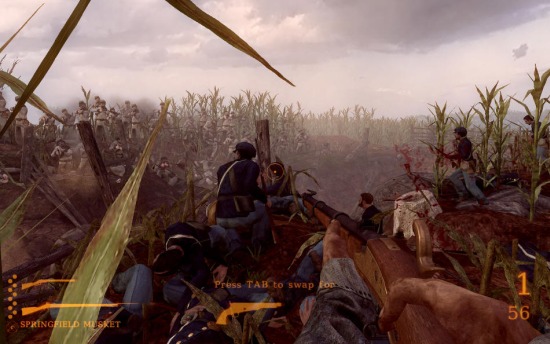
Darkest of Days takes the player through time into historic battles in an effort to save key individuals from certain death. The battles range from Custer's Last Stand at the Battle of the Little Bighorn in 1876 to fighting in Pompeii as ash and fire rain down from an erupting Mt. Vesuvius in 79 AD. Other locations include the battles of Antietam and Tannenberg, and a German World War II P.O.W. camp. There are different missions in every time period and the game takes about 4 hours to complete.
The game features over twenty weapons, both from the original time period as well as those brought back from the future. In addition, there are artillery weapons from different time periods to assist in battle.
Note: With the PhysX set to Medium or High Darkest of Days take advantage of the NVIDIA PhysX abilities. For that reason we will test ATI cards at the Low preset, NVIDIA based cards though will be tested at Low and High.
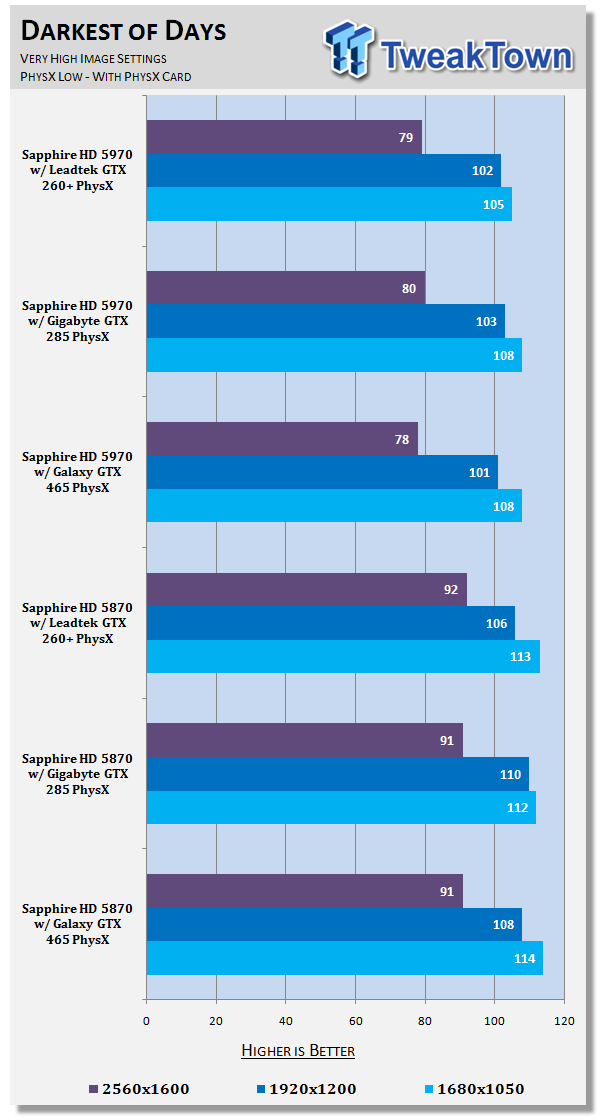
Under Darkest of Days you see the numbers between all the setups are very similar. Since the game doesn't deal with Crossfire all that well, you can see the dual GPU HD 5970 falls back at the highest resolution.
Benchmarks - Batman Arkham Asylum
Batman Arkham Asylum
Version and / or Patch Used: 1.1
Timedemo or Level Used: Built-in Test
Developer Homepage: http://www.batmanarkhamasylum.com/
Product Homepage: http://www.batmanarkhamasylum.com/

Batman: Arkham Asylum exposes players to a unique, dark and atmospheric adventure that takes them to the depths of Arkham Asylum - Gotham's psychiatric hospital for the criminally insane. Gamers will move in the shadows, instigate fear amongst their enemies and confront The Joker and Gotham City's most notorious villains who have taken over the asylum.
Using a wide range of Batman's gadgets and abilities, players will become the invisible predator and attempt to foil The Joker's demented scheme.
Batman: Arkham Asylum features an original story penned exclusively for the game by famous Batman author and five-time Emmy award winner Paul Dini, whose credits include Lost season one and Batman: The Animated Series.
Note: With support for PhysX NVIDIA based cards will be tested with the technology on and off, ATI cards will be tested with the technology off due to it not being supported on their cards.
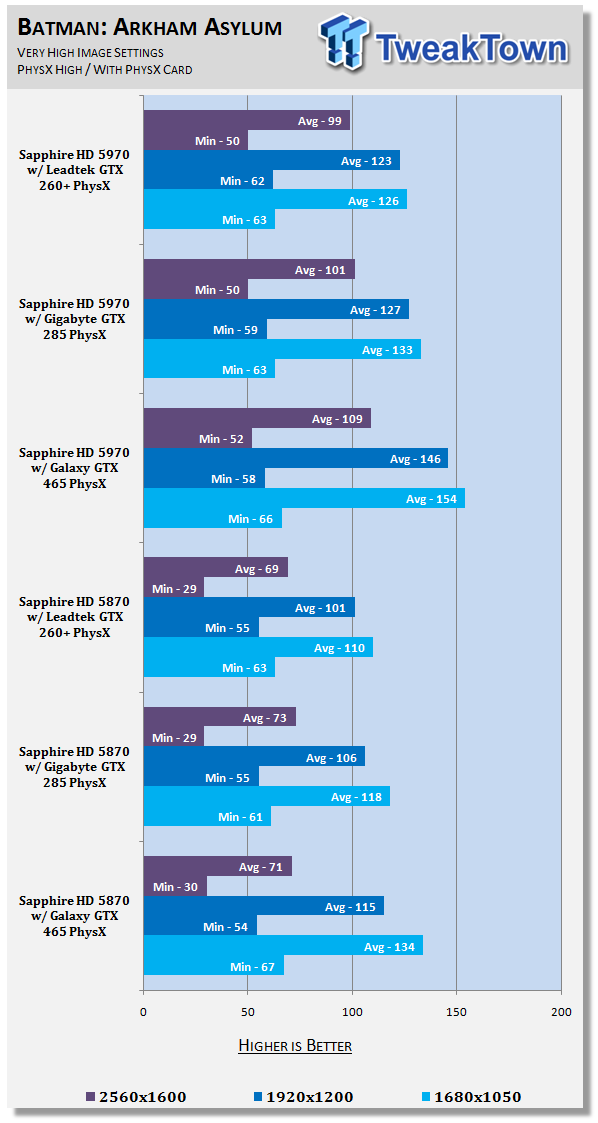
Here we can see that the GTX 260+ and GTX 285 both perform very similar. Moving to the new GTX 465, you can see that while there's not much in the minimums, the overall averages have gone up at all resolutions.
Benchmarks - Dark Void
Dark Void
Version and / or Patch Used: Benchmark Demo
Timedemo or Level Used: Built-in Test
Developer Homepage: http://www.airtightgames.com
Product Homepage: http://www.darkvoidgame.com/
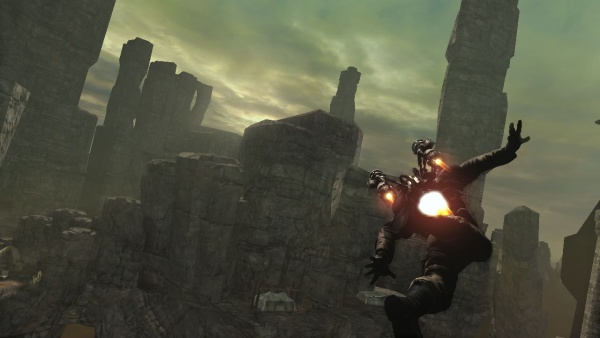
The game's story takes place during World War II and centers around a cargo pilot named William Augustus Grey (voiced by Nolan North) who is teleported to another world while flying through the Bermuda Triangle. In this world, known as the 'Void', Will encounters an alien race as well as other humans, which are known as the Watchers and the Survivors respectively.
Will reluctantly joins the Survivors who are engaged in a feud with the alien race to satisfy his desire to return to Earth. While aiding the Survivors, Will discovers that the Void is a middle ground that connects both the Watchers homeworld and Earth. It also becomes apparent that the Watchers are supplying the Axis powers with various supplies for reasons unknown. With the help of Nikola Tesla, Will utilizes retrofited Watcher technology to combat the Watchers and eventually find a way to escape the Void.
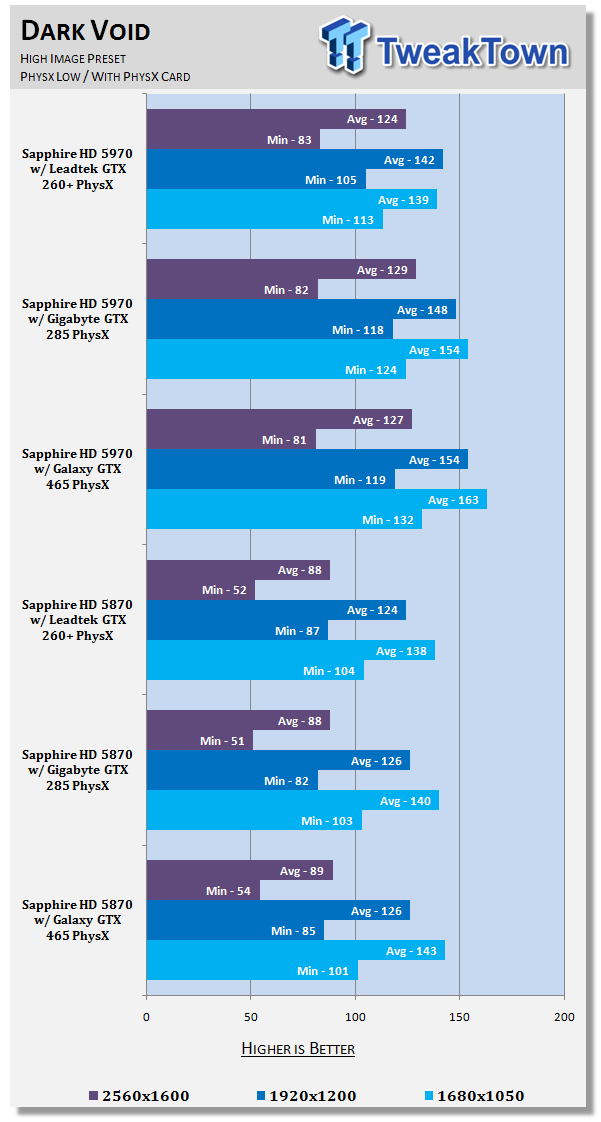
Again, like Batman AA we see the two GTX 200 series cards perform very similar. When looking at the GTX 465, though, it manages to pull out a clear win in the average department.
Final Thoughts
PhysX is no doubt a cool technology and as we see more and more games make use of it, why wouldn't you want to use it? - The problem at the moment for NVIDIA is that no one with a high end ATI card is going to move over to a high end NVIDIA one. At the same time, if people want the fastest single card on the market, you can't look past the HD 5970.
PhysX for most people isn't going to be a big enough swaying point to pick one brand over another. Yes, the list of games that support the technology is big, but once you cut that list down to games you want to play and then cut that list down to ones that actually play better with PhysX, you're not going to have a large list of titles in front of you.
On the other hand, if you're using a HD 5800 or HD 5900 series card and for a few hundred dollars could add PhysX ability, the option becomes quite attractive. I could easily see people picking up a GTX 465 to go alongside a HD 5800 series like we have here today.
The good news is that these beta drivers aren't going to be hard to get a hold of and since they're part of the latest series and driver updates for NVIDIA aren't very regular, buying a cheap second hand GTX 200 series card or using one you may have lying around could be a good option for experiencing PhysX.
A GTX 465 over a GTX 260, while adding more performance, doesn't really add loads, so it's probably not warranted picking one up while the technology isn't officially going to be supported by NVIDIA.
In saying that, though, if NVIDIA did decide to support the technology long term, like I personally think they should, then I would suggest getting something like the GTX 465 which is going to handle more intensive PhysX better and if Mafia II is anything too go by, it's the perfect reason or excuse to nab an NV card to go along side your ATI one.
We have to wonder if the inclusion of PhysX support with an ATI card present was a mistake or if NVIDIA did it on purpose to see what kind of attention it would get. If it was done on purpose, then hello NVIDIA, offer it already!
Our Latest AMD Radeon GPU Article Coverage
- SAPPHIRE Radeon RX 9070 GRE PULSE OC Review - A New 1440p Challenger Has Arrived
- ASRock Radeon RX 9070 GRE Steel Legend Review - The RDNA 4 Mid-Range Reshuffle
- SAPPHIRE Radeon RX 9070 XT NITRO+ PhantomLink Review - RDNA 4's Beast Mode
- ASRock Radeon RX 9070 XT Monster Hunter Wilds Edition Review - RDNA 4 Style
- ASRock Radeon RX 9060 XT 16GB Steel Legend OC Review - AMD Brings the Fight to GeForce RTX
 SAPPHIRE Radeon RX 9070 GRE PULSE OC Review - A New 1440p Challenger Has Arrived
 ASRock Radeon RX 9070 GRE Steel Legend Review - The RDNA 4 Mid-Range Reshuffle
 ASUS ROG Strix GeForce RTX 5070 Ti 16GB OC Edition Review - Premium Design, Premium Performance
 SAPPHIRE Radeon RX 9070 XT NITRO+ PhantomLink Review - RDNA 4's Beast Mode
 COLORFUL iGame GeForce RTX 5070 Ultra OC Review - When Style and Performance Meet
 Ubisoft responds to Black Flag Resynced DLC critics by telling them they're 'not a requirement'
 NVIDIA is reportedly preparing the GeForce RTX 5090 SE to sit between the RTX 5080 and 5090
 id founder John Carmack comments on sad fate of studio
 Report: Minecraft profits used to fund Xbox games portfolio
 Assassin's Creed Black Flag Resynced has $80 worth of cosmetics and time-saving DLC
 Need For Speed seemingly on ice as Criterion becomes a Battlefield studio
 51 Ubisoft employees who worked on the successful Assassin's Creed Black Flag Resynced have just been laid off
 AMD expands Ryzen 200 and 100 'Hawk Point' APU lineup with 11 new SKUs
 Open-Source Windows alternative ReactOS runs Half-Life 2 on a GTX 960
 NVIDIA and Sega to celebrate 30 years of partnership at a 'Guerrilla event' in Japan
 Micron 6600 ION 245.76TB Enterprise SSD Review - Best in Class Programming Speeds
 MOZA MA3F EFCM Flight Control Module Review: authentic Airbus A320 autopilot panel for simulators
 Turtle Beach Stealth Pro II Wireless Gaming Headset Review - Premium Sound, Fantastic Features
 MOZA MGX1000 Instrument Panel Review: a realistic Garmin G1000 replica for immersive flight sims
 Simagic Zeus Formula Steering Wheel Review: premium build and advanced inputs for F1 racing
 GIGABYTE X870E Aero X3D Dark Wood Review - A woody goody
 The Super Mario Galaxy Movie (2026) 4K Ultra HD Blu-ray Review
 KTC H49S66 5K2K (5120x1440) 49-inch 180Hz Gaming Monitor Review
 HighPoint Rocket 1604L Gen5 x16 NVMe Software RAID AIC Review: half the price with full 59 GB/s speed
 Next Level Racing ERS3 Haptic Seat Review: immersive sim racing comfort with integrated haptics
 Don't sell your Windows laptop until you do these things
 6 PC cleaning mistakes to avoid for safer hardware maintenance
 Phison and Intel Take Aim at Local AI's Memory Wall with aiDAPTIV
 How to Remap Keyboard Keys in Windows using Microsoft PowerToys
 7 tips to organize your Windows files for faster, easier access
 Intel Arc G3 Extreme first impressions with MSI's Claw 8 EX AI+ - Incredible power for an extreme price
 How to fix Wi-Fi Adapter Not Working on Windows laptops: troubleshooting tips
 Hisense U7SG 4K TV: Modern Entertainment for the New Age
 6 underrated Microsoft Word features worth using to boost your productivity
 Level Up Your PC Gaming with these Fantastic ASUS Prime Day Deals on GPUs, Motherboards, and More