

Introduction
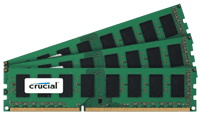
For the most part, more is better. But the thing about this equation is while more is going to be faster, does the extra speed warrant the price increase that is going to come with the upgrade? - The release of the X58 chipset saw two new standards for memory capacity; because of the extra module included we now see memory kits in 3GB and 6GB.
3GB versus 6GB is a bit of a weird one. With the older dual channel chipsets we saw memory come in 2GB and 4GB form and with Vista the extra 2GB of memory was extremely helpful. But moving past that didn't really show us a whole lot more improvement.
If you didn't have an x64 bit version of Vista, though, you were only using around 3GB of your 4GB memory kit. But even this yielded some pretty impressive performance increases over the 2GB kit, which makes us wonder; with 3GB kits being a standard for X58 systems, is that more than enough memory to keep one satisfied?
Today we intend to find out. On the next page we will have a closer look at the test system we're using today and how exactly we're going to see what the extra memory does for us. DDR3 Tri-Channel kits aren't cheap and if we have the chance to save you some money by getting less RAM, you might be able to get yourself a better graphics card that could yield a more noticeable performance gain.
Test System Setup and wPrime
Test System Setup
Processor(s): Intel i7 920 @ 3.8GHz (190MHz x 20)
Cooling: Noctua NH-U12P (Supplied by Noctua)
Motherboard(s): GIGABYTE EX58-UD5 (Supplied by GIGABYTE)
Graphics Card(s): GIGABYTE GTX 285 (Supplied by GIGABYTE)
Hard Disk(s): Western Digital 300GB Velicorapter (Supplied by Western Digital)
Operating System: Windows Vista SP1 64-Bit
Drivers: ForceWare 181.20
The particular memory we have with us today is from Crucial and these are quite basic kits. With no heat spreader and a speed rating of just 1333MHz, we thought we would have to adjust our test system.
Placing the kits in our test system gave us a nice surprise once we began efforts to clock them up a bit. We managed to push them to 1520MHz with timings of 9-9-9-24. While these timings are quite loose, the kits ran beautifully and allowed us to leave the testbed as is and just get stuck straight into our benchmarking.
For those wondering the model numbers of these kits, the 6GB one is CT3KIT25664BA1339 and the 3GB one is CT3KIT12864BA1339, these going for $170.00 and $93.99 USD respectively over at Newegg. While they aren't anything fancy and we haven't done full separate reviews on them yet, the testing we've done today shows that they're impressive modules and offer excellent value for money, especially if you're just looking for memory that doesn't have all the bling of the more expensive modules.
Just quickly, before we get into the benchmarks I will make note that our lineup is a combination of synthetic memory and graphics benchmarks along with some real world gaming tests thrown in. In the conclusion we will wrap everything up and also talk about how Windows Vista felt with the two different kits installed.
wPrime
Version and / or Patch Used: 1.62
Developer Homepage: http://www.wprime.net/
Product Homepage: http://www.wprime.net/
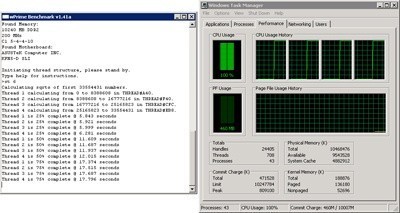
wPrime uses a recursive call of Newton's method for estimating functions, with f(x)=x2-k, where k is the number we're sqrting, until Sgn(f(x)/f'(x)) does not equal that of the previous iteration, starting with an estimation of k/2. It then uses an iterative calling of the estimation method a set amount of times to increase the accuracy of the results. It then confirms that n(k)2=k to ensure the calculation was correct. It repeats this for all numbers from 1 to the requested maximum.
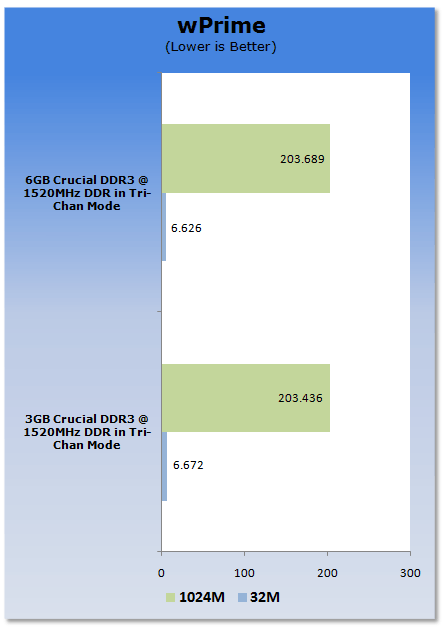
wPrime shows that both memory configurations perform very similar, but this isn't really a surprise as wPrime prefers speed over quantity and with both kits running at the same speed there should be no significant difference.
Benchmarks - EVEREST Ultimate Edition
EVEREST
Version and / or Patch Used: Ultimate Edition
Developer Homepage: http://www.lavalys.com/
Product Homepage: http://www.lavalys.com/products/overview.php?pid=3&ps=UE&lang=en
Buy It Here
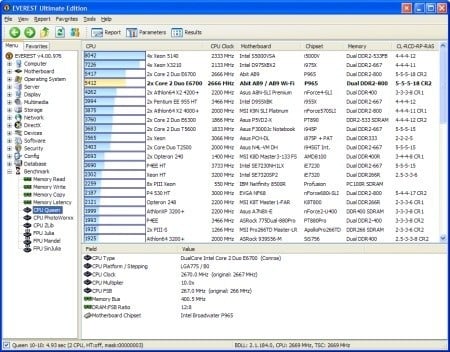
EVEREST Ultimate Edition is an industry leading system diagnostics and benchmarking solution for enthusiasts PC users, based on the award-winning EVEREST Technology. During system optimizations and tweaking it provides essential system and overclock information, advanced hardware monitoring and diagnostics capabilities to check the effects of the applied settings. CPU, FPU and memory benchmarks are available to measure the actual system performance and compare it to previous states or other systems. Furthermore, complete software, operating system and security information makes EVEREST Ultimate Edition a comprehensive system diagnostics tool that offers a total of 100 pages of information about your PC.
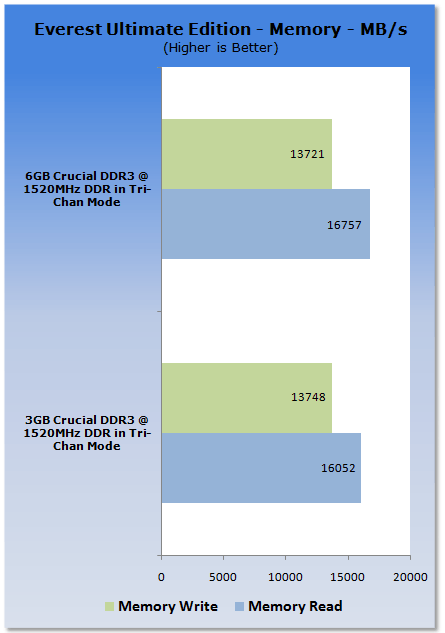
While the read speed on the 3GB setup is a little lower, we see for the most part that there is again no real difference between the two setups. But with both setups running the same speed this doesn't come as any real surprise.
Benchmarks - SiSoft Sandra
SiSoft Sandra
Version and / or Patch Used: Professional Home
Developer Homepage: http://www.sisoftware.co.uk
Product Homepage: http://sisoftware.jaggedonline.com/index.php?location=home&a=TTA&lang=en
Buy It Here
SiSoft Sandra (System ANalyser, Diagnostic and Reporting Assistant) is a synthetic Windows benchmark that features different tests used to evaluate different PC subsystems.
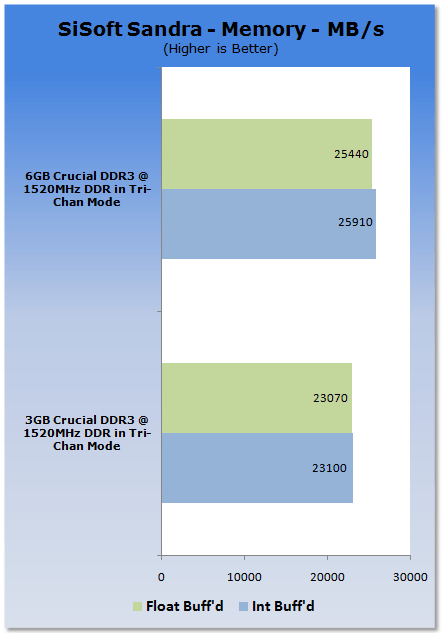
Under Sandra we can see that the 6GB setup is a little faster, but it's nothing to write home about.
Benchmarks - Sciencemark
ScienceMark 2.0
ScienceMark 2.0 is a mathematical program designed to stress the memory subsystems of both desktop/workstation and server environments to determine the read/write latency as well as the overall memory bandwidth available between the CPU and the memory controller.
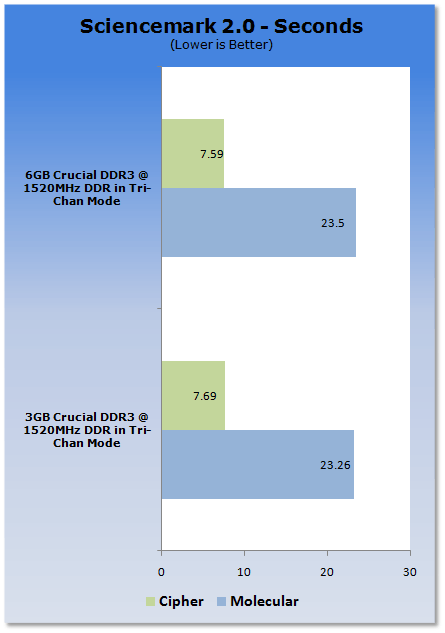
We leave our synthetic memory benchmarks with Sciencemark and we again see that due to both kits running at the same speed there isn't really any difference.
Benchmarks - 3DMark Vantage
3DMark Vantage
Version and / or Patch Used: 1.0.1
Developer Homepage: http://www.futuremark.com
Product Homepage: http://www.futuremark.com/products/3dmarkvantage/
Buy It Here

3DMark Vantage is the new industry standard PC gaming performance benchmark from Futuremark, newly designed for Windows Vista and DirectX10. It includes two new graphics tests, two new CPU tests, several new feature tests, and support for the latest hardware.
3DMark Vantage is based on a completely new rendering engine, developed specifically to take full advantage of DirectX10, the new graphics API from Microsoft.
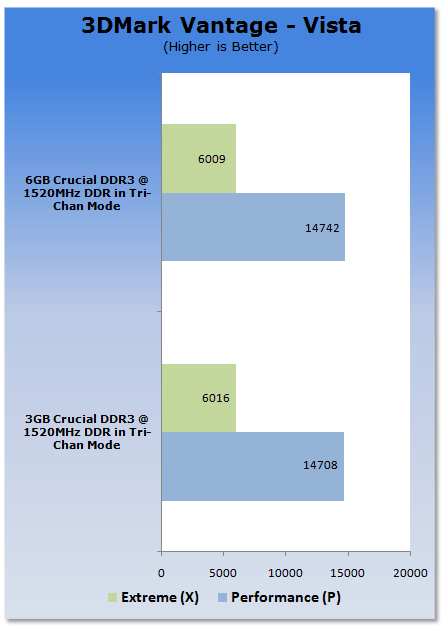
Checking out something that uses the graphics card, we can see that the two memory setups again show no real difference when it comes to gaming performance under Vantage.
Benchmarks - CINEBENCH
CINEBENCH R10
Version and / or Patch Used: Release 10
Developer Homepage: http://www.maxon.net/
Product Homepage: http://www.maxon.net

CINEBENCH is a real-world test suite that assesses your computer's performace capabilities. MAXON CINEBENCH is based on MAXON's award-winning animation software, CINEMA 4D, which is used extensively by studios and production houses worldwide for 3D content creation. MAXON software has been used in blockbuster movies such as Spider-Man, Star Wars, The Chronicles of Narnia and many more.
MAXON CINEBENCH runs several tests on your computer to measure the performance of the main processor and the graphics card under real world circumstances. The benchmark application makes use of up to 16 CPUs or CPU cores and is available for Windows (32-bit and 64-Bit) and Macintosh (PPC and Intel-based).
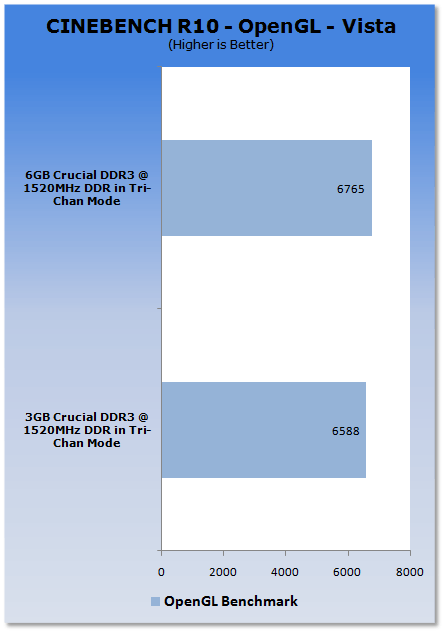
While CINEBENCH sees a slight boost in performance with double the RAM, it isn't enough to accept the price increase that comes with the upgrade.
Benchmarks - Far Cry 2
Far Cry 2
Version and / or Patch Used: 1.01
Timedemo or Level Used: Ranch Long
Developer Homepage: http://www.ubi.com/
Product Homepage: http://www.farcry2.com/
Buy It Here

The Dunia Engine was built specifically for Far Cry 2 by the award-winning Ubisoft Montreal development team. It delivers the most realistic destructible environments, amazing special effects such as dynamic fire propagation and storm effects, real-time night-and-day cycle, dynamic music system, non-scripted enemy A.I. and so much more.
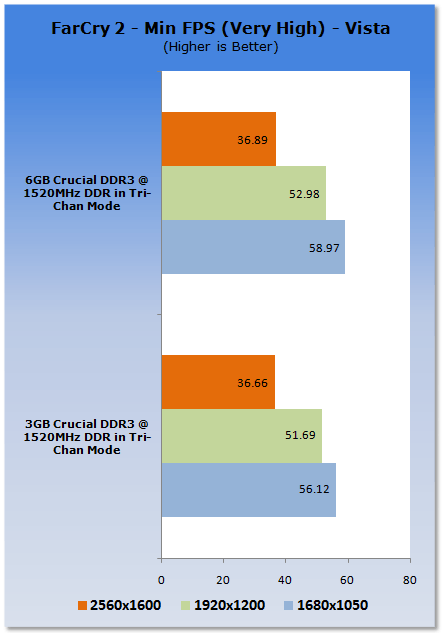
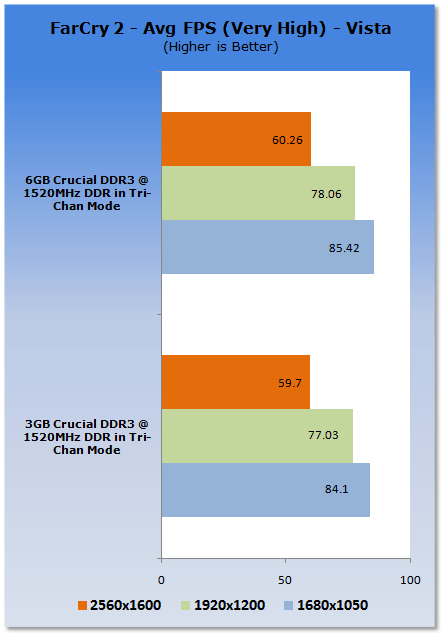
Getting into a real world gaming environment, we can see across the board the extra 3GB of memory offers a slight boost in performance under both the minimum and average scores.
Benchmarks - Left 4 Dead
Left 4 Dead
Version and / or Patch Used: Latest Steam Update
Timedemo or Level Used: Custom Timedemo
Developer Homepage: http://www.valvesoftware.com/
Product Homepage: http://www.l4d.com/
Buy It Here

Left 4 Dead uses the latest version of Valve's Source engine, with improvements such as multi-core processor support and physics-based animation to more realistically portray hair and clothing, and to improve physics interaction with enemies when shot or shoved in different body parts. Animation was also improved to allow characters to lean realistically when moving in curved paths.
Rendering and artificial intelligence were scaled up to allow for greater number of enemies who can navigate the world in better ways, such as climbing, jumping or breaking obstacles. Lighting has been enhanced with new self-shadowing normal mapping and advanced shadow rendering that is important to convey information about the environment and player actions.
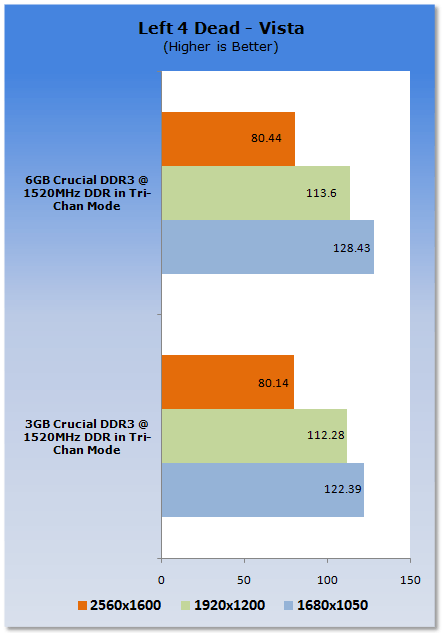
Left 4 Dead also shows that the performance is slightly up with the extra 3GB of memory, but unlike Far Cry 2 it's not really enough to make any real difference to your gaming experience.
Benchmarks - High Quality AA and AF
High Quality AA and AF
Our high quality tests let us separate the men from the boys and the ladies from the girls. If the cards weren't struggling before they will start to now.
Far Cry 2
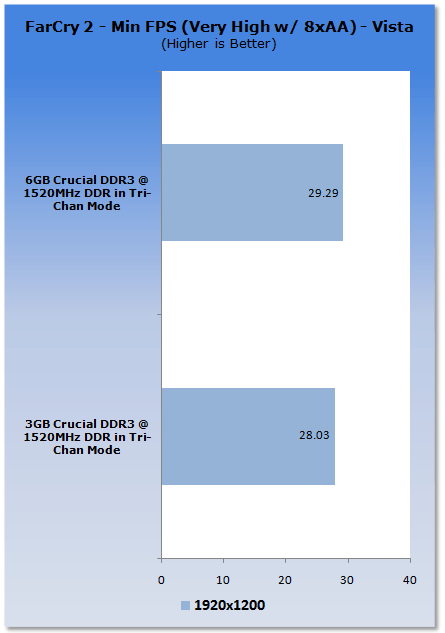
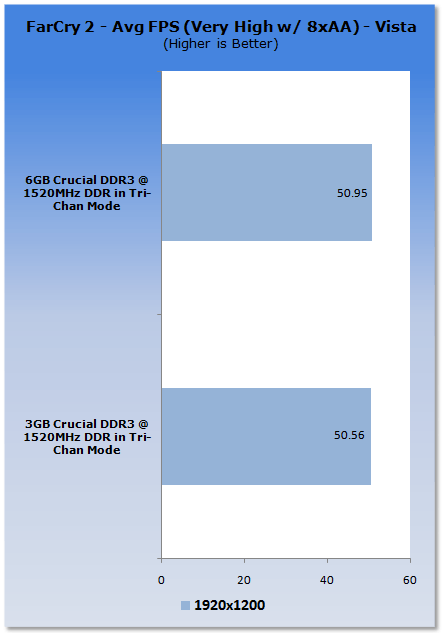
Cranking up the settings in Far Cry 2, we can again see that the extra memory gives us a small increase in performance.
Left 4 Dead
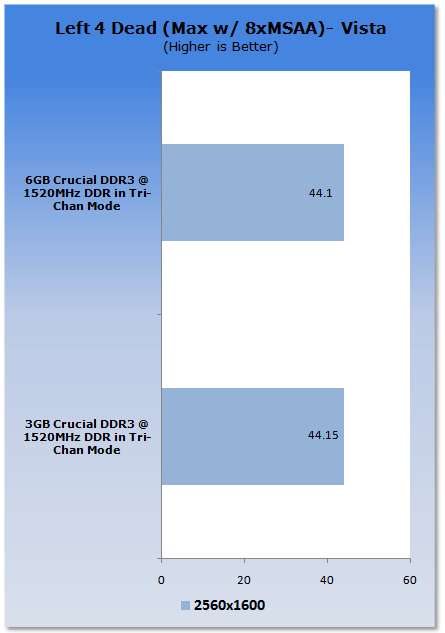
Under Left 4 Dead we see that both setups score almost identically with nothing really separating them.
Final Thoughts
The first thing I have to say is that these little Crucial memory modules were extremely surprising when it came to overclocking ability. In an individual review I wouldn't hesitate giving these modules an Editor's Choice award thanks to the competitive price and overall excellent performance they offer.
Moving away from the modules themselves and having a closer look at the two configurations, we find that double the amount of memory is doing very little in everything from synthetic memory benchmarks all the way to real world games.
One of the biggest advantages when moving from 2GB of memory to 4GB of memory was that your overall Vista experience felt smoother and snappier. But moving from 3GB to 6GB doesn't really give us this effect and with 3GB of memory everything is still running very nicely. While for most people they thought that going from 2GB to 4GB of memory gave the best performance increase, it was more so moving from 2GB to 3GB+ that helped the most.
Does this mean that 6GB kits are pointless? No! - For people who multi-task heavily, the extra memory is extremely handy. Also, start throwing programs like Photoshop and other graphics rendering / creating programs into it and the extra memory is not really wanted; rather, it's needed.
From a gaming perspective, though, even at the ultra intensive 2560 x 1600 resolution the extra memory does very little for extra performance and while your games might load ever so slightly faster, for people on a tight or strict budget the increase doesn't warrant the extra cost that is carried with moving to a 6GB kit.
Depending on who you are will decide on how much memory you get. If you have the money or just want the best you're going to end up with 6GB. If you multi-task a lot and use your computer for work that runs memory intensive programs, then you will no doubt end up with 6GB or even 12GB.
If you're on a budget or would rather spend the money you save by buying a 3GB kit over a 6GB one in order to upgrade your graphics card, you will end up with 3GB of memory and still be extremely happy.
Don't let someone tell you that buying 6GB is a must; if you're not the kind of user that is going to use it, the money could be better spent in other areas where a bigger impact will be made on performance.
 United
States: Find other tech and computer products like this
over at
United
States: Find other tech and computer products like this
over at  United
Kingdom: Find other tech and computer products like this
over at
United
Kingdom: Find other tech and computer products like this
over at  Australia:
Find other tech and computer products like this over at
Australia:
Find other tech and computer products like this over at  Canada:
Find other tech and computer products like this over at
Canada:
Find other tech and computer products like this over at  Deutschland:
Finde andere Technik- und Computerprodukte wie dieses auf
Deutschland:
Finde andere Technik- und Computerprodukte wie dieses auf  LG's 32-inch gaming OLED monitor with 480Hz refresh rate is imminent, with pre-orders live now
 Google Pixel 8a leak boasts 7 years of security updates but leaves one question unanswered
 Apple has plummeted from first to fifth place in the Chinese smartphone market, analysts warn
 You can blame Tim Cook for 8GB Macs, it seems
 Apple removes three AI apps capable of creating nude images of people from the App Store
 SteelSeries Arctis Nova 4X Wireless Gaming Headset Review
 ACEMAGIC AD08 "Core i9 11900H" Mini PC Review
 Lenovo ThinkPad X1 Carbon Gen 12 Review
 ASUS ROG Swift Pro PG248QP Gaming Monitor Review - Frames, frames, and more frames
 FlexiSpot C7B-Mesh Ergonomic Office Chair Review
 Samsung G8 34-inch QD-OLED Gaming Monitor Review - 175Hz for $900
 ASRock NUCBOX-155H Mini PC Review
 NuPhy Air96 V2 Wireless Mechanical Keyboard Review
 TEAM T-FORCE Siren DUO360 RGB Liquid CPU Cooler Review
 AVerMedia Live Streamer ULTRA HD Review
 Building the Ultimate Home Entertainment Server with an ASUSTOR NAS and Viper Gaming NVMe SSDs
 Everything you need to know about the latest ASUS NUC Mini PCs - NUC 14 Pro and ROG NUC
 How to Overclock Your GPU and Boost Your PC Gaming with ASUS GPU Tweak III
 ASUS's AMD Radeon RX 7000 Series GPU lineup has something for every gamer
 ASUS OLED Premium Care defends the ROG Swift OLED PG32UCDM gaming monitor from burn-in