











Rise my apprentice!
Rocking up with the previously reviewed SideWinder X5 mouse, I was lucky enough to receive an X6 keyboard to complete the desktop of evil.
This keyboard boasts a full backlight and letter illumination with a built-in dial to adjust the intensity.

There's a volume knob to annoy your house mates with, as well as full media controls so you can kick out the jams all night long.
Additionally, a series of useful macro buttons add feature to this keyboard to really set it apart from other solutions on the market.

The coupe de grace, however, comes with the hot swappable numeric keypad module that can be changed up, left or right depending on your preference, or if you want to add more macros to the left hand side.

With more features than the Deathstar itself, let's get this keyboard out and have a look at what it can do.
Plugging into the USB, this keyboard lights up a brilliant red and orange glow. I recommend doing this in the dark for full effect because it does look pretty freaking sweet when you do.

The keys are a standard black plastic design with no special rubberised surface or nonsense like that, so it feels normal to type on.
The Fn keys up top are slimmer than normal to accommodate the extra function buttons up top without drastically increasing the size of the board itself. This is a genius move really, because I've handled some behemoths in my time and while they were sweet setups, they really dominate the desktop.
That's no moon!
Above the Fn keys we can see a SideWinder symbol which brings up the Intellitype Pro software to allow you to quickly configure macros and assign functions to the Sn keys.
A running man key acts as a key lock function to save you having to hold down one key for a prolonged period of time. It also works for any combination of keys being pressed at the time.

There's a record macro function that lets you assign macros on the fly and in-game to any of the Sn keys.
Then you have a preset selector switch, allowing you to jump between three presets of recorded and assigned macro settings on the keyboard.
After messing about with the macros and the media controls, I figure it's time to get gaming.

The best test for all these macros is World of Warcraft, so back in I go to the addiction. A few dungeons later and a couple of levels up, it's clear that having the macro functions really help with games with grind.
The keys are responsive and have a nice solid click, so you can always be sure of when you have or haven't pressed it enough. The spacing is about right if you are used to a full sized keyboard.

A neat feature of the backlighting on the keys is that the WASD keys have a series of dots on the side facing the user, so they can be easily located in dark conditions.
The macro keys down the left hand side are also backlit in orange rather than red to help define the edge of the regular keyboard, so your hand position remains over the WASD and not too far to the left to press TAB and Capslock.
I find your lack of faith disturbing
The beauty of this keyboard is in the modular design where you can swap the numeric keypad from one side to the other. In doing this you activate the extra Sn keys on the keypad.
The keypad itself has magnets on the side so the interface snaps in and out without any trouble and this has an amazing quality design feel to it that you don't often find in many products on the market.


When combined with the X5 mouse, this is a desktop with some serious looks, like something you expect to see top gamers using and it's clear that Microsoft have put serious thought into what their target market for this keyboard is. They could have added a lot of features as seen in their other keyboard lines, but it's what they leave out that makes this a great keyboard.

There is no special LCDs or fancy features, they have gone for a very utilitarian format and layout using chunky buttons and led indicators. Then they gave it some sweet backlighting to offset the blackness of the design.

My only criticisms for this keyboard is the lack of any USB ports on it to allow you to easily jack in pen drives to your system if you don't have a hub. That and the volume and backlight adjuster knobs are a little bit cheap and have a bit of wobble to them; this could be easily resolved by a closer fit to the base. But even so, it's no show stopper.

Our Latest Keyboards Article Coverage
- Logitech G316 X 98 Wired Gaming Keyboard Review - Retro-Inspired Board that Falls a Little Short
- Logitech G512 X 98 Analog Mechanical Gaming Keyboard Review - An Innovative Two-in-One
- IQUNIX Magi96 Pro Aluminum Low Profile Mechanical Keyboard Review - Premium Build, Satisfying Sound
- Razer Pro Type Ergo Wireless Split Ergonomic Keyboard Review - Built for Comfort and Support
- ASUS ROG Strix Morph 96 Wireless Gaming Keyboard Review - Great Performance, More Affordable
 Logitech G316 X 98 Wired Gaming Keyboard Review - Retro-Inspired Board that Falls a Little Short
 Logitech G512 X 98 Analog Mechanical Gaming Keyboard Review - An Innovative Two-in-One
 ASUS ROG Raikiri II Xbox Wireless Controller Review - Ready to Take Control
 IQUNIX Magi96 Pro Aluminum Low Profile Mechanical Keyboard Review - Premium Build, Satisfying Sound
 Razer Pro Type Ergo Wireless Split Ergonomic Keyboard Review - Built for Comfort and Support
 Sony has secured enough memory to meet PS5 sales targets through March 2027 and says no further price hikes are planned
 Reddit is building a video and audio listening experience for the viral post format it accidentally created for TikTok
 Seagate says Mozaic 5 50TB hard drives are on track for 2027, with 100TB already on the roadmap
 MSI adds a BIOS toggle to tighten standard DDR5 timings closer to EXPO ULL kits
 Keychron is building an open-source gaming mouse firmware called ZGM
 Assassin's Creed Odyssey gains 90% more players due to Christopher Nolan's 'The Odyssey'
 AMD Radeon GPU prices set to increase by 10% in August
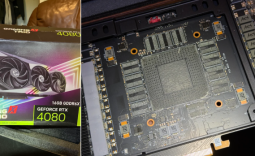 Redditor buys an RTX 4080, opens it up to find no GPU die or VRAM inside
 NVIDIA GPU rumors swirl claiming major price hikes of 20 to 30% - or more - are coming, as VRAM costs climb
 AMD's RX 9050 GPU comes up short in first review, but there's a good reason why it lags behind NVIDIA's RTX 5050 here
 Montech TG3 Mid-Tower Chassis Review
 ASUS ROG Strix X870E-A Gaming WiFI7 Neo Review - A New Enticing Option
 Noctua NL-LC1-36 Liquid CPU Cooler Review
 Biwin M560 2TB SSD Review - Best Overall Retail-Ready DRAMless SSD
 Thrustmaster T.Flight HOTAS 5 MSFS Edition Review
 SteelSeries Arctis Nova Pro Omni Wireless Headset Review - One Headset to Rule Them All
 SteelSeries Arctis Nova 7 Wireless Gen 2 Headset Review - New and Improved, But Is It Enough?
 AMD Ryzen 7 7700X3D Review - Days of Future Past
 Six File Explorer tips every Windows user should know
 I switched my PC to encrypted DNS in Windows 11, and browsing felt more private
 Printer Not Working in Windows? How to fix detection, print queues and drivers
 The Ultimate Guide to Personalizing Your Windows 11 Taskbar
 How to Turn Your Windows Laptop Into a Second Monitor with Miracast and Wireless Display in Minutes
 6 Mistakes to Avoid When Buying a Windows Laptop
 I capped Windows Update's bandwidth with Delivery Optimization, and my downloads stopped choking
 I use this decade-old free tool that finds files faster than Windows Search does
 I install and update most of my apps with this Windows command now, and I stopped downloading sketchy installers
 Hisense U6SF 65-inch MiniLED TV: High Performance Meets Leisurely Convenience