Introduction
I have to admit I wasn't a big fan of the Samsung 830. We only tested the 128GB model and no matter what firmware we loaded on the drive, the write latency on that capacity size was always an issue. This year Samsung released two drives, a mainstream model with spectacular low power consumption and an enthusiast model. We've already published two articles on the mainstream drives, 250GB and 500GB capacity sizes. Today we start working through the Pro models; the 128GB is up first with the 256GB on deck.
The Samsung 840 Pro uses the same MDX three-core controller found in the 840 base model. The main difference between these two classes of SSDs is the NAND flash. The 840 non-Pro uses triple-level cell flash, the first consumer SSD to use TLC flash. The 840 Pro uses Samsung's new 22nm MLC flash. Samsung pairs the MLC flash with a DRAM buffer, also from Samsung's catalog. All of the main components used in the 840 Pro come from Samsung and they are one of just a few SSD makers who are in a position to make such a product a reality.
A few weeks ago we told you we're lining up several 128GB capacity size SSDs after spending most of the year focusing on the larger capacity sizes. Today, we have benchmarks from the three fastest 120/128GB drives on the market today - Samsung 840 Pro 128GB, OCZ Vector 128GB and SuperSSpeed S301 SLC 128GB.
We have a few more high performance drives in route to the lab including the Corsair Neutron, Neutron GTX and the Plextor M5 Pro (with new Extreme firmware). We're also retesting several new, next gen 256GB products, but you'll have to wait till CES for those to hit the site.
Specifications, Pricing and Availability
Samsung offers the 840 Pro in four capacity sizes - 64GB, 128GB, 256GB and 512GB. The performance varies between capacity sizes like most MLC SSDs. Today we're focusing on the 840 Pro 128GB and soon the 256GB model review will go live. You may wonder why we're so late with these drives, well...I don't think Samsung really liked our 830 128GB review so we just went out and bought these two drives. In Samsung's defense, they planned on sending us drives, but a FUBAR with the firmware on the media drives meant that the North American allocation needed to go back to South Korea for a flash. Then we started testing with our two purchased retail drives and found new firmware issues, MobileMark 2012 would BSOD every time we ran it. Samsung released a new firmware, version DXM04B0Q and it fixed our notebook power test. We're now ready for the review.
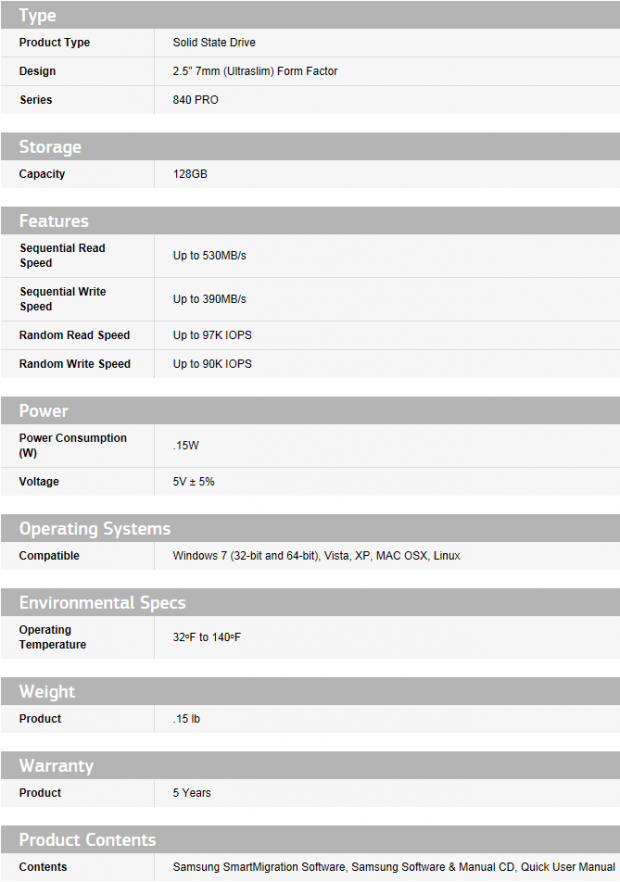
Samsung specs the 840 Pro 128GB with a sequential read speed of 530MB/s, sequential write speed of 390MB/s, random read speed of 97K IOPS and finally random write speed of 90K IOPS. Physically, the 840 Pro uses a 7mm z-height form factor so you can use it in an ultrabook. The mounting points are the same as traditional 9.5mm notebook drives so you can use this drive in a notebook or desktop with a desktop adapter bracket (not included).
Samsung does include a five year warranty as well as a very good software package. The Samsung Magician software rivals that from Intel, these two pretty much tie in the software feature department. Samsung takes it up a notch though with the included data migration software. The software ships on an included CD so you don't have to fumble with an internet download to start using the software.
Our Latest SSD Review Coverage
- Biwin M560 2TB SSD Review - Best Overall Retail-Ready DRAMless SSD
- Samsung 990 2TB SSD Review - Ninth Gen QLC at PCIe Gen4 Speeds
- Phison E37T SSD Controller Exclusive Preview - The Fastest DRAMless SSD Platform Yet
- Seagate FireCuda X1070 4TB SSD Review - A New Mainstream Contender
- Micron 3610 2TB SSD Review - DRAMless QLC at 11,000 MB/s
Newegg lists all four 840 Pro capacity sizes at the time of writing, the 64GB model was sold out though. The prices are 64GB for $99.99, 128GB for $149.99, 256GB for $339.99 and the large 512GB for $574.99. If you're shopping for a great deal on the 512GB model, B&H has them for $456.49 at the time of writing.
Packaging and Accessories
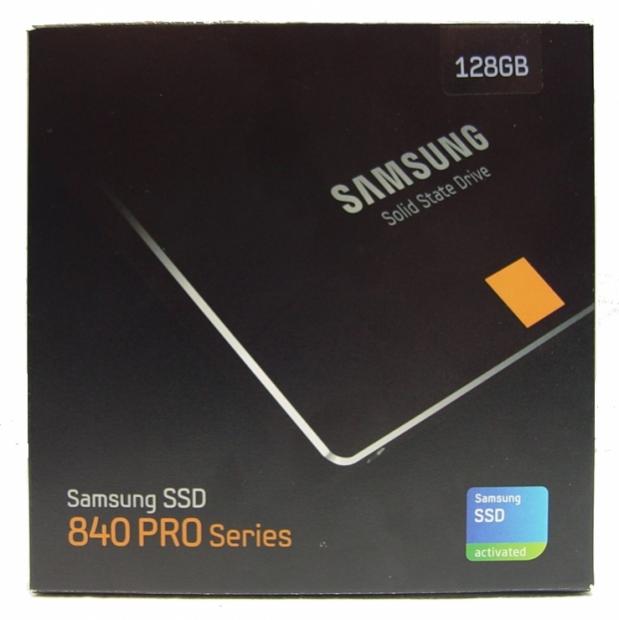
The Samsung 840 Pro package doesn't give us a lot of info on the front of the box.
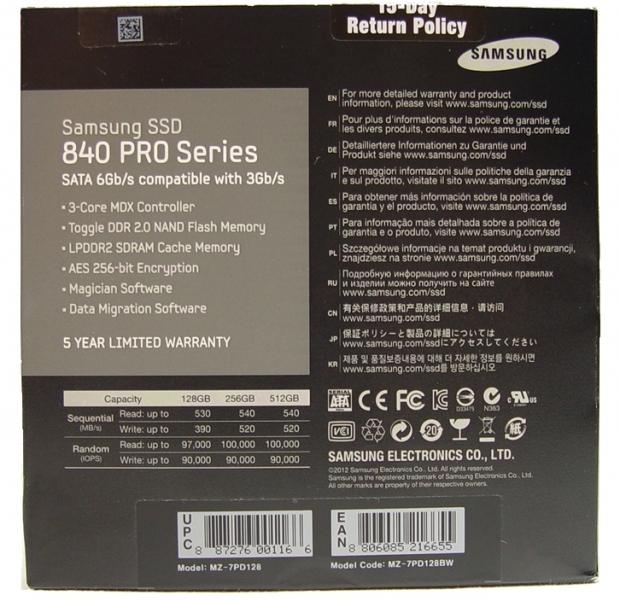
Luckily, the back of the package gives us everything we want to know including performance data.

Inside we found a drive stashed away from the accessory package so it doesn't get damaged during shipping. Samsung also includes a software disk, stickers and two paper manuals.
Samsung 840 Pro 128GB SSD
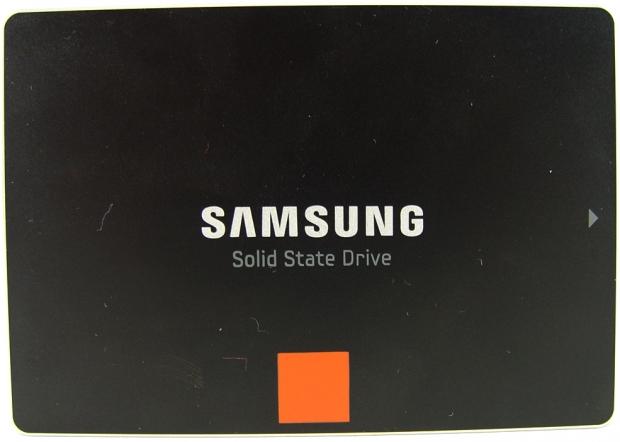
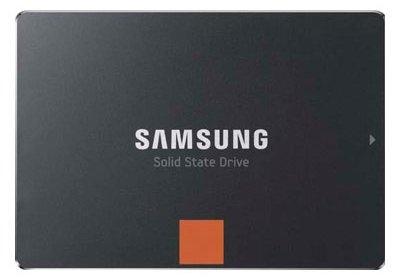
Here we get our first look at the Samsung 840 Pro. The case is made of metal all the way around, unlike the 830 that used some plastic components.
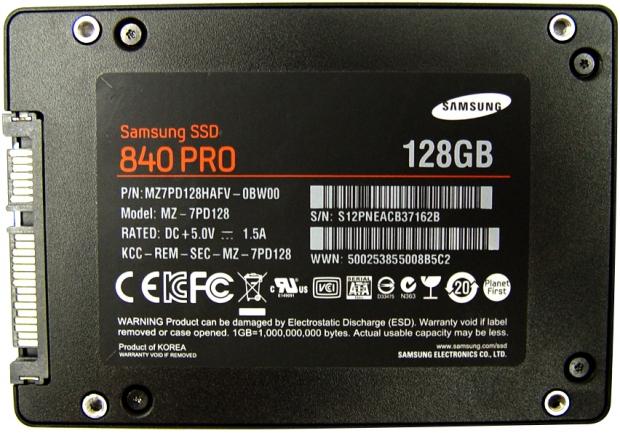
The model number and serial number are located on the back of the drive as well as the capacity size. The bottom mounting points look larger than most SSDs, but the silver inserts make them appear larger than they are. The 840 Pro still uses standard fine thread screws.

The 7mm z-height means you can use the 840 Pro in your ultrabook.
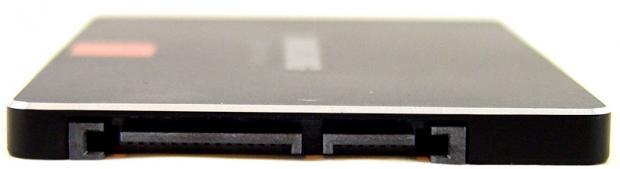
The SATA power and data connectors are offset in the standard 2.5" form factor location.
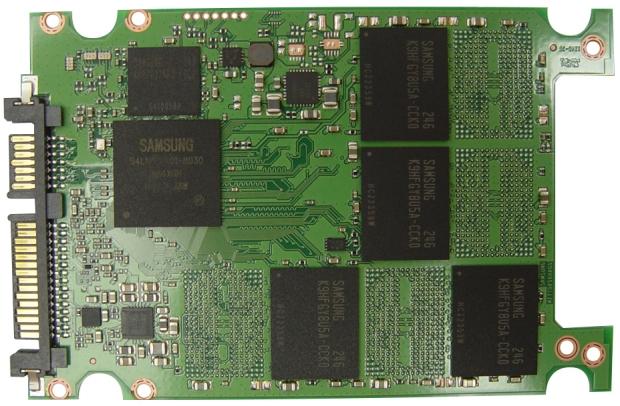
Inside we found four Samsung 22nm NAND flash chips with the Samsung MDX tri-core controller and a Samsung low voltage DRAM chip.
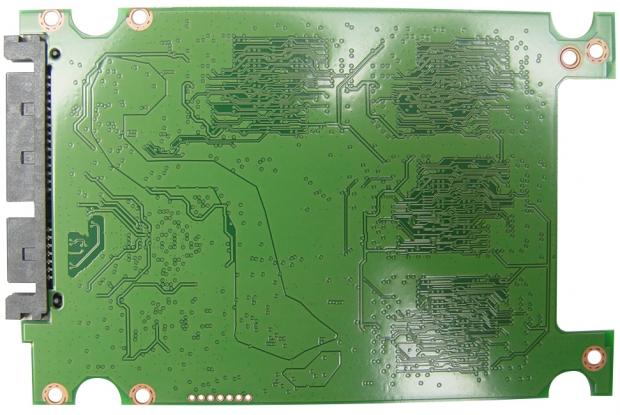
The back of the PCB is void of surface mount components, but we do get to see several traces.
Benchmarks - Test System Setup and ATTO Baseline Performance
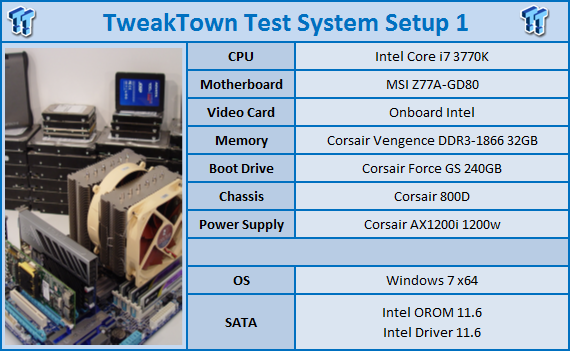
Desktop Test System
Lenovo W530 - Mobile Workstation
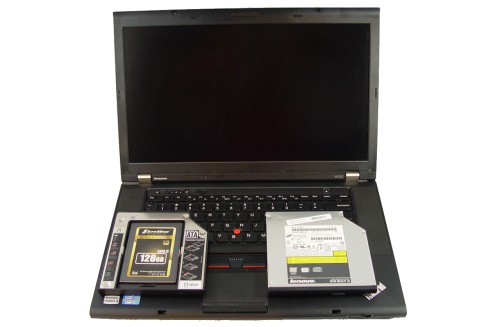
We use two systems for SSD testing. The desktop runs a majority of the tests and the Lenovo W530 runs the notebook power tests as well as the real-world file transfer benchmark.
ATTO Baseline Performance
Version and / or Patch Used: 2.34
ATTO is used by many disk manufacturers to determine the read and write speeds that will be presented to customers.
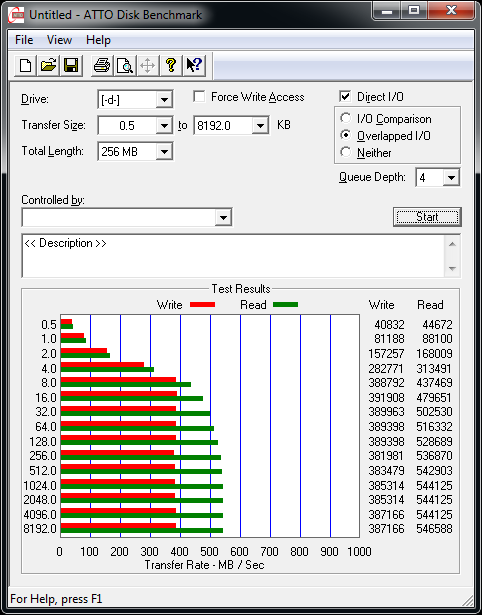
Using ATTO to determine the highest possible speed, we recorded read performance at 547MB/s and write performance at 387MB/s.
Benchmarks - Sequential Performance
HD Tune Pro
Version and / or Patch Used: 4.00
Developer Homepage: http://www.efdsoftware.com
Product Homepage: http://www.hdtune.com
HD Tune is a Hard Disk utility which has the following functions:
Benchmark: measures the performance
Info: shows detailed information
Health: checks the health status by using SMART
Error Scan: scans the surface for errors
Temperature display
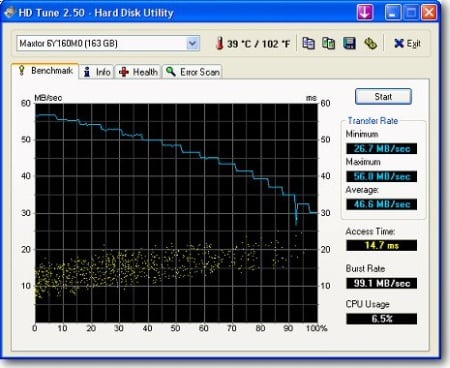
HD Tune Pro gives us accurate read, write and access time results and for the last couple of years has gained popularity amongst reviewers. It is now considered a must have application for storage device testing.
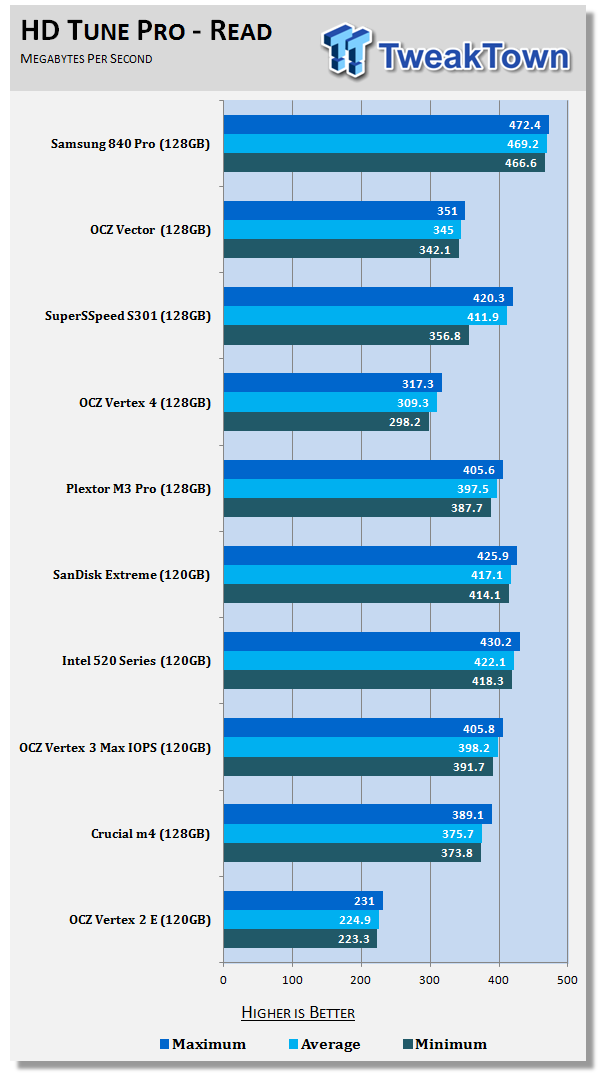
The Samsung 840 Pro reads sequentially across the drive at an average speed of 469MB/s. As you can see, we have the OCZ Vector and SuperSSpeed S301 SLC in the charts as well today. The Vector test is a bit misleading since it limits single reads to roughly 350MB/s so you have overhead to perform another task without slowing the first.
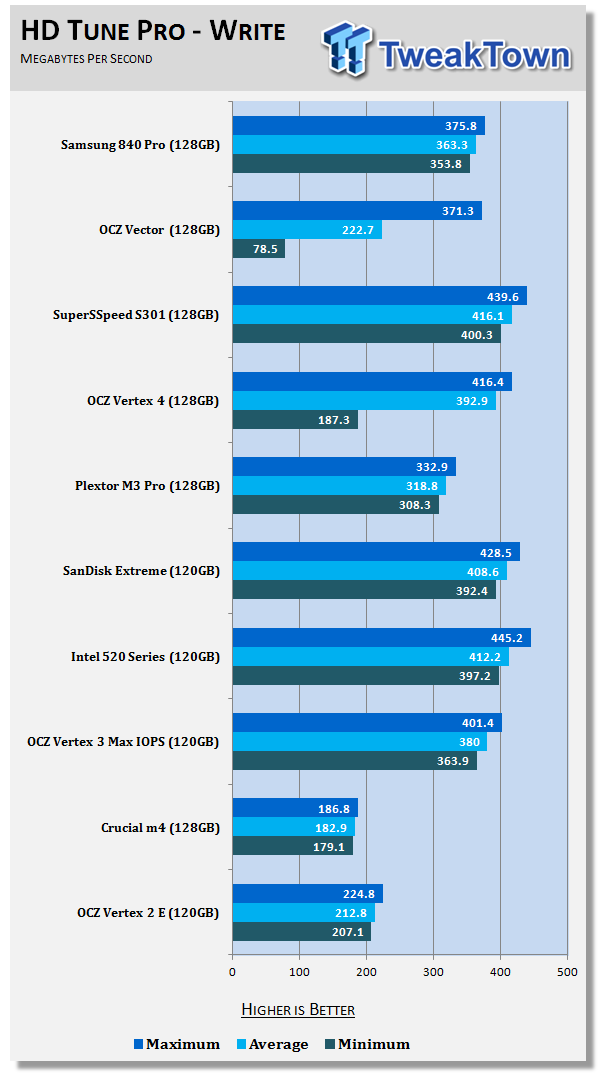
The 840 Pro writes sequential data to the drive on average at 363MB/s. OCZ plays some tricks here as well since Vector uses storage and performance modes when you write data to the drive rapidly.
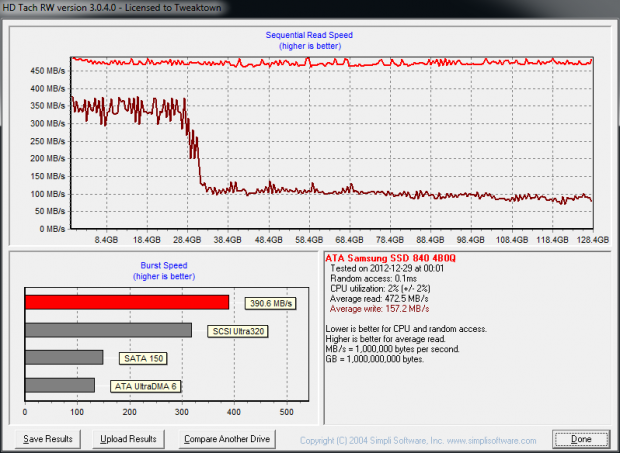
In order to get a drive into a true consumer steady state when we get to the benchmarks later in this review we run a handful of tests to wear the test SSDs down. HD Tune Pro has six tests we run, the two tests shown above, the two IOPS tests and the Extras Tests in the software suite.
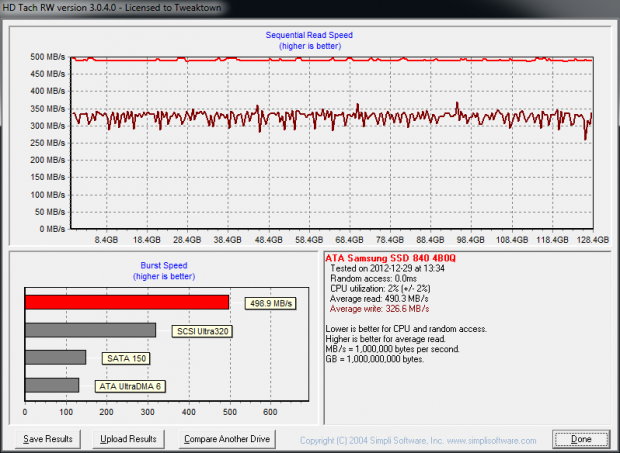
After the six HD Tune Pro tests are ran, we run HD Tach, an older program that uses a different block size than HD Tune Pro. This is what we saw in HD Tach, a worn down 840 Pro that is already running like a drive that's spent a few hours in a datacenter.
Benchmarks - AIDA64 Random Access Time
AIDA64 Random Access Time
Version and / or Patch Used: 1.60
Developer Homepage: http://www.aida64.com
Product Homepage: http://www.aida64.com
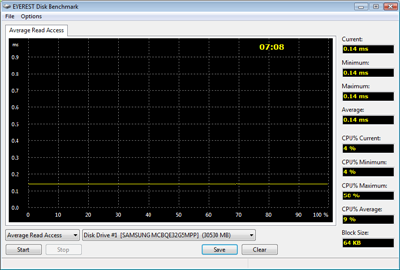
AIDA64 offers several different benchmarks for testing and optimizing your system or network. The Random Access test is one of very few if not only that will measure hard drives random access times in hundredths of milliseconds as oppose to tens of milliseconds.
Drives with only one or two tests displayed in the write test mean that they have failed the test and their Maximum and possibly their Average Scores were very high after the cache fills. This usually happens only with controllers manufactured by JMicron and Toshiba.
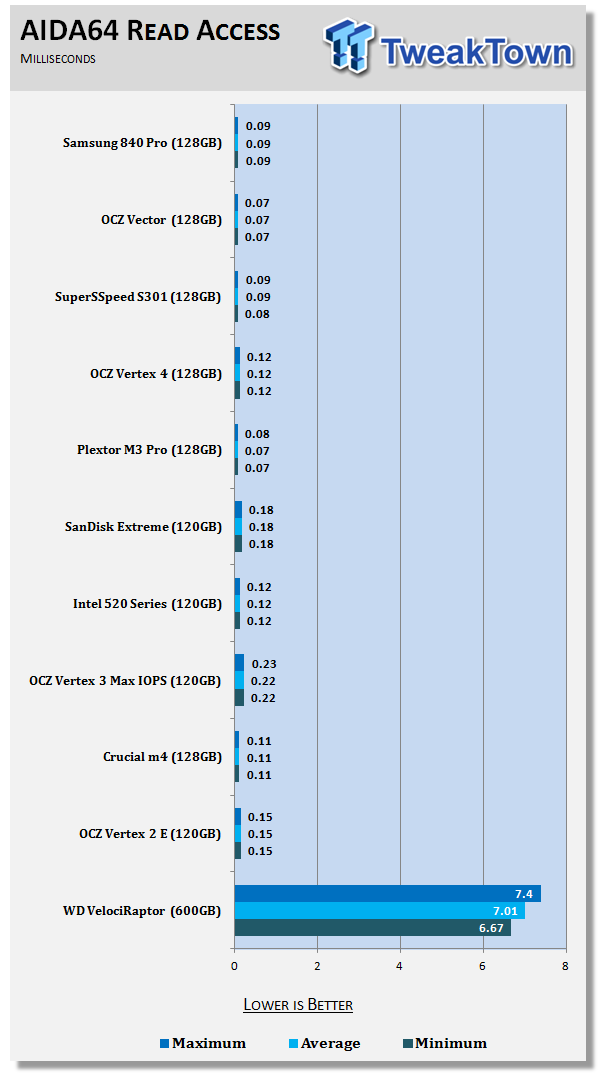
One of, if not the most important test for a SSD is latency, referred to as access times. The read access time refers to how quickly an action happens after you double click. No one likes to see the Windows hourglass. The Samsung 840 Pro does very well when reading data quickly and the performance is steady across the drive.
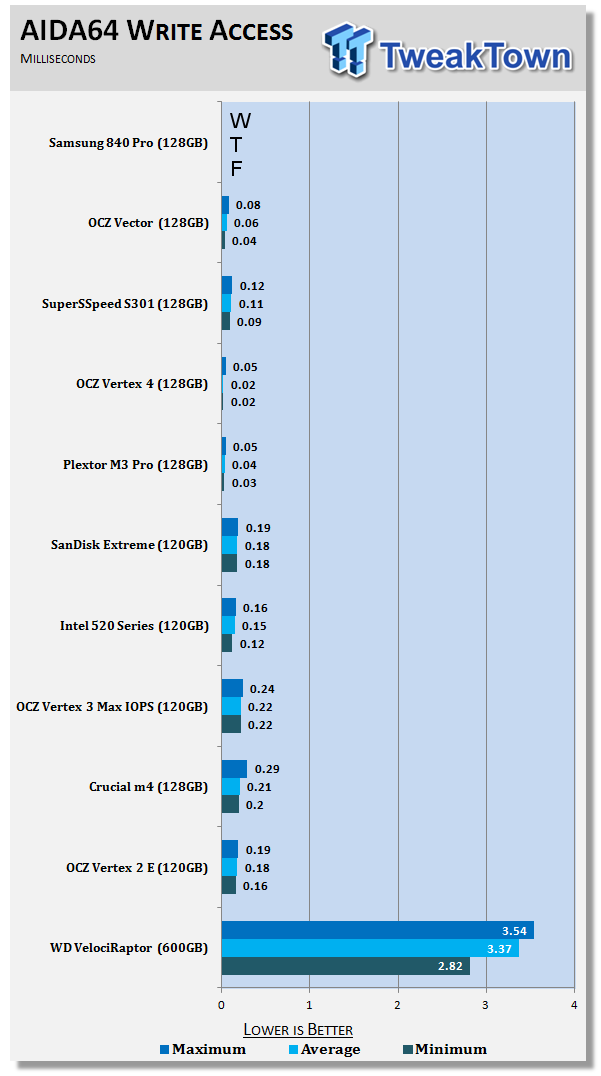
I didn't want to clutter my chart with the Samsung 840 Pro 128GB. We found the same issue with this model that we found on the 830 128GB, high write latency. AIDA64 is run after the six tests in HD Tune Pro and the run in HD Tach. The drive was secure erased prior to our test run and given time to recover.
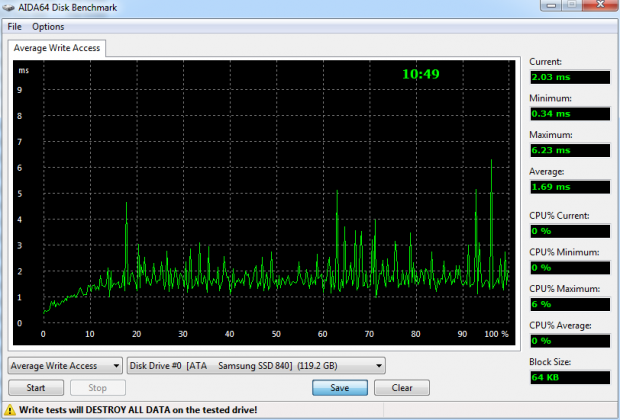
This is our first run, the ninth test in the benchmark cycle. The write latency is all over the place, this look more like a budget JMicron drive than a flagship product from the largest SSD manufacturer in the world.
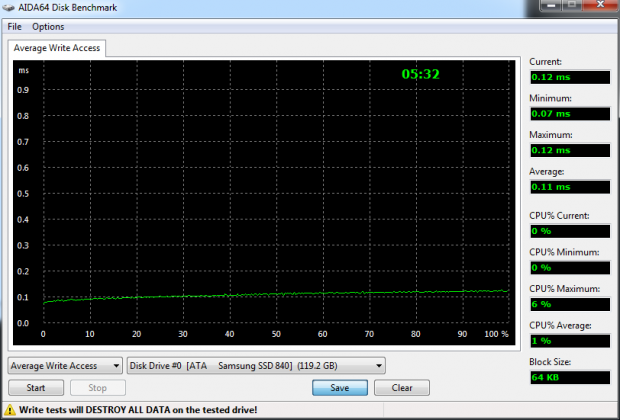
After a secure erase, we recorded another write latency measurement. As you can see the results were much better. At the end of the benchmark session, we ran the test again and the results were back to the high levels.
We think the Samsung 840 Pro uses a very aggressive background garbage collection scheme that kicks into overdrive very quickly. When background GC is going on the write latency increases. Once the drive has time to clean itself up the write latency goes back to the steady levels. This would be good for RAID users and those working in an environment without TRIM, but users working with large files might find it a bit inconvenient. If you work the drive hard enough, your user experience will suffer.
Benchmarks - Anvil Storage Utilities
Anvil Storage Utilities
Version and / or Patch Used: RC5
So what is Anvil Storage Utilities? First of all, it's a storage benchmark for SSDs and HDDs where you can check and monitor your performance. The Standard Storage Benchmark performs a series of tests, you can run a full test or just the read or the write test or you can run a single test, i.e. 4K DQ16.
Anvil Storage Utilities is not officially available yet but we've been playing with the beta for several months now. The author, Anvil on several international forums has been updating the software steadily and is adding new features every couple of months.
The software is used several different ways and to show different aspects for each drive. We've chosen to use this software to show the performance of a drive with two different data sets. The first is with compressible data and the second data set is incompressible data. Several users have requested this data in our SSD reviews.
Fill Compressible Data
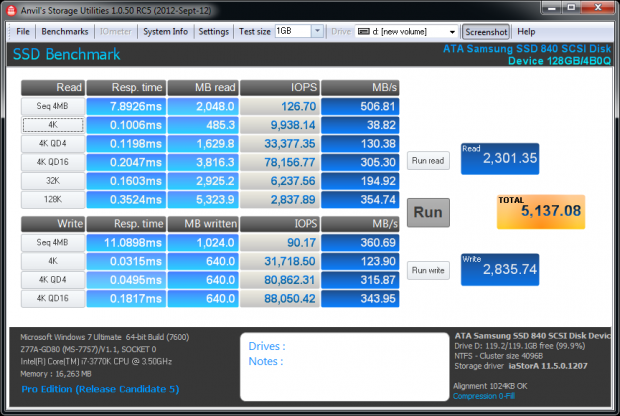
Incompressible Data
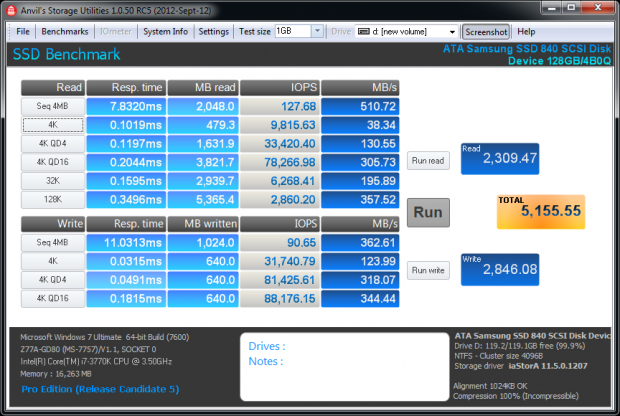
The Samsung 840 Pro doesn't slow when working with incompressible data like drives using LSI SandForce controllers (other than the SuperSSpeed S301 SLC).
Scaling Read IOPS through Queue Depth
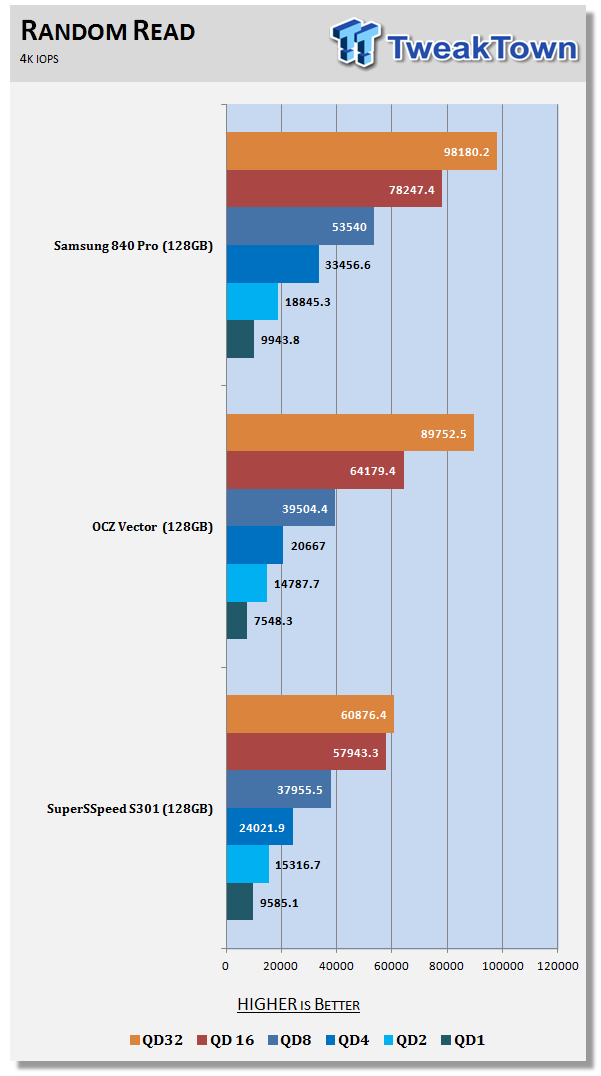
When manufacturers rate their SSDs for IOPS performance they like to show the high queue depths numbers. In a desktop or notebook environment you rarely reach these high queue depths, most users rarely achieve more than QD8. Here we see a breakdown between the three fastest 128GB drives on the market today with several queue depths. The Samsung 840 Pro dominates the 1-8 queue depth read IOPS.
Scaling Write IOPS through Queue Depth
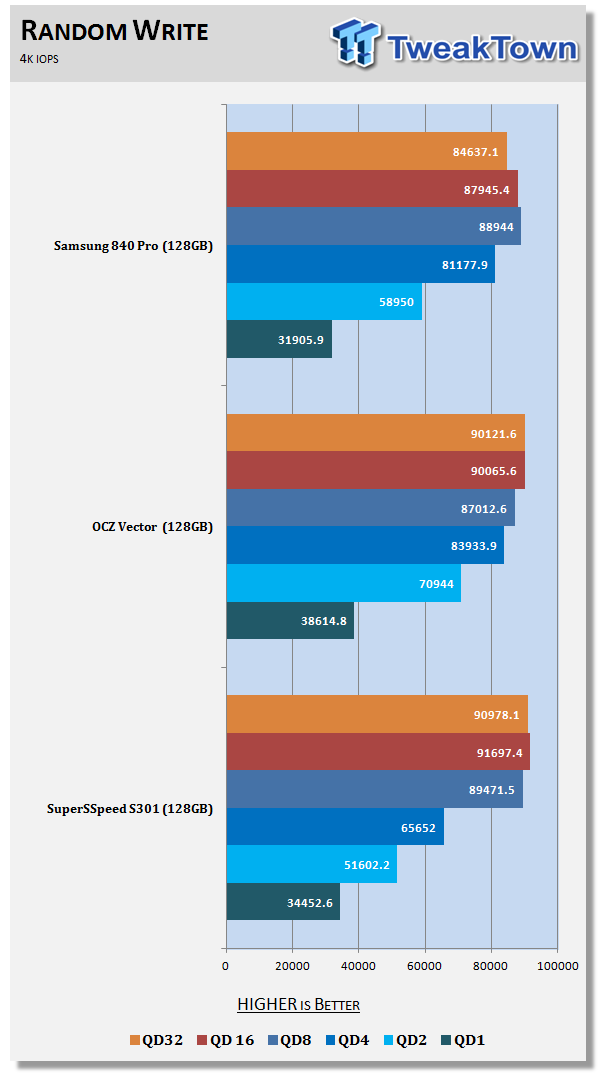
All three of these drives perform very well in the write IOPS chart. In the queue depths that matter to enthusiasts, 1-8 the OCZ Vector is faster in three of the four tests.
Benchmarks - CrystalDiskMark
CrystalDiskMark
Version and / or Patch Used: 3.0 Technical Preview
Developer Homepage: http://crystalmark.info
Product Homepage: http://crystalmark.info/software/CrystalDiskMark/index-e.html
Download here: http://crystaldew.info/category/software/crystaldiskmark
CrystalDiskMark is a disk benchmark software that allows us to benchmark 4K and 4K queue depths with accuracy.
Key Features:-
* Sequential reads/writes
* Random 4KB/512KB reads/writes
* Text copy
* Change dialog design
* internationalization (i18n)
Note: Crystal Disk Mark 3.0 Technical Preview was used for these tests since it offers the ability to measure native command queuing at 4 and 32.
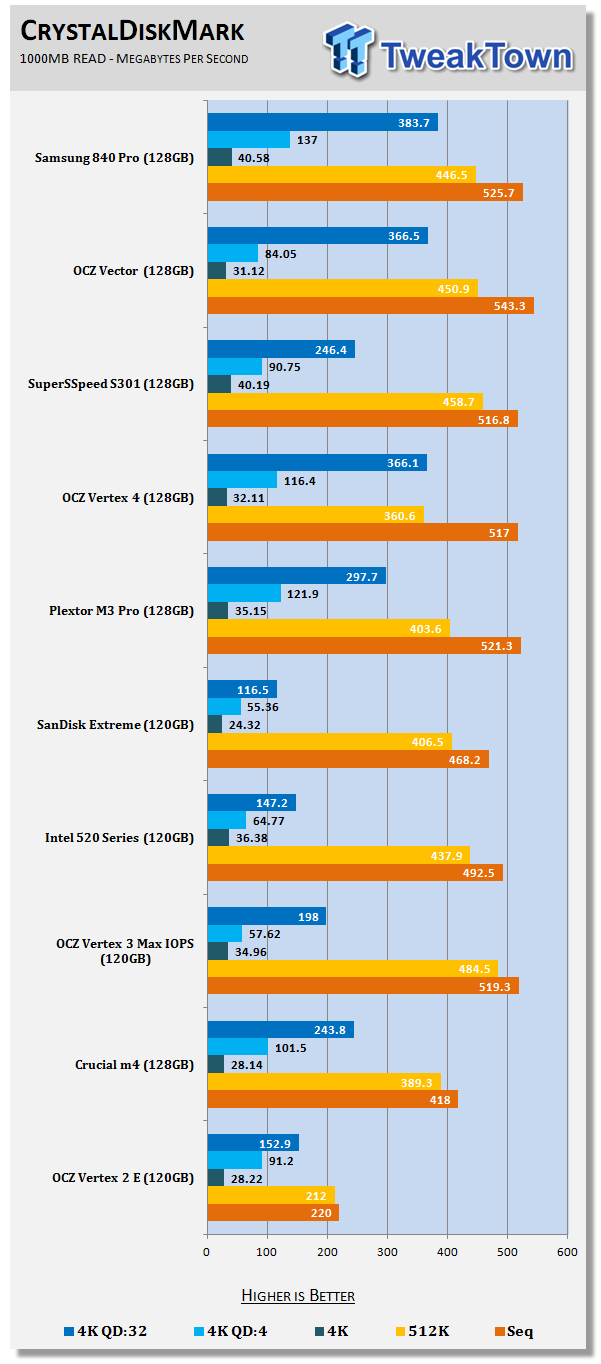
We've only had two 2.5" drives break the 40MB/s QD1 4K read mark, the Samsung 840 Pro and the SuperSSpeed S301 SLC. When moving to QD4 the Samsung steps away from the pack and delivers a blazing 137MB/s.
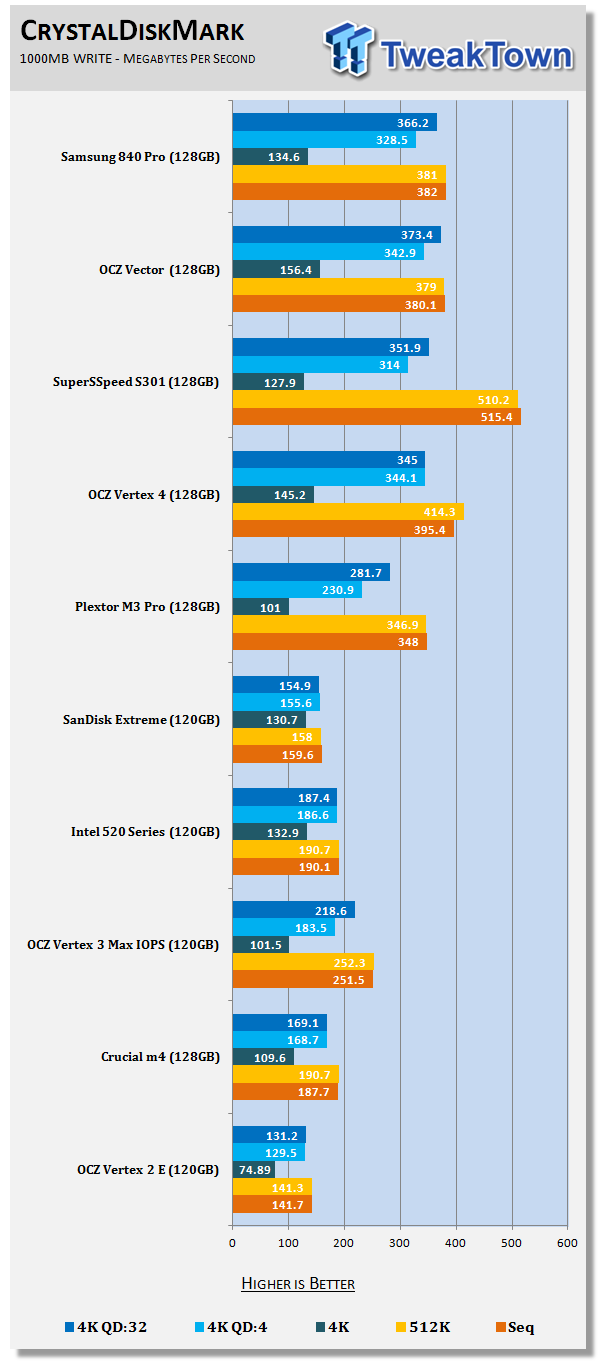
When it comes to 4K write performance, the OCZ Vector is a bit faster in all three of the 4K write tests. CDM uses incompressible data and surprisingly enough, the SuperSSpeed S301 SLC is quite a bit faster in the sequential write test.
Benchmarks - PCMark Vantage Hard Disk Tests
PCMark Vantage - Hard Disk Tests
Version and / or Patch Used: 1.0.0
Developer Homepage: http://www.futuremark.com
Product Homepage: http://www.futuremark.com/benchmarks/pcmark-vantage/

PCMark Vantage is the first objective hardware performance benchmark for PCs running 32 and 64 bit versions of Microsoft Windows Vista. PCMark Vantage is perfectly suited for benchmarking any type of Microsoft Windows Vista PC from multimedia home entertainment systems and laptops to dedicated workstations and high-end gaming rigs. Regardless of whether the benchmarker is an artist or an IT Professional, PCMark Vantage shows the user where their system soars or falls flat, and how to get the most performance possible out of their hardware. PCMark Vantage is easy enough for even the most casual enthusiast to use yet supports in-depth, professional industry grade testing.
FutureMark has developed a good set of hard disk tests for their PCMark Vantage Suite. Windows users can count on Vantage to show them how a drive will perform in normal day to day usage scenarios. For most users these are the tests that matter since many of the old hat ways to measure performance have become ineffective to measure true Windows performance.
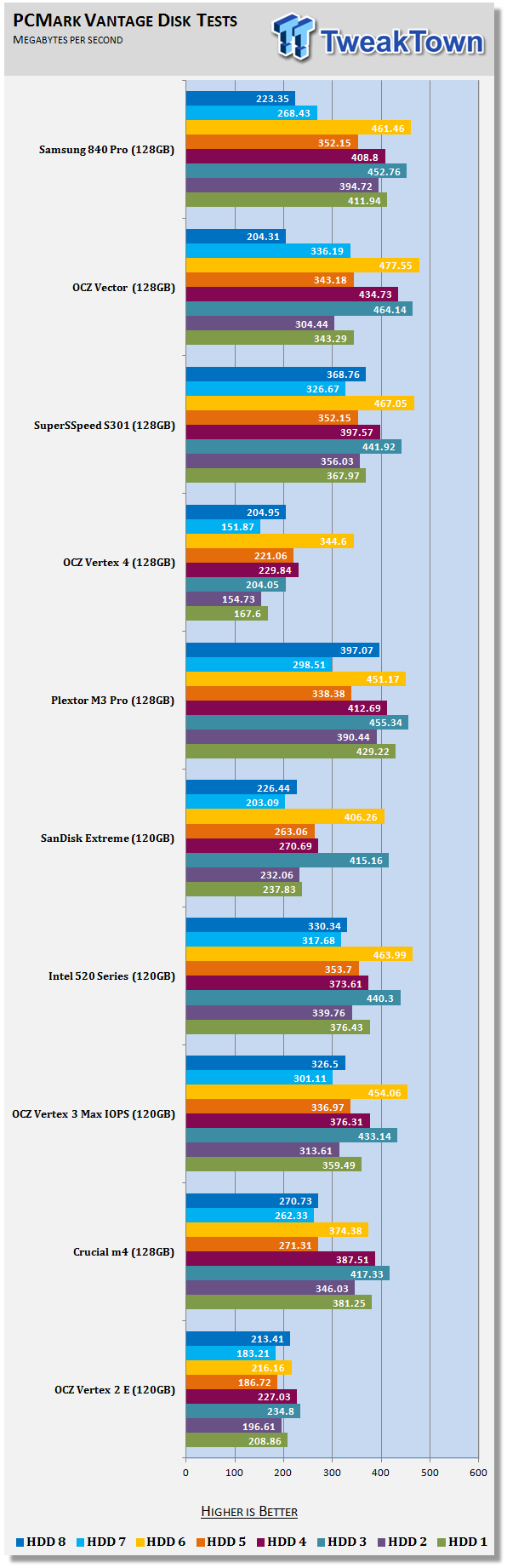
HDD1 - Windows Defender
HDD2 - Gaming
HDD3 - Windows Photo Gallery
HDD4 - Vista Startup
HDD5 - Windows Movie Maker
HDD6 - Windows Media Center
HDD7 - Windows Media Player
HDD8 - Application Loading
With the drives empty, all three of our super power SSDs trade real-world daily use software performance wins.
Benchmarks - PCMark Vantage - Drives with Data Testing
For a complete breakdown on the Drives with Data Testing please read this article. You will be able to perform this test at home with the files provided in the article - full instructions are included.
- Brief Methodology
SSDs perform differently when used for a period of time and when data is already present on the drive. The purpose of the Drives with Data testing is to show how a drive performs in these 'dirty' states. SSDs also need time to recover, either with TRIM or onboard garbage collection methods.
Drives with Data Testing - 25%, 50%, 75% Full States and Dirty / Empty Test
Files needed for 60 (64GB), 120 (128GB), 240 (256GB)
60GB Fill - 15GB, 30GB, 45GB
120GB Fill - 30GB, 60GB, 90GB
240GB Fill - 60GB, 120GB, 160GB
Empty but Dirty - a test run just after the fill tests and shows if a drive needs time to recover or if performance is instantly restored.
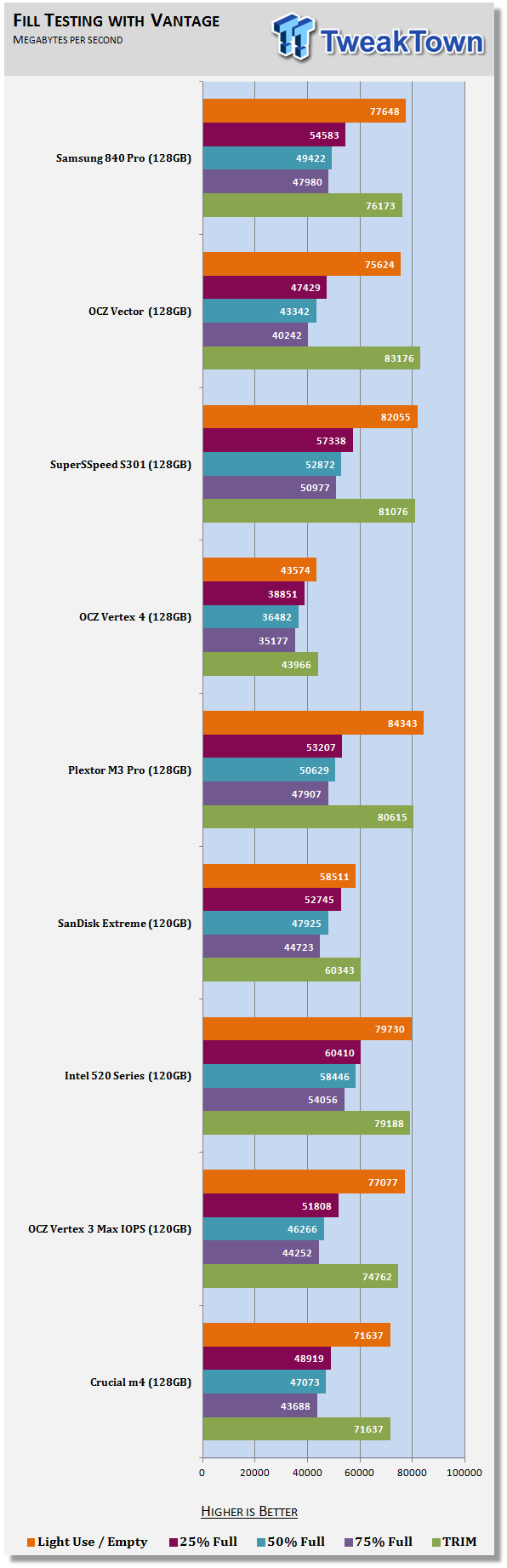
The Samsung 830 128GB fell flat when tested with data on the drive, but the 840 Pro 128GB raised its game...and benchmark result. Using the 50% of flash capacity full, the 840 Pro outperformed the OCZ Vector and nearly matched the S301.
Benchmarks - BootRacer
BootRacer - System Boot Time
Version and / or Patch Used: 4.0
Developer Homepage: Greatis
Product Homepage: BootRacer
Download here: http://www.greatis.com/bootracer/download.htm
Note: In this test we use the Lenovo W530 Mobile Workstation loaded with an operating system and several program files. The data on the drive at the time of the test is 45GB. The second test, 50GB Free, was run with the drives filled with block data until only 50GB of free capacity remained.
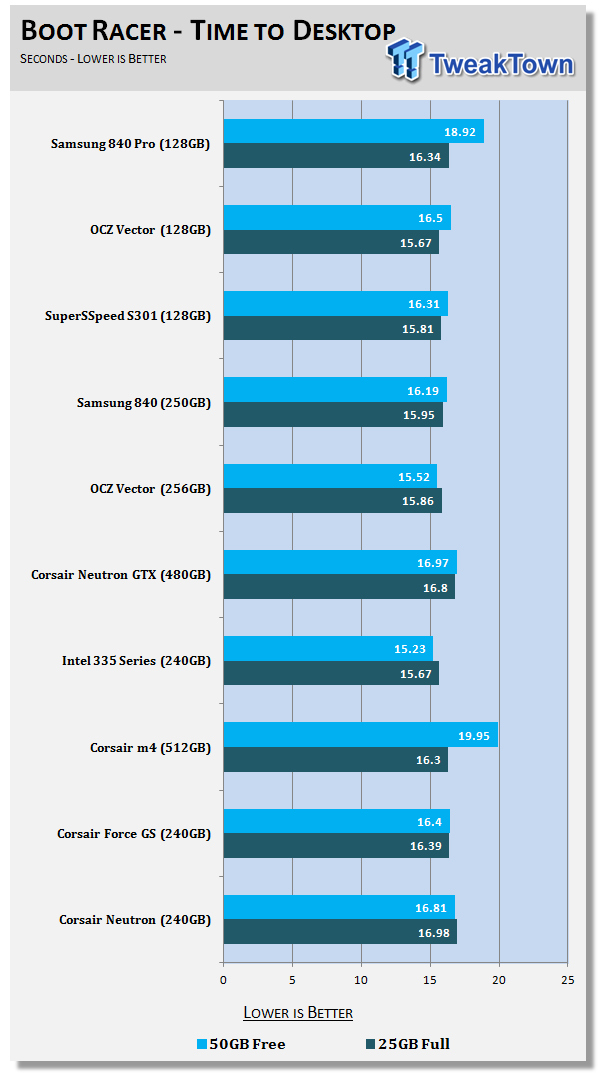
Booting into Windows can be a time consuming task with spinners and one of the reasons why SSDs have become so popular. As SSDs begin to fill, boot times increase and that's why we perform this test at two different states of available space. The first is with only 25GB on the drive, Windows, Office and a few applications are using space. The second test leaves only 50GB free.
The Samsung 840 Pro's boot time increased more than most of the other drives in this chart today.
Benchmarks - DiskBench
DiskBench - Directory Copy
Version and / or Patch Used: 2.6.2.0
Developer Homepage: Nodesoft
Product Homepage: DiskBench
Download here: http://www.nodesoft.com/diskbench/download
Note: In this test we use the Lenovo W530 Mobile Workstation and a SuperSSpeed S301 SLC 128GB SSD to move a 15GB block of data to and from the target drive. This is part of our real world test regiment. Roughly 45GB of data resides on the target drive before the '15GB Block' is transfer. The 15GB Block is the same data we built for the Data on Disk Testing and is a mix of compressible and incompressible data.
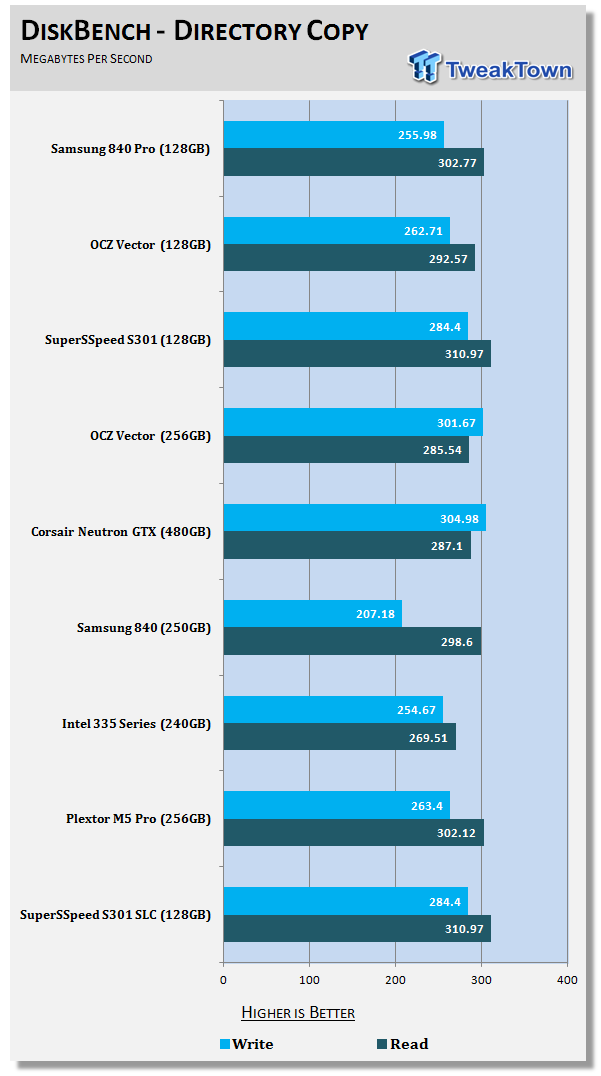
All three of the new super drives read data in a directory copy situation at around 300MB/s. Writing data gives us a broader range of performance, around 30MB/s between the Samsung 840 Pro and the SuperSSpeed S301.
Benchmarks - Power Testing
Bapco MobileMark 2012 1.5
Version and / or Patch Used: 2012 1.5
Developer Homepage: http://www.bapco.com
Test Homepage: http://www.bapco.com
MobileMark 2012 1.5 is an application-based benchmark that reflects usage patterns of business users in the areas of office productivity, media creation and media consumption. Unlike benchmarks that only measure battery life, MobileMark 2012 measures battery life and performance simultaneously, showing how well a system design addresses the inherent tradeoffs between performance and power management.
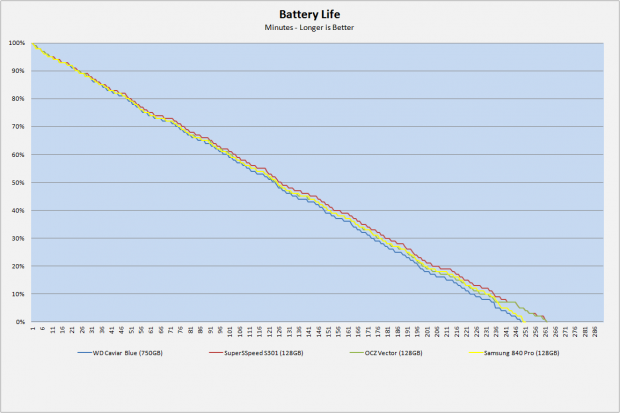
The Samsung 840 non-Pro delivered one of the best battery life performances we've seen to date, but the 840 Pro falls on the other end of the scale. The 840 Pro 128GB delivers only a small improvement over the Western Digital Caviar Blue 750GB. The OCZ Vector 128GB and SuperSSpeed S301 SLC 128GB aren't power angels, but they do deliver an extra 10 minutes of battery power with our Lenovo W530 using a small 6-cell battery.
PCMark Vantage HDD Tests - Power Draw
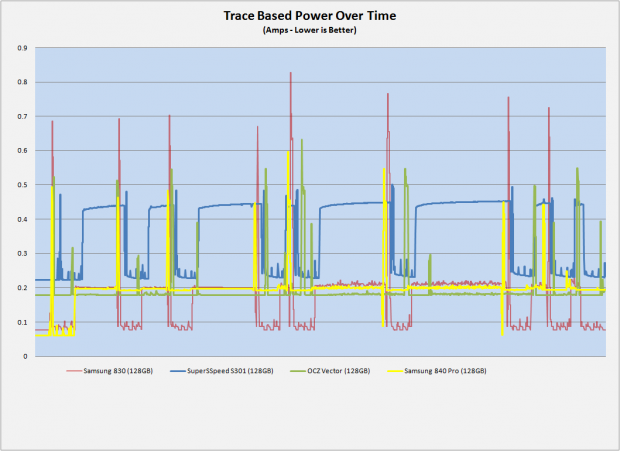
Earlier we stated the Samsung 840 Pro has a very aggressive background garbage collection scheme and we can prove it with this power test. The 840 Pro, plotted in yellow, has an initial low power state at idle, the first few minutes of the test. After the drive starts running the benchmark the low power state changes and never returns to the low power target for the time we measured. The last few minutes are also idle state for most drives but the Samsung 840 Pro 128GB keeps pulling higher than idle power even though the tests were complete.
Final Thoughts
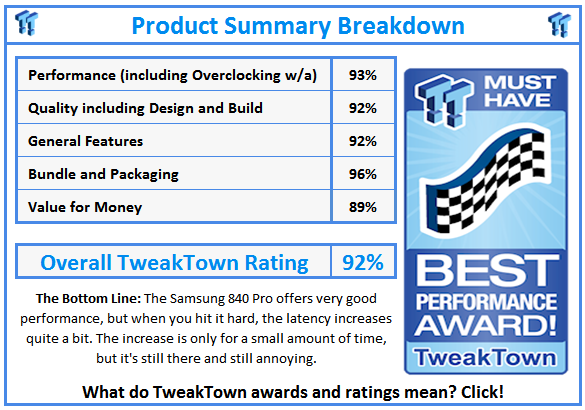
Many people are buzzing about the Samsung 840 Pro, but we think the drive has a split personality. This is an approach several companies are actively working on and we'll see more of it in 2013. OCZ's Vertex 4 and Vector do the something similar with performance and storage mode and Samsung does it behind the scenes without giving the behavior a name. We have a new drive in from Toshiba and a couple of drives under NDA till January 7 (CES), all with high performance initially and a fall back mode. The Samsung approach is quite a bit different from these other drives, but the end results are the same.
When the Samsung 840 Pro starts working the data in the background the write performance suffers with lower write speeds and increased latency. This is common with most SSDs, but only when the drive runs out of clean flash. The normal methods are to wait until the drive is idle and then perform the background clean up tasks, the 840 Pro doesn't wait for idle time - it just gets to work right away. If you do a lot of disk intensive tasks then you'll feel a loss of performance.
The good news is performance comes back and fairly quickly. The image above is a test after 30 to 40 minutes of idle time. The Samsung 840 Pro went through the clean up cycle and all of the write performance returned. The 840 Pro 256GB didn't seem to go into clean up mode as quickly as the 128GB we looked at today. We'll take a look at that drive in a few days.
So the real question everyone wants answered is what drive to buy, the OCZ Vector 128GB or the Samsung 840 Pro. These are the two big powerhouse drives in this capacity size with the SuperSSpeed S301 SLC kind of off to the side as an alternative, expensive option. To answer that question you need to figure out how you use your computer. If you write a lot of data to your drive rapidly, the Samsung option will shuffle that data and your user experience will decrease due to the additional latency. The Vector on the other hand will switch to storage mode and the sequential performance will decrease for a short time. Personally, I can live with slower sequential reads and writes when working on my PC, but increased latency is a deal breaker since it slows everything else down that I'm trying to accomplish. The OCZ drive has a built-in multitask safeguard which limits QD1 reads so you have additional bandwidth for another task, that's why we don't see storage mode increasing latency in AIDA64.
Other drives also just on the outskirts of top performance are also an option. Drives like the Plextor M5 Pro and Corsair Neutron GTX don't have the bipolar personality 'feature', at least not to the same degree as Vector and 840 Pro. Shopping for a 128GB SSD is difficult now since nothing really stands out as the ultimate everything to all drive.
In this capacity size, I think Vector is a better option, but it's pretty close. The power test really pushes Vector to the top of the list since it offers better battery life over 840 Pro. Then again, if you are exclusively worried about battery life there are drives on the market that offer much longer battery life over Vector. We have a LSI SandForce drive in the lab now with new B02 silicon and it offers longer battery life than anything else we've tested.