











Introduction and Package
Introduction

The Lightning series is one of my favorite series on the market and the main reason for that is because they're more than just a card that carries a good overclock or has the ability to achieve a good one. MSI go back to the drawing board and make sure the card stands out from anything else on the market.
The GTX 480 has always had a bit of trouble gaining momentum on the market and no matter what you think of the model on a whole, it hasn't been a fantastic model for NVIDIA. Recently, though, we've seen companies really begin to attack the card and make it stand out for all the right reasons.
We saw Galaxy strap a massive cooler on the card which made it an absolute beast; GIGABYTE has brought it into its SOC series and today MSI are bringing the card into the Lightning series. It looks like an absolute beast; that much I can tell you. But how does it go once we slide it into our testbed and use our favorite overclocking software from MSI?
The Package


It's been a while since we've seen a big box like this from MSI and while the picture doesn't give the best perspective, we can tell it's clearly larger than most VGA boxes these days.

Inside the big box there's a fair bit going on; we've got the normal stuff like some paperwork and a driver CD; we've got a DVI to VGA and DVI to HDMI connector, HDMI cable along with a number of power convertors which include a dual Molex to 6-Pin and two 6-Pin to 8-Pin ones.
Also included are another three little cables. We've seen these before from MSI and what they're used for is to measure the voltage of the card in certain areas. Most people will not use these cables and this feature, but it's another extra that puts the Lightning series a level above the competition.
Card and Specifications
The Card

Looking at the card, you're going to see the third installment of the Twin Frozr series cooler and it looks like a beast. The best thing about it is that MSI keep it as a dual slot card and it will be interesting to see how it performs when we get down and dirty with the card soon.

The GTX 480 Lightning needs some serious juice to get up and running. We've got two 8-Pin connectors here along with a single 6-Pin one. Running three or four of these would probably require a second power supply.


We don't see too many other surprises; we've got our two SLI connectors at the top of the card and connectivity is the same with two Dual-Link DVI connectors along with a HDMI and DisplayPort connector. Just quickly moving back to the SLI connectors for a second, though, you can see that the card sits a little taller than normal. This isn't unusual for the Lightning series and shouldn't cause a problem for most people, but it's something that has to be noted.

We mentioned on the first page about the extra cables that let you measure some of the voltage levels on the card. This is where you plug in those three cables if it's a feature that you want to make use of.
Specifications
Out of the box the MSI GTX 480 Lightning is overclocked which isn't a surprise. What else isn't a surprise is the fact that the out of the box overclock isn't all that large. We've seen this since the launch of the series as MSI has placed the overclocking focus on you, the user.
Out of the box the MSI GTX 480 Lighting comes with a 750MHz core clock and 1500MHz Shader clock, which is up from the default 701MHz and 1401MHz core and Shader clock. The 1536MB of GDDR5 memory has also been bumped from 3696MHz QDR to a nice sounding 4000MHz QDR.
Because the out of the box clocks aren't the highest we've seen, what we've decided to do is just get stuck into overclocking the card. Being part of the Lightning series means we've also got more options when it comes to voltages. Instead of just the core voltage being bumped, we're able to bump that higher than others along with having the ability to move the memory and AUX voltage.

We moved our three voltages, the memory and AUX to maximum which is +100mV and +50mV and core to +131mV which is a little shy of the +200mV maximum, which we found didn't give us any more OC potential.
What we ended up with was a core clock of 900MHz; this bumped the Shader clock to 1800MHz and we managed to get the memory up another 200MHz QDR too 4200MHz QDR.
Test System Setup and 3DMark Vantage
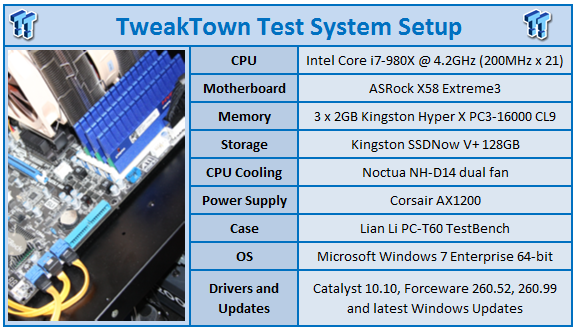
We would like to thank the following companies for supplying and supporting us with our test system hardware and equipment: Intel, ASRock, Kingston, Mittoni, Noctua and Corsair.
The GTX 480 is already a very fast card; we know that. It's the fastest single GPU video card on the market at the moment. We have a lot of faith in what MSI can offer us, so for that reason we've put in some tough competition for the GTX 480 Lightning today which includes the HD 6850 in Crossfire.
We've got a few other cards including the HD 6870, GTX 460 Black from ECS and the GIGABYTE GTX 460 OC in SLI.
Let's get started!
3DMark Vantage
Version and / or Patch Used: 1.0.1
Developer Homepage: http://www.futuremark.com
Product Homepage: http://www.futuremark.com/products/3dmarkvantage/
Buy It Here
3DMark Vantage is the new industry standard PC gaming performance benchmark from Futuremark, newly designed for Windows Vista and DirectX10. It includes two new graphics tests, two new CPU tests, several new feature tests, and support for the latest hardware.
3DMark Vantage is based on a completely new rendering engine, developed specifically to take full advantage of DirectX10, the new graphics API from Microsoft.
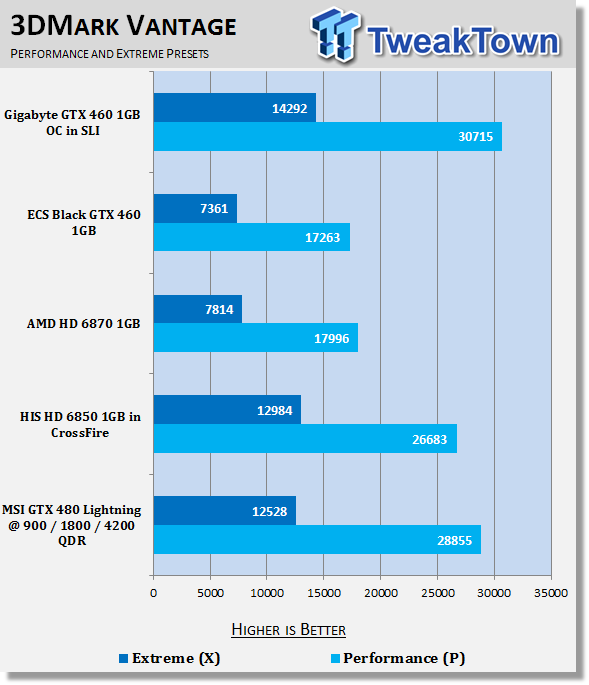
Under Vantage we've got very strong performance from the GTX 480 Lightning. Over the last few months, though, we've put less emphasis on 3DMark Vantage and more on the games we test.
Unigine Heaven Benchmark
Version and / or Patch Used: 2
Developer Homepage: http://www.unigine.com
Product Homepage: http://unigine.com/press-releases/091022-heaven_benchmark//
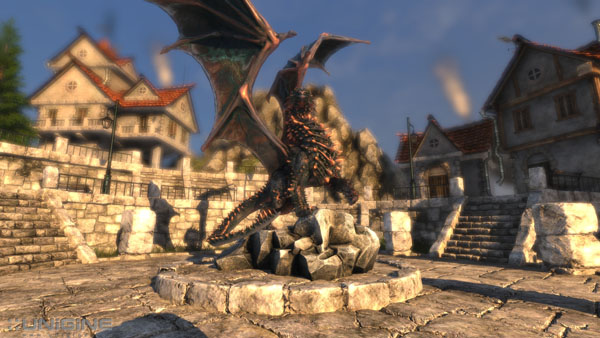
New benchmark grants the power to unleash the DirectX 11 potential in the gift wrapping of impressively towering graphics capabilities. It reveals the enchanting magic of floating islands with a tiny village hidden in the cloudy skies. With the interactive mode emerging experience of exploring the intricate world is ensured within reach. Through its advanced renderer, Unigine is one of the first to set precedence in showcasing the art assets with tessellation, bringing compelling visual finesse, utilizing the technology to the full extend and exhibiting the possibilities of enriching 3D gaming.
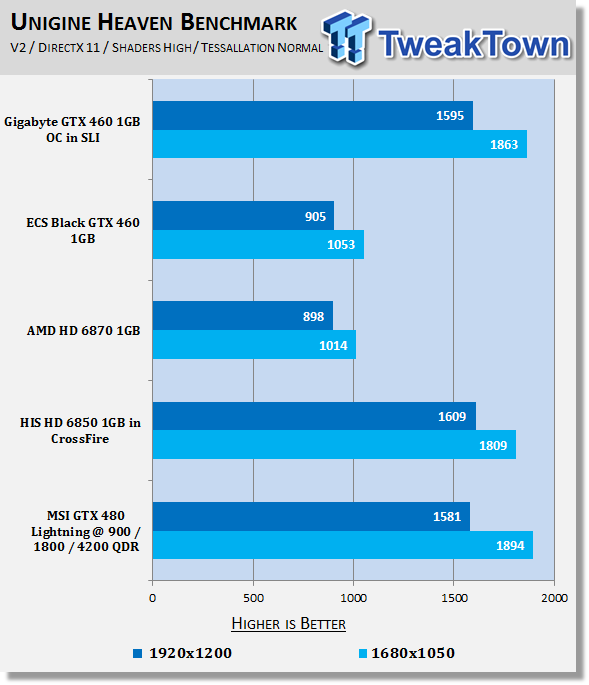
AMD has improved Tessellation performance, but you can see that the MSI GTX 480 Lightning at 900MHz manages to still beat the two-card Crossfire setups at the lower resolution and almost match it at the higher.
Benchmarks - Resident Evil 5
Resident Evil 5
Version and / or Patch Used: Demo Benchmark
Developer Homepage: www.residentevil.com/
Product Homepage: http://www.residentevil.com/
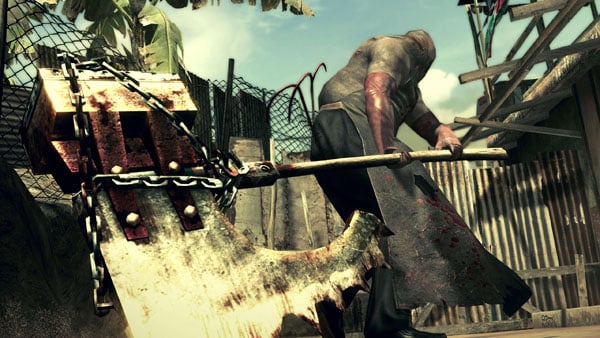
Resident Evil 5 is a survival horror video game developed and published by Capcom. The game is the seventh installment in the Resident Evil survival horror series, and was released on September 18. Resident Evil 5 revolves around Chris Redfield and Sheva Alomar as they investigate a terrorist threat in Kijuju, a fictional town in Africa.
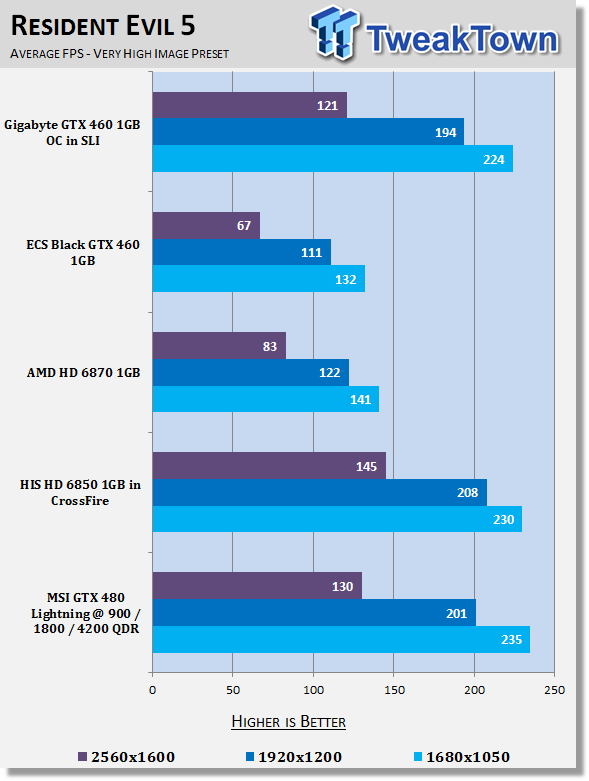
We see some strong performance from the MSI GTX 480 Lightning here and we've got some great numbers at all resolutions.
Benchmarks - Tom Clancy's H.A.W.X.
Tom Clancy's H.A.W.X.
Version and / or Patch Used: Benchmark Demo
Timedemo or Level Used: Built-in Test
Developer Homepage: http://www.ubi.com/UK/default.aspx
Product Homepage: http://www.hawxgame.com/
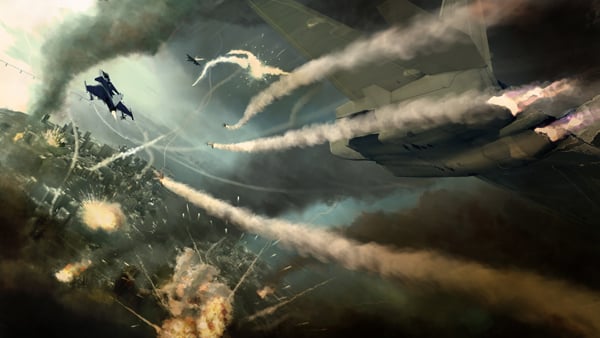
Tom Clancy's H.A.W.X is an arcade-style flight simulator video game developed by Ubisoft Romania and published by Ubisoft for Microsoft Windows, Xbox 360, PlayStation 3, and iPhone OS.
The fundamental gameplay mechanics are similar to those of other console-based flight series. Players take on enemies with over 50 aircraft available. Each mission is at real world locations in environments created with commercial satellite data. A cockpit, first person, and third person view are selectable. The third person view gives the player an external view of both their plane and the target.
Set above the skies of a near-future world, increasingly dependent on private military companies with elite mercenaries who have a relaxed view on the law. As these non-governmental organizations gain power, global conflict erupts with one powerful PMC attacking the United States.
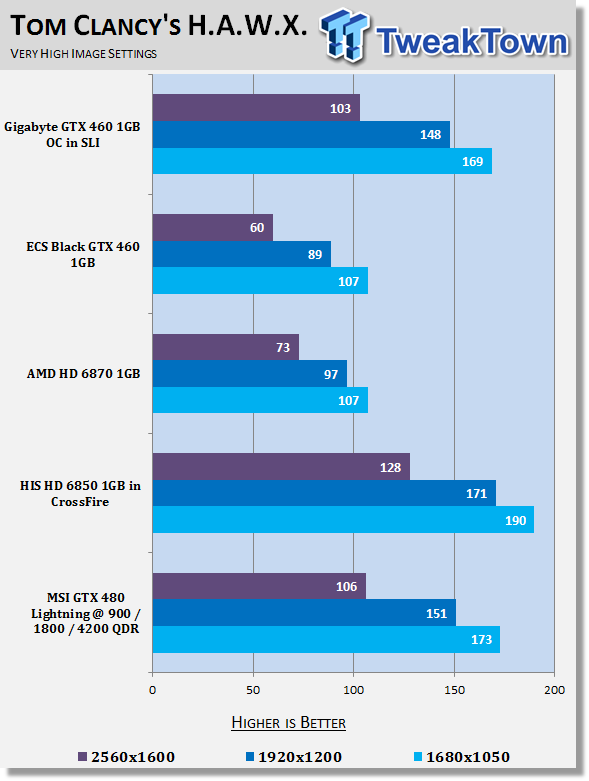
We talk about how great the GTX 460 is in SLI, but we can clearly see that across the board the single GTX 480 Lightning at 900MHz manages to win out at all resolutions. There's some serious power here.
Benchmarks - Mafia II
Mafia II
Version and / or Patch Used: Latest Steam Update
Timedemo or Level Used: Built in Benchmark
Developer Homepage: http://www.2kczech.com/
Product Homepage: http://www.mafia2game.com/
Buy It Here
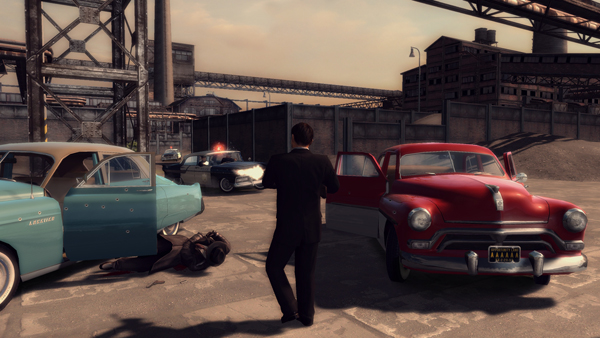
Mafia II is a third-person action-adventure video game, the sequel to Mafia: The City of Lost Heaven. It is developed by 2K Czech, previously known as Illusion Softworks, and is published by 2K Games. The game is set from 1943 to 1951 in Empire Bay (the name is a reference to New York's state nickname "The Empire State"), a fictional city based on San Francisco and New York City, with influences from Chicago and Detroit. The game features a completely open-ended game map of 10 square miles. No restrictions are included from the start of the game. There are around 50 vehicles in the game, as well as licensed music from the era.
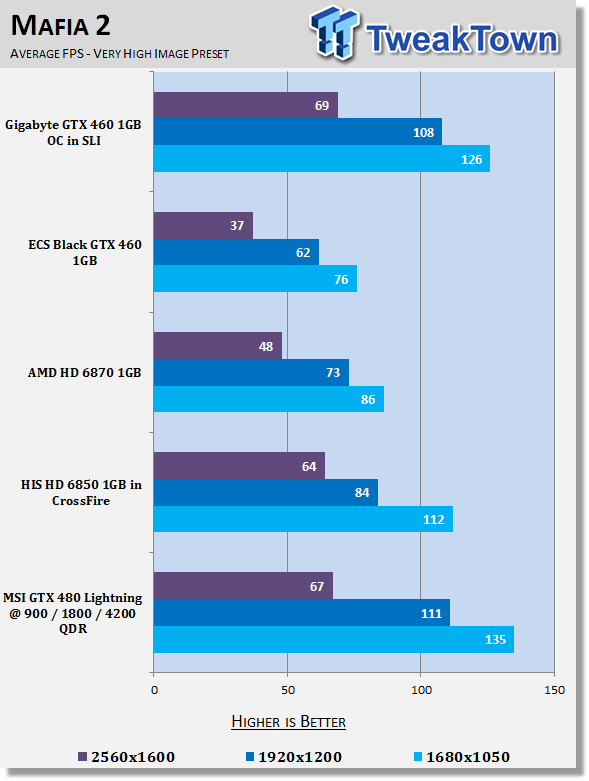
Good numbers across the board with an average of over 60 FPS at all resolutions. We can see here that compared to the HD 6850 CF setup as well, performance is very impressive across the board.
Benchmarks - Lost Planet 2
Lost Planet 2
Version and / or Patch Used: Benchmark Demo
Timedemo or Level Used: Built in Benchmark - Test A Scene 1
Developer Homepage: http://www.capcom.com/
Product Homepage: http://www.lostplanet2game.com/
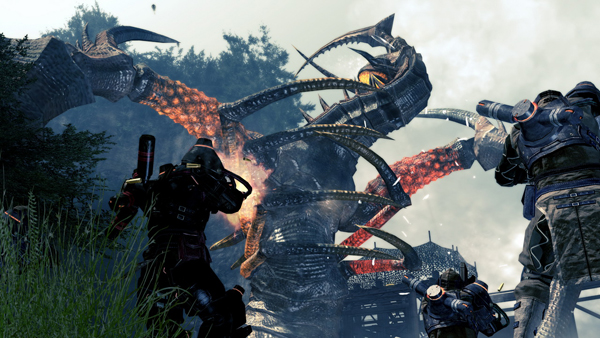
Lost Planet 2 is a third-person shooter video game developed and published by Capcom. The game is the sequel to Lost Planet: Extreme Condition which is also made by Capcom, taking place ten years after the events of the first game, on the same fictional planet. The story takes place back on E.D.N. III 10 years after the events of the first game. The snow has melted to reveal jungles and more tropical areas that have taken the place of more frozen regions. The plot begins with Mercenaries fighting against Jungle Pirates. After destroying a mine, the Mercenaries continue on to evacuate the area, in which a Category-G Akrid appears and attacks them. After being rescued, they find out their evacuation point (Where the Category-G appeared) was a set-up and no pick up team awaited them. The last words imply possible DLC additions to the game, "There's nothing to be gained by wiping out snow pirates... unless you had some kind of grudge."
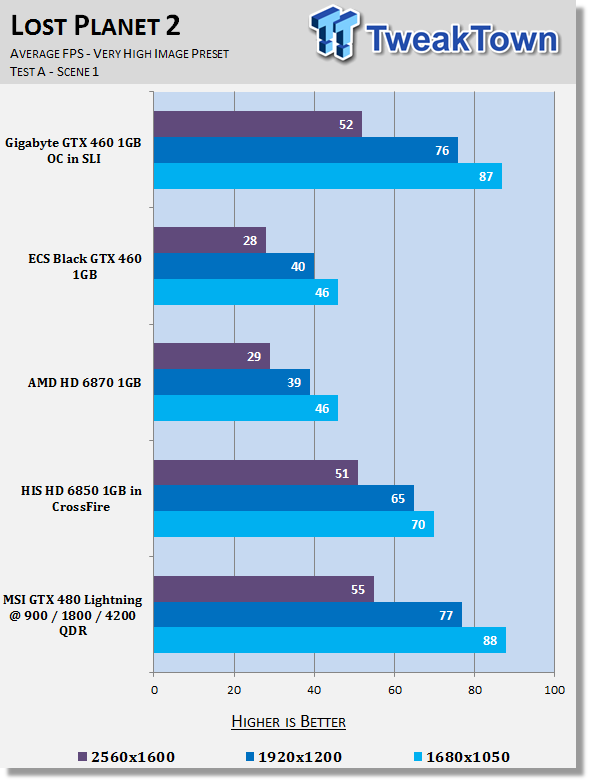
Lost Planet 2 is a Tessellation heavy game and you can see that while AMD has improved in the area, the NVIDIA cards continue to perform very strong under applications that are Tessellation heavy still.
Benchmarks - Aliens vs. Predator
Aliens vs. Predator
Version and / or Patch Used: Standalone Benchmark
Timedemo or Level Used: Built in Benchmark
Developer Homepage: http://www.rebellion.co.uk/
Product Homepage: http://www.sega.com/games/aliens-vs-predator/
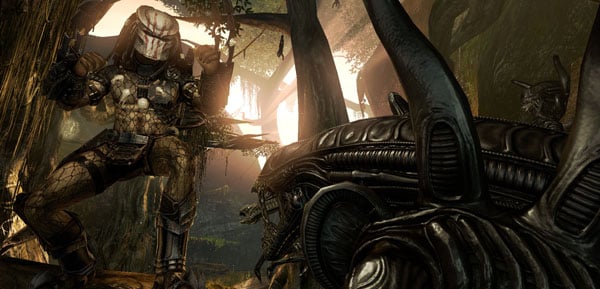
Aliens vs. Predator is a science fiction first-person shooter video game, developed by Rebellion Developments, the team behind the 1999 original PC game, and published by Sega for Microsoft Windows, the PlayStation 3 and the Xbox 360. The game is based on the Alien vs. Predator franchise, a combination of the characters and creatures of the Alien franchise and the Predator franchise. There are three campaigns in the game, one for each race/faction (the Predators, the Aliens and the Colonial Marines), that, while separate in terms of individual plot and gameplay, form one overarching storyline.
Following the storyline of the campaign modes comes the multiplayer aspect of the game. In this Multiplayer section of the game, players face off in various different gametypes in various different ways.
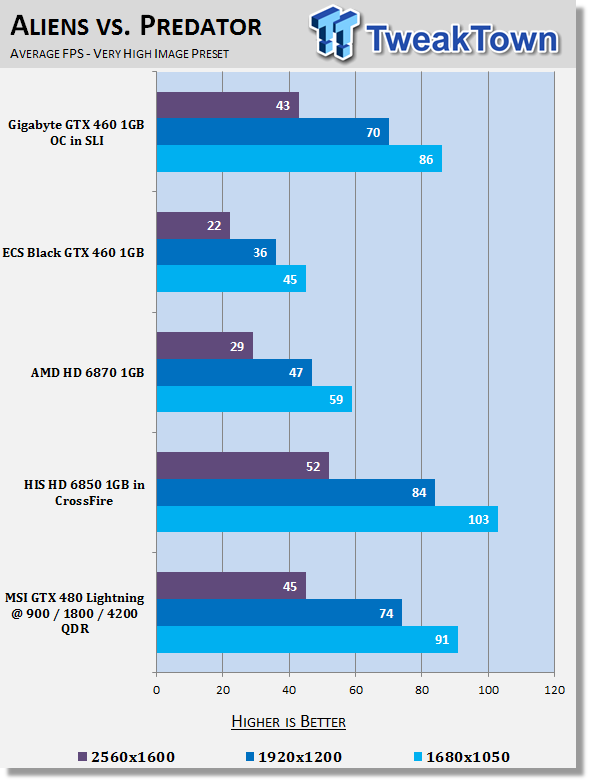
Compared to the GTX 460 SLI setup the performance from MSI here on the single 480 is still very strong. The only setup to come ahead of the GTX 480 Lightning is the dual card Crossfire setup.
Benchmarks - Final Fantasy XIV
Final Fantasy XIV
Version and / or Patch Used: Standalone Benchmark
Timedemo or Level Used: Built in Benchmark - Elezen (Male)
Developer Homepage: http://www.square-enix.com/
Product Homepage: http://www.finalfantasyxiv.com/
Final Fantasy XIV, also known as Final Fantasy XIV Online, is the fourteenth installment in the Final Fantasy series. The game is a massively multiplayer online role-playing game and is developed and published by Square Enix. The game takes place in a land called Hydaelyn, mainly in a region named Eorzea, which will have a contemporaneously aesthetic blend of science fiction and classic fantasy elements.
The battle and job systems will be different from the one previously used in Final Fantasy XI, which utilized experience points and level-based progression. Final Fantasy XIV is being designed to utilize a skill-based progression[15] system similar to that of Final Fantasy II. Character races will resemble and allow players to create avatars similar to ones in Final Fantasy XI. Group play has been de-emphasized, and now solo and group play have been balanced. Weapon use will alter "character development".
Note: Final Fantasy XIV gives us a score and not a normal FPS rating, our understanding is that anything around 2000 points or above is considered playable.
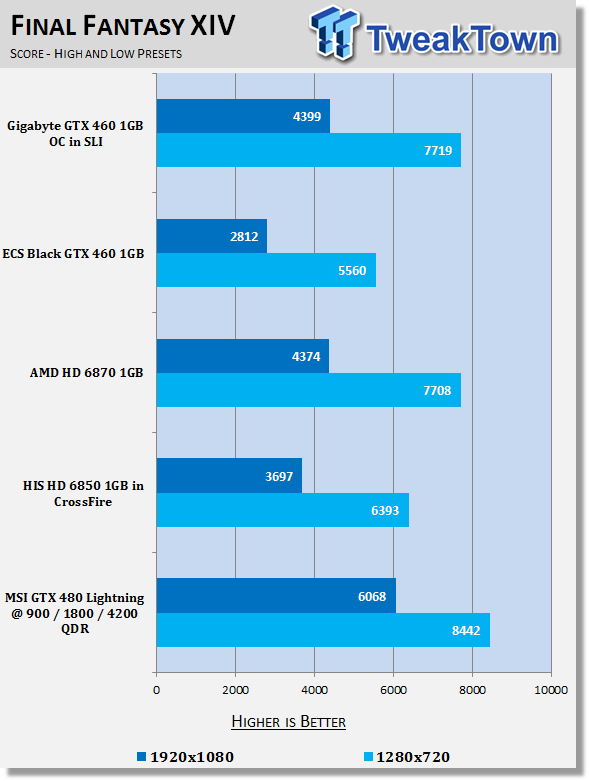
The GTX 480 sees some great performance under Final Fantasy XIV.
Benchmarks - Street Fighter IV
Street Fighter IV
Version and / or Patch Used: Standalone Benchmark
Timedemo or Level Used: Built in Benchmark
Developer Homepage: http://www.capcom.com/
Product Homepage: http://www.streetfighter.com/
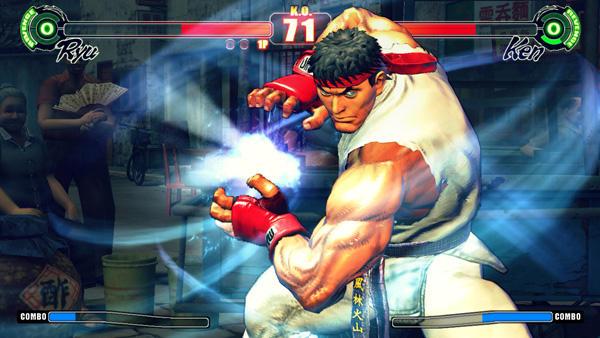
While Street Fighter IV features models and backgrounds rendered in 3D, the gameplay remains on a traditional 2D plane, with the camera having freedom to move in 3D at certain times during fights, for dramatic effect. Producer Yoshinori Ono has stated that he wanted to keep the game closer to Street Fighter II. A new system called "Focus Attacks" ("Saving Attack" for the Japanese version) has been introduced, as well as Ultra moves. The traditional six-button control scheme returns, with new features and special moves integrated into the input system, mixing classic gameplay with additional innovations.
All the characters and environments in Street Fighter IV are rendered as 3D models with polygons, similar to the Street Fighter EX sub-series Capcom produced with Arika. However, there are a couple of key differences. Art director and character designer Daigo Ikeno, who previously worked on Street Fighter III 3rd Strike, opted for non-photorealistic rendering to give them a hand-drawn look, with visual effects accented in calligraphic strokes, ink smudges and ink sprays during the fights.
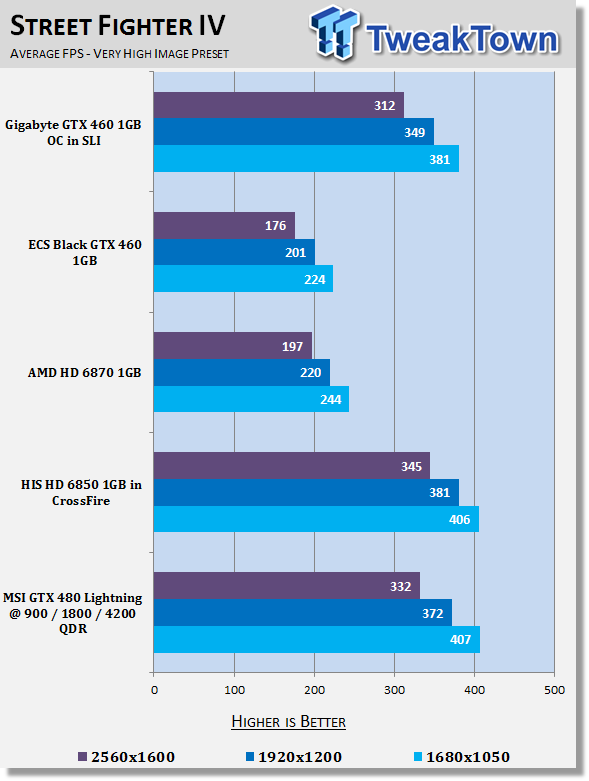
Big numbers across the board from all cards here including the GTX 480 Lightning at 900MHz.
Benchmarks - Far Cry 2
Far Cry 2
Version and / or Patch Used: 1.01
Timedemo or Level Used: Ranch Long
Developer Homepage: http://www.ubi.com/
Product Homepage: http://www.farcry2.com/
Buy It Here
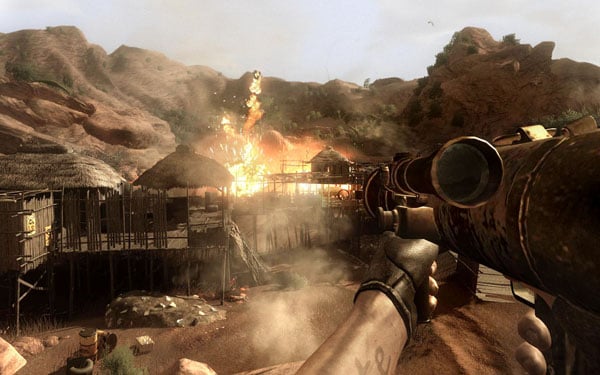
The Dunia Engine was built specifically for Far Cry 2 by the award-winning Ubisoft Montreal development team. It delivers the most realistic destructible environments, amazing special effects such as dynamic fire propagation and storm effects, real-time night-and-day cycle, dynamic music system, non-scripted enemy A.I. and so much more.
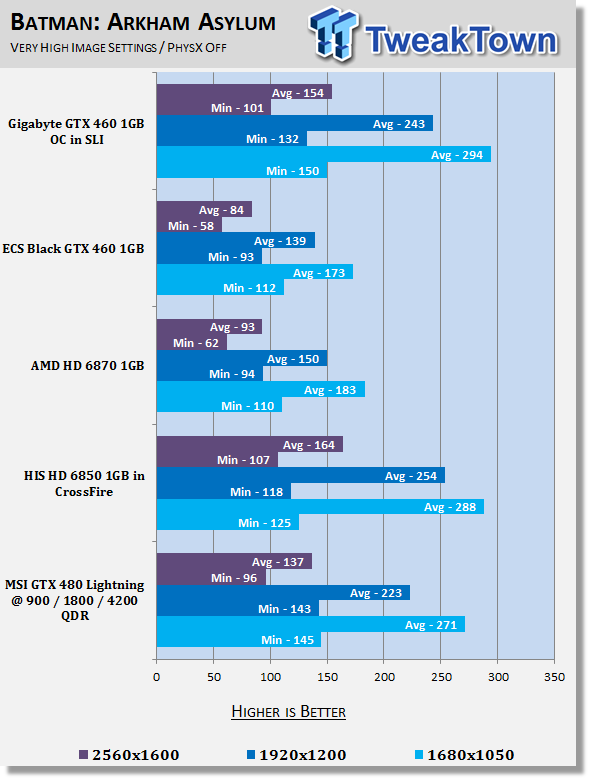
Batman AA performance is strong across the board from the GTX 480 Lightning at 900MHz; we can see it falls a little behind the CF setup at the highest resolution, but we've got very impressive and playable numbers at all resolutions.
Benchmarks - Batman Arkham Asylum
Batman Arkham Asylum
Version and / or Patch Used: 1.1
Timedemo or Level Used: Built-in Test
Developer Homepage: http://www.batmanarkhamasylum.com/
Product Homepage: http://www.batmanarkhamasylum.com/
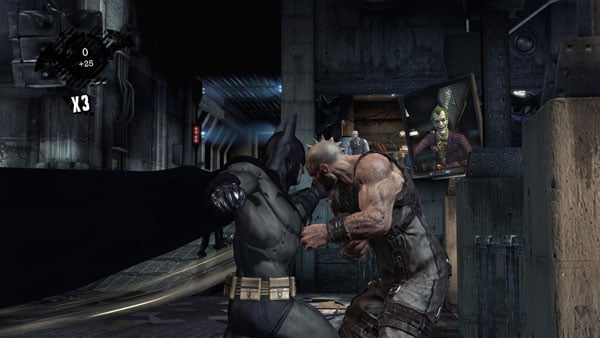
Batman: Arkham Asylum exposes players to a unique, dark and atmospheric adventure that takes them to the depths of Arkham Asylum - Gotham's psychiatric hospital for the criminally insane. Gamers will move in the shadows, instigate fear amongst their enemies and confront The Joker and Gotham City's most notorious villains who have taken over the asylum.
Using a wide range of Batman's gadgets and abilities, players will become the invisible predator and attempt to foil The Joker's demented scheme.
Batman: Arkham Asylum features an original story penned exclusively for the game by famous Batman author and five-time Emmy award winner Paul Dini, whose credits include Lost season one and Batman: The Animated Series.
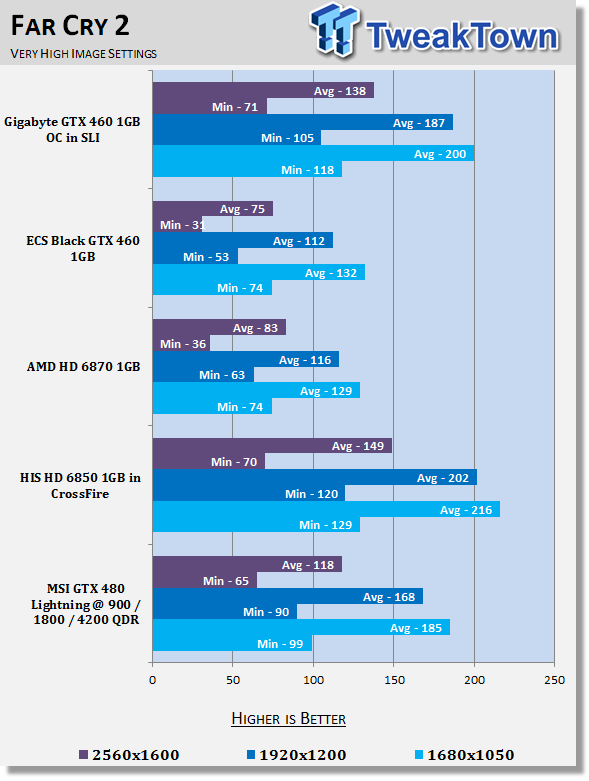
Across the board we're way above the 30 FPS minimum that we need at all resolutions.
Benchmarks - High Quality AA and AF
High Quality AA and AF
Our high quality tests let us separate the men from the boys and the ladies from the girls. If the cards weren't struggling before they will start to now.
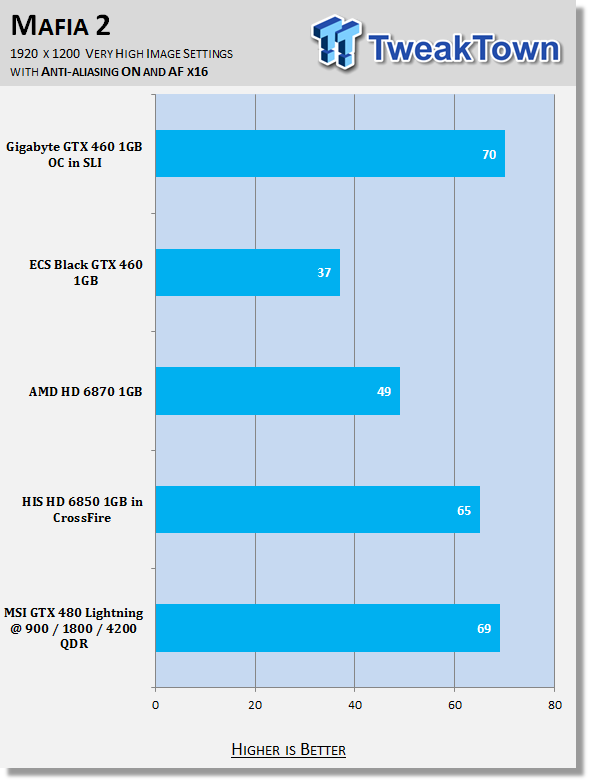
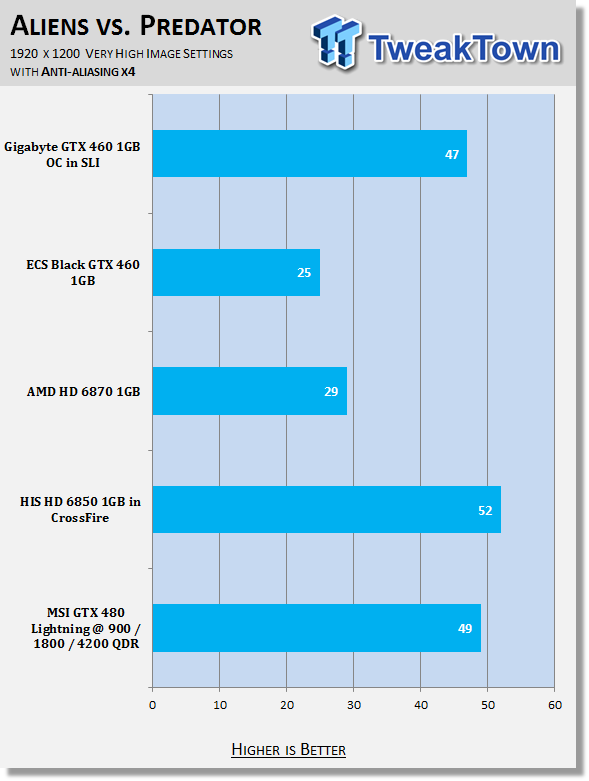
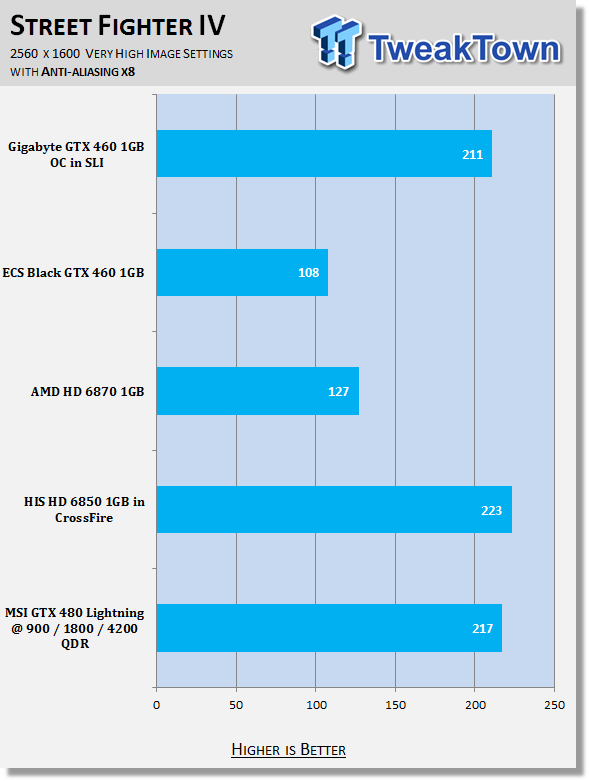
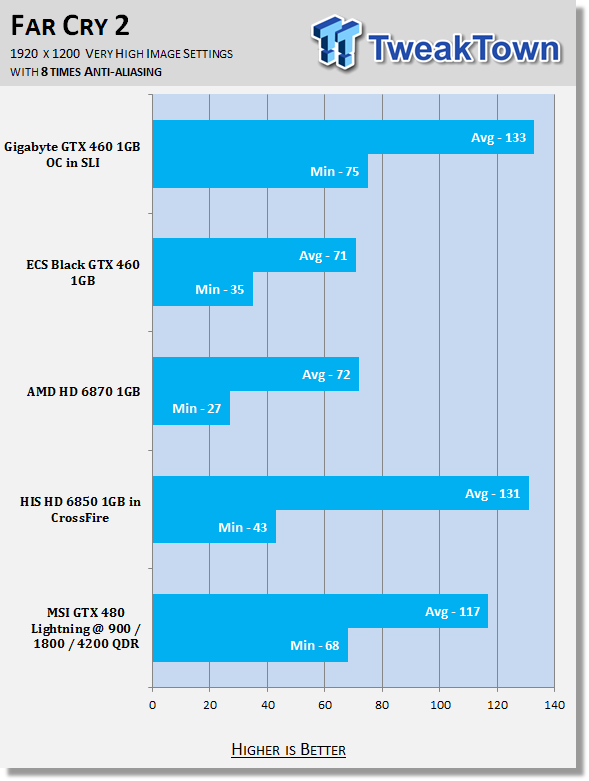
AA performance from the GTX 480 Lightning is very good; the only game that drops below playable levels is the very intensive Aliens vs Predator.
Benchmarks - PhysX Tests
PhysX Tests
Here we're able to find out when PhysX is turned on in games that support it what kind of frame rates we're able to get. We always set PhysX to the highest possible in game settings while also keeping detail at its highest.
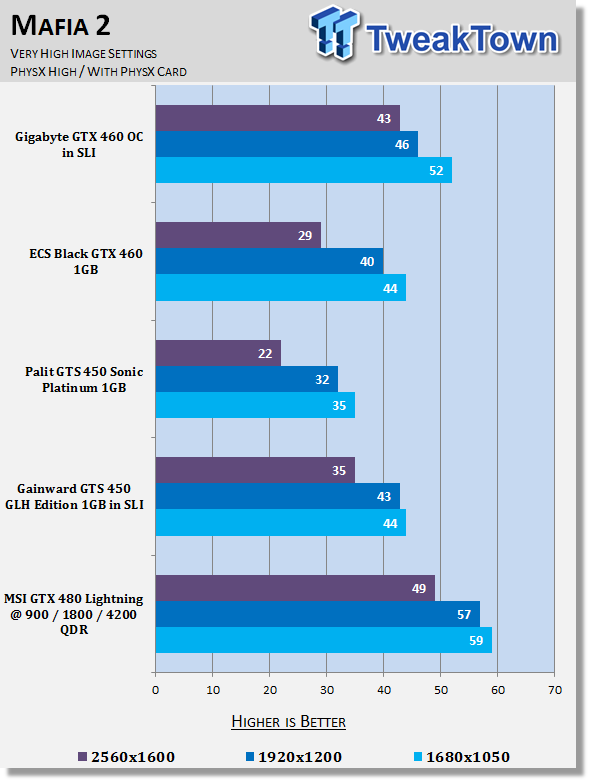
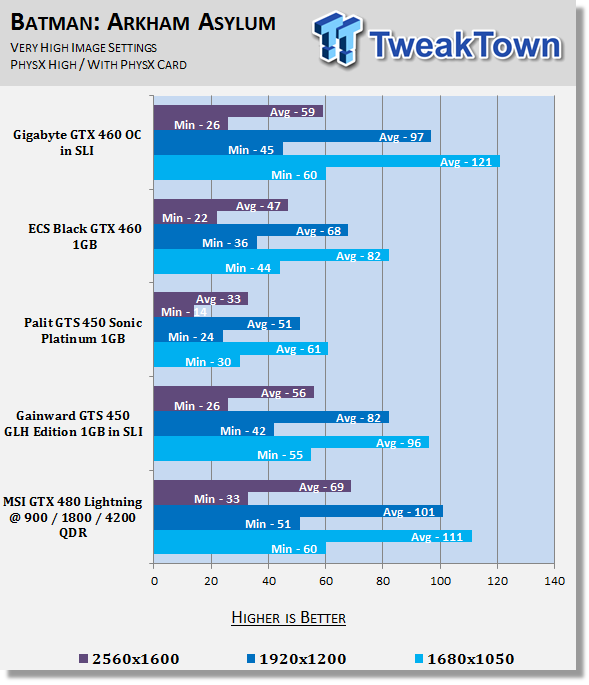
Testing an NVIDIA card means we're back on to testing PhysX again. We can see Mafia II performance is just shy of that 60 FPS average we want. The good news is the picture is a lot more attractive under Batman AA with the 30 FPS minimum being reached at all resolutions.
Temperature Test
Temperature Tests

The temperature of the core is pulled from MSI Afterburner with the max reading used after a completed run off 3DMark Vantage and the Performance preset.
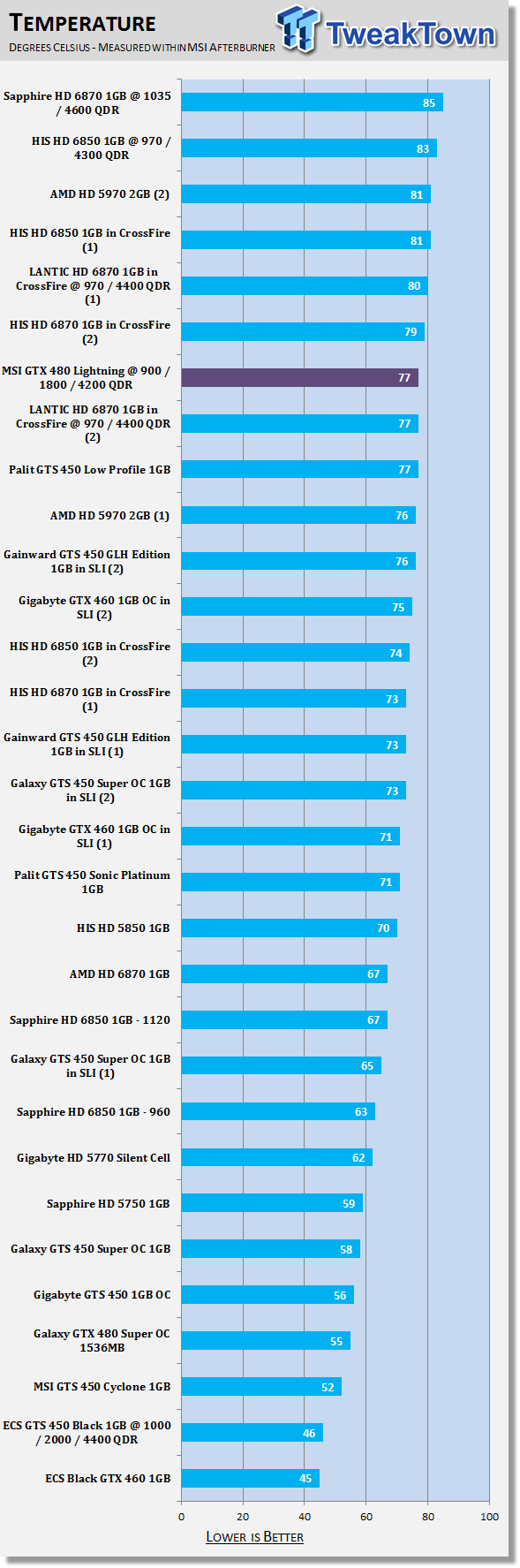
The MSI GTX 480 Lightning at 900MHz isn't the hottest card here, but it does indeed run quite warm compared to a lot of other setups. The extra voltage across a number of areas would be the main reason for that.
Sound Test
Sound Tests

Pulling out the TES 1350A Sound Level Meter we find ourselves quickly yelling into the top of it to see how loud we can be.
After five minutes of that we get a bit more serious and place the device two CM away from the fan on the card to find the maximum noise level of the card when idle (2D mode) and in load (3D mode).
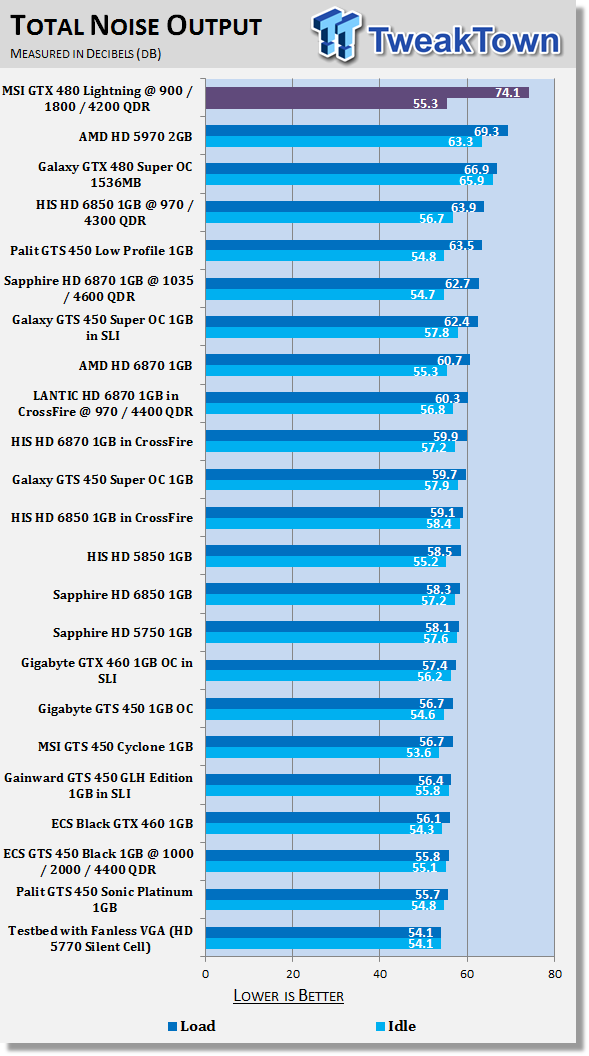
While the card manages to idle at an attractive level, when we get into games the card starts to get very audible. Like we mentioned on the previous page, the extra voltage across the core, memory and AUX means the card has to work harder than normal.
Power Consumption Tests

Using our new PROVA Power Analyzer WM-01 or "Power Thingy" as it has become quickly known as to our readers, we are now able to find out what kind of power is being used by our test system and the associated graphics cards installed. Keep in mind; it tests the complete system (minus LCD monitor, which is plugged directly into AC wall socket).
There are a few important notes to remember though; while our maximum power is taken in 3DMark06 at the same exact point, we have seen in particular tests the power being drawn as much as 10% more. We test at the exact same stage every time; therefore tests should be very consistent and accurate.
The other thing to remember is that our test system is bare minimum - only a SSD hard drive is used with a single CD ROM and minimal cooling fans.
So while the system might draw 400 watts in our test system, placing it into your own PC with a number of other items, the draw is going to be higher.
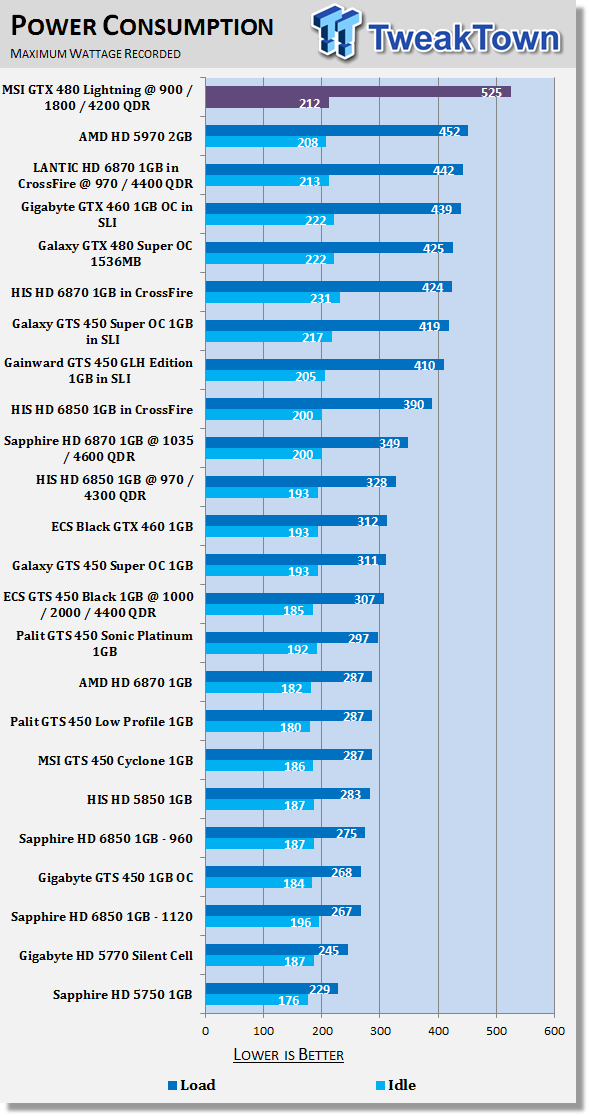
Power draw is high at load and clearly ahead of everything else; this doesn't come as a surprise with the amount of power connectors we've got plugged into the card, but it's got to be said. Of course, anyone buying this card should have a very good power supply anyway, so it shouldn't cause an issue for most.
Total Performance Rating (TPR)
Total Performance Rating
The TPR graph is a combination of all our benchmarks in which NVIDIA and ATI are on an even playing field.
The TPR number is a combination of:
3DMark Vantage, Heaven Benchmark V2, Resident Evil 5, Tom Clancy's H.A.W.X., Mafia 2 (PhysX Off), Lost Planet 2, Aliens vs. Predator, Final Fantasy XIV, Street Fighter IV, Far Cry 2, Batman: Arkham Asylum (PhysX Off) and our four High Quality tests which include Mafia 2, Aliens vs. Predator, Street Fighter IV and Far Cry 2.
All of the benchmark results achieved are then combined into a single number. As this graph will grow over time and cards won't be re-tested, next to each model you'll find the driver version that was used when the card was benchmarked.
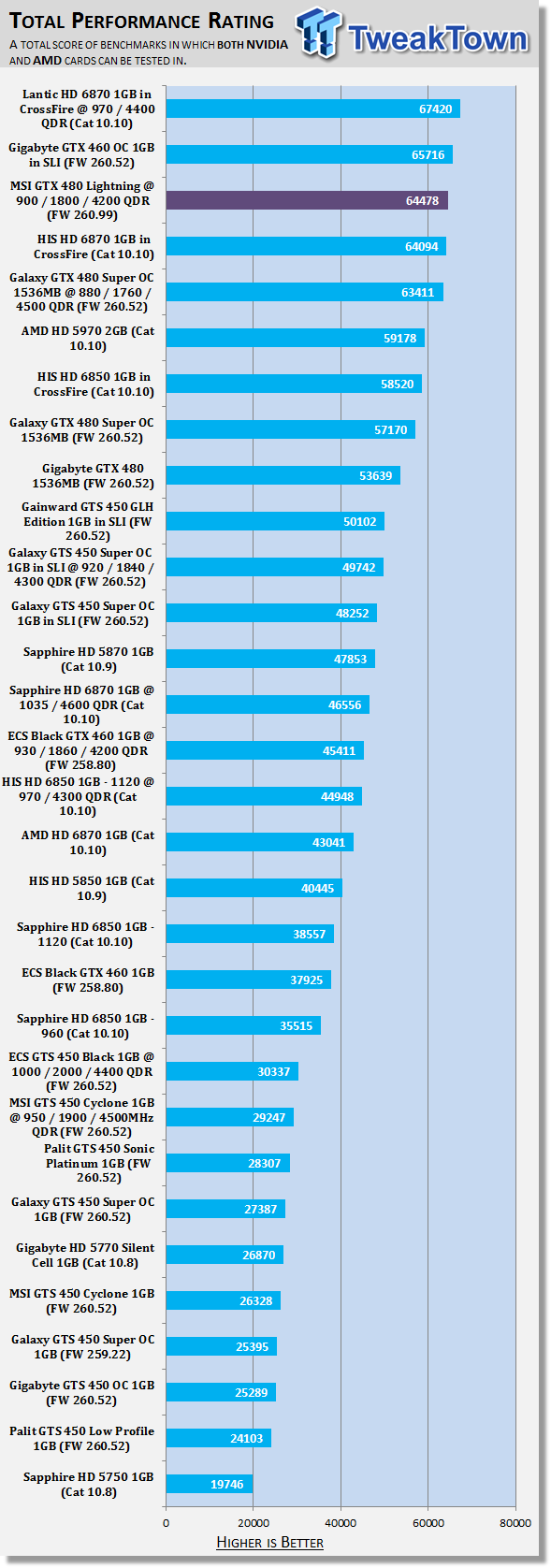
The MSI GTX 480 Lightning doesn't have too many problems climbing up the ladder when it comes to overall performance. There's no denying that the GTX 480 is already a fast card; the Lightning version from MSI is just even faster, and the only setups ahead of it are multi GPU ones which is very impressive.
Total Value Rating (TVR)
Total Value Rating
The TVR graph is the TPR score divided by the price of the video card. The price of the video card is based on the list price of the model on Newegg.com. In the event the card isn't listed, it will be based on the U.S. $ MSRP given to us by the manufacturer.
In the event we can't source a price from either, the product will not receive a TVR rating. As with our TPR graph, the amount of video cards on the list will grow over time and the price of the model won't change from what it was when first reviewed. For this reason the U.S. $ price that the card is based off will be included next to the name of the model.
In the event you want to find the TVR rating yourself based on the current price, all you have to do is simply divide the TPR number by the list price.
TVR numbers are rounded to the nearest whole number; 100.3 will be 100; 100.8 will be 101 and 100.5 will be rounded down to 100.
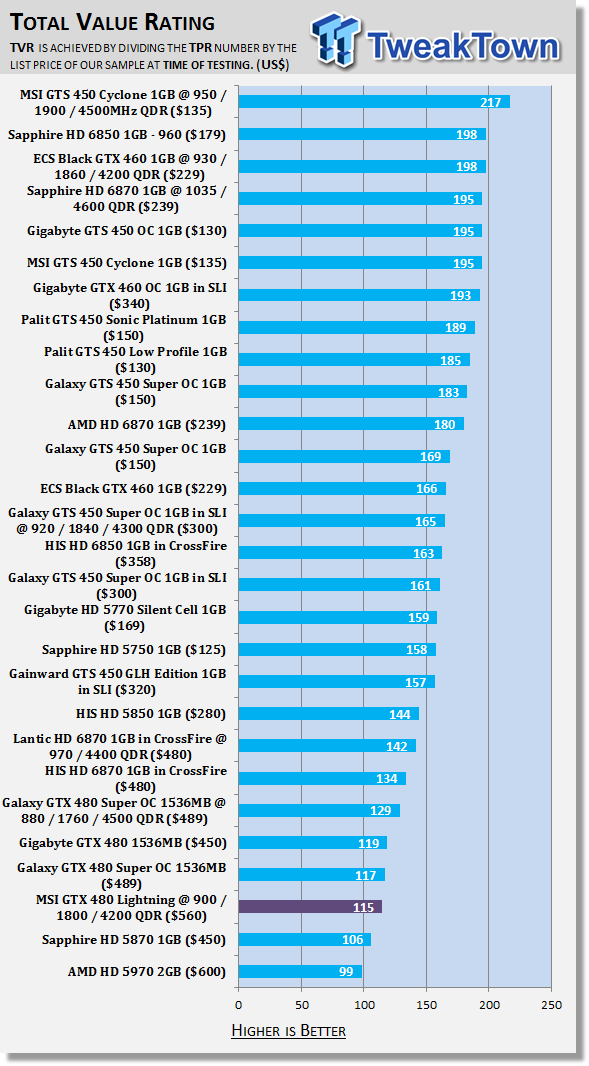
Value has never been a strong point for the GTX 480 and the Lightning version with its huge $560 price tag isn't any different here. There's no denying that this card isn't for everyone.
Final Thoughts
The Lightning series is all about the overclock and that's the first thing we've got to cover. Initially I felt the clock speed of 900MHz being achieved wasn't all that fantastic. Yes, it was good, but not fantastic. As I began to think about it, though, NVIDIA has really skewed our perception on what a good overclock is because of the massive overclocking potential that their mid-range card offers.
Really, what it all comes down to is that we've got a 200MHz overclock from the stock clocks and on such a high end model that's indeed impressive. What you end up with is a really fast single card setup that manages to outperform a number of dual GPU setups. If that isn't awesome, then I don't know what is.
At $560 the GTX 480 Lightning isn't cheap in any sense of the word and for most people it's just going to be a turn off. Other people would've been waiting for the Lightning variation and the chances are you're not going to be disappointed. What's going to be interesting now is what happens with NVIDIA and this GTX 580 that's just around the corner. The big question we wonder is, while the GTX 580 will no doubt be faster than a stock GTX 480, how much more expensive will it be and when will we see stock?
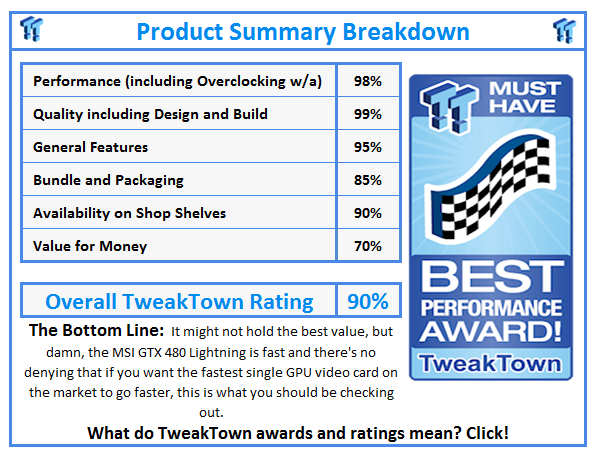
For now, though, the MSI GTX 480 Lightning is really everything we would want; it would've been nice to see a higher overclock, but really, at 900MHz / 4200MHz QDR the performance is very strong and that is seen in our graphs today.
MSI as always has done a good job with the Lightning version of the card and as we mentioned, it's not going to be for everyone including the light hearted and the light walleted (is that a word?!? lol), but if you're looking for some serious power from a single video card, this is one you've got to look at.
Our Latest NVIDIA GeForce GPU Review Coverage
- ASUS ROG Strix GeForce RTX 5070 Ti 16GB OC Edition Review - Premium Design, Premium Performance
- COLORFUL iGame GeForce RTX 5070 Ultra OC Review - When Style and Performance Meet
- PNY GeForce RTX 5080 Slim OC Review - A Compact 4K Powerhouse
- MSI GeForce RTX 5060 Ti 16G VENTUS 2X OC PLUS Review
- MSI GeForce RTX 5070 Ti VENTUS 3X PZ OC Review - Hidden Cable, Visible Performance
 SAPPHIRE Radeon RX 9070 GRE PULSE OC Review - A New 1440p Challenger Has Arrived
 ASRock Radeon RX 9070 GRE Steel Legend Review - The RDNA 4 Mid-Range Reshuffle
 ASUS ROG Strix GeForce RTX 5070 Ti 16GB OC Edition Review - Premium Design, Premium Performance
 SAPPHIRE Radeon RX 9070 XT NITRO+ PhantomLink Review - RDNA 4's Beast Mode
 COLORFUL iGame GeForce RTX 5070 Ultra OC Review - When Style and Performance Meet
 Xbox explains why its massive outage locked players out of games they owned
 Take-Two doubles down on GTA 6 release date, expects net bookings to increase by 22%
 Lenovo's Legion C700 is a thin Android handheld built just for local game streaming
 YouTube Premium subscribers in the US will get Peacock Premium bundled for free starting in 2027
 Redditor turns Steam Deck into a spike-covered, taser-equipped fortress to scare off family
 Apple delays its smart glasses to build privacy features rivals don't have
 Xbox console gamers get free copies of Ubisoft titles on PC
 Xbox outage turns ugly as players use Xbox App glitch to download and play titles for free
 Xbox servers go down just days after PlayStation outage, giving us a glimpse into our digital-only future
 Xbox Series X survives a devastating house fire and still works!
 Biwin M560 2TB SSD Review - Best Overall Retail-Ready DRAMless SSD
 Logitech G512 X 98 Analog Mechanical Gaming Keyboard Review - An Innovative Two-in-One
 Thrustmaster T.Flight HOTAS 5 MSFS Edition Review
 SteelSeries Arctis Nova Pro Omni Wireless Headset Review - One Headset to Rule Them All
 SteelSeries Arctis Nova 7 Wireless Gen 2 Headset Review - New and Improved, But Is It Enough?
 AMD Ryzen 7 7700X3D Review - Days of Future Past
 Samsung 990 2TB SSD Review - Ninth Gen QLC at PCIe Gen4 Speeds
 ASUS ExpertBook Ultra (Panther Lake) 14" Business Laptop Review
 ASUS ROG Raikiri II Xbox Wireless Controller Review - Ready to Take Control
 MOZA FMP18 Panel Bundle Review: authentic F/A-18 Hornet cockpit controls for flight sims
 Printer Not Working in Windows? How to fix detection, print queues and drivers
 The Ultimate Guide to Personalizing Your Windows 11 Taskbar
 How to Turn Your Windows Laptop Into a Second Monitor with Miracast and Wireless Display in Minutes
 6 Mistakes to Avoid When Buying a Windows Laptop
 I capped Windows Update's bandwidth with Delivery Optimization, and my downloads stopped choking
 I use this decade-old free tool that finds files faster than Windows Search does
 I install and update most of my apps with this Windows command now, and I stopped downloading sketchy installers
 Hisense U6SF 65-inch MiniLED TV: High Performance Meets Leisurely Convenience
 I stopped digging through Windows menus after I set up this one folder
 Don't sell your Windows laptop until you do these things