











Introduction

At this point do we really even need an intro for the Crucial RealSSD C300? For months Crucial has taunted us with videos, screen shots and snippets of information. At Storage Visions just days before CES we met with Crucial and they were waving a drive around; our eyes were like a dog fixated on its master swinging around a fresh piece of bacon. You can look, you can touch, you can take pictures but you can't plug it in. Damn it man, stop with the cruelty!
Today Crucial finally let a RealSSD C300 out of their grasp and somehow we managed to have it land on our doorstep. The RealSSD C300 uses Marvell's new SATA 6Gbps solid state drive controller, the first of its kind. Crucial took Marvell's hardware and let Crucial engineers produce the firmware for the drive.
We have already gone over the benefits and potential of SATA 6Gbps in other articles so there is little need to give a full breakdown. The short story is that SATA 6G has twice the headroom as SATA 3G has. There is more to the story, but for the most part 2x the potential covers it for today. It should be noted that in our testing the fastest SATA II SSDs have been able to reach right around 250 to 260 MB/s in our tests.
When it comes to the availability of SATA 6G products, you are in luck. GIGABYTE and ASUS have already released several P55 boards with SATA 6G and GIGABYTE also has an X58 motherboard with the latest technology already. SATA 6G connectivity is currently only available as an add-on chip from Marvell for the motherboard market. LSI and Intel both have high end SATA / SAS RAID controllers that support both SATA 6G and SAS 6G products. Several other companies like Highpoint and Promise have add-in boards that bring SATA 6G connectivity to current motherboards and are reasonably priced.
Enough with the chit chat, let's get to what you want to really see.
Specifications, Availability and Pricing
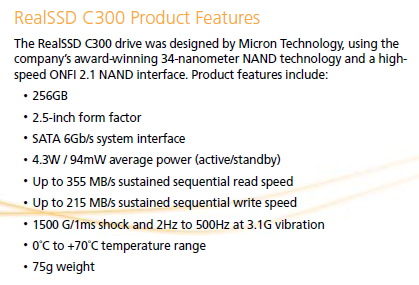
The big story leading up to now has been the SATA 6G portion of the RealSSD C300. After testing the RunCore Pro V (with the SandForce 1500 controller and MLC NAND flash), it became apparent that SATA II solid state drives still have a few tricks up their sleeve. In the past we have tested drives with very high read and write speeds in the synthetic benchmarks, but when it came to real world performance they fell flat on their face. Armed with this knowledge, we took all of Crucial's blog videos and posts with a grain of salt. Today is the day to verify their claims.
There is not a lot of information floating around on the new Marvell controller. At this time we are not all that concerned about the number of channels in the controller or the amount of cache the controller uses. Today is mainly about testing the drive and seeing what it offers us as far as real world performance.
We were able to find some information on pricing at the 11th hour. In the coming weeks Crucial will have the RealSSD C300 128GB for 499.99 and the 256GB drive for 799.99 USD on Crucial.com. As of today that leaves the RealSSD C300 256GB drive costing just 100 USD more than the Crucial M225 256GB. In the conclusion we will talk more about the overall value offered by the C300 since we don't want to give the performance numbers away so soon.
The Packaging

Our sample arrived in press kit fashion, but we hear from Crucial that they will offer many of the items shown here in a bundle that will cost a little more than just a bare drive.

Here we see the box that the drive shipped in.

This side pretty much tells us that it is not the retail package.

Crucial has always packed their products well and will more than likely use a package similar to what the M225 shipped in.
The Crucial RealSSD C300

The Crucial RealSSD C300 has been pictured several times since CES. Here you get to see another shot of the front.

The back of the drive holds all of the product information. The serial number leads us to believe that there are at least 630 other C300s ready to ship out to customers when the drives go on sale any day now. The firmware on our drive states 0001; at CES the drive listed firmware 0005 but it is important to remember that the CES drive was a prototype.

At the side we see that the C300 has all of the mounting locations where they should be.

Standard SATA power and data connectors are also where they should be, so you will have no problem installing the C300 in your notebook or desktop with the appropriate adapter.

The RealSSD C300 uses the Marvell controller and Micron BGA flash.

The first thing we noticed right from the start is that the drive doesn't use double stacked flash even though our sample was the largest offered; 256GB.

Here we get a good look at the Marvell controller.

We found flash on the back of the drive as well. At the top left side we also found the DRAM cache.
Test System Setup and ATTO Baseline
Test System
Motherboard: Gigabyte X58A-UD7 (Supplied by Gigabyte)
Processors: Intel 975 EE (Supplied by AVADirect)
Memory: Corsair Dominator 1600 MHz Triple Channel Kit
Graphics Card: Leadtek Quadro FX1700 (Supplied by Leadtek)
Enclosure: Lian Li V2000
Cooling: Noctua NH-U12P SE2 (Supplied by Noctua)
SAS Controller: LSI MegaRAID SAS 9260-8i (Supplied by LSI)
Operating System: Microsoft Windows 7 Ultimate X64
You can read more about TweakTown's Storage Product Testing Workstation and the procedures followed to test products in this article.
In 2010 we will begin using the GIGABYTE X58A-UD7 for all our storage product tests. The X58A-UD7 offers both SATA 6G and USB 3.0; features not found on our previous years ASUS P6T7 WS SuperComputer. In the coming weeks we will have a full report on the X58A-UD7's full capabilities and even a dedicated article showing the storage performance and features.
In the charts showing other products for comparison, you will find the RunCore Pro V, RunCore's SandForce 1500 with MLC flash. When the tests were ran we were sitting in our hotel room at CES. We didn't realize at the time that the motherboard was operating in IDE mode. Ideally solid state drives will be used in AHCI mode. In the coming days we will have new benchmarks with the RunCore Pro V, Crucial RealSSD C300 and OCZ Vertex II Pro all on the same GIGABYTE X58A-UD7. Also, all other benchmark results in this review were tested on the ASUS P6T7 WS SuperComputer.
ATTO Baseline Performance
Version and / or Patch Used: 2.34
ATTO is used by many disk manufacturers to determine the read and write speeds that will be presented to customers.
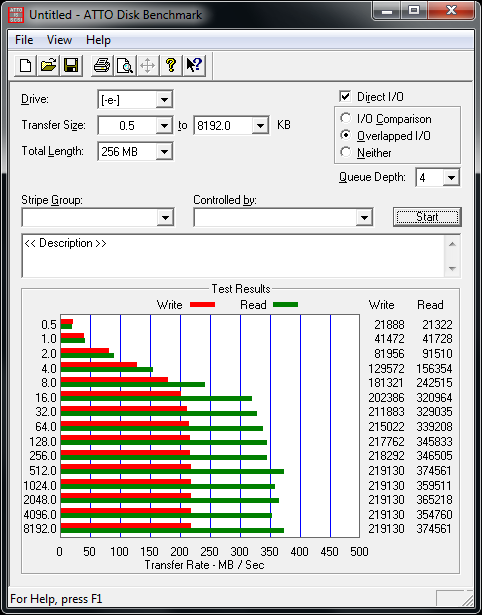
The ATTO test shows us what a drive is capable of doing under the best circumstances. Here we see the RealSSD C300 blowing past the limits of SATA 3Gbps in read speed. The write speeds are still very good, but the read speed numbers really steal the show.
Benchmarks - HD Tune Pro
HD Tune Pro
Version and / or Patch Used: 3.00
Developer Homepage: http://www.efdsoftware.com
Product Homepage: http://www.hdtune.com
HD Tune is a Hard Disk utility which has the following functions:
- Benchmark: measures the performance
- Info: shows detailed information
- Health: checks the health status by using SMART
- Error Scan: scans the surface for errors
- Temperature display
HD Tune Pro gives us accurate read, write and access time results and for the last couple of years has been gaining popularity amongst reviewers. It is now considered a must have application for storage device testing.
Read Tests
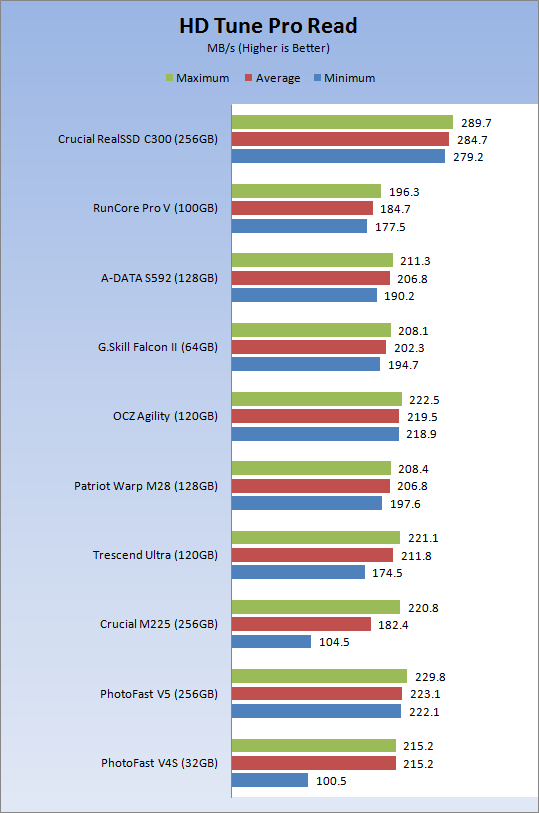
There was no doubt that the Crucial RealSSD C300 would blaze past the limits of SATA II. Here we see the fastest solid state drive on the market blasting past the competition.
Write Tests
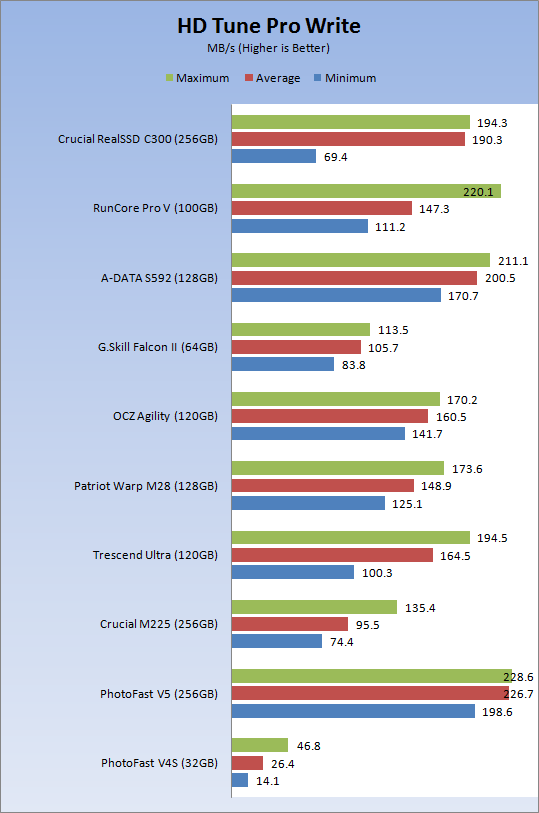
The write speed is another story. Here we see several Indilinx Barefoot drives putting up higher numbers. The minimum write speed of the C300 looks really low in the graph, but there were just a few spots on the drive where it would dip in performance. Later in the review we will show the full graph.
Benchmarks - Everest Random Access Time
Everest Random Access Time
Version and / or Patch Used: 4.60
Developer Homepage: http://www.lavalys.com
Product Homepage: http://www.lavalys.com
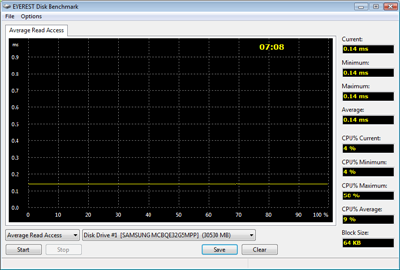
Everest Ultimate and Corporate Edition offer several different benchmarks for testing and optimizing your system or network. The Random Access test is one of very few if not only that will measure hard drives random access times in hundredths of millisECOnds as oppose to tens of millisECOnds.
Read Tests
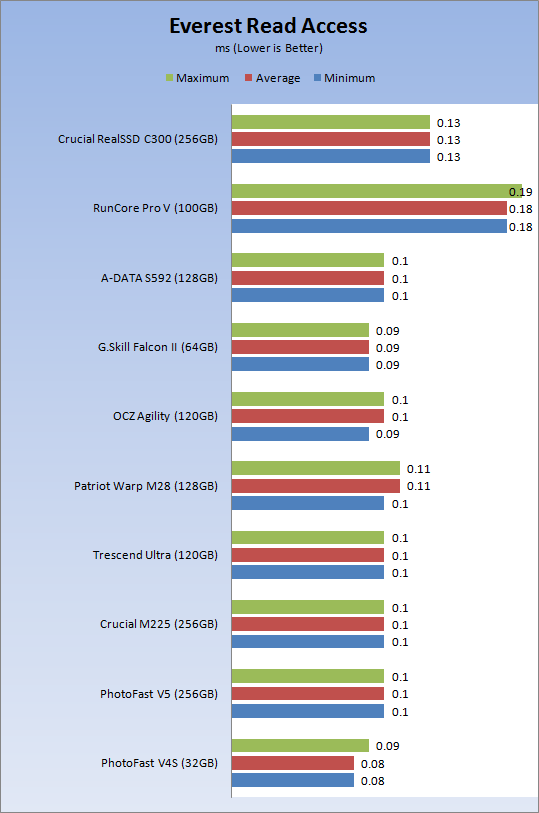
Random Access Time is what makes solid state drives so appealing and gives us that "feeling of fast" when clicking open new windows and doing things other than benchmarks. Here we see the C300 keeping pace with the Barefoot drives and scoring much lower numbers than we received with our SandForce 1500 MLC sample.
Write Tests
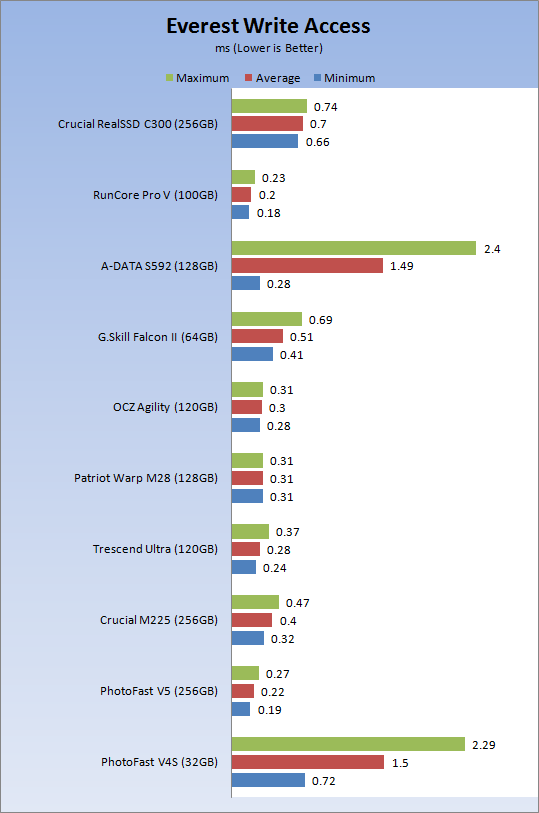
The write access times are higher than the Barefoot drives, but once again lower than the SandForce drive.
Let's see how all of these synthetic benchmarks relate to real world applications.
Benchmarks - PCMark Vantage Hard Disk Tests
PCMark Vantage - Hard Disk Tests
Version and / or Patch Used: 1.0.0
Developer Homepage: http://www.futuremark.com
Product Homepage: http://www.futuremark.com/benchmarks/pcmark-vantage/
Buy It Here

PCMark Vantage is the first objective hardware performance benchmark for PCs running 32 and 64 bit versions of Microsoft Windows Vista. PCMark Vantage is perfectly suited for benchmarking any type of Microsoft Windows Vista PC from multimedia home entertainment systems and laptops to dedicated workstations and high-end gaming rigs. Regardless of whether the benchmarker is an artist or an IT Professional, PCMark Vantage shows the user where their system soars or falls flat, and how to get the most performance possible out of their hardware. PCMark Vantage is easy enough for even the most casual enthusiast to use yet supports in-depth, professional industry grade testing.
FutureMark has developed a good set of hard disk tests for their PCMark Vantage Suite. These tests are based on real world applications that many of us use daily.
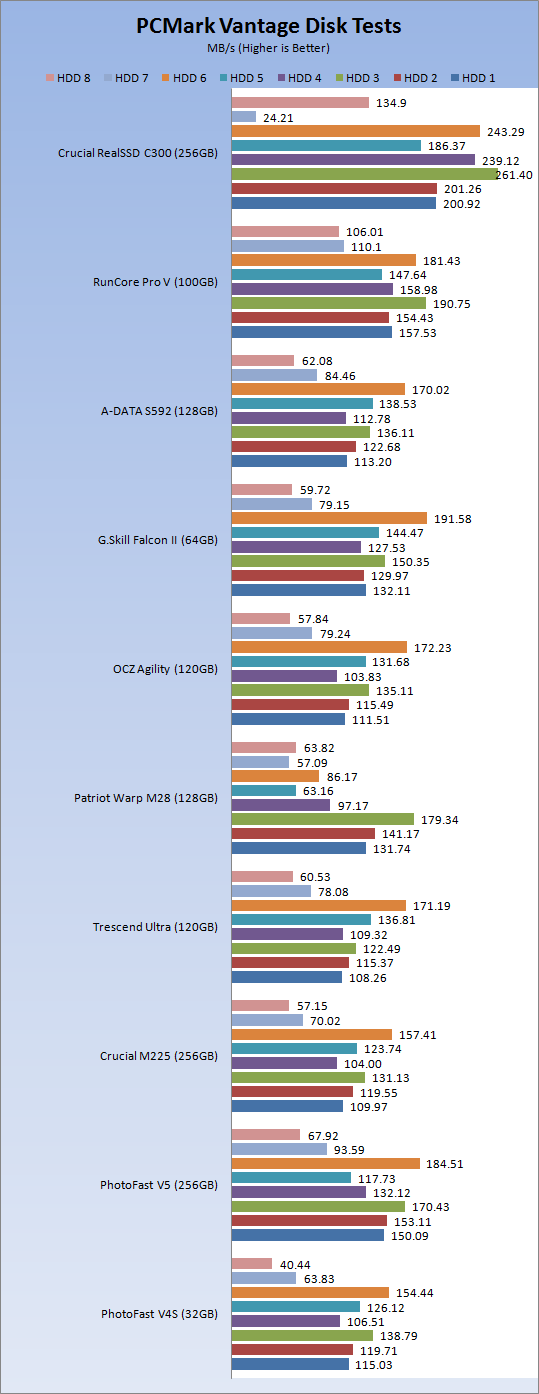
HDD1 - Windows Defender
HDD2 - Gaming
HDD3 - Windows Photo Gallery
HDD4 - Vista Startup
HDD5 - Windows Movie Maker
HDD6 - Windows Media Center
HDD7 - Windows Media Player
HDD8 - Application Loading
The real world Windows tests show the Crucial RealSSD C300 slaughtering the competition. In this test the SandForce drive would have performed better with AHCI so discard its score for now and focus on the Barefoot drives that are already on the market.
There is one test that concerns me and that is Test 7, Windows Media Player. We ran this Vantage five times, the other four after our other tests and came up with the same score, give or take 2-3MB/s. This is an area that will have to focus on in the future as we start to become more familiar with the Marvell controller.
Benchmarks - Passmark
Passmark Advanced Multi-User Tests
Version and / or Patch Used: 6.1
Developer Homepage: http://www.passmark.com
Test Homepage: http://www.passmark.com
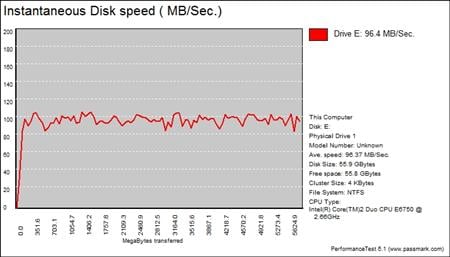
Many users complain that I/O Meter is too complicated of a benchmark to replicate results so my quest to find an alternative was started. Passmark has added several multi-user tests that measure a hard drives ability to operate in a multi-user environment.

The tests use different settings to mimic basic multi-user operations as they would play out on your server. Variances is read / write percentage as well as random / sequential reads are common in certain applications, Web Servers read nearly 100% of the time while Database Servers write a small amount of data.
The Workstation test is the only single user environment and will be similar to how you use your system at home.
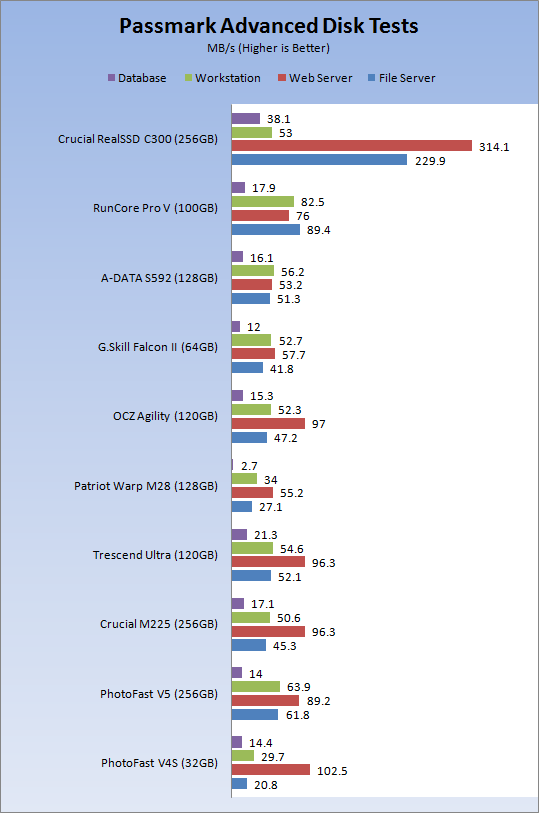
Most consumer class drives are not designed for enterprise level workloads, but over the last two years we have noticed that SSDs are able to outperform the fastest SAS drives on the market in many of these tests.
Judging from the chart above, it appears that the Crucial RealSSD C300 might have a future in the enterprise market some day.
Benchmarks - For Your Viewing Pleasure
Benchmarks - For Your Pleasure
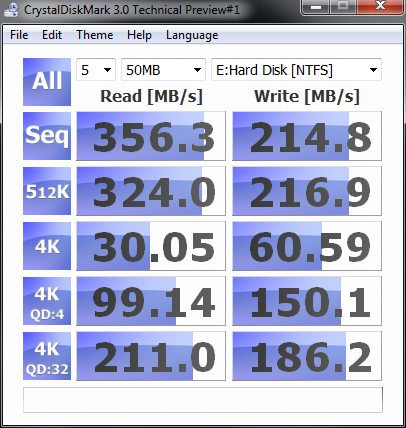
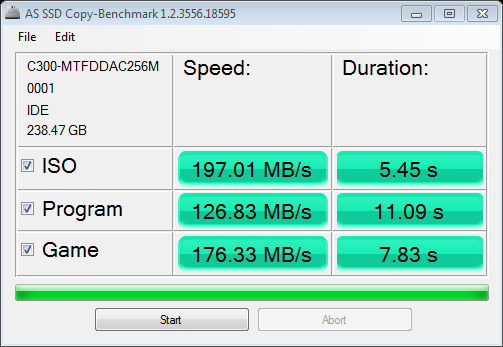
Normally that would conclude our benchmark section of the review. From time to time we do show some AS SSD numbers, but that is usually the extent of out published numbers.
If you have read our Storage Product Testing Article then you know that I hoard benchmarks results. In the past I have received emails and requests to run certain tests on new drives. To keep the usual followers from asking for more, more, more, here you go -For your viewing pleasure.
The following page will have our conclusion and final thoughts on the RealSSD C300.
Crystal Disk Info

Crystal Disk Mark
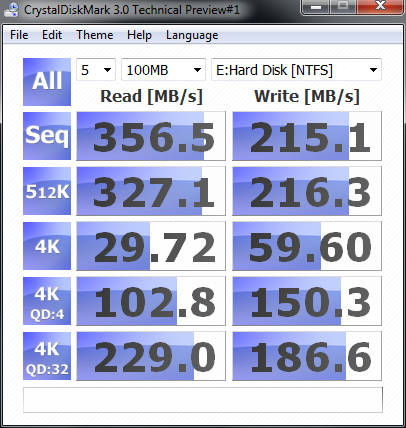
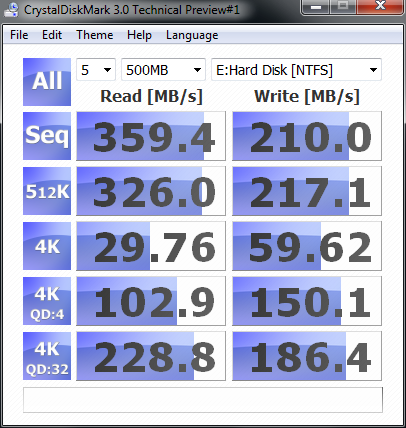
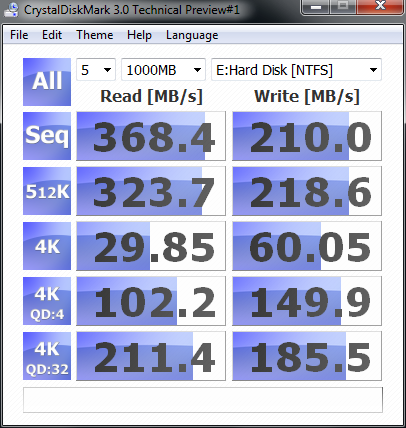
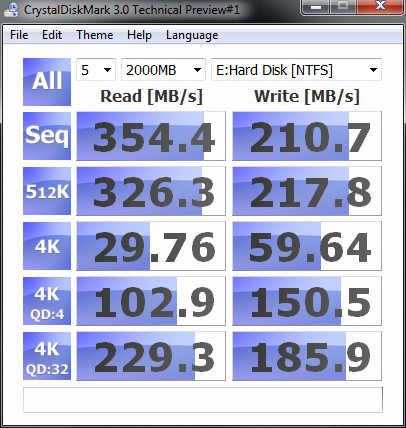
AS SSD

HD Tune


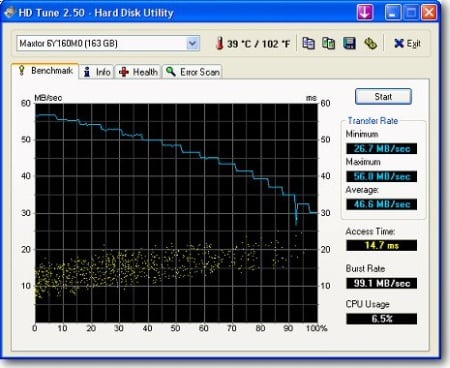
If you recall the first time we discussed this benchmark, we noted that it would pop back up later in the article. Here we see four performance dips. The good news is that they bottom out at around 70MB/s. The JMicron drives that we tested would go all the way to the bottom of the graph registering .1MB/s in the tests. It is safe to say that under normal real world conditions you will not notice a momentary drop in performance from 190 to 70MB/s.


Of all the benchmarks we do not show in the standard review, this is one of the most significant. This is a final run of the HD Tune Write Test. It comes after we beat the hell out of a drive with everything we have at least once.
Here we see that the Crucial RealSSD C300 takes the abuse without slowing down by any significant margin. It is important to also remember that this run is right after the other benchmarks and everything is ran one right after the other. The drive does not get a chance to idle. Most drives that have an internal clean up system work when a drive is idle.
Final Thoughts
Half way through my testing I shot an email over to Crucial asking why they didn't tell me that the C300 was so fast. At this point I feel a little silly going on and on to all of my friends about how fast the SandForce drives are. You would think that as a hardware reviewer in the storage field that someone would have tipped me off," psst...you should really cut down on the SF stuff, here look at this."
Either way, I am still grateful Crucial has given us the opportunity to test the RealSSD C300. Over the coming weeks we will be able to dive a little deeper into the drive and also use it to test all of the SATA 6G products we have sitting around. At that point in time we will figure out what is going on with the one isolated test that shows the C300 taking a dive. There has to be a reason; hopefully it can be remedied in a firmware update.
At this point in time there is no other drive, platter or solid state that is in the same league as the Crucial RealSSD C300. This is the drive enthusiasts have been begging for, mainstream users will hear the buzz about and anyone who requires high speed storage devices will be pre-ordering. The best thing is that we can actually afford the RealSSD C300! As I mentioned earlier, we have one other next gen drive in for testing and now that I have seen the final retail C300, you have to wonder if "The Other Guys" sent out pre-release drives just to get the articles published before the C300 hit our test benches.
Back to the price for a few more words. Crucial is telling us the 128 and 256GB drives will be listed for sale in February. The 128GB will cost 499 and the 256GB drive will be 799 USD. Right now Indilinx Barefoot drives in 128GB run right around the 400 USD mark, so you are looking at a 100 Dollar premium for a premium experience. Back when we reviewed the M225 256GB drive, we speculated that Crucial would lower the price in a few months.
It took a longer than three months for Crucial to drop the price and right now the 256GB drive is only 100 USD less than it was when we published the article. The good news is that other e-tailers lowered the price of the Crucial M225 256GB much sooner than Crucial did, so there is a good chance that we will see other online sellers dishing out C300's in a few months at a reduced price.
We are realists around here and know that 500 Dollars for 128GB is a lot of dough no matter how fast it is. If you can wait a couple of months then you may just find yourself getting a deal. For me, well I would just say to hell with it and get my drive as soon as possible. If for you, like me, time is money and you stand to make more the faster you work, the Crucial RealSSD C300 may just pay for itself over time.
Our Latest SSD Review Coverage
- Biwin M560 2TB SSD Review - Best Overall Retail-Ready DRAMless SSD
- Samsung 990 2TB SSD Review - Ninth Gen QLC at PCIe Gen4 Speeds
- Phison E37T SSD Controller Exclusive Preview - The Fastest DRAMless SSD Platform Yet
- Seagate FireCuda X1070 4TB SSD Review - A New Mainstream Contender
- Micron 3610 2TB SSD Review - DRAMless QLC at 11,000 MB/s
 Biwin M560 2TB SSD Review - Best Overall Retail-Ready DRAMless SSD
 Samsung 990 2TB SSD Review - Ninth Gen QLC at PCIe Gen4 Speeds
 HighPoint Rocket 1604L Gen5 x16 NVMe Software RAID AIC Review: half the price with full 59 GB/s speed
 UGREEN NASync DXP4800 GT Review: powerful 4-bay NAS with AMD Ryzen and dual 10GbE ports
 Phison E37T SSD Controller Exclusive Preview - The Fastest DRAMless SSD Platform Yet
 Phantom Blade Zero on PC will launch with DLSS 4.5 and Ray Tracing on day one
 Razer announces its first Artisan Keycap with the Triple-Headed Snake Edition
 ZOTAC's 20th Anniversary Edition GeForce RTX 5080 features a titanium colorway and mirror-like backplate
 GeForce NOW app for Linux leaves beta, while DLSS Frame Generation cloud latency also improves
 Twitch opts streamers into gen AI training by default, faces harsh backlash
 Sean Murray still plays the 2016 launch version of No Man's Sky
 China's YMTC has climbed to third place in global NAND flash shipments
 $100 GTA 6 version makes up 89% of pre-orders, analysts estimate
 HWiNFO's latest update quietly confirms Intel is working on Razor Lake-AX
 Nintendo puts Switch 2 price increase warnings on store demo kiosks ahead of September 1 hike
 D-Link F518 5G Wi‑Fi 6 AX1800 Mobile Hotspot Review: All-Day Mobile Hotspot
 Bose Lifestyle Ultra Speaker Review - Impressively Detailed Room-Filling Sound
 MSI Z890 Gaming Plus WIFI6E Review - Z890 for under $200
 Mortal Kombat (1995) 4K Ultra HD Blu-ray Review
 CPS PCCOOLER YS1200 ATX 3.1 80 PLUS Gold PSU Review
 ASRock X870E Taichi White Review: a premium AM5 motherboard with 10G LAN and WiFi 7
 Asetek Initium Pedal Modular Upgrades Review
 Thinkware U3000 Pro Review - Smart Dashcam with Wi-Fi quirks
 Montech TG3 Mid-Tower Chassis Review
 ASUS ROG Strix X870E-A Gaming WiFI7 Neo Review - A New Enticing Option
 I ditched the Windows 11 context menu for this open-source tool, and here's why
 Windows 11 may be encrypting your drive already, and I checked where my recovery key went
 GIGABYTE's 40 Days of INFINITY celebrates 40 Years of Innovation with stunning GeForce RTX graphics cards and rewards
 I swapped File Explorer for this free file manager and finally got the layout I wanted
 How to tell if someone has been using your Windows PC without your permission
 6 Task Manager tips for troubleshooting Windows performance problems
 ASUS ROG's 20th Anniversary Line-up of Premium PC Gaming Gear has Arrived - Here's Everything You Need to Know
 Six File Explorer tips every Windows user should know
 I switched my PC to encrypted DNS in Windows 11, and browsing felt more private
 Printer Not Working in Windows? How to fix detection, print queues and drivers