

Introduction

Dual channel memory is back and honestly, it's back with a vengeance. The release of the P55 chipset from Intel has bought with it a huge amount of new memory modules due to its support for cheaper dual channel kits.
With our new P55 testbed setup, it's time to see what's going on in this market and what kind of performance we can expect out of the kits that are currently available. There's so many advantages to dual channel kits of memory; for starters, there's the price. With one less module you're able to save a couple of dollars straight away.
Other benefits include higher MHz offerings. Again, due to there being only two modules, it's easier to get them to work together at higher speeds than it would be to get three. For so many people 4GB is plenty of memory, so paying for that extra 2GB module in a triple channel kit is again considered wasting money.
With that said, we'll see what's going on with the PC3-15000 kit we have here today from OCZ. We'll check out the package and modules before having a closer look at the specifications and then its overclocking ability.
The Packaging and Modules
The Package


Let's simply start with the fact that we're dealing with RAM, so there isn't going to be a whole lot going on. The front of the package gives us a look at the modules while also giving us the ability to see what the specifications of the memory are. The back just gives us a bit of a blurb about OCZ and the features of the modules.
The Modules
Having a look at the modules themselves, you instantly notice that the Platinum series isn't quite as fancy as it used to be. Since the series has been around for so long, OCZ hasn't done a whole lot to change what was previously the top kit from the company. Instead, they have introduced new series like the Blade, Reaper and more.


While we still get the nice Platinum coloured heatsink, it clearly isn't as fancy as some of the previously mentioned series. Both sides have the Z3 logo in the middle while only one has a sticker that gives us a run down on the modules; in this case, you can see it's two 2GB modules rated for PC3-15000 @ 9-9-9 @1.65v.
Overclocking
While PC3-15000 might be a bit of a weird number with PC3-16000 being a bit more common, the particular kit comes in at 1866MHz DDR. The 4GB kit runs in a 9-9-9-27 setup at 1.65v. Ultimately this isn't anything too out of the ordinary. As for achieving the speeds, there wasn't a single issue; we set the BCLK to where it needed to be and lined up the modules at 1866MHz DDR. By the time we ended up in Windows, though, they had jumped slightly to 1875MHz DDR.
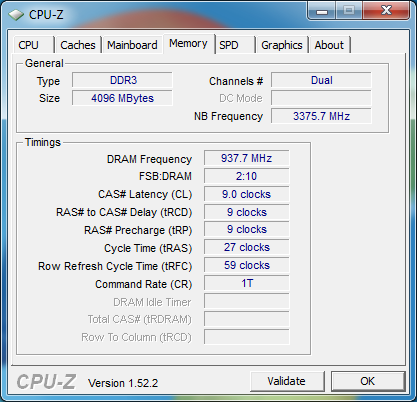
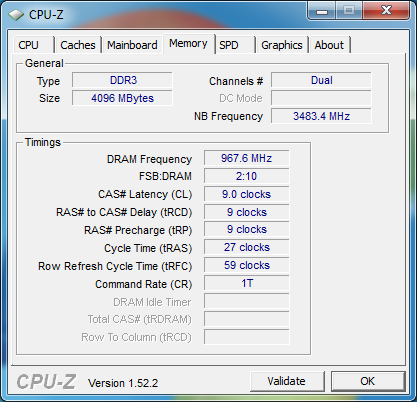
As for going further, we fortunately had a bit of luck. While we thought we would be optimistic and simply aimed for 2000MHz, we found ourselves shot down pretty fast. With that said, though, a bit of timings adjustment and no extra voltage saw the modules achieve a clock of 1935MHz DDR or a 69MHz DDR overclock from the stock speeds. It's not a massive overclock, but a free 5% isn't something to complain about.
Important Editor Note: Our maximum overclocking result is the best result we managed in our limited time of testing the memory. Due to time constraints we weren't able to tweak the motherboard to the absolute maximum and find the highest possible FSB, as this could take days to find properly. We do however spend at least a few hours overclocking every motherboard to try and find the highest possible overclock in that time frame. You may or may not be able to overclock higher if you spend more time tweaking, or as new BIOS updates are released. "Burn-in" time might also come into play if you believe in that.
Test System Setup and wPrime
Test System Setup
Processor(s): Intel Core i7 920 @ 3.8GHz (190MHz x 20)
Cooling: Noctua NH-U12P (Supplied by Noctua)
Motherboard(s): ASROCK P55 Deluxe (Supplied by ASROCK)
Video Card: Gigabyte GTX 285 896MB (Supplied by GIGABYTE)
Hard Disk(s): Western Digital 300GB Velicorapter (Supplied by Western Digital)
Operating System: Windows 7
Drivers: ForceWare 191.07
Being our first dual channel kit of memory we've tested in our new ASRock P55 setup, we'll simply be comparing the Platinum modules from OCZ against themselves. We'll be testing the kit at 1875MHz DDR 9-9-9-27 which is right near its standard 1866MHz DDR clock. We'll also see the numbers we're able to achieve with the same kit of memory overclocked to 1935MHz 9-9-9-27.
When it came to overclocking the modules to achieve the higher clock rates, we had to move our BCLK. What this means is while we're pushing up the MHz of the memory, we're also moving the MHz of our CPU up. While this isn't a bad thing, it can skew the results in some tests that rely heavily on the CPU along with the memory. That being said, though, the CPU speed and BCLK will be displayed in each graph and we'll tend to make mention when the better performance at one speed over the other is helped by the increase in CPU clock.
Let's get started!
wPrime
Version and / or Patch Used: 1.62
Developer Homepage: http://www.wprime.net/
Product Homepage: http://www.wprime.net/
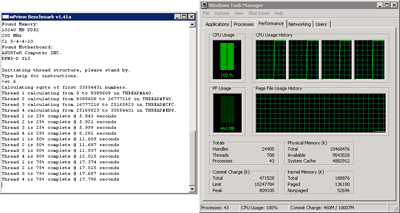
wPrime uses a recursive call of Newton's method for estimating functions, with f(x)=x2-k, where k is the number we're sqrting, until Sgn(f(x)/f'(x)) does not equal that of the previous iteration, starting with an estimation of k/2. It then uses an iterative calling of the estimation method a set amount of times to increase the accuracy of the results. It then confirms that n(k)2=k to ensure the calculation was correct. It repeats this for all numbers from 1 to the requested maximum.
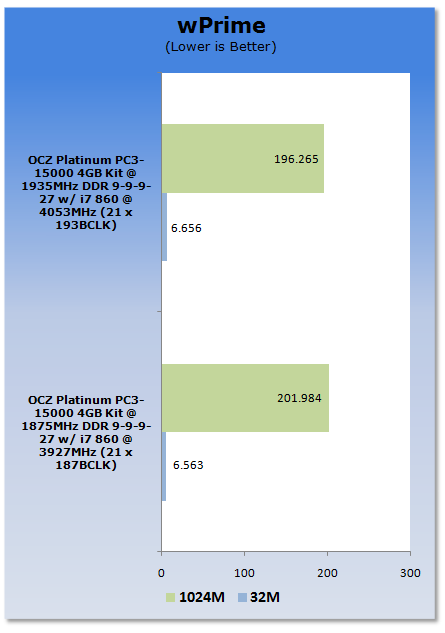
Under wPrime we see both setups perform quite similar to each other. There's very little difference in the 32M test, while the 1024M one does favor the higher clocked RAM and CPU.
Benchmarks - Everest Ultimate Edition
EVEREST
Version and / or Patch Used: Ultimate Edition
Developer Homepage: http://www.lavalys.com/
Product Homepage: http://www.lavalys.com/products/overview.php?pid=3&ps=UE&lang=en
Buy It Here
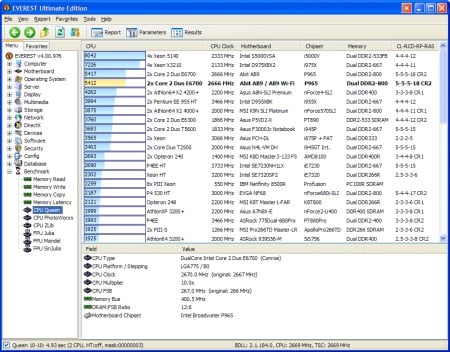
EVEREST Ultimate Edition is an industry leading system diagnostics and benchmarking solution for enthusiasts PC users, based on the award-winning EVEREST Technology. During system optimizations and tweaking it provides essential system and overclock information, advanced hardware monitoring and diagnostics capabilities to check the effects of the applied settings. CPU, FPU and memory benchmarks are available to measure the actual system performance and compare it to previous states or other systems. Furthermore, complete software, operating system and security information makes EVEREST Ultimate Edition a comprehensive system diagnostics tool that offers a total of 100 pages of information about your PC.
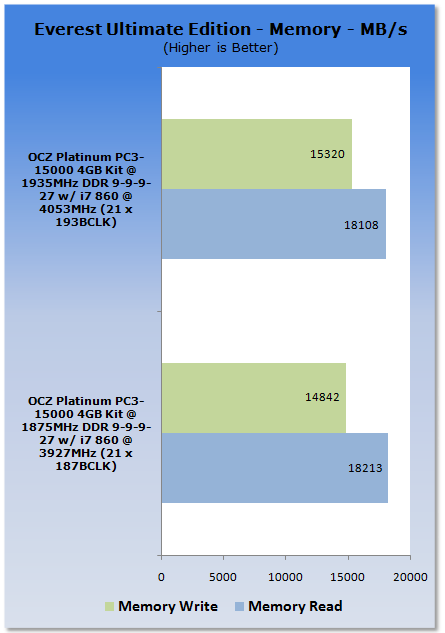
With the extra MHz on offer from the overclocked Platinum kit, we're able to see that write performance is up. As for read, there isn't much difference between the two kits.
Benchmarks - SiSoft Sandra
SiSoft Sandra
Version and / or Patch Used: Professional Home
Developer Homepage: http://www.sisoftware.co.uk
Product Homepage: http://sisoftware.jaggedonline.com/index.php?location=home&a=TTA&lang=en
Buy It Here
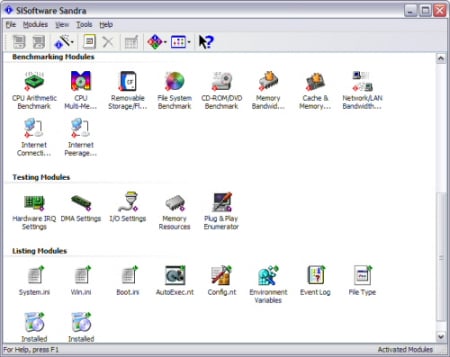
SiSoft Sandra (System ANalyser, Diagnostic and Reporting Assistant) is a synthetic Windows benchmark that features different tests used to evaluate different PC subsystems.
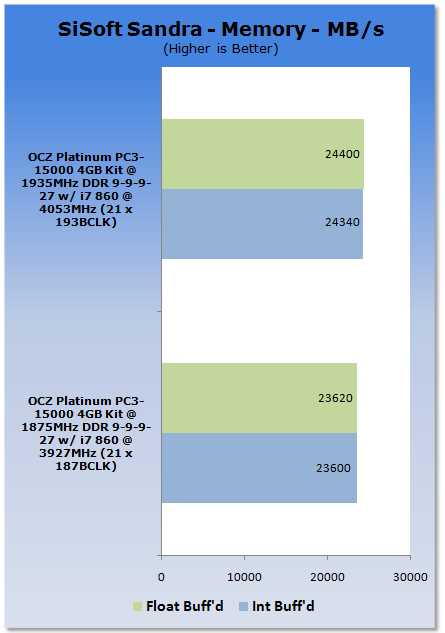
SiSoft Sandra again sees an increase in performance when comparing the overclocked speed to the standard one. The gains aren't huge, but are consistent which is what you would expect when it comes to overclocking.
Benchmarks - Sciencemark
ScienceMark 2.0
ScienceMark 2.0 is a mathematical program designed to stress the memory subsystems of both desktop/workstation and server environments to determine the read/write latency as well as the overall memory bandwidth available between the CPU and the memory controller.
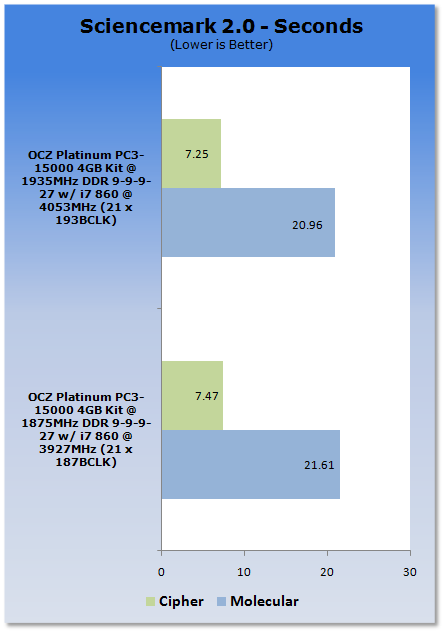
Under our ScienceMark 2.0 tests we can see a small performance increase with the overclocked modules. The results continue to be consistent with what we're seeing in our other tests.
Benchmarks - Far Cry 2
Far Cry 2
Version and / or Patch Used: 1.03
Timedemo or Level Used: Ranch Long
Developer Homepage: http://www.ubi.com
Product Homepage: http://www.farcry2.com
Buy It Here

The Dunia Engine was built specifically for Far Cry 2 by the award-winning Ubisoft Montreal development team. It delivers the most realistic destructible environments, amazing special effects such as dynamic fire propagation and storm effects, real-time night-and-day cycle, dynamic music system, non-scripted enemy A.I. and so much more.
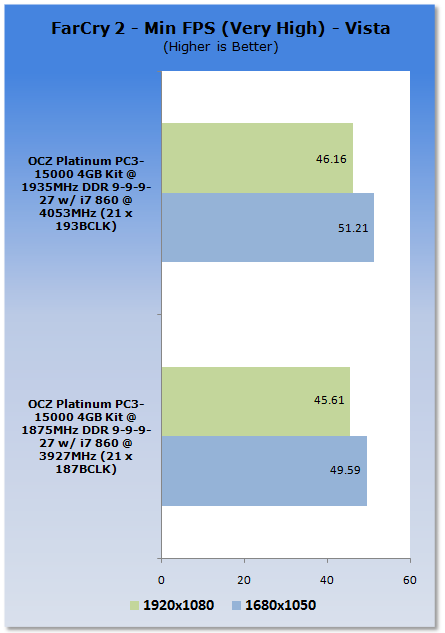
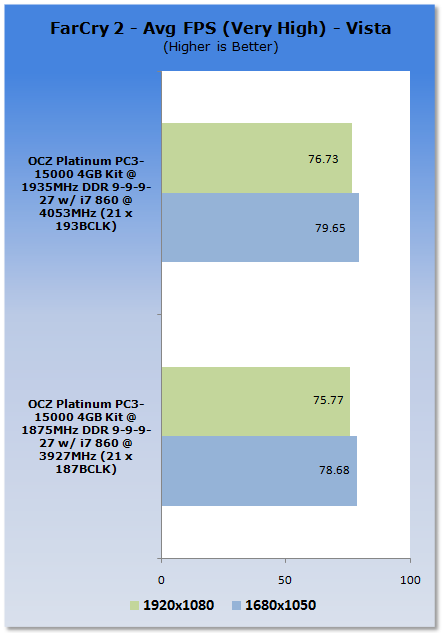
Under Far Cry 2 we can see there's a bump in performance with our overclocked setup. Under a test like this, though, the increased performance is mainly due to the higher CPU clock more so than anything else.
Final Thoughts
There's nothing all that fancy about the OCZ kit we've got here today. The Platinum series is nothing we haven't seen before and the 1866MHz DDR standard clock with a 9-9-9 setup isn't exactly the most aggressive we've seen. So what exactly does this mean for you? Well, it's simple really. You've got a no frills kit that does what it's supposed to.
You're not going to be breaking any records with this RAM, nor are you going to achieve hundreds of MHz over its stock clock. What you're going to get is a 4GB kit at a reasonable price that does everything it's supposed to do, while at the same time offering a few more MHz in the event you want to go higher.
If you want something that's a bit faster than the 1600MHz stuff, but don't want to pay the premium that 2000MHz kits carry, this is a fantastic 4GB kit for your P55 setup. Newegg are currently selling it for just $125.99 USD. It's a nice offering from OCZ for people who want to get a kit that is going to offer some decent MHz off the bat while not breaking the bank.
The fact that it doesn't have big fins protruding out the top or extremely tight timings means you're able to get a kit of memory that offers a reasonably high standard MHz at a reasonable price. The PC3-15000 ultimately represents a good medium where you don't pay that 2000MHz+ premium, but you have some more speed to play with unlike 1333MHz or 1600MHz DDR kits.

 United
States: Find other tech and computer products like this
over at
United
States: Find other tech and computer products like this
over at  United
Kingdom: Find other tech and computer products like this
over at
United
Kingdom: Find other tech and computer products like this
over at  Australia:
Find other tech and computer products like this over at
Australia:
Find other tech and computer products like this over at  Canada:
Find other tech and computer products like this over at
Canada:
Find other tech and computer products like this over at  Deutschland:
Finde andere Technik- und Computerprodukte wie dieses auf
Deutschland:
Finde andere Technik- und Computerprodukte wie dieses auf  Microsoft fixes odd situation where those upgrading to Windows 11 would get an old version
 Buying a maxed-out M4 iPad Pro? You'll need to spend almost Apple Vision Pro money to do it
 Buying a new M4 iPad Pro or M2 iPad Air? You'll need new accessories and maybe a new SIM
 Apple announces a big new Final Cut Pro update for iPad and Mac
 Apple slashed the price of its entry-level 10th-gen iPad and killed off the 9th-gen model
 Lexar SL500 1TB Portable SSD Review - The best of native USB
 Corsair Platform:6 Elevate Modular Desk Review
 True Lies (1997) 4K Blu-ray Review
 Fractal Design North XL Full-Tower Chassis Review
 Western Digital WD Gold 24TB HDD Review - High-Capacity Masterpiece
 AOC U27G3X 27-inch Gaming Monitor Review - 4K 160Hz for $500
 MSI Vector GP68HX Gaming Laptop Review
 Dell UltraSharp 40 5K Curved Thunderbolt Hub Monitor (U4025QW) Review
 XPG Core Reactor II VE 850w 80 PLUS Gold ATX 3.0 PSU Review
 SteelSeries Arctis Nova 4X Wireless Gaming Headset Review
 Building the Ultimate Home Entertainment Server with an ASUSTOR NAS and Viper Gaming NVMe SSDs
 Everything you need to know about the latest ASUS NUC Mini PCs - NUC 14 Pro and ROG NUC
 How to Overclock Your GPU and Boost Your PC Gaming with ASUS GPU Tweak III
 ASUS's AMD Radeon RX 7000 Series GPU lineup has something for every gamer
 ASUS OLED Premium Care defends the ROG Swift OLED PG32UCDM gaming monitor from burn-in