Introduction
ZOTAC has been one of the biggest supporters of the ITX form factor since VIA first brought it into the market and from there we have managed to see desktop processors on boards designed for micro systems aimed at being installed as HTPC's or digital entertainment in cars.
So far we have seen a few of their boards cross the TweakTown labs. Most have been Intel with an AMD one thrown in here and there. On the Intel front we have seen the GeForce 7050 and the 7150 variations and while impressive, they lack the current technology such as PCIe 2.0 connectivity and a current generation video architecture.
Today we have been given an Intel Core 2 series supporting ITX model on steroids in the form of the 9300-ITX WiFi. Costing a mere $145 USD from Newegg, it's priced right, but will it perform? - Let's have a look.
The Box and What's Inside
Package and Contents

ZOTAC hasn't changed much in its box design for its ITX boards. In fact, it's an identical box to the other boards we have seen, but a new sticker has been placed on the bottom with the board model and CPU support.

Being an ITX based board we weren't expecting any bells and whistles on the back, which was good since this box is universal. With only some new stickers on it, there is just basic info on the ITX standard and some market hype about the ZOTAC company.

ZOTAC has included a light manual supply. There is a small manual that describes the board itself as well as the features of it and the included software. The DVD included comes with software for Vista and XP along with NVIDIA control utilities.

When it comes down to the accessories and cables, the setup is identical to all the other boards. There is a single SATA data cable, power splitter and IDE cable.

Since this is part of the WiFi series, the board comes with a USB based Wireless Ethernet card which pokes out the back of the I/O shield and uses a stick antenna. To give the board its HDMI interface, a DVI to HDMI interface converter is included.
The Motherboard
The Board

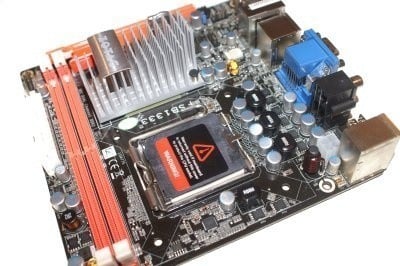
Now to the board itself. Being an ITX layout there isn't much room for interpretation. The board measures 17x17cm using a 6 layer black PCB. On the right hand side of the board there is the 24-pin ATX power connector sitting behind the two DDR2 memory slots on the board. The 4-pin ATX power connector for the CPU is located behind the rear I/O ports, keeping the cables away from the CPU area as much as possible.

The CPU socket for such as small board is relatively clean, allowing large copper blocks to be installed. The CPU gets its power supplied though a 4 phase voltage regulation system using solid state components.

Now it's down to the rear I/O ports. ZOTAC has done an even better job on this board than any previous ITX offering. First off, this board follows from what ASUS has started. There is only one PS/2 port which is a Keyboard/Mouse port and there are two USB ports directly below it. There are two video ports; a CRT and DVI port that supports both DVI and HDMI output through he supplied converter. There is also displayport located between the USB/PS/2 towers and the RCA/Toslink audio ports. That's right, there is digital audio-out on this board as well. Lastly, there are six stereo audio ports included on this board as well as an eSATA port; finally eSATA makes its appearance on ITX!

Now to the board's expansion and being ITX there is only one slot available, but on this board it's a PCIe x16 slot that supports a graphics card for Hybrid SLI or any other PCIe based expansion card on the market if you are happy with sticking to the board's own graphics support.
BIOS and Overclocking
BIOS

Moving along to the BIOS now and we get a bit of a gander at the setup ZOTAC has provided. The board uses the Award Modular 6 blue screen with the overclocking options spread across a few menus.

Under the Advanced Chipset Features menu you have control over the IGP including the ability to overclock the IGP slot from its standard 450MHz core and 1200MHz shader engine all the way up to 800MHz and 1500MHz respectively.

The Frequency/Voltage menu hides two extra setups. First off, under the main menu you have the memory, Northbridge and CPU voltages.

Under the FSB and Memory Configuration sub-menu you have the usual NVIDIA overclocking setup, allowing memory and CPU FSB configurations.
Overclocking
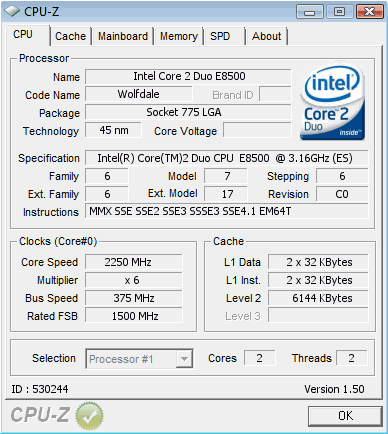
Now, this is something we certainly didn't expect. While other ZOTAC boards have had FSB tweaks, none have really allowed any overclocking. This ZOTAC board allowed us to set our 333MHz FSB CPU to a max of 375MHz FSB, giving us 3.56GHz using a 9.5x multiplier. Given the limiting ITX format, this is a super impressive result.
Important Editor Note: Our maximum overclocking result is the best result we managed in our limited time of testing the motherboard. Due to time constraints we weren't able to tweak the motherboard to the absolute maximum and find the highest possible FSB, as this could take days to find properly. We do however spend at least a few hours overclocking every motherboard to try and find the highest possible overclock in that time frame. You may or may not be able to overclock higher if you spend more time tweaking, or as new BIOS updates are released. "Burn-in" time might also come into play if you believe in that.
Test System Setup and Memory Performance
Test System
Processor: Intel Core 2 Duo E8500 (9.5x 333MHz)
Memory: 2x 2GB DDR2-1200 Gskill (Supplied by gskill)
Hard Disk: Intel X25-M 80GB SSD (Supplied by Intel)
Graphics Card: Integrated Graphics Processor (IGP)
Cooling: Stock Intel cooling
Operating System: Microsoft Windows Vista X64 SP1
Drivers: ForceWare 180.24
Onto our test phase we go and today we have the new 9300-ITX WiFi board up against our 610i and 630i based boards from ZOTAC; this just to see if this new board is able to outperform the previous generation boards.
EVEREST Ultimate Edition
Version and / or Patch Used: 2006
Developer Homepage: http://www.lavalys.com
Product Homepage: http://www.lavalys.com
Buy It Here
EVEREST Ultimate Edition is an industry leading system diagnostics and benchmarking solution for enthusiasts PC users, based on the award-winning EVEREST Technology. During system optimizations and tweaking it provides essential system and overclock information, advanced hardware monitoring and diagnostics capabilities to check the effects of the applied settings. CPU, FPU and memory benchmarks are available to measure the actual system performance and compare it to previous states or other systems.
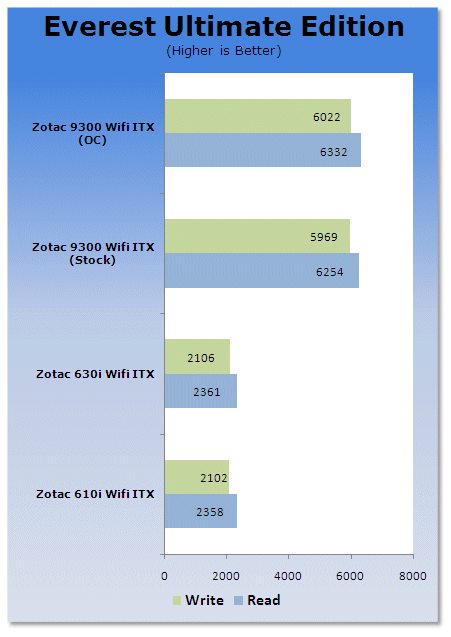
First off, EVEREST shows us that the new 9300's dual channel memory controller is a much more impressive arrangement and is able to deliver more power than the single channel controllers in the 610i and 630i series.
Benchmarks - Sisoft Sandra
SiSoft Sandra
Version and / or Patch Used: 2009
Developer Homepage: http://www.sisoftware.co.uk
Product Homepage: http://sisoftware.jaggedonline.com/index.php?location=home&a=TTA&lang=en
Buy It Here
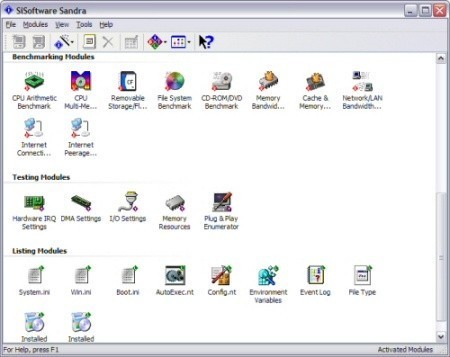
SiSoft Sandra (System ANalyser, Diagnostic and Reporting Assistant) is a synthetic Windows benchmark that features different tests used to evaluate different PC subsystems.
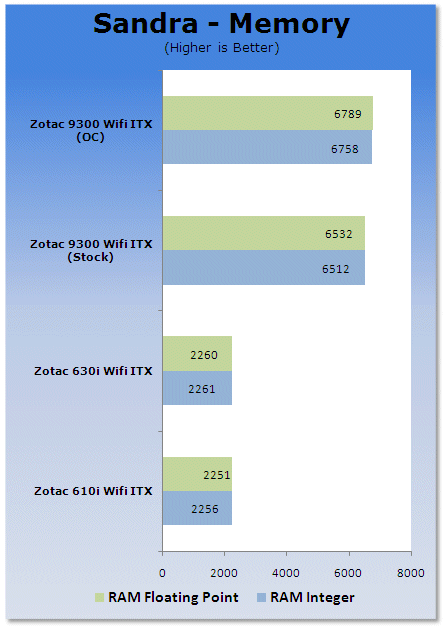
Sandra also shows a similar trend, so we can tell that the 9300 based board is able to double the amount of memory bandwidth to the processor and the IGP.
Benchmarks - PCMark Vantage
PCMark Vantage
Version and / or Patch Used: Unpatched
Developer Homepage: http://www.futuremark.com
Product Homepage: http://www.futuremark.com/benchmarks/pcmark-vantage//
Buy It Here

PCMark Vantage is the first objective hardware performance benchmark for PCs running 32 and 64 bit versions of Microsoft Windows Vista. PCMark Vantage is perfectly suited for benchmarking any type of Microsoft Windows Vista PC from multimedia home entertainment systems and laptops to dedicated workstations and high-end gaming rigs.
Regardless of whether the benchmarker is an artist or an IT Professional, PCMark Vantage shows the user where their system soars or falls flat, and how to get the most performance possible out of their hardware. PCMark Vantage is easy enough for even the most casual enthusiast to use yet supports in-depth, professional industry grade testing.
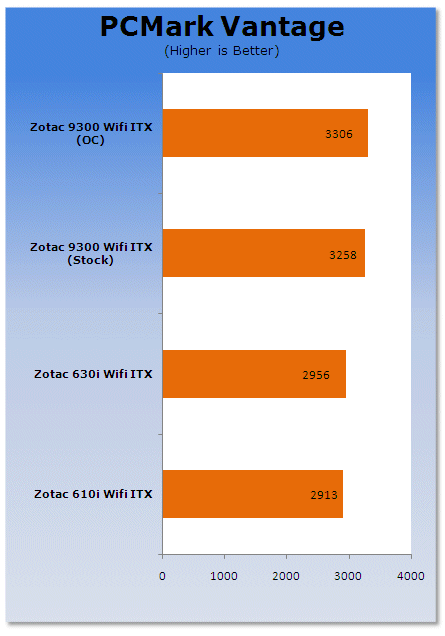
Under PCMark Vantage we get to see that the 9300 based board is able to outperform the other two boards quite remarkably, thanks to its extra memory bandwidth and its higher clocked and superior IGP.
Benchmarks - Media Playback
MPEG2 Playback
For MPEG-2 playback tests, we ran The Matrix DVD, a personal favourite of mine on each system with hardware acceleration enabled to check for smoothness of playback as well as CPU usage during the test. The result was with 30 minutes of playback and the CPU utilization is the average.
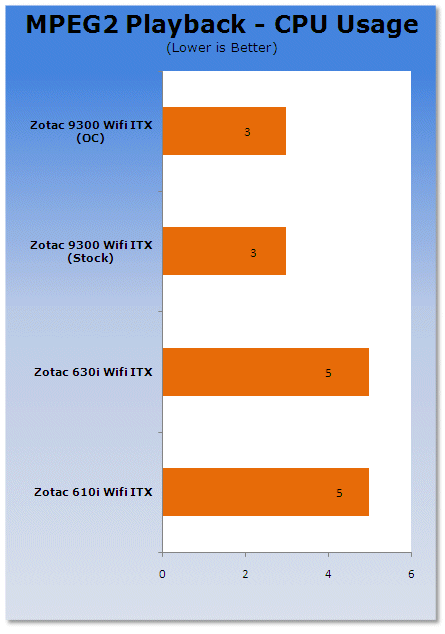
Media playback under MPEG2 across the board is very similar as all three boards have MPEG2 decoding built into the IGPs.
MPEG4 Playback
Playback for MPEG-4 was again done with the Matrix, only encoded down to an MPEG-4 DivX 6.8 codec. 30 minutes was the time run. Smoothness of playback, audio sync and CPU usage are the keys here once again.
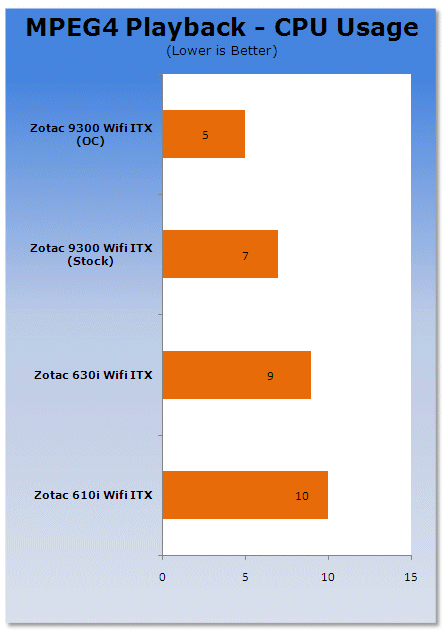
Here we again see all three setups breezing through this test thanks to them each having MPEG4 decoding on the IGP's.
HD 720p Playback
This is the big one for the platforms. We downloaded a random 720p video to test out using Media Player 11. Again, quality of video playback, audio sync and CPU usage are the big things to focus on here.
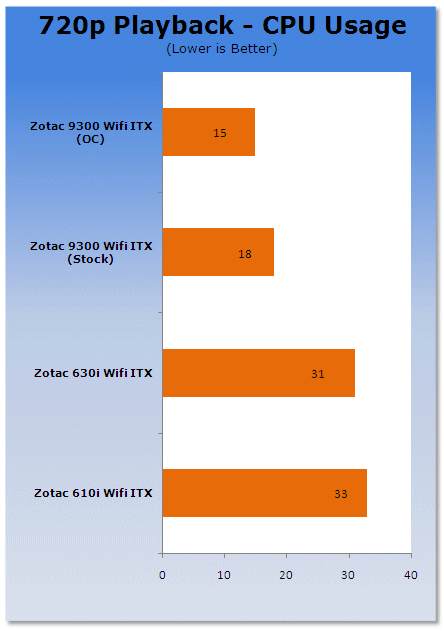
This is where the 9300 manages to get a clear win thanks to higher memory bandwidth and the CUDA technology to decode the 720p on the GPU rather than the CPU.
Benchmarks - Crysis
Crysis
Version and / or Patch Used: 1.1
Timedemo or Level Used: Custom Timedemo
Developer Homepage: http://www.crytek.com/
Product Homepage: http://www.ea.com/crysis/
Buy It Here

From the makers of Far Cry, Crysis offers FPS fans the best-looking, most highly-evolving gameplay, requiring the player to use adaptive tactics and total customization of weapons and armor to survive in dynamic, hostile environments including Zero-G.
Real time editing, bump mapping, dynamic lights, network system, integrated physics system, shaders, shadows and a dynamic music system are just some of the state of-the-art features the CryENGINE™ 2 offers. The CryENGINE™ 2 comes complete with all of its internal tools and also includes the CryENGINE™ 2 Sandbox world editing system.
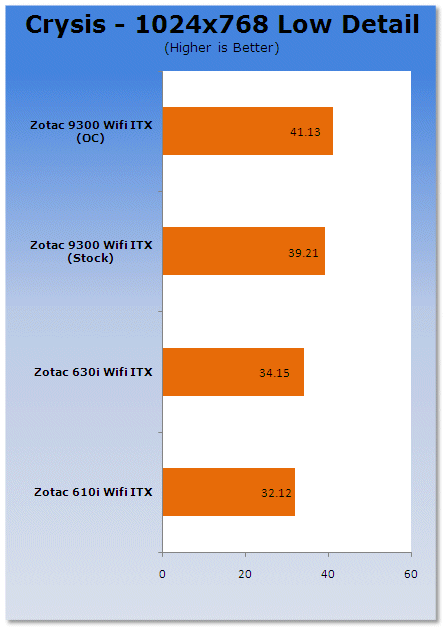
Lastly, we get into some gaming. While it's still not all that playable on the 9300 based board, its performance is much better compared to the 6xx series NVIDIA chipsets.
Power Usage
Power Consumption
We are now able to find out what kind of power is being used by our test system and the associated graphics cards installed. Keep in mind; it tests the complete system (minus LCD monitor, which is plugged directly into an AC wall socket).
There are a few important notes to remember though; while our maximum power is taken in 3DMark06 at the same exact point, we have seen in particular tests the power being drawn as much as 10% more. We test at the exact same stage every time; therefore tests should be very consistent and accurate.
The other thing to remember is that our test system is bare minimum - only a 7,200RPM SATA-II single hard drive is used without CD-ROM or many cooling fans.
So while the system might draw 400 watts in our test system, placing it into your own PC with a number of other items, the draw is going to be higher.
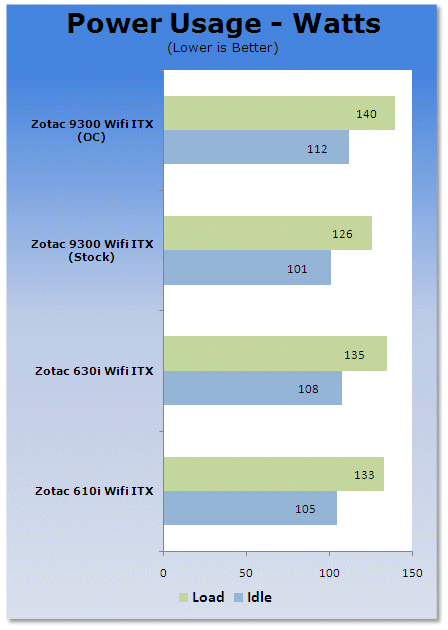
Under our power usage test we see that the new ZOTAC board is slightly more power efficient than the older boards; this thanks to its solid state components.
Final Thoughts
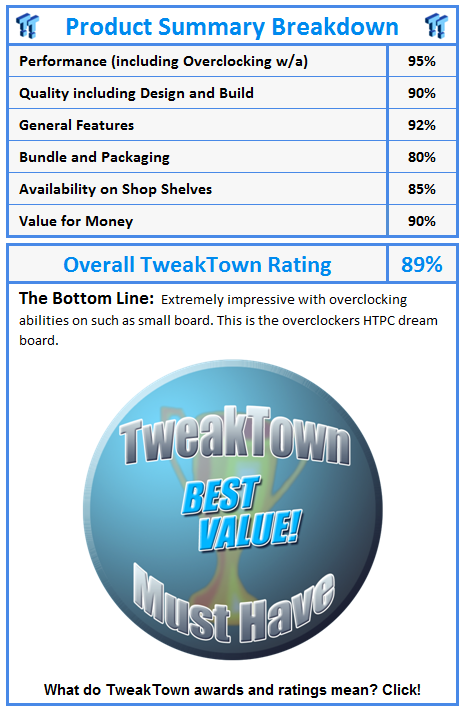
Well, all we can say for the latest installment from ZOTAC is that it's extremely impressive. This board has all the makings for an extremely impressive HTPC, or even better, for the digital entertainment PC in cars. ZOTAC has really taken it on its own back to develop the ITX format to the final degree.
The ZOTAC GeForce 9300-ITX WiFi motherboard using NVIDIA's latest IGP based Intel chipset makes perfect sense, as this chipset not only has one of the best IGP's for the Intel platform, but its performance is extremely impressive and its overclocking, while nothing stellar, is good to have for a free performance boost. And with ZOTAC supporting this feature, this board is definitely one to own.
Coming into the market at $145 USD from Newegg, it's one to definitely consider for your HTPC and digital entertainment needs.