









Introduction

Having just had a look at the GTX 285 from GIGABYTE which strictly follows the reference design, it's nice to see a company at launch offer a card that doesn't carry the stock clocks. While there is nothing wrong with reference clocks and the speeds the GTX 285 puts out in its stock form, there's no denying that we want more power if we can get it.
Inno3D tend to send us some special cards, be it a good overclock or a nice new heatsink that helps keep the card nice and cool. While it doesn't come as any surprise that this Inno3D card carries with it the reference heatsink, it's good to know it carries their overclock trait.
Before we look at the clocks the card offers, let's have a look at the package, what comes with it and a closer look at the physical card. From there we will check out the clock speeds on offer here and see just what kind of performance increase the card achieves.
The Package
The front of the package we received from Inno3D was actually the wrong one. For this reason we've had to use a photo from them so you can see what it really looks like. We can see that the Inno3D logo is present along the side of the box with the NVIDIA logo, while also being seen in the top right corner.

Across the bottom we have more NVIDIA logos and to the right we have the number 285 along with just a few of the main features. Above that we have mention of the card being a GeForce GTX and finally we have some stickers that let us know that Company of Heroes: Opposing Forces and Warmonger are included.

Turning the box over gives us a little blurb; moving down gives us a run down on some of the features and we also have a bit of information about SLI and what's needed to get it up and running. We also see all the other information that we've become accustomed to seeing on graphics card boxes.

Moving inside the package, we have a little install guide that has our driver CD attached and also present is a full version copy of Warmonger, a game I actually don't know anything about. While not seen here, the card will also include a full version copy of Company of Heroes: Opposing Forces which was mentioned on the front of the box.

As far as cables go, we have everything we need; dual molex to 6-pin PCI-E, S/PDIF loopback cable, S-Video to RCA, Component out Dongle, DVI to VGA connector and a DVI to HDMI connector.
The Card
While the card uses the reference cooler, I have to say the choice of sticker that Inno3D has gone for looks absolutely fantastic. With the card sitting in my testbed, I really have trouble taking my eyes off it as the whole gold and black theme looks simply awesome. It's unfortunate that once it's in its PCI-E slot, you're probably not going to be able to see it.

We can see to the right of the cooler there's a fan present that helps push cool air across the GPU and out the back of the case. We can also see here that Inno3D has put its logo on there.


Making our way around the card, we can see the same reference design which doesn't come as a surprise. Towards the back of the card we have two 6-pin PCI-E power connectors, while closer to the front gives us two SLI connectors which gives us the ability to run three cards.

As far as the I/O side of things go, we have two Dual-Link DVI connectors and a single TV-Out port. Across the top of the card we have some vents that let the hot air escape which helps keep the card and your whole system cool.
Specifications
We have mentioned already that the card is overclocked, but since there was no mention of clock speeds on the box, we weren't 100% sure what we were dealing with until we fired up GPU-Z.

While Inno3D have left the shader clock at the default 1476MHz, the core has been increased 50MHz to 700MHz while the 1GB of GDDR3 memory has had a slight bump from 2483MHz DDR to 2560MHz DDR.
The overclock on a whole isn't too bad and we will have to find out just what kind of increase in performance this helps us yield when it comes to our benchmarks.
Test System Setup and 3DMark Vantage
Test System Setup
Processor(s): Intel i7 920 @ 3.8GHz (190MHz x 20)
Cooling: Noctua NH-U12P (Supplied by Noctua)
Motherboard(s): GIGABYTE EX58-UD5 (Supplied by GIGABYTE)
Memory: 3 X 2GB OCZ Technology PC-12800 DDR-3 8-8-8-24 (OCZ3G1600LV6GK)
Hard Disk(s): Western Digital 300GB Velicorapter (Supplied by Western Digital)
Operating System: Windows XP Professional SP2, Windows Vista SP1 64-Bit
Drivers: Catalyst 8.12, Forceware 180.47 (GTX 280), Forceware 181.20 (GTX 285)
While we will see how the GTX 285 OC from Inno3D performs against other cards like the GTX 280, HD 4870 X2 and HD 4870, we will also see what kind of performance increase the extra MHz on offer gives us when compared to the stock GTX 285 we just reviewed from GIGABYTE.
3DMark Vantage
Version and / or Patch Used: 1.0.1
Developer Homepage: http://www.futuremark.com
Product Homepage: http://www.futuremark.com/products/3dmarkvantage/
Buy It Here

3DMark Vantage is the new industry standard PC gaming performance benchmark from Futuremark, newly designed for Windows Vista and DirectX10. It includes two new graphics tests, two new CPU tests, several new feature tests, and support for the latest hardware.
3DMark Vantage is based on a completely new rendering engine, developed specifically to take full advantage of DirectX10, the new graphics API from Microsoft.

Straight away we can see a nice little boost in performance in both the P and X tests with the overclocked GTX 285 from Inno3D. Hopefully this performance increase is also seen in real world games.
Benchmarks - PT Boats: Knights of the Sea
PT Boats: Knights of the Sea
Version and / or Patch Used: Benchmark Demo
Developer Homepage: http://en.akella.com/
Product Homepage: http://www.pt-boats.net/

PT Boats: Knights of the Sea is a naval action simulator that places gamers in charge of a mosquito fleet of the Allied Forces, Russia or Germany during the height of World War II.
Using the latest Direct X 10 technology PT Boards - Knights of the Sea manages to apply a lot of stress to the components of today which in turn gives us quite an intensive benchmark.


Here we can see the Inno3D performance is a bit all over the place in the minimum department when compared to the stock model. The average department on the other hand sees the Inno3D take out the win at all resolutions.
Benchmarks - CINEBENCH R10
CINEBENCH R10
Version and / or Patch Used: Release 10
Developer Homepage: http://www.maxon.net/
Product Homepage: http://www.maxon.net

CINEBENCH is a real-world test suite that assesses your computer's performace capabilities. MAXON CINEBENCH is based on MAXON's award-winning animation software, CINEMA 4D, which is used extensively by studios and production houses worldwide for 3D content creation. MAXON software has been used in blockbuster movies such as Spider-Man, Star Wars, The Chronicles of Narnia and many more.
MAXON CINEBENCH runs several tests on your computer to measure the performance of the main processor and the graphics card under real world circumstances. The benchmark application makes use of up to 16 CPUs or CPU cores and is available for Windows (32-bit and 64-Bit) and Macintosh (PPC and Intel-based).

As expected, CINEBENCH makes no use of the overclock and shows both GTX 285 cards performing almost identically.
Benchmarks - World in Conflict
World in Conflict
Version and / or Patch Used: 1.0.0.5
Timedemo or Level Used: Built-in Test
Developer Homepage: http://www.massive.se
Product Homepage: http://www.worldinconflict.com

World in Conflict is a real-time strategy video game by Massive Entertainment and to be published by Sierra Entertainment for Windows (DX9 and DX10) and the Xbox 360.
The game is set in 1989 where economic troubles cripple the Soviet Union and threaten to dissolve it. However, the title pursues a "what if" scenario where, in this case, the Soviet Union does not collapse and instead pursues a course of war to remain in power. It is an intensive new game is sure to put plenty of stress on even the latest graphics cards and we use the built-in benchmarking for our testing.


We again see in the minimum department there is a bit of jumping around, but in the average department we see the Inno3D again pull out a win at all resolutions.
Benchmarks - Crysis Warhead
Crysis Warhead
Version and / or Patch Used: unpatched
Timedemo or Level Used: Airfield
Developer Homepage: http://www.crytek.com
Product Homepage: http://crysiswarhead.ea.com/
Buy It Here

Crysis Warhead updates and refines the gameplay of the original game through a sidestory plot involving Psycho, one of previous protagonist Nomad's allies. The game is a parallel story that follows Sergeant Michael "Psycho" Sykes, a character from the original Crysis, as he faces his own trials and challenges on the other side of the island during the time period of the first game.
It also showcases a new, enhanced and optimized version of CryEngine 2 using full DX10 extensions and is the first game developed by Crytek's Budapest studio.


Again we see the in the average department the GTX 285 OC from Inno3D is able to chalk up a win. In the minimum department performance is a bit all over the place with one test showing it to be 1FPS quicker, another the same and the final an FPS slower.
Benchmarks - Far Cry 2
Far Cry 2
Version and / or Patch Used: 1.01
Timedemo or Level Used: Ranch Long
Developer Homepage: http://www.ubi.com/
Product Homepage: http://www.farcry2.com/
Buy It Here

The Dunia Engine was built specifically for Far Cry 2 by the award-winning Ubisoft Montreal development team. It delivers the most realistic destructible environments, amazing special effects such as dynamic fire propagation and storm effects, real-time night-and-day cycle, dynamic music system, non-scripted enemy A.I. and so much more.


Far Cry 2 manages to get a nice little bump from the overclock with that minimum climbing towards 40 FPS when running at 2560 x 1600.
Benchmarks - S.T.A.L.K.E.R. - Clear Sky
S.T.A.L.K.E.R. - Clear Sky
Version and / or Patch Used: 1.5.07
Timedemo or Level Used: Custom Timedemo
Developer Homepage: http://www.gsc-game.com/
Product Homepage: http://cs.stalker-game.com/en/
Buy It Here
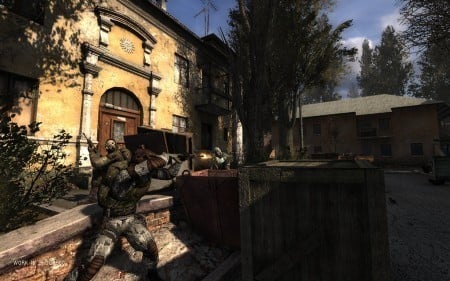
S.T.A.L.K.E.R.: Clear Sky, is the stand-alone prequel for S.T.A.L.K.E.R.: Shadow of Chernobyl, a first-person shooter computer game by Ukrainian developer GSC Game World.[3] The game consists of a roughly 50/50 mix of new areas and old, remodeled areas from the previous game. The X-ray graphics engine has been updated to version 1.5 and includes DirectX 10 support (later patch 1.5.06 included DirectX 10.1). Additionally, the AI received an overhaul to accommodate the new faction wars feature.


While on a whole Clear Sky performance is disappointing on the NVIDIA cards, we do again see a boost in performance with the overclocked offering from Inno3D.
Benchmarks - Left 4 Dead
Left 4 Dead
Version and / or Patch Used: Latest Steam Update
Timedemo or Level Used: Custom Timedemo
Developer Homepage: http://www.valvesoftware.com/
Product Homepage: http://www.l4d.com/
Buy It Here

Left 4 Dead uses the latest version of Valve's Source engine, with improvements such as multi-core processor support and physics-based animation to more realistically portray hair and clothing, and to improve physics interaction with enemies when shot or shoved in different body parts. Animation was also improved to allow characters to lean realistically when moving in curved paths.
Rendering and artificial intelligence were scaled up to allow for greater number of enemies who can navigate the world in better ways, such as climbing, jumping or breaking obstacles. Lighting has been enhanced with new self-shadowing normal mapping and advanced shadow rendering that is important to convey information about the environment and player actions.

Left 4 Dead manages to get a slight boost at all resolutions, showing that the overclock is doing something.
Benchmarks - High Quality AA and AF
High Quality AA and AF
Our high quality tests let us separate the men from the boys and the ladies from the girls. If the cards weren't struggling before they will start to now.
Far Cry 2


We again see a nice boost in performance with the overclock managing to break that 30 FPS minimum that we love to see.
World In Conflict


WIC performance is also up an FPS in both the minimum and average department.
Left 4 Dead

Finally we see Left 4 Dead performance is also slightly up.
Benchmarks - World in Conflict - XP
World in Conflict
Version and / or Patch Used: 1.0.0.5
Timedemo or Level Used: Built-in Test
Developer Homepage: http://www.massive.se
Product Homepage: http://www.worldinconflict.com
World in Conflict is a real-time strategy video game by Massive Entertainment and to be published by Sierra Entertainment for Windows (DX9 and DX10) and the Xbox 360.
The game is set in 1989 where economic troubles cripple the Soviet Union and threaten to dissolve it. However, the title pursues a "what if" scenario where, in this case, the Soviet Union does not collapse and instead pursues a course of war to remain in power. It is an intensive new game is sure to put plenty of stress on even the latest graphics cards and we use the built-in benchmarking for our testing.


Under XP in the minimum department we see a slight boost in the minimum department at the lower resolutions. The average department manages to get an increase at all resolutions.
Benchmarks - Far Cry 2 - XP
Far Cry 2
Version and / or Patch Used: 1.01
Timedemo or Level Used: Ranch Long
Developer Homepage: http://www.ubi.com/
Product Homepage: http://www.farcry2.com/
Buy It Here
The Dunia Engine was built specifically for Far Cry 2 by the award-winning Ubisoft Montreal development team. It delivers the most realistic destructible environments, amazing special effects such as dynamic fire propagation and storm effects, real-time night-and-day cycle, dynamic music system, non-scripted enemy A.I. and so much more.


We again see that Far Cry 2 manages to see a slight boost in performance in both the minimum and average department when running under XP.
Benchmarks - S.T.A.L.K.E.R. - Clear Sky - XP
S.T.A.L.K.E.R. - Clear Sky
Version and / or Patch Used: 1.5.07
Timedemo or Level Used: Custom Timedemo
Developer Homepage: http://www.gsc-game.com/
Product Homepage: http://cs.stalker-game.com/en/
Buy It Here
S.T.A.L.K.E.R.: Clear Sky, is the stand-alone prequel for S.T.A.L.K.E.R.: Shadow of Chernobyl, a first-person shooter computer game by Ukrainian developer GSC Game World.[3] The game consists of a roughly 50/50 mix of new areas and old, remodeled areas from the previous game. The X-ray graphics engine has been updated to version 1.5 and includes DirectX 10 support (later patch 1.5.06 included DirectX 10.1). Additionally, the AI received an overhaul to accommodate the new faction wars feature.


Clear Sky sees some good jumps with the overclock offering, but again it's nothing too exciting.
Temperature and Sound Tests
Temperature Tests
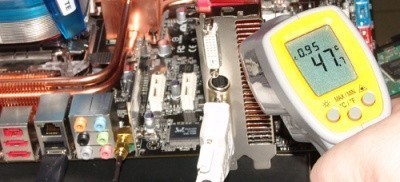
With the TES 1326 Infrared Thermometer literally in hand we found ourselves getting real-world temperatures from the products we test at load (3D clock speeds).
There are two places we pull temperature from - the back of the card directly behind the core and if the card is dual slot and has an exhaust point we also pull a temperate from there, as seen in the picture.

Very little in temperature difference is seen between the stock GIGABYTE card and the overclocked Inno3D offering.
Sound Tests
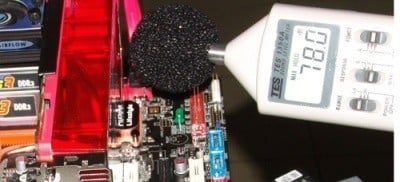
Pulling out the TES 1350A Sound Level Meter we find ourselves quickly yelling into the top of it to see how loud we can be.
After five minutes of that we get a bit more serious and place the device two CM away from the fan on the card to find the maximum noise level of the card when idle (2D mode) and in load (3D mode).

It doesn't come as any real surprise that the noise levels on both GTX 285 offerings are almost identical.
Power Consumption Tests
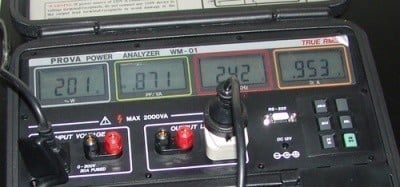
Using our new PROVA Power Analyzer WM-01 or "Power Thingy" as it has become quickly known as to our readers, we are now able to find out what kind of power is being used by our test system and the associated graphics cards installed. Keep in mind; it tests the complete system (minus LCD monitor, which is plugged directly into AC wall socket).
There are a few important notes to remember though; while our maximum power is taken in 3DMark06 at the same exact point, we have seen in particular tests the power being drawn as much as 10% more. We test at the exact same stage every time; therefore tests should be very consistent and accurate.
The other thing to remember is that our test system is bare minimum - only a 7,200RPM SATA-II single hard drive is used without CD ROM or many cooling fans.
So while the system might draw 400 watts in our test system, placing it into your own PC with a number of other items, the draw is going to be higher.

As far as power goes, the GTX 285 from Inno3D did manage to use a little bit more, but nothing too crazy with it still coming in a good chunk below the GTX 280.
Final Thoughts
I was excited that Inno3D was sending a GTX 285, this mainly due to the fact that it was going to give me the second piece to my three piece SLI setup I wanted. The thing is, though, once the card had arrived and I had ripped open the boring brown box, I was surprised to see the word overclock present on the front of the box.
Overclocked cards at launch don't tend to happen too much, but there's no doubt companies have had the GTX 285 for a while now and have been able to do a bit of tweaking to find out just what kind of clocks can be achieved. Inno3D was able to do this; create a BIOS, do up the packaging and pimp the card out with a blingy sticker all in time for launch.
If the GTX 285 is a 55nm overclocked GTX 280, then what is a GTX 285 overclocked? Well, ultimately it's a really high overclocked GTX 280 and you know what? That's great!
If this wasn't enough already, Inno3D manage to put together a kick ass package that includes two full version games, something that more and more companies are choosing to ignore these days.
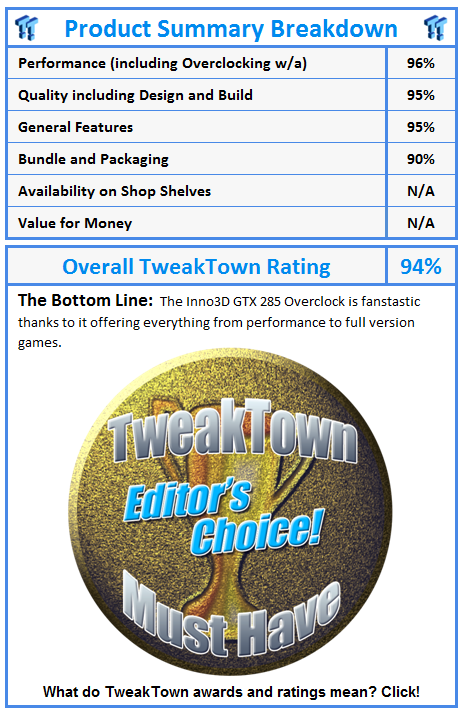
The Inno3D GTX 285 is a great card and is a bit faster than the stock offering. If that wasn't enough for you to buy it, though, the two full version games in the package should be an extra incentive.
Our Latest NVIDIA GeForce GPU Review Coverage
- ASUS ROG Strix GeForce RTX 5070 Ti 16GB OC Edition Review - Premium Design, Premium Performance
- COLORFUL iGame GeForce RTX 5070 Ultra OC Review - When Style and Performance Meet
- PNY GeForce RTX 5080 Slim OC Review - A Compact 4K Powerhouse
- MSI GeForce RTX 5060 Ti 16G VENTUS 2X OC PLUS Review
- MSI GeForce RTX 5070 Ti VENTUS 3X PZ OC Review - Hidden Cable, Visible Performance

 SAPPHIRE Radeon RX 9070 GRE PULSE OC Review - A New 1440p Challenger Has Arrived
 ASRock Radeon RX 9070 GRE Steel Legend Review - The RDNA 4 Mid-Range Reshuffle
 ASUS ROG Strix GeForce RTX 5070 Ti 16GB OC Edition Review - Premium Design, Premium Performance
 SAPPHIRE Radeon RX 9070 XT NITRO+ PhantomLink Review - RDNA 4's Beast Mode
 COLORFUL iGame GeForce RTX 5070 Ultra OC Review - When Style and Performance Meet
 NZXT unveils aesthetically pleasing cases, fans and coolers at Computex 2026
 NVIDIA GeForce Hotfix 610.52 driver released, fixes issues related to G-SYNC, Smooth Motion, and stability
 3DMark adds native Windows on Arm support for ray-tracing benchmarks
 MSI showcases its next-gen GPU cooling tech and it could be for the GeForce RTX 60 Series
 'Radically different' business models coming to Xbox, CEO Asha Sharma says
 GEEKOM's new GeekBook M16 brings a Core Ultra 9 and a 99.9Wh battery to the business laptop market for $899
 AMD warns DDR5 prices won't recover until 2028 as AI demand continues pulling supply away from consumers
 SEGA under fire for using gen AI in new Crazy Taxi game
 Halo Studios quietly establishes innovative new business model for legacy game remakes
 Zelda Ocarina of Time remake confirmed for 2026 launch on Switch 2
 Navman MiVue Smart True 4K Surround Dashcam Review - Seeing In All Directions At Once
 IQUNIX Magi96 Pro Aluminum Low Profile Mechanical Keyboard Review - Premium Build, Satisfying Sound
 Asetek Forte S-Series Racing Simulator Bundle Review
 Razer Pro Type Ergo Wireless Split Ergonomic Keyboard Review - Built for Comfort and Support
 ASUS ROG Strix Morph 96 Wireless Gaming Keyboard Review - Great Performance, More Affordable
 NZXT H6 RGB+ Compact Dual-Chamber Chassis Review
 ASRock Z890 Taichi Aqua Motherboard Review - Flagship features without the flagship price
 GIGABYTE Z890I AORUS Ultra Motherboard Review - Mini-ITX with surprisingly good thermals
 The PowerToys utilities I keep enabled on every Windows 11 PC, and the ones I turned off within a week
 TweakTown's Best of Computex 2026 Awards - The Best Hardware, Gaming Gear, and AI
 Phison E37T SSD Controller Exclusive Preview - The Fastest DRAMless SSD Platform Yet
 USB Ports Not Working in Windows 11? Try These Fixes
 ASUS WiFi Routers and Networking Solutions Deliver Long-term Security and Reliability with No Additional Cost
 Second Monitor Not Detected in Windows 11? Try These Fixes
 Turn Your Old Smartphone Into a Dedicated Webcam for Your Windows PC
 The Send To menu is the right-click feature on Windows 11 that nobody bothers to customize
 Windows 11 will not let you pin a folder to the taskbar, but a 30-second workaround does
 ASUS ProArt Displays Unlock Creativity with Professional Monitors for Everyone