









Introduction
Top of the range graphics cards have taken the entire spotlight lately with talks of Quad SLI, GeForce 7950GX2 and issues which users are experiencing with overclocked GeForce 7900GT cards - the talk is very much focused on the high-end nVidia camp at the moment.
This isn't to say that ATI aren't turning out anything to get all excited about, it just means that nobody seems to be paying any real attention to what they are doing right now. For companies like HIS and GeCube though, who only concentrate on ATI graphics cards, it isn't a fun time for them.
So today after putting away all our nVidia graphics cards and cracking open some new ATI cards, that have made their way into our labs recently, we will let both HIS and GeCube be the first to take a run on our new benchmark suite. It has had a few programs kicked out and welcomed some new ones with open arms.
We have the arrival of Lost Coast with HDR enabled and disabled and the departure of Far Cry, since it doesn't serve us well as a VGA benchmark anymore because it is too dependent on the CPU. We would (of course) love to include Oblivion because it's the hottest game of the moment, however due to benchmarking challenges (no way to run consistent benchmark tests), we haven't added it yet but hopefully someone will come up with a benchmarking program for it soon. We'll be adding in a couple new games soon but we are yet to decide what - if you have any suggestions, you are welcome to leave a comment below which we WILL read.
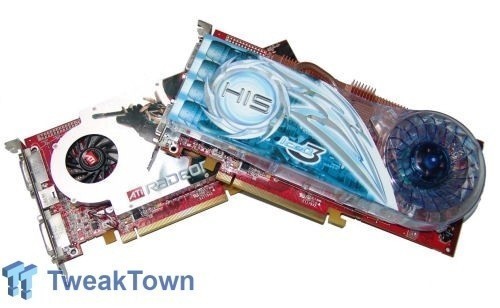
We have with us two Radeon graphics cards today, the HIS X1800GTO and the GeCube X1900GT. Let's check them out individually and then move onto the important performance figures.
GeCube X1900GT - The Packaging
First out to bat is the GeCube X1900GT. It feels like such a long time since we looked at an ATI graphics card let alone a GeCube product. We can clearly see that the box design hasn't changed much.

The front of the box shows us the main features like SM 3.0, Dual DVI support Dual-Link, HDTV out, AVIVO and high definition video playback. We can also see that 256MB of DDR3 is included on the card and Delta Force Xtreme is also included.

Turning the box over we get some more detail of the cards features. We also see a description of how to use the ports on the card including dual display and TV out. We also have a short little list of features that are explained in a multitude of languages.

Opening up the box and having a look at the cable supplied we have a fair amount. DVI to VGA connector for people who don't have a DVI monitor, Molex to 6-pin PCI Express power cable, HDTV component out cables, S-Video and RCA TV out cable along with a longer S-Video and RCA cable so you can start making use of those TV Out abilities instantly.

Paper work wise we have a simple manual for the X1900 series. We saw the front and chucked it back in the box and no doubt this is what most of our readers would do as well.

Moving to the end of the package we have the CDs, our normal ATI driver CD is included along with Delta Force Xtreme as we saw on the front of the box. We also have two CDs from CyberLink which include PowerDVD 5 and PowerDirector PRO 2.5 ME.
Not a hugely exciting packaging but enough to get us up and running without any troubles. With all the little tidbits out the way, let's have a look at what the card offers.
GeCube X1900GT - The Card
The X1900GT is a card we haven't looked at yet and GeCube are the first to come to the party with it here in our labs.

The front of the card uses what is pretty much a big chunk of aluminum with a small little fan on it. We have the heatsink to the right of the card to cool some of those little components that we never pay any attention to but manage to get warm.
The GeCube X1900GT comes clocked with a default core clock speed of 575MHz and 600MHz (or 1200MHz DDR).

Moving to the side of the card we can see a closer look at the red heatsink and we can also see that the cooler has copper fins inside it to help keep the core as cool as possible. Like all higher end cards from both nVidia and ATI, we can see the PCI Express 6-pin power connector in the top corner.

From one end to other we can see our 2 DVI plugs which are both Dual Link capable. What this means is that people with 30" LCD monitors can not only run one monitor on this card but two. Dual Link DVI is something that has only really picked up in the past 6 months thanks to the competitive pricing that has begun on the 30" LCD market. We also have our little S-Video like connector which lets us do all our TV Out functions be it via RCA, S-Video or Component.

Moving back to the front of the card we can see just how small the fan is. While we worried for a little due to the small fan (on what is considered quite a high-end card), during our testing we didn't run into any troubles at all in our heated lab (29c Heater on 24/7 thanks to cold Melbourne weather).

Turning the card over we have the bracket that holds the large heatsink in place and our normal array of stickers and screws. All the memory is located on the front of the card which is cooled by the heatsink already.
HIS X1800GTO - The Packaging
While GeCube haven't done much with their box, HIS has. Normally we have the clear window on the front of the box showing the card and listing the features.

The new box looks great and gives us our normal information - 256MB DDR3, Dual Link DVI, VIVO along with the Turbo speeds, Crossfire Ready logo and of course the massive IceQ 3 logo which means we have something other then the reference cooler for once.

Moving to the back of the card we have our old faithful window that shows us the card. The new box design is great as it now points to the main features of the card and tells us exactly what they offer. Like low noise, increased air flow, dual slot and more. We also see a number of awards that HIS have won.

The cable collection on the inside is exactly the same as we found on the GeCube card - PCI Express 6-pin power connector, HDTV component out cable, VIVO cable with S-Video and RCA along with an S-Video and RCA cable. It's your standard run of the mill cables.

We also have included two DVI connectors if you want to run multiple monitors but don't use a DVI monitor. Also is the filter for the other slot, while it is meant to help keep the dust out but with the gaps being so large, you will probably find yourself not installing it for maximum airflow out of the case.

On the paperwork side of things we have the User Guide/Manual and a nice little HIS Power Up sticker so you can display your HIS graphics card loudly and proudly.

HIS, as always, have a very solid software bundle included in the package. The HIS Excalibur CD has a number of different programs and a copy of Dungeon Siege, the driver CD comes in next which is then followed by a copy of PowerDVD and finally a copy of Flat Out which might not be the most intensive game but it is an absolute bucket load of fun.
HIS always put a good package together on their IceQ models and this one does not disappoint. Let's have a closer look at the card and its funky new cooler.
HIS X1800GTO - The Card
HIS X1800GTO - The Card
We had a quick peak at the HIS graphics card from the rear of the box but its time to get all that packaging out the way and have a real good look at just what we have on our hands today.

If you don't pay too much attention, the cooler looks like the standard Arctic Cooling cooler which we have seen on a number of HIS cards. It's not until you pay a bit more attention that you can see some changes to the cooler dubbed IceQ 3. These changes are the result of a lot of work by HIS over in Hong Kong over the past year.
The model sent into us for review by HIS is their "Turbo" edition which means you can overclock the card if you need some extra FPS. While not as impressive as other cards we have received from HIS in the past, you are able to boost the clock speed by 20MHz to 520MHz although the memory clock speeds stays the same, 500MHz (or 1GHz DDR). It does seem like the Radeon X1800GTO is already pretty maxed out as far as clock speeds go so don't expect too much when it comes to overclocking.

Where the GeCube X1900GT had a red heatsink at the rear of the card, we can see that HIS have a copper version just underneath the fan. We also have the regular 6-pin PCI Express connector since the motherboard alone is not able to provide enough adequate power for the card.

Here we can see the main changes to the IceQ heatsink. Not only are we using copper but heat pipe technology as well to help dissipate even more efficiently. Most companies are turning to heat pipe cooling, so it was only a matter of time till we saw it on a HIS graphics card.

The front of the card gives us two Dual Link DVI ports and our S-Video like port. We also have the big gap for the air to exit and if you choose to install the filter like panel over the top, it sits over this gap.

Moving to the back of the card it is a similar picture to what we saw on our GeCube X1900GT with a bracket to hold the heatsink in place and a whole bunch of stickers.
Benchmarks - Test System Setup and 3DMark05
Test System Setup
Processor(s): AMD Athlon X2 3800+ Socket 939 (at 2GHz and 2.6GHz)
Motherboard(s): DFI Lanparty UT SLI DR Expert (Supplied by Bronet)
Memory: 2 X 1GB G.Skill HV PC4000 DDR (Supplied by Bronet)
Hard Disk(s): Hitachi 80GB 7200RPM SATA 2
Operating System: Windows XP Professional SP2
Drivers: ATI Catalyst 6.5 and DX9c
We will be looking at both the Radeon X1800GTO from HIS and the Radeon X1900GT from GeCube. We have also added the X1800XT into the equation to give you an idea of where both the HIS and GeCube sit when compared to the older but still very capable Radeon X1800XT.
As discussed in the introduction, Half Life 2 Lost Coast has been added to the mix with HDR and non-HDR tests used to give you an idea on how performance is affected with this new technology.
As usual, we'll run our test of benchmark tests and then enable AA and AF and also overclock the CPU to 2.6GHz to see how much the graphics cards are affected by CPU clock speed. We tested the HIS X1800GTO at its "Turbo" speed which is 520MHz on the core - just a 20MHz increase in clock speed over the default ATI reference clock speed.
3DMark05
Version and / or Patch Used: Build 120
Developer Homepage: http://www.futuremark.com
Product Homepage: http://www.futuremark.com/products/3dmark05/
Buy It Here
3DMark05 is now the second latest version in the popular 3DMark "Gamers Benchmark" series. It includes a complete set of DX9 benchmarks which tests Shader Model 2.0 and above.
For more information on the 3DMark05 benchmark, we recommend you read our preview here.
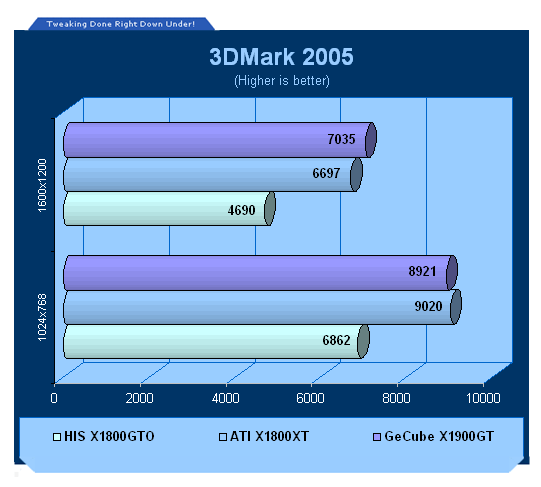
We can clearly see the difference between the X1800GTO and X1800XT. The X1900GT and X1800XT on the other hand sit quite close together with the higher resolution favoring the newer X1900GT from GeCube.
Benchmarks - 3DMark06
3DMark06
Version and / or Patch Used: Build 102
Developer Homepage: http://www.futuremark.com
Product Homepage: http://www.futuremark.com/products/3dmark06/
Buy It Here

3DMark06 is the very latest version of the "Gamers Benchmark" from FutureMark. The newest version of 3DMark expands on the tests in 3DMark05 by adding graphical effects using Shader Model 3.0 and HDR (High Dynamic Range lighting) which will push even the best DX9 graphics cards to the extremes.
3DMark06 also focuses on not just the GPU but the CPU using the AGEIA PhysX software physics library to effectively test single and Dual Core processors.
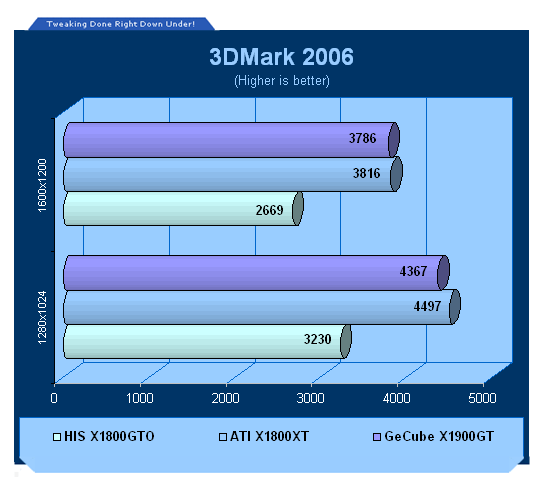
3DMark06 shows a very similar picture but instead of the X1900GT beating the X1800XT at the higher resolution, it sits very closely behind it.
Benchmarks - Half Life 2 (Lost Coast)
Half Life 2 (Lost Coast)
Version and / or Patch Used: Unpatched
Timedemo or Level Used: Custom Timedemo
Developer Homepage: http://www.valvesoftware.com
Product Homepage: http://www.half-life2.com
Buy It Here

By taking the suspense, challenge and visceral charge of the original, and adding startling new realism, responsiveness and new HDR technology, Half-Life 2 Lost Coast opens the door to a world where the player's presence affects everything around him, from the physical environment to the behaviors even the emotions of both friends and enemies.
We benchmark Half Life 2 Lost Coast with our own custom timedemos as to avoid possible driver optimizations using the "record demo_name" command and loading the timedemo with the "timedemo demo_name" command - For a full list of the commands, click here.
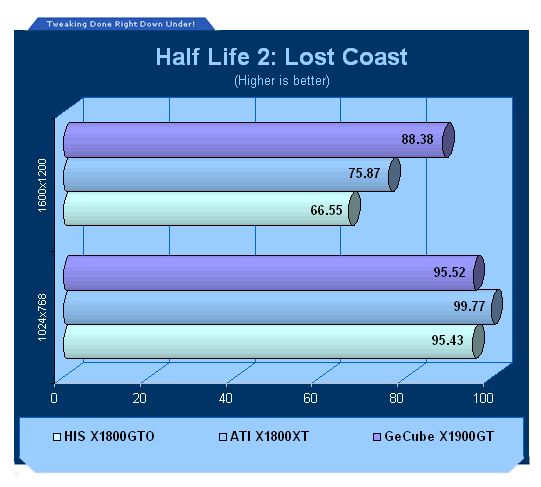
Lost Coast without HDR shows performance at the lower resolution to be similar across the board. At the higher resolution we can clearly see the upside down stair like pattern that is created. While the X1800GTO from HIS is providing 66FPS, it is a very playable average.
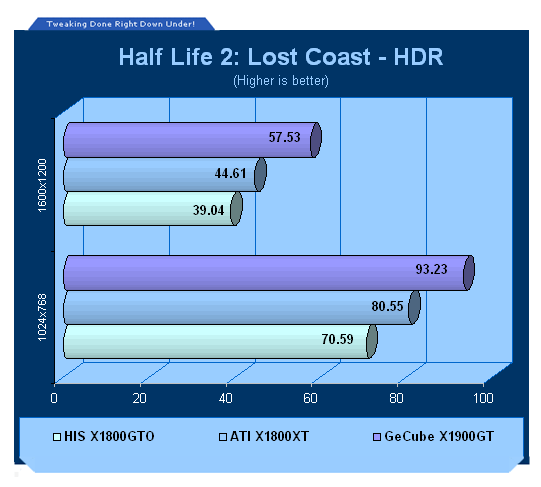
When we turn on HDR we see a similar picture to our high resolution non-HDR testing.
While 1024 x 768 offers a playable setup across all cards with HDR enabled, when we move to 1600 x 1200 the only card that can put out a frame rate worth playing with is the X1900GT. Both X1800 cards minimum would be too low to offer a nice smooth and enjoyable frame rate in actual gaming.
Benchmarks - F.E.A.R.
F.E.A.R.
Version and / or Patch Used: Unpatched
Timedemo or Level Used: Built in Test
Developer Homepage: http://www.vugames.com
Product Homepage: http://www.whatisfear.com/us/
Buy It Here
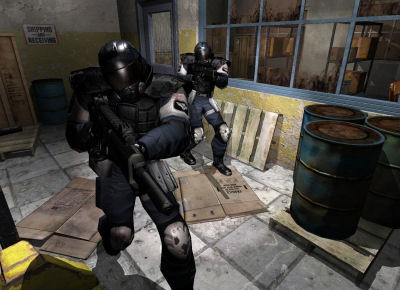
F.E.A.R. (First Encounter Assault Recon) is an intense combat experience with rich atmosphere and a deeply intense paranormal storyline presented entirely in first person. Be the hero in your own spine-tingling epic of action, tension, and terror...and discover the true meaning of F.E.A.R.
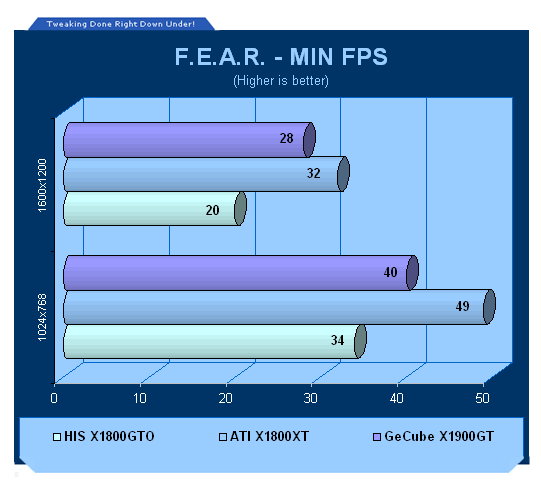
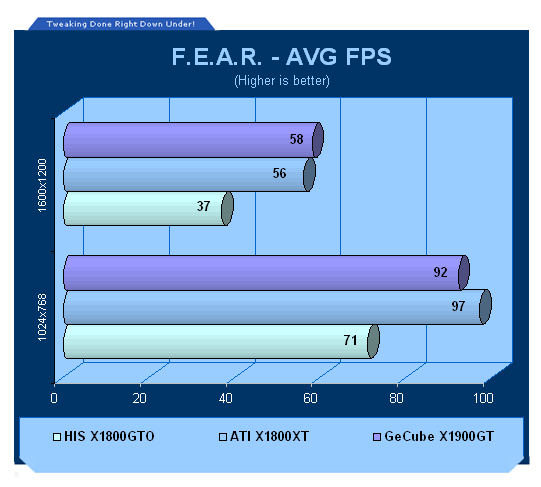
F.E.A.R. at the lower resolution offers a playable set up from all cards with the X1800GTO just scraping in.
Although, moving to the higher resolution the minimum on both the X1800GTO and X1900GT is going to be too low with the X1800XT just creeping in there offering what some people would consider playable.
Benchmarks - Doom 3
Doom 3
Version and / or Patch Used: Unpatched
Timedemo or Level Used: Custom Timedemo
Developer Homepage: http://www.idsoftware.com
Product Homepage: http://www.doom3.com
Buy It Here
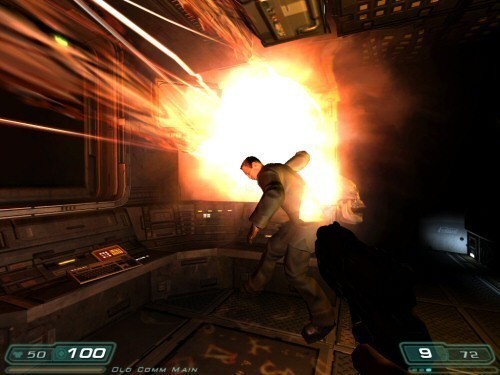
Doom 3 is still one of the most popular games at the moment and is quite intensive in the 3D department, even though it is starting to age. With our own custom time demo we are able to give a realistic rating on what kind of FPS you will be achieving.
For more information on benchmarking Doom 3 we recommend you check out our extensive article regarding it here.
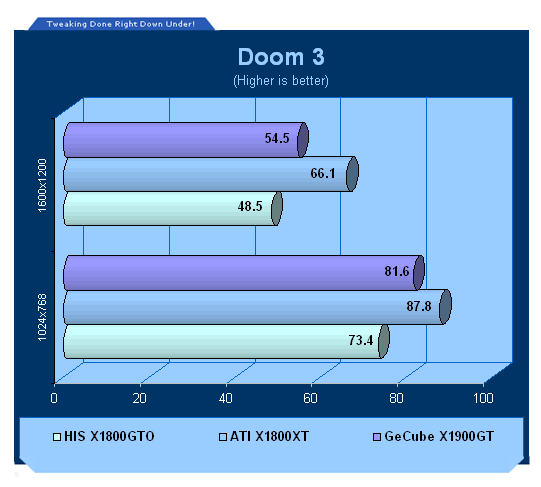
The X1800XT clearly offers better performance over both cards, with that said though even at 1600 x 1200 the X1800GTO from HIS is able to push out a playable frame rate.
Benchmarks - Quake 4
Quake 4
Version and / or Patch Used: Unpatched
Timedemo or Level Used: Custom Timedemo
Developer Homepage: http://www.idsoftware.com
Product Homepage: http://www.quake4game.com
Buy It Here

Quake 4 is one of the latest new games to be added to our benchmark suite. It is based off the popular Doom 3 engine and as a result uses many of the features seen in Doom. However, Quake 4 graphics are more intensive than Doom 3 and should put more strain on different parts of the system.
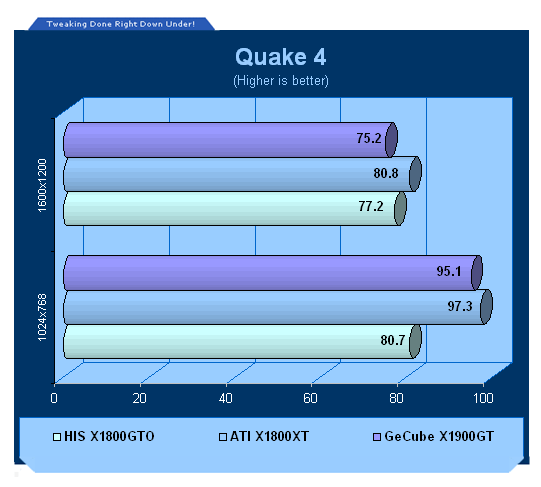
Quake 4 while you would expect similar results to Doom 3 give us some different ones. All cards offer playable gameplay numbers at both resolutions with the higher resolution finding all cards very close together.
Benchmarks - High Quality AA and AF
High Quality AA and AF
Our high quality tests let us separate the men from the boys and the ladies from the girls. If the cards weren't struggling before, they will start to now. ATI are able to offer HDR and AA at the same time unlike nVidia so we have ran our HQ Lost Coast test with HDR enabled to really stress the graphics cards.
All settings are listed on the graph with 3DMark05, 06 and Doom 3 running 8x AA and 16x AF. Half Life 2 Lost Cost (with HDR enabled) is at 4x AA and 16x AF.
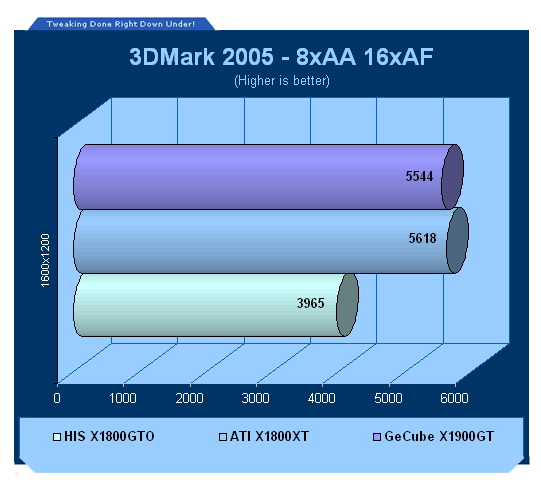
3DMark05 AA tests show that even under these conditions at the high resolution the X1800XT and X1900GT sit very close to each other.
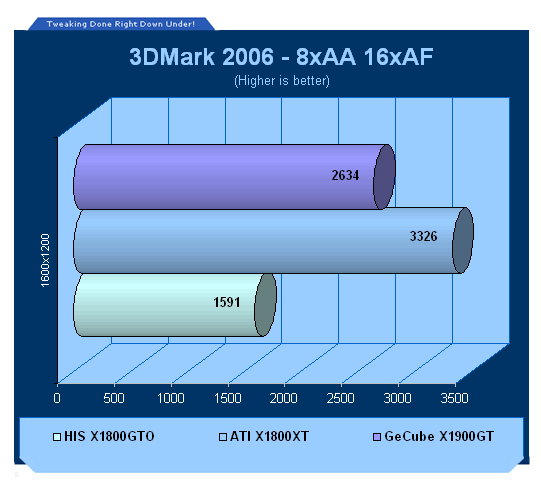
The X1900GT clearly slips back when moving to the intensive 3DMark06.
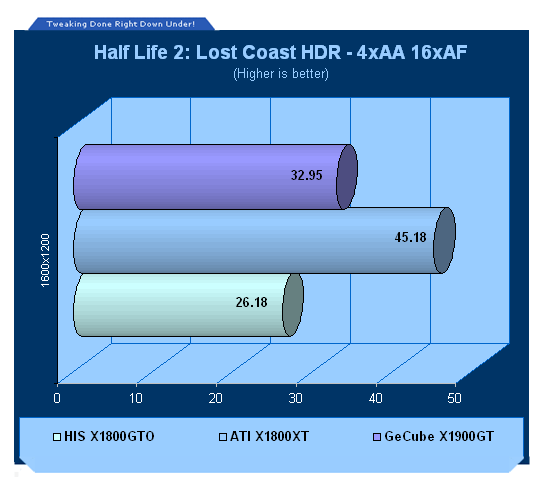
The only card able to offer a playable experience at these intensive settings is the X1800XT with both the X1900GT from GeCube and X1800GTO from HIS offering some pretty low frame rates.
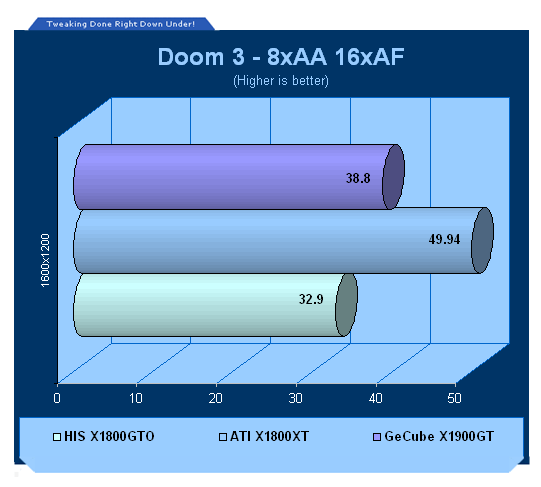
The X1800XT clearly offers a playable result with the X1900GT being borderline and the X1800GTO being a bit to low an average which would result in a low minimum.
Benchmarks - CPU Overclocking
CPU Overclocking
Even with the power of the AMD Athlon X2 and Intel Extreme Edition processors, we still find ourselves hitting a CPU limitation in a lot of our benchmarks. That is, the graphics cards have more performance to give but the processor is letting the team down.
By overclocking the processor we can see what kind of a performance increase we get. When something isn't CPU limited the performance increase isn't all that major but when we do have a CPU bottleneck, every MHz extra we can get can show us an excellent jump in performance.
The AMD Athlon X2 3800+ Socket 939 was increased from 2GHz to 2.6GHz with a slight increase in the front side bus utilizing air cooling.
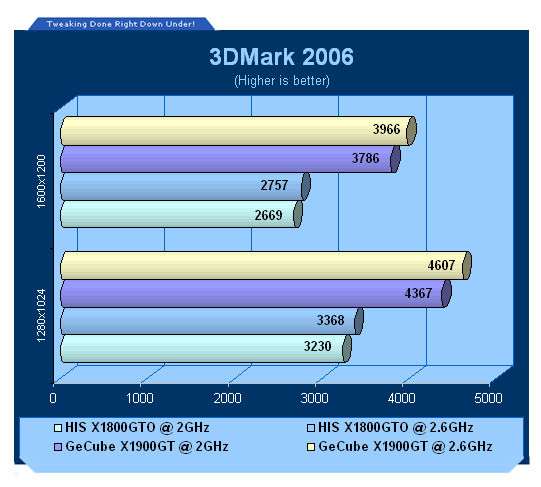
The X1900GT clearly sees a more significant performance increase at both resolutions with the overclocked processor when compared to the X1800GTO.
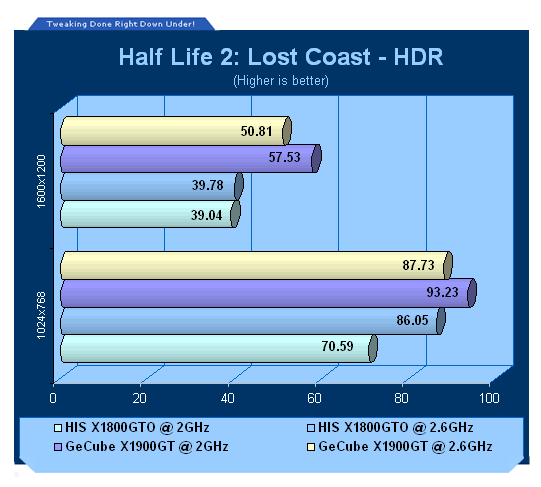
The low resolution test saw the HIS X1800GTO increase in leaps and bounds but no effect seen at the higher resolution, the X1900GT managed to see a negative affect with the overclock with frame drops of roughly 10%.
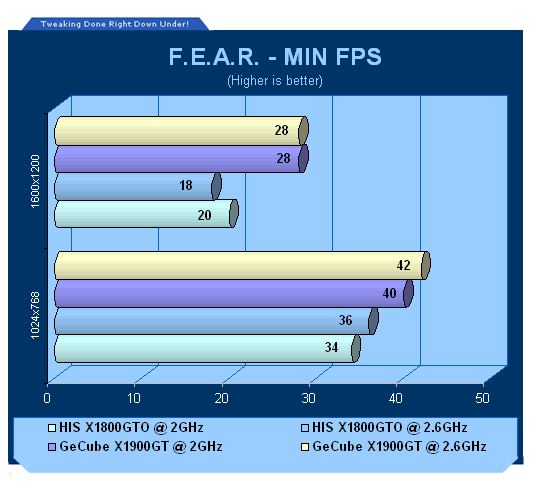
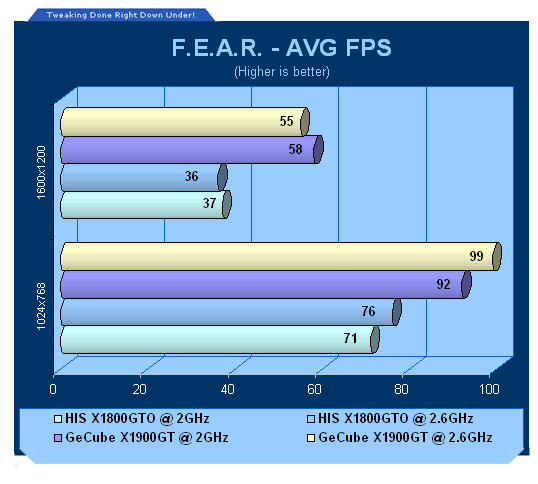
Low resolution results see a minor increase for the lower end card but when it comes to the higher resolution (where it's all graphics cards doing the hard work) the difference isn't seen and in turn we can even see negative results.
Final Thoughts
GeCube X1900GT Final Thoughts
When you open up the GeCube package and have a look through it, you're not all that excited but when it comes to looking at the performance benchmark numbers, it is a very good card.
It is basically on par with the Radeon X1800XT with it being slightly better at producing better numbers at the high resolutions. It's not the kind of card you would buy if you had an X1800XT already. Although, if you had an X1800GT or something in the mid-range area such as a GeForce 6600GT from nVidia or a Radeon X1600XT from ATI, it is a very good graphics cards upgrade path for you to consider. Available at under $500 AUD in Australia and roughly around $300 USD in the United States, it is also quite a bargain for people who just think that you cannot beat ATI image quality or don't want to spend about $100 USD extra on the higher X1900XT model.
The X1900GT also has the ability to play with HDR and AA enabled, and when we say play we mean at a good FPS. This is still a feature that nVidia owners are unable to achieve which is a huge bummer considering you can fork out huge dollars for a top of the line SLI rig and still not be able to achieve something which a graphics card valued at $500AUD card can.
While the GeCube X1900GT cannot offer smooth playable gaming at 1600 x 1200 with AA and AF turned on, you won't have any problems playing most of the latest games at 1600 x 1200 without turning up your settings. If you want to play at 1600 x 1200 and above with all the settings turned up, you'll need to spend more money on a X1900XT or XTX or consider buying another X1900GT and put into Crossfire mode.
- Pros
Great value for money
Good Performance
VIVO
Two Dual Link DVI ports
- Cons
Light package
Rating - 8.5 out of 10 and TweakTown's "MUST HAVE" Best Value Award

HIS X1800GTO Final Thoughts
The HIS graphics card unlike the GeCube card looks really good as far as appearances go - the big cooler looks excellent and it comes with a bucket load of goodies.
The problem is all this comes at a price that is around the $400 AUD mark in Australia. If you have a very strict budget and you cannot venture past $400 AUD, it's a good option. Performance at 1024 x 768 is good even with AA and AF turned on. You'll be able to play most games at 1600 x 1200 with the HIS X1800GTO although when you start to turn up settings, the gameplay might not be as smooth you will want.
You also find yourself getting features like VIVO and Dual Link DVI ports which make it quite an attractive graphics card for the price. If you can squeeze some extra dollars out of your wallet we would recommend looking at the X1900GT but if you can't, the HIS X1800GTO is a decent graphics card for the price but for just $100 AUD extra, the Radeon X1900GT clearly is the better option.
- Pros
IceQ 3 Cooling
VIVO
Perfect 1024 x 768 performance
Two Dual Link DVI ports
- Cons
Probably not best value
Rating - 7.5 out of 10
Our Latest AMD Radeon GPU Article Coverage
- SAPPHIRE Radeon RX 9070 GRE PULSE OC Review - A New 1440p Challenger Has Arrived
- ASRock Radeon RX 9070 GRE Steel Legend Review - The RDNA 4 Mid-Range Reshuffle
- SAPPHIRE Radeon RX 9070 XT NITRO+ PhantomLink Review - RDNA 4's Beast Mode
- ASRock Radeon RX 9070 XT Monster Hunter Wilds Edition Review - RDNA 4 Style
- ASRock Radeon RX 9060 XT 16GB Steel Legend OC Review - AMD Brings the Fight to GeForce RTX

 SAPPHIRE Radeon RX 9070 GRE PULSE OC Review - A New 1440p Challenger Has Arrived
 ASRock Radeon RX 9070 GRE Steel Legend Review - The RDNA 4 Mid-Range Reshuffle
 ASUS ROG Strix GeForce RTX 5070 Ti 16GB OC Edition Review - Premium Design, Premium Performance
 SAPPHIRE Radeon RX 9070 XT NITRO+ PhantomLink Review - RDNA 4's Beast Mode
 COLORFUL iGame GeForce RTX 5070 Ultra OC Review - When Style and Performance Meet
 KIOXIA SSD technology will power data centers on the lunar surface
 Xbox needs help launching next-gen Helix console
 Xbox confirms hardware costs are exploding, and that's bad news for the next Xbox and PS6
 Ubisoft is closing two studios with hundreds of employees on the chopping block
 AMD says its next-gen EPYC 'Venice' processor is over 3X faster than NVIDIA Vera
 Fable's new 30-minute gameplay deep dive shows you how to buy property, fancy clothes, and get a date
 Logitech's new Mobi Fold is a portable mouse that looks like a flip phone
 Rampant fraud forces Valve to cut Steam gift card sales
 Microsoft sets a Patch Tuesday record with 206 fixes, and finally patches every zero-day Nightmare Eclipse disclosed
 Todd Howard is playing Elder Scrolls VI and it looks 'amazing,' Xbox exec says
 MOAIPLAY ORA PRO G1 850W ATX 3.1 PSU Review: high efficiency and 10-year warranty for $119.99
 Navman MiVue Smart True 4K Surround Dashcam Review - Seeing In All Directions At Once
 IQUNIX Magi96 Pro Aluminum Low Profile Mechanical Keyboard Review - Premium Build, Satisfying Sound
 Asetek Forte S-Series Racing Simulator Bundle Review
 Razer Pro Type Ergo Wireless Split Ergonomic Keyboard Review - Built for Comfort and Support
 ASUS ROG Strix Morph 96 Wireless Gaming Keyboard Review - Great Performance, More Affordable
 NZXT H6 RGB+ Compact Dual-Chamber Chassis Review
 ASRock Z890 Taichi Aqua Motherboard Review - Flagship features without the flagship price
 Quick Assist is the only remote-support tool I open when a relative calls about their PC
 The PowerToys utilities I keep enabled on every Windows 11 PC, and the ones I turned off within a week
 TweakTown's Best of Computex 2026 Awards - The Best Hardware, Gaming Gear, and AI
 Phison E37T SSD Controller Exclusive Preview - The Fastest DRAMless SSD Platform Yet
 USB Ports Not Working in Windows 11? Try These Fixes
 ASUS WiFi Routers and Networking Solutions Deliver Long-term Security and Reliability with No Additional Cost
 Second Monitor Not Detected in Windows 11? Try These Fixes
 Turn Your Old Smartphone Into a Dedicated Webcam for Your Windows PC
 The Send To menu is the right-click feature on Windows 11 that nobody bothers to customize
 Windows 11 will not let you pin a folder to the taskbar, but a 30-second workaround does