

Introduction

In Win is a company that has been around for a long time. Founded in 1986, these folks have been in the business of making enclosures for over 20 years. Granted, back in those ancient times the enclosure was basically a beige colored box, but this is still a very long lived company in terms of computer component manufacturers.
With the advent of more modern looking and accessorized enclosures, In Win has grown with the market and is still offering enclosures that go beyond the basic OEM styling that others are still creating. This brings us to today's article, a small roundup of three of the current product lineup being offered by In Win. This will include one ATX and two mATX enclosures that offer both looks and features.
So relax for a few moments as we take a look at some of what In Win has to offer. As always, we will look at such things as aesthetics, features and ease of the system build. After all, we need to be able to make informed decisions when it comes time to spend our upgrading dollars.
F430 Mid Tower - Exterior

We begin our piece by taking a look at the single ATX enclosure in the roundup. The case is designed with a race car at the heart. Our test model comes in with a fiery candy apple red exterior, but it is also available in orange and black. A quick glance is all it takes to note that the paint on this baby is more in lines with what you would see on a performance automobile than a computer case. Even from this angle you can see the glossy finish and the nice reflection toward the base.

The front bezel is plastic and includes the same paint job as the rest of the enclosure. Being a mid tower design it has the standard four optical bay openings and also includes two 3.5" openings as well. Toward the bottom you will see some openings that allow for air to move from the lower front portion of the case, which is exactly as it should be.

To keep up the concept of a race car, the power button even has a label of "START ENGINE". To make things even more entertaining, this power button emits an engine-inspired roar when you punch it. For those who may find this annoying, you can adjust the volume to silence the beast.

As with any decent enclosure design, the F430 includes a nice selection of external ports that are located on the left side as you are looking at the box. This I/O panel includes headphone and microphone jacks, a single IEEE1394 Firewire port and four USB ports. Many manufacturers are now using a 4-port USB design and this is a very nice addition. I have had to add hubs from time to time because I ran out of USB ports. This not only adds an extra pair of USB connections, it also keeps them easily accessible close to the front bezel.

The side panel has no windows like so many offerings today, but it is still more than a flat piece of metal. There is a single ventilation hole that is mounted on an extruding curved piece of the side plate. This gives a little flowing pattern to the side and is very easy on the eyes. Also of note is the fact that the raised portion housing the ventilation hole allows added ventilation from a lower position. We'll take a little better look at this feature when we pop the side panel off. The two black tabs you see toward the rear of the panel are the means of opening the case, so it is also appealing to those looking for a tool-free concept.

Above is the inside of the side panel. There are two areas that allow for incoming airflow and both are filtered. You will also note that one of those ports allows you to move a plastic shroud for better positioning of the ventilation over the processor.

Moving to the back of the enclosure shows a pretty standard layout. The opening for the power supply is completely industry standard so you will have no issues with your favorite PSU. You can also see that while there are no screws installed to keep the side panel secured, you can install them yourself if you so desire. During testing, I never had any issues with the plastic clips, but if you're just not comfortable with that you can add two screws.
F430 Mid Tower - Interior

Dropping the side panel shows a pretty average interior. Since the inside is meant for business and not looks, this isn't necessarily a bad concept. The case is made of a .8mm steel material so isn't as sturdy as some using the thicker 1mm enclosures out there. Even so, I had no problems with the stability or strength of the case. The thinner metal will serve two purposes; first it will make the enclosure lighter and secondly it will help keep costs down.

As mentioned earlier, the F430 includes four optical drive bays. Installation is straightforward with no surprises. Having four bays gives you a lot of flexibility, especially if you happen to be using a water cooling solution that requires this space for an internal reservoir.

Sliding down just a bit in the drive tower shows mounting brackets in place for two externally accessible 3.5" devices. Of course if you don't happen to need this flexibility, you can always mount a couple of extra hard drives in here.

At the very bottom of the drive tower is space for three hard drives. Two drives fit in the open air cradle and a third will slide into the bottom of the tower. Those with a quick eye will also note the plastic brace above the hard drive cradle designed to work as a stabilizer for those extra long video boards. The hook on the inside is used as a cable management tool to help keep those pesky wires under firm control.

Finishing up our look of the F430 is the rear fan. This is the only included fan that comes as standard equipment for this enclosure. It is a nice 120mm model that uses ceramic bearings for quiet and long lived operation. You can also see from this angle that the PCI slots are standard types and will require some screws to secure your peripherals in place.
Alpha 360 Mini Tower - Exterior

The next enclosure we will look at is the Alpha 360. Though it has an outward appearance of a ATX enclosure, this model is in fact a smaller mATX case. It also has some interesting features that we will delve into in a bit. The outer coating is a flat silver coloring, but like the F430 there are a couple of other color choices. Though they all have a matte finish, you can choose between the silver, graphite or blue.

The front bezel, like many cases on the market today, is made of plastic. Unlike many other similar products, however, this one does not have a hinged door that opens from either side. If you hit that little dotted area that is located at the bottom of the top panel this is what happens...

Hmmm, this could be entertaining. The panel slides open on a hydraulic-like pair of arms and seats itself on top of the enclosure. While it doesn't require a lot of extra space over the case, you will want to make sure that you don't have this case sitting in a hole that barely accommodates the size or you will run into problems. Once the panel is in its up position you will see we have room for a pair of optical drives and a pair of 3.5" devices.

The bottom portion of the front bezel houses some more functional components, namely the power button and the externally accessible I/O ports. The Alpha 360 gives you the standard headphone and microphone jacks, a single IEEE1394 Firewire port and a pair of USB ports.

Moving to the side shows a smooth appearance with some venting holes over the area of the processor and peripheral slots. You can also see the top panel that has a ribbed material covering the entire surface of the enclosure. While I cannot truly recommend this, the flat contour would work as a small table top, but the risks are entirely up to you.

Next we move around to the back... at least I think it is the back. Well, there is a button along the top edge of this panel so lets see what it does.

There we go! This is more like it. As you can see, the Alpha 360 goes out of its way to be different but still retain its functionality. Once we have ready access to the working area of the back panel we can see that it is set up just like it should be. For those who have noticed that there are no retention screws for the side panel, fear not. The button under the PSU toward the right side of the panel is the release lever. Push it in and the side panel easily comes off.

Oh, a closer look at the removable back panel covering shows that there are small portions that can be taken out to access the peripherals, the power cord or whatever. Since the entire cover plate is perforated, airflow will not be an issue for either the rear fan or the fan on your power supply.
Alpha 360 Mini Tower - Interior

Popping the side panel off allows us to get to the internal area of the Alpha 360. It takes no more than a glance to see that it isn't your ordinary layout. Yes, the drive bays are oriented toward the front and the peripherals to the rear, but that monstrosity hanging off the side stands out as an immediate difference. Let's take a little closer look.

This shroud is designed to help keep your processor running cool. You see, the cone moves in and out to allow it to sit very close to your HSF. Even though there is no fan mounted to the side panel in this location, the natural airflow of the HSF blows down toward the processor. This shroud lets cool air be drawn from outside the enclosure instead of warmer air being drawn from inside the case.

The optical bays and 3.5" external bays are positioned as a single cradle in the drive tower. Each of the upper bays has protruding tabs to make installation of your drives easier. Also of note is the tool free retention mechanism. Once the drives are in place, you simply push in on those yellow plungers along the side of the tower. This securely mounts the drive in the bay and I had no issues at all with loose and noisy drives.

Rotating around to the rear portion brings us to a couple of items of note. The first is the rear fan, only fan included with the default configuration. This 9cm fan is not totally silent, but the noise level is more than acceptable.

Also of note is the tool free retention mechanism for your installed peripherals. Though it is nothing fancy, the simple operation allows the entire brace to be rotated upward and out of the way so you can easily install your peripheral(s). Once in place, simply rotate the mount back down and snap it into place and you're finished.
Mountain Jade Tiny Tower - Exterior

Our final stop in this little roundup is the smallest of the enclosures tested. This little gem, called Mt. Jade, is a small enclosure that can be either laid over on its side (as pictured above) or stood up in a tiny tower configuration. In either case, the Mt. Jade has a very small footprint.

On the left side of the front bezel are the power button and the mounting area for a single 3.5" device. This device will be mounted vertically when the case is set up as a desktop unit due to the limited amount of space that is available to work with.

Across the way to the right hand side of the front bezel shows us a cutout for a single optical drive and the front I/O ports. I was pleasantly surprised to see a full compliment of four USB ports. While this is becoming more commonplace on larger enclosures, it is not exactly standard equipment on the smaller cases. Also included are the IEEE1394 Firewire port and the expected headphone and microphone jacks.

Moving around to the back shows nothing out of the ordinary. A nice feature, however, is the fact that this enclosure is tall enough to be able to fit in four full height PCI peripheral cards. You probably won't need this capability, but the flexibility is a nice touch.
Mountain Jade Tiny Tower - Interior

Popping the cover is reminiscent of removing the top from an old desktop rig. Of course, this was to be expected given the small size of the Mt. Jade. I was impressed with the clean look of this enclosure once the top was removed. What's more, there are no additional fans for cooling. The optical drive is mounted in the upper left corner, the external 3.5" device is mounted in the far right upper bay and the hard drive is mounted just to the left of that. There is also enough height to allow for reasonable cable management.

A look at from the side shows a different view of that cage that was pictured toward the lower left in the photo directly above this one. This is an innovative cooling mechanism designed for Intel brand processors that worked surprisingly well. After mounting the motherboard and processor (preferably with the stock Intel HSF), you move the plate so that it is mounted directly over the HSF. The radial sink will be partially inside the hole. The purpose of this mechanism is to allow the airflow to come directly from the cool vented air outside the case and allow a very minimal amount of warm air to be recirculated back through the fins of the HSF.

As with many smaller enclosures on the market today, the Mt. Jade includes a pre-installed power supply. It isn't a powerhouse, but then it shouldn't be in this type of system. The power supply used in this enclosure is a FSP branded model rated at a maximum of 300 watts. The rails are not too bad either. The 3.3v rail is rated at 20A, the 5v rail is rated at 18A and the two 12v rails are rated at 8A and 16A respectively. As mentioned, the PSU isn't a monster, but most applications for this type of enclosure will not need a massive power draw anyway. In the event your system does require more juice, this enclosure is fitted for a standard SFX type power supply.
Final Thoughts
After looking at length at all three enclosures I can say up front that they all offer features that are both innovative and effective. Though none of the boxes were flawless, there were no glaring deficiencies noted in any of the models tested.
Speaking of testing, after delving into the appearances and features, I installed an operational system in all three cases to test the ease of system installation and to again look for any problems that might arise. In the F430 I used a Gigabyte GA-965P-DS4 ATX motherboard, 2GB of memory and a GeCube X1900XT graphics board. In the two other cases I used a Gigabyte GA-965GM-S2, 2GB memory and the onboard graphics (thanks to the folks at Gigabyte for providing our test boards).
F430 Mid Tower
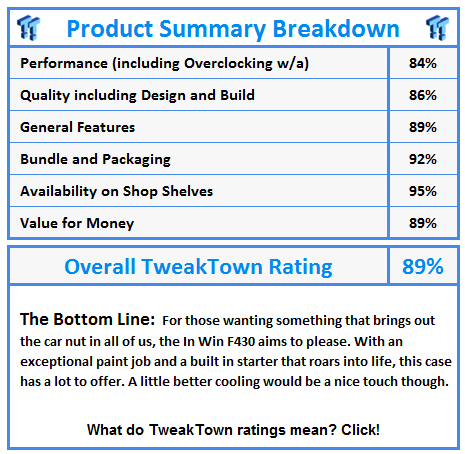
The F430 is a nice enclosure designed for those who have a love for the sports automobile. With an incredibly fine finish and a gloss that is almost mirror-like, the overall appearance is exceptional. Cooling is adequate but an additional fan up front (intake) in the normal configuration would be a nice feature. The engine roaring to life sound from the power button is a nice touch, but could wear on users after a while. Fortunately you can adjust the volume to take care of your mood. As far as cost is concerned, you can find this particular model for around $78US. This is the most expensive enclosure tested in this roundup.
Alpha 360 Mini Tower
The Alpha 360 was the most entertaining enclosure tested in this group. With an unusual oval shape and hydraulic-like panels, this case has a lot of personality. Though smaller in size than many other models, this is a nice addition for those looking for something with a cool appearance and smaller footprint. It is perfect for that child's machine that will be sitting in the back room. Like the F430, this model really would do better with an extra fan up front in its standard configuration. This model comes in with a price tag of $61US and is the middleweight in price.

Mountain Jade Tiny Tower
The Mt. Jade is classified as either a tiny tower or a desktop enclosure, depending on the method you use to mount your system. It is quite small and is designed for those looking into something along the lines of a HTPC system. With no internal fans and a solid mounting carriage for the drives, there will be no noise from this enclosure beyond what your HSF and drives will produce. With careful selection of your components, you can have a nearly silent system. The price tag of this enclosure will also leave a smile on your face. Even with the included power supply, you can dig this case up for around $44US. Given that many HTPC cases are considered specialty items and often have a price tag to match this designation, this inexpensive alternative is a very nice choice.

 United
States: Find other tech and computer products like this
over at
United
States: Find other tech and computer products like this
over at  United
Kingdom: Find other tech and computer products like this
over at
United
Kingdom: Find other tech and computer products like this
over at  Australia:
Find other tech and computer products like this over at
Australia:
Find other tech and computer products like this over at  Canada:
Find other tech and computer products like this over at
Canada:
Find other tech and computer products like this over at  Deutschland:
Finde andere Technik- und Computerprodukte wie dieses auf
Deutschland:
Finde andere Technik- und Computerprodukte wie dieses auf  Corsair launches MP700 PRO SE PCIe 5.0 SSDs: up to 4TB capacity, up to 14GB/sec read speeds
 TT Show Episode 34 - The Helldivers 2 PC Controversy and Apple's New OLED iPad Pro
 NVIDIA GeForce RTX 5090 and RTX 5080 will be available within a few weeks of each other
 EA CEO says next-gen Battlefield has 'the largest Battlefield team in franchise history'
 Apple apologies for new iPad Pro ad that 'missed the mark' and pulls it from airing on TV
 Corsair 6500X Mid-Tower Dual Chamber Chassis Review
 Corsair MP700 Pro SE 4TB SSD Review - As Fast as They Come
 Corsair MP600 Mini 2024 Edition 1TB SSD Review - Fastest Tiny Drive on the Planet
 Lexar SL500 1TB Portable SSD Review - The best of native USB
 Corsair Platform:6 Elevate Modular Desk Review
 True Lies (1997) 4K Blu-ray Review
 Fractal Design North XL Full-Tower Chassis Review
 Western Digital WD Gold 24TB HDD Review - High-Capacity Masterpiece
 AOC U27G3X 27-inch Gaming Monitor Review - 4K 160Hz for $500
 MSI Vector GP68HX Gaming Laptop Review
 Building the Ultimate Home Entertainment Server with an ASUSTOR NAS and Viper Gaming NVMe SSDs
 Everything you need to know about the latest ASUS NUC Mini PCs - NUC 14 Pro and ROG NUC
 How to Overclock Your GPU and Boost Your PC Gaming with ASUS GPU Tweak III
 ASUS's AMD Radeon RX 7000 Series GPU lineup has something for every gamer
 ASUS OLED Premium Care defends the ROG Swift OLED PG32UCDM gaming monitor from burn-in