









Introduction
Got the big bucks? Can't close your wallet because there's too much money in it? Can't remember how many 0s after that first number in your bank account? Well we have the article for you.
The top dog for anyone wanting to go the Nvidia route is the 8800 Ultra, it's a fast card but it doesn't exactly scream performance-to-cost ratio. With pricing that starts around $600US to $700US, they're certainly not cheap.
The HD 2900 XT is the card sitting up top of the ATI pyramid. Pricing is closer to the $400US mark for just about all brands. A pair in crossfire is going to set you back around $800US.
It's more expensive but with the average price of an Ultra costing around $700US it's only roughly 13%. If you see the performance increase it's not really that big of a deal.
Since we're going to use the Sapphire HD 2900 XT in today's article which we hadn't had the chance to look at before, we thought we would just have a quick look at the package and the card before we get into what really matters.
Let's hop to it.
The Package
Sapphire have moved over to a new package for the HD 2900 XT, and I must say it looks great! It's up a bit on size compared to our standard VGA box, but this is becoming quite common on higher end cards these days. It's a bit annoying from a freight perspective but the cards are also getting bigger so it does make sense.

The front of the box has a see-through panel which lets us view the front of the card; We also have the main features listed across the bottom. We can see there is mention of HDMI, VIVO, Black Box and 3DMark. This is all very standard these days but it's nice to see a new box from Sapphire.

Moving inside we again have another healthy package which seems to be pretty consistent with HD 2900 XT cards. Apart from the boring manual we have PowerDVD and PowerDirector from Cyberlink, 3DMark 06, a driver CD and the Black Box voucher.

Connectivity is also pretty full on with two DVI to VGA connectors, a DVI to HDMI dongle, HDTV Out, VIVO and lastly a crossfire cable. These handy additions compliment the whole package rather nicely.

The big packages are pretty common nowadays. Palit have included an extra game next to Valve's Black Box. ASUS included S.T.A.L.K.E.R. with Black Box as well. Then there is Sapphire who have given us a full version of 3DMark 06 for good measure. AMD and its partners had better be careful as we could get very used to this. It's more than we can say for some NVIDIA partners who don't even include a game at all.
The Card
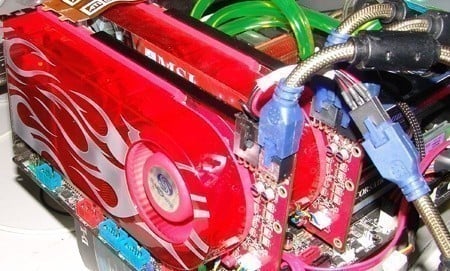
Sapphire are actually the first company we have seen stick with the OEM flame design and have only opted to place a sticker on the fan. The flame design on the cooler is actually really cool and it looks a bit tacky when a partner has placed a sticker on top while still having the flames slightly visible.

The front of the card is mostly taken up by the heatsink, leaving not much room for anything else. We can see the heatsink / heatpipe design thanks to the see-through housing which looks pretty funky.

Doing a quick spin around the card we have our two power connectors, one is our standard 6-pin PCI-Express connector and the other is a newer 8-pin connector. Since Sapphire hasn't chosen to include any 6-pin to 8-pin connectors you will have to use a standard 6-pin connector in it if your power supply doesn't have an 8-pin connector. The good news is that the only feature you lose is the auto-overclocking feature in the drivers, you can continue to overclock manually when using the card by itself.

Sitting across the top of the card we also have our crossfire connectors which we will be finally making use of. Of course two cables need to be connected to make use of Crossfire and that's exactly what we intend to do.

Since the main focus of the article today is the performance of Crossfire vs 8800 Ultra, we will quickly give our quick final thoughts on what the Sapphire HD 2900 XT offered.
While the card managed to overclock it didn't go quite as hard as our MSI offering, though it did manage to do better than the ASUS. It seems to be hit and miss at the moment with these cards and it's completely random as to how well yours will overclock.
The package on a whole is fantastic with the only thing missing being some power connectors, these being molex to 6-pin or 6-pin to 8-pin. With that said the 8-pin isn't really needed and most people should find themselves with a power supply that comes with at least two PCI-Express power connectors these days.
With stock clocks the card performs exactly like you would expect, and priced at roughly only 10% more than the cheapest offerings it's a pretty nice card.
With the formalities out the way let's roll out (Yes, I saw Transformers "Auto-bots Roll Out!")...rolling out!
Benchmarks - Test System Setup and 3DMark05
Test System Setup
Processor(s): Intel Core 2 Duo E6600 @ 3GHz (333MHz x 9)
Motherboard(s): ASUS P5K3 Deluxe (Supplied by ASUS)
Memory: 2 X 1GB Corsair XMS3 DDR-3 1066MHz 7-7-7-21 (Supplied by Corsair)
Hard Disk(s): Hitachi 80GB 7200RPM SATA-II
Operating System: Microsoft Windows XP Professional SP2
Drivers: Nvidia ForceWare 158.22, ATI 47096 and DX9c
The Catalyst drivers still seem to be having some issues with Crossfire so we have moved back to the 47096 driver which runs like an absolute charm. We didn't have two Sapphire HD 2900 XT cards on hand so it was time to try and do a bit of mixing and matching. With the MSI HD 2900 XT in hand, it slotted in and recognized Crossfire right off the bat. Following a reboot the setup ran like a charm. But how much of a charm? We will find out in just a second.
Crossfire overclocking, though possible is still unknown to just about everyone. While some people have managed to do it no one wants to let us know how they did, so we unfortunately didn't get to look down that path. What we did get to look at though is 2560 x 1600 gaming and a few other resolutions across a multitude of games.
So let's not ramble on anymore and roll out! Okay, that's the last time I say it, I promise!
3DMark05
Version and / or Patch Used: Build 130
Developer Homepage: http://www.futuremark.com
Product Homepage: http://www.futuremark.com/products/3dmark05/
Buy It Here
3DMark05 is now the second latest version in the popular 3DMark "Gamers Benchmark" series. It includes a complete set of DX9 benchmarks which tests Shader Model 2.0 and above.
For more information on the 3DMark05 benchmark, we recommend you read our preview here.
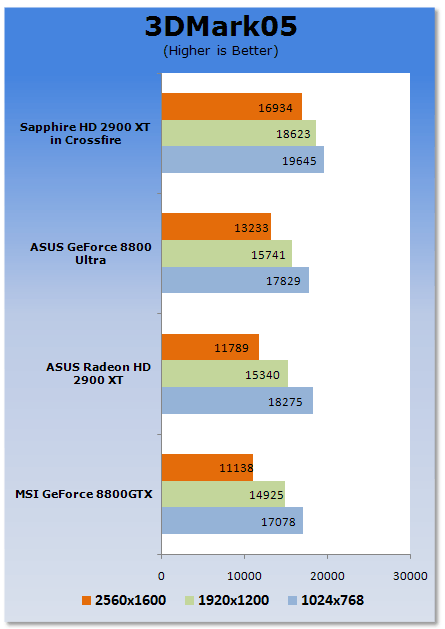
Straight away we can see in the older 3DMark05 that the Crossfire solution is able to outperform the Ultra. We can especially see as we move up in resolutions that the impact isn't as great. Hopefully this translates to the more intensive game tests.
Benchmarks - 3DMark06
3DMark06
Version and / or Patch Used: Build 110
Developer Homepage: http://www.futuremark.com
Product Homepage: http://www.futuremark.com/products/3dmark06/
Buy It Here

3DMark06 is the very latest version of the "Gamers Benchmark" from FutureMark. The newest version of 3DMark expands on the tests in 3DMark05 by adding graphical effects using Shader Model 3.0 and HDR (High Dynamic Range lighting) which will push even the best DX9 graphics cards to the extremes.
3DMark06 also focuses on not just the GPU but also the CPU using the AGEIA PhysX software physics library to effectively test single and dual-core processors.
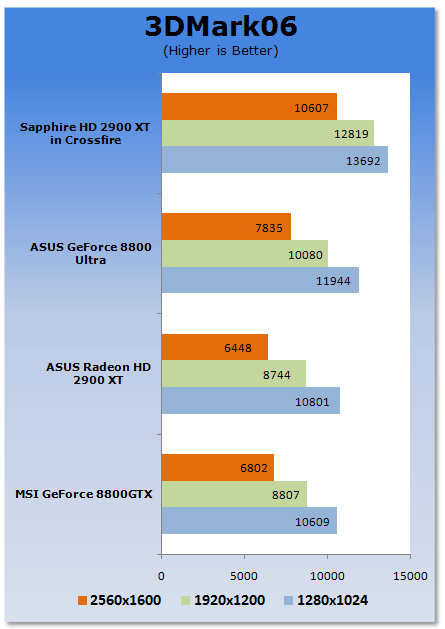
We again see that the Crossfire solution significantly outperforms the ultra at the highest resolution. We can see as we move up in resolution that the impact on performance is a lot less. The biggest gains over the single card solution are also noticed at the highest resolution.
Benchmarks - Rydermark
RyderMark
Version and / or Patch Used: Beta 2
Developer Homepage: http://www.candellasoftware.com
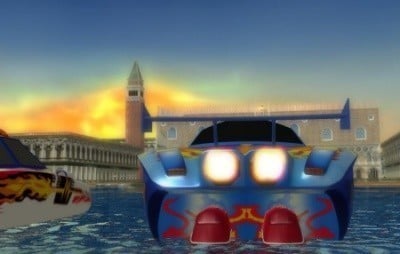
RyderMark is a new 3D benchmark application by Candella Software designed to take on the 3DMark series from Futuremark.
We are testing using the early Beta 2 version which was sent to us by the developers. For a closer look at the benchmark software, take a look at our preview.
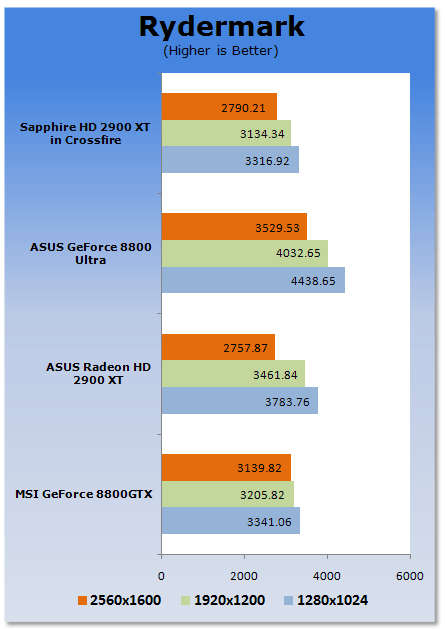
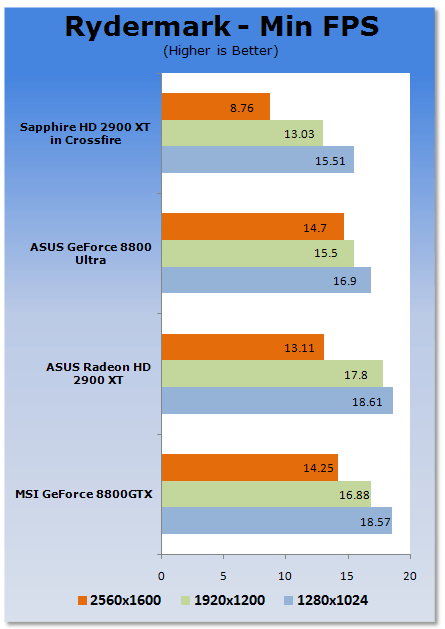
This is why we are still taking Rydermark with a grain of salt. We're not basing any conclusions on the results Rydermark spit out. We can see though, it has the Ultra outperforming the Crossfire setup. This could be due to the lack of multi-card support in Rydermark at the moment. Hopefully this is fixed when we move out of the beta stages.
Benchmarks - Half Life 2 (Lost Coast HDR)
Half Life 2 (Lost Coast HDR)
Version and / or Patch Used: Latest from Steam
Timedemo or Level Used: Custom Timedemo
Developer Homepage: http://www.valvesoftware.com
Product Homepage: http://www.half-life2.com
Buy It Here

By taking the suspense, challenge and visceral charge of the original, and adding startling new realism, responsiveness and new HDR technology, Half-Life 2 Lost Coast opens the door to a world where the player's presence affects everything around him, from the physical environment to the behaviors even the emotions of both friends and enemies.
We benchmark Half Life 2 Lost Coast with our own custom timedemos as to avoid possible driver optimizations using the "record demo_name" command and loading the timedemo with the "timedemo demo_name" command - For a full list of the commands, click here.
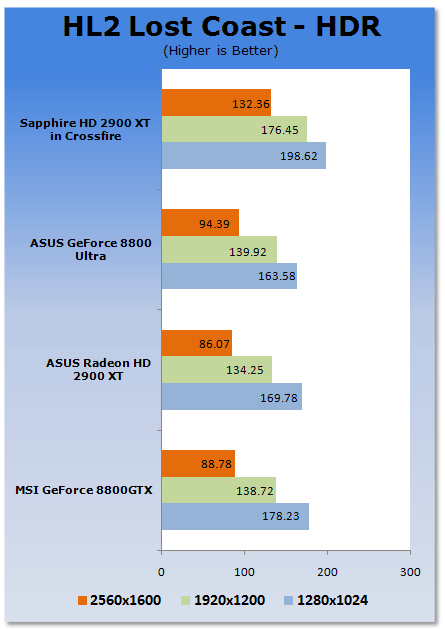
Across the board the Crossfire solution continues to perform exceptionally well. Gains of over 40% can be seen at the highest settings.
Benchmarks - Prey
Prey
Version and / or Patch Used: Unpatched
Timedemo or Level Used: HardwareOC Custom Benchmark
Developer Homepage: http://www.humanhead.com
Product Homepage: http://www.prey.com
Buy It Here
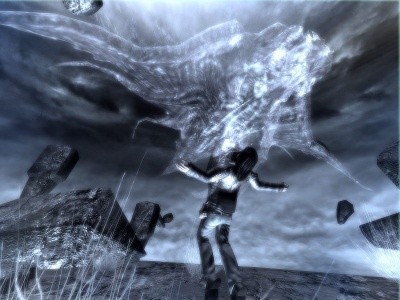
Prey is one of the newest games to be added to our benchmark line-up. It is based off the Doom 3 engine and offers stunning graphics passing what we've seen in Quake 4 and does put quite a lot of strain on our test systems.
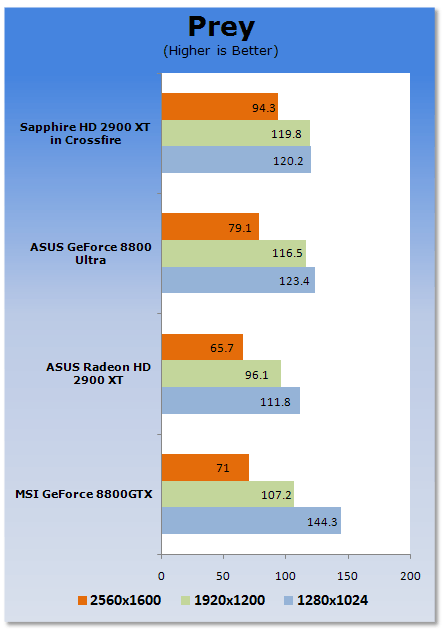
Moving to the OpenGL side of things with Prey, we continue to see that even a game which generally finds huge favours in the NVIDIA team, is able to perform significantly well at the high 2560 x 1600 resolution on the Crossfire setup.
Benchmarks - F.E.A.R.
F.E.A.R.
Version and / or Patch Used: Unpatched
Timedemo or Level Used: Built-in Test
Developer Homepage: http://www.vugames.com
Product Homepage: http://www.whatisfear.com/us/
Buy It Here
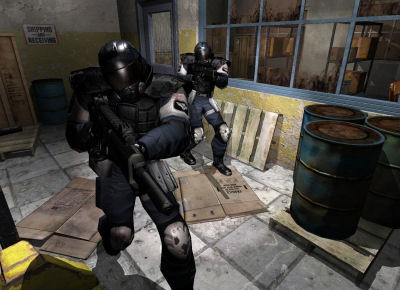
F.E.A.R. (First Encounter Assault Recon) is an intense combat experience with rich atmosphere and a deeply intense paranormal storyline presented entirely in first person. Be the hero in your own spine-tingling epic of action, tension, and terror...and discover the true meaning of F.E.A.R.
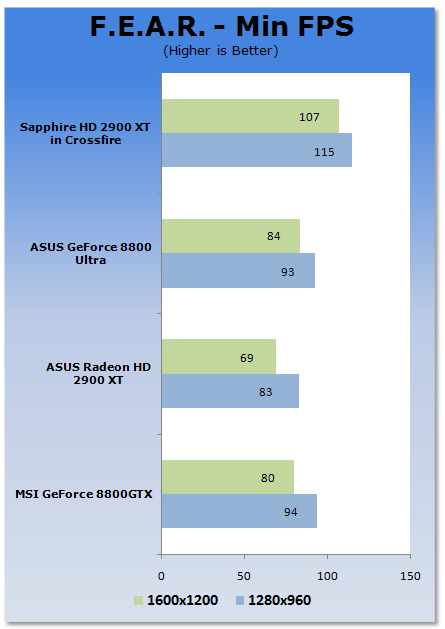
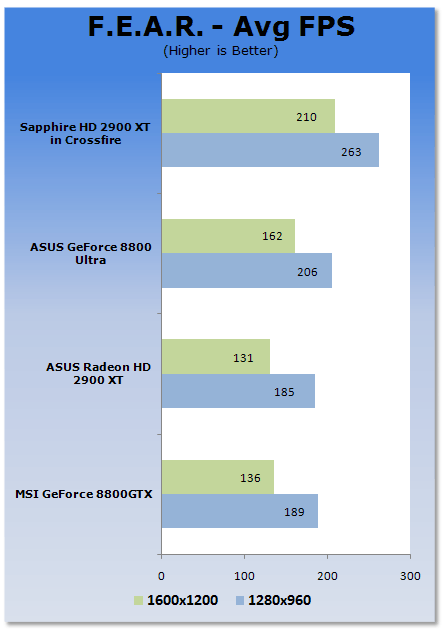
F.E.A.R., a game that has always managed to make excellent use of SLI sees good gains for Crossfire users, clearly outperforming the single Ultra.
Benchmarks - Company of Heroes
Company of Heroes
Version and / or Patch Used: 1.5
Timedemo or Level Used: Built-in Test
Developer Homepage: http://www.relic.com
Product Homepage: http://www.companyofheroesgame.com
Buy It Here
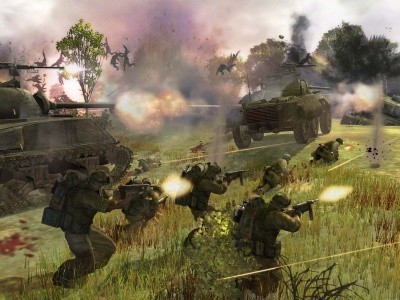
Company of Heroes, or COH as we're calling it, is one of the latest World War II games to be released and also one of the newest in our lineup of benchmarks. It is a super realistic real-time strategy (RTS) with plenty of cinematic detail and great effects. Because of its detail, it will help stress out even the most impressive computer systems with the best graphics cards - especially when you turn up all the detail. We use the built-in test to measure the frame rates.
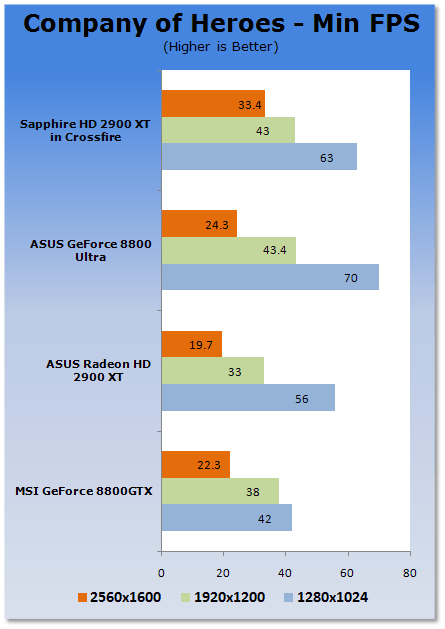
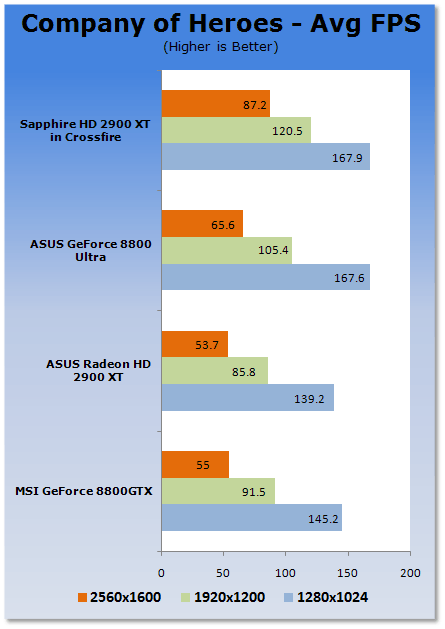
Company of Heroes again sees big gains for the Crossfire setup at the highest 2560 x 1600 resolution. The Crossfire solution is the only setup that is really able to offer a playable setup with the minimum FPS being above 30FPS at 2560 x 1600.
Benchmarks - Supreme Commander
Supreme Commander
Version and / or Patch Used: 3220
Timedemo or Level Used: Built-in Test
Developer Homepage: http://www.gaspowered.com
Product Homepage: http://www.supremecommander.com
Buy It Here
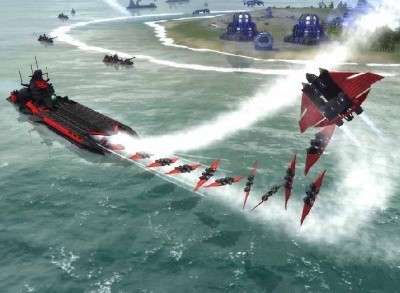
In the 37th Century, you are the Supreme Commander of three races, with a single goal in mind-to end the 1000 year Infinite War and become the reigning power supreme. For a thousand years, three opposing forces have waged war for what they believe is true. There can be no room for compromise: their way is the only way. Dubbed The Infinite War, this devastating conflict has taken its toll on a once-peaceful galaxy and has only served to deepen the hatred between the factions.
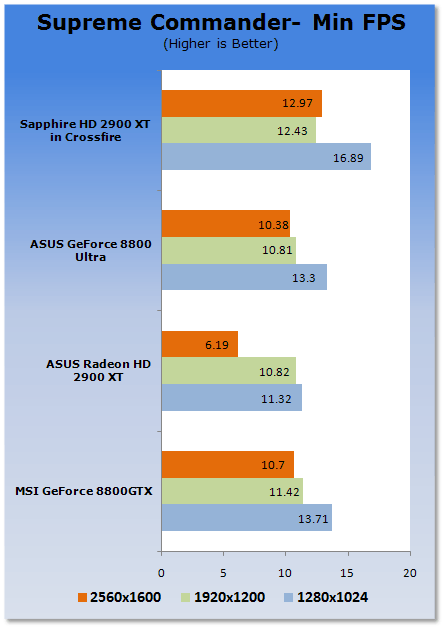
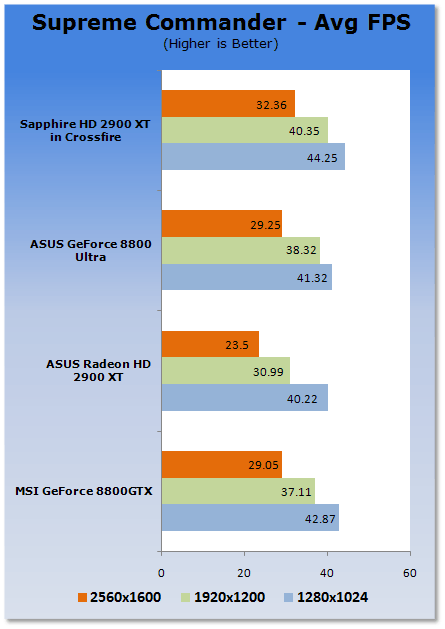
Supreme Commander performance is up on the Crossfire solution, though the numbers it puts out are still extremely low. It's clear that you have to go in and change some of the settings from high to medium.
Benchmarks - High Quality AA and AF
High Quality AA and AF
Our high quality tests let us separate the men from the boys and the ladies from the girls. If the cards weren't struggling before they will start to now.
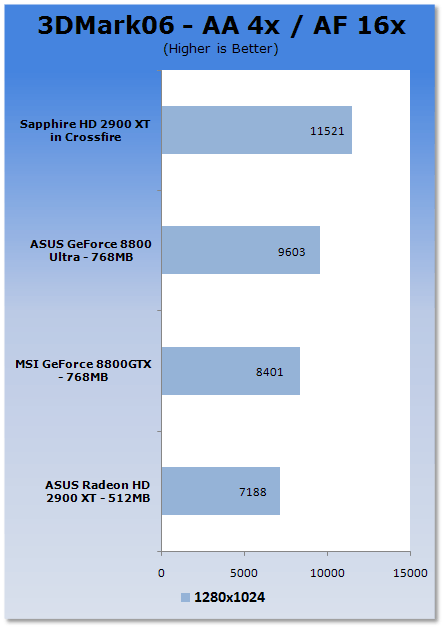
We again see that under the high amounts of pressure the Crossfire solution is able to offer big gains when compared to the Ultra.
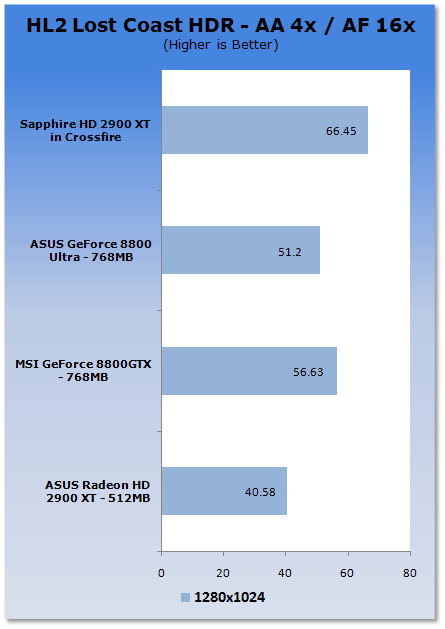
These gains are also carried over to HL-2 where we again see the Crossfire cards managing to beat the Ultra.
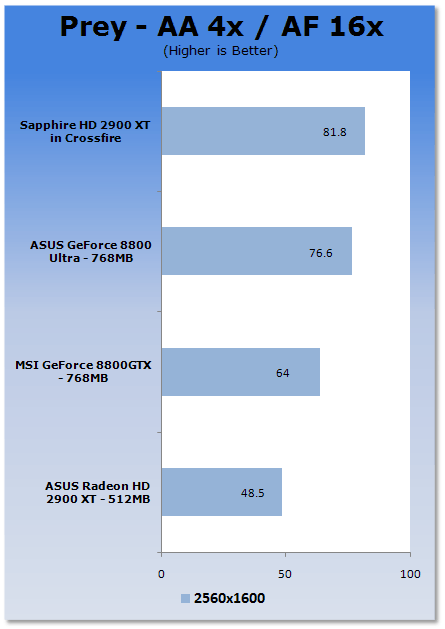
Finally we leave our gaming tests with Prey which we again must mention would usually favour NVIDIA thanks to the OpenGL implementation. However, the Crossfire solution is able to handle the intensive settings with ease.
Temperature and Sound Tests
Temperature Tests
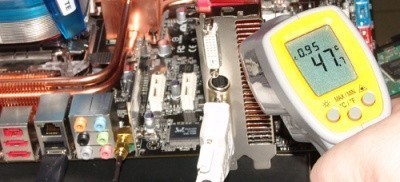
With the TES 1326 Infrared Thermometer literally in hand we found ourselves getting real-world temperatures from the products we test at load (3D clock speeds).
There are two places we pull temperature from - the back of the card directly behind the core, and if the card is dual-slot and has an exhaust point we also pull a temperature from there, as seen in the picture.
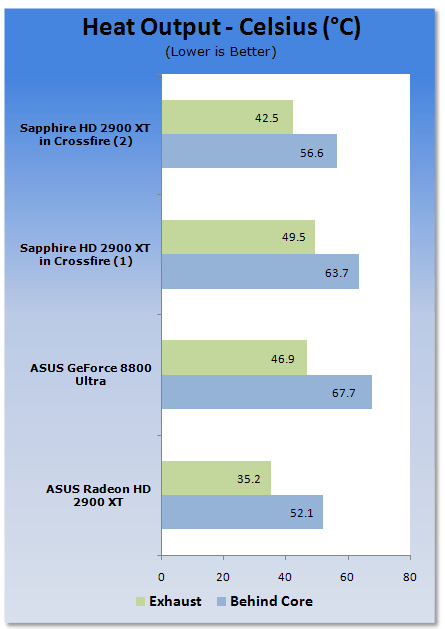
Even though we have two cards in Crossfire, the heat output on them is generally lower than that of the Ultra which is nice. We honestly thought that we would be pumping out a bit more heat
Sound Tests
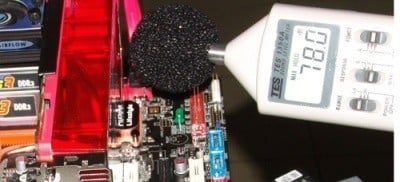
Pulling out the TES 1350A Sound Level Meter we find ourselves quickly yelling into the top of it to see how loud we can be.
After five minutes of that we get a bit more serious and place the device two CM away from the fan on the card to find the maximum noise level when idle (2D mode) and in load (3D mode).
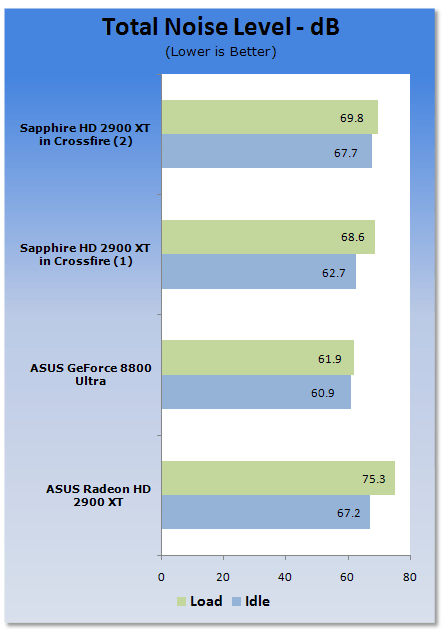
The noise levels on the Crossfire setup are clearly louder, even when at idle. It may bother some people so it's something worth thinking about.
Power Consumption Tests
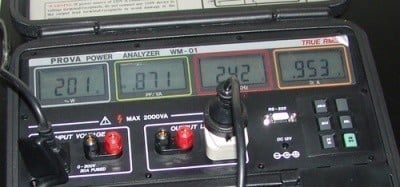
Using our new PROVA Power Analyzer WM-01 or "Power Thingy" as it has become quickly referred to by our readers, we are now able to find out what kind of power is being used by our test system and the associated graphics cards installed. Keep in mind; it tests the complete system (minus LCD monitor, which is plugged directly into an AC wall socket).
There are a few important notes to remember though; while our maximum power is taken in 3DMark 06 at the exact same point, we have seen in particular tests the power being drawn as much as 10% more. We test at the exact same stage every time; therefore tests should be very consistent and accurate.
The other thing to remember is that our test system is bare minimum - only a 7,200RPM SATA-II single hard drive is used without CD-ROM or many cooling fans.
So while the system might draw 400 watts in our test system, placing it into your own PC with a number of other items, the draw is inevitably going to be higher.
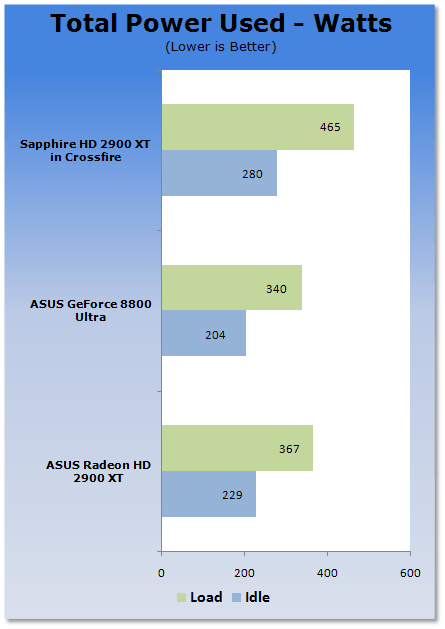
There is no doubt that the Crossfire setup is drawing out the big numbers. Hitting over 450 Watts is pretty serious and you want to make sure you have a decent power supply. While we grab our maximum wattage in 3DMark 06 when doing some serious CPU overclocking, we managed to get over 500 Watt power draw on the Crossfire solution in 3DMark 06. So if you also consider the fact that you will most likely be able to overclock your Crossfire setup in due course, make sure you pay some serious attention to the power supply you're using.
Final Thoughts
While I was testing, I made the graphs as the results came through but I didn't really notice the performance numbers until I was writing about the scores. The Crossfire setup really kicks butt. But the best thing? It's consistent.
What helps Crossfire is the fact that the P35 is such a fantastic board and only currently supports Crossfire as a multi-card solution. So if you want an excellent motherboard that is going to give your CPU huge overclocks, along with the graphics performance to go with it, Crossfire is the only solution. When compared to Nvidia's SLI arrangement, Crossfire generally manages to scale better as well, everything saw a performance increase and at 2560 x 1600 there were some pretty significant ones.
All we need now is the ability to overclock the cards and we will be absolutely rocking along.
The pros are there, performance, performance and performance. What about the cons though? Well you're going to need a decent power supply, but then you're going to want a decent one for an 8800 Ultra as well.
The Catalyst drivers also seem to be having some problems at the moment. The 47096 driver runs like an absolute dream but the 6.6 and 6.5 Catalysts seem to have some trouble with initializing Crossfire.
The other thing to remember is that the new 6.7 drivers actually add OpenGL performance, so once the Crossfire issue is delt with in the latest drivers we should begin to see even more performance. The monthly updates that AMD offer really apply some major pressure to NVIDIA.
We're glad that AMD have been able to do something good with the HD 2900 XT. It's a pity that it took so long, but you know what they say, better late than never! The playing field could become a whole lot more competitive though. Come September, the release of the X38 and its Crossfire / SLI compatibility means that NVIDIA and AMD are going to be on an even playing field when it comes to chipsets. For the first time we will be able to really compare SLI vs Crossfire with the only difference being the graphics cards.
While the Ultra is not a heap of crap, to be brutally honest... it is not far from it! Huge price tags and a ridiculous price-to-performance ratio doesn't make the card that attractive. Throw in the fact that a large amount of people still feel more comfortable using their Intel CPU on an Intel chipset and you really see yourself looking at Crossfire as an enthusiast setup. I know we mentioned this the other week but the bottom line is that thanks to the ridiculous price tag of the 8800Ultra it makes the HD 2900 XT smell like roses.
If you have the money and the motherboard, check out the HD 2900 XT in Crossfire. It is safe to say you won't be disappointed, especially if you're the owner of a screen which is capable of outputting 2560 x 1600. And thanks to more and more of them being released lately, pricing has become more aggressive, making a screen of this calibre a more viable choice.
Our Latest AMD CrossFire Articles Article Coverage
- AMD Radeon RX 6800 XT in mGPU: 2 x Big Navi GPUs = Insane Performance
- AMD Radeon RX 480 in CrossFire - Beating the GeForce GTX 1080 at 4K
- AMD Radeon R9 Fury X in 4-Way CrossFire at 11,520 x 2160 (Triple 4K)
- AMD Radeon R9 Fury X Video Cards in 4-way CrossFire at 4K
- AMD Radeon R9 Fury X Video Cards in CrossFire

 SAPPHIRE Radeon RX 9070 GRE PULSE OC Review - A New 1440p Challenger Has Arrived
 ASRock Radeon RX 9070 GRE Steel Legend Review - The RDNA 4 Mid-Range Reshuffle
 ASUS ROG Strix GeForce RTX 5070 Ti 16GB OC Edition Review - Premium Design, Premium Performance
 SAPPHIRE Radeon RX 9070 XT NITRO+ PhantomLink Review - RDNA 4's Beast Mode
 COLORFUL iGame GeForce RTX 5070 Ultra OC Review - When Style and Performance Meet
 'Radically different' business models coming to Xbox, CEO Asha Sharma says
 GEEKOM's new GeekBook M16 brings a Core Ultra 9 and a 99.9Wh battery to the business laptop market for $899
 AMD warns DDR5 prices won't recover until 2028 as AI demand continues pulling supply away from consumers
 SEGA under fire for using gen AI in new Crazy Taxi game
 Halo Studios quietly establishes innovative new business model for legacy game remakes
 Zelda Ocarina of Time remake confirmed for 2026 launch on Switch 2
 ID Cooling shows off wooden PC cases and matching AIO coolers at Computex 2026
 Formula V Line's Ice Nova Pro 3 air cooler could be perfect for brass-themed PC builds
 SAMA's Computex 2026 lineup includes a curved-glass case and AIO coolers with swappable screens
 Master Chief crashes the Covenant's vacation in new Halo remake prequel missions
 Navman MiVue Smart True 4K Surround Dashcam Review - Seeing In All Directions At Once
 IQUNIX Magi96 Pro Aluminum Low Profile Mechanical Keyboard Review - Premium Build, Satisfying Sound
 Asetek Forte S-Series Racing Simulator Bundle Review
 Razer Pro Type Ergo Wireless Split Ergonomic Keyboard Review - Built for Comfort and Support
 ASUS ROG Strix Morph 96 Wireless Gaming Keyboard Review - Great Performance, More Affordable
 NZXT H6 RGB+ Compact Dual-Chamber Chassis Review
 ASRock Z890 Taichi Aqua Motherboard Review - Flagship features without the flagship price
 GIGABYTE Z890I AORUS Ultra Motherboard Review - Mini-ITX with surprisingly good thermals
 The PowerToys utilities I keep enabled on every Windows 11 PC, and the ones I turned off within a week
 TweakTown's Best of Computex 2026 Awards - The Best Hardware, Gaming Gear, and AI
 Phison E37T SSD Controller Exclusive Preview - The Fastest DRAMless SSD Platform Yet
 USB Ports Not Working in Windows 11? Try These Fixes
 ASUS WiFi Routers and Networking Solutions Deliver Long-term Security and Reliability with No Additional Cost
 Second Monitor Not Detected in Windows 11? Try These Fixes
 Turn Your Old Smartphone Into a Dedicated Webcam for Your Windows PC
 The Send To menu is the right-click feature on Windows 11 that nobody bothers to customize
 Windows 11 will not let you pin a folder to the taskbar, but a 30-second workaround does
 ASUS ProArt Displays Unlock Creativity with Professional Monitors for Everyone