Introduction
It's come to my attention that more than a few of you aren't ready to go back to paying more than $250 for an SSD. I get it, I really do. Low cost LSI SandForce controllers and OCZ itself pushed SSD prices so low that anything over $1 per GB seems excessive. Over the last couple of months a handful of premium SSDs hit the market and pricing has crept back up to 2011 levels. The higher prices have led to an outcry for us to get back into testing smaller capacity units, an area we started to get away from in 2012.
The move back into smaller capacity sizes caught some companies off guard since most of the industry shifted to cover the 256GB capacity size or larger. So, instead of waiting for the industry to catch up we stepped up to deliver what you asked for, next gen SSD reviews in lower capacity size. In order to decrease the latency we went out and purchased the OCZ Vector 128GB on our own.
Today we're looking at the new Indilinx Barefoot 3 controlled Vector 128GB in a different light. This is a product purchased with my money and it was my time waiting for it to arrive. Today's article isn't just a review, but a look at the whole experience starting from the initial purchase to the excitement of loading the drive in my computer.
Today I'll be the judge and I want you to participate as the jury. At the bottom of every page is a comment section. Give your two cents, chime in with your thoughts, and let us know what you want to see. This month I'm putting the final details on some new benchmarks that'll make it into all of the SSD reviews in 2013; you'll get introduced to another new one today. Make sure you give us your feedback and be heard at the end of the review.
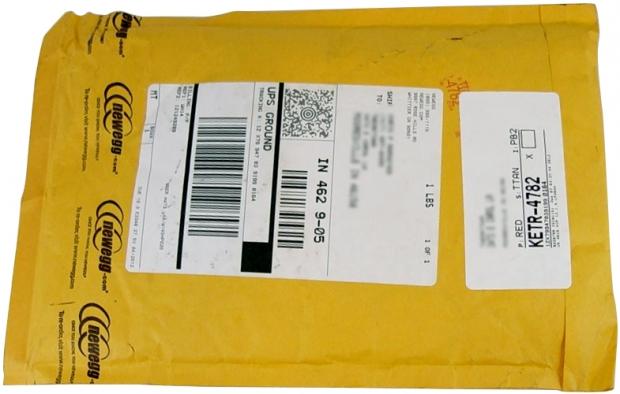
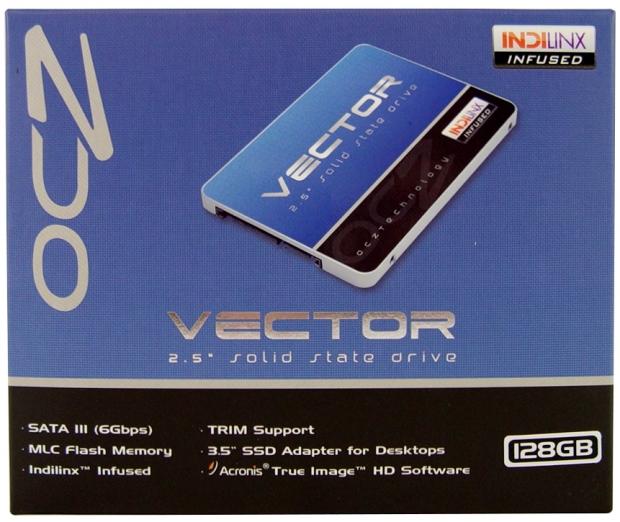
Our OCZ Vector 128GB was purchased at Newegg on 12/4/12 for $159.99 and we upgraded the shipping to UPS Ground 3-Day for an additional 1.99. Newegg shipped the drive on December 5th and it arrived around Noon December 7th.
Let's take a look at the specifications and then see what arrived in the package.
Specifications, Pricing and Availability
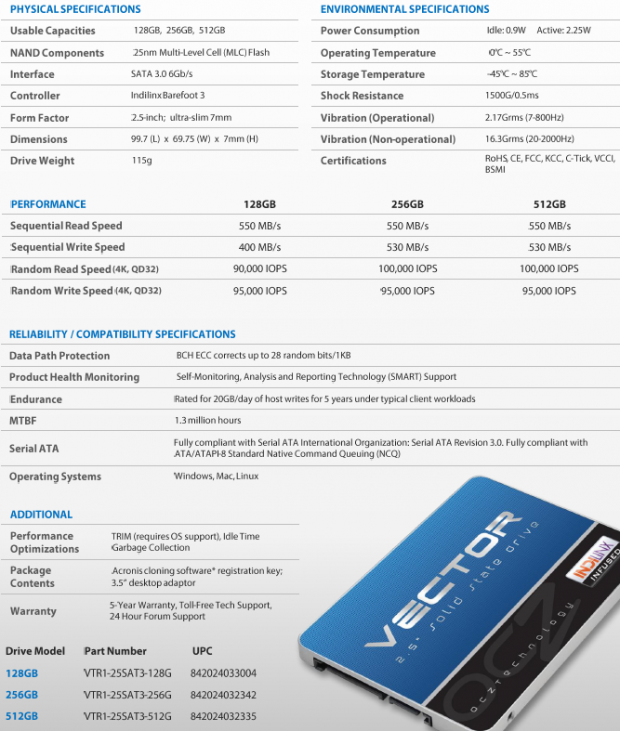
Vector is OCZ's newest flagship SSD and uses an in-house controller made possible through the acquisitions of Indilinx and PLX assets. At the time of writing OCZ lists three capacity sizes - 128GB, 256GB and 512GB. We suspect Barefoot 3 can scale to at least 1TB with new 20nm 1GB die (eight 16GB die per NAND package) when it hits the market in 2013. OCZ hasn't mentioned a 1TB capacity size model, but that would be the logical progression and we're already seeing 20nm flash ship on some products. Vector uses 25nm IMFT synchronous flash now that was purchased in bulk and packaged by OCZ.
Our Latest SSD Review Coverage
- Biwin M560 2TB SSD Review - Best Overall Retail-Ready DRAMless SSD
- Samsung 990 2TB SSD Review - Ninth Gen QLC at PCIe Gen4 Speeds
- Phison E37T SSD Controller Exclusive Preview - The Fastest DRAMless SSD Platform Yet
- Seagate FireCuda X1070 4TB SSD Review - A New Mainstream Contender
- Micron 3610 2TB SSD Review - DRAMless QLC at 11,000 MB/s
The 128GB model we're looking at today doesn't share the same performance specifications as the two larger models. The sequential read performance stays steady at 550MB/s across the board, but the sequential write speed moves to 400MB/s. The random read speed also shrinks to 90K IOPS, 10K lower than the two larger models.
Aside from the performance increases, Vector brings two new features to the table. The first is a new 7mm Z-height for many ultrabook designs. OCZ does have a Vertex 3 LP with the same 7mm Z-height, but Vertex 4 was never scaled to the smaller form factor. The second new accessory is a software inclusion for cloning an existing HDD/SSD. The software is called Acronis True Image and we've used it for years with great success.
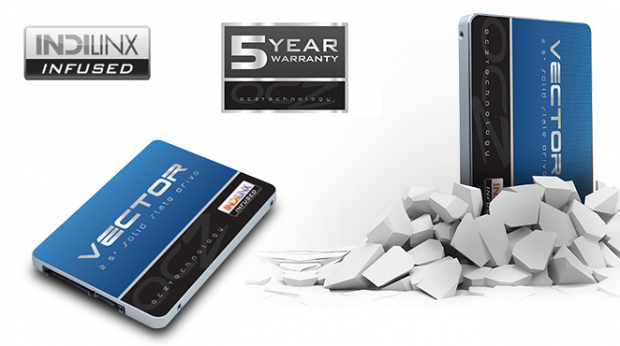
Vector continues OCZ's new flagship warranty length of five years, a term first introduced on Vertex 4. The rest of the accessory package is OCZ standard, desktop adapter bracket, mounting screws, a sticker and a couple of paper docs.
As we stated in the introduction, we spent $161.98 ($1.99 added for faster shipping) at Newegg for our Vector 128GB and waited roughly four days for it to arrive after the purchase.
Packaging and Accessories
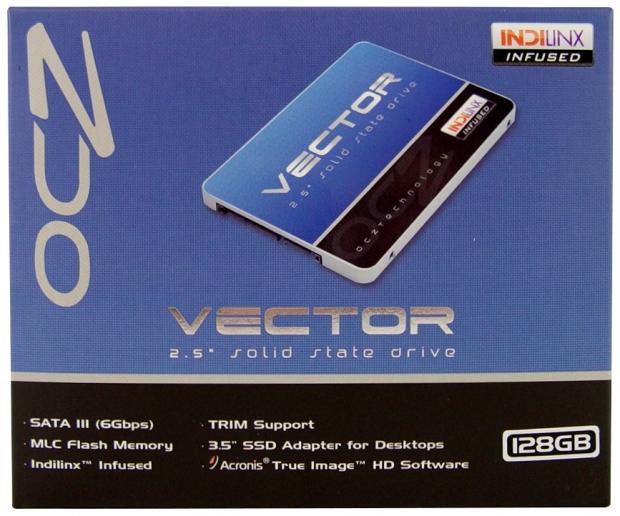
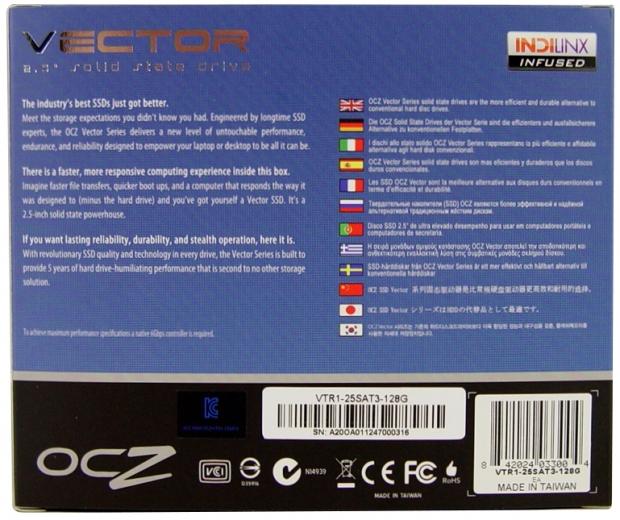
We're not going to spend as much time going on and on about the obvious any longer. If we see something that's out of place we'll let it be known.

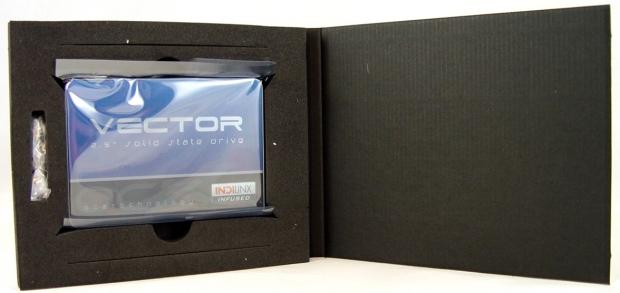
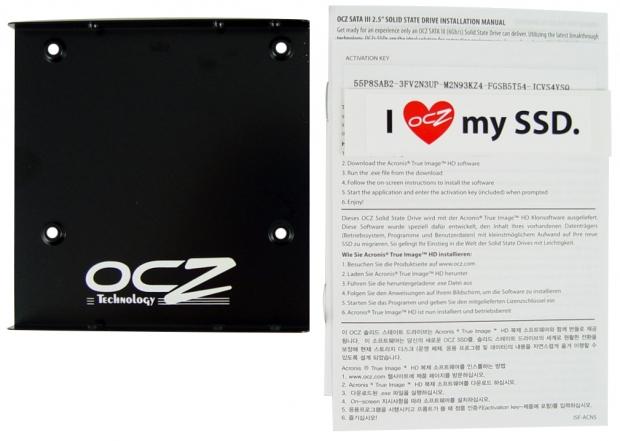
OCZ includes a product key for Acronis True Image on a paper document in the package. We've hidden some of it here so hands off mine. You do have to go to OCZ's website to download the software as it isn't shipped on the drive or included in the package.
OCZ Vector 128GB SSD
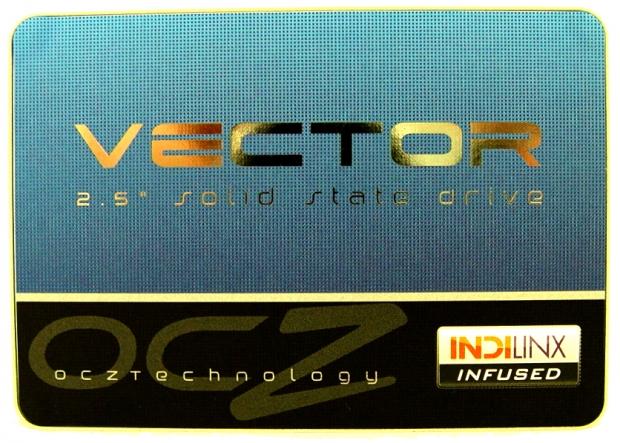
Here we get our first look at Vector 128GB. The new case design is really cool and a big step up from the mixed plastic with thin brushed metal used on Vertex 4.
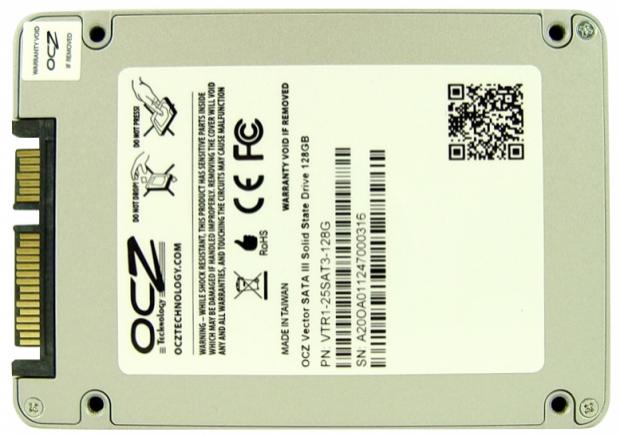
All of the relevant information is on the back label. Here you'll find the part number and the serial number.

All three Vector capacity sizes ship in a slim 7mm case. The 7mm form factor uses the same mounting positions as standard 9.5mm 'notebook' drives so you won't have a problem installing the drive in your existing notebook or new ultrabook as long as it has an open SATA port.
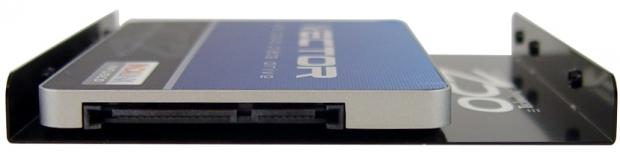
OCZ also includes a desktop adapter bracket that allows you to mount the drive in your desktop 3.5" form factor bay.
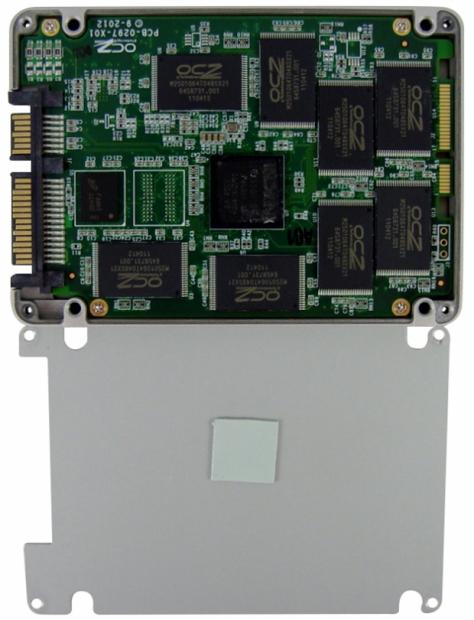
The Indilinx Barefoot 3 controller is fused to the case via thermal transfer material. This aids in moving any heat from the controller to the case keeping the controller cool.
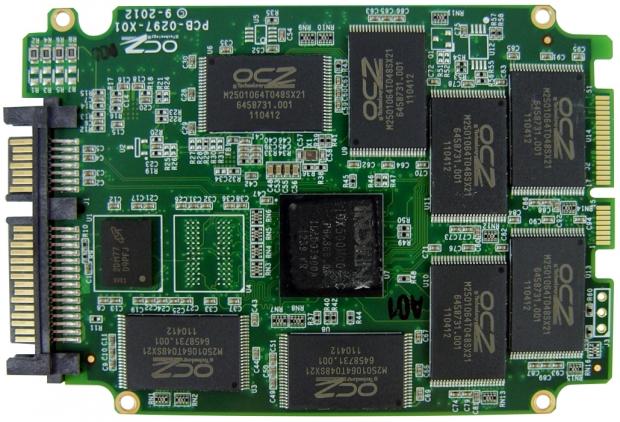
The controller takes up residence in the middle of the PCB and 25nm IMFT NAND flash surrounds the controller. There are two DRAM buffers for caching page table data, one on each side just like what we found on the 256GB model. There is an empty pad next to the controller and we suspect it's used on the larger 512GB model. Hopefully we can acquire a 512GB model soon!
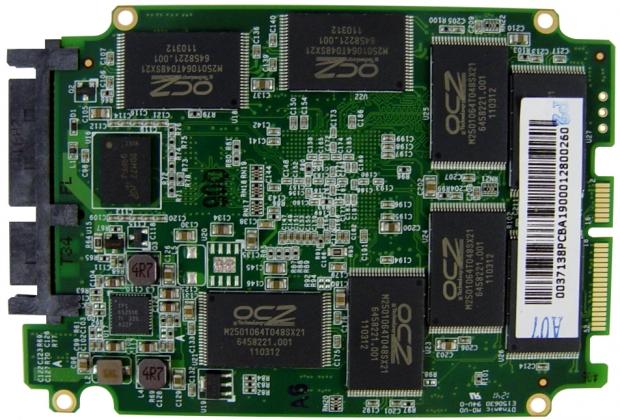
I want to point out that you should never open your SSD. We are trained professionals... well trained by trial and error. If you open your case you will void your warranty and possibly kill your drive.
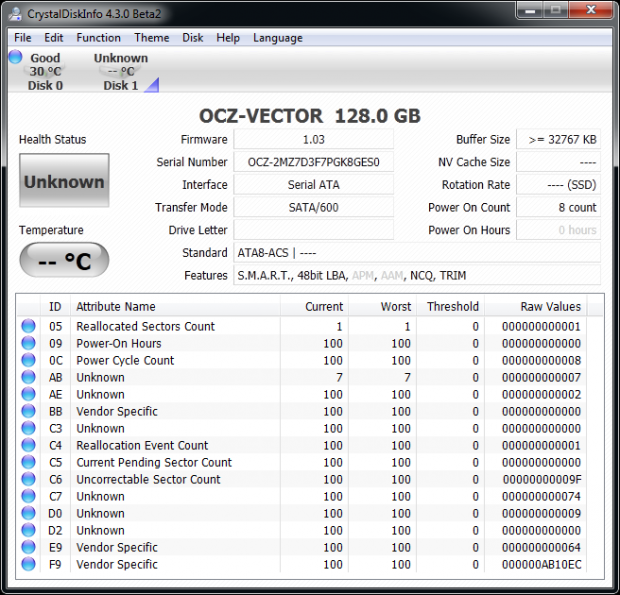
Our drive arrived with a power on count of 8. It looks like OCZ tests their drives before shipping them. Burn In helps increase the quality of the products you receive.
Our retail purchased Vector 128GB shipped with firmware 1.03. This is a new release for us, our 256GB sample shipped with 1.02. We don't know what changes between the firmware releases.
Benchmarks - Test System Setup and ATTO Baseline Performance
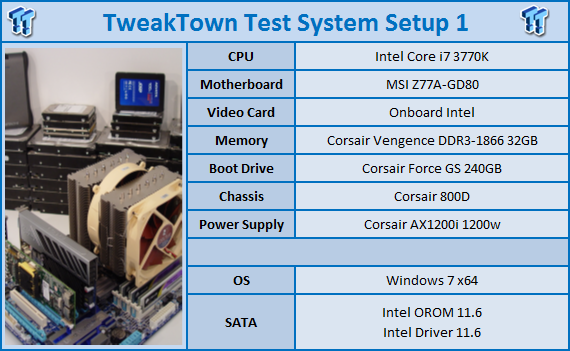
Desktop Test System
Lenovo W530 - Mobile Workstation
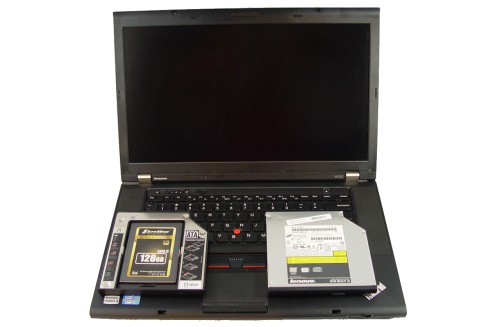
We use two systems for SSD testing. The desktop runs a majority of the tests and the Lenovo W530 runs the notebook power tests as well as the real-world file transfer benchmark.
ATTO Baseline Performance
Version and / or Patch Used: 2.34
ATTO is used by many disk manufacturers to determine the read and write speeds that will be presented to customers.
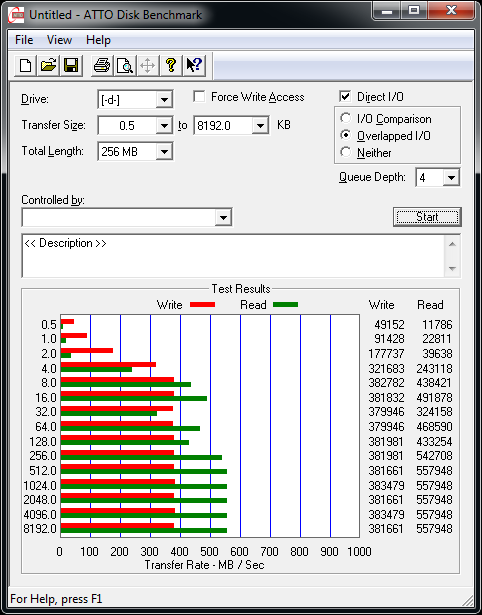
OCZ measures their marketing performance at a queue depth of 10, but we use QD4, the default for ATTO. In our test we achieved a read speed of nearly 558MB/s and a write speed of 381MB/s. The dip at block size 32 is still here with this firmware release.
Benchmarks - Sequential Performance
HD Tune Pro
Version and / or Patch Used: 4.00
Developer Homepage: http://www.efdsoftware.com
Product Homepage: http://www.hdtune.com
HD Tune is a Hard Disk utility which has the following functions:
Benchmark: measures the performance
Info: shows detailed information
Health: checks the health status by using SMART
Error Scan: scans the surface for errors
Temperature display
HD Tune Pro gives us accurate read, write and access time results and for the last couple of years has gained popularity amongst reviewers. It is now considered a must have application for storage device testing.
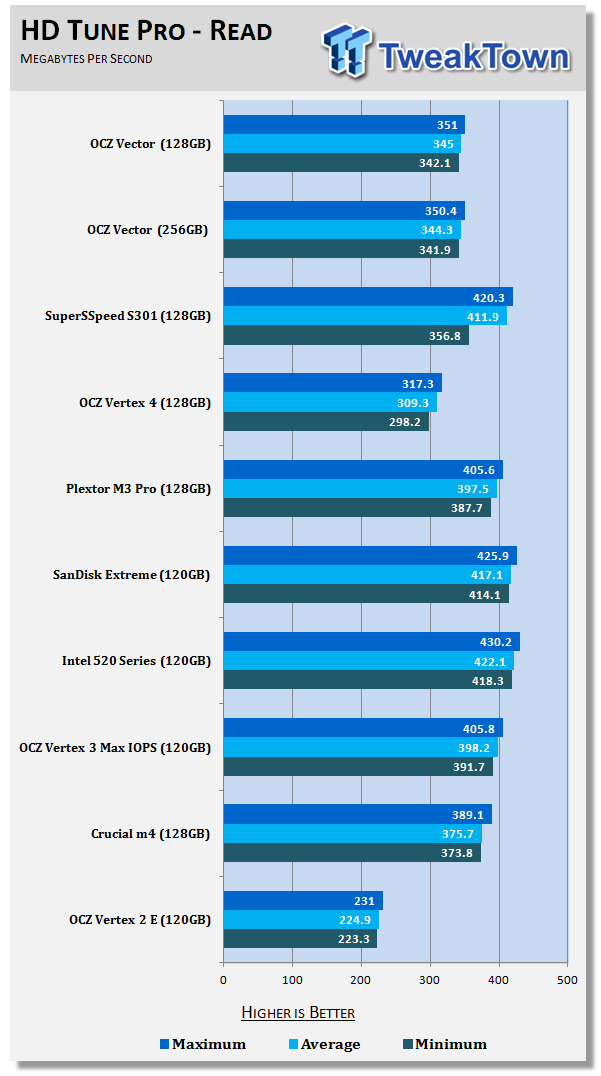
Reading across the drives with a queue depth of one, Vector 128GB keeps pace with the 256GB version. OCZ built in a feature that artificially limits single queue depth read performance. For a while, we thought it was a burden, but we couldn't explain why Vertex 4 felt faster than what the benchmarks stated. We have a little more understanding about it now.
If you limit a single request to 350MB/s, you have headroom for another task to take place without interrupting the first. It's a bit like having two thin driveways to your garage instead of one wide one. You and your spouse are trying to leave at the same time and both of you are in a hurry. If you have one wide driveway you both can drive fast because you're not worried about dropping a tire off the edge. The driveway isn't wide enough for you to drive side-by-side so you have to go one in front of the other. If your spouse is in the front and drives slower, you're delayed because of the latency of your spouse driving slower. The way OCZ worked it is with two thinner driveways. You can't drive as fast on the thinner driveway, but you don't get delayed by other traffic.
When we first saw this behavior on Vertex 4 with the initial firmware the limit was just 200MB/s. OCZ increased the limit in later firmware releases to just over 300MB/s and Vector increases it to around 350MB/s. We'll talk about this a little later on in the review because the artificial limit affects some benchmarks and makes their reported performance seem lower than what you'll find in real-world situations. At the same time, when copying data the 350MB/s limit is the maximum you'll get when moving data by copy and paste.
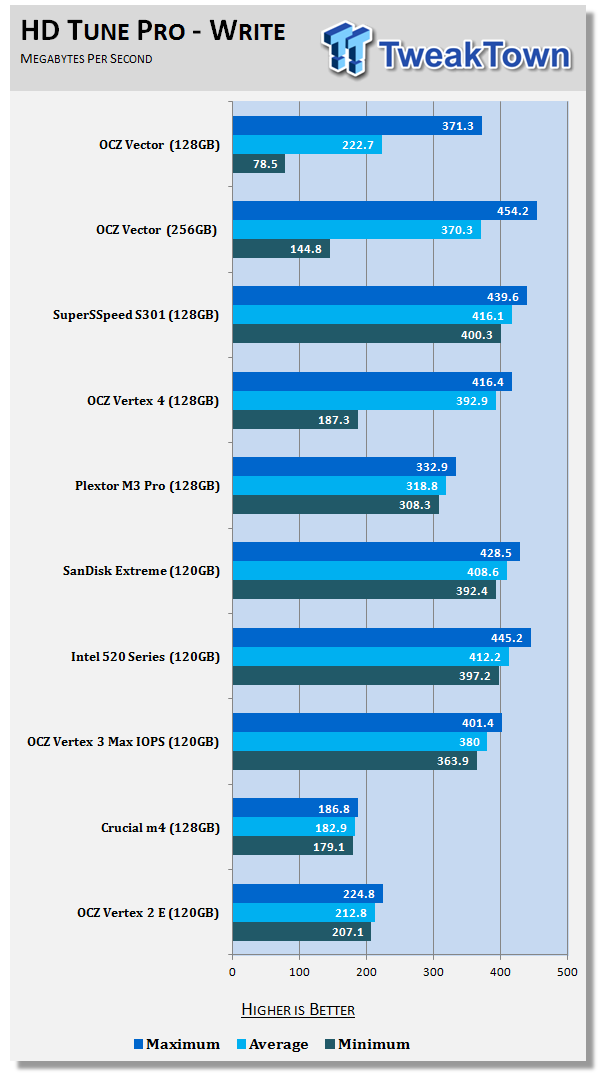
OCZ has another trick up its sleeve, this time we see it when writing a lot of data to the drive. HD Tune Pro uses 64KB data, but when we move the test to 128KB, the 'storage mode' affect goes away.
This one is a little harder to explain. We've read that storage mode doesn't kick in until after half of the flash has data on it, but we've taken that theory off the table. If that were true then our Data on Disk testing would show a massive performance decrease when we move from 25% full to 50% full, but it doesn't.
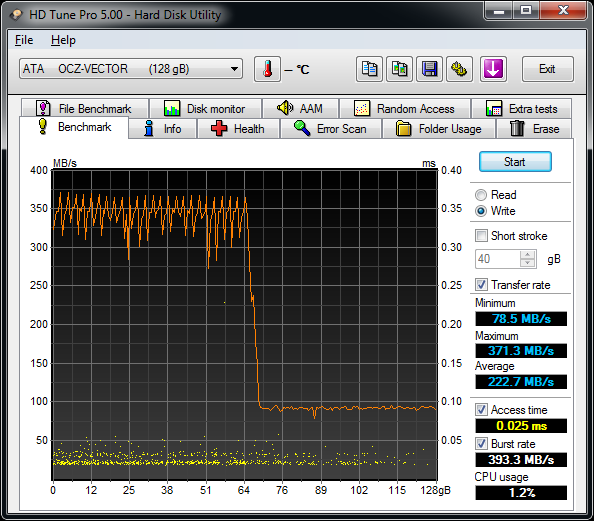
Here we see the actual benchmark run. The performance drops at 50%, but it has more to do with the block size of the data and how fast we put the data on the drive. At the 64KB size the drop in performance when blasting the drive with data is at 50%, but with 128KB data the drive doesn't drop at all.
Benchmarks - AIDA64 Random Access Time
AIDA64 Random Access Time
Version and / or Patch Used: 1.60
Developer Homepage: http://www.aida64.com
Product Homepage: http://www.aida64.com
AIDA64 offers several different benchmarks for testing and optimizing your system or network. The Random Access test is one of very few if not only that will measure hard drives random access times in hundredths of milliseconds as oppose to tens of milliseconds.
Drives with only one or two tests displayed in the write test mean that they have failed the test and their Maximum and possibly their Average Scores were very high after the cache fills. This usually happens only with controllers manufactured by JMicron and Toshiba.
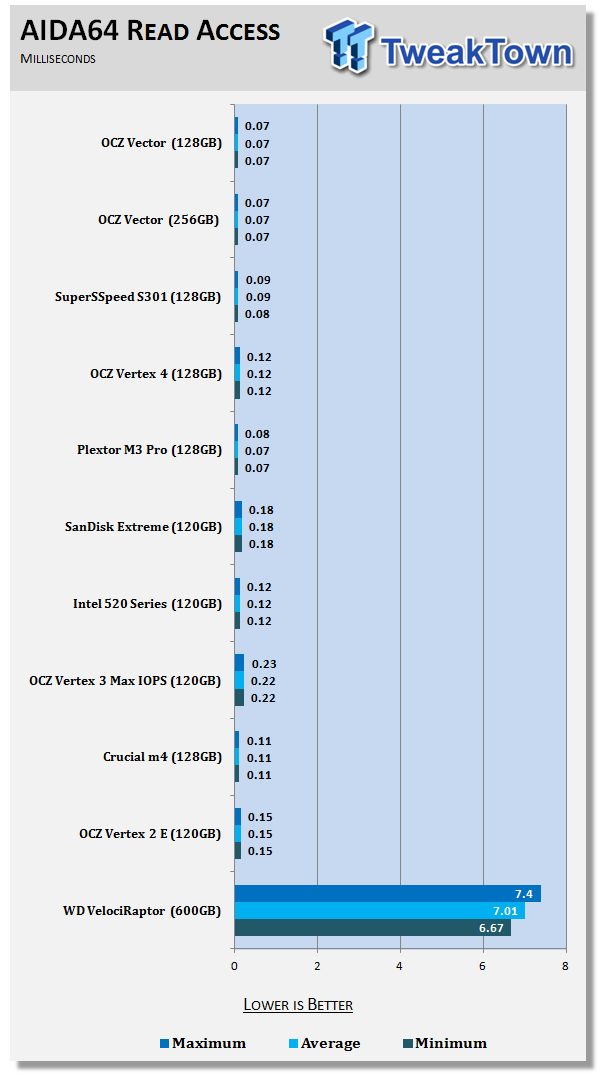
Vector has very low read access time. We measured .07ms across the board at 64KB.
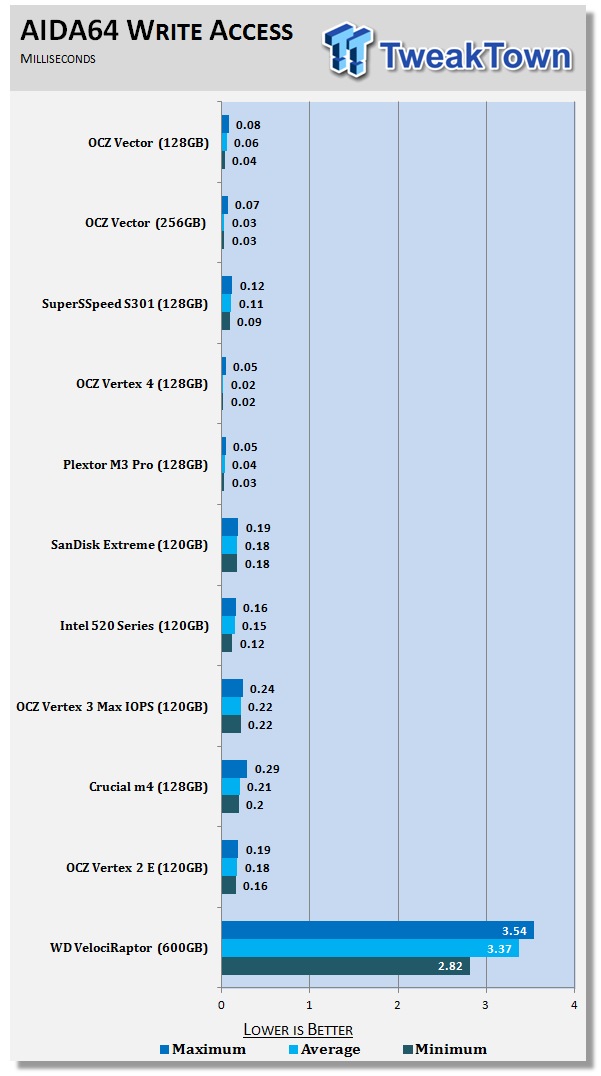
The write access time is very low as well, but the 128GB Vector access time is a little higher than the 256GB Vector.
Benchmarks - Anvil Storage Utilities
Anvil Storage Utilities
Version and / or Patch Used: RC5
So what is Anvil Storage Utilities? First of all, it's a storage benchmark for SSDs and HDDs where you can check and monitor your performance. The Standard Storage Benchmark performs a series of tests, you can run a full test or just the read or the write test or you can run a single test, i.e. 4K DQ16.
Anvil Storage Utilities is not officially available yet but we've been playing with the beta for several months now. The author, Anvil on several international forums has been updating the software steadily and is adding new features every couple of months.
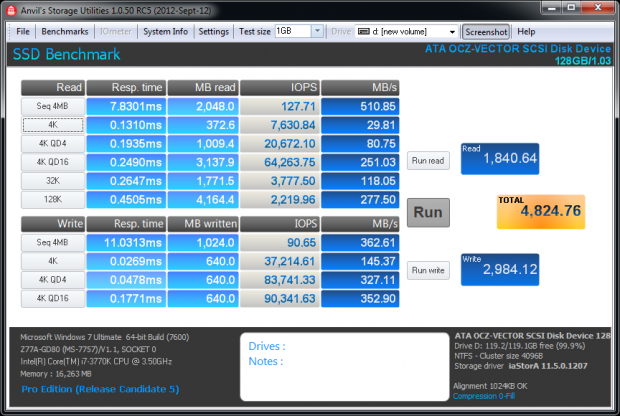
The software is used several different ways and to show different aspects for each drive. We've chosen to use this software to show the performance of a drive with two different data sets. The first is with compressible data and the second data set is incompressible data. Several users have requested this data in our SSD reviews.
Fill Compressible Data
Incompressible Data
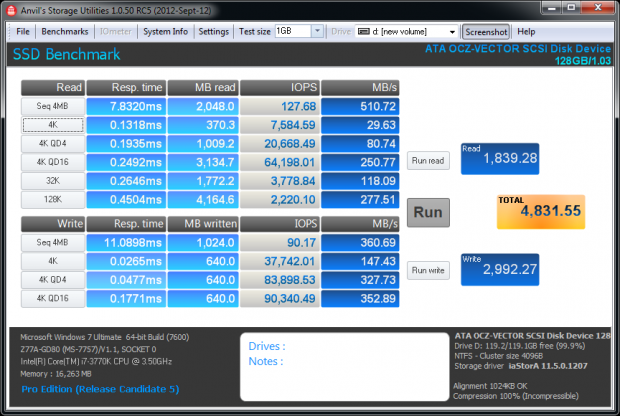
The OCZ Vector 128GB doesn't change performance when changing from compressible to incompressible data.
Scaling Read IOPS through Queue Depth
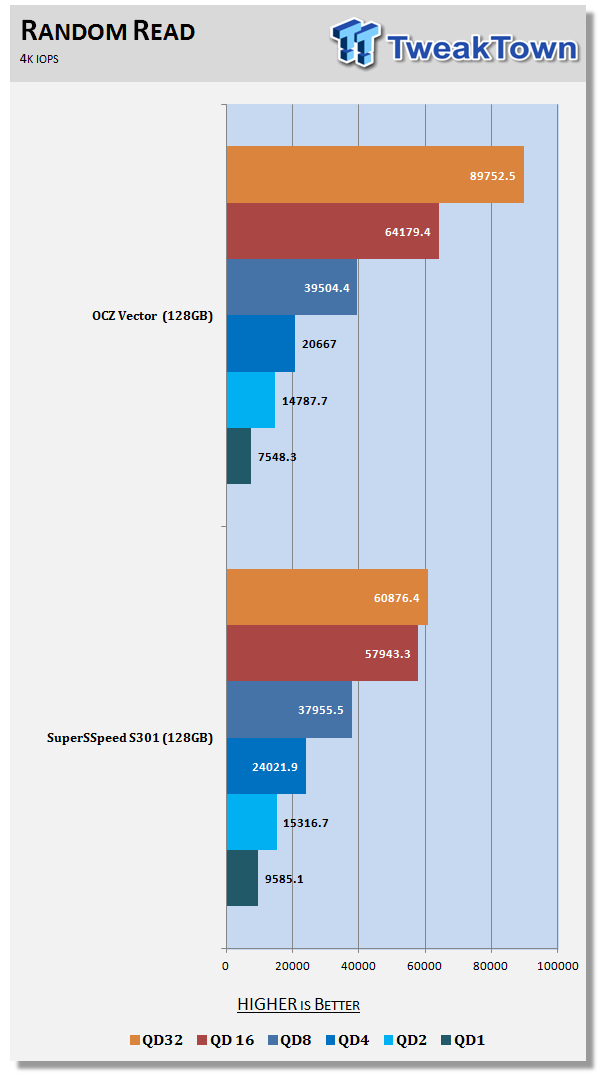
Here we have one of the new tests. When companies market their drives they publish their highest performance. When it comes to IOPS, you rarely if ever will see a queue depth of 32. Performance at lower queue depths is much important than higher queue depths for most users.
Scaling Write IOPS through Queue Depth
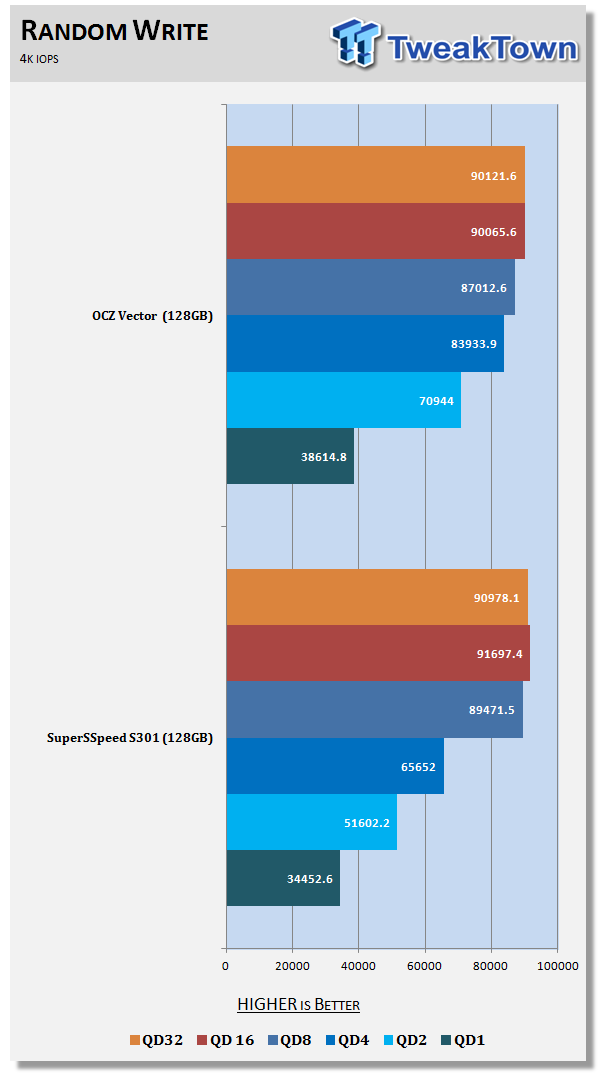
The same goes for 4K write IOPS, the lower queue depths are more meaningful than the high queue depths. The OCZ Vector 128GB manages to outperform the SuperSSpeed S301 with SLC NAND flash in this test. I didn't think it was possible.
Benchmarks - CrystalDiskMark
CrystalDiskMark
Version and / or Patch Used: 3.0 Technical Preview
Developer Homepage: http://crystalmark.info
Product Homepage: http://crystalmark.info/software/CrystalDiskMark/index-e.html
Download here: http://crystaldew.info/category/software/crystaldiskmark
CrystalDiskMark is a disk benchmark software that allows us to benchmark 4K and 4K queue depths with accuracy.
Key Features:-
* Sequential reads/writes
* Random 4KB/512KB reads/writes
* Text copy
* Change dialog design
* internationalization (i18n)
Note: Crystal Disk Mark 3.0 Technical Preview was used for these tests since it offers the ability to measure native command queuing at 4 and 32.
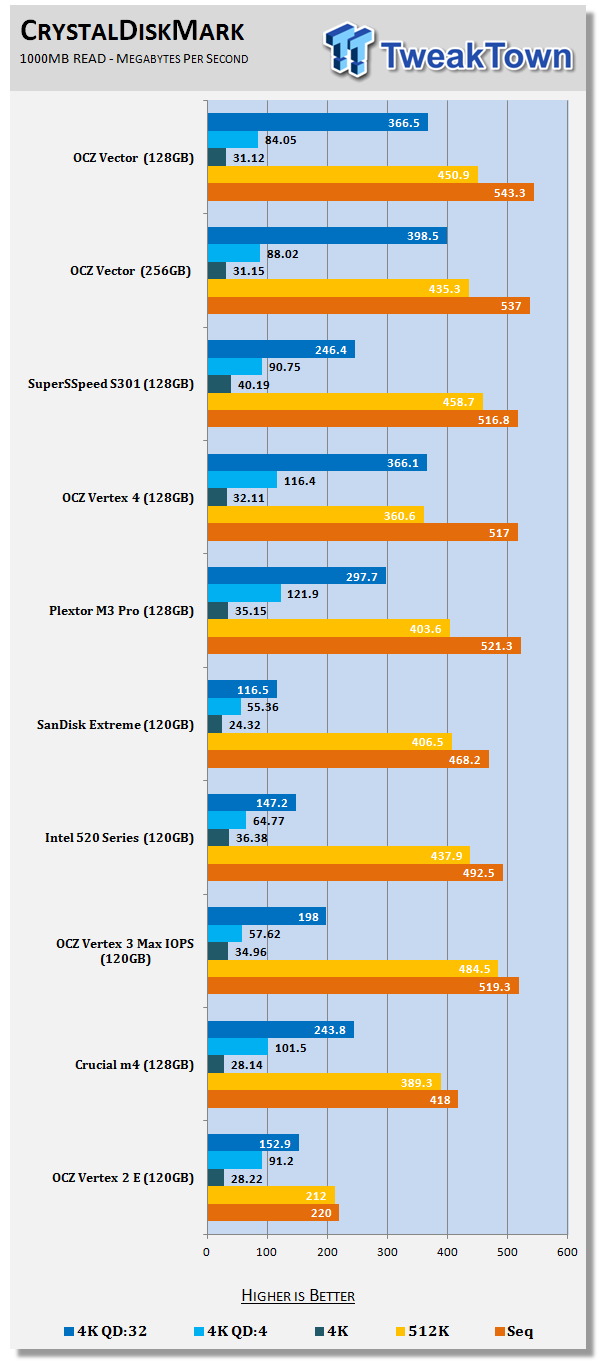
In CDM we're looking at 4K performance in MB/s and scale it with queue depths. Both of the Vector drives perform at almost the same rate when reading data.
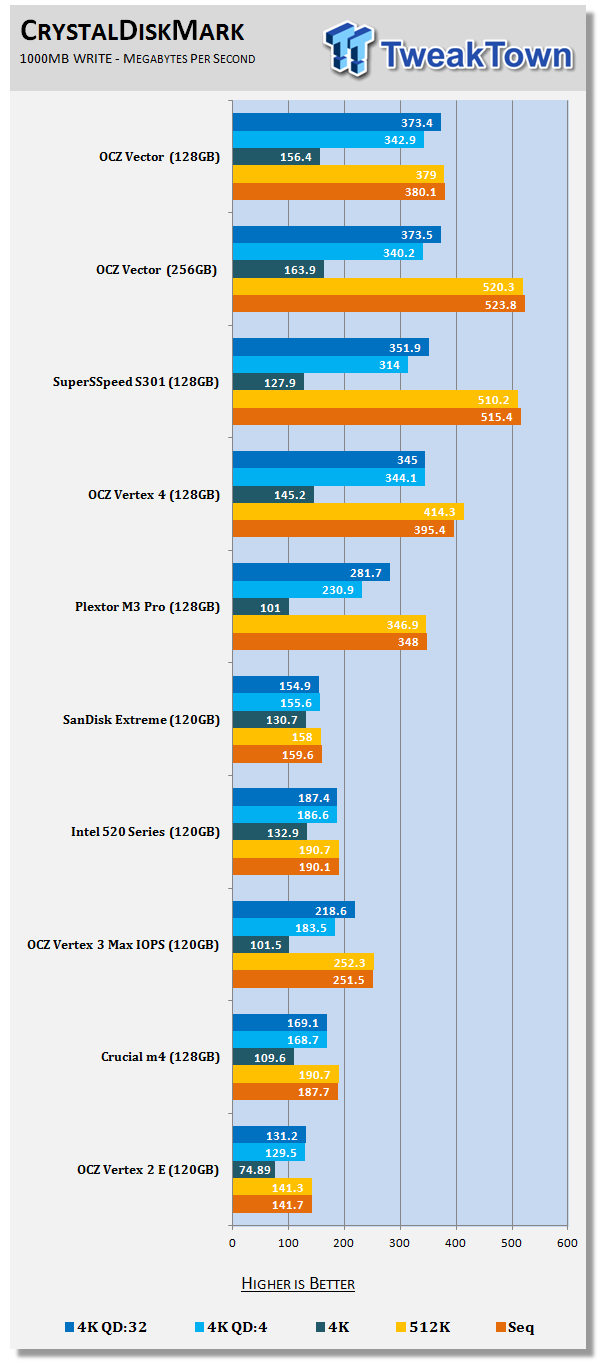
The 4K writes are nearly the same between the two capacity sizes, but the 256GB Vector has more headroom when working with sequential data.
Benchmarks - PCMark Vantage Hard Disk Tests
PCMark Vantage - Hard Disk Tests
Version and / or Patch Used: 1.0.0
Developer Homepage: http://www.futuremark.com
Product Homepage: http://www.futuremark.com/benchmarks/pcmark-vantage/

PCMark Vantage is the first objective hardware performance benchmark for PCs running 32 and 64 bit versions of Microsoft Windows Vista. PCMark Vantage is perfectly suited for benchmarking any type of Microsoft Windows Vista PC from multimedia home entertainment systems and laptops to dedicated workstations and high-end gaming rigs. Regardless of whether the benchmarker is an artist or an IT Professional, PCMark Vantage shows the user where their system soars or falls flat, and how to get the most performance possible out of their hardware. PCMark Vantage is easy enough for even the most casual enthusiast to use yet supports in-depth, professional industry grade testing.
FutureMark has developed a good set of hard disk tests for their PCMark Vantage Suite. Windows users can count on Vantage to show them how a drive will perform in normal day to day usage scenarios. For most users these are the tests that matter since many of the old hat ways to measure performance have become ineffective to measure true Windows performance.
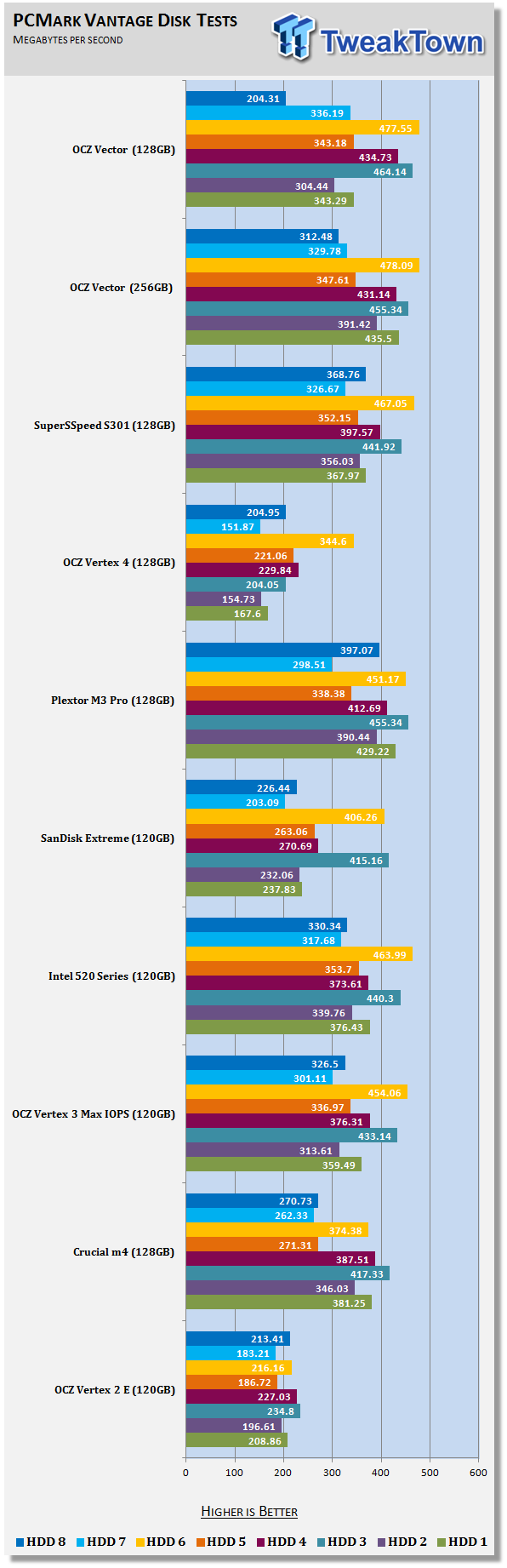
HDD1 - Windows Defender
HDD2 - Gaming
HDD3 - Windows Photo Gallery
HDD4 - Vista Startup
HDD5 - Windows Movie Maker
HDD6 - Windows Media Center
HDD7 - Windows Media Player
HDD8 - Application Loading
So far we've seen Vector 128GB and 256GB perform very well and the smaller drive even managed to outperform the larger version in some tests. With the drives empty these two drives go back and forth again in the individual benchmarks, but the 256GB model is master in more of the tests.
Benchmarks - PCMark Vantage - Drives with Data Testing
For a complete breakdown on the Drives with Data Testing please read this article. You will be able to perform this test at home with the files provided in the article - full instructions are included.
- Brief Methodology
SSDs perform differently when used for a period of time and when data is already present on the drive. The purpose of the Drives with Data testing is to show how a drive performs in these 'dirty' states. SSDs also need time to recover, either with TRIM or onboard garbage collection methods.
Drives with Data Testing - 25%, 50%, 75% Full States and Dirty / Empty Test
Files needed for 60 (64GB), 120 (128GB), 240 (256GB)
60GB Fill - 15GB, 30GB, 45GB
120GB Fill - 30GB, 60GB, 90GB
240GB Fill - 60GB, 120GB, 160GB
Empty but Dirty - a test run just after the fill tests and shows if a drive needs time to recover or if performance is instantly restored.
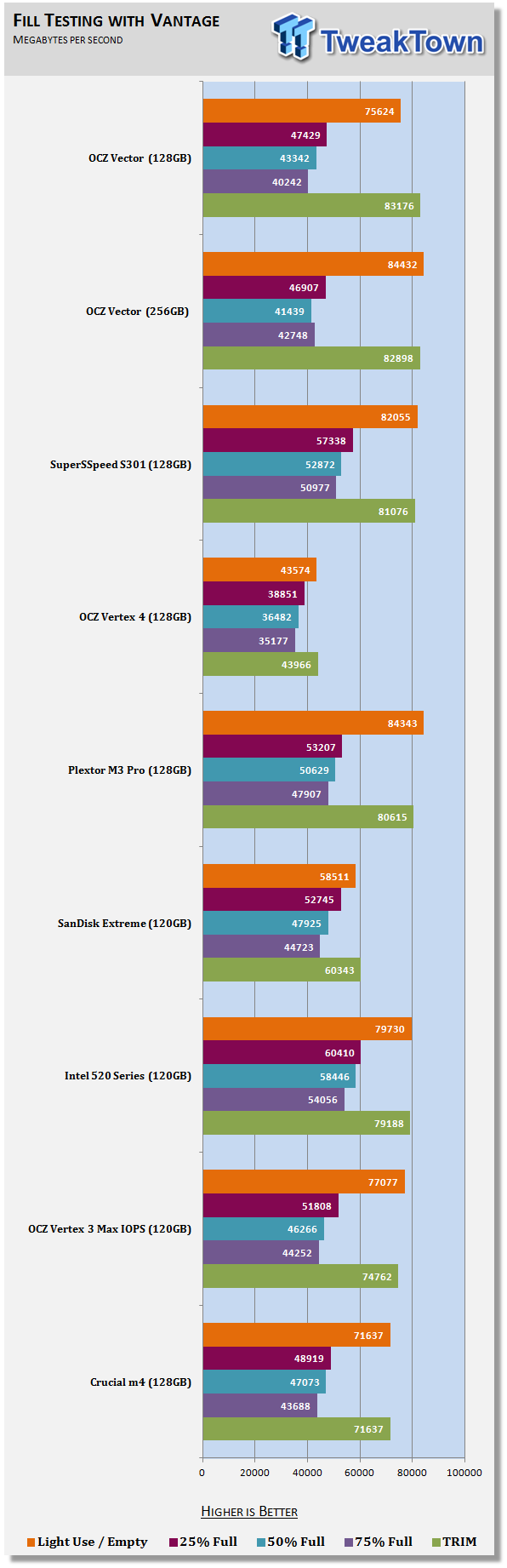
Vector 128GB performs very well when half of the drive has data on it. This contradicts some of the statements made about the way storage mode works. If storage mode becomes active when half of the drive has data on it we would see a massive performance drop here, but as you can see, there is only a small drop between 25% and 50%.
Benchmarks - BootRacer
BootRacer - System Boot Time
Version and / or Patch Used: 4.0
Developer Homepage: Greatis
Product Homepage: BootRacer
Download here: http://www.greatis.com/bootracer/download.htm
Note: In this test we use the Lenovo W530 Mobile Workstation loaded with an operating system and several program files. The data on the drive at the time of the test is 45GB. The second test, 50GB Free, was ran with the drives filled with block data until only 50GB of free capacity remained.
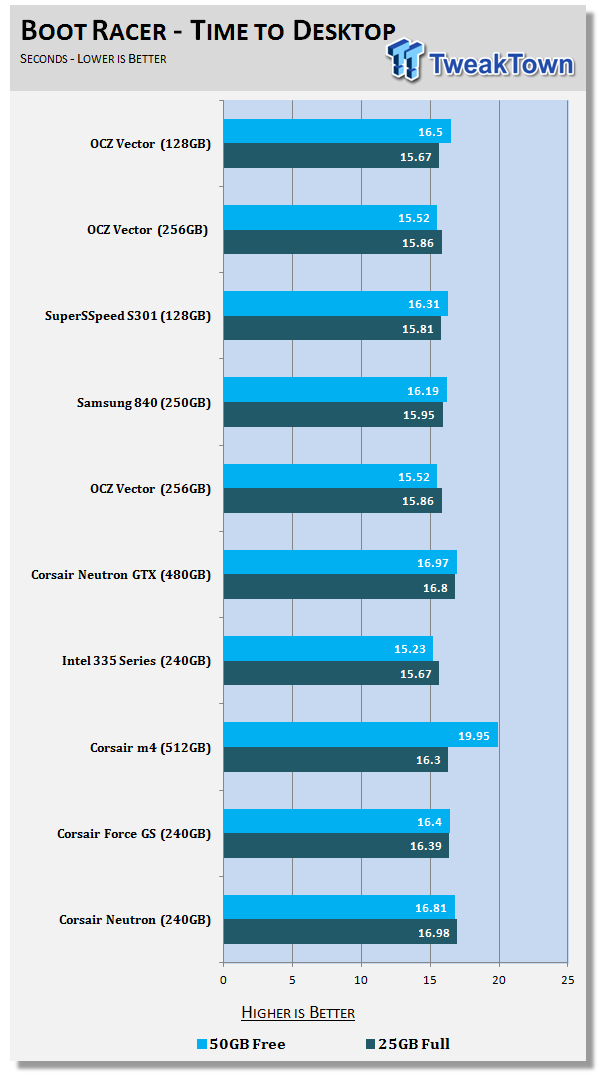
Looking over the chart, there isn't much of a difference when booting into Windows under typical notebook conditions.
Benchmarks - DiskBench
DiskBench - Directory Copy
Version and / or Patch Used: 2.6.2.0
Developer Homepage: Nodesoft
Product Homepage: DiskBench
Download here: http://www.nodesoft.com/diskbench/download
Note: In this test we use the Lenovo W530 Mobile Workstation and a SuperSSpeed S301 SLC 128GB SSD to move a 15GB block of data to and from the target drive. This is part of our real world test regiment. Roughly 45GB of data resides on the target drive before the '15GB Block' is transfer. The 15GB Block is the same data we built for the Data on Disk Testing and is a mix of compressible and incompressible data.
Directory Copy
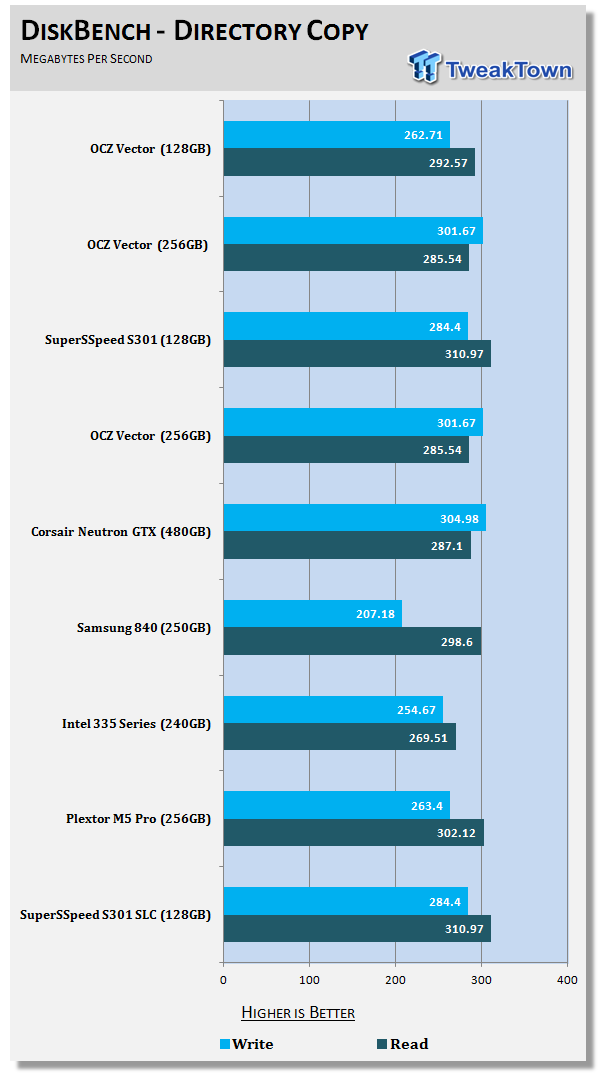
Transferring real world data to and from Vector is very fast. The 256GB is a little faster when writing the data, but the 128GB is a little faster at reading it back.
Benchmarks - Power Testing
Bapco MobileMark 2012 1.5
Version and / or Patch Used: 2012 1.5
Developer Homepage: http://www.bapco.com
Test Homepage: http://www.bapco.com
MobileMark 2012 1.5 is an application-based benchmark that reflects usage patterns of business users in the areas of office productivity, media creation and media consumption. Unlike benchmarks that only measure battery life, MobileMark 2012 measures battery life and performance simultaneously, showing how well a system design addresses the inherent tradeoffs between performance and power management.
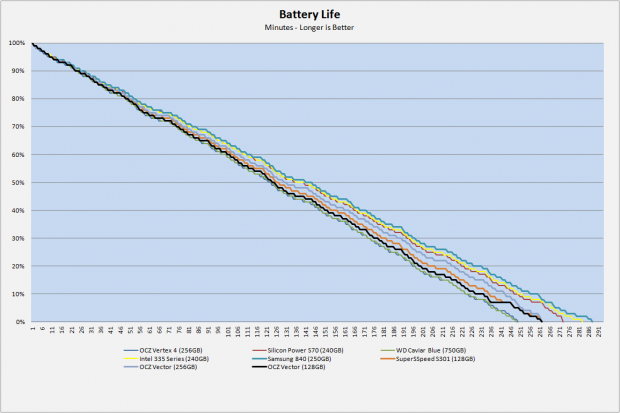
The Vector 128GB (highlighted in black on the chart) delivers middle of the road battery life performance. Both Vector drives score nearly identical times and both deliver a lot more battery time over Vertex 4.
PCMark Vantage HDD Tests - Power Draw
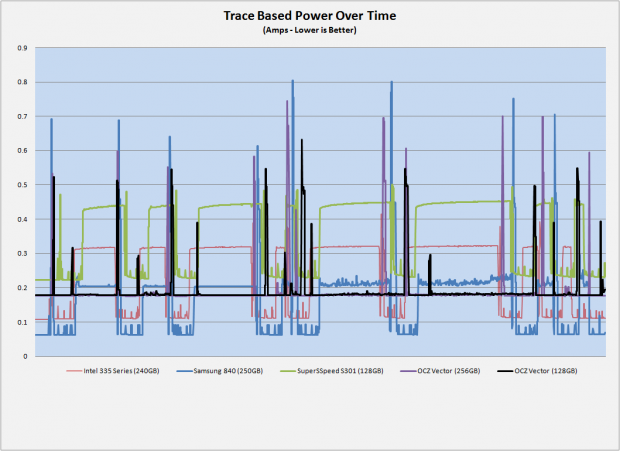
Here we see power draw of the SSD with Vector 128GB again in black. The idle power is higher than some of the other drives on the chart, but when reading sequential data, the power doesn't increase a lot. Writing sequential data doesn't increase the power pull either. The only time we see large spikes is with random data.
Final Thoughts
On our charts today we put the OCZ Vector up against a number of previous generation 128GB drives, Vector 256GB and the SLC wonder drive, SuperSSpeed S301. Vector 128GB blew away all of the previous generation drives by a good margin in many of the tests.
That still leaves us with the current crop of best in class SSDs that just hit the market over the last three months. For the last three or four months we've let some of our SSD reviews slide in order to further develop our SSD and NAS testing procedures for 2013. That's starting to bite us because we don't have Neutron, Neutron GTX, M5, M5 Pro or either of the two new Samsung drives to compare with today. We have a few of those 128GB drives on the way and are working on the rest, unfortunately we don't have them on hand now so the big Next Gen 128GB Showdown will have to wait another week.
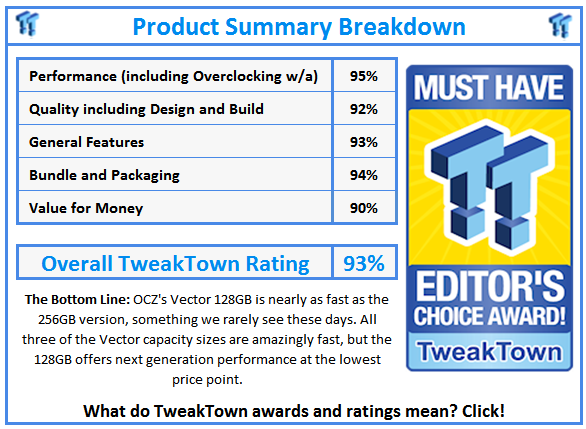
Without the other competitors on hand for the fastest 128GB SSD show down, we can't say if Vector is the fastest in this capacity size. We will say today that Vector 128GB is amazingly fast and one of the top two to three contenders for the speed crown in all three capacity sizes.
With a price of $159.99, Vector 128GB isn't cheap. Over the holiday shopping season, we've seen 120/128GB drives sell for as low as $60. A few of those drives were built by OCZ and some of them are very good, high performing drives. OCZ is going to have a difficult time convincing some people to lay down the loot for some of the best performance available when drives like Vertex 3 Max IOPS are so cheap yet so good. I think once Vector gets down to $1 per GB it looks a lot more attractive.
What do you think?