









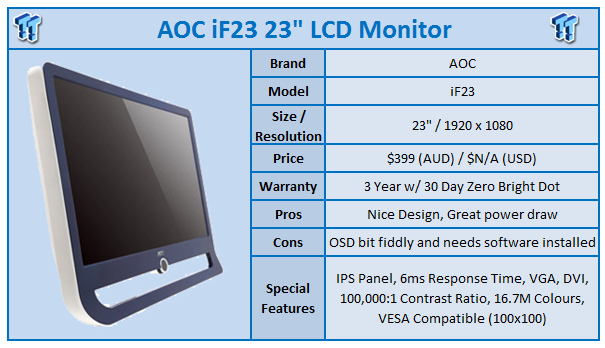
AOC for a long time has been associated with budget displays; not so much budget in the sense of poor quality, but budget in the sense that they're cheaper than their competitors. It's been a few years since I've looked at an AOC monitor; let's just say that 4:3 was still the in screen ratio at that time. So let's have a look at what AOC are doing these days.
At first glance I have to say that the iF23 is a beautiful looking monitor. Not to sound harsh towards AOC, but it's a lot nicer looking than I thought it would be. The iF23 comes in at 23" as you might've already guessed. It sports a 1920 x 1080 16:9 resolution via an IPS panel. We've also got a 100,000:1 Contrast Ratio (Typical), 6ms response time and 250 cd/m2 brightness ratio.
The box isn't anything exciting, but inside we've got a nice little surprise. Included we've got some paperwork on how to set the monitor up, driver CD and some cables including power, DVI and VGA. Also inside is a nice little cleaning cloth that you can use to keep your screen looking as beautiful as the day you received it.
AOC say the monitor is designed in almost a photo frame design. It might sound a bit silly since this is a monitor and not a photo frame, but it looks really nice and elegant. A little stand sits at the back of the monitor which can be twisted to adjust the angle.
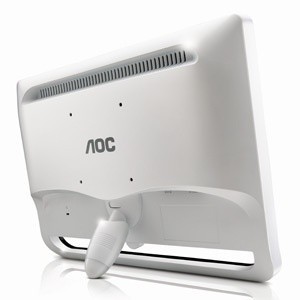
If you're not a fan of that, an optional more traditional stand can be purchased which will let you tilt the monitor and move it to and from landscape and portrait. If you're thinking of wall mounting the monitor, it is also VESA 100mm compatible which is something worth noting.
Connectivity is a little lacking with only DVI and VGA being present, but the pricing of the monitor and the market it's aimed at means this isn't a huge surprise. Most people will be connecting only a PC to the monitor, which means there's no point paying extra for connections you won't use.
Access to the OSD is done via what AOC call the Navi-Ring. To be honest, it confused the hell out of me because I didn't spend 15 seconds reading the eight step setup guide. What you need to do is use the CD that is included in the bundle and install the i-Menu software.
The problem we had once the software was installed is that we couldn't get the OSD up and running. After a bit of research we discovered that currently the i-Menu software isn't compatible with Windows 7; a clearly notable drawback. We've been informed that a compatible version is coming, however.
Looking at the OSD on a compatible operating system, the whole setup is quite fancy. Full colour menus make it easy to navigate and it's just an all round pleasure. The fact that software is needed does turn us off slightly, but it's not the end of the world.
Colours look good; the difference in blacks can be seen at 1.6% and whites at 1%. Backlight bleed is visibly present. When white we can see bleed come from both sides and looking at the black screen we can see bleed from the bottom corners. The good news is that outside of solid screens you don't see the bleed much at all. On the dead pixel front there's not a single bright or stuck pixel seen, which is great.
With the monitor on we're drawing 33.6w which is the lowest power draw from a monitor we've tested so far. The more expensive Alienware OptX AW2310 which was the same size and resolution drew 37w. Off power draw was also lower at 0.4w which is again the lowest power draw we've had.
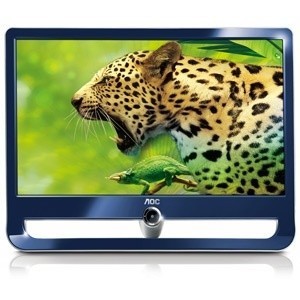
1920 x 1080 on the iF23 is nice. The pixels are nice and close together and the IPS is really a nice panel when it comes to looking at websites and visual content. HD content looks nice thanks to the native 1080p resolution.
Gaming isn't the best in the same way as the U2711 Dell. While the IPS panel is fantastic for bright colours and fantastic viewing angles, in fast paced action it does have a habit of ghosting slightly. It's something that's visible if you're paying attention to spotting it and not your game. When in the thick of the action and paying more attention to what's going on, you don't notice it.
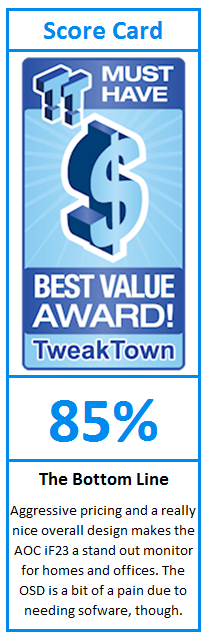
Looking over the monitor one last time, you can clearly see where the monitor shines; in a business environment or standard home PC one. The aggressive pricing makes it attractive to users who don't need a monitor for intense gaming; instead they want it to work in Excel and on Facebook.
The appealing design, low power draw and attractive price make it a fantastic monitor for someone who wants a sharp looking monitor on their desk at home or wants some decent monitors with a good resolution and aggressive price for an office. While not the best option for gamers, the monitor has a clear market and to be honest, it's probably a larger one.
Our Latest Monitors Review Coverage
- KOORUI 34E6UC Gaming Monitor Review - UltraWide Gaming at 180Hz on a Budget
- AOC U27G4 Gaming Monitor Review - Affordable Dual-Mode 4K and 320Hz Gaming in One Display
- MSI MPG 272QRF X36 Review - NVIDIA Pulsar Powers the Peak of 1440p Esports Gaming Monitors
- ASUS ROG Swift PG32UCDM3 Gaming Monitor Review - Unbeatable OLED Just Got Even Better
- ASUS ROG Strix Pulsar XG27AQNGV Review - The Bleeding Edge of 1440p Gaming Monitors is Here

 KOORUI 34E6UC Gaming Monitor Review - UltraWide Gaming at 180Hz on a Budget
 AOC U27G4 Gaming Monitor Review - Affordable Dual-Mode 4K and 320Hz Gaming in One Display
 MSI MPG 272QRF X36 Review - NVIDIA Pulsar Powers the Peak of 1440p Esports Gaming Monitors
 ASUS ROG Swift PG32UCDM3 Gaming Monitor Review - Unbeatable OLED Just Got Even Better
 ASUS ROG Strix Pulsar XG27AQNGV Review - The Bleeding Edge of 1440p Gaming Monitors is Here
 GTA 6 is a 'singleplayer experience,' GTA Online may be sold separately
 Rockstar confirms GTA 6's price, no physical disc version
 Ausom discounts three electric scooters by up to $100 in new soccer promotion
 GEEKOM GeekBook X16 Pro Prime Day Deal, save big on this thin and ultralight laptop
 GEEKOM's Prime Day deals deliver Massive Savings and up to 30% off Mini PCs
 Club386 is the latest victim of melted 12V-2x6 cable connectors, RTX 5090 and PSU both damaged
 Valve is working with NVIDIA to make GeForce GPUs compatible with SteamOS
 Meta Quest gets full-body VR movement system with Omni One for Quest
 Steam Deck code is bleeding into Steam Machine game functionality
 GIGABYTE launching stylish new RTX 5080 AORUS Infinity Wood graphics card
 Dell XPS 14 (2026) Laptop Review - Premium Quality, Impressive Performance
 Ocypus Sigma F36 BK ARGB Cooling Fan Review: high airflow and unified design in one frame
 PCCooler CPS RZ820 Display Review: a flagship-level CPU air cooler with an LCD screen
 UGREEN FineTrack Mini 2 Air Tracker Tag Review - Long battery life, lesser performance
 Speed Racer (2008) 4K Ultra HD Blu-ray Review: a stunning remaster of the cult classic
 MOAIPLAY ORA PRO G1 850W ATX 3.1 PSU Review: high efficiency and 10-year warranty for $119.99
 Navman MiVue Smart True 4K Surround Dashcam Review - Seeing In All Directions At Once
 IQUNIX Magi96 Pro Aluminum Low Profile Mechanical Keyboard Review - Premium Build, Satisfying Sound
 Asetek Forte S-Series Racing Simulator Bundle Review
 Razer Pro Type Ergo Wireless Split Ergonomic Keyboard Review - Built for Comfort and Support
 GIGABYTE Wants to Kickstart Your New Gaming PC or Upgrade with These Limited-Time Deals
 7 Windows settings to change right after installation for better privacy, security, and performance
 I stopped Windows 11 notifications from interrupting me with Do Not Disturb, Focus, and a priority list
 7 ways to transfer data from Android to Windows PC quickly and easily
 I read the Windows Backup app screen carefully, and it does not back up what most people think
 Low Sound Volume on Windows 11? How to fix audio issues and restore normal volume
 8 Critical Warning Signs You Should Never Ignore in Windows 11
 This Windows security feature protects Documents from ransomware, but it is off by default
 Windows 11 already has a voice typing tool, and it is the one most people are not using
 Quick Assist is the only remote-support tool I open when a relative calls about their PC