









HD DVD and Blu-ray Ripping

Quick and Easy HD DVD and Blu-ray Ripping Guide
It's really quite amazing how quickly Advanced Access Content System (AACS - HD content protection for HD DVD and Blu-ray discs) got defeated, especially considering how much money the industry and Hollywood movie studios putting into protecting their HD movie content.
It might not be a hack like regular DVD decryption DeCSS, but it seems very unlikely that this workaround will ever stop working as it means that all current HD DVD and Blu-ray players would either need a firmware upgrade or become obsolete when it comes to playing newer movies.
But how do you take advantage of this? Well, first of all you need the required hardware, which is a Blu-ray or HD DVD drive. With HD DVD this is quite an affordable option thanks to Microsoft and the external Xbox 360 HD DVD drive. This connects to your PC via USB, just as it would to the Xbox 360 and it's the drive that was used for this tutorial, but any compatible drive should work just fine.
The next step is to get hold of some software that makes it easy to strip the AACS copy protection from the video files and then copy them to your hard drive. For this we used AnyDVD HD 6.1.3.3 of which you can download a demo of from the SlySoft website. Once you've installed AnyDVD HD you have to reboot your PC, as otherwise AnyDVD HD won't recognise your drives. Once you've rebooted you're ready to start the time consuming part of stripping the AACS copy protection from your movies.
There are several advantages to doing this, but the most obvious one is that you can playback your HD movies on systems that lack HDCP support. We're could go into a very lengthy debate about DRM and copy protection but basically it was a scheme employed to try and stop people copying and re-distributing their HD materials. This meant that AACS was introduced which bought with it HDCP (High-bandwidth Digital Content Protection) that requires certain parts of your system (and software) to be HDCP compatible such as monitor, graphics card and VGA driver. With Blu-ray media, AnyDVD HD will also remove the region coding, perfect for those importing discs from abroad to try and save a few bucks. Other benefits include the ability to remove those annoying FBI warnings and trailers that you cannot usually skip past.
Move onto the next page for the quick and easy step by step guide!
Quick and Easy Step by Step Guide
AnyDVD HD is dead easy to use - as soon as you insert a HD DVD or Blu-ray disc, AnyDVD HD scans it automatically.
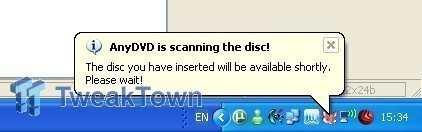
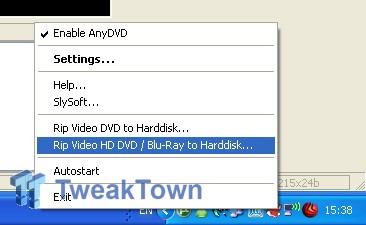
There is a small fox shaped icon in the task pane, right click on it to bring up a menu with options. One of the options is "Rip Video HD DVD / Blu-ray to Harddisk..." which is the one to select in this case.
You're greeted by a menu that gives you the option to select destination and source directories and that is all there is too it.
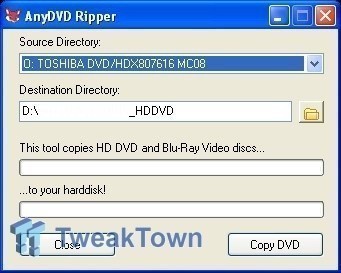
Press the "Copy DVD" button and wait and hour and you're done!
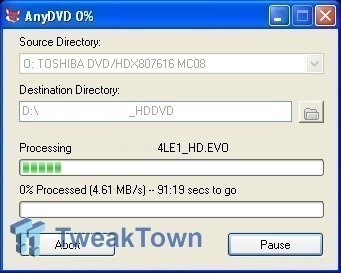
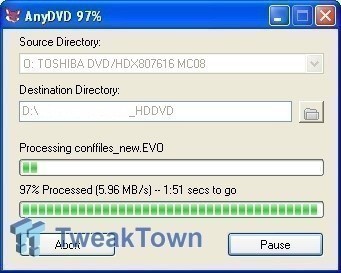
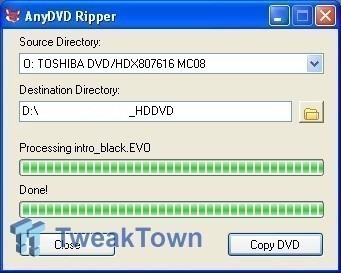
It really is that easy, but remember that you need to have about 25GB of drive space for a single layer disc and up towards 50GB for some Blu-ray movies. AnyDVD HD doesn't have any options for compressing the HD content (it rips it to your hard drive in raw untouched format), so keep an eye on your available free space, if you decide to go a little crazy.
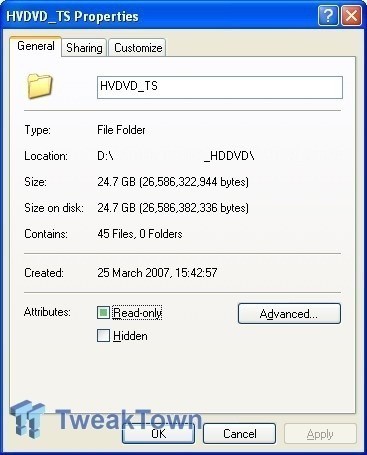
It's not the most space efficient way of copying movies, nor is it blisteringly faster (using Microsoft's Xbox 360 HD DVD USB drive), but hopefully newer drives will be able to rip movies faster as technology improves and they move to faster connections such as IDE and SATA.
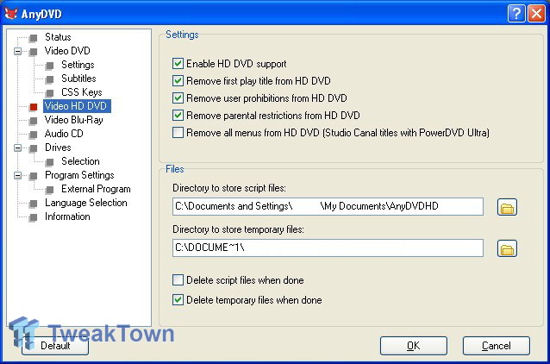
There are of course a range of more advanced options in the settings menu, but unless you're ripping a region coded Blu-ray disc, most of these can be left at their default settings.
Once the movie has finished being copied to your hard drive, you're not quite out of the woods yet. To play back the HD content you'll need a HD DVD or Blu-ray software movie player and there still isn't a great selection out yet. The best we have used so far is CyberLink's PowerDVD Ultra (our personal favourite) which supports HD DVD and Blu-ray discs and the full version will set you back $99.95 USD (or roughly $125 AUD). If you know what you are doing, you could also convert the raw HD content into a different format such as x264 which is used for encoding H.264 and MPEG-4 AVC video into a smaller compressed file and that way you could potentially avoid paying for movie playback software. If you wanted to go a step further and have money to burn, buy a HD DVD or Blu-ray burner (along with the media that will cost you upwards of $15 USD per disc) and you've got a backup of your movies without any DRM-like infections.
AnyDVD HD isn't the only software that is able to rip HD DVD's and we figured we'd give DVDFab HD Decrypter a go, but for some reason it refused to detect the Xbox 360 HD DVD drive. If you're the adventurous kind, you could also try out BackupHDDVD, but this has a limited key database and isn't as easy to use as AnyDVD HD.
Of course, the best advantage of AnyDVD HD is its ability to remove AACS encryption on the fly, so if you've got HD DVD or Blu-ray playback software on your PC, but an older graphics card or display without HDCP support, you can still watch your HD DVD or Blu-ray movies which you own fair and square!
Have fun!
Our Latest Guides Article Coverage
- The PowerToys utilities I keep enabled on every Windows 11 PC, and the ones I turned off within a week
- USB Ports Not Working in Windows 11? Try These Fixes
- Second Monitor Not Detected in Windows 11? Try These Fixes
- Turn Your Old Smartphone Into a Dedicated Webcam for Your Windows PC
- The Send To menu is the right-click feature on Windows 11 that nobody bothers to customize

 The PowerToys utilities I keep enabled on every Windows 11 PC, and the ones I turned off within a week
 USB Ports Not Working in Windows 11? Try These Fixes
 Second Monitor Not Detected in Windows 11? Try These Fixes
 Turn Your Old Smartphone Into a Dedicated Webcam for Your Windows PC
 The Send To menu is the right-click feature on Windows 11 that nobody bothers to customize
 NZXT unveils aesthetically pleasing cases, fans and coolers at Computex 2026
 NVIDIA GeForce Hotfix 610.52 driver released, fixes issues related to G-SYNC, Smooth Motion, and stability
 3DMark adds native Windows on Arm support for ray-tracing benchmarks
 MSI showcases its next-gen GPU cooling tech and it could be for the GeForce RTX 60 Series
 'Radically different' business models coming to Xbox, CEO Asha Sharma says
 GEEKOM's new GeekBook M16 brings a Core Ultra 9 and a 99.9Wh battery to the business laptop market for $899
 AMD warns DDR5 prices won't recover until 2028 as AI demand continues pulling supply away from consumers
 SEGA under fire for using gen AI in new Crazy Taxi game
 Halo Studios quietly establishes innovative new business model for legacy game remakes
 Zelda Ocarina of Time remake confirmed for 2026 launch on Switch 2
 Navman MiVue Smart True 4K Surround Dashcam Review - Seeing In All Directions At Once
 IQUNIX Magi96 Pro Aluminum Low Profile Mechanical Keyboard Review - Premium Build, Satisfying Sound
 Asetek Forte S-Series Racing Simulator Bundle Review
 Razer Pro Type Ergo Wireless Split Ergonomic Keyboard Review - Built for Comfort and Support
 ASUS ROG Strix Morph 96 Wireless Gaming Keyboard Review - Great Performance, More Affordable
 SAPPHIRE Radeon RX 9070 GRE PULSE OC Review - A New 1440p Challenger Has Arrived
 NZXT H6 RGB+ Compact Dual-Chamber Chassis Review
 ASRock Radeon RX 9070 GRE Steel Legend Review - The RDNA 4 Mid-Range Reshuffle
 ASRock Z890 Taichi Aqua Motherboard Review - Flagship features without the flagship price
 GIGABYTE Z890I AORUS Ultra Motherboard Review - Mini-ITX with surprisingly good thermals
 TweakTown's Best of Computex 2026 Awards - The Best Hardware, Gaming Gear, and AI
 Phison E37T SSD Controller Exclusive Preview - The Fastest DRAMless SSD Platform Yet
 ASUS WiFi Routers and Networking Solutions Deliver Long-term Security and Reliability with No Additional Cost
 Windows 11 will not let you pin a folder to the taskbar, but a 30-second workaround does
 ASUS ProArt Displays Unlock Creativity with Professional Monitors for Everyone