



Microsoft has made installing apps from the Microsoft Store easier by implementing a new feature - the ability to download and run executables/installers directly from apps.microsoft.com. Microsoft's Rudy Huyn took to X to outline the update and its reasoning in great detail.
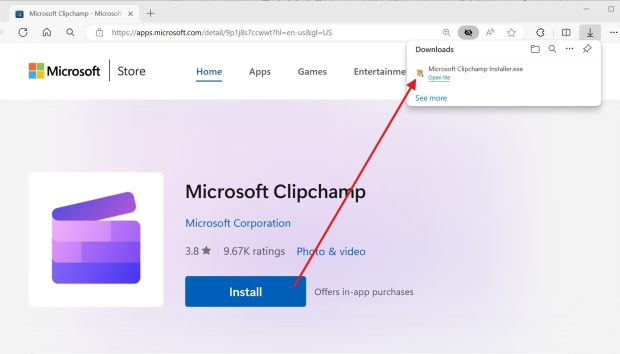
The website for Microsoft apps has been around for a while. To install an app using the site, you click on a link, confirm that you'll need to switch to the dedicated store app, and then select and go through the install process on the app. Rudy Huyn said, "Feedback indicated that the install flow involved too many clicks."
The reason installation directly from the site wasn't available was security, which is beneficial to users and partners releasing apps through the Microsoft Store. That said, switching to a two-click system for a select group of developers "led to a 12% increase in installations and a 54% increase in the number of applications launched after installation."
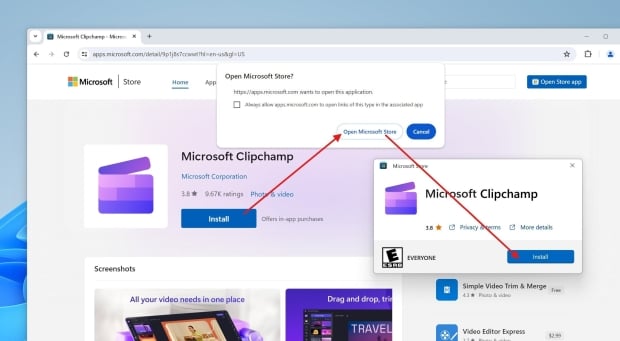
Microsoft is now expanding this "experiment" to download and run an installer or executable from a website to more apps and plans to improve how it works. One of the benefits of the new system is a much smaller executable that is always up-to-date, and the download process is faster than opening the Microsoft Store. There's even support for parallel installations.
Once most or all apps are available to download (in installer form) from the website, the dedicated Microsoft Store app and interface will not disappear - they will still act as a streamlined interface for installing and updating Windows apps.
- Read more: Microsoft OneDrive cloud storage finally gets an offline mode - with a catch
- Read more: Windows 11 has a couple of useful tweaks in testing for File Explorer and widgets
- Read more: Windows 11 might hit you with an extra-lengthy nagging session after your next update
- Read more: Are full-blown adverts coming to Windows 11's Start menu? We hope not, but it looks that way