



If you're a Google Chrome web browser user you're about to benefit from not just one, but three different AI capabilities that will do everything from automatically organizing your open tabs to writing text for you the next time that you need to fill in a form online. The new AI features are part of a new Chrome M121 release and are experimental, which means that they could change or just not work. But the fun is in the finding out.
There are three different features all announced under one AI-based blog post and they're all set to be useful to varying degrees. The first will automatically suggest and create tab groups based on the tabs that a user has open which could be useful when you're researching something but also want to keep those tabs separate from where you're ordering your groceries.
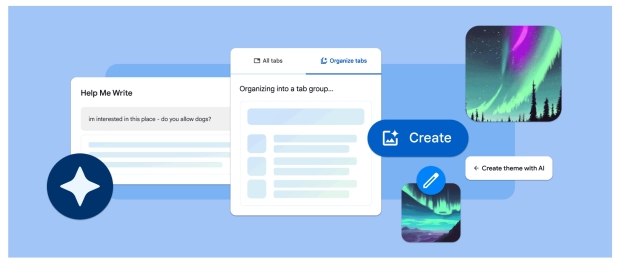
Chrome already has generative AI wallpapers on the Google Pixel 8 devices thanks to Android 14 and now the same text-to-image technology is now coming to Chrome. It'll create you new custom themes based on a mood or subject, or you can just give it a color or style and let it work its magic. The feature could be huge for people who just want a new theme but have no idea what they want it to look like - just let the generative AI do the creative thinking for you.
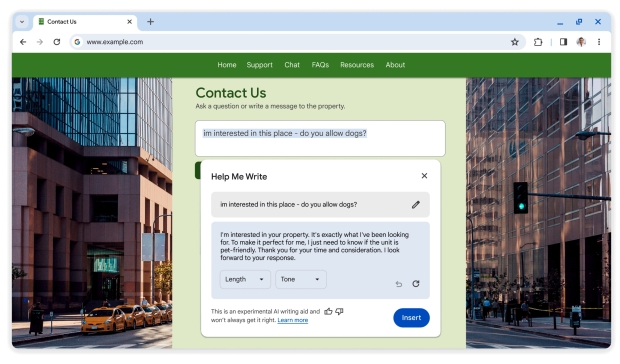
Finally, and arguably the most interesting, is a new generative AI feature designed to make it quicker and easier to fill in forms on websites. This feature isn't actually coming until next month's Chrome release but it will offer a button that says 'Help me write," and pressing it will do just what you expect. Chrome users will be able to offer a few prompts to get the process started before letting Google's AI work its magic. The length and tone of the text can be selected to allow for the perfect input, while the whole thing can be edited or ditched entirely if you'd rather go that route of course.
There are already similar tools and extensions that can do something similar to what Google Chrome will soon do on its own of course, but having it built right into the web browser could make it more readily usable than those other options. Some may find it easier to trust Google with such things than a random third party, too.
For now, all eyes will be on next week's Chrome release to see what the new feature is like.