









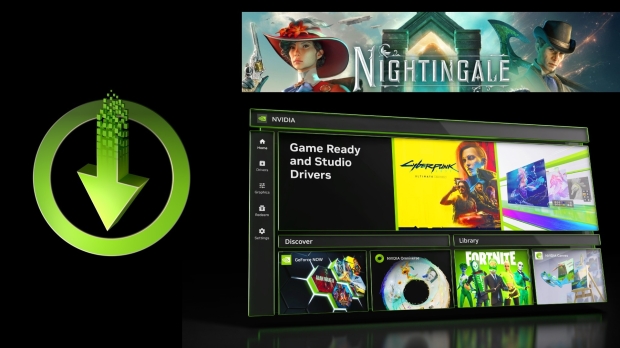




Alongside the launch of the new NVIDIA App, be sure to check out our full coverage below if you haven't already; NVIDIA has also just released the latest GeForce Game Ready 551.61 WHQL driver that you can download through the GeForce Experience app, the new NVIDIA App, or directly from GeForce.com.
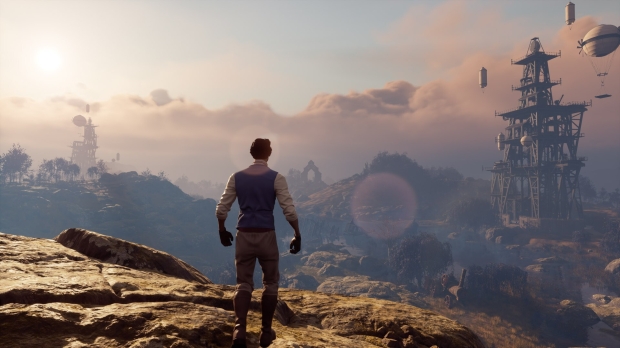
In terms of game support, the new Game Ready Driver adds day-one support for Nightingale, an impressive-looking fantasy survival adventure game. Nightingale has some pretty intense hardware requirements, so thankfully, there's DLSS 3 Frame Generation support for those with GeForce RTX 40 Series GPUs.
Popular Now: Memory capacity for all of 2027 has reportedly been booked and sold, with no more DRAM or HBM availableThe big NVIDIA story for GeForce RTX owners this week has been the launch of the new NVIDIA App, available now in beta, with the GeForce Game Ready 551.61 WHQL driver supporting the new app that combines GeForce Experience and the old-school NVIDIA Control Panel in a slick, fast, and impressive new package.
The new Game Ready Driver and NVIDIA App also include the new AI-powered RTX HDR and RTX Dynamic Vibrance tools.
The latest Game Ready Driver also fixes a few issues. Here's a look at the Release Notes.
Release Highlights
Game Ready for Nightingale
This new Game Ready Driver provides the best gaming experience for the latest new games supporting DLSS 3 technology including Nightingale. In addition, this driver supports the beta release of the NVIDIA App, which unifies GeForce Experience and the NVIDIA Control Panel.
Fixed Gaming Bugs
- Tom Clancy's Rainbow Six Siege: Stability issues when running Vulkan API (4460050)
Fixed General Bugs
- RTX Video HDR: Tone mapping not working properly with custom HDR brightness values in Windows (4472972)
- Chrome/Edge Browsers: Poor black level quality in SDR video playback with Windows HDR setting enabled (4492243)
- NVIDIA Freestyle: Filter settings are not saved after quitting game (4472656)
- Adobe Substance 3D: Stager unable to initialize the viewport (4403960)
- Adobe Substance 3D: Vulkan version of Substance Painter cannot be launched (4425856)
Known Issues
- (Netflix) Display issues for videos when using Edge browser. Recommend using
- Windows Netflix application as workaround. (4388454)
- GeForce GTX 10/RTX 20 series: PC may randomly freeze when Windows HardwareAccelerated GPU Scheduling and NVIDIA SLI are both enabled (4009884)


 GeForce Game Ready Driver 595.71 released, fixes issues from last week's recalled version
 GeForce Game Ready Driver for Final Fantasy 16 and God of War Ragnarok is here
 GeForce Game Ready Driver for Crimson Desert and Death Stranding 2 available now
 NVIDIA issues Security Bulletin for GeForce users, so make sure you've updated your driver
 NVIDIA rolls out new Game Ready Driver: support added for The Outer Worlds
 AMD confirms it'll deliver opening keynote for IFA 2026 on the 'Era of Personal AI'
 Samsung reveals zHBM: future RAM is stacked above AI accelerator, boasts 8x performance of HBM5 and 3x energy efficiency
 If you launch Call of Duty: Black Ops 2 on PS4 or PS5 to be immediately told you're banned - don't panic, there's an easy fix
 MSI launches its 'DRACO EPIC EDITION' 40th anniversary PC gear
 Lower Xbox and PlayStation sales see AMD's Gaming revenue drop by 31%
 Memory capacity for all of 2027 has reportedly been booked and sold, with no more DRAM or HBM available
 GIGABYTE launches flagship AORUS P1600W power supply that supports up to four graphics cards
 GIGABYTE's GeForce and Radeon GPU prices have reportedly increased by up to 40% in Japan
 Adobe Acrobat Alternative: UPDF AI Workflow for Windows
 Battlefield 6 Season 4 update fixes RTX 50 series crashing without requiring an NVIDIA driver update
 Asetek Initium Pedal Modular Upgrades Review
 Thinkware U3000 Pro Review - Smart Dashcam with Wi-Fi quirks
 Montech TG3 Mid-Tower Chassis Review
 ASUS ROG Strix X870E-A Gaming WiFI7 Neo Review - A New Enticing Option
 Noctua NL-LC1-36 Liquid CPU Cooler Review
 Logitech G316 X 98 Wired Gaming Keyboard Review - Retro-Inspired Board that Falls a Little Short
 Biwin M560 2TB SSD Review - Best Overall Retail-Ready DRAMless SSD
 Logitech G512 X 98 Analog Mechanical Gaming Keyboard Review - An Innovative Two-in-One
 Thrustmaster T.Flight HOTAS 5 MSFS Edition Review
 SteelSeries Arctis Nova Pro Omni Wireless Headset Review - One Headset to Rule Them All
 GIGABYTE's 40 Days of INFINITY celebrates 40 Years of Innovation with stunning GeForce RTX graphics cards and rewards
 I swapped File Explorer for this free file manager and finally got the layout I wanted
 How to tell if someone has been using your Windows PC without your permission
 6 Task Manager tips for troubleshooting Windows performance problems
 ASUS ROG's 20th Anniversary Line-up of Premium PC Gaming Gear has Arrived - Here's Everything You Need to Know
 Six File Explorer tips every Windows user should know
 I switched my PC to encrypted DNS in Windows 11, and browsing felt more private
 Printer Not Working in Windows? How to fix detection, print queues and drivers
 The Ultimate Guide to Personalizing Your Windows 11 Taskbar
 How to Turn Your Windows Laptop Into a Second Monitor with Miracast and Wireless Display in Minutes