



There are plenty of instant messaging platforms to choose from right now and most phones have first-party options built in, including Apple's wildly popular iMessage. But WhatsApp is also a great option and it's free, encrypted, and available across every platform you're likely to think of. And now it has some new text formatting options that make it easier than ever to get the point across.
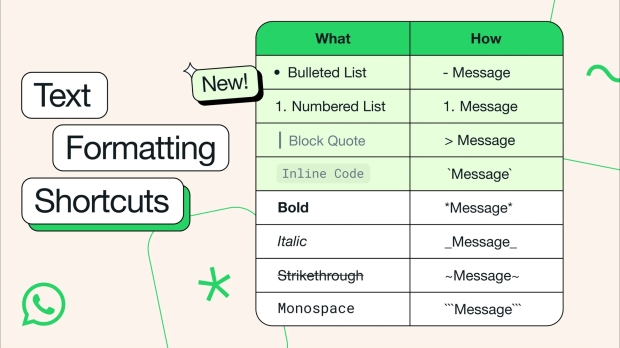
While WhatsApp already offered Markdown-like syntax for formatting text, it now has four new options to go with bold, italic, strikethrough, and monospace. The new options are bulleted lists, numbered lists, block quotes, and inline code.
The first of those is fairly obvious and users can create a bulleted list by placing a '-' before a line. Numbered lists are the same, but a number followed by a period replaces the hyphen. All simple stuff and great for sending things like shopping lists to your significant other.
Next, we have block quotes which are good for, you guessed it, quoting someone or something. The '>' symbol followed by a space is all that's required here while putting a backtick (') around the text turns it into inline code which is great for people who write such things and need to share code snippets with others.
Being able to format text in messages can make it much easier to get the message across and we're absolutely here for it. Trying to convey a message using just words is difficult enough at the best of times and being able to format those words definitely adds an extra string to our bow.