









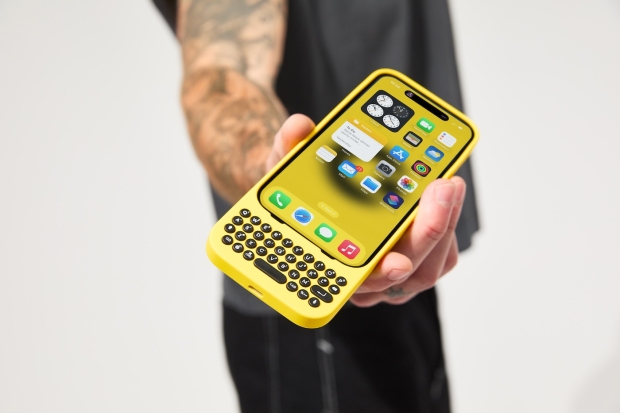




When Steve Jobs announced the iPhone 14 years ago one of the biggest things that he made a point of reminding people of was the fact that the switch to an on-screen keyboard was a game-changer. Previously, phones like the BlackBerry models offered physical QWERTY keyboards and that was seen as a real selling point over the dumb phones of the time. Apple said that software keyboards allowed more flexibility, letting the on-screen keyboard change and adapt to whatever was needed at the time. That was all very true, but there's still something about clicking away on a physical keyboard that has its merits. And now you can do that on your iPhone, too.
That's thanks to Clicks, a new typing accessory that adds a physical QWERTY keyboard to the bottom of your iPhone 14 Pro, iPhone 15, or iPhone 15 Pro Max and includes additional features Those features include keyboard shortcuts for quickly returning to the Home screen, opening Spotlight, and more. Apps that support physical keyboards will also have their own shortcuts as well, especially if they have an iPad counterpart. On top of that, the Clicks accessory is also backlit so that you will be able to easily see your keys as you type in the dark, too.
Buying a new Clicks accessory will start from $139, and the iPhone 14 Pro model is already available for February 1 delivery. Those with an iPhone 15 Pro will see their new keyboard in mid-March. while iPhone 15 Pro Max owners will have to wait until early spring, unfortunately. Two colors are offered; BumbleBee (yellow) and London Sky (gray) although we're told that more colors could well be on the way depending on feedback.
There is no denying that this isn't a cheap accessory. But it appears to be one that will scratch an itch for some people and if that's you, you really could do a lot worse than take the Clicks keyboard for a spin. It's more than just a new way to type - by removing the software keyboard iOS is given some screen space back, allowing more of your apps to be shown on-screen at any given moment. That can be a huge deal if you're working with a large document, for example, and the same goes for when you're livestreaming from your iPhone, too. Whatever you're doing, getting back the space normally taken up by a keyboard seems like a great idea to us.


 Turtle Beach announces new Command Series keyboard and mice lineup with integrated touchscreens
 ENDORFY's Thock V2 gaming keyboards are here, and there are 17 different models to choose from
 Official Microsoft PC peripherals, including ergonomic keyboards, are returning later this year
 Hands-on with Corsair's K100 AIR keyboard has me throwing my Logitech G915 X in the trash
 NuPhy's impressive new Node100 and WH80 keyboards should be on your radar
 God of War Laufey gets a release date and Kratos is making a return
 GTA 6 trailer 3 expected to arrive within two weeks, according to insider
 Thieves stole 16 RAM sticks from Chinese eSports hotels, arrested
 Lisuan LX7G100 GPU achieves playable FPS in system with no Intel AMD or NVIDIA hardware inside
 Elder Scrolls 6 roadmap not affected by layoffs, Bethesda says
 Intel and AMD are locking Chinese customers into long-term CPU deals as server chip prices climb more than 40%
 Ubisoft CEO says Sony's PlayStation disc shutdown will not disturb the industry too much
 Vibe coding is flooding the App Store with new apps - on track for record submissions in 2026
 Geekbench 7 is out with CUDA support, smarter multi-core scoring, and new AI workloads across all major platforms
 GTA 6 physical copies in Japan have a 170-day expiration date
 Thrustmaster T.Flight HOTAS 5 MSFS Edition Review
 SteelSeries Arctis Nova Pro Omni Wireless Headset Review - One Headset to Rule Them All
 SteelSeries Arctis Nova 7 Wireless Gen 2 Headset Review - New and Improved, But Is It Enough?
 AMD Ryzen 7 7700X3D Review - Days of Future Past
 Samsung 990 2TB SSD Review - Ninth Gen QLC at PCIe Gen4 Speeds
 ASUS ExpertBook Ultra (Panther Lake) 14" Business Laptop Review
 ASUS ROG Raikiri II Xbox Wireless Controller Review - Ready to Take Control
 MOZA FMP18 Panel Bundle Review: authentic F/A-18 Hornet cockpit controls for flight sims
 Micron 6600 ION 245.76TB Enterprise SSD Review - Best in Class Programming Speeds
 MOZA MA3F EFCM Flight Control Module Review: authentic Airbus A320 autopilot panel for simulators
 The Ultimate Guide to Personalizing Your Windows 11 Taskbar
 How to Turn Your Windows Laptop Into a Second Monitor with Miracast and Wireless Display in Minutes
 6 Mistakes to Avoid When Buying a Windows Laptop
 I capped Windows Update's bandwidth with Delivery Optimization, and my downloads stopped choking
 I use this decade-old free tool that finds files faster than Windows Search does
 I install and update most of my apps with this Windows command now, and I stopped downloading sketchy installers
 Hisense U6SF 65-inch MiniLED TV: High Performance Meets Leisurely Convenience
 I stopped digging through Windows menus after I set up this one folder
 Don't sell your Windows laptop until you do these things
 6 PC cleaning mistakes to avoid for safer hardware maintenance