

Introduction
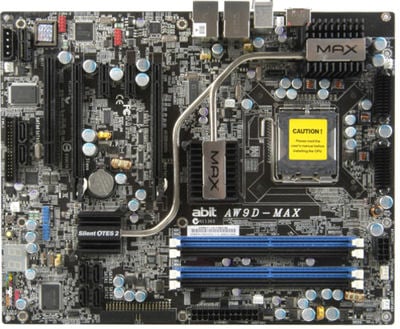
ABIT is back baby!
It has been far too long since the ABIT name has been seen on anything here in our labs. Our last motherboard we received was the A8N-32X which was just after ABIT had reclaimed its name under the Universal ABIT brand.
ABIT has been through quite a bit in the last year - mainly financial troubles including being suspended from trading on the Taiwan Stock Exchange. This really hurt ABIT quite a bit and for quite a while it was the last we saw of them, especially in the hardcore arena.
Today they are back, bigger and better with new backing, new staff and a full throttle attitude towards the enthusiast market.
Today we have ABIT's new Core 2 supporting motherboard based on Intel's 975X Express chipset - not only does it support Core 2 but it supports all of the Pentium 4, Pentium D and Pentium Extreme Edition families.
Dubbed the AW9D-MAX, today we are going to delve into a new motherboard from the hardcore kings at ABIT and see if it can stack up against the strong competition.
Specifications
Specifications of the ABIT AW9D-MAX
CPU
Supports Intel Core 2 Duo/Extreme Series
Supports Intel Pentium D 800/900 Series
Supports Intel Pentium Extreme Series
Supports Intel Pentium 4 LGA775 Series
Supports Intel Celeron D Series
Quad Core Ready
Chipset
Intel i975X Express Chipset
i975X Northbridge
i82801HR Southbridge
DMI @ 2GB/s
System Memory
4 DDR2 SDRAM 240pin DIMM Sockets
Supports DDR2-400/533/667
64/128Bit Dual Channel
Supports up to 4GB Total Memory (4x 1GB)
Bus Frequency
133/200/266MHz Internal
533/800/1066MHz External
Expansion Slots
2 PCI Express x16
2 PCI Express x1
1 PCI
1 AudioMAX
Connectivity
1 Parallel ATA port supporting 2 IDE Drives
7 Serial ATA ports
1 Gigabit Ethernet Port
Expansion Ports
1 PS2 Keyboard Port
1 PS2 Mouse Port
8 USB 2.0 Ports (4 rear accessible, 4 via expansion bracket)
6 Stereo Audio Ports
1 e.SATA port
Package and Contents
Inside the ABIT Box


ABIT's theme for the AW9D Max is a samurai theme. The box is dark and mysterious on the front with just the name, model number and a picture of a dude with a sword. The new ABIT logo also appears on this box which is the first time we have seen it on the packaging.
The back of the box is where ABIT has done its best. There is a full detailed description of all the features that the board supports as well as a large colour picture of the board itself with no mysteries on what you are getting here.

ABIT provides 2 quick start manuals and 1 full fledged user manual. 1 of the quick start manual explains the installation of the board into the chassis and the second explains the uGURU operations.

ABIT's CD and FDD package is quite extensive. There are 3 floppy disks, 1 for the Silicon Image 3132 chip for 32-bit Windows, 1 for the 3132 controller for XP 64-bit and 1 FDD for the Intel ICH7R controller which has XP and XP64 drivers. The included CD has drivers and software for Windows and Linux and the included software that ABIT brings to the party.

In the first of our cable bundle we have 1 rounded IDE cable with 2 drive support, 1 rounded FDD cable, a USB/Firewire PCI riser combo and a Toslink cable. ABIT is the first company we have seen who include a Toslink cable in their packages.

Our last cable bundle gives us 7 SATA cables - that's right, ABIT is the first also to give you as many SATA cables as you have SATA ports on your board, which definitely goes a long way to complimenting the "MAX" model name. An SLI link connector is included into the package, which means we may see 975X supporting SLI very shortly but that is by no means confirmed and you shouldn't count on it at this stage. Lastly is the rear I/O shield for use in ATX cases.

Like DFI, ABIT has moved its audio ports to a separate daughter board. The daughter board contains the actual codec chip, so without this board installed, the onboard audio will be disabled completely. There are 6 stereo audio ports for 7.1 audio and 1 Toslink port on the rear of the case. Inside on the board there is a Front Audio panel connector and a CD-In audio connector. The board plugs into what ABIT calls an AudioMAX audio port located at the bottom of the board - it looks somewhat like a PCI Express x1 slot in reverse and it designed to reduce the amount of noise interference compared to traditional solutions although it is debatable if this actually makes any difference but you be the judge.
The Motherboard

ABIT is back in style with this board - it comes in a full ATX size on a black PCB with a lot of black and white contrasts which are quite appealing to the eye.
On placement of connectors, ABIT has done a good job, with only 1 slight no-no. The 24-pin ATX power connector is located behind the 4 DIMM sockets just above the single IDE connector that is controlled by the Southbridge. The 8-pin EPS12V connector is located above the 4 DIMM sockets, a very good place to keep this bulky cable.
The main gripe is the placement of the FDD connector at the bottom of the board just below 2 of the extra SATA ports that are controlled by 1 of the 2 Silicon Image 3132 RAID chips.

ABIT's choice of power and cooling is a so-so affair. First off you have a 4 phase power regulation system to provide power to the CPU. While this is enough for the Core 2 Duo and Core 2 Extreme, the Pentium 4, Pentium D and Pentium Extreme and possibly the upcoming Core 2 Quad processors might find this a bit constricting when it comes to overclocking. ABIT has placed cooling on its Mosfets around the CPU as well as a new Silent OTES 2 cooling solution that covers the Northbridge, Southbridge and the additional voltage regulators. The cooling system is quite effective and looks very attractive but most importantly, it is silent.

ABIT's rear I/O ports are extremely limited but are enough to get you going - the "MAX" range of motherboard are designed for gamers and overclockers, so they do cut out a lot of the sometimes unnecessary ports and plugs.
On the back there is a single e.SATA port which is controlled by one of the two Silicon Image 3132 chips, there is also a SATA port behind this on the board that is also run off the same chip as the e.SATA port and beside that is the PS/2 port stack. Lastly we have a couple USB towers with two ports per tower and a single RJ-45 port on top of each tower. These Gigabit LAN ports run off two Realtek PCI Express chips.
Since the motherboard is based around the Intel 975X chipset, you have support for full performance ATI Crossfire dual graphics. ABIT has also changed their capacitors in recent times to full solid state which promises to offer increased life time of the motherboard and that's bound to help you considering you will most likely be overclocking. Along with that you've also got quick power and reset buttons on that motherboard which stops you having to short out jumpers with a screw driver and there is a debug LED which let's you know what is happening if you have problems with the board.
BIOS and Overclocking

The ABIT BIOS hasn't changed much at all. The Award 6 BIOS is used only this time ABIT has gone with a black and white colour style setup rather than the blue and red setup this BIOS is accustomed to. uGURU menu is the location for all of the overclocking features which the board supports.

Under uGURU menu you are greeted with the ABIT Overclocking which we are accustomed to. In order to gain access to the CPU Overclocking you need to set the CPU Operating Speed option to user defined. This will then give you control of the CPU.
CPU FSB can be adjusted from 133MHz to 600MHz in 1MHz increments and CPU Ratio can be adjusted on unlocked Extreme Edition and Core 2 Extreme processors. CPU voltage is adjustable from 1.3v to a max of 1.65v in 0.025v increments.
DDR2 Voltage is adjustable from 1.8v to 2.65v in 0.05v increments, certainly not the highest we have seen, but good enough. ABIT combines Northbridge and PCI-E voltage control into one setup and this can go from 1.5v to 2.0v in 0.01v increments - this is the highest we have seen for a Northbridge and PCI Express voltage setup.
PCI Express bus can also be adjusted from 100MHz to 200MHz in 1MHz increments. PCI Express is unstable when overclocked which means unless you are an experienced overclocker, it is best is to leave it at 100MHz for optimal stability.
With all these setting we managed to hit a massive FSB of 408MHz with the latest BIOS from ABIT installed. We did this with RAM at 1:1, Chipset/PCIE voltage at 1.9v, DDR-2 voltage at 2v and CPU voltage at 1.4v - it's a very impressive overclock from an Intel 975X based motherboard I must say (P965 is the better overclocker) and a sign that ABIT is back and they mean business like in the old times.
Benchmarks - Test System Setup and Sandra
Test System Setup
Processor: Intel Core 2 Extreme X6800 (Supplied by Intel)
Memory: 2x 1GB DDR2-1066 Corsair (Supplied by Corsair)
Hard Disk: 500GB Seagate 7200.9 (Supplied by Seagate)
Graphics Card: nVidia GeForce 7800GT
Cooling: Gigabyte 3D Galaxy II (Supplied by Gigabyte)
Operating System: Microsoft Windows XP Professional SP2
Drivers: Intel INF 8.1.1.1002, nVidia ForceWare 91.31 and DX9c
This time around we are comparing the ABIT AW9D-MAX against the DFI 975 and MSI 975 boards (which we reviewed here earlier) at both stock and maximum overclocked FSB speeds.
We used an 8x multiplier on the ABIT motherboard like we did on the MSI and DFI boards and the memory ratio was set at 1:1 for each motherboard. This means the ABIT board is running with the CPU at 3264MHz (408MHz FSB x 8), DFI with the CPU at 3024MHz (378MHz FSB x 8) and MSI with the CPU at 2896MHz (362MHz FSB x 8).
SiSoft Sandra
Version and / or Patch Used: 2007
Developer Homepage: http://www.sisoftware.co.uk
Product Homepage: http://sisoftware.jaggedonline.com/index.php?location=home&a=TTA&lang=en
Buy It Here
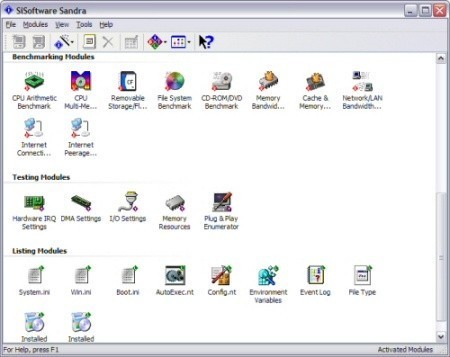
SiSoft Sandra (System ANalyser, Diagnostic and Reporting Assistant) is a synthetic Windows benchmark that features different tests used to evaluate different PC subsystems.
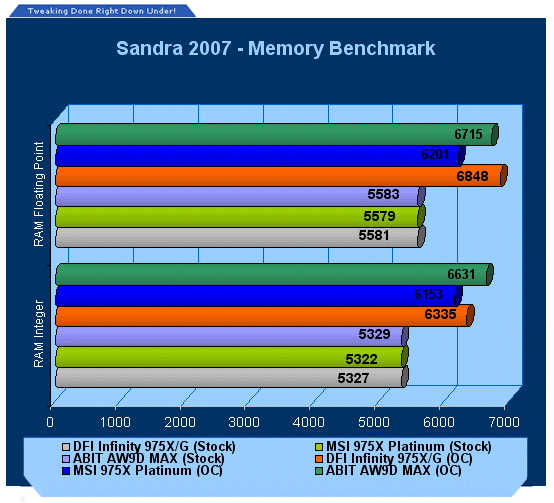
At stock speeds all boards are tied up but when overclocking, ABIT's higher FSB manages to score some extra bandwidth points.
Benchmarks - PCMark
PCMark
Version and / or Patch Used: 1.1.0
Developer Homepage: http://www.futuremark.com
Product Homepage: http://www.futuremark.com/products/pcmark04/
Buy It Here
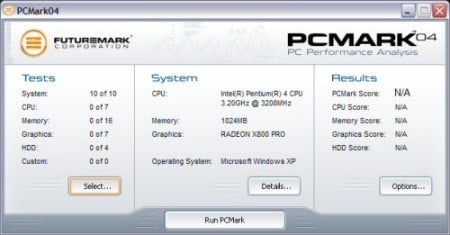
PCMark is a multipurpose benchmark, suited for benchmarking all kinds of PCs, from laptops to workstations, as well as across multiple Windows operating systems. This easy-to-use benchmark makes professional strength benchmarking software available even to novice users. PCMark consists of a series of tests that represent common tasks in home and office programs. PCMark also covers many additional areas outside the scope of other MadOnion.com benchmarks.
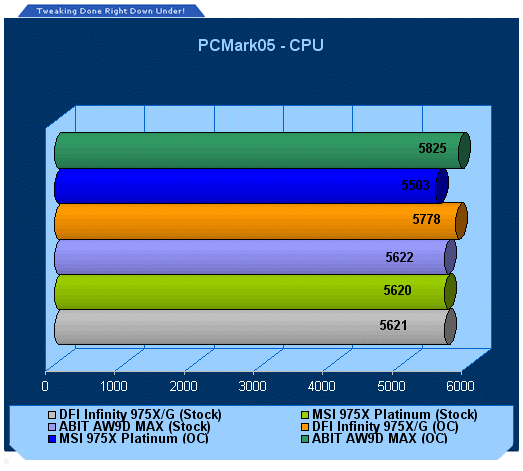
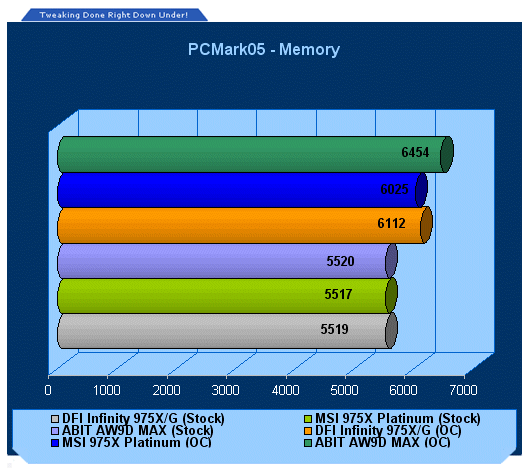
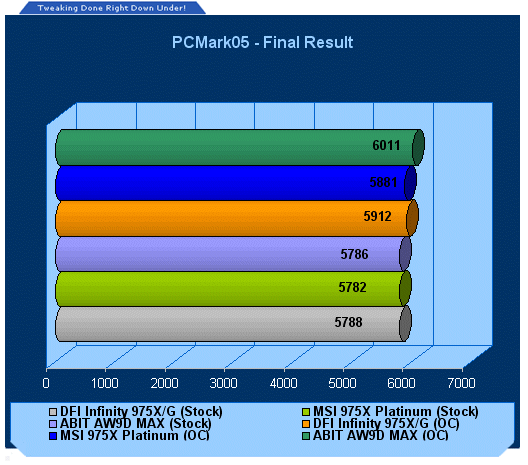
At stock again, all boards are equal, showing a good optimised BIOS on all 3 boards. When overclocking, the more MHz the memory can put out, the more points it scores, ABIT with 408MHz of raw memory speed beats out the DFI and MSI boards.
Benchmarks - 3DMark05
3DMark05
Version and / or Patch Used: Build 120
Developer Homepage: http://www.futuremark.com
Product Homepage: http://www.futuremark.com/products/3dmark05/
Buy It Here

3DMark05 is now the second latest version in the popular 3DMark "Gamers Benchmark" series. It includes a complete set of DX9 benchmarks which tests Shader Model 2.0 and above.
For more information on the 3DMark05 benchmark, we recommend you read our preview here.
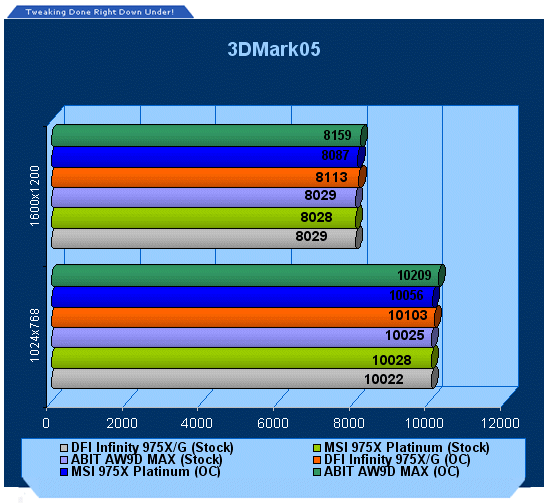
ABIT manages to pull ahead in overclocked conditions, at stock, all are equal once again.
Benchmarks - 3DMark06
3DMark06
Version and / or Patch Used: Build 102
Developer Homepage: http://www.futuremark.com
Product Homepage: http://www.futuremark.com/products/3dmark06/
Buy It Here

3DMark06 is the very latest version of the "Gamers Benchmark" from FutureMark. The newest version of 3DMark expands on the tests in 3DMark05 by adding graphical effects using Shader Model 3.0 and HDR (High Dynamic Range lighting) which will push even the best DX9 graphics cards to the extremes.
3DMark06 also focuses on not just the GPU but the CPU using the AGEIA PhysX software physics library to effectively test single and Dual Core processors.
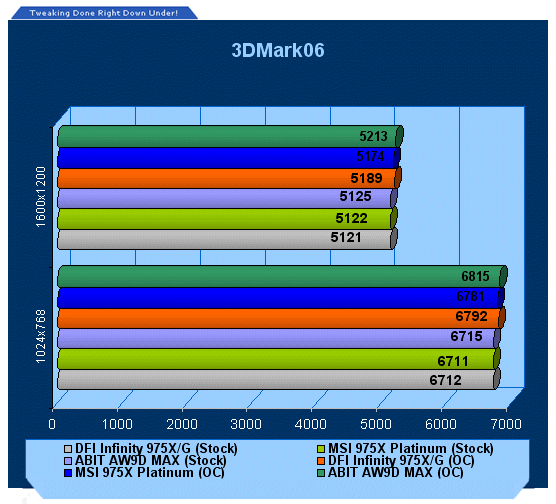
When the stress is turned up, the ABIT's score is even more impressive.
Benchmarks - Doom 3
Doom 3
Version and / or Patch Used: 1.1
Timedemo or Level Used:Custom Timedemo
Developer Homepage: http://www.idsoftware.com
Product Homepage: http://www.doom3.com
Buy It Here
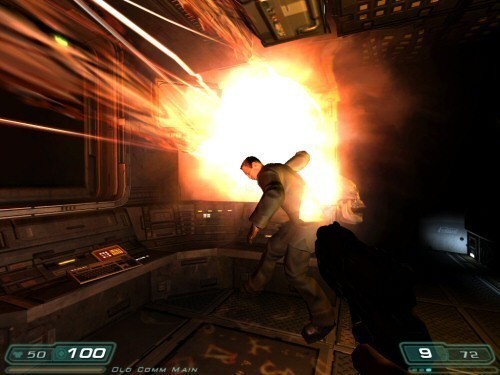
Doom 3 is still one of the most popular games at the moment and is quite intensive in the 3D department, even though it is starting to age. With our own custom time demo we are able to give a realistic rating on what kind of FPS you will be achieving.
For more information on benchmarking Doom 3 we recommend you check out our extensive article regarding it here.
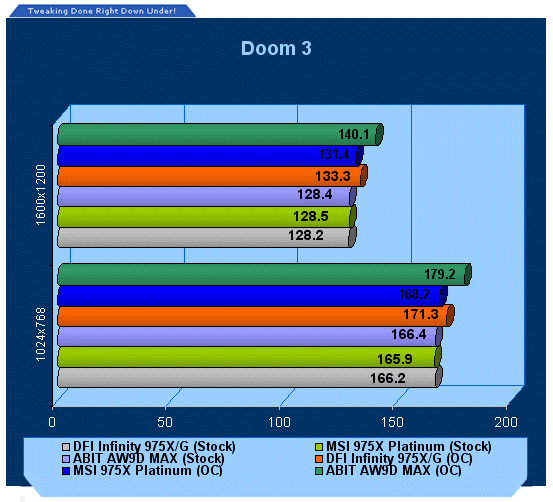
Doom 3 favours the ABIT on the Overclocking tests, no surprises here.
Benchmarks - Quake 4
Quake 4
Version and / or Patch Used: Unpatched
Timedemo or Level Used: Custom Timedemo
Developer Homepage: http://www.idsoftware.com
Product Homepage: http://www.quake4game.com
Buy It Here

Quake 4 is one of the latest new games to be added to our benchmark suite. It is based off the popular Doom 3 engine and as a result uses many of the features seen in Doom. However, Quake 4 graphics are more intensive than Doom 3 and should put more strain on different parts of the system.
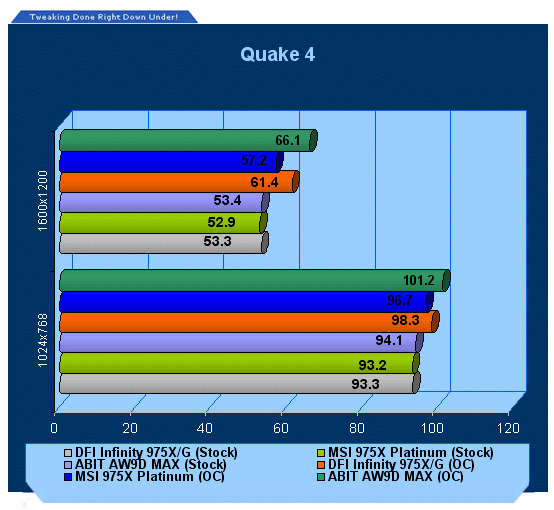
Quake 4 also puts the ABIT board in a good light.
Benchmarks - F.E.A.R.
F.E.A.R.
Version and / or Patch Used: Unpatched
Timedemo or Level Used: Built-in Test
Developer Homepage: http://www.vugames.com
Product Homepage: http://www.whatisfear.com/us/
Buy It Here
F.E.A.R. (First Encounter Assault Recon) is an intense combat experience with rich atmosphere and a deeply intense paranormal storyline presented entirely in first person. Be the hero in your own spine-tingling epic of action, tension, and terror...and discover the true meaning of F.E.A.R.
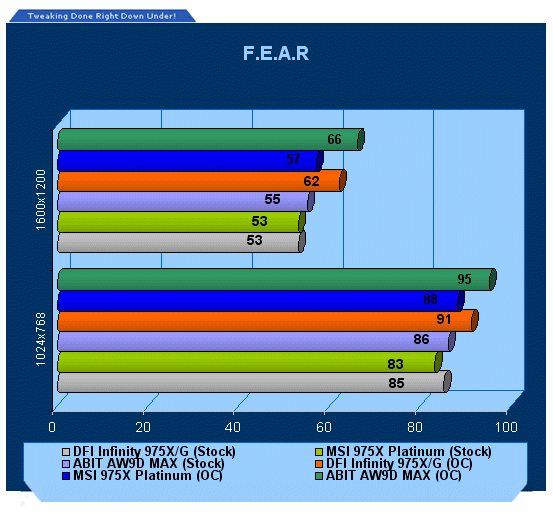
Our last test shows that the graphics is more the limiting factor here than the CPU and board.
Final Thoughts
Well, all we can say is "WOW!"
Without a doubt ABIT is back, bigger and better than ever before. ABIT's reputation for overclocking to the max is secure - in fact, this is definitely a personal best for any Intel 975X motherboards we have had here in the TweakTown labs. No other company has managed to break 400MHz FSB until now.
ABIT's bundle and onboard features are also a fantastic mix - you get ALL the cables you need for the board, unlike some boards that come with half of the cables that the board can support. ABIT goes the full Monty and even provides a Toslink cable, no other board we have ever tested has arrived on our doorstep with this.
Overall the bundle, motherboard and overclocking were far above anything we expected and we see no reason not to recommend the ABIT AW9D-MAX to you - that is, along as you have a few extra dollars tucked away as this board will cost you more than most Intel 975X motherboards.
- Pros
Core 2 support out of the box
Core 2 Quad support (probably requires BIOS update)
First 975X board here to break 400MHz FSB
Extremely stable
Supports ATI Crossfire
Firewire onboard
Impressive silent cooling
- Cons
Expensive
Placement of FDD connector
Rating - 9.5 out of 10 and TweakTown's "MUST HAVE" Best Performance Award

 United
States: Find other tech and computer products like this
over at
United
States: Find other tech and computer products like this
over at  United
Kingdom: Find other tech and computer products like this
over at
United
Kingdom: Find other tech and computer products like this
over at  Australia:
Find other tech and computer products like this over at
Australia:
Find other tech and computer products like this over at  Canada:
Find other tech and computer products like this over at
Canada:
Find other tech and computer products like this over at  Deutschland:
Finde andere Technik- und Computerprodukte wie dieses auf
Deutschland:
Finde andere Technik- und Computerprodukte wie dieses auf  Forget the PS5 Pro, Sony's neck-based air conditioner is the invention turning heads right now
 Windows 11 Settings gets another Control Panel feature as painfully slow migration continues
 Sony's PlayStation 5 Pro is expected to fix critical issues in select games
 Microsoft continues with plan to roll out controversial Windows 11 update
 Scientists close in on new technology that uses lasers to propel submarines
 ACEMAGIC AD08 "Core i9 11900H" Mini PC Review
 Lenovo ThinkPad X1 Carbon Gen 12 Review
 ASUS ROG Swift Pro PG248QP Gaming Monitor Review - Frames, frames, and more frames
 FlexiSpot C7B-Mesh Ergonomic Office Chair Review
 Samsung G8 34-inch QD-OLED Gaming Monitor Review - 175Hz for $900
 ASRock NUCBOX-155H Mini PC Review
 NuPhy Air96 V2 Wireless Mechanical Keyboard Review
 TEAM T-FORCE Siren DUO360 RGB Liquid CPU Cooler Review
 AVerMedia Live Streamer ULTRA HD Review
 AVerMedia Live Gamer 4K 2.1 Review
 Everything you need to know about the latest ASUS NUC Mini PCs - NUC 14 Pro and ROG NUC
 How to Overclock Your GPU and Boost Your PC Gaming with ASUS GPU Tweak III
 ASUS's AMD Radeon RX 7000 Series GPU lineup has something for every gamer
 ASUS OLED Premium Care defends the ROG Swift OLED PG32UCDM gaming monitor from burn-in
 Patriot Viper Xtreme 5 Engineering Prototype 48GB Dual-Channel Memory Kit Preview