

Introduction

Thumb drives come and thumb drives go. They have become a part of our normal daily routine for many, so having one in a pocket, briefcase or purse is quite common. If you spend just a minute or two searching, you will also come up with almost as many manufacturers with their own thumb drive that they want to sell you. But what if the data you store on that drive is important; or special; or even, shall I say it, secret?
Enter a company called A-DATA, a smaller company founded in 2001 dealing in memory. Since thumb drives are based on Flash memory, it shouldn't come as a surprise that a memory manufacturer would delve into this market segment. They have come up with a normal enough thumb drive except for one small thing, it is biometric.
So relax as we take a look at the A-DATA Biometric Thumb Drive. We'll cover what makes it special and also take a peek at the performance of the drive. After all, just because we want security doesn't mean we want to give up performance.
What You Get

After we cut our way through the hermetically sealed plastic container, we end up with the thumb drive, an extension USB cable, and a driver disk. The driver disk will only be needed if you are using Windows 98. All newer versions of Windows (including ME) will automatically recognize the device as an external storage media and load the proper drivers by default.

Taking a closer look at the device shows a rather squared looking module that has a removable covering to protect the USB tip. This can be extremely handy in the event it falls out of your pocket; and yes, this would be from someone who is talking from experience here.
As far as size is concerned, a quick viewing of the ruler shows the dimensions of the drive to be 66mm x 24mm x 10mm. For those who are metrically challenged, this works out to be about 2 5/8" x 1" x 3/8". So while it isn't the smallest drive on the market, it is easily small enough to fit almost anywhere with no problems.

Taking the cover from the drive shows a pretty common looking storage device. It is slim enough that it should fit into any front/side mounted USB port of your machine with no issues. Once you have finished, just put the cap back on and you're ready to go.
But what about the security features?

Ah, when you flip the drive over, you see a small metallic plate. This is a small scanning device that allows you to secure your data by means of a fingerprint. Simply put, you can lock access to the device unless someone has the proper fingerprint to scan or a proper password. Let's take a closer look at this concept, shall we?
Biometrics and Setup
According to Wikipedia, "biometrics is the study of automated methods for uniquely recognizing humans based upon one or more intrinsic physical or behavioral traits". In layman's terms, it is the ability to use the human body, your human body, to provide the security for your digital information.
In the case of the A-DATA thumb drive, it does so by allowing you to scan your own fingerprint into its storage area so as to secure your data. It also allows access to the data by means of a password that you can change so that others with a need to know can have access to the contents of the drive. All this is done automatically when you plug the drive into the USB port, so you might want to keep that USB extension handy to make it easier to access the scanner.
Since we now have a general idea of what this biometric security is about, let's take a closer look at what happens when we plug in the device.
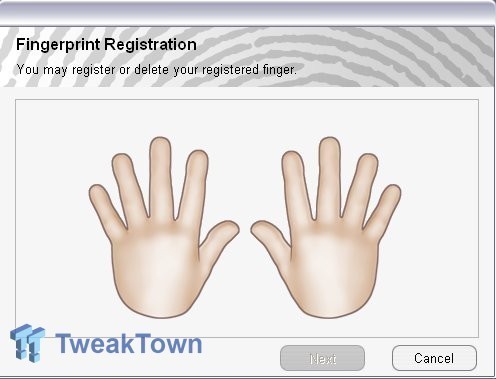
Above is the first thing that pops up on the screen when you first try to access the thumb drive. Remember, everything is stored on the thumb drive itself so no programs or utilities need to be installed to make use of these security features. A total of 6 smaller processes are started when the drive is plugged in, but these are non-intrusive to the system and stop when the drive is unplugged.
The first step to setting up your protected data area is to choose which finger you would like to use. Click next and you will be taken to an input screen that allows you to scan your chosen finger until the program is satisfied that it has an accurate capture of the ridge detail. After you have input a fingerprint that is acceptable, you will be presented with the opportunity to create a password.
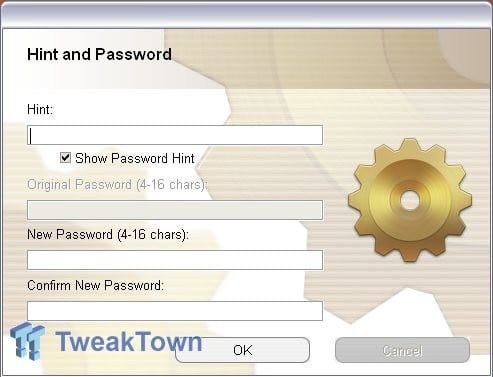
Like many websites, you can enter not only a password, but a hint to remind you what the password is. This block is not required, however, so you can leave it blank. The password feature is not used in conjunction with the fingerprint scan, it is used as an alternative method to gain access to your data.
After the initial setup, every time you plug in the thumb drive, you will be asked to either scan a designated finger or enter a password.
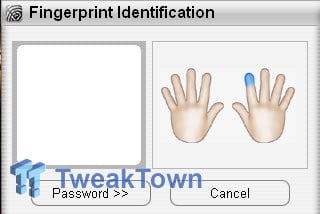
Just a small window that indicated which finger you should scan. If you choose not to use the scanner or have lent the drive to a coworker, you simply click the "Password" button to gain access. Once you have validated your authority to enter the drive you will be presented with a menu screen.
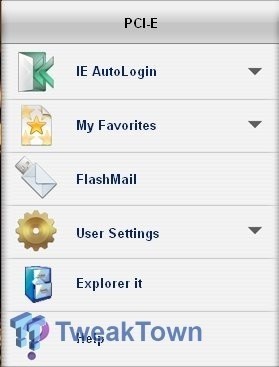
At this point you can make changes to your setup features, security features, or add things into different categories. If you prefer not to make use of the included menu utility, simply click outside the menu box and it will disappear. You can also access data from the normal Windows Explorer interface.

Above shows the explorer entries for the thumb drive. You will notice that two drive letters are associated to the removable device. The first (G:\ in this example) is the location of the setup files for the security features. The second drive letter (H:\ in this example) is the storage area. If you cancel out of the authentication screens when you plug in the drive, the only drive visible will be the setup portion. The other data will not be available.
Our test product is the 512MB version of this device. Other sizes are now available up to 8GB of capacity, so you can get whatever size best suits your needs. The properties screen above shows a slightly reduced storage capacity due to the security utilities being loaded on the thumb drive, the capacity is still near the full drive limit.
Security and Performance
Security
For those not familiar with my daily profession, I have been in law enforcement for the past 12+ years. One of my normal duties consists of fingerprint comparisons and identification of unknown latent fingerprints (yeah, just like CSI). Given my background and level of training in this field, I was very interested in seeing if the scanning technology used by A-DATA actually worked, or if it was so generic that it offered little in the way of security. I was impressed with my findings.
When first setting up the thumb drive to recognize my fingerprint, I chose my right index finger. I chose it because out of my ten fingers, I have two that have similar patterns. For others who are interested in the science, both of my index fingers are tented arch ridge patterns. The utility to set up the fingerprint gives you ten chances to properly recognize the print; it took only three for the utility to be satisfied that it had a scanned image that could be properly recognized. After this step had been accomplished, I began playing a bit.
I started by using different portions of the proper finger. I still maintained a good area of the central edge of the finger, but I had it rolled slightly to give a totally different contact patch over the scanning platen. As long as I managed to get the middle portion of the finger to roll somewhere over the platen, the utility properly recognized me as an authorized user and gave me access to the drive. I also scanned my finger upside down from the means in which it was captured (same scanning direction but starting with the finger tip instead of the joint) and it allowed me access. My first thought was that it may be too generic and won't offer security.
My next step was to use different fingers to attempt to gain access. Even the other tented arch platen on my left index finger did not pass muster. I noted an access denied symbol on the login screen and the security window disappeared. When attempting to access the information through Windows Explorer, I was denied. This same result occurred when I had my daughter try to scan a finger to gain entry... DENIED!
As with any fingerprint scanning technology, you should make sure that your finger is dry. If it is slightly wet (like after taking a drink from a cold glass with condensation on the outside), the reader will not register that you scanned a finger. This is a common sense step and does not reflect poorly on the capabilities of the device.
Performance
For testing of the performance, I dragged out my trusty HD Tach utility and grabbed up a 449MB demo of Prey. I will use HD Tach to measure read and burst rates as well as random access times, and I will use the Prey demo to time the data transfers from the system to the drive and back again. This should help give us a decent look at what a benchmarking utility will show as well as a more "real-world" test.
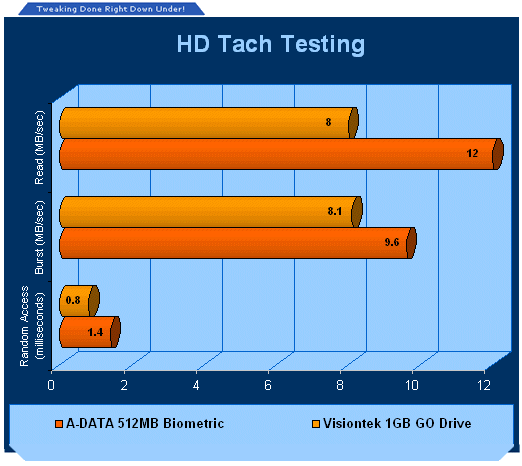
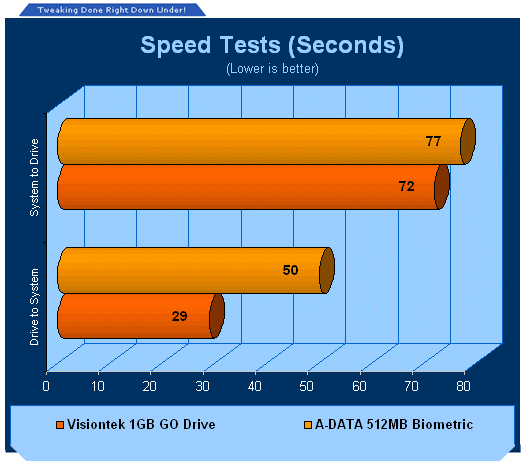
I have been using a Visiontek 1GB thumb drive for a while now and it has been proven to be a reliable comparison source. The results graphed above show that the A-DATA drive produces better read results, but falls behind a bit during the data transfer tests. When transferring data from your computer to the drive it is pretty close, but it lags behind a good deal when copying data from itself back to your system. I feel that this is likely going to be caused by the security programs that are running in the background. While the performance does not fall back enough not to make this an interesting product choice, it does take a very noticeable hit when moving or copying data to your system.
Final Thoughts
When it comes to digital data, security of your information has become not just a luxury, but in many cases a necessity. A-DATA is one of only a few companies currently offering this type of security-driven data protection, but I can only imagine that the field will soon blossom with others who think they have a better product. That said, I was pleasantly surprised and somewhat impressed with the reliability of this drive.
The scanning technology used is crude by professional standards, but its goal is not court-tested security either. It did prove reliable enough to keep others out of my data storage area, though, and that is the purpose of the device. It managed to allow me access and kept others out, so mission accomplished from this front.
There was a performance hit likely due to the background processes running associated with this drive, but the data was still transferred reliably without corruption. If performance is your primary concern, then you may be a little disappointed with this device. If security is a more important aspect, you should be well served with the A-DATA Biometric device.
As far as price is concerned, the 512MB model tested today can be found for under US$25. The 2GB models can be found online for under US$45, so price is right on par for any normal USB thumb drive of its respective size. Given the added security built into the device, this makes for a good deal if you have been looking for a means to keep your private data private.
Bottom line... For those who have been looking for some way to secure their personal and private digital information, make sure to check out the A-DATA line of biometric devices. They come in varying sizes to handle your needs and the fingerprint authentication actually works. Add to this the cost factor being the same as an unsecured device and it looks better all the time. Yes, data transfer performance will suffer a bit, but not so much as to make the drive unusable.
- Pros
Working fingerprint authentication
Backup password access
Cool factor
Cost
- Cons
Performance hit, particularly for data from drive to system
Six running processes when connected
Rating - 9 out of 10 and TweakTown's "MUST HAVE" Best Value Award!

 United
States: Find other tech and computer products like this
over at
United
States: Find other tech and computer products like this
over at  United
Kingdom: Find other tech and computer products like this
over at
United
Kingdom: Find other tech and computer products like this
over at  Australia:
Find other tech and computer products like this over at
Australia:
Find other tech and computer products like this over at  Canada:
Find other tech and computer products like this over at
Canada:
Find other tech and computer products like this over at  Deutschland:
Finde andere Technik- und Computerprodukte wie dieses auf
Deutschland:
Finde andere Technik- und Computerprodukte wie dieses auf 


 Corsair launches a pair of affordable new HS35 gaming headsets for PC and consoles
 Micron to get $6.1 billion in US funding for chip plants in New York, Idaho
 Enthusiasts are building a custom 3dfx VoodooX graphics card with 32MB RAM, DVI output
 Intel Lunar Lake-V CPUs: 8-core max, 8 Xe2 GPU cores, 32GB LPDDR5X, 17-30W TDP
 NVIDIA unveils two new single-slot Ampere-based RTX A1000, A400 workstation GPUs
 Samsung G8 34-inch QD-OLED Gaming Monitor Review - 175Hz for $900
 ASRock NUCBOX-155H Mini PC Review
 NuPhy Air96 V2 Wireless Mechanical Keyboard Review
 TEAM T-FORCE Siren DUO360 RGB Liquid CPU Cooler Review
 AVerMedia Live Streamer ULTRA HD Review
 AVerMedia Live Gamer 4K 2.1 Review
 XPG Invader X Mid-Tower Chassis Review
 Intel Core i9-14900KS CPU Review
 Arbiter Polar 65 Magnetic Gaming Keyboard Review
 ASUS ROG Falchion RX Low Profile Keyboard Review
 Everything you need to know about the latest ASUS NUC Mini PCs - NUC 14 Pro and ROG NUC
 How to Overclock Your GPU and Boost Your PC Gaming with ASUS GPU Tweak III
 ASUS's AMD Radeon RX 7000 Series GPU lineup has something for every gamer
 ASUS OLED Premium Care defends the ROG Swift OLED PG32UCDM gaming monitor from burn-in
 Patriot Viper Xtreme 5 Engineering Prototype 48GB Dual-Channel Memory Kit Preview