


Introduction
 23
23If you follow my reviews, and really if you look out into the world of mice, the idea has been to deliver a mouse with all the functionality possible with Macros and profiles. Most usually have some sort of changeable LED lighting system, and are based off of some really involved software to allow users the ability to define the control of the mouse rather than using default settings. The idea from AZiO this time around is completely different. Here the concept was to make an affordable mouse that isn't tied down to software and just works flawlessly out of the box to give users the ability to plug-and-play this new mouse into any PC.
That isn't to say that mice with all those added benefits are in any ways bad. Some of my favorite mice have had some really in-depth software, and with the way those mice were designed, without the software, some of them would not have been so nice to use long term. What usually comes associated with most mice that have the latest and greatest components, and wan full control via software, they usually don't come cheap. Here again, AZiO not only wants to rid you of the hassle of using it, they also don't want you to have to dig all the way to the bottom of your pocket to be able to afford this solution.
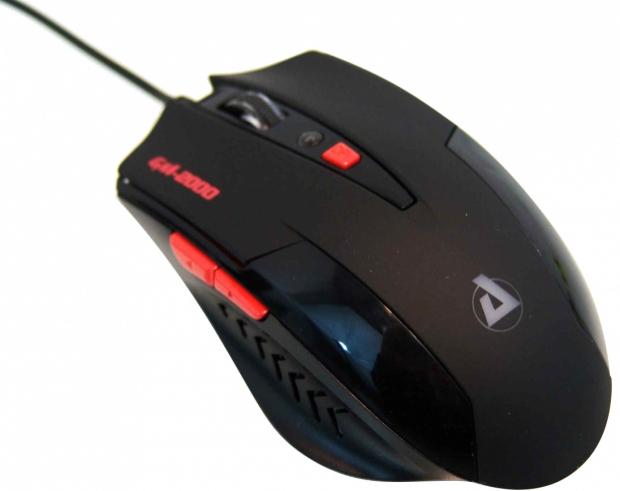
The latest submission from AZiO hits our desk with the Levetron GM-2000 mouse we are going to be looking at in depth today. As I mentioned, the idea here is to deliver a usable product that everyone would like, except for the left-handers out there. AZiO brings forth a bit of style, a bunch of comfort, and releases users from the trials of customizing a mouse with software. What you are about to see is an affordable solution in mice that looks at the way mice are used today in a different light, but still offering a product that is aesthetically pleasing enough for even the most picky of customers.
I do think you should stick around, as I truly believe that the Levetron GM-2000 is a mouse that will make you overlook the lower specifications of components inside the mouse, and just learn to enjoy the style of product that this mouse is.
Specifications, Availability and Pricing
 23
23Externally you are given a mouse made mostly of plastic. The GM-2000 uses a mix if a shiny piano black finish on some parts, a matte rubberized coating on other parts, and has accents of red in the buttons and in the LED lighting of the mouse. The mouse is designed for right handed people, even though the design is truly universal, the thing that makes it one side only are the pair of buttons on the side. Along with those two buttons you also have the right and left click, the scroll wheel click, and the DPI selector button. Along with a form fitting design that allows users to easily lift and move the Levetron GM-2000, AZiO ships the mouse with four PTFE feet to allow the mouse to glide very easily on many surfaces.
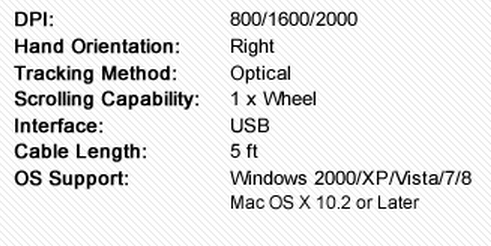
On the inside there is quite a mix of components. The main component is of course the PXI made optical sensor. This has the ability to track at 2000 DPI, and the GM-2000 has three settings of 800, 1600 and 2000DPI pre-programmed into the mouse. Since there isn't any software, and you cannot program Macros or profiles, you also don't have the need for storage on the onboard memory, and is why there isn't any attached to the PCB in this mouse. To make every click you make on the mouse register to the PC, there is a mix of micro-switches I cannot find a name on, HUANO switches under the right and left click buttons, with ZHIJ switches also being used in this mouse. As I said, there aren't the top of the line components we have come to expect in mice built today, but the price also reflects that.
Speaking of the pricing, I was able to find the Levetron GM-2000 at really affordable prices, while at the same time I see others charging what I think it way too much for this mouse. As I look around, Newegg seems to have the best current pricing at $29.99 and only requires an additional $1.99 in shipping. Other locations are charging in excess of $40 for the base price, and are also demanding more to cover the shipping.
To tell you the truth, there aren't too many mice that I get to play around with at this price point and it makes me really want to check it out and see if gamers can get by with a mouse that is built to get the job done, rather than to impress your friends with all of its "flash and bling" that doesn't equate to a better user experience every time.
Packaging
 23
23The packaging is much like the mouse inside of it, mostly black with accents of red. There is an image of the Levetron GM-2000 on top of an AZiO logo with a few features listed at the bottom such as the three year warranty.
 23
23The front of the box will open up to allow you to get a view of the mouse inside. On the left there is just more naming and the site address on that panel. To the right you have the same icons that were on the front, but now you can see the actual GM-2000 inside under the clear plastic.
 23
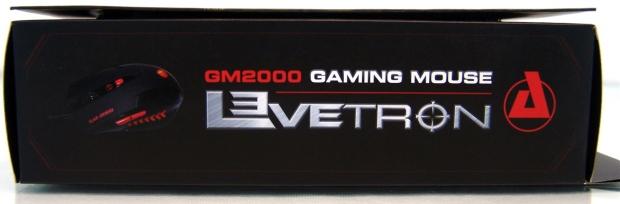
23This side offers an image of the GM-2000, its name, the fact that it is a gaming mouse, and that it falls under the Levetron series name.
 23
23On the back there is a list of four features that gets repeated in eight various languages. Near the bottom and to the left of the image of the GM-2000 you also get a list of the specifications.
 23
23This side matches the opposite side, and offers nothing new to discuss.
 23
23Inside of the box there was obviously the clear plastic portion of the packaging, but once it is removed you can see it is only one part of the two piece system. There is a black piece that holds the mouse in from the bottom while the form fitting clear top holds it in place for transit.
AZiO Levetron GM-2000 Gaming Mouse
 23
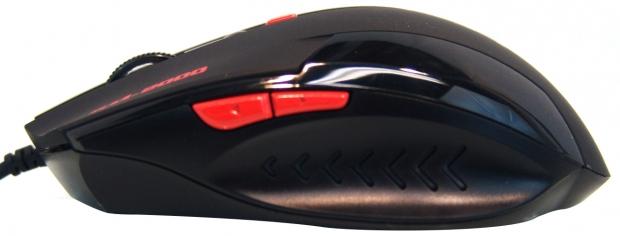
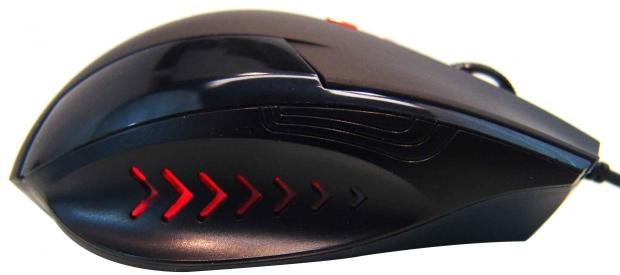
23On the left of the GM-2000 you can see the two bright red buttons that offer page forward and page back functions. You also see that the top of the mouse is shiny, while the contoured side that fits your thumb is not. There are also chevrons cut into the side to give you a bit of grip and are also backlit.
 23
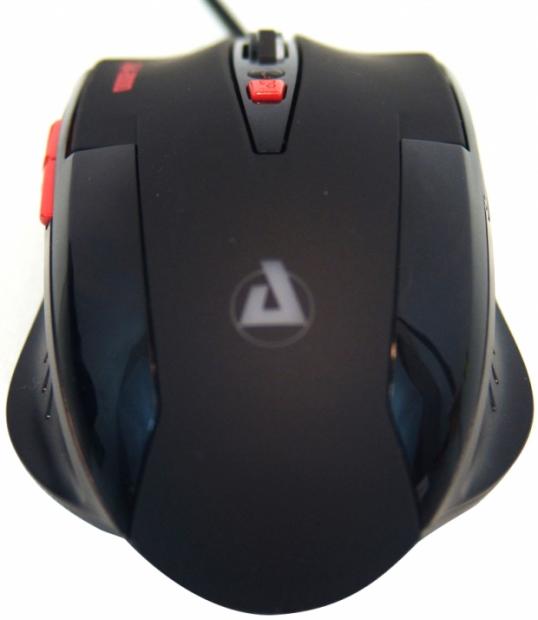
23The heel of the mouse does have a soft rubber coating applied that runs the length of the GM-2000. On either side you can see the shiny additions to the design, and in the middle, now white, will be the glow of red LEDs backing the AZiO logo.
 23
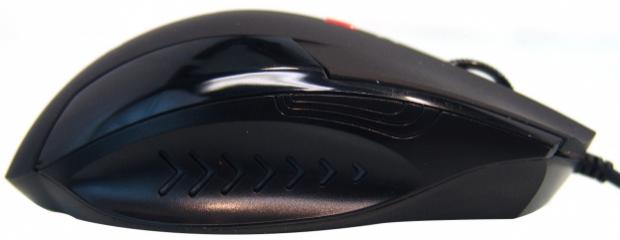
23The right side of the mouse is a dead on copy of the left side of the GM-2000, and honestly the only thing keeping this from being ambidextrous is the lack of the buttons on this side.
 23
23The front of the GM-2000 protrudes most in the center as both the right and left click buttons are shortened as they reach the outside edges. Both of the buttons are also concave to allow your fingers to easily rest in the gentle groove in them.
Between those buttons you will find a clear plastic scroll wheel that has a rubberized center on it for assurance you are going to move it. The movements are slightly defined, and this also offers the click down function. That leaves the red DPI button and the LED in front of it that is off, or has two intensities to denote the current DPI in use.
 23
23Underneath the GM-2000 you have four very small PTFE feet that have a layer of plastic on them currently to protect the feet in transit. The sticker around the optical sensors eye shows compliance icons and at the bottom has the model number, voltage requirements, and that this is made in China.
 23
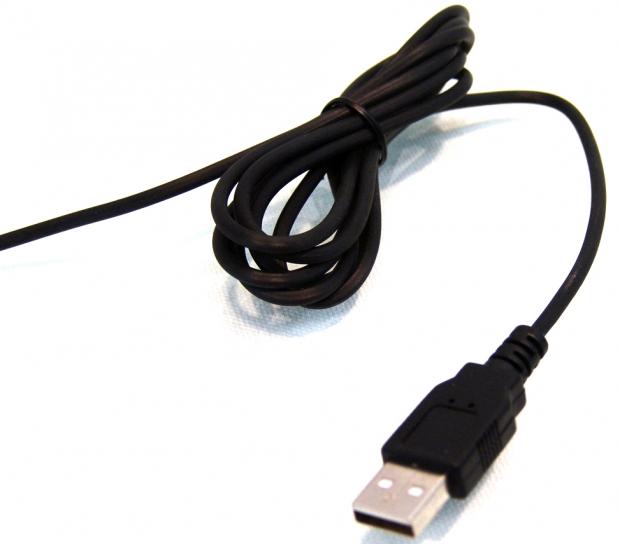
23To connect the mouse to the PC, AZiO gives you five foot of ribbed rubber cable with a USB 2.0 connector on the end of it. While it should reach to most I/O panels, with my setup the cable does just fall short of making it to my PC.
Inside the Levetron GM-2000
 23
23There is only one screw to remove, and by gently separating the back half, it allows you to slide back the top to unlatch a pair of clips. Inside the lens in the bottom is free to float around, as for the PCB in the middle; I disconnected that from the bottom half so it was easier to show.
 23
23The clear plastic scroll wheel is just connected to the mouse with a central pin in the other side that registers the scroll of the wheel. You can also see it offers the click feature of the wheel with the switch on this side.
 23
23Removing the wheel for a much better view of the switch types, you can clearly see that HUANO switches are used under the right and left click buttons, and the ZHIJ switch is used under the scroll wheel.
 23
23This is a view of the PAN chip made by PIX. This is a 16-bit controller that not only controls the communications of all the components, but is what also controls the tracking as this optical sensor offers its 2000 DPI maximum.
 23
23I also wanted to show that the LEDs in the GM-2000 are old school and large compared to the surface mount LEDs we typically see.
 23
23The top PCB that controls the DPI selector button with the use of the ZHIJ switch to the right, it also houses the micro-switches for the side buttons functionality, but I cannot find a name on them.
 23
23Putting the Levetron GM-2000 back together, I plugged it in to be sure I have everything correct. Instantly upon system recognition, you are given the red glow of the LED illumination. As you can see, the lighting shows right through the pattern on the sides.
 23
23The other side you can see glows just as well, and since I have the DPI set to 2000 currently the red LED in front of the DPI button also glows brightly. The AZiO logo on the heel is also illuminated, but oddly enough, the clear scroll wheel does not.
Final Thoughts
It has been a very long time since I have had a mouse that was truly plug-and-play, and I have to be honest, I really like it. No extra software shortcuts on the desk, nothing to worry about at all. All you do is plug in the GM-2000, wait for the OS to auto detect it, and enjoy using it. Even being a more economical choice, and while it may not offer the top of the line innards, the Levetron GM-2000 works just as well as some of the ones that do. The mouse is a tad small for me to use long term, but the time I did spend with it was comfortable in the hand, and glided very well on the various mouse pads I tested on. In my time using the GM-2000, I really couldn't sense anything that would make me not want to use this if it fit my hand a little better.
I will be honest, at first I was about to write off the GM-2000 as a low dollar, budget entry to mice, that really wasn't something I would end up liking so much. Using the mouse, having the ability for DPI on-the-fly adjustments, having a page back button which is a must for me only made me like this even more. Normally this is where I would say there is some amazing software to accompany this mouse, but that's just it, the GM-2000 works perfectly and does exactly as it is intended to do right out of the box without having to worry about LOD and polling rates and such. With the Levetron GM-2000, you get a mouse that is ready to go and as hassle free as possible, so that users can just enjoy the mouse for what it is, not for what the software brings to the table.
Considering the Levetron GM-2000 is definitely one of the most economically friendly solutions I have tested in quite some time, my thoughts of this mouse lacking in any way are really unjustified. The only real issue I have with this mouse, at any price, is that the cord is only five foot long and may make for some interesting routing to keep the wire out of the way for some setups. With a price of $29.99 there is no way that I cannot recommend the Levetron GM-2000. I don't care if you are a gaming professional or just an average gamer at home, this mouse has what it takes to be competitive in the peripherals game, and the price will just leave a smile on your face as you walk out of the store with your new mouse.
AZiO really turned my assumptions on their ear and delivered an optical gaming mouse that is well worth anyone's attention.

 United
States: Find other tech and computer products like this
over at
United
States: Find other tech and computer products like this
over at  United
Kingdom: Find other tech and computer products like this
over at
United
Kingdom: Find other tech and computer products like this
over at  Australia:
Find other tech and computer products like this over at
Australia:
Find other tech and computer products like this over at  Canada:
Find other tech and computer products like this over at
Canada:
Find other tech and computer products like this over at  Deutschland:
Finde andere Technik- und Computerprodukte wie dieses auf
Deutschland:
Finde andere Technik- und Computerprodukte wie dieses auf 


 Star Wars Outlaws does a great job upselling Ubisoft+ subscriptions
 Roblox charges users a 'publishing fee' to sell custom creations
 Is Square Enix preparing a Final Fantasy series subscription?
 NVIDIA wants to take the pain out of compact PC builds with 'SFF Enthusiast GeForce' GPU scheme
 What Sony's new PS5 Pro 'Enhanced' label means for gamers
 ASRock NUCBOX-155H Mini PC Review
 NuPhy Air96 V2 Wireless Mechanical Keyboard Review
 TEAM T-FORCE Siren DUO360 RGB Liquid CPU Cooler Review
 AVerMedia Live Streamer ULTRA HD Review
 AVerMedia Live Gamer 4K 2.1 Review
 XPG Invader X Mid-Tower Chassis Review
 Intel Core i9-14900KS CPU Review
 Arbiter Polar 65 Magnetic Gaming Keyboard Review
 ASUS ROG Falchion RX Low Profile Keyboard Review
 MSI MPG 321URX QD-OLED Gaming Monitor Review - 4K gaming at its best
 Everything you need to know about the latest ASUS NUC Mini PCs - NUC 14 Pro and ROG NUC
 How to Overclock Your GPU and Boost Your PC Gaming with ASUS GPU Tweak III
 ASUS's AMD Radeon RX 7000 Series GPU lineup has something for every gamer
 ASUS OLED Premium Care defends the ROG Swift OLED PG32UCDM gaming monitor from burn-in
 Patriot Viper Xtreme 5 Engineering Prototype 48GB Dual-Channel Memory Kit Preview