


Introduction
 44
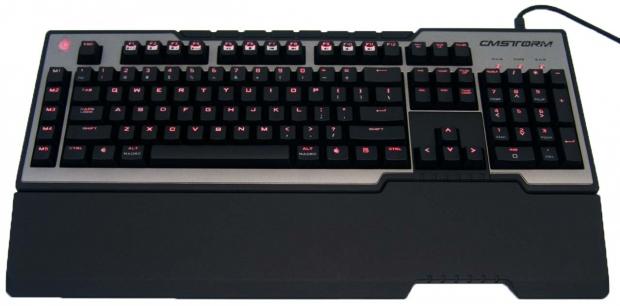
44It really seems there is no stopping the train when it comes to the overwhelming takeover in the last year of mechanical switches offered in keyboards now. It used to be that there were only a select handful of companies that have the distinction of being very well known - Ducky, DAS and Deck are few that immediately come to mind. That has all changed recently with the flood of various manufacturers in the peripherals game that listened to its customers' demands and developed mechanical keyboards to suit the needs of its consumers. Occasionally you run into a manufacturer that will not only deliver a keyboard that already offered many types of switches, but due to specific demand, they will go back and equip an already released model with a more specific audience.
If you are deep into keyboards, more specifically you keep up on all the latest offerings, you are well aware of all of the Cherry MX switch offerings already on the market. You can get anything from the more silent reds on through the blues, browns, blacks, and for those who can afford them, there is a company also keeping Alps switches alive. One thing that was once available was the now elusive unicorn of Cherry MX switches - Cherry MX green switches. While these switches may not be for everyone with their tactile feel and audible click as you depress the keys, or even the increased spring pressure are all things to consider, but after some time with these green switches, I am finding myself torn between these and the Alps found on the Matias.
Back in May when I looked at the Cooler Master CM Storm QuickFire Pro, I was let down a bit with the complete package. While the switches were fine, and the usage of the board was normal and as one would expect, the feature set was a little lacking in my opinion. Well, today I get to look at another solution in the CM Storm lineup, as CM shipped me the Trigger mechanical keyboard to look at today. Not only is the feature set more involved in the Trigger, but this is also my first time ever using the Cherry MX green switches.
With all the hype surrounding the switch type and the fact that the Trigger has more of what I am looking for in a keyboard, I have a feeling by the time I am done typing this up, CM is going to not only get a nice award out of this, but while supplies last, I think this will come highly recommended from me as well.
Specifications, Availability and Pricing
 44
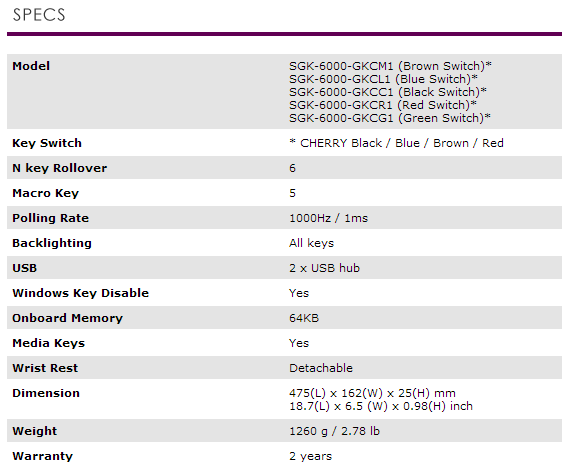
44Going down the list for the SGK-6000-GKCG1-US version of the CM Storm Trigger you can see right away that Cooler Master addresses everything important in a keyboard. They attack NKRO with a 6-key roll over solution with Anti-Ghosting capability. It offers Multi-Media keys, Macro keys, LED lighting controls with a full backlit option, and comes with a detachable wrist rest. Other offerings include a Windows key lockout, a two port USB 2.0 hub, 1000MHz polling rate, 64KB of on board memory for the software profile and Macro storage, and all of this is done in a much more attractive packaging than what we saw with the QuickFire Pro.
The one thing I have yet to cover is the foundation of this specific Trigger is the gold plated Cherry MX green switches used here. Essentially to make life easy in the description, they are a stiffer version of Cherry MX blue switches. The greens have a very stiff feel compared to all of the Cherry switches I have tested. They also have a defined actuation point, not only by the obvious click that comes from it, but there is definitely a fair bit of resistance that wasn't so apparent in the blues. While it has taken a couple of days for my forearms to get used to the heavier springs in the greens, once that was done, I do feel that I mistype random keys a lot less frequently as well since each key takes so much pressure to use, even if slightly on the side of another key, it isn't likely activated. So whether playing a game or typing as I am right now, you get what you mean to use out of the keyboard; making it generally more enjoyable to use.
While you can shop just about anywhere for the four original versions of the Trigger carrying blacks, blues, browns, or reds, there is only one place to find this version with the Cherry MX green switches. When I was asked to do the review, I was informed of the MSRP and it was set to $129.99 at the CM Store only. As I went to check it out, I was pleasantly surprised to see that the CM Store is actually listing the Trigger with Cherry MX green switches is listing for $104.99 currently. I am sure that price is subject to change at any time, but it does strike me odd that the unicorn of Cherry switches is the cheapest offering the CM store has for any of the Trigger keyboards.
Any way you look at it, you are getting a very well equipped solution based off of switches that not everyone will be able to get. So if you have the money handy act fast, because with limited quantities of this specific Trigger mechanical keyboard, those who wait will likely lose out.
Packaging
 44
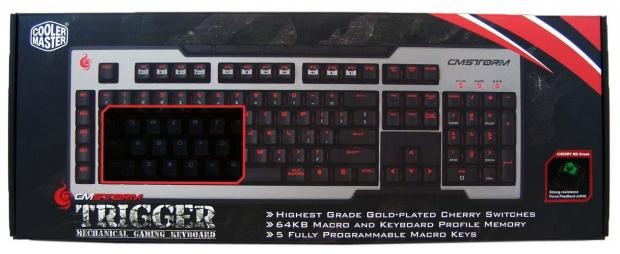
44On a dark camouflaged backdrop you see the Trigger keyboard. There is the CM Storm red slashes at the top and a window cut out over the keys to look inside at the actual keyboard.
 44
44Moving in much closer on the right side of the front panel we can now see the sticker they have placed there denoting the use of the Cherry MX green switches.
 44
44The end of the packaging houses the typical CM Storm Tactics. Strength, Security, and Control is what makes CM Storm products unique.
 44
44The back of the box is topped with text, but near the bottom there is a look at the back of the keyboard in this image showing off the USB connectivity and hub there.
 44
44The text on the top half, states that this is a mechanical gaming keyboard with the name of Trigger, and is repeated in 20 other languages.
 44
44The other small end of the packaging holds the CM Storm name and logo along with a stylized Trigger name with camouflage and barbed wire.
 44
44On the back of the package you are given lists of the features under the Trigger naming. At the right you are shown images of three features Cooler Master wanted to show.
 44
44This is the same features list that can be found on their site. Since most readers won't go there unless to buy it, I thought I would get in closer so you could read them.
 44
44The images to the right side cover the row of five Macro keys, the dual port USB 2.0 hub, and the last image with the Trigger X64 refers to the onboard memory.
 44
44When you open the box you find the Trigger is mostly out in the open with high density foam supports used on both ends to ensure a safe transit to your house.
 44
44Lifting out the inner packaging and flipping over the keyboard, you will find the wrist rest under in inside of the foam envelope.
CM Storm Trigger Mechanical Gaming Keyboard
 44
44Fresh from the packaging you can see the Trigger arrives with a109-key layout including the number pad, Macro keys and multi-media and keyboard controls.
 44
44The Trigger is chunky and measures almost a full inch to the deck in the front and just over an inch in the back. If you use the adjustable feet, the back is then set to 1.5".
 44
44The main section of the keyboard has black keycaps inside of the aluminium trim, and all are cast white first, then have the black layer applied over it to help keep the legends intact on the key caps longer.
 44
44Moving in closer you can more easily see the cut away for the logo in the aluminium trim that will later illuminate, but I also wanted to cover the lighting keys next to it that will adjust the light levels and patterns of illuminated keys.
 44
44The key caps are cylindrical in shale which helps to center your fingers for touch typists, and the home keys have a distinct ridge on them that is easy to find.
 44
44The right side of the Trigger houses the "lock" LEDs at the top with a full number pad and arrow keys used with this layout. The front of the board is also notched here and gives the palm of your hand a guide of sorts to say on the keys.
 44
44Just like the other side of the Trigger, there is this two piece plastic construction that gives the Trigger a bulky look and feel. Since I type on my lap mostly this isn't an issue.
 44
44Looking down the length of the back of the keyboard you can see some grooves further back purely as a design element. Nearest to you is the I/O panel on the Trigger.
CM Storm Trigger Continued
 44
44In the I/O panel you see there is a DC 5V input connection to maybe power the USB ports, but there isn't a power cable included. Then we move on to the mini-USB port for the keyboard connectivity, leaving the standard sized USB 2.0 ports as a pass through hub.
 44
44Flipping the keyboard over you can see an imprint of CM Storm taking up much of the bottom panel. On the left side there is a manufacturer sticker with the model and serial number on it, and a tiny OK sticker denoting it passed quality control testing.
 44
44At the back of the keyboard there are three thick rubber pads used as feet, and will keep the keyboard from sliding around. If you prefer to raise the back half of the board, simply lift the fold in feet to add another half inch of height.
 44
44On the front edge of the board you will find three more of those thick rubber feet for a total of six under the Trigger, but here you will also find places near each foot to clip in the wrist rest.
 44
44The wrist rest easily clips into the base of the keyboard, and as you can see it contours to the shape of the front of the keyboard as well. The hexagonal design isn't just to look good; it adds structural support to the rest as well.
 44
44With the wrist rest on the Trigger, you get an additional eight feet made of the same material, just a bit smaller in size. With 14 anti-skid feet now on the Trigger I can assure you it isn't going to move around during use.
 44
44The wrist rest is really deep, but keeps a gentle angle rising as it meets the front of the Trigger. I did spend some time with it in use on my desk, and with the blunt leading edge of the Trigger, this really helps if you have the room to use it.
Accessories and Documentation
 44
44The only accessory to ship with the Trigger is the near two meters of thick braided cable. Both ends are gold plated to fight corrosion, but one is full size USB to plug into the PC, while the smaller end plugs into the back of the keyboard.
 44
44Under the keyboard inside of the box you will find the literature. There is a Quick Start Guide to help you along as well as an insert that gives you the web address to find drivers, software, or support for any questions you may have yet unanswered.
 44
44Inside of the guide CM starts things off with an image of the keyboard with highlighted on it and a list of the nine things following it to get you acquainted with the Trigger layout. It also covers the package contents, system requirements, where to go for tech support, and basically covers the two year warranty.
 44
44If you want the full details on what is and isn't covered under the two year limited warranty, you can look toward the back of the guide as it will describe everything that will void your warranty, as well as the steps you should take to RMA it if you do have an issue that can't easily be fixed.
Disassembly and Finished Product
 44
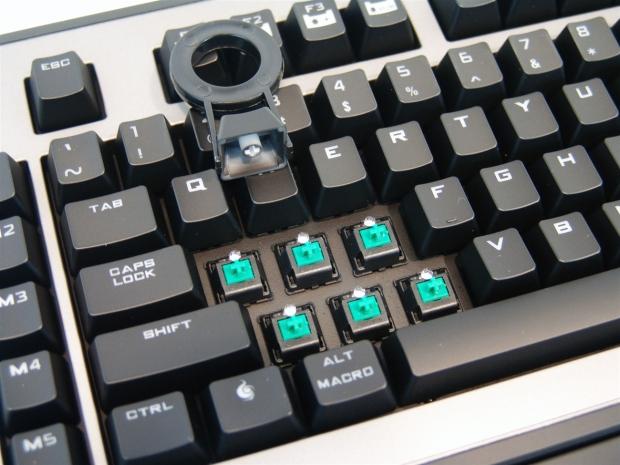
44The first thing I wanted to do was to remove a few of the key caps and see what switches are actually on the steel plate in this Trigger. They are in fact the Cherry MX Green switches as promised and are individually LED lit, but it was at this point I realized I would have liked an included key puller.
 44
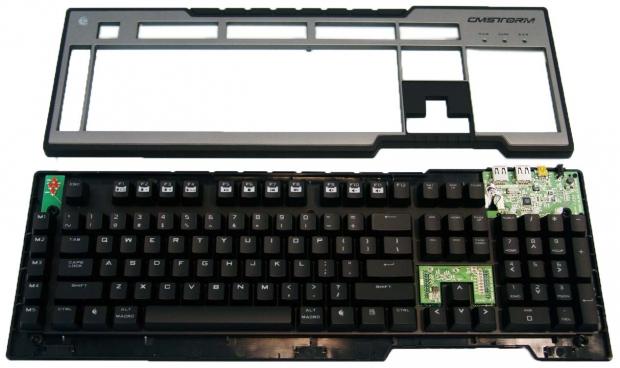
44Removing six screws from the back of the Trigger you can separate the top from the bottom of the two piece enclosure. What are left in the middle are the PCB, plate, and the switches.
 44
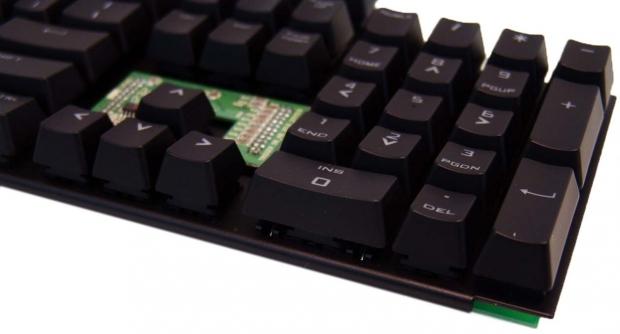
44The steel plate that stabilizes the switches as no not allow for flex when the PCB would have to take the pressure is this eight inch steel plate that is rounded over for strength on the front and back edges, then painted black to match the rest of the keyboard.
 44
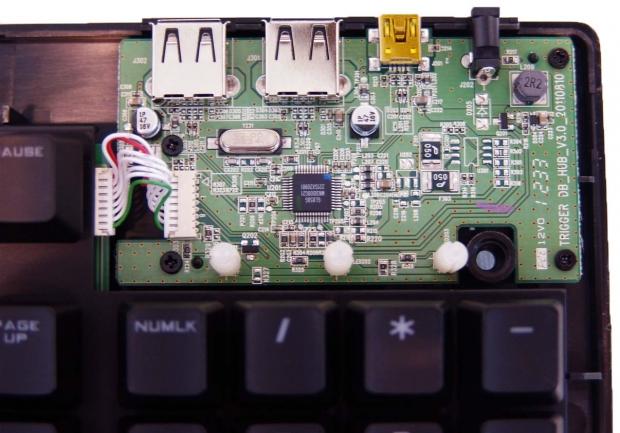
44The USB connectivity PCB is separate from the main PCB and with the quick removal of the cable you can go ahead and clean the switches if you should accidentally spill something.
 44
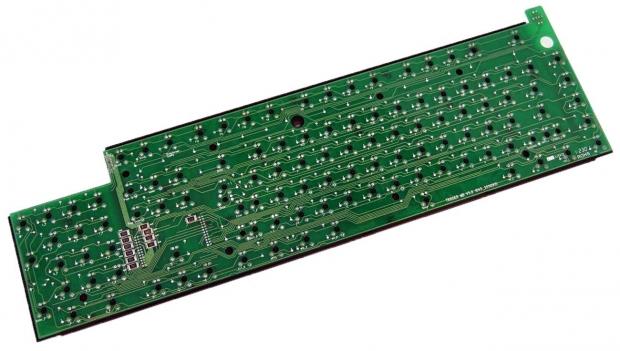
44On the back of the PCB there is some very well done solder work to all of the switches and LEDs. I was looking around for some numbers to help pin down the OEM, but there are only CM numbers painted on the PCB.
 44
44Once I got the Trigger all back in one piece I added in the braided cable and powered up the lighting modes. Now you can use the Trigger without any backlighting, but where is the fun in that? Here is one of the modes that illuminate the logo, Macro keys, WASD, and the arrow keys in red.
 44
44The other mode of LED lighting is full on red where every key on the keyboard is lit. You do have the option to limit or increase the amount of light in five steps for each mode as well. So if the lighting is too intense you can tone it down, or turn it up to full and easily see the Trigger in complete darkness.
Software
 44
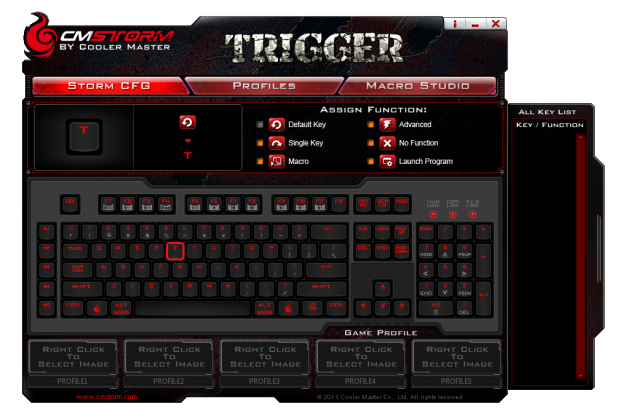
44Since there wasn't a disc included you do have to go to the CM Storm website to retrieve the software and driver package. Download it, install it, and open it and you are greeted with this popping up on your desktop. The Trigger software opens to the Storm CFG tab and allows you to take control of establishing the profiles along the bottom. Once a profile is selected, you can change the functionality of any key on the board via this page and the function menu at the top.
 44
44Under the Profiles tab you can manage what profiles are kept where. While the 64KB of built in memory allows you to store five profiles on the keyboard, you can store as many as you have room for on the PC. This page allows you to be able to set the keyboard before you leave the house so you can just keep game profiles on the board and leave the Photoshop, or Excel shortcuts at home.
 44
44In the Macro Studio you have full control of the Macro keys and their functionality. As I set the test name to the left to start the Macro programming I am brought to this handy screen. It offers various ways of recording for different applications. 1:1 mode is an exact copy of what you do, with time left for the applications to open or the time needed to recharge before spamming the next cast. There is a speed mode if you just want to set a macro that has no need to wait for things to open, and then there is a God mode that has not shorter delays, but absolutely no delay in the combinations set into these Macros.
 44
44Something I saw after the first reboot, and was the first inclination that the Trigger had this ability. Since the ALT key is also labeled Marco. Hitting it then selecting a M-key, you can program Macros on the fly, and even if you didn't save it, the next time you restart the PC the software automatically scans for those you didn't save at that time, and does it at the boot of the PC for you.
Final Thoughts
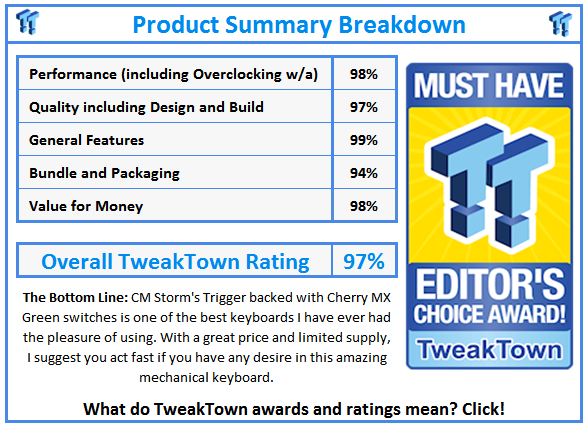
As I spend more time with the Cherry MX green switches, I really got a feel for what all the hype was about. At first I had thoughts that the tougher key stroke would wear out my hands faster, and it does do that for a couple of days, but in the long term I found myself becoming much more accurate in my keystrokes. The stiff resistance offered to the actuation point of the switch doesn't allow you to be sloppy on the sides of the keys like softer reds, even the Alps will allow at times. So while the Trigger may be a bit to get yourself used to in the beginning, I completely think it is worth the time and energy associating yourself with the Trigger because it will lead to you being a better typist, and you get more defined control in gaming without accidentally brushing other keys. For those of you with super-fast fingers, the 6-key roll over and anti-ghosting support may be a little weak for your needs, but I found no limitations in my gaming or typing while thoroughly enjoying my time with the Trigger.
Other aspects of the Trigger lends to it being a keyboard that most users can enjoy with things such as the fully back lit option, the detachable wrist rest, the detachable cable and USB 2.0 hub; they are all good selling points to any ordinary keyboard submission. Putting them all in together with some of the easiest software I have used for a keyboard, the unlimited control it offers users, and the feature set now including the Cherry MX green switches, there is just nothing that should turn you away from seriously considering the CM Storm Trigger as your next keyboard purchase. If I were to try to attack this keyboard for anything, I would say the blunt front edge may be uncomfortable to some users, and is something I found out long term with the QuickFire Pro, but the Trigger comes with the wrist rest to combat this issue as long as you have the room for it.
If you follow my keyboard reviews, you know how high I hold the Matias Tactile Pro 3 keyboard, and to tell you the truth, after spending quite a bit of time with the green switches on this Trigger, I don't see a real reason to go back. I really do think that for my every day runner, the currently $104.99 CM Storm Trigger with Cherry MX green switches is overtaking my desire to even plug the Matias back into my PC.
While this keyboard isn't for everyone, and is why it is in limited quantities, those with desires of using these green beauties, jump onto the local Cooler Master site and order yourself one, you won't be disappointed.
 United
States: Find other tech and computer products like this
over at
United
States: Find other tech and computer products like this
over at  United
Kingdom: Find other tech and computer products like this
over at
United
Kingdom: Find other tech and computer products like this
over at  Australia:
Find other tech and computer products like this over at
Australia:
Find other tech and computer products like this over at  Canada:
Find other tech and computer products like this over at
Canada:
Find other tech and computer products like this over at  Deutschland:
Finde andere Technik- und Computerprodukte wie dieses auf
Deutschland:
Finde andere Technik- und Computerprodukte wie dieses auf 


 TT Show Episode 31 - AI-Powered iPhone and PS5 Pro and an AI-Generated Romantic Comedy
 NASA is about to make Treasure Planet real with a solar sail mission
 AI discovers famous painting wasn't entirely painted by the credited artist
 Dubai government responds to claims cloud seeding caused historic flooding
 Elgato announces new Neo range that includes plug-and-play Wave, Facecam, Stream Deck, and more
 FlexiSpot C7B-Mesh Ergonomic Office Chair Review
 Samsung G8 34-inch QD-OLED Gaming Monitor Review - 175Hz for $900
 ASRock NUCBOX-155H Mini PC Review
 NuPhy Air96 V2 Wireless Mechanical Keyboard Review
 TEAM T-FORCE Siren DUO360 RGB Liquid CPU Cooler Review
 AVerMedia Live Streamer ULTRA HD Review
 AVerMedia Live Gamer 4K 2.1 Review
 XPG Invader X Mid-Tower Chassis Review
 Intel Core i9-14900KS CPU Review
 Arbiter Polar 65 Magnetic Gaming Keyboard Review
 Everything you need to know about the latest ASUS NUC Mini PCs - NUC 14 Pro and ROG NUC
 How to Overclock Your GPU and Boost Your PC Gaming with ASUS GPU Tweak III
 ASUS's AMD Radeon RX 7000 Series GPU lineup has something for every gamer
 ASUS OLED Premium Care defends the ROG Swift OLED PG32UCDM gaming monitor from burn-in
 Patriot Viper Xtreme 5 Engineering Prototype 48GB Dual-Channel Memory Kit Preview