


Introduction
 31
31Since I am a self taught typist, there was a time where I spent a lot of time looking at the keys to get my messages out onto the web, but as with anything, the more time you put into it, the easier it gets. Another challenge that I found then was being able to see the keyboard if the room wasn't lit enough for me to see the painted on letters on each of the key caps. To solve this kind of issue you have two options. Turn a light on in the room, or the more obvious choice so you don't lose the ambiance is to obtain a backlit keyboard. The last issue that even more recently I have run into is that even when I can see the keyboard, after a night out with some friends and a few drinks, the keys start to blur together, and having a keyboard with larger lettering on it would definitely solve my issue, and for those that don't partake in drinking, it will certainly reduce eye strain trying to discern the smaller labeled keys on the market.
AZiO, the company we just looked at the Levetron Mech5 keyboard from, has also delivered me another keyboard to look at that solves the issues I just described. In their own statement in an overview of the keyboard we are going to look at today that (paraphrasing here) the extra large print on the keys will reduce eye strain and promote productivity. It also offers red, blue, or purple backlighting, quick access hot keys, and multimedia keys to deliver you the "ideal productivity keyboard". The first two claims are easy to see how large print and backlighting can help users of this board, but I plan to really test out if this board is "ideal" for not just being productive, but using this keyboard more long term.
With a touch of style in the design, contrasting between textured surfaces and skinny piano black ones, offering an easy to see 104 key layout with LED backlighting, the Large Print 3 Color backlit keyboard or KB505U is AZiO's solution to make you more productive so that when working at the PC you spend less time actually working, leaving you more time to game with your friends or go out and enjoy nature.
What makes the AZiO KB505U even more appealing is the very affordable price point that makes it an easy choice for you and not over the top as a gift idea either.
Specifications, Availability and Pricing
 31
31Aesthetically you are given a compact design that has just enough around the 104 key layout that the keyboard still is able to stay rigid. The key caps are ever so slightly contoured to offer a place for your fingertips to settle on the keys and of course are almost completely taken up with the letter, number, or abbreviated commands on the secondary keys. The design of the keyboard is rounded at the front and flattens out as it reaches a maximum height of 1.1" without the adjustable legs being used. The key caps are textured, and so is the outer edge of the frame, but an insert of a shiny piano black finish surrounding the keys is a nice touch to add just a bit of elegance to what is basically a plastic keyboard with rubber dome switches.
Technically, on the inside and around the KB505U, there is a bit to discuss as well. To connect this device you have a USB connection on the end of five feet of plastic coated cable. Above the standard 104 key layout you are also given Email, Home and Favorites buttons along with the full assortment of multimedia keys, and ending with My Computer and Calculator buttons on the right. One last button you will find on the top right corner is the LED button, and that takes us to the inside if the keyboard. There you will fine rubber domes under the key caps that make contact against a plastic membrane. Under those two layers is a thick layer of plastic that has LEDs along the one edge of it, and when powered, this plastic that goes from end to end and top to bottom will illuminate every key on the board with either a red, blue, or purple glow of the LED lighting system coming through those extra-large print key caps.
In my opinion, for a keyboard that is plug and play ready, with no accompanying software, you shouldn't have to break the bank buying one. AZiO is on the same page here, and why they do offer a solution with less eye strain than others, even a LED backlighting system that has optional colors, but that doesn't mean you are going to be raked over the coals. From what I can tell the AZiO KB505U Large Print 3 Color backlit keyboard is a steal at the price I am seeing over the 21 places I could buy it. Careful where you buy one though, at the high-end you are going to have to spend near $50, and while not bad, there are much better deals to be had. If you shop carefully, even at respected e-tailers, you can acquire this board for $33.32 at Geeks.com with shipping included at the time of writing.
Now you can see why I addressed its affordable enough to give it a go, and definitely makes for an attractive price point for gift ideas for someone you know who could benefit from what the KB505U offers.
Packaging
 31
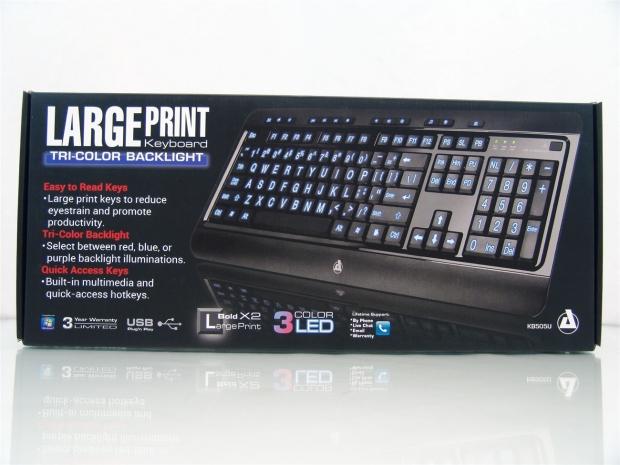
31The packaging is very straight forward and easy to see and figure out what is inside. If the large text on the left didn't give it away, one look at the keyboard on the right and you can see the two main features; the extra-large print and the LED backlighting.
 31
31Even if these are stacked on the shelf you can see on the thin side that they again offer all the information you really need. Covering the print on the keys, the LED system, it is Windows ready, has a three year warranty, and uses USB for connectivity.
 31
31Even with much less space on the sides of the box, AZiO makes sure to put in everything they could fit, including an image of the keyboard.
 31
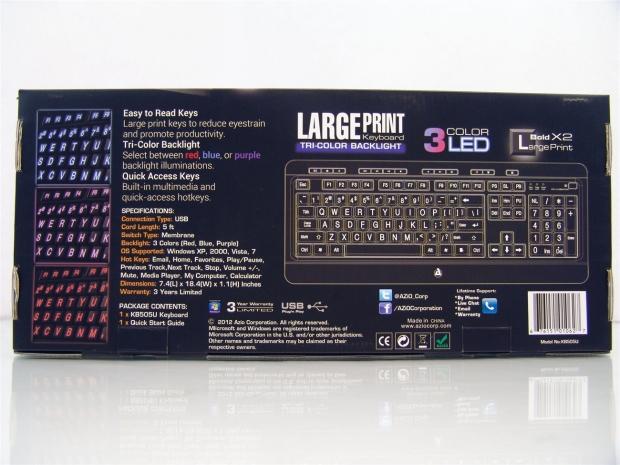
31On the back is where you will see all the KB505U has to offer in images and in text. On the left are images of the keyboard while lit in each of the three colors next to the wall of text covering the features and specifications. On the right is a rendering of the keyboard to show you every key offered and give you an idea of the scale of the printing used on the keys and what abbreviations are used.
 31
31Inside of the box the KB505U is shipped inside of a plastic liner to keep the keyboard from rubbing against the box. The front edge of the box is thickened to allow for the USB cable to be bundled and secured there, also helping to keep the keyboard from sliding left to right in transit.
AZiO KB505U Large Print 3 Color Backlit Keyboard
 31
31Right out of the box you can definitely see the large print used on the KB505U as the milky white color of the rubber dome switches shows through them. You also can get a sense of the textured finish contrasting against the shiny section that surrounds the keys, along with the rounded over front edge and gentle corners of this keyboard.
 31
31For the basic 74 key layout on the KB505U all of the icons, numbers, letters, and commands are all increased in size quite a bit to make it much easier on the eyes finding the right keys.
 31
31The other 30 keys on the right are a mix of the standard keys on the number pad with ten keys obviously abbreviated to just two or three letters to get the point across to what the key does. For those used to touch typing and keyboard layouts this matters very little, but may confuse those users who aren't used to what the keys were for on a board that writes out the full command.
 31
31Above the standard keys on the KB505U you also get a row of smaller keys across the top edge. Here you can see the Email, Home, and Favorites keys and the Play/Pause, Rewind, Fast Forward, and Stop keys on the left half of the keyboard.
 31
31Moving just off center to the right you then find the rest of the multimedia keys and a few other handy keys. There are the Volume Down, Volume Up, and Mute keys to finish off the multimedia section, and then the Media Player, My Computer, and Calculator buttons to finish off the quick-keys.
 31
31The last thing I want to discuss that is found on the top of the KB505U is the three LED indicators for the number lock, caps lock, and scroll lock. These sit right next to the button marked LED that is what you need to use to change through the three color options of the backlighting.
 31
31I wanted to get in very close to show that there is a slight cupping on the top of the key caps to give your fingers sort of a resting zone as you go to use them. It is a little less than I prefer on my caps, but just enough to feel and be useful.
 31
31Under the keyboard you can see the rounded front edge does work as a wrist rest, even if not that long, without the added bit here the keyboard would be much harder to use long term. Besides that, near the front edge, there are a couple of drain points if you do accidentally pour a drink in the keyboard it has a way to let the liquid out.
 31
31Both the right and left sides of the front edge offer two feet. A larger one on the leading edge of the keyboard and the thinner one installed under the rest to ensure this keyboard won't move around, nor will the added plastic click against the desktop under the pressure of your hands.
 31
31If the slight rise of the keys designed into the KB505U is not enough for your comfort during use, they do offer a foot like this on both corners in the rear to allow you to add roughly another half of an inch to the back of the keyboard.
AZiO KB505U Keyboard Continued
 31
31Looking at the KB505U from the side, you can see that like I said, the keyboard is very flat from front to back, so you very well may want to pop out the legs in the back.
 31
31To do so you just lift the front edge of the foot, and the three piece hinge there will click into the locked out position. I know with the size of this foot it is tough to add, but I would prefer a rubber pad for grip on these legs.
 31
31With the feet extended you can see how it changes the angle of the keys quite a bit and should help alleviate any wrist issues you may have from lengthy typing sessions.
 31
31The USB cable comes folded up and wrapped in a plastic sleeve for transport, but once the twist ties and plastic sleeve are removed, you have five foot of black plastic cable to make the USB connection to the rear I/O of your computer.
 31
31After removing quite a few screws I was able to open up the keyboard to have a look at what is inside. What I ran into first is the PCB that the USB cable connects to and is the workhorse of the keyboard controlling its usage as well as the LED functionality.
 31
31Lifting the lighting panel out of the way you can now see the plastic membrane with the traces in it and you can even see the dome switches through the membrane that make the contacts for each key.
 31
31This is only about two-thirds of the panel, but you can get the idea of how the system is run. Three wires run to the LEDS on the far edge, and when they are powered they illuminate this whole panel to deliver quite a bit of LED glow through the key caps.
 31
31With the inside of the KB505U thoroughly looked over I put it back together and powered it up to be sure I didn't break anything. Once I plugged in the USB to the PC I was greeted with the blue option showing through that large print on the keys.
 31
31You also have the option to go with red as the backlight. The lighting is a bit dim due to being red and not showing so well in images, but it is in reality a bit dimmer than the blue and purple options.
 31
31Not a huge fan of purple, this isn't my first choice, but if I were against the blue, I would use this over the red solely based on intensity alone. Either way it's much better than no lighting at all for the keys, so I will take what I can get for now.
Accessories and Documentation
 31
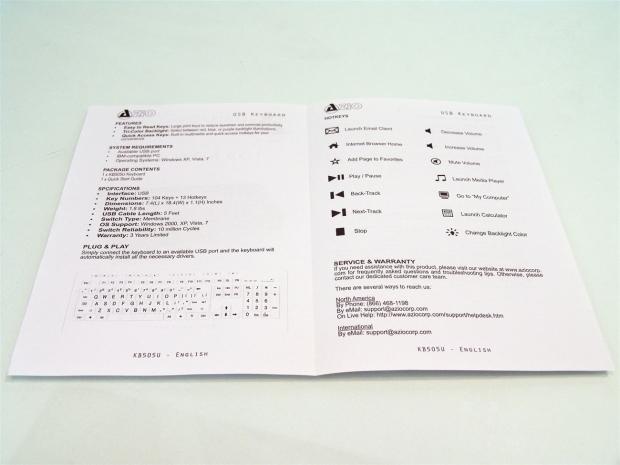
31I did find the user guide for the KB505U sitting in the bottom of the box under the keyboard. Even with the move to black and white, AZiO isn't shy about showing off the KB505U and flaunting the features every chance they get.
 31
31Inside the guide starts by telling you the features and system requirements, and then moves on the package contents and the specifications. Once that is done you are given the full layout of the keys at the bottom.
Over on the right you are shown what all of the multimedia and quick-access keys do. That page then finishes with where you will want to make contact with AZiO if you need to make a warranty or service claim.
 31
31On the back of the guide you will find all of the technical data on what is covered and how to avoid voiding your warranty so that you can benefit from the three year limited warranty that AZiO offers with this keyboard.
Final Thoughts
With my use of the KB505U from AZiO it took me a while to get used to the super light actuation pressure needed for a keyboard that uses rubber dome switches. I was able to get used to the keyboard, and in that time I settled for the blue LED to backlight my night time usage of this board. For what it is, and as its name suggests, the Large Print 3 Color Backlit Keyboard, delivers on all aspects claimed by AZiO. The LEDs are bright and do a good job of illuminating your way around the keyboard. If your vision is slightly blurred from spirits or you tend to have to swap to the magnifying section of your bifocals, this is a solution that definitely takes the strain off your eyes while attempting to move around the keyboard. I still think that the secondary command keys off to the right should have full words, because lets be honest, if you need to really see your way around a keyboard, it's likely you don't use those keys regularly and may not know what PU and PD means or what NL does.
Everything the board claims to be it is, but for those looking for NKRO or any sort of software support for Macros and such, this is not the keyboard for you. This is more a factory replacement board that would make it easy for your kids to use or a perfect gift idea for your tech buddies that you tend to watch moving their glasses so that they can see the typical tiny printing usually used on key caps. Sticking with the basics allows AZiO to be able to give you a keyboard with full sized keys, LED backlighting, all in an attractive looking frame. Even if the large print on the keyboard isn't a must for you now, I can say when you do come home with blurry vision, you can troll all your friends on Facebook with confidence that you are at least able to see what you are trying to convey.
AZiO could have simply went with this same design and just painted the key caps a day glow yellow like the keyboards found on late night infomercials, and still been able to charge $25 a board, and seeing one of those in real life will almost want to make you vomit as your eyes try to adjust to that color on all of the keys. Instead they took the basic rubber dome keyboard, increased the font size of the key caps, and illuminated the keyboard with LEDs instead. Also leaving the keyboard as a plug and play device with no drivers or software needed, AZiO is still able to deliver us a much better thought out way to reduce eye strain, and make night time use of the keyboard just as easy with the three optional colors.
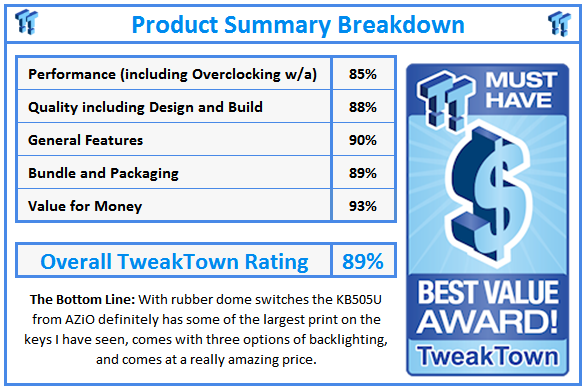
What makes the deal so sweet is even with the additional perks of the KB505U Large Print 3 Color backlit keyboard is only going to cost you under $34 to find out if you like it.
 United
States: Find other tech and computer products like this
over at
United
States: Find other tech and computer products like this
over at  United
Kingdom: Find other tech and computer products like this
over at
United
Kingdom: Find other tech and computer products like this
over at  Australia:
Find other tech and computer products like this over at
Australia:
Find other tech and computer products like this over at  Canada:
Find other tech and computer products like this over at
Canada:
Find other tech and computer products like this over at  Deutschland:
Finde andere Technik- und Computerprodukte wie dieses auf
Deutschland:
Finde andere Technik- und Computerprodukte wie dieses auf 


 The Apple Vision Pro's marketing chief has left Apple after 36 years
 The fourth season of the popular Apple TV+ show Trying has its first trailer
 Watch the trailer for Apple TV+ docuseries Hollywood Con Queen Right Here
 MSI's advice for Core i9 CPUs hit by game crashes includes 'workarounds recommended by Intel'
 No, your Apple trade-in hasn't been canceled - no matter what Apple says
 ACEMAGIC AD08 "Core i9 11900H" Mini PC Review
 Lenovo ThinkPad X1 Carbon Gen 12 Review
 ASUS ROG Swift Pro PG248QP Gaming Monitor Review - Frames, frames, and more frames
 FlexiSpot C7B-Mesh Ergonomic Office Chair Review
 Samsung G8 34-inch QD-OLED Gaming Monitor Review - 175Hz for $900
 ASRock NUCBOX-155H Mini PC Review
 NuPhy Air96 V2 Wireless Mechanical Keyboard Review
 TEAM T-FORCE Siren DUO360 RGB Liquid CPU Cooler Review
 AVerMedia Live Streamer ULTRA HD Review
 AVerMedia Live Gamer 4K 2.1 Review
 Building the Ultimate Home Entertainment Server with an ASUSTOR NAS and Viper Gaming NVMe SSDs
 Everything you need to know about the latest ASUS NUC Mini PCs - NUC 14 Pro and ROG NUC
 How to Overclock Your GPU and Boost Your PC Gaming with ASUS GPU Tweak III
 ASUS's AMD Radeon RX 7000 Series GPU lineup has something for every gamer
 ASUS OLED Premium Care defends the ROG Swift OLED PG32UCDM gaming monitor from burn-in