


Introduction
![SteelSeries Sensei [RAW] Laser Gaming Mouse Review 99](https://static.tweaktown.com/content/4/8/4857_99_steelseries_sensei_raw_laser_gaming_mouse_review.jpg "SteelSeries Sensei [RAW] Laser Gaming Mouse Review 99")
 32
32With everything I have been delivered from SteelSeries since our meeting up in Las Vegas for CES 2012, I was one mouse shy of seeing the entire lineup in some form or another. The one mouse from them that I always get asked about is the Sensei and that just happened to be the one mouse I had not seen. Well, that time is over, sort of. As the title alluded to, I am in fact using the Sensei, but in a new form. By no means do I mean the quality has changed nor has the ambidextrous nature of the mouse been changed, it's all about the features or lack thereof and a really attractive price point that is spawning the newest version of the Sensei laser gaming mouse.
For starters, aesthetically the Sensei has gone from a metal exterior to plastic in either a glossy or rubberized finish for the new version. Both keep the same laser sensor, Omron switches, eight buttons, software support and a braided cord. Where things start to differ internally is that this newest sample has only white LED backlighting options and the original offered 16.8 million choices. The 32-bit ARM processor is replaced with a 16-bit MCU. The CPI is relatively the same as well, but the idea here was to deliver gamers everything good about SteelSeries mice, without all of the professional options for those who will be taking mice to various pre-set PCs to game on. Most of us who game, do so at home or take our rigs to a LAN event, so the need to store a ton of profiles and have an expensive mouse that offers things we don't need isn't something we have to settle for anymore, there are now better solutions on the market.
Now this isn't a knock-down model of the Sensei by any means. It still uses a great laser sensor and has the feel of the original with the same amount of programmable buttons. This time with the release of the Sensei [RAW] you get the down and dirty model of the mouse that is geared more for the masses and not solely driven towards professional gamers. I have been a fan of the light and easy to use mice from SteelSeries, but I will agree that most of what was included in the SteelSeries Engine software was a bit over the top for me. If anything I would go and set things once, maybe change the color, but besides that, once it was set, I pretty much left all of the options and profiles at default. With the Sensei [RAW] in its rubberized coating, I now have the simpler mouse I always wanted from SteelSeries. That is one that is plug-and-play, easy to use and navigate the software and is just a pleasure to use.
I think SteelSeries hit the nail on the head with the Sensei [RAW] and if you continue reading, I think you will be as intrigued as I am about this new laser gaming mouse.
Specifications, Availability and Pricing
![SteelSeries Sensei [RAW] Laser Gaming Mouse Review 01](https://static.tweaktown.com/content/4/8/4857_01_steelseries_sensei_raw_laser_gaming_mouse_review.png "SteelSeries Sensei [RAW] Laser Gaming Mouse Review 01") 32
32![SteelSeries Sensei [RAW] Laser Gaming Mouse Review 97](https://static.tweaktown.com/content/4/8/4857_97_steelseries_sensei_raw_laser_gaming_mouse_review.png "SteelSeries Sensei [RAW] Laser Gaming Mouse Review 97") 32
32On the outside of the Sensei [RAW] you are given a fully plastic shell where the top component of it have been completely covered in a rubberized coating, while the bottom section of the mouse is clear. The mouse is curved on both sides equally to give this mouse true ambidextrous appeal to left handed users. On both sides there is a pair of buttons. By default the left two are page forward and back, while the pair on the right will scroll up and down. Across the top of the mouse you have a CPI adjustment button for one of two settings, a scroll wheel and an LED to denote which of the two CPI profiles are active. To keep the Sensei [RAW] moving as effortlessly as possible, 16 percent of the bottom surface is taken up with three large PTFE feet.
On the inside of the mouse you have a mixture of Omron switches for the right and left click buttons and the scroll wheel click. As for the side buttons on the mouse, they are backed with TTC switches on a separate PCB. To control the flow of clicks and movement to the PC, the Sensei [RAW] is equipped with a 16-bit MCU that offers full USB 2.0 bandwidth. To read where the mouse is at or moving to, this has the Avago ADNS-9500 laser sensor for tracking with up to 5670 CPI and with 30G lateral acceleration, you should be able to move faster than this mouse can read your movements. There is a bit of lighting to the Sensei [RAW] as well, but the unlimited choices have been limited to only white to illuminate the logo on the heel of the mouse, the center of the scroll wheel and with the clear bottom, it will lightly glow with the white LEDs as well.
News just as recently as five days ago is showing that this mouse is just releasing to retailers and via a bit of searching I could only find two listings on the right side of the pond for the Sensei [RAW] at this time. As I mentioned, compared to the original Sensei's pricing of very near $90, the Sensei [RAW] is more economically friendly with an MSRP of $59. For those of you on the other half of the globe, just like with Steam games, the pricing is set to the $1 equals 1€, so the deal is much sweeter for US buyers.
Either way you are getting essentially the same thing as the original without the ARM processor and color choice of LEDs for some $30 cheaper making this a much more inviting option to anyone looking into laser gaming mice.
Packaging
![SteelSeries Sensei [RAW] Laser Gaming Mouse Review 02](https://static.tweaktown.com/content/4/8/4857_02_steelseries_sensei_raw_laser_gaming_mouse_review.jpg "SteelSeries Sensei [RAW] Laser Gaming Mouse Review 02") 32
32The Sensei [RAW] comes in packaging that is basically black, grey and white to make the orange in the naming an on the trim pop right out and grab your attention. You can see we received the rubberized version by both the name at the top and the patch at the bottom that you can feel the coating in. Right in the middle is an image of the Sensei [RAW] with pencil drawings of it behind the mouse.
![SteelSeries Sensei [RAW] Laser Gaming Mouse Review 03](https://static.tweaktown.com/content/4/8/4857_03_steelseries_sensei_raw_laser_gaming_mouse_review.jpg "SteelSeries Sensei [RAW] Laser Gaming Mouse Review 03") 32
32The front of the packaging opens to expose the black panel on the left that tells you why SteelSeries came up with the [RAW] and at the bottom there is a checklist of what both of the Sensei styles offer for features. The right side is all orange and makes the mouse inside pop right out for an easy glance even if it is covered in a protective plastic.
![SteelSeries Sensei [RAW] Laser Gaming Mouse Review 04](https://static.tweaktown.com/content/4/8/4857_04_steelseries_sensei_raw_laser_gaming_mouse_review.jpg "SteelSeries Sensei [RAW] Laser Gaming Mouse Review 04") 32
32This side of the box offers you a glance at the mouse looking at it from above with the LEDs lit up. Below that is an insert that also shows how the side of the scroll wheel will illuminate along with the CPI indicator just behind it.
![SteelSeries Sensei [RAW] Laser Gaming Mouse Review 05](https://static.tweaktown.com/content/4/8/4857_05_steelseries_sensei_raw_laser_gaming_mouse_review.jpg "SteelSeries Sensei [RAW] Laser Gaming Mouse Review 05") 32
32The back starts with some limited specifications at the top above the images of the Sensei [RAW] denoting the five features listed in four languages below it.
![SteelSeries Sensei [RAW] Laser Gaming Mouse Review 06](https://static.tweaktown.com/content/4/8/4857_06_steelseries_sensei_raw_laser_gaming_mouse_review.jpg "SteelSeries Sensei [RAW] Laser Gaming Mouse Review 06") 32
32This last side shows you a view from the side of the mouse and also has an insert showing off the illuminated logo.
![SteelSeries Sensei [RAW] Laser Gaming Mouse Review 07](https://static.tweaktown.com/content/4/8/4857_07_steelseries_sensei_raw_laser_gaming_mouse_review.jpg "SteelSeries Sensei [RAW] Laser Gaming Mouse Review 07") 32
32Inside there is a bit of folded cardboard to keep the wiring tidy in transit that also runs the entire length of the box. This along with the plastic over the mouse keeps it from moving around or getting marked up on the shelves.
![SteelSeries Sensei [RAW] Laser Gaming Mouse Review 08](https://static.tweaktown.com/content/4/8/4857_08_steelseries_sensei_raw_laser_gaming_mouse_review.jpg "SteelSeries Sensei [RAW] Laser Gaming Mouse Review 08") 32
32Laying under the inner cardboard you will find a multi-lingual quick start guide, the fold out with all of the SteelSeries products you may not have and the sticker to put on your"¦ well, put it wherever you want to.
SteelSeries Sensei RAW Laser Gaming Mouse
![SteelSeries Sensei [RAW] Laser Gaming Mouse Review 09](https://static.tweaktown.com/content/4/8/4857_09_steelseries_sensei_raw_laser_gaming_mouse_review.jpg "SteelSeries Sensei [RAW] Laser Gaming Mouse Review 09") 32
32Fresh out of the box you can now see the rubber coating applied to this Sensei [RAW] as well as getting a good feel for the shape and contours of this mouse.
![SteelSeries Sensei [RAW] Laser Gaming Mouse Review 10](https://static.tweaktown.com/content/4/8/4857_10_steelseries_sensei_raw_laser_gaming_mouse_review.jpg "SteelSeries Sensei [RAW] Laser Gaming Mouse Review 10") 32
32The left side has a lower section that is concave to accept your hand comfortably with the pair of buttons in easy reach for use. Keep in mind; all buttons aside from the CPI selector are re-programmable.
![SteelSeries Sensei [RAW] Laser Gaming Mouse Review 11](https://static.tweaktown.com/content/4/8/4857_11_steelseries_sensei_raw_laser_gaming_mouse_review.jpg "SteelSeries Sensei [RAW] Laser Gaming Mouse Review 11") 32
32At the heel of the mouse you can see the gentle curve across the top to allow for a relaxed grip. Taking up the majority of this end of the [RAW] is a dot matrix of the SteelSeries logo that illuminates once the mouse has power.
![SteelSeries Sensei [RAW] Laser Gaming Mouse Review 12](https://static.tweaktown.com/content/4/8/4857_12_steelseries_sensei_raw_laser_gaming_mouse_review.jpg "SteelSeries Sensei [RAW] Laser Gaming Mouse Review 12") 32
32The right side is an exact mirror image of the left side of the Sensei [RAW]. The buttons here will speed scroll pages for you by default, but the identical shape is what lends to this mouse being marketed for both right and left handed users. Again, these can also be re-programmed.
![SteelSeries Sensei [RAW] Laser Gaming Mouse Review 13](https://static.tweaktown.com/content/4/8/4857_13_steelseries_sensei_raw_laser_gaming_mouse_review.jpg "SteelSeries Sensei [RAW] Laser Gaming Mouse Review 13") 32
32The front of the mouse is smooth across the front without any odd angles that may leave your fingers hanging over. The right and left click buttons are also reprogrammable and get spaced a bit by the center section of the Sensei [RAW].
![SteelSeries Sensei [RAW] Laser Gaming Mouse Review 14](https://static.tweaktown.com/content/4/8/4857_14_steelseries_sensei_raw_laser_gaming_mouse_review.jpg "SteelSeries Sensei [RAW] Laser Gaming Mouse Review 14") 32
32In that section of the mouse you have the adjustable CPI button and the LED just in front of it to denote which of the two CPI settings you can change, are active currently. You then have the scroll wheel with a rubber ring for easy grip and segmented movement to be sure you are selecting one weapon at a time.
![SteelSeries Sensei [RAW] Laser Gaming Mouse Review 15](https://static.tweaktown.com/content/4/8/4857_15_steelseries_sensei_raw_laser_gaming_mouse_review.jpg "SteelSeries Sensei [RAW] Laser Gaming Mouse Review 15") 32
32The bottom portion of the mouse is clear and has the laser sensor right in the middle below the factory sticker. There is one large front foot and two smaller rear feet near the logo that offer you more Teflon to skate on than a typical mouse would offer.
![SteelSeries Sensei [RAW] Laser Gaming Mouse Review 16](https://static.tweaktown.com/content/4/8/4857_16_steelseries_sensei_raw_laser_gaming_mouse_review.jpg "SteelSeries Sensei [RAW] Laser Gaming Mouse Review 16") 32
32To power and allow the signals to pass from the Sensei [RAW] to the PC you are given two meters of braided cable with a grey accent strand passing through the sheathing.
Inside the Sensei RAW
![SteelSeries Sensei [RAW] Laser Gaming Mouse Review 17](https://static.tweaktown.com/content/4/8/4857_17_steelseries_sensei_raw_laser_gaming_mouse_review.jpg "SteelSeries Sensei [RAW] Laser Gaming Mouse Review 17") 32
32After gently removing the feet from the bottom of the mouse, I gained access to four screws that I removed to open the Sensei [RAW]. I don't advise you do this, but if you do be wary of the short ribbon cable that runs from the top of the mouse to the main PCB.
![SteelSeries Sensei [RAW] Laser Gaming Mouse Review 18](https://static.tweaktown.com/content/4/8/4857_18_steelseries_sensei_raw_laser_gaming_mouse_review.jpg "SteelSeries Sensei [RAW] Laser Gaming Mouse Review 18") 32
32Looking towards the back of the mouse you can see the A9500 marking on the laser sensor alluding to the Avago ADNS-9500's use inside of the [RAW].
![SteelSeries Sensei [RAW] Laser Gaming Mouse Review 19](https://static.tweaktown.com/content/4/8/4857_19_steelseries_sensei_raw_laser_gaming_mouse_review.jpg "SteelSeries Sensei [RAW] Laser Gaming Mouse Review 19") 32
32Looking up the MC9508JM16 brings you to white papers telling you about this MCU and its USB 2.0 capabilities and its 16-bit processing. This is the component that "talks" to the switches and PC.
![SteelSeries Sensei [RAW] Laser Gaming Mouse Review 20](https://static.tweaktown.com/content/4/8/4857_20_steelseries_sensei_raw_laser_gaming_mouse_review.jpg "SteelSeries Sensei [RAW] Laser Gaming Mouse Review 20") 32
32The right and left click buttons both use the D2FC-F-7N(10M) Omron switches that offer a ten million click lifespan and should give you years of functionality.
![SteelSeries Sensei [RAW] Laser Gaming Mouse Review 21](https://static.tweaktown.com/content/4/8/4857_21_steelseries_sensei_raw_laser_gaming_mouse_review.jpg "SteelSeries Sensei [RAW] Laser Gaming Mouse Review 21") 32
32The black PCB you saw in the top half of the mouse is what I am showing you here, it's just the top side of it was brown. These are the switches that allow the side buttons and the CPI buttons to function and via the six strand wire, communicate with the MCU and then the PC.
![SteelSeries Sensei [RAW] Laser Gaming Mouse Review 22](https://static.tweaktown.com/content/4/8/4857_22_steelseries_sensei_raw_laser_gaming_mouse_review.jpg "SteelSeries Sensei [RAW] Laser Gaming Mouse Review 22") 32
32For these buttons, SteelSeries has moved to TTC micro switches to do the work on this section of the mouse.
![SteelSeries Sensei [RAW] Laser Gaming Mouse Review 23](https://static.tweaktown.com/content/4/8/4857_23_steelseries_sensei_raw_laser_gaming_mouse_review.jpg "SteelSeries Sensei [RAW] Laser Gaming Mouse Review 23") 32
32Once I got the Sensei [RAW] all back together it was time to check my work. When you first power up the mouse it offers you illumination with a "œbreathing mode" to the lighting. This is the 50% LED illumination, which is the lowest you can set unless you want the light off all together.
![SteelSeries Sensei [RAW] Laser Gaming Mouse Review 24](https://static.tweaktown.com/content/4/8/4857_24_steelseries_sensei_raw_laser_gaming_mouse_review.jpg "SteelSeries Sensei [RAW] Laser Gaming Mouse Review 24") 32
32Moving the slider for the LED controls in the software to the maximum setting of 100% gives you a bright logo and an even brighter light coming from the center of the scroll wheel. As for the LED denoting the CPI profile, I am on the default profile for this image, hence why it is not illuminated.
SteelSeries Engine Software
![SteelSeries Sensei [RAW] Laser Gaming Mouse Review 25](https://static.tweaktown.com/content/4/8/4857_25_steelseries_sensei_raw_laser_gaming_mouse_review.png "SteelSeries Sensei [RAW] Laser Gaming Mouse Review 25") 32
32After installing the SteelSeries Engine you will need to right click on the icon in the taskbar and open it. Once it opens you are delivered to this page. The Buttons tab is where you are able to re-program each of the buttons specified. Notice they don't offer the CPI button as one that is re-programmable. This is also where you would set any Macros you plan to use.
![SteelSeries Sensei [RAW] Laser Gaming Mouse Review 29](https://static.tweaktown.com/content/4/8/4857_29_steelseries_sensei_raw_laser_gaming_mouse_review.png "SteelSeries Sensei [RAW] Laser Gaming Mouse Review 29") 32
32All you have to do is click on a button at the top like I did with button six that is now highlighted orange. A new window pops up from the bottom and this is where you gain access to Macro programmability with or without time delays.
![SteelSeries Sensei [RAW] Laser Gaming Mouse Review 26](https://static.tweaktown.com/content/4/8/4857_26_steelseries_sensei_raw_laser_gaming_mouse_review.png "SteelSeries Sensei [RAW] Laser Gaming Mouse Review 26") 32
32Under the Settings tab is where you gain control of the two swappable CPI levels. Simple choose one setting for when the LED is off and then adjust the other slider to a level you want to use when the LED light is on.
You can also adjust the polling rate of the sensor as well as being able to change the intensity or "œbreathing pattern" of the LED. You can see by my custom profiles I did mess around with the settings and saved a couple just by clicking save after I made adjustments and renaming the default title it gives you. You can also start with the new profile button and program after you name things.
![SteelSeries Sensei [RAW] Laser Gaming Mouse Review 27](https://static.tweaktown.com/content/4/8/4857_27_steelseries_sensei_raw_laser_gaming_mouse_review.png "SteelSeries Sensei [RAW] Laser Gaming Mouse Review 27") 32
32If you want to set profiles that are game specific. SteelSeries has you covered. For instance you may have one way of setting things up got Guild Wars 2 that don't work when you switch over to BF3. This allows you to pick the application starting and which profile you want to key up when that game starts.
![SteelSeries Sensei [RAW] Laser Gaming Mouse Review 28](https://static.tweaktown.com/content/4/8/4857_28_steelseries_sensei_raw_laser_gaming_mouse_review.png "SteelSeries Sensei [RAW] Laser Gaming Mouse Review 28") 32
32The Statistics tab is an interesting feature that allows you to start the stats rolling, then jump into a game and see what buttons you use most. At the tip at the right shows, this may help you with the button layouts and your programming choices to improve your gaming efficiency with the Sensei [RAW].
Final Thoughts
As with all of the SteelSeries mice I have had the pleasure of using, the Sensei [RAW] is just as agile and light as you would expect. I can't say much for the shiny version, but the grip and comfort of the rubber coating on this version made the mouse easy to lift and even with sweaty hands in this warmer weather, I wasn't sliding off the mouse or missing clicks in gaming situations. For someone with a medium sized hand, the Sensei [RAW] will be a comfortable fit. I even took a couple of days with this mouse in the left handed setup and the ambidextrous nature of the design feels exactly the same for both hands. The shape and contour along with the rubber coating really "œjust fits" without having to jockey your hand around for just the right comfort zone.
Mechanically the Sensei [RAW] is very solid. The mix of Omron and TTC switches on the inside are solid and I couldn't get them to miss a click with the software running to verify my testing. While the Omron switches are rated for a longer life, in my short time using the Sensei [RAW], I barely put a dent in its lifespan and really see no reason not to put more expensive switches where they aren't used as much. The Avago sensor is plenty for anyone with the 5670 CPI top end. I tend to prefer mice on the higher end, but as much as I tried, I could not get used to the super responsive nature of that setting as I overshot enemies. This is where that CPI switch comes in though. Even at the basic level I could still zoom around the desktop and with the click of a button I trimmed down the sensitivity and got my gaming in with much better control.
While I was only left one choice of lighting, the white parts that do illuminate really accent the matte exterior of the rubber coated [RAW] very well. I wasn't much of a fan while typing of the breathing mode, it becomes a bit of a distraction, but during gaming or between rounds or maps, the pulsating lighting effect is a nice option to have for those who can appreciate it. There is also a mode where the lights will flash with the left click button, but at that time you have your hand covering most of what illuminates. The ARM processor and its stack of onboard memory got removed, but the 16-bit sensor is plenty for what this mouse was intended for.
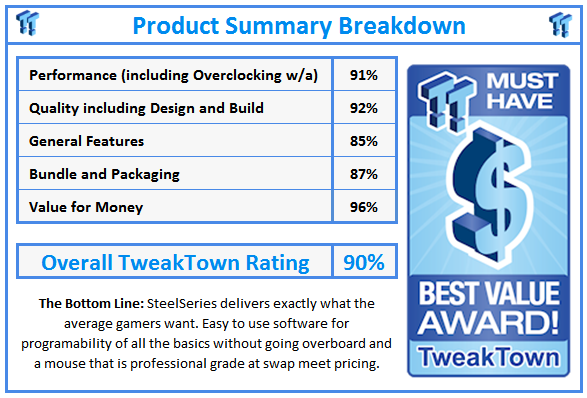
The best thing about this is you can get the Sensei for much less now if you opt for the [RAW] edition in either form, it will only cost you $59.99. To step into what makes professional gamers as accurate and deadly as they are with such a drop in pricing over its predecessor, this is the perfect time to experience it for yourself with the SteelSeries Sensei [RAW].
 United
States: Find other tech and computer products like this
over at
United
States: Find other tech and computer products like this
over at  United
Kingdom: Find other tech and computer products like this
over at
United
Kingdom: Find other tech and computer products like this
over at  Australia:
Find other tech and computer products like this over at
Australia:
Find other tech and computer products like this over at  Canada:
Find other tech and computer products like this over at
Canada:
Find other tech and computer products like this over at  Deutschland:
Finde andere Technik- und Computerprodukte wie dieses auf
Deutschland:
Finde andere Technik- und Computerprodukte wie dieses auf 


 MSI's advice for Core i9 CPUs hit by game crashes includes 'workarounds recommended by Intel'
 No, your Apple trade-in hasn't been canceled - no matter what Apple says
 WhatsApp is rolling passkey support out for iPhone users
 Elon Musk is launching a separate app to watch X videos on your TV
 Meta's Twitter clone 'Threads' already has more users than Elon Musk's X
 ACEMAGIC AD08 "Core i9 11900H" Mini PC Review
 Lenovo ThinkPad X1 Carbon Gen 12 Review
 ASUS ROG Swift Pro PG248QP Gaming Monitor Review - Frames, frames, and more frames
 FlexiSpot C7B-Mesh Ergonomic Office Chair Review
 Samsung G8 34-inch QD-OLED Gaming Monitor Review - 175Hz for $900
 ASRock NUCBOX-155H Mini PC Review
 NuPhy Air96 V2 Wireless Mechanical Keyboard Review
 TEAM T-FORCE Siren DUO360 RGB Liquid CPU Cooler Review
 AVerMedia Live Streamer ULTRA HD Review
 AVerMedia Live Gamer 4K 2.1 Review
 Building the Ultimate Home Entertainment Server with an ASUSTOR NAS and Viper Gaming NVMe SSDs
 Everything you need to know about the latest ASUS NUC Mini PCs - NUC 14 Pro and ROG NUC
 How to Overclock Your GPU and Boost Your PC Gaming with ASUS GPU Tweak III
 ASUS's AMD Radeon RX 7000 Series GPU lineup has something for every gamer
 ASUS OLED Premium Care defends the ROG Swift OLED PG32UCDM gaming monitor from burn-in