

Introduction and Package
 40
40Having just checked out the BIOSTAR TZ77EX4 it's time to move on to another Intel Z77 based motherboard with this one coming from ASRock and being part of the popular Fatal1ty series. This is the second ASRock based Z77 motherboard we've looked at with the first one being the ASRock Z77 Extreme6 which did a good job of impressing us.
ASRock have had a great run of motherboards recently and we hope that the Fatal1ty Z77 board we've got on our hands today continues the trend of the strong performing boards that hit at a strong price point. Of course there are a few things we need to do before we get into the performance side.
The first thing we'll do is check out the package to see just what ASRock is offering us here today while we also cover some of the main features. Once we've done that we'll move onto the motherboard itself and look at the layout and cover some of the main standout points.
From there we'll move onto the BIOS before we take a quick look at our testbed, the boards that will also be in our graphs and finally the overclocking side of things before we get into the performance. As we mentioned, though, the first thing we need to do is check out the package to see just what ASRock is offering us inside the box of the Fatal1ty Z77 Professional.
Package
 40
40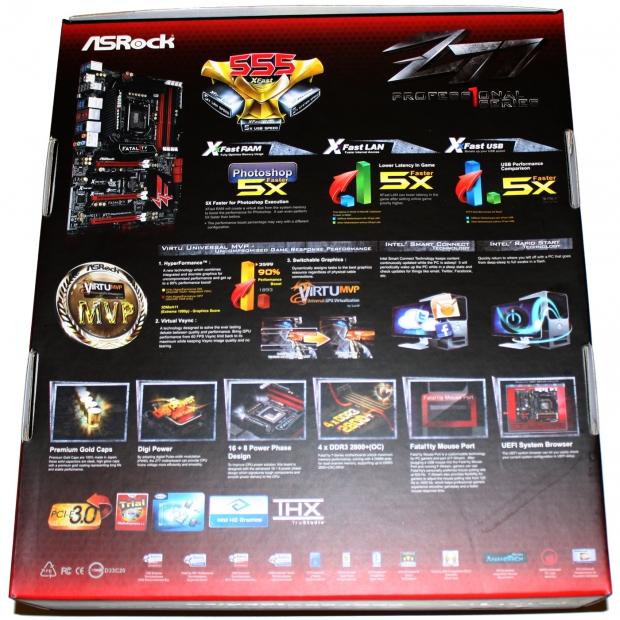 40
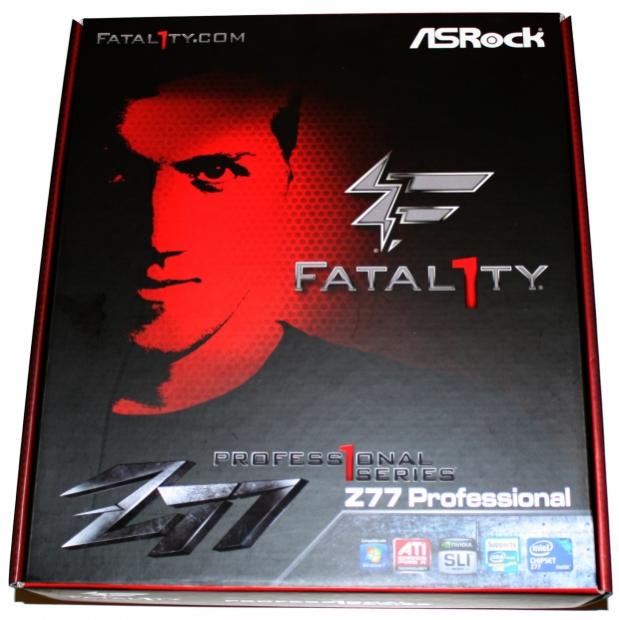
40Looking at the front of the box there's not heaps of information on offer with the main highlight being the fact that the board is part of the Fatal1ty series. Turning over, though, we get a look at some of the main features with the big one being the 555 XFast technology with XFast RAM, XFast LAN and XFast USB.
Another big feature that ASRock is pushing is Lucid VirtuMVP which we've tested before. If you're interested in it we highly recommend you read our Lucid Virtu MVP (HyperFormance) Tested with ASRock Z77 and Intel Ivy Bridge article we posted in April. Along with this we've also got Premium Gold Caps, Digi Power, 16 + 8 Power Phase, Fatal1ty Mouse Port and UEFI BIOS.
 40
40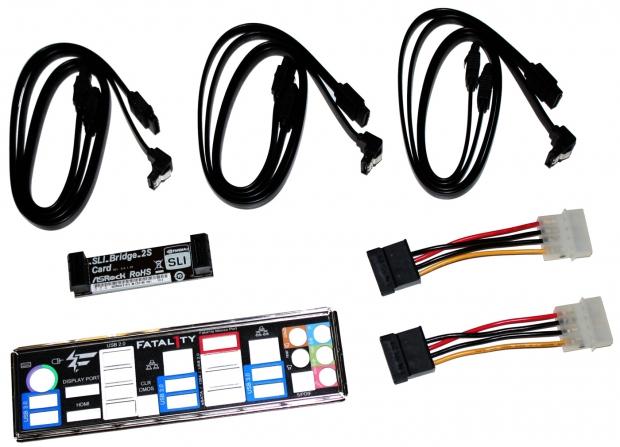 40
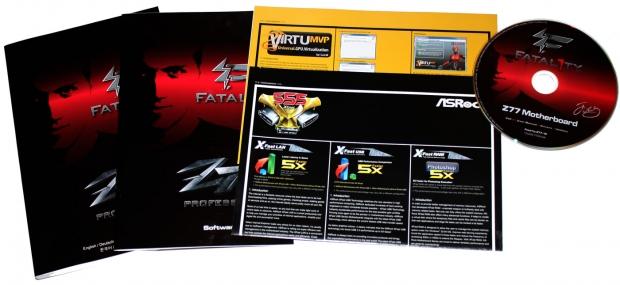
40Moving inside the box we've got a bit of paperwork that highlights the 555 XFast feature along with a Lucid VirtuMVP installation guide and driver CD. In the cable department we've got six SATA cables, SLI Bridge, two Molex to SATA connectors and the I/O backplate.
 40
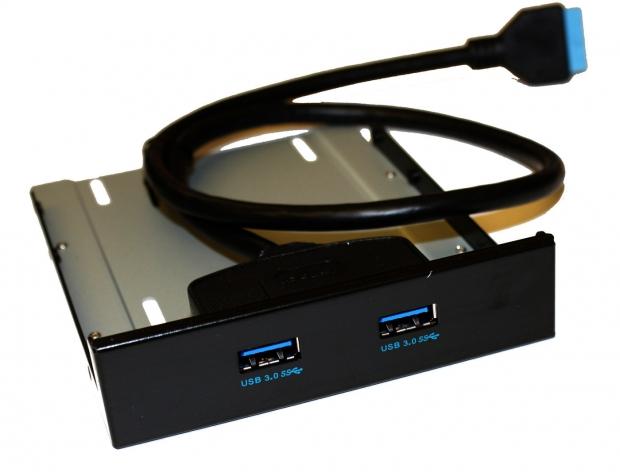
40Along with all that we've also got the added bonus of a USB 3.0 header that can be installed in the front of your case or with the included bracket it can be installed in the back of your case.
ASRock Fatal1ty Z77 Professional Motherboard
 40
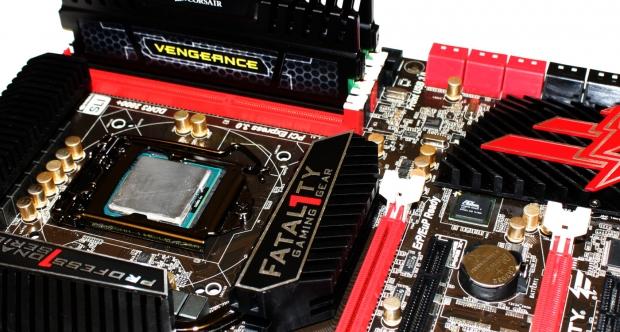
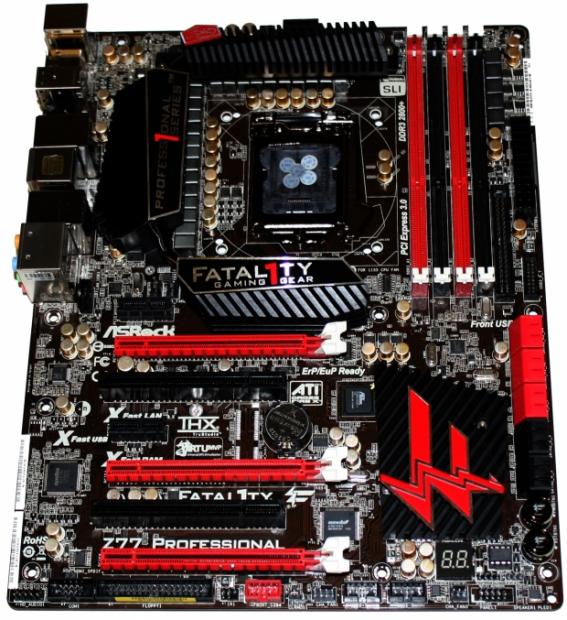
40Moving onto the board you can see the overall design is fairly similar to what we're used to seeing when it comes to Fatal1ty based boards with the strong red and black color scheme being present. We can also see heavy Fatal1ty labeling throughout.
 40
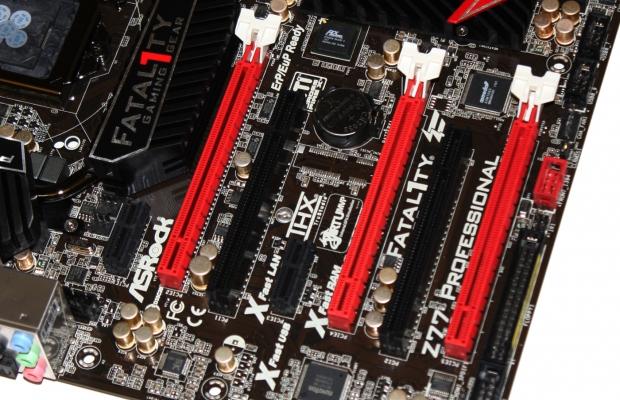
40Looking at the expansion side of things we've got two PCIe x1 slots and two older legacy PCI slots. On the PCIe x16 front we've got three ports on offer with the first one running at x16 or x8 if it's used in conjunction with the second slot while the third slot will run at only x4.
 40
40Looking across the bottom we've got a fair bit going on starting with the HD Audio connector and COM1 part next to each other. Next to that for some reason we've got an FDD floppy connector along with a Firewire header, clear CMOS button, fan header, two USB 2.0 headers another fan header and front panel connector. Also just above here we can see the debug LED meter that is going to make figuring out any problems easier.
 40
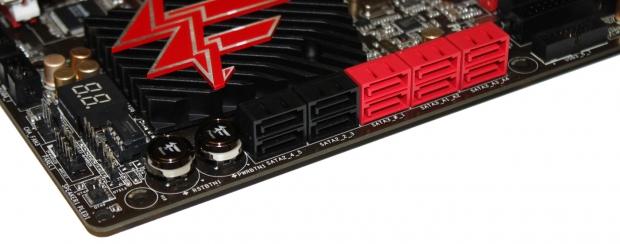
40Turning around the corner you can see the power and reset button along with a total of ten SATA ports. Starting from the left we've got four SATA II ports that run off the Intel Z77 chipset while the closest red ports also run of the Z77 chipset but are SATA III. Next to that the other four SATA III ports run off the ASMedia ASM1061 controller.
 40
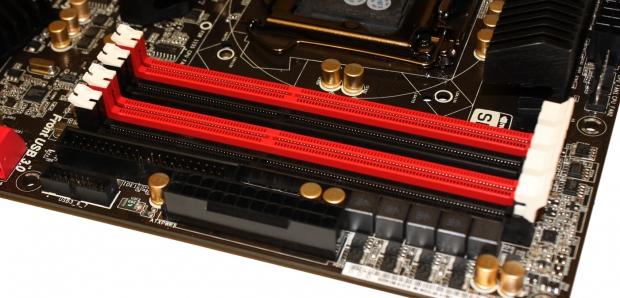
40Heading towards the top end of the board you can see four DIMM slots that support up to 32GB of DDR3 ranging from 1066MHz to 2800MHz DDR via overclocking. Also here you can see the 24-pin ATX power connector and next to that we've got a USB 3.0 header. Finally we've also got an IDE connector...some of the design motivations around this board are questionable, but we'll talk about that in the final thoughts, when we wrap everything up.
 40
40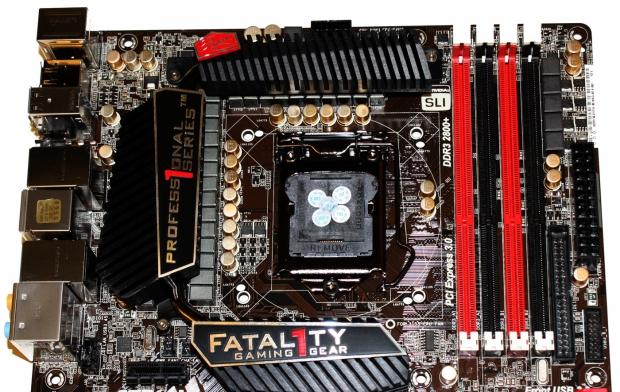 40
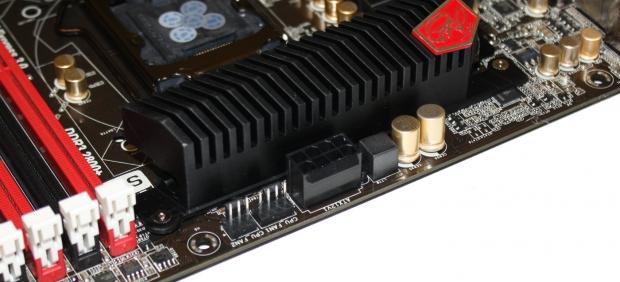
40As we head around to the top end you can see the 8-pin CPU power connector next to a couple of fan headers and as we move back we get a better idea of the CPU area with the strong cooling solution that is present and the gold caps that are present throughout making for a really good looking motherboard.
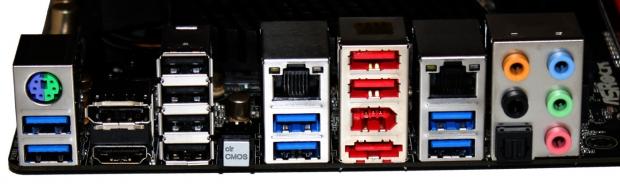 40
40As always we finish off with the I/O side of things and we can see the combo PS/2 port on the left with two USB 3.0 connectors. Moving across we've got a HDMI and DisplayPort output followed by four USB 3.0 connectors. Next to that we've got a clear CMOS button, two more USB 3.0 connectors and gigabit networking via the Broadcom BCM57781 chip, which is mirrored again just over.
Between that, though, we've got two more USB 3.0 ports, 1394 Firewire and an eSATA III connector. Finally we finish off with five auxiliary and an optical audio port that run off the Realtek ALC898 audio codec.
BIOS
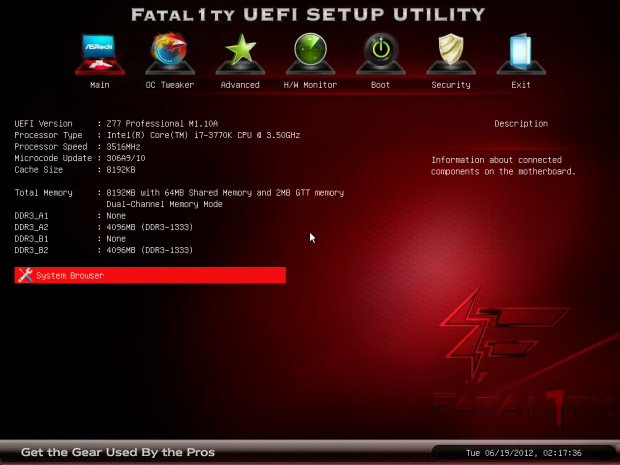
Heading into the BIOS we're greeted with a Fatal1ty themed UEFI BIOS with pretty much an identical design to what we saw in the Z77 Extreme6 minus the theme. If you're going to be doing any overclocking, you'll want to head into the "OC Tweaker" section of the BIOS.
 40
40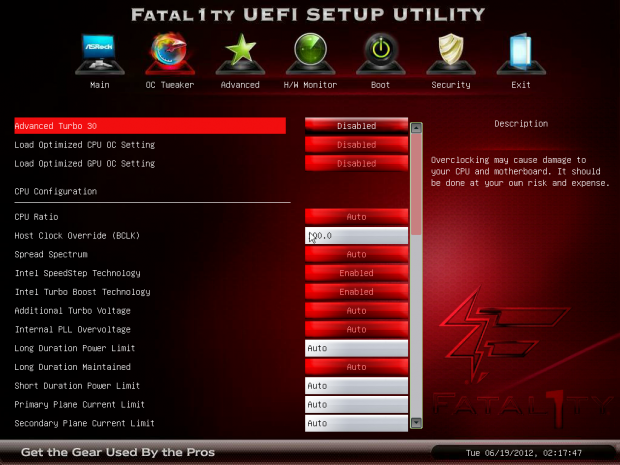 40
40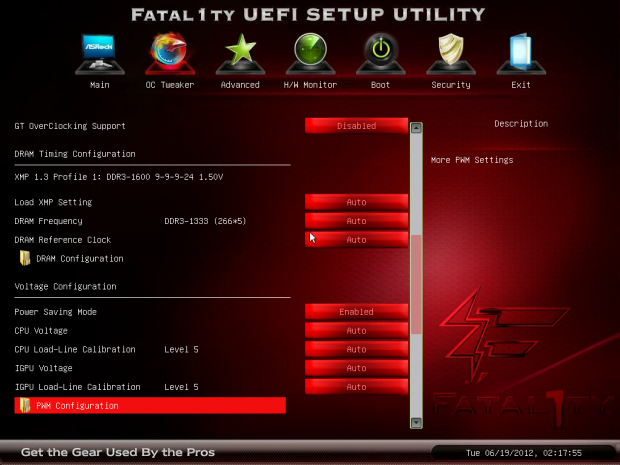 40
40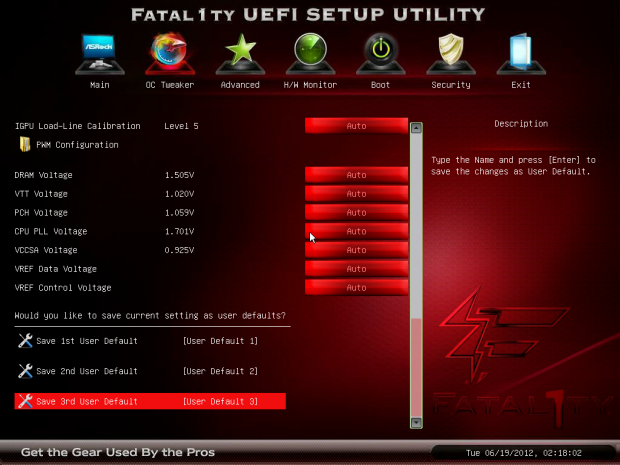 40
40The "OC Tweaker" section really brings everything you'd expect with a strong lineup of overclocking options being present throughout the board. If you've seen an ASRock BIOS in recent months, you won't be too confused here if you've used one. You shouldn't have any problems getting around and overclocking thanks to everything being located in the one area.
 40
40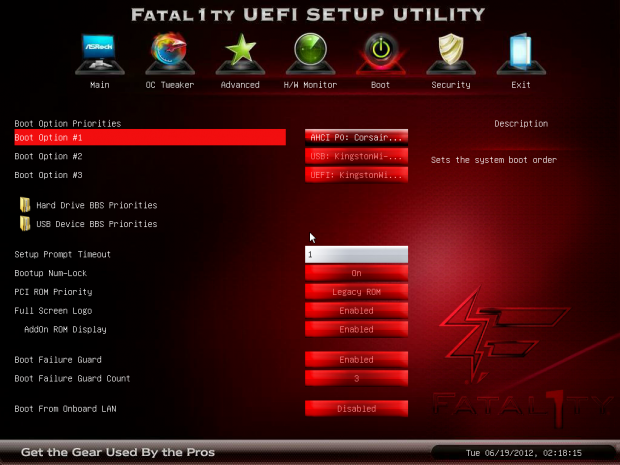 40
40 40
40 40
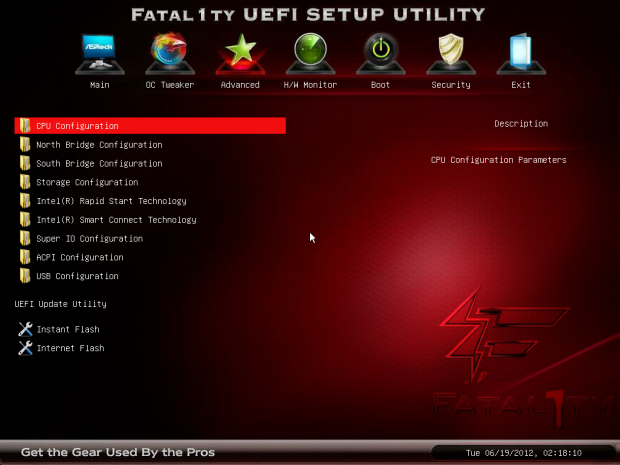
40Jumping through the rest of the BIOS we can see all the usual options are present with no real surprises present. ASRock have one of the best UEFI BIOSs on the market and it only continues to get better with each new product.
Benchmarks - Test System Setup and Overclocking
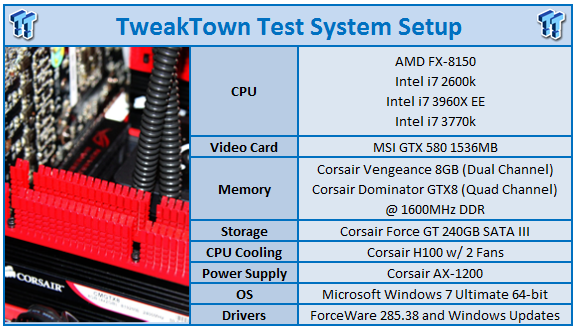 40
40We would like to thank the following companies for supplying and supporting us with our test system hardware and equipment: Intel, ASUS, MSI, Western Digital, MemoRight and Corsair.
We've got a number of boards in our graphs today with the first of course being the ASRock Fatal1ty Z77 Professional which we'll be running at both stock and overclocked speeds. We'll cover the overclocked numbers in just a moment. Along with this board, though, we've also got the ASRock Z77 Extreme6 and ASUS Maximus V Gene which are both based on the Z77 chipset.
We've also got the ASUS Maximus IV Extreme-Z based on the Z68 chipset which was one of our best Sandy Bridge motherboards we've tested. Finally to round everything off we've got the ASRock X79 Extreme4 with an i7 3960X CPU.
With that covered it's time to get into the overclocking side of things. Having overclocked on so many ASRock boards, moving around the BIOS is an absolute breeze to us.
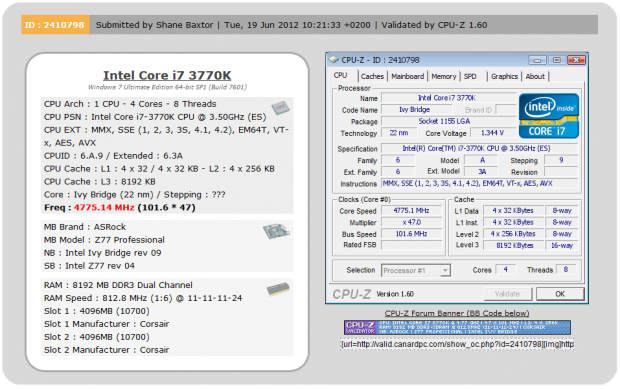
Knowing our 3770k the first thing we do is change to a 47x multiplier to give us a 4.7GHz overclock. We headed into Windows and started running MediaEspresso which is our most intensive benchmark and it passed with no issue. With that working fine we headed back into the BIOS and moved to a 48x multiplier.
We got into Windows again with no issues, but after a few minutes in MediaEspresso, we got a BSOD. We headed back to a 47x multiplier and upped our BCLK slightly to find the sweet spot between 4.7GHz and 4.8GHz.
 40
40After a bit of time we ended up in Windows with a 47x multiplier and a 101.6 BCLK that resulted in our CPU running at 4775MHz or 4.76GHz as illustrated in our graphs today. This is a nice overclock and should bring with it some good performance gains over the stock speeds.
Let's get started!
CPU Benchmarks
HyperPi 0.99
Version and / or Patch Used: 0.99
Developer Homepage: www.virgilioborges.com.br
Product Homepage: www.virgilioborges.com.br
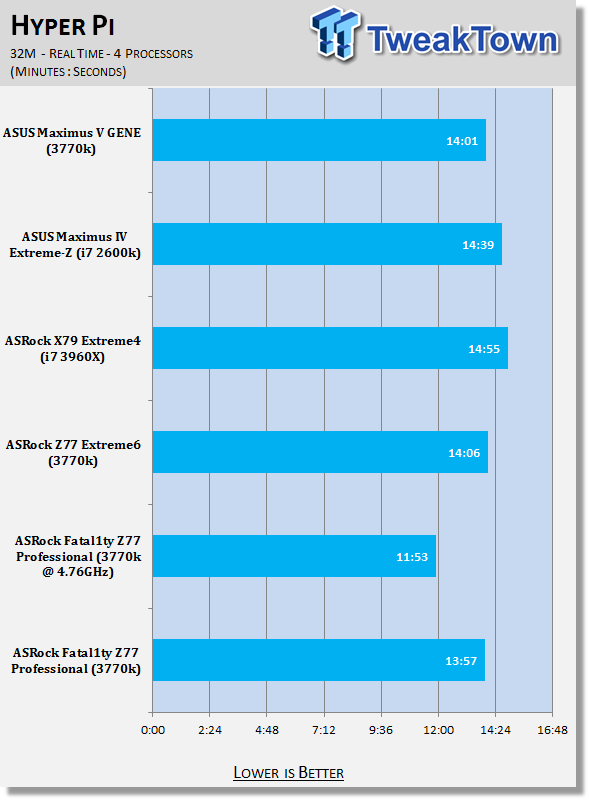
HyperPi is a front end for SuperPi that allows for multiple concurrent instances of SuperPi to be run on each core recognized by the system. It is very dependent on CPU to memory to HDD speed. The faster these components, the faster it is able to figure out the number Pi to the selected length.
For our testing we use the 32M run. This means that each of the four physical and four logical cores for the i7 and the four physical cores of the i5 is trying to calculate the number Pi out to 32 million decimal places. Each "run" is a comparative to ensure accuracy and any stability or performance issues in the loop mentioned above will cause errors in calculation.
 40
40AIDA64
Version and / or Patch Used: 1.00.1035BETA
Developer Homepage: http://www.aida64.com
Product Homepage: http://www.AIDA64.com
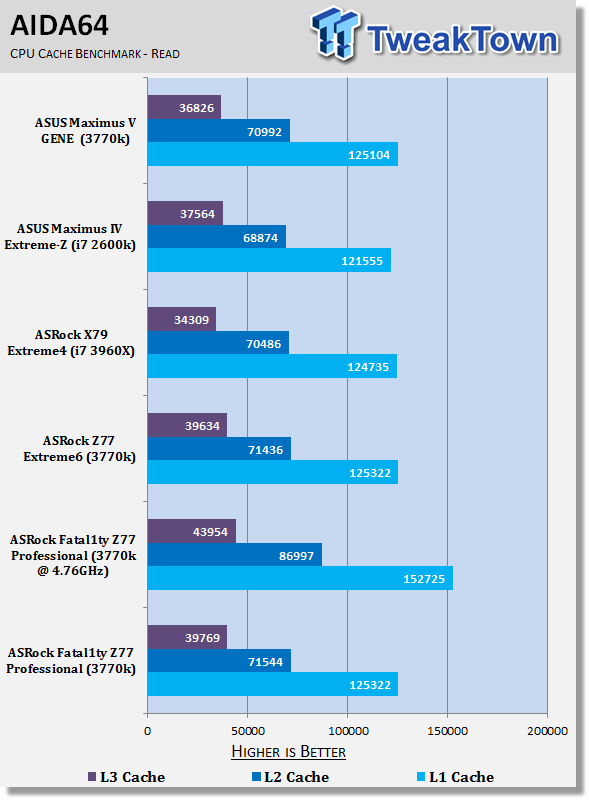
Replacing Everest in our labs is AIDA64. This new testing suite is from the core development team from Lavalys and continues that tradition. The guys have thrown in better support for multithreaded CPUs as well as full 64 bit support. We use this to test memory and HDDs for now, but may find ourselves opening this up to other areas of the motherboard.
 40
40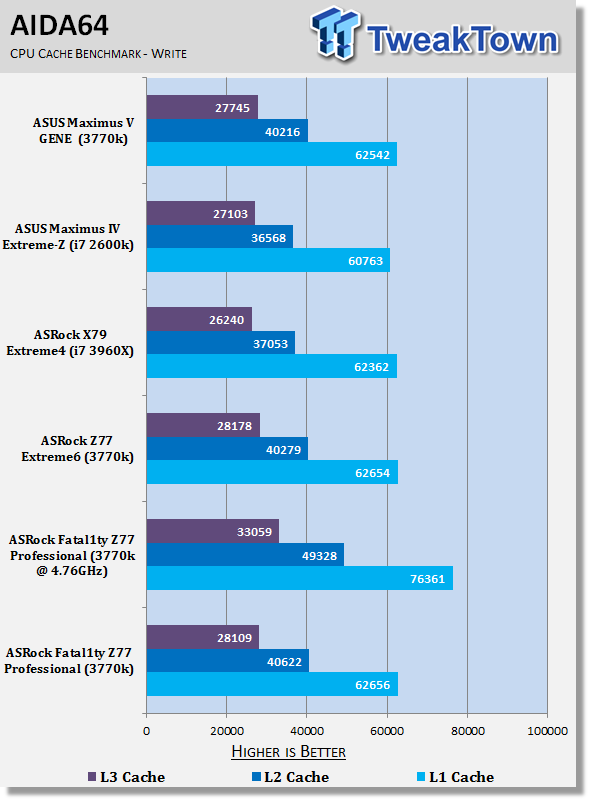 40
40HyperPi stock performance comes in a little stronger than the other boards, but nothing too major. The AIDA64 numbers line up with the other Z77 offerings.
Checking out our 3770k at 4.76GHz, though, carries with it a nice boost in overall performance in both tests.
System Benchmarks
PCMark 7
Version and / or Patch Used: 1.04
Developer Homepage: http://www.pcmark.com
Product Homepage: http://www.pcmark.com
PCMark 7 includes a range of tests that give different views of your system's performance. In the Advanced Edition you can choose which tests to run. The common use and hardware component tests are unavailable in the Basic Edition.
Overall system performance is measured by the PCMark test. This is the only test that returns an official PCMark score. The Lightweight test measures the system capabilities of entry-level systems and mobility platforms unable to run the PCMark test, but it does not generate a PCMark score. Common use performance is measured by the scenario tests - Entertainment, Creativity and Production - each of which results in a scenario score. Hardware component performance is measured by the hardware tests - Computation and Storage - each of which results in a hardware score.
 40
40MediaEspresso
Version and / or Patch Used: 6.5
Developer Homepage: http://www.cyberlink.com/
Product Homepage: http://www.cyberlink.com/products/mediaespresso/overview_en_AU.html?fileName=overview&r=1
MediaEspresso is a blazingly fast media universal converter that can transcode your videos, photos and music files and out put them to a huge range of portable devices including mobile phones, portable media players and even game consoles. With technologies like Smart Detect, Direct Sync and CyberLink's TrueTheater™ video enhancements, you can not only forget about complicated format, resolution and output settings, but your converted file will come out the other side looking better than when it went in!
 40
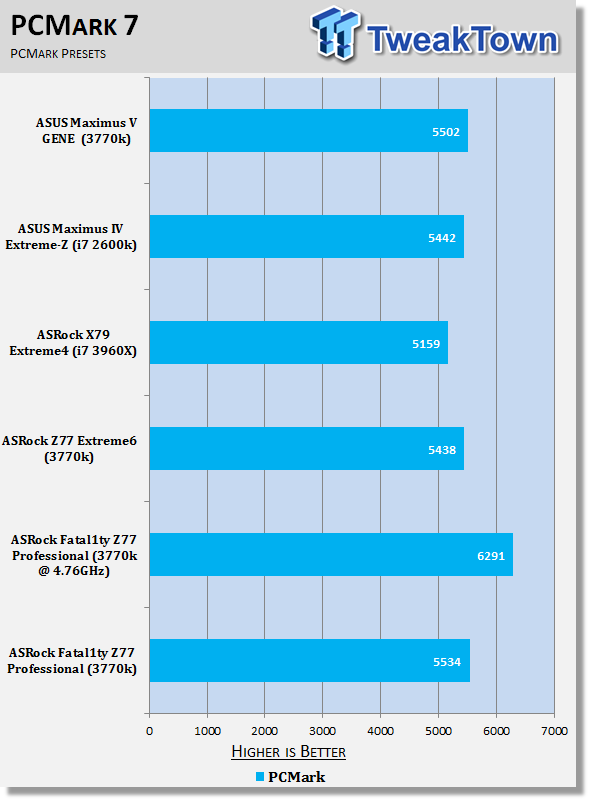
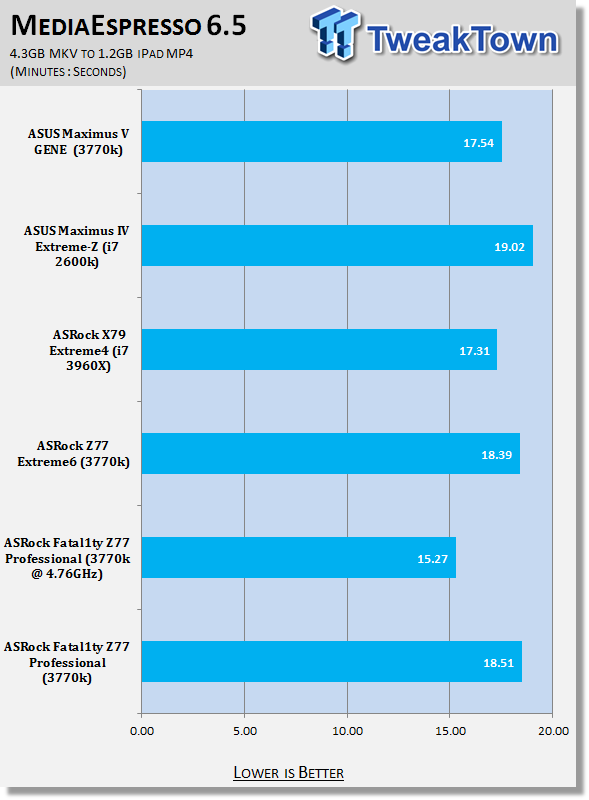
40PCMark 7 performance out of the box is a little stronger compared to the other Z77 offerings while MediaEspresso encode time looks a little worse. Again, though, we can see a strong boost in our overclocked numbers as we see over three minutes shaved off the MediaEspresso encode time.
USB 2.0 and 3.0 Benchmarks
AIDA64
Version and / or Patch Used: 1.70.1400
Developer Homepage: http://www.aida64.com
Product Homepage: http://www.AIDA64.com
Replacing Everest in our labs is AIDA64. This new testing suite is from the core development team from Lavalys and continues that tradition. The guys have thrown in better support for multithreaded CPUs as well as full 64 bit support. We use this to test memory and HDDs for now, but may find ourselves opening this up to other areas of the motherboard.
 40
40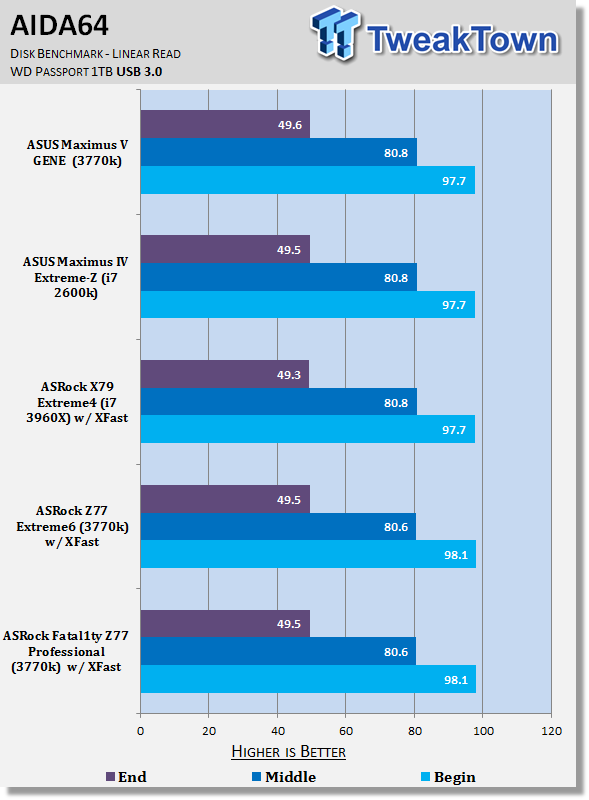 40
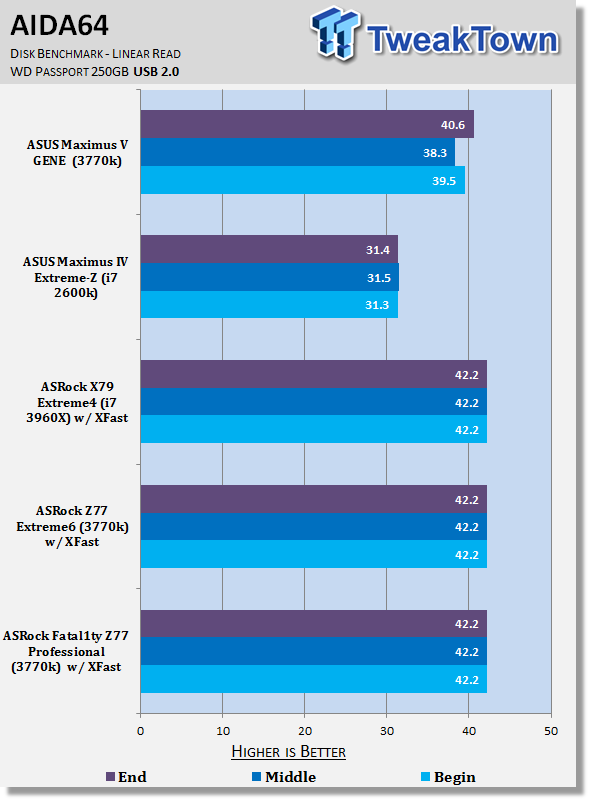
40Thanks to XFast technology we can see that USB 2.0 performance on the ASRock boards are stronger than the competition. Moving to USB 3.0 performance, though, you can see there's no real difference present between all the setups.
SSD Benchmarks
AIDA64
Version and / or Patch Used: 1.70.1400
Developer Homepage: http://www.aida64.com
Product Homepage: http://www.AIDA64.com
Replacing Everest in our labs is AIDA64. This new testing suite is from the core development team from Lavalys and continues that tradition. The guys have thrown in better support for multithreaded CPUs as well as full 64 bit support. We use this to test memory and HDDs for now, but may find ourselves opening this up to other areas of the motherboard.
 40
40HD Tune Pro
Version and / or Patch Used: 4.61
Developer Homepage: http://www.hdtune.com
Product Homepage: http://www.hdtune.com
HD Tune Pro gives us accurate read, write and access time results and for the last couple of years has been gaining popularity amongst reviewers. It is now considered a must have application for storage device testing.
 40
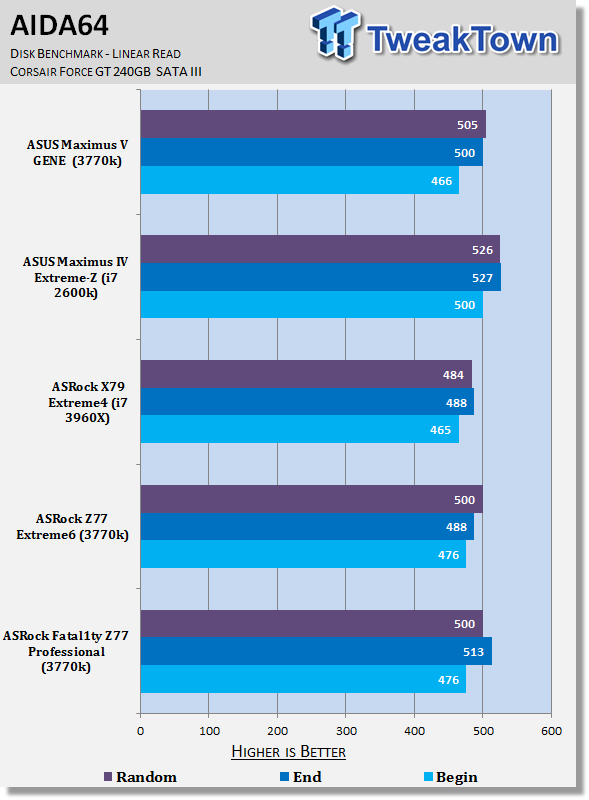
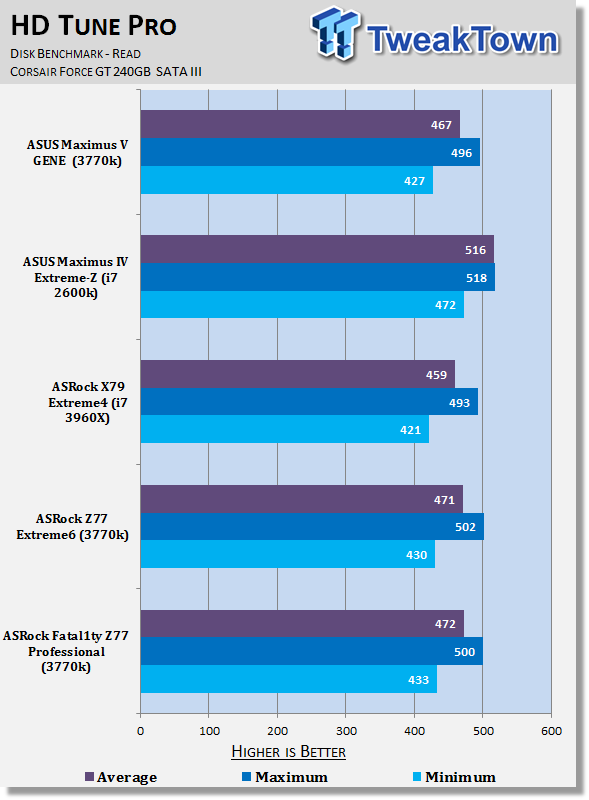
40SSD performance on the ASRock Fatal1ty Z77 Professional board is strong and lines up with the other boards here. We've recently seen some Z77 boards perform lower than this, so it's nice to see that ASRock don't disappoint when it comes to SSD performance on this motherboard.
Memory Benchmarks
AIDA64
Version and / or Patch Used: 1.00.1035BETA
Developer Homepage: http://www.aida64.com
Product Homepage: http://www.AIDA64.com
Replacing Everest in our labs is AIDA64. This new testing suite is from the core development team from Lavalys and continues that tradition. The guys have thrown in better support for multithreaded CPUs as well as full 64 bit support. We use this to test memory and HDDs for now, but may find ourselves opening this up to other areas of the motherboard.
 40
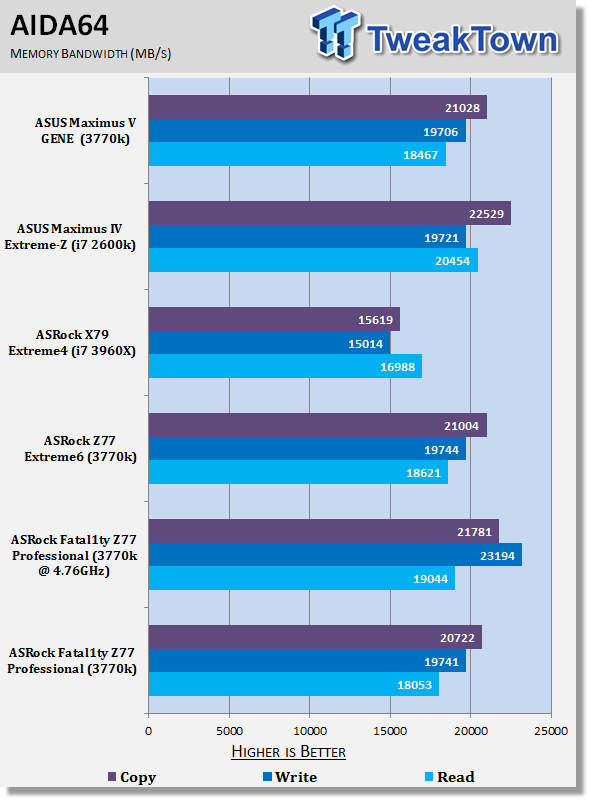
40At stock we have pretty standard looking numbers that line up with the other Z77 offerings. Overclocked we as always see a boost in performance with the write speeds seeing the best gains.
Gaming Benchmarks
3DMark 11
Version and / or Patch Used: 1.0
Developer Homepage: http://www.futuremark.com
Product Homepage: http://www.3dmark.com/3dmark11/
3DMark 11 is the latest version of the world's most popular benchmark. Designed to measure your PC's gaming performance 3DMark 11 makes extensive use of all the new features in DirectX 11 including tessellation, compute shaders and multi-threading. Trusted by gamers worldwide to give accurate and unbiased results, 3DMark 11 is the best way to consistently and reliably test DirectX 11 under game-like loads.
 40
40Metro 2033
Version and / or Patch Used: Latest Steam Update
Timedemo or Level Used: Built in Benchmark
Developer Homepage: http://www.4a-games.com//
Product Homepage: http://www.thqnordic.com/
Metro 2033 is an action-oriented video game with a combination of survival horror and first-person shooter elements. The game is based on the novel Metro 2033 by Russian author Dmitry Glukhovsky. It was developed by 4A Games in Ukraine and released in March 2010 for Microsoft Windows and Xbox 360.[3] In March 2006, 4A Games announced a partnership with Glukhovsky to collaborate on the game.[4] The game was announced at the 2009 Games Convention in Leipzig;[5] a first trailer came along with the announcement.[6] A sequel was announced, currently titled Metro: Last Light.
 40
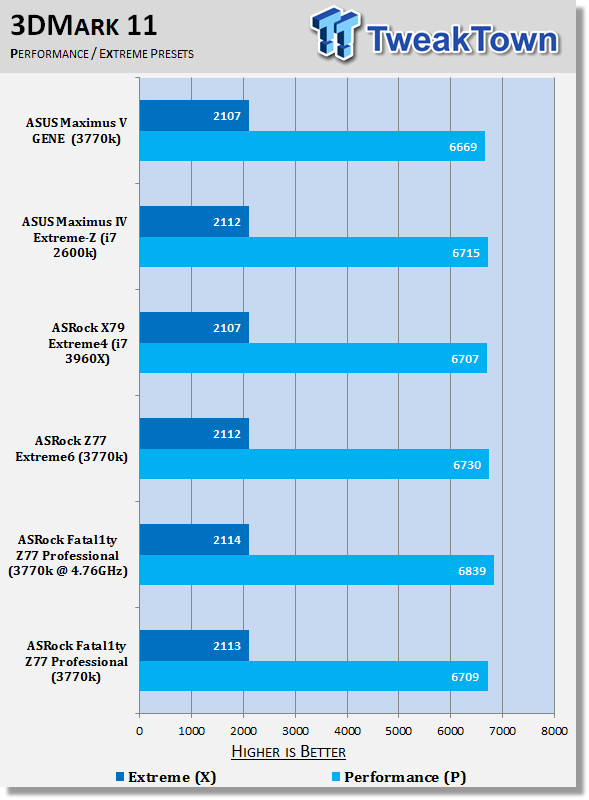
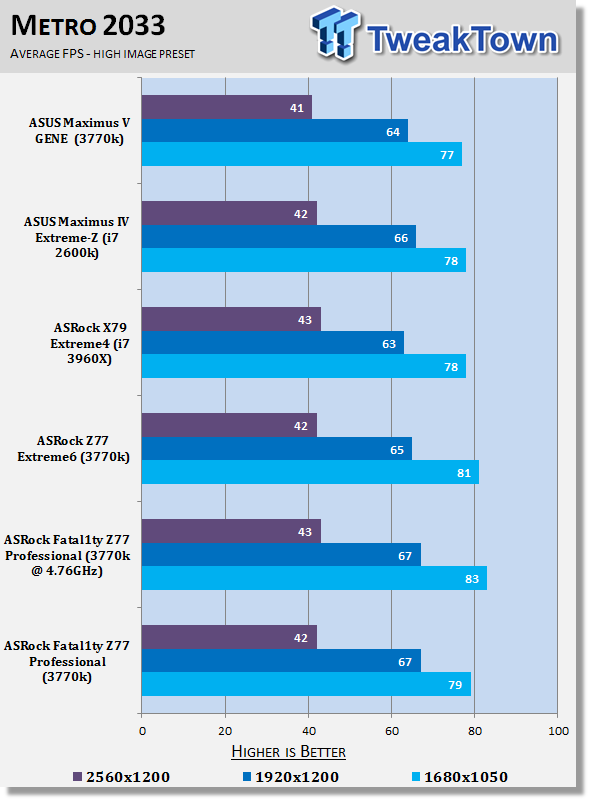
40Looking at 3DMark 11 and Metro 2033 we can see the stock performance is just as you'd expect while overclocked we see a boost in our Performance preset under 3DMark and a boost in the1680 x 1050 numbers. Apart from that we can see the overclock does little for performance in other areas under our 3D benchmarks.
Temperature and Power
Power Consumption
 40
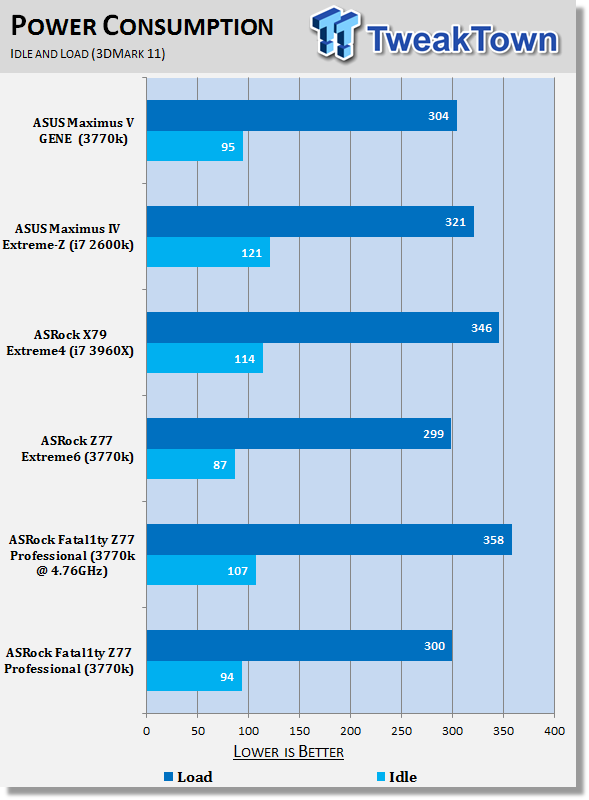
40At stock clocks we see that the ASRock Fatal1ty Z77 Professional numbers line up with the other Z77 offerings at both idle and stock. Overclocked we see an increase in power draw, but the numbers are still extremely strong.
Core Temperature
 40
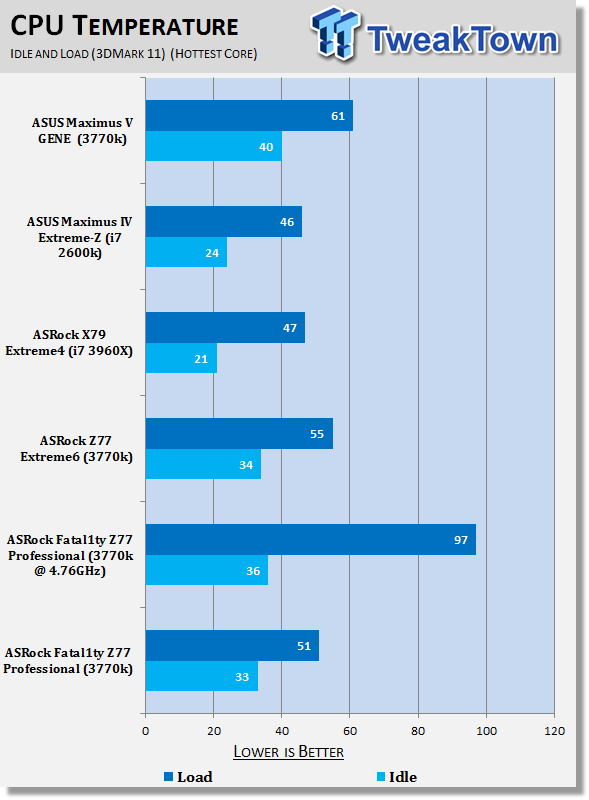
40As for our CPU temperature we can see at idle the numbers are pretty standard with the load numbers coming in lower than the other Z77 boards. Overclocked we see those numbers sky rocket, though, with our 3770k coming close to the 100c mark at load.
Final Thoughts
The first thing I want to say is that I really do like the Fatal1ty Z77 Professional, but there are some design decisions that I just down right don't agree with. I'm not sure if they're coming from the ASRock side or from Fatal1ty who has say in the design. Why have we got an IDE and floppy connector on this board? There's nothing gamer about it and there's nothing professional about it.
I just don't understand why we see these connectors on Fatal1ty designed boards, which make me think that the decision for this is coming from that end more so than the ASRock team itself. The simple fact is that we don't see these connectors on any of ASRock's top non Fatal1ty boards or any other brand's high-end boards.
Along with that I would've liked to have seen a move over to just a single legacy PCI slot and add a third PCIe 1x into the mix or no legacy PCI slot period. I'd love to see ASRock offer us a black and red themed high-end board without the Fatal1ty branding because the looks on the board are killer, but some of the extras on the board are highly questionable.
In the end, though, I find myself complaining about "extra" things that are added to the board more so than the stuff that is missing. It just feels like its stuff we don't need and this could in turn make the price slightly more aggressive or the room could be used for other things like another USB 3.0 header or something similar.
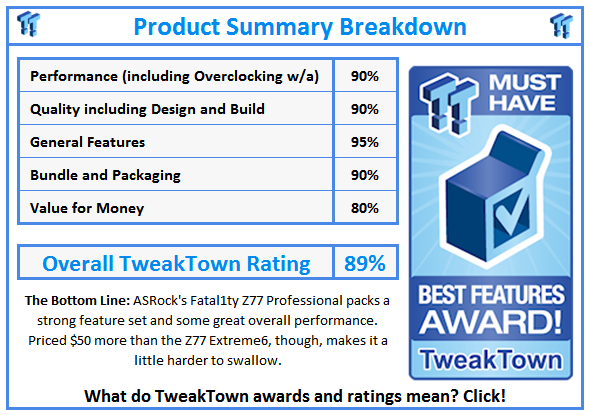
At $229.99 the ASRock Fatal1ty Z77 Professional isn't a cheap Z77 option as the Z77 Extreme6 which really impressed us carries a $174.99 price tag. For the most part it feels like we're paying an extra $55 for a different color scheme. This is a good board, but it doesn't shine as bright as other ASRock offerings in the past.
If you're after a good looking board that performs well this is a good option. If you're after something that can perform just as well while saving some money, then it might be worth looking at the Z77 Extreme6 offering.
 United
States: Find other tech and computer products like this
over at
United
States: Find other tech and computer products like this
over at  United
Kingdom: Find other tech and computer products like this
over at
United
Kingdom: Find other tech and computer products like this
over at  Australia:
Find other tech and computer products like this over at
Australia:
Find other tech and computer products like this over at  Canada:
Find other tech and computer products like this over at
Canada:
Find other tech and computer products like this over at  Deutschland:
Finde andere Technik- und Computerprodukte wie dieses auf
Deutschland:
Finde andere Technik- und Computerprodukte wie dieses auf  Fallout 76 broke its all-time player count record on Steam thanks to the Fallout TV show
 GIGABYTE unveils XTREME Prestige Limited Edition AORUS Z790 motherboard and RTX 4080 SUPER
 PlayStation 5 Pro release window has a major issue no one is talking about
 Acer Predator Z57 Mini LED 57-inch dual 4K ultrawide beast will launch for $1,999
 Pimax Crystal Super announced, new flagshig VR headset with 4K 120Hz per eye QLED panels
 NuPhy Air96 V2 Wireless Mechanical Keyboard Review
 TEAM T-FORCE Siren DUO360 RGB Liquid CPU Cooler Review
 AVerMedia Live Streamer ULTRA HD Review
 AVerMedia Live Gamer 4K 2.1 Review
 XPG Invader X Mid-Tower Chassis Review
 Intel Core i9-14900KS CPU Review
 Arbiter Polar 65 Magnetic Gaming Keyboard Review
 ASUS ROG Falchion RX Low Profile Keyboard Review
 MSI MPG 321URX QD-OLED Gaming Monitor Review - 4K gaming at its best
 UGREEN NASync DXP480T All-Flash NAS Review
 Everything you need to know about the latest ASUS NUC Mini PCs - NUC 14 Pro and ROG NUC
 How to Overclock Your GPU and Boost Your PC Gaming with ASUS GPU Tweak III
 ASUS's AMD Radeon RX 7000 Series GPU lineup has something for every gamer
 ASUS OLED Premium Care defends the ROG Swift OLED PG32UCDM gaming monitor from burn-in
 Patriot Viper Xtreme 5 Engineering Prototype 48GB Dual-Channel Memory Kit Preview