

Introduction and Package
 27
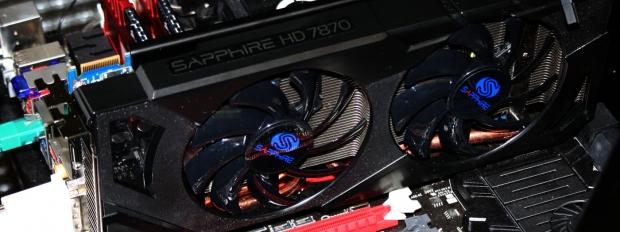
27Over the last few weeks we've looked at some high-end video cards from both AMD and NVIDIA thanks to partners starting to release high-end variants of the HD 7900 series while NVIDIA of course launched the new GTX 680.
Today, though, we'll be stepping back a little to the mid-range market again as we check out the Sapphire HD 7870 2GB OC. This is one of a few HD 7800 series based video cards we've got here at the moment and over the next week or two you'll see a couple of variants from different companies.
Today though is all about the Sapphire version which hopefully stands out for all the right reasons. Over the last few months since the release of the HD 7000 series we've seen some awesome Sapphire cards that have offered awesome coolers that have not only ran extremely quiet, but have been able to keep GPU temperatures at amazingly low numbers.
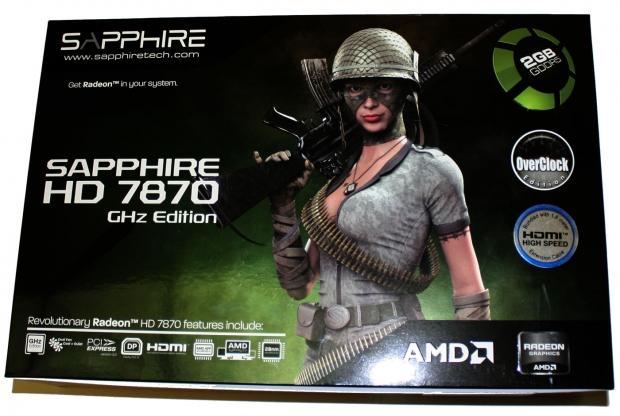
Hopefully the new HD 7870 gets the same treatment and we've got a cooler that works as just as well. Before we take a look at the card, though, the first thing we need to do is look at the package of the card to see just what's going on in that department.
Once we've gone over the package we'll move onto the card itself and take a closer look at the cooler that Sapphire has opted for while also seeing some of the other standout features on the card. Once we've done that we'll then of course move onto the specification side of things where we'll look at the kind of overclock Sapphire is offering us today on this OC model.
Then as always we'll get into the fun stuff and see just what kind of performance we're able to get out the card against a number of others. As we've just mentioned, though, the first thing we've got to do is check out the bundle.
Package
 27
27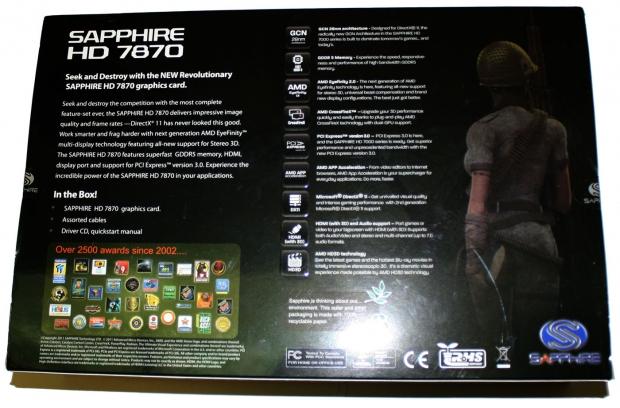 27
27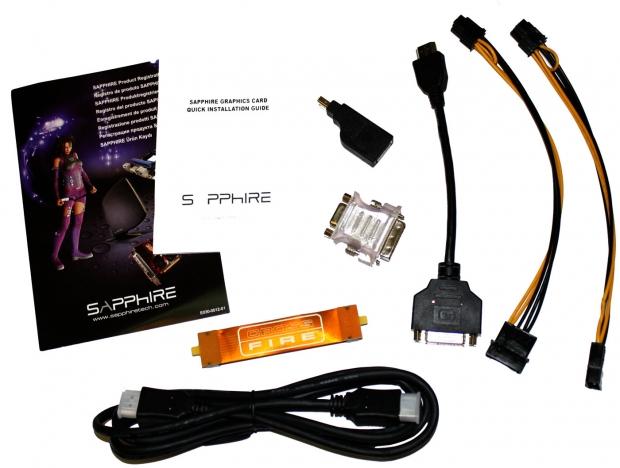 27
27Moving inside the box Sapphire as usual has done a pretty good job with the bundle.
We've got the normal line up of extras including paperwork, Molex to PCIe power connectors, DVI to VGA connector and CrossFire bridge. Along with that we've also got a HDMI to DVI convertor, MiniDP to DisplayPort convertor and a full size HDMI cable.
The Card and Specifications
The Card
 27
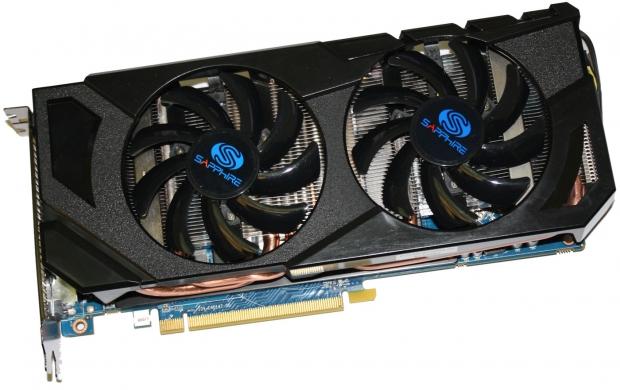
27Checking out the card you can see we've got a mean looking dual fan setup going on and you can see we've got a really nice heatsink sitting behind it. Looking through the fans and at the bottom of the card we can see the copper heatpipes that are making their way throughout the card.
 27
27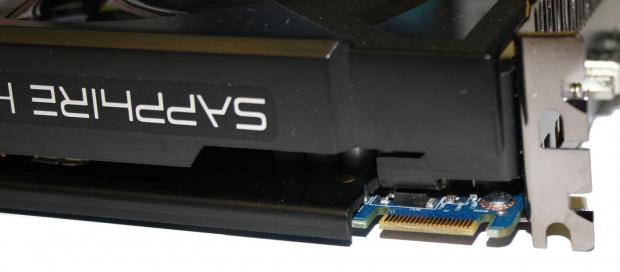 27
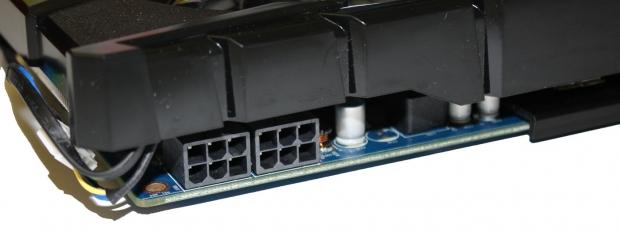
27Taking a quick spin around the card we can see towards the back we've got the typical dual 6-pin PCIe power connector setup while closer to the front you can see we've got a single CrossFire connector which lets us run two cards in CrossFire.
 27
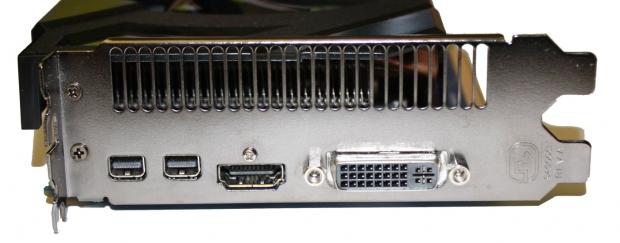
27Finally we finish off with the I/O side of things and you can see we've got a Dual-Link DVI connector on the far right with a full size HDMI connector next to that and two MiniDP connectors to round off everything.
Specifications
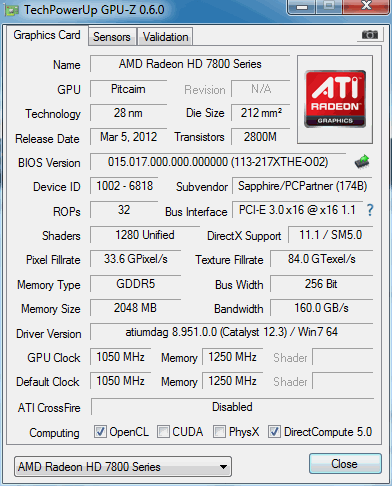
Having a look below we can see the main specifications that are on offer from the Sapphire HD 7870 2GB OC. Being an OC model of course means that we've got an overclock out of the box and you can see that the 1050MHz core is slightly up on the default 1000MHz core clock.
 27
27As for the 2GB of GDDR5 memory, that's also been bumped up as we see we've moved from a 4800MHz QDR clock to a more rounded 5000MHz QDR. This isn't a huge overclock overall, but a nice little bump in both areas that should help bring with it a little bit of extra performance.
Benchmarks - Test System Setup
 27
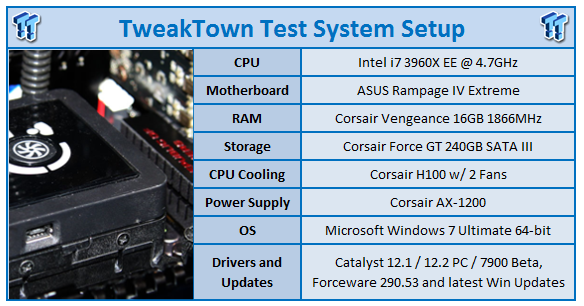
27We would like to thank the following companies for supplying and supporting us with our test system hardware and equipment: Intel, ASUS and Corsair.
Looking at our testbed there's nothing out of the ordinary when it comes to the components we'll be using today. Before we get into the performance side of things, though, we'll just quickly cover the cards that you will see in the graphs here today.
Along with the Sapphire HD 7870 2GB OC, we'll have the HD 6950 2GB, HD 7770 2GB, HD 7850 2GB and HD 7870 2GB which are all clocked at the default reference speeds. The main thing we want to see is what kind of performance boost we get from the overclock when compared to a reference clocked model.
Along with those cards we've also got the HD 7950 and HD 7970 thrown into the mix for good measure along with a couple of NVIDIA based cards that include the GTX 560 Ti, GTX 570 and finally GTX 580.
Let's get started!
The FPS Numbers Explained
When we benchmark our video cards and look at the graphs, we aim to get to a certain level of FPS which we consider playable. While many may argue that the human eye can't see over 24 FPS or 30 FPS, any true gamer will tell you that as we climb higher in Frames Per Seconds (FPS), the overall gameplay feels smoother. There are three numbers we're looking out for when it comes to our benchmarks.
30 FPS - It's the minimum number we aim for when it comes to games. If you're not dropping below 30 FPS during games, you're going to have a nice and smooth gaming experience. The ideal situation is that even in a heavy fire fight, the minimum stays above 30 FPS making sure that you can continue to aim easily or turn the corner with no dramas.
60 FPS - It's the average we look for when we don't have a minimum coming at us. If we're getting an average of 60 FPS, we should have a minimum of 30 FPS or better and as mentioned above, it means we've got some smooth game play happening.
120 FPS - The new number that we've been hunting down over recent months. If you're the owner of a 120 Hz monitor, to get the most out of it you want to get around the 120 FPS mark. Moving from 60 FPS / 60 Hz to 120 FPS / 120 Hz brings with it a certain fluidity that can't really be explained, but instead has to be experienced. Of course, if you're buying a 120 Hz monitor to take advantage of 3D, an average of 120 FPS in our benchmark means that in 3D you will have an average of 60 FPS, which again means you should expect some smooth gameplay.
Benchmarks - 3DMark 11
3DMark 11
Version and / or Patch Used: 1.1
Developer Homepage: http://www.futuremark.com
Product Homepage: http://www.3dmark.com/3dmark11/
3DMark 11 is the latest version of the world's most popular benchmark. Designed to measure your PC's gaming performance 3DMark 11 makes extensive use of all the new features in DirectX 11 including tessellation, compute shaders and multi-threading. Trusted by gamers worldwide to give accurate and unbiased results, 3DMark 11 is the best way to consistently and reliably test DirectX 11 under game-like loads.
 27
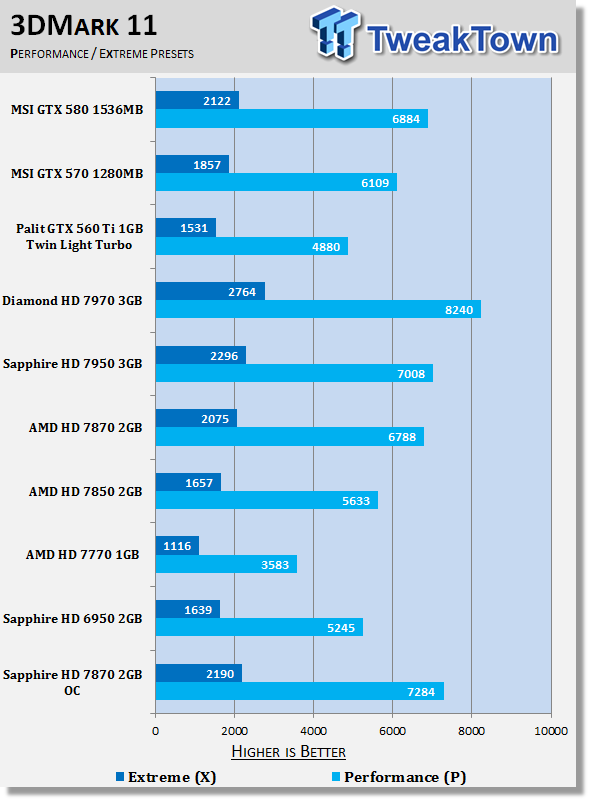
27Starting with 3DMark 11 we can see some nice performance out the gate which sees a strong boost in the Performance preset which helps come out ahead of the reference clocked HD 7950.
Moving to the higher end Extreme preset we can see a nice boost again over the reference clocked card, but we're sitting behind the HD 7950 in this case as the HD 7900 series of course deals with high resolution better.
Benchmarks - Unigine Heaven Benchmark
Unigine Heaven Benchmark
Version and / or Patch Used: 2.5
Developer Homepage: http://www.unigine.com
Product Homepage: http://unigine.com/press-releases/091022-heaven_benchmark//
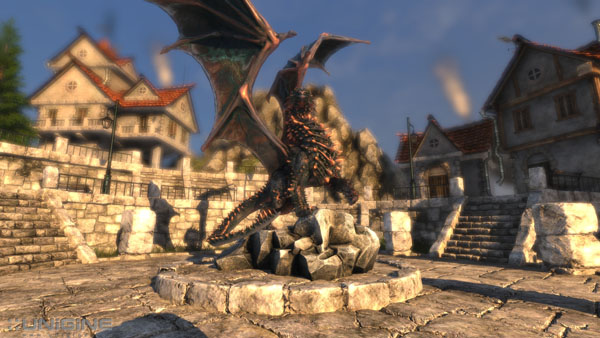
New benchmark grants the power to unleash the DirectX 11 potential in the gift wrapping of impressively towering graphics capabilities. It reveals the enchanting magic of floating islands with a tiny village hidden in the cloudy skies. With the interactive mode emerging experience of exploring the intricate world is ensured within reach. Through its advanced renderer, Unigine is one of the first to set precedence in showcasing the art assets with tessellation, bringing compelling visual finesse, utilizing the technology to the full extend and exhibiting the possibilities of enriching 3D gaming.
 27
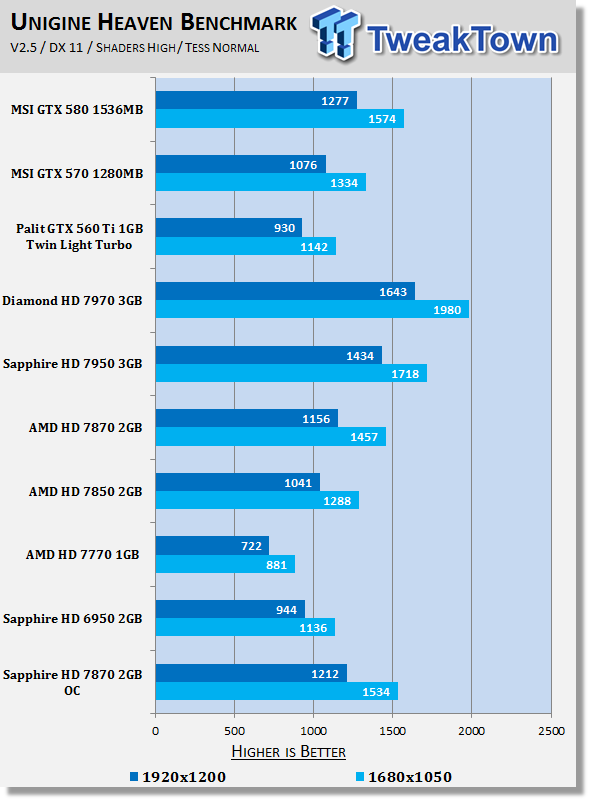
27Looking at Heaven performance we can see we've again got a little bump in performance which sees a nice little performance boost over the stock clocked HD 7870. It's nothing too major, but the +50MHz and +200MHz QDR increase isn't a big overclock.
Benchmarks - Tom Clancy's H.A.W.X. 2
Tom Clancy's H.A.W.X.2
Version and / or Patch Used: Benchmark Demo
Timedemo or Level Used: Built-in Test
Developer Homepage: http://www.ubi.com/UK/default.aspx
Product Homepage: http://www.hawxgame.com/
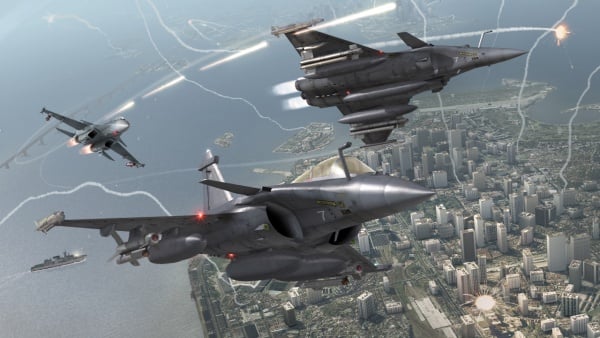
Tom Clancy's H.A.W.X. 2 is an arcade-style flight action game developed by Ubisoft Romania and published by Ubisoft. The game is the sequel to Tom Clancy's H.A.W.X., released in 2009.
The game begins with Colonel David Crenshaw participating in a routine patrol mission in the Middle East. After halting an insurgent attack, a volley of missiles is fired at the Air Force base that Crenshaw was stationed at, with one of the missiles disabling Crenshaw's aircraft, resulting Crenshaw being in enemy captivity. A joint strike force composed of the U.S. Navy, U.S. Air Force, and a Ghost Recon squad executes an operation to rescue Crenshaw. In Scotland, Royal Navy Pilot Colin Munro encounters an unidentified passenger aircraft that explodes from an on-board bomb when undergoing training exercise. In Russia, an air force squadron led by Colonel Denisov and Captain Dmitri Sokov engages separatist aircraft but is ordered to retreat from the region after numerous Russian military installations have been attacked.
 27
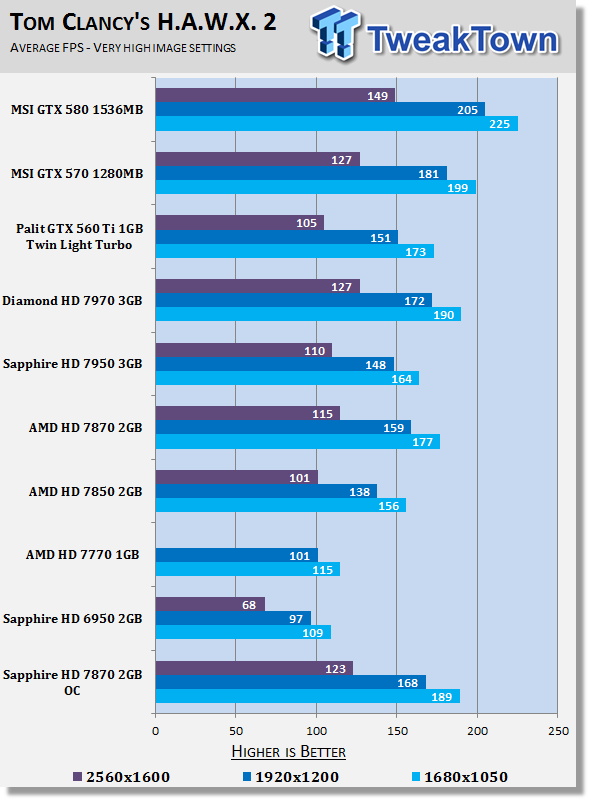
27Moving into H.A.W.X. 2 we can see across the board we've got a boost in performance and just some very playable numbers period. It's great to see the performance that the new HD 7870 brings over the HD 6950 as well which was considered a very strong model last year.
Benchmarks - Mafia II
Mafia II
Version and / or Patch Used: Latest Steam Update
Timedemo or Level Used: Built in Benchmark
Developer Homepage: http://www.2kczech.com/
Product Homepage: http://www.mafia2game.com/
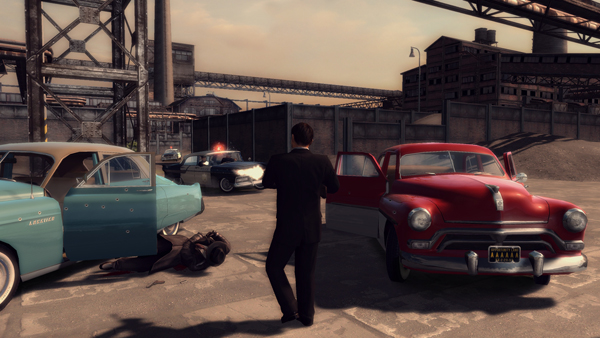
Mafia II is a third-person action-adventure video game, the sequel to Mafia: The City of Lost Heaven. It is developed by 2K Czech, previously known as Illusion Softworks, and is published by 2K Games. The game is set from 1943 to 1951 in Empire Bay (the name is a reference to New York's state nickname "The Empire State"), a fictional city based on San Francisco and New York City, with influences from Chicago and Detroit. The game features a completely open-ended game map of 10 square miles. No restrictions are included from the start of the game. There are around 50 vehicles in the game, as well as licensed music from the era.
 27
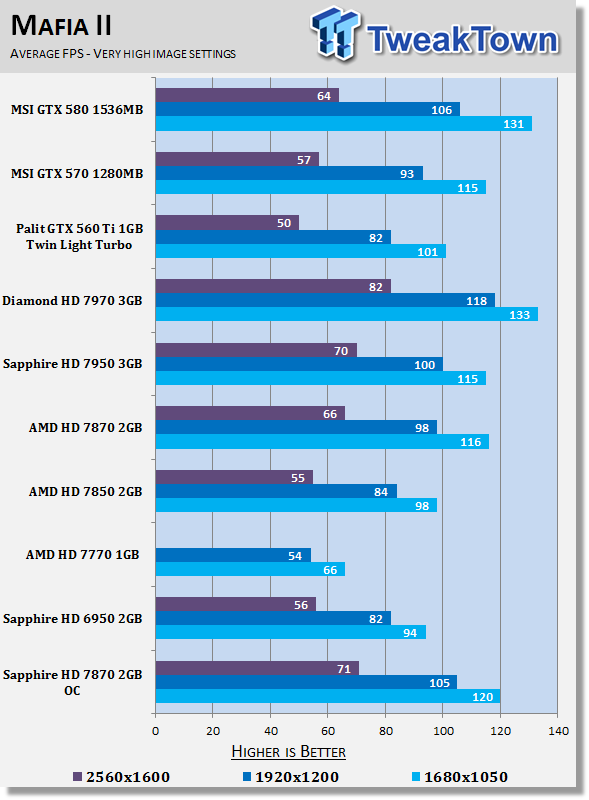
27Looking at Mafia II performance we can see across the board a couple of extra FPS. The most appreciated increase comes at 2560 x 1600 as we see we move a bit further away from that 60 FPS average we aim for that provides a solid gaming experience.
Benchmarks - Lost Planet 2
Lost Planet 2
Version and / or Patch Used: Benchmark Demo
Timedemo or Level Used: Built in Benchmark - Test A Scene 1
Developer Homepage: http://www.capcom.com/
Product Homepage: http://www.lostplanet2game.com/
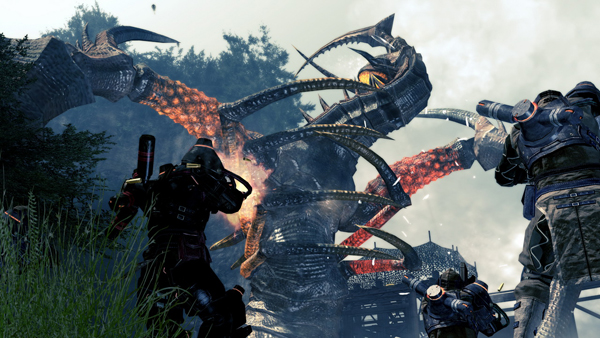
Lost Planet 2 is a third-person shooter video game developed and published by Capcom. The game is the sequel to Lost Planet: Extreme Condition which is also made by Capcom, taking place ten years after the events of the first game, on the same fictional planet. The story takes place back on E.D.N. III 10 years after the events of the first game. The snow has melted to reveal jungles and more tropical areas that have taken the place of more frozen regions. The plot begins with Mercenaries fighting against Jungle Pirates. After destroying a mine, the Mercenaries continue on to evacuate the area, in which a Category-G Akrid appears and attacks them. After being rescued, they find out their evacuation point (Where the Category-G appeared) was a set-up and no pick up team awaited them. The last words imply possible DLC additions to the game, "There's nothing to be gained by wiping out snow pirates... unless you had some kind of grudge."
 27
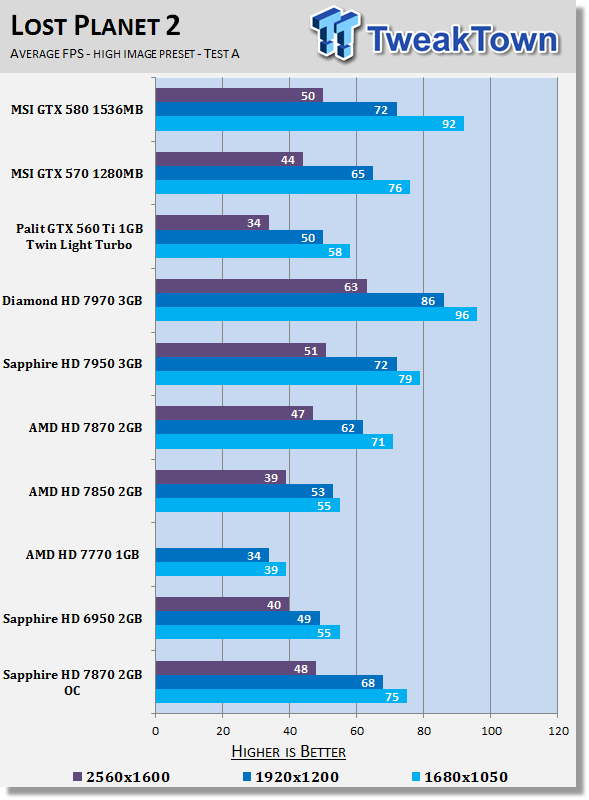
27Lost Planet 2 also sees a nice performance boost and the most appreciated gains come at 1920 x 1200 where we see the overclock helps give us a bit more breathing room.
We do see a little bump at 2560 x 1600 as well, but we're below that 60 FPS number we're looking for.
Benchmarks - Aliens vs. Predator
Aliens vs. Predator
Version and / or Patch Used: Standalone Benchmark
Timedemo or Level Used: Built in Benchmark
Developer Homepage: http://www.rebellion.co.uk/
Product Homepage: http://www.sega.com/games/aliens-vs-predator/
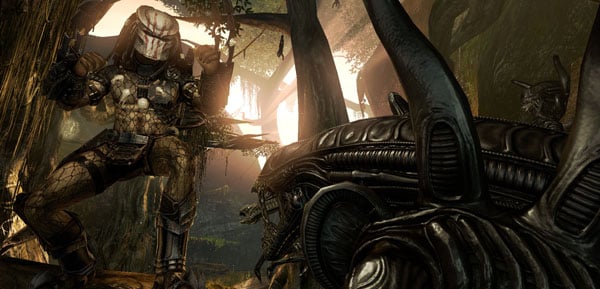
Aliens vs. Predator is a science fiction first-person shooter video game, developed by Rebellion Developments, the team behind the 1999 original PC game, and published by Sega for Microsoft Windows, the PlayStation 3 and the Xbox 360. The game is based on the Alien vs. Predator franchise, a combination of the characters and creatures of the Alien franchise and the Predator franchise. There are three campaigns in the game, one for each race/faction (the Predators, the Aliens and the Colonial Marines), that, while separate in terms of individual plot and gameplay, form one overarching storyline.
Following the storyline of the campaign modes comes the multiplayer aspect of the game. In this Multiplayer section of the game, players face off in various different gametypes in various different ways.
 27
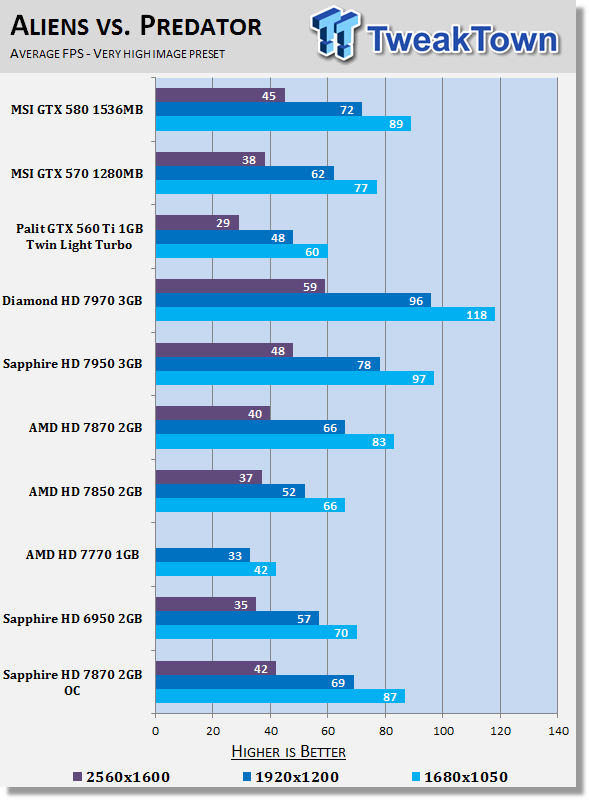
27While 2560 x 1600 continues to not be an option, we can see that the overclock helps give us a nice little performance bump at 1920 x 1200 where we are able to move further away from that 60 FPS average we aim for.
Benchmarks - Just Cause 2
Just Cause 2
Version and / or Patch Used: 1.0.0.2
Timedemo or Level Used: Dark Tower
Developer Homepage: http://www.eidos.com/
Product Homepage: http://www.justcause.com/
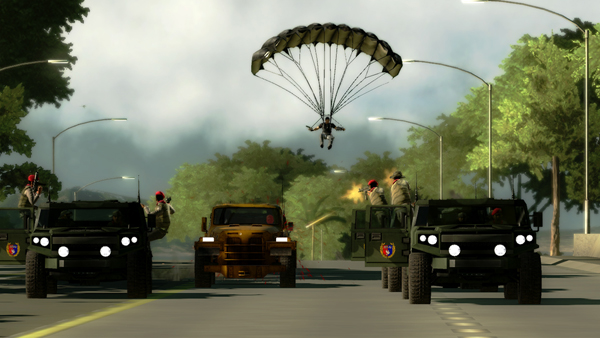
Just Cause 2 employs the Avalanche Engine 2.0, an updated version of the engine used in Just Cause. The game is set on the other side of the world from the original Just Cause, on the fictional island of Panau in Southeast Asia. Panau has varied terrain, from desert to alpine to rainforest. Rico Rodriguez returns as the protagonist, aiming to overthrow the evil dictator Pandak "Baby" Panay and confront his former mentor, Tom Sheldon.
 27
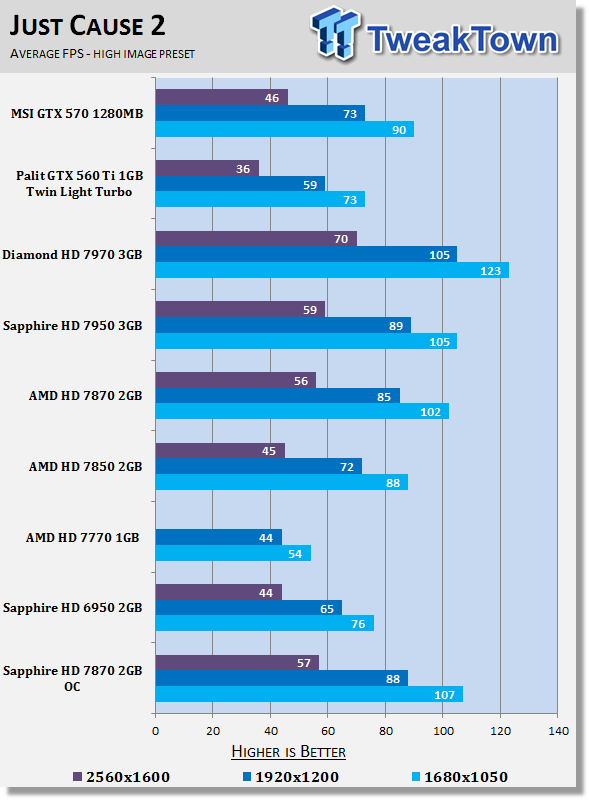
27Across all resolutions we can see a bump in the overall FPS. Unfortunately at 2560 x 1600 we see only a single FPS extra which pushes us to 57 FPS, but still overall finds us below that 60 FPS average we want.
Benchmarks - Metro 2033
Metro 2033
Version and / or Patch Used: Latest Steam Update
Timedemo or Level Used: Built in Benchmark
Developer Homepage: http://www.4a-games.com/
Product Homepage: http://www.thqnordic.com/
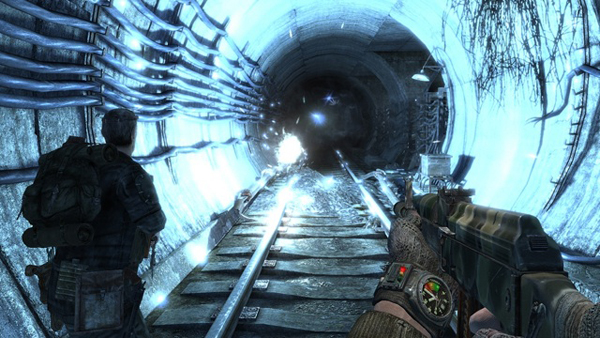
Metro 2033 is an action-oriented video game with a combination of survival horror and first-person shooter elements. The game is based on the novel Metro 2033 by Russian author Dmitry Glukhovsky. It was developed by 4A Games in Ukraine and released in March 2010 for Microsoft Windows and Xbox 360.[3] In March 2006, 4A Games announced a partnership with Glukhovsky to collaborate on the game.[4] The game was announced at the 2009 Games Convention in Leipzig;[5] a first trailer came along with the announcement.[6] A sequel was announced, currently titled Metro: Last Light.
 27
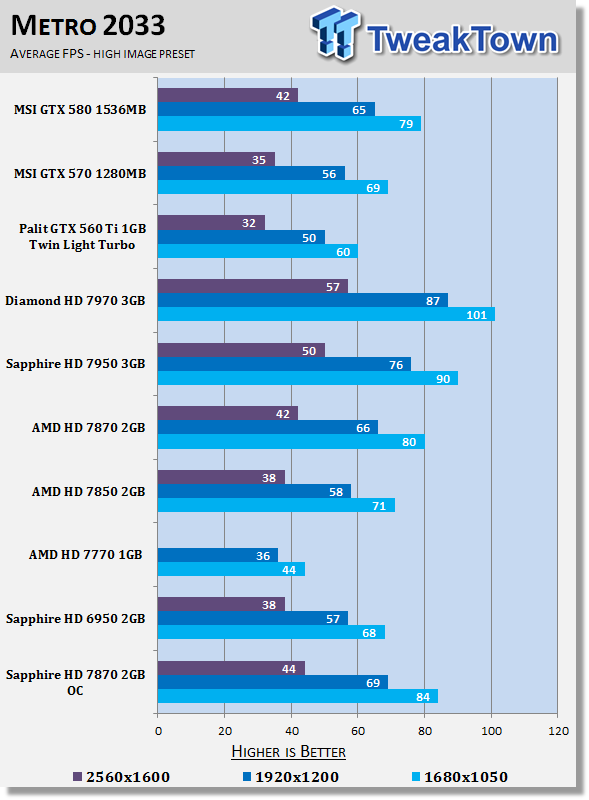
27Like we've seen in a lot of our benchmarks we can see that at 1920 x 1200 the extra MHz on offer from the Sapphire OC helps boost our FPS numbers that are just over 60 FPS to a little higher giving us a bit more breathing room overall.
Benchmarks - Dirt 3
Dirt 3
Version and / or Patch Used: Latest Steam Update
Timedemo or Level Used: Built in Benchmark
Developer Homepage: http://www.codemasters.com/
Product Homepage: http://www.dirt3game.com/
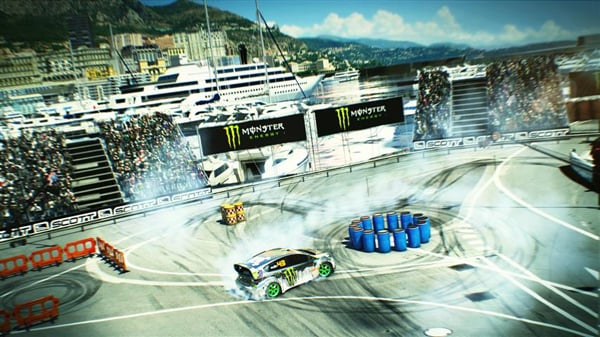
DiRT 3 boasts more cars, more locations, more routes and more events than any other game in the series, including over 50 rally cars representing the very best from five decades of the sport. With more than double the track content of 2009's hit, DiRT 3 will see players start at the top as a professional driver, with a top-flight career in competitive off-road racing complimented by the opportunity to express themselves in Gymkhana-style showpiece driving events.
 27
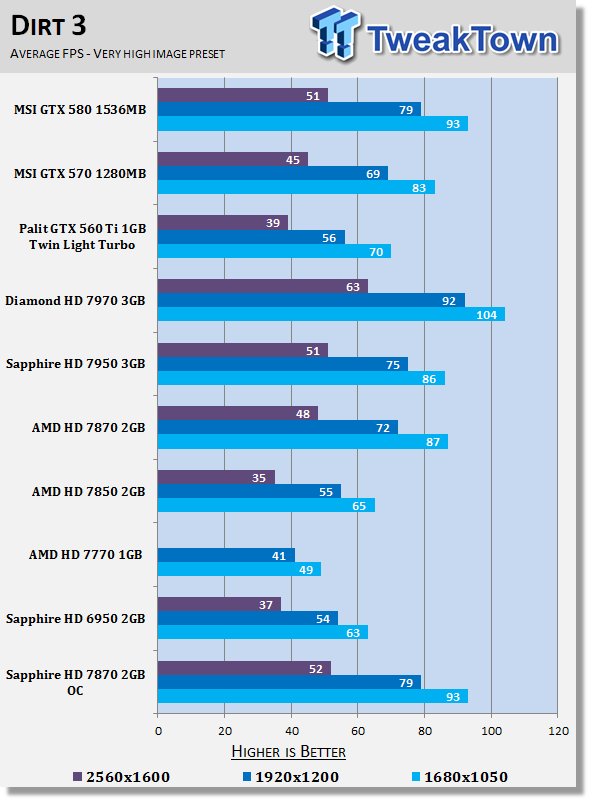
27Looking at Dirt 3 numbers we can see some nice gains are seen across the board. At the highest resolution the extra 4 FPS equates to an increase of around 10%. Unfortunately we're still below that 60 FPS mark at this resolution. 1920 x 1200 and lower, though, we've got some strong numbers.
Benchmarks - Far Cry 2
Far Cry 2
Version and / or Patch Used: 1.01
Timedemo or Level Used: Ranch Long
Developer Homepage: http://www.ubi.com/
Product Homepage: http://www.farcry2.com/
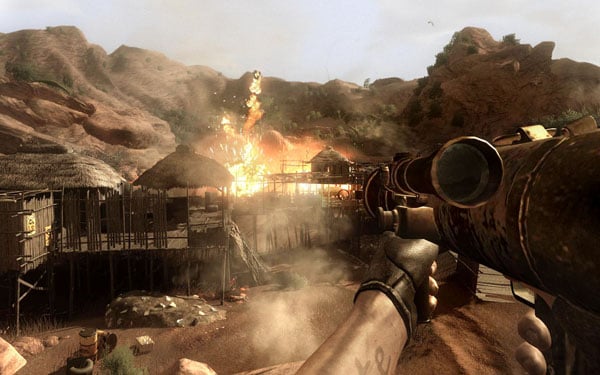
The Dunia Engine was built specifically for Far Cry 2 by the award-winning Ubisoft Montreal development team. It delivers the most realistic destructible environments, amazing special effects such as dynamic fire propagation and storm effects, real-time night-and-day cycle, dynamic music system, non-scripted enemy A.I. and so much more.
 27
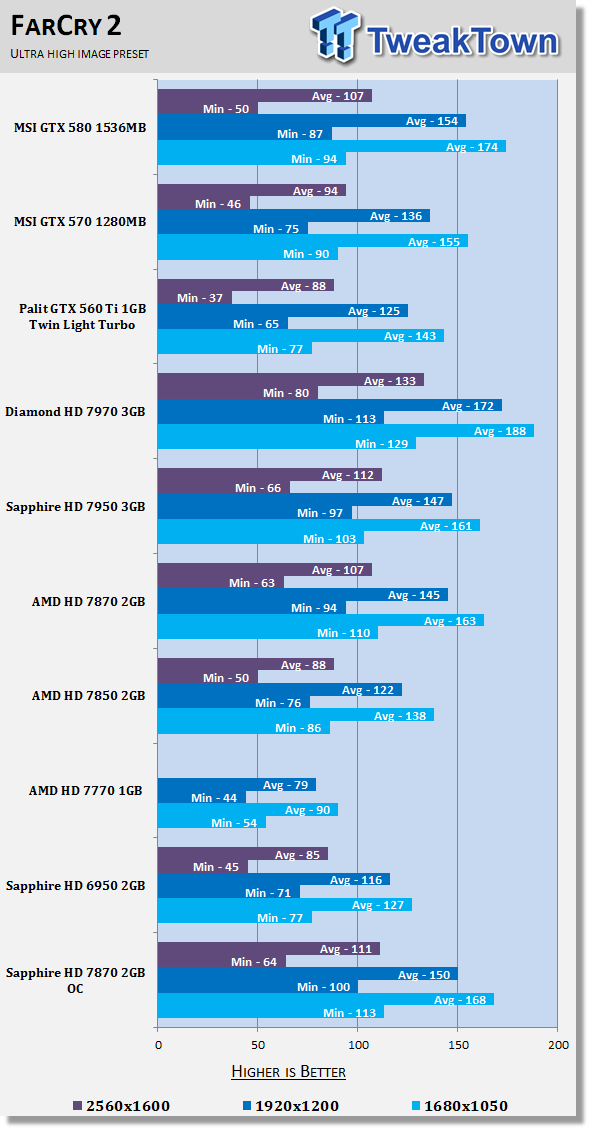
27Far Cry 2 as you'd expect sees a little bump across all resolutions, but also just as you'd expect, we've got very playable numbers at all resolutions.
Benchmarks - High Quality AA and AF
High Quality AA and AF
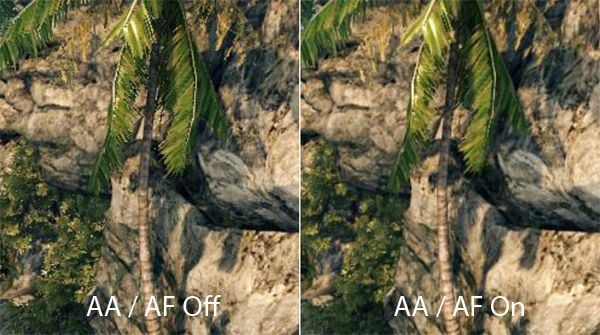
While we test all our games with maximum in-game settings, turning on Anti-Aliasing (AA) and Antistrophic Filtering (AF) helps take the intensity of our testing to another level.
Here we see video cards go from playable FPS to an unplayable FPS and the real power houses continue to help break that 60 FPS mark we always aim for to provide a smooth gaming experience.
 27
27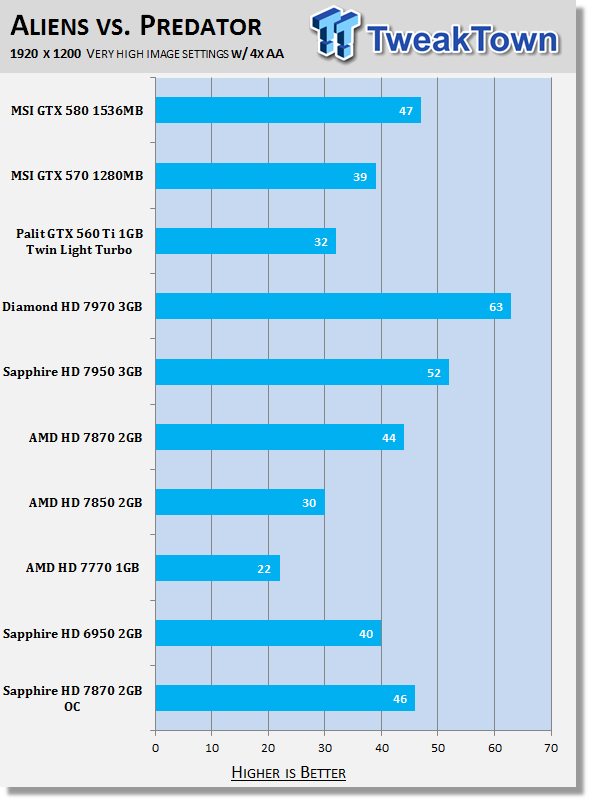 27
27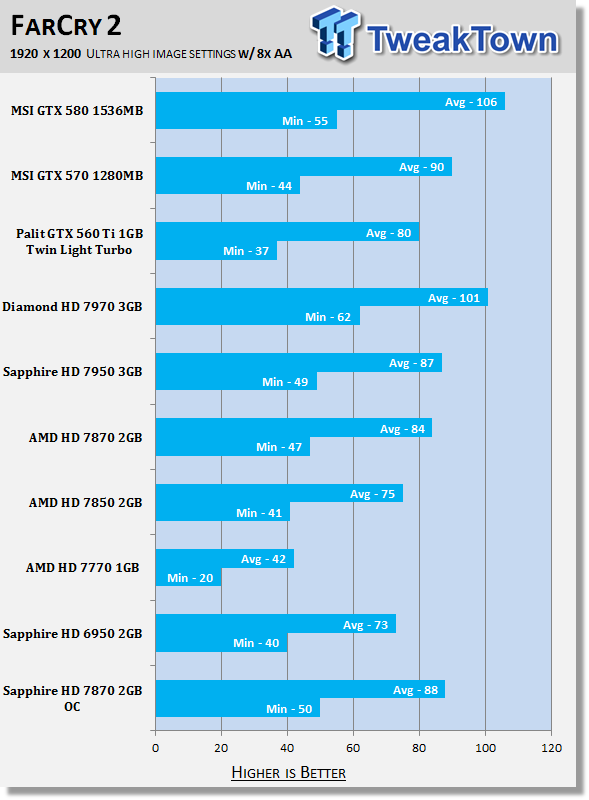 27
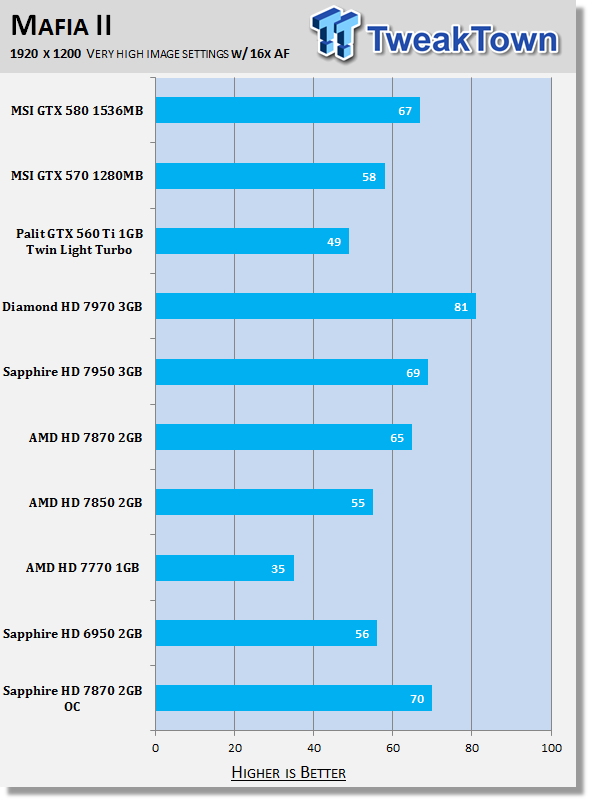
27Moving onto our higher end AA and AF tests we can see that we continue to get a nice little boost in performance.
Unfortunately while the boost isn't enough for us to get playable numbers under Aliens vs. Predator, we've got nice playable numbers under both Far Cry 2 and Mafia 2, which benefits the most from the overclock.
Temperature Test

The temperature of the core is pulled from MSI Afterburner with the max reading used after a completed run off 3DMark Vantage and the Performance preset.
 27
27Looking at the noise temperature numbers on the Sapphire HD 7870 OC you can see that we come in a little cooler then the reference clocked card while also running slightly faster thanks to the overclock on offer from Sapphire.
Sound Test

Pulling out the TES 1350A Sound Level Meter we find ourselves quickly yelling into the top of it to see how loud we can be.
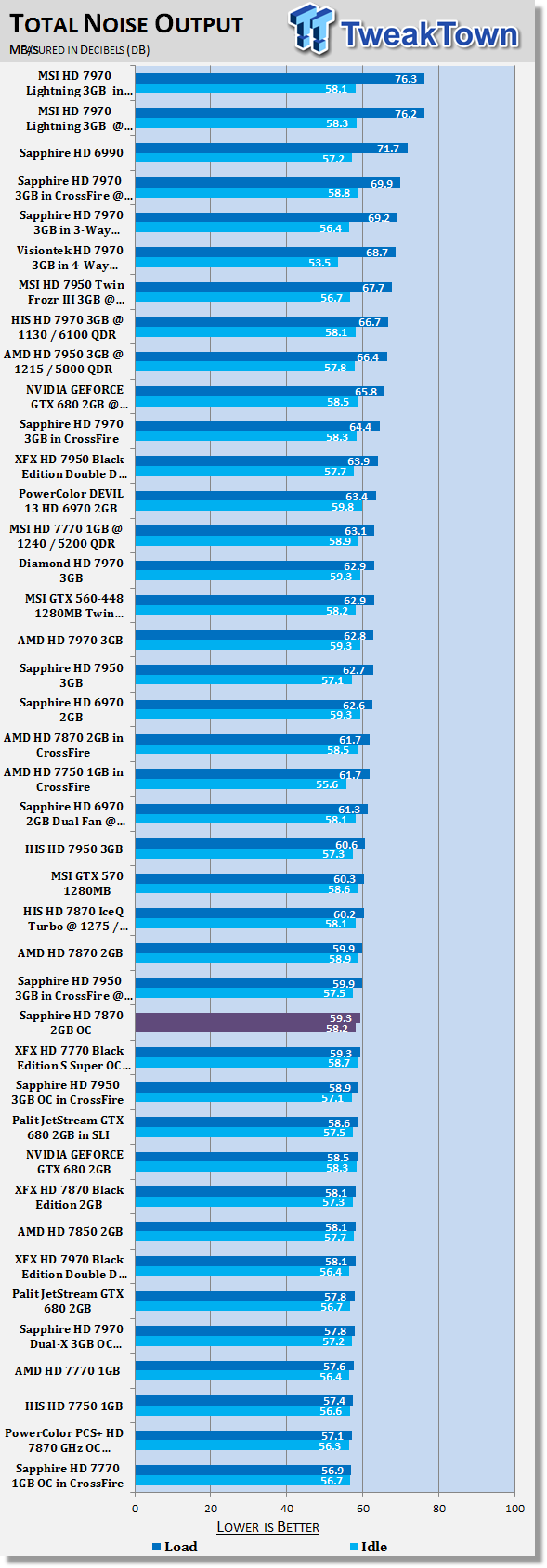
After five minutes of that we get a bit more serious and place the device two CM away from the fan on the card to find the maximum noise level of the card when idle (2D mode) and in load (3D mode).
 27
27On the noise front we can see that the Sapphire offer also manages to come in a little quieter. It's always nice to see a card run both cooler and quitter while at the same time running slightly faster thanks to an out of the box overclock.
Power Consumption Test

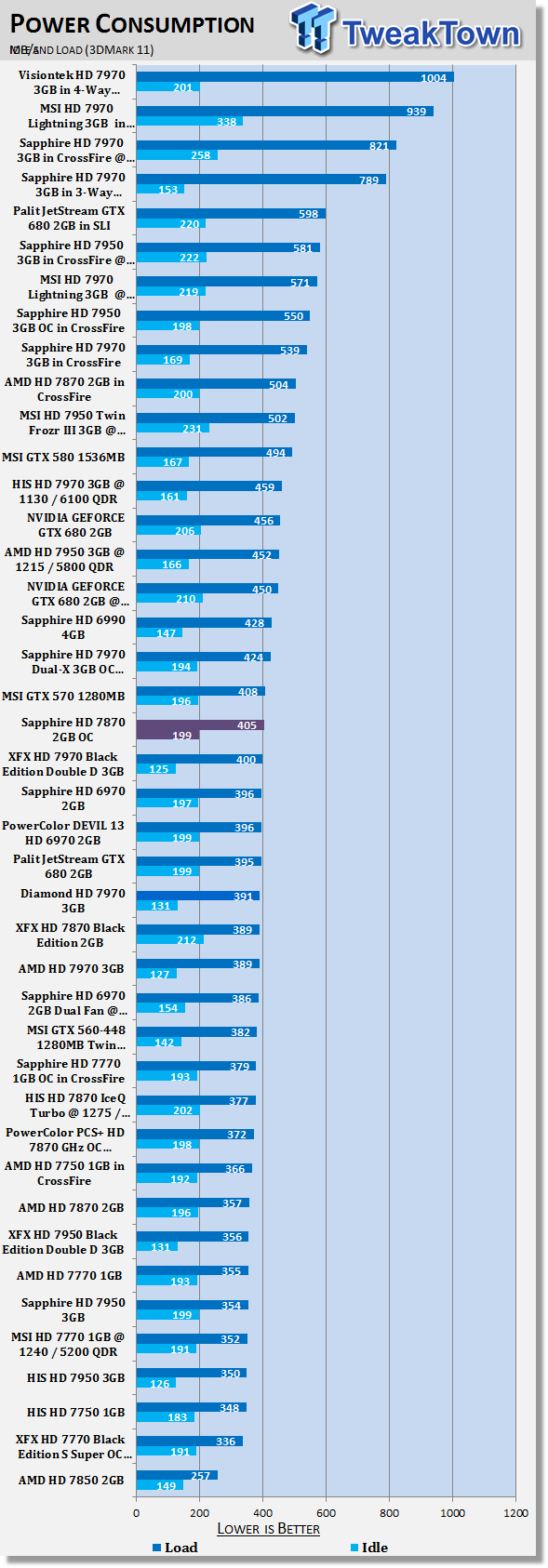
Using our PROVA Power Analyzer WM-01 or "Power Thingy" as it has become quickly known as to our readers, we are now able to find out what kind of power is being used by our test system and the associated graphics cards installed. Keep in mind; it tests the complete system (minus LCD monitor, which is plugged directly into AC wall socket).
There are a few important notes to remember though; while our maximum power is taken in 3DMark06 at the same exact point, we have seen in particular tests the power being drawn as much as 10% more. We test at the exact same stage every time; therefore tests should be very consistent and accurate.
The other thing to remember is that our test system is bare minimum - only a SSD hard drive is used with a single CD ROM and minimal cooling fans.
So while the system might draw 400 watts in our test system, placing it into your own PC with a number of other items, the draw is going to be higher.
 27
27On the power draw side of things there's no surprises as the card comes in around the 400 Watt mark.
Final Thoughts
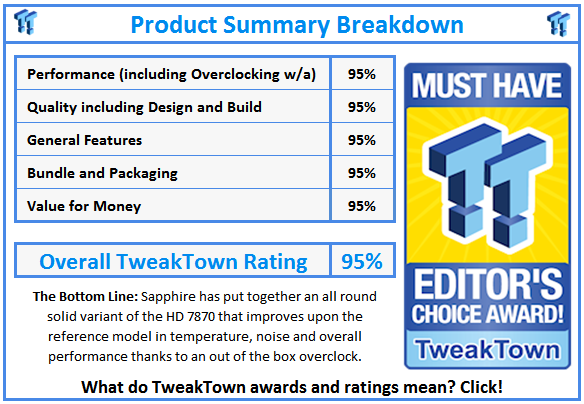
Sapphire has put together a really nice variation of the AMD Radeon HD 7870 video card thanks to improvements in all the key areas. On the cooling side of things we can see that we manage to have a card that not only runs slightly cooler thanks to the cooler choice, but it also manages to run a little quieter.
As for the performance, thanks to a slight out of the box overclock, you can see we're able to get an overall slight boost in performance which helps it also come out ahead when compared to the reference card.
Along with all that it's great to see that these added extras come at the cost of only $359.99, a price tag that is only $10 higher than the average price of the HD 7870. What makes the whole card even more attractive is that it doesn't have a whole lot of competition at the moment.
While NVIDIA have done a fantastic job at this $499 - $549 price bracket, we know it's still going to be a little bit till they fill out the whole range of GTX 600 series GeForce video cards. Thanks to this we can see that AMD are able to come out and show a strong presence at many price levels that NVIDIA can't hit at with a new generation card at this moment.
If you're on the lookout for a video card that comes in at that mid $300 price range, the HD 7870 is a great model for that. This isn't anything new, though, we've told you this a couple of times including at launch when we looked at it.
If you're happy to spend just slightly more, and I'm not sure why you wouldn't spend an extra $10, you can find yourself owning a card that manages to perform a little quicker thanks to an overclock while also being able to run cooler and quieter thanks to a terrific cooler from the team over at Sapphire.
 United
States: Find other tech and computer products like this
over at
United
States: Find other tech and computer products like this
over at  United
Kingdom: Find other tech and computer products like this
over at
United
Kingdom: Find other tech and computer products like this
over at  Australia:
Find other tech and computer products like this over at
Australia:
Find other tech and computer products like this over at  Canada:
Find other tech and computer products like this over at
Canada:
Find other tech and computer products like this over at  Deutschland:
Finde andere Technik- und Computerprodukte wie dieses auf
Deutschland:
Finde andere Technik- und Computerprodukte wie dieses auf 


 Sony's upgraded PS5 Pro is real, and developers are getting ready for it right now
 Intel rumored to launch cut-down AI chips for China, just like NVIDIA did with its AI GPUs
 NVIDIA A100 AI GPU in beefed-up, higher-spec form found in China: more specs than 'normal' A100
 AMD teams with Vindral to showcase 8K 10-bit HDR live streaming with ultra-low latency
 Star Wars Outlaws does a great job upselling Ubisoft+ subscriptions
 ASRock NUCBOX-155H Mini PC Review
 NuPhy Air96 V2 Wireless Mechanical Keyboard Review
 TEAM T-FORCE Siren DUO360 RGB Liquid CPU Cooler Review
 AVerMedia Live Streamer ULTRA HD Review
 AVerMedia Live Gamer 4K 2.1 Review
 XPG Invader X Mid-Tower Chassis Review
 Intel Core i9-14900KS CPU Review
 Arbiter Polar 65 Magnetic Gaming Keyboard Review
 ASUS ROG Falchion RX Low Profile Keyboard Review
 MSI MPG 321URX QD-OLED Gaming Monitor Review - 4K gaming at its best
 Everything you need to know about the latest ASUS NUC Mini PCs - NUC 14 Pro and ROG NUC
 How to Overclock Your GPU and Boost Your PC Gaming with ASUS GPU Tweak III
 ASUS's AMD Radeon RX 7000 Series GPU lineup has something for every gamer
 ASUS OLED Premium Care defends the ROG Swift OLED PG32UCDM gaming monitor from burn-in
 Patriot Viper Xtreme 5 Engineering Prototype 48GB Dual-Channel Memory Kit Preview