


Introduction
 30
30Just the other day I wrote up what has been as truly pleasurable keyboard to use all the time, no matter that situation, the Vengeance K90 for MMO and RTS gamers, but today we have something a bit different.
In that review I stressed that just because the title said it wasn't specifically geared towards those of us with headshots in an FPS title, it was still very useable for anyone, not just MMO and RTS players. With the latest submission from Corsair I now get why regular users and FPS gamers were left out!
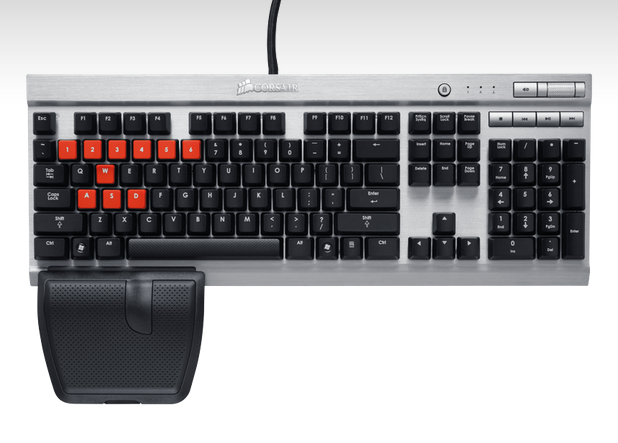
The mechanical keyboard I am looking at today is really a shrink of the original K90. By this I mean that it offers almost all of the same functionality, but two major components have been removed leaving a much smaller overall keyboard design once all of the G-keys are removed and of course the M-keys are gone as well. The second part to get the axe and what I miss the most is that super cool blue LED backlighting of the keys that would reflect off of the aluminum top for a visually tricked out appearance. Just because a couple of things have been removed doesn't mean that that is the end of the story. Even though Corsair removed a couple of the tricks that is going to make the K90 one of the most successful selling mechanical keyboards this year, the little brother doesn't hold back either, it just got looked at from a different approach during the design.
If you liked what you read about the K90, want to save a bit of cash on the purchase and Macro keys and LEDS aren't top of your list of "must haves" in a keyboard, then the latest submission is right up your alley. The Vengeance K60 Performance FPS mechanical gaming keyboard offers plenty of bang for the buck with the fact it keeps the Cherry MX red switches, the contoured wrist rest that even holds a surprise inside and lastly there is the material choices with aluminum winning out for the choice of materials to face this keyboard with.
That in mind, I say we get right into it and you can see for yourself if the K90 we just saw, or this streamlined version, the Vengeance K60 is the right weapon of choice for your hours of FPS gaming.
Specifications, Availability and Pricing
 30
30Let's start with the top of the K60. There are 102 keys plus a windows lockout button and multimedia controls. All of the keys are black with white pained tops denoting the keys functional purpose. One interesting thing that I did notice about these keyboards is that not all keys are backed with the Cherry MX red switches. The function buttons and the nine keys above the arrows are backed by rubber dome switches. That being said, the majority of your usage is still pushing up to forty-five grams of force on the main keys as you enjoy typing anything on. Considering the mechanical switches are rated for fifty million operations, I don't think they are going to have usage issues any time soon.
This is where I discussed the macros and the software last time, but with the lack of the G and M-keys, not only is there no macro programmability, there isn't a driver suite for this keyboard either. Instead what I want to discuss here is the fact that you do still get a wrist wrest for the left hand on the K60. Since it is based for FPS gamers it only makes sense since your right hand is busy with the mouse during battle.
I mentioned a surprise hidden inside of the rest and it is the ten optional keys that are inside of it with a handy key puller tool as well. These keys are not only red for high contrast against the rest of the keys, they are contoured for a great feel while in gamer, but also aid your fingers onto the correct keys by blindly feeling around. The keys that get the option for the switch are the W, A, S and D keys along with the numbers 1-6 at the top. The coolest part is that you just put the black keys into the rest for storage and they are easy to find later if the red key covers don't feel right for day to day use of the K60.
Just like with the latest reviews of Corsair's products, you can of course go directly to them and pay the $109.99 plus shipping costs for the K60. This time however, there are a few locations where a few dollars can be saved. So not only do you get to keep an extra portrait of Andrew Jackson in your wallet, if you look around you can also keep his friend Alexander Hamilton around as well. For those of you, who don't get the denominational humor of that, let me simplify things.
I was able to locate the Vengeance K60 at Newegg.com for $99.99 and that is to-your-door pricing. So not only can the K60 be had for less that the MSRP, you can get this for $30 less than what the K90 is currently demanding. To me it makes the choice between the two even tougher, it really comes down to your personal "must haves" as to which performance mechanical gaming keyboard from the Vengeance series is the perfect fit for you.
Packaging and Contents
 30
30As you would see the K60 on a shelf at your local tech store, there is an image of the customized version of the keys next to a window that shows both the left edge of the K60 inside, but also has the W, A, S and D keys lined up on the left to show them off.
 30
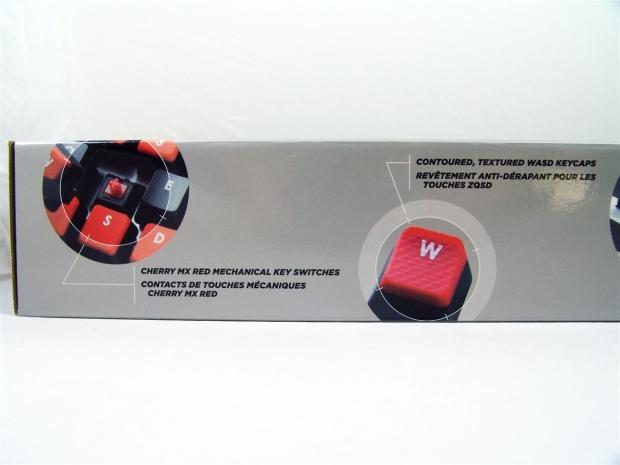
30On this side Corsair points out the use of Cherry MX Red switches and the textured and contoured that really specifies this keyboard for FPS style gaming.
 30
30At the other end of the same side of the packaging Corsair wanted to show off the 1.75mm thick aluminum top that adorns the K60.
 30
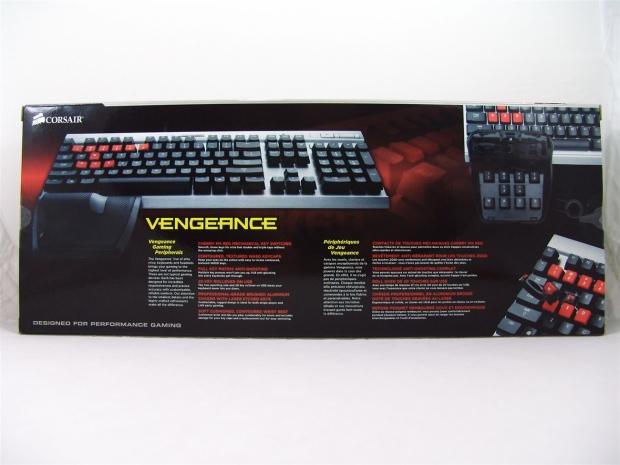
30The back offers images of the K60 with the red keys and the left hand wrist rest and an image of the rest opened at the right. Centered at the bottom is a story on Vengeance peripherals with a list of features that covers six things the K60 has.
 30
30The other thin side of the K60 box has a technical specifications list at the left hand side of this panel.
 30
30The right end of that panel covers the textured and contoured design of the wrist rest.
 30
30Sliding out the inner packaging shows this two leveled container that has the K60 under plastic at the top and under the keyboard you will find the paperwork. Another level down you will locate the wrist rest and don't forget to remove the keys on the left for use a little bit later.
Corsair Vengeance K60
 30
30Straight out of the box the K60 comes with all black keys covering the 102 key layout. Gone are the macro keys, but the K60 keeps the multi-media keys I like so much and it looks really good with the black keys contrasting against the natural brushed aluminum top.
 30
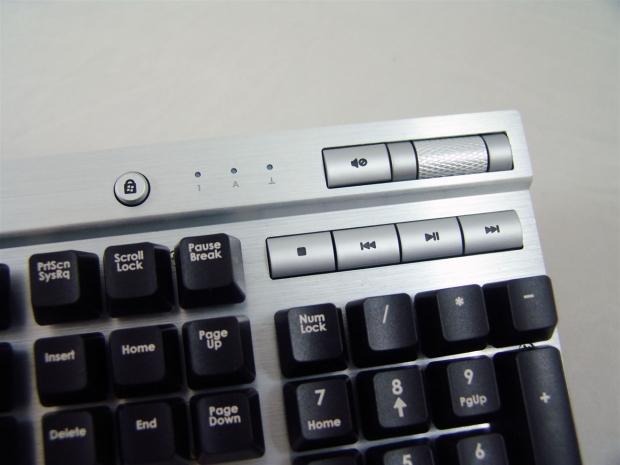
30The multimedia section covers the weighted bar to adjust the sound with a mute button to its left. The second row covers the stop, rewind, play/pause and the fast forward functions. To the left of all of these keys there are three white LEDs to denote scroll, number and caps locks being active or not and the Windows lockout key remains as well.
 30
30From the side you can see Corsair offers a bit of an angle to the board to give you a more ergonomically correct usage angle to the keys. If this isn't enough, there are four legs under the keyboard to get the K60 to the perfect angle for your specific needs to make your gaming more comfortable.
 30
30On the back, near the thick braided cable to connect the K60 to your PC is the reverse compatible, USB 2.0, pass-through port to connect anything you want to use without having to go to the case for connectivity.
 30
30That thick braided cable I just spoke of is two meters long when unfolded and terminates with two light blue USB 2.0 connections. One obviously works for the keyboard specifically, while the second connection powers only the pass-through port.
 30
30Under the keyboard, at the back edge, this being the right side, there are adjustable legs that flip out to the sides to allow you to add half an inch of height to the back of the K60. If you choose to leave them in the keyboard, there is a slim rubber pad to keep the keyboards footing on your desk.
 30
30I chose the right side of the back to show the front feet because this side has the mounts for the wrist rest as well. The front edge of the K60 is on the right and both right and left sides also have half an inch feet that can pop out to raise the whole keyboard up if that is a better feel for you.
Paperwork and Accessories
 30
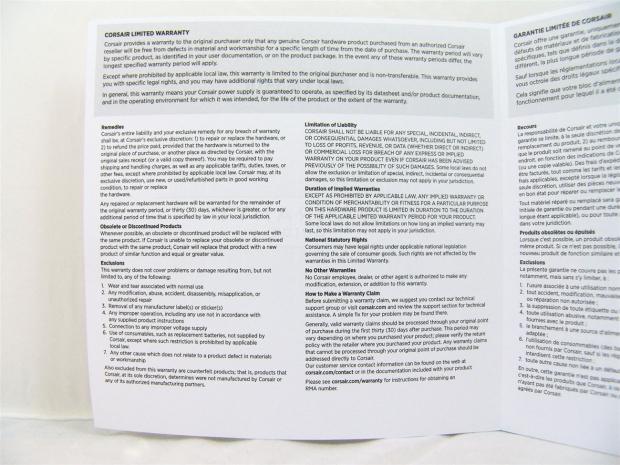
30Directly under the keyboard you will find these two fold-outs lying in the tray. On the left is the Quickstart Guide and on the right is where you can read the terms of the two year warranty.
 30
30The guide shows you about the wrist rest and the keys and puller inside of it and even shows a picture of how to work the key puller. To get the K60 functioning at its fullest, just turn on the PC and plug it in. There aren't any drivers for this keyboard, so it is truly plug and play.
 30
30If you need any information or have any questions, the left panel says to go to corsair.com to get anything you might need. The right side has the typical "STOP!" page reminding you that if issues arise, go directly to Corsair to resolve them, not the reseller.
 30
30By reading this, things are pretty simple. As long as you don't deface, modify, customize, or in any way take the keyboard outside of its "normality's" the two year warranty should apply. If the product is no longer made and yours can't be fixed, they will offer you something of similar functionality, even if it might be more expensive.
 30
30This is the left hand only wrist rest slash place to store your extra keys. I have yet to push the button on the front of the rest to open the top portion, but I can assume I am going to need the red keys that were in the top of the box as well.
 30
30The rest comes apart in two halves. The top of the rest has the key puller clipped into the hole that resembles the shape of the puller. The lower half of the wrist rest has places for all the extra keys and is labeled for each key. In this instance, the red keys are all kept safely for me to use when I get the urge.
Corsair Vengeance K60 Customized
 30
30Installing the wrist rest is as simple as clicking in the tabs. All you have to do is line them up and push gently until you hear them click into place. I like the touch of adding feet to the rest to help keep the keyboard from sliding around if all four of the feet are used on the keyboards underside.
 30
30This is the last image of the K60 in its natural state, as I mentioned this keyboard is customizable for comfort and usability.
 30
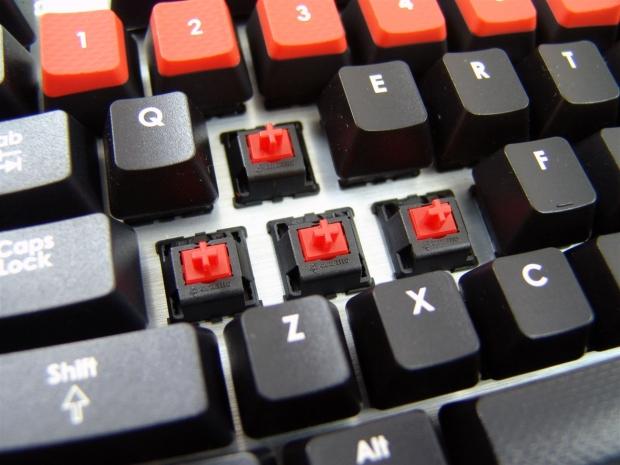
30Since I am swapping out the red keys onto the keyboard I thought it was a great time to go ahead and give the Cherry MX Red switches, this time without LEDs, their glamour shot in the review.
 30
30Looking at the numbers one through six keys, you can see a gentle curve from edge to edge. This cradles your fingers into them and makes sorting out the keys without looking much easier. Same is said for the curvature of the W, A, S and D keys that make fining them in the dark a cinch. All of these buttons are also textured so hours of game play and sweaty hands won't be an issue sliding off the keys.
 30
30As for the black keys that used to reside on the keyboard, you simply press them onto the pegs in the wrist rest for storage and they will be easy to find later if you want to change some or all of them back to these black keys.
 30
30When the K60 receives power via the USB 2.0 cables the only lighting to be had is when the Windows lock-out key and the "locks" have been activated on the keyboard.
 30
30This is our last look at the Vengeance K60 Performance FPS mechanical gaming keyboard in its fully customized glory. I will test with both the black arrangement and with the red keys installed to see if there are any actual benefits, aside from looking good and the K60 definitely does that in this configuration.
Final Thoughts
I tested the K60 for a few days with the standard black keys, with and without the rest in place. For day to day use I found the wrist rest was an awkward feel when typing out a review such as this, or when doing any typical day to day internet trolling that we all do. The thing I like most about the K60 is that the wrist rest just pops in and just as easily it can pop back out for whatever your comfort needs are at that moment. There is no feel difference between the K90 and K60 with the layout of Cherry MX Red switches and the surrounding rubber domed switches for the less used keys, so I can't say either is any better than the other in this respect.
Even with the macro keys being removed, I do have to make a few more mouse clicks in Photoshop, but I don't really miss them. The multimedia keys are something I use every day and have also been getting used to the Windows lock-out key for uninterrupted gameplay even if you do accidentally hit the Windows key in a serious battle. Once I added the red contoured and textured keys to the board, I found that in combination with the wrist rest is a far superior "feel" while tooling around in your favorite FPS. I was slightly worried that the curvature of the W, A, S and D keys would mess up the feel for day to day typing. It did take a few hours to get used to, but as I type this out to you on it, I don't even realize they are there when I type.
The one thing I really do miss from the K90 that the K60 just does not offer and that is the backlit keys the K90 offers. I do tend to do a lot of typing in the dark at the wee hours of the night and the gently blue glow of the keys will be sadly missed. For me there is a silver lining to this though. With the reduction in size of the K60, this keyboard is much more comfortable to set on my lap to write with, or while I am gaming with my feet on the desk, the K60 wins out hands down for me there. Keeping the sleek aluminum top, adding the textured and contoured keys along with the contoured wrist rest, the gaming experience is keyboard meets a gamepad in feel and functionality, without having to actually buy a separate device, the Vengeance K60 has it all included, it just takes a few minutes to go from out of the box condition to fully customized FPS superiority.
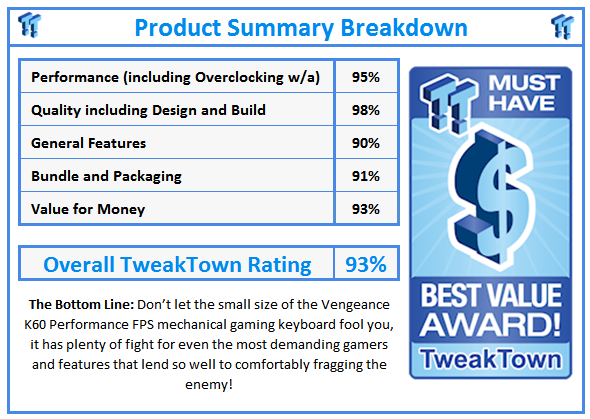
The price of the K60 is what I think is going to make this as stiff of a competitor in the market as the K90 is. While the larger and more functional K90 does have its perks and features that will make you want to dig $30 deeper in the pocket to own it, the K60 offers plenty to stand on its own and not live in the shadow of its bigger brother. Even though I raved about the K90, the K60 is actually what is sitting on my desk now and every day that goes by I think the K60 is more of a perfect fit for my needs and gaming style. The fact that currently the K60 is currently listing at reputable e-tailers for $99.99 with sipping included, I can't help but recommend that those wanting a mechanical keyboard with a few very useful options, the sub-$100 pricing make it affordable for anyone to try out and reap its benefits.
 United
States: Find other tech and computer products like this
over at
United
States: Find other tech and computer products like this
over at  United
Kingdom: Find other tech and computer products like this
over at
United
Kingdom: Find other tech and computer products like this
over at  Australia:
Find other tech and computer products like this over at
Australia:
Find other tech and computer products like this over at  Canada:
Find other tech and computer products like this over at
Canada:
Find other tech and computer products like this over at  Deutschland:
Finde andere Technik- und Computerprodukte wie dieses auf
Deutschland:
Finde andere Technik- und Computerprodukte wie dieses auf 


 Qualcomm details its Snapdragon X Elite: all SKUs have NPU with 45 TOPS for AI workloads
 There's a capsule toy machine in Japan that spits out Intel Core i7-8700 CPUs for around $3
 NVIDIA is helping Japan build their bleeding-edge ABCI-Q quantum supercomputer with HPC and AI
 TSMC doesn't need ASML's new High-NA EUV lithography machines for its next-gen A16 process
 Noctua's new NH-L12Sx77 low-profile CPU cooler is perfect for small form-factor SFF PCs
 ACEMAGIC AD08 "Core i9 11900H" Mini PC Review
 Lenovo ThinkPad X1 Carbon Gen 12 Review
 ASUS ROG Swift Pro PG248QP Gaming Monitor Review - Frames, frames, and more frames
 FlexiSpot C7B-Mesh Ergonomic Office Chair Review
 Samsung G8 34-inch QD-OLED Gaming Monitor Review - 175Hz for $900
 ASRock NUCBOX-155H Mini PC Review
 NuPhy Air96 V2 Wireless Mechanical Keyboard Review
 TEAM T-FORCE Siren DUO360 RGB Liquid CPU Cooler Review
 AVerMedia Live Streamer ULTRA HD Review
 AVerMedia Live Gamer 4K 2.1 Review
 Everything you need to know about the latest ASUS NUC Mini PCs - NUC 14 Pro and ROG NUC
 How to Overclock Your GPU and Boost Your PC Gaming with ASUS GPU Tweak III
 ASUS's AMD Radeon RX 7000 Series GPU lineup has something for every gamer
 ASUS OLED Premium Care defends the ROG Swift OLED PG32UCDM gaming monitor from burn-in
 Patriot Viper Xtreme 5 Engineering Prototype 48GB Dual-Channel Memory Kit Preview