


Introduction

 47
47Some time ago, back when extra hardware wasn't something that was available to me, I had my first go at a Danger Den acrylic chassis build with the Black 21 chassis. If you want to, go ahead and have a look at how limited hardware and installing air cooling into a chassis designed for water can really bring a slick looking chassis down a peg. With that in mind, with this newly developed chassis there will be a full on custom water cooling loop installed into the chassis to showcase it how it deserves to be, and to give the readers more of what is to be expected when reviewing a product that is specifically driven as a chassis to house water cooling out of the gate.
If the Black 21 was a full tower, this new chassis is more of a mid tower just going by the chassis sizing, but don't let that cloud your judgment. Even though the chassis has gotten smaller than the last solution I looked at, this new design has a couple of things the other didn't, as well as a better handle in the way the water cooling is mounted into the chassis rather than directly to the face as the Black 21 did. The more obvious changes up front are things like the power button moved to the rear in the new chassis, the acrylic motherboard tray has been redesigned and the PSU has been moved from the top to the bottom. There are a couple of others to mention as well, but I've got to save some material for the rest of the review, so if you want to see what those things are, stick with me; I'm sure you are about to like what you see over the next few pages.
Dan over at Danger Den must have seen some potential in me after the first go with an acrylic chassis from them. When this chassis was released we got into contact with them and he was more than gracious with helping us about even after butchering the Black 21 review. We went through a couple of emails to make sure the chassis was set up with a few of the selectable options so I could not only install my loop, but also show off the kinds of options that you may or may not want to select when purchasing yours. At this point I just ask that you get comfortable and enjoy the ride I am about to take you on as we look at the Q20 acrylic tower chassis from Danger Den.
Specifications, Availability and Pricing
 47
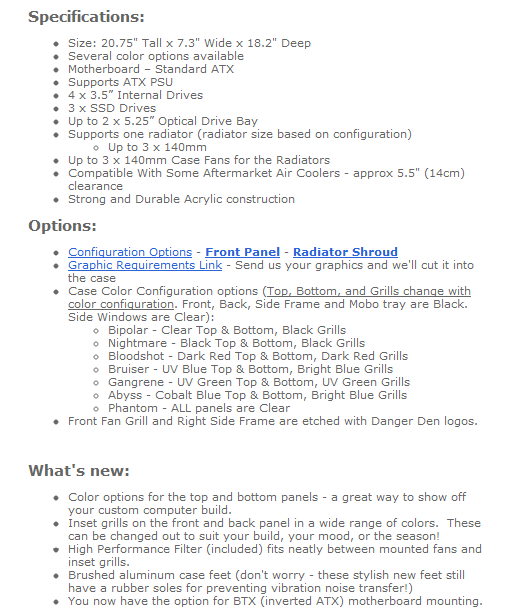
47Danger Den's Q20 is all acrylic, except for the assembly hardware and a few components of the build. When assembled, the Q20 is 20.75" tall, 7.3" wide and 18.2" from front to back. Depending on the piece of acrylic in question, Danger Den uses a mix of thicknesses from a little over 4mm on the thinnest pieces and near 9mm on the structural components. The list from Danger Den also shows his chassis will accept an ATX PSU and motherboard, but the motherboard tray does have the mounting holes and pre-threaded acrylic to accept Micro-ATX boards as well. All of the cases ship in base form with room for four 3.5" hard drives and the mounting on the motherboard tray for three 2.5" drives. From here we start to add optional ways of purchasing the chassis.
With no options selected the chassis ships with black and clear panels, without a front I/O, no optical drive slots and has a triple 120mm fan shroud included. If you want color, and there are plenty of options here, it will cost another $20, unless you want the whole case as the "Phantom" choice which is all clear acrylic. There are six other color options with cool names like "Abyss" or "Shadow" that we are going to shortly be looking at. Of course, there are radiator configuration options too. There is a triple 120, dual 140 or even a triple 140 option, and that is a free option. The front I/O is $15.95 on top of the case price too. As far as options for the 5.25" bays, you can get the front cut with none, one bay, or two bays cut; ours has the dual bays and that is free as well. If you really want, you can even have the chassis set up for BTX motherboards.
So what will the Q20 set you back? If you get the chassis stock, it is going to run you $269.99 US dollars. Without creating an account for Danger Den I wasn't able to get a shipping cost, but plan to ship twenty-five pounds of acrylic and hardware to your door with the Q20. The only place you are going to be able to purchase this chassis is at the Danger Den store directly from them. The version we are going to be seeing over the next few pages, the "Shadow" version I received, will set you back closer to $306 US dollars. So let's get right down to it and see what the Danger Den Q20 is all about and what is involved with this acrylic tower chassis.
The Packaging & Hardware
 47
47Custom cut cardboard packaging is what surrounds my Q20 chassis. Using the FedEx sticker as a size reference, you can see there is going to be a lot of assembly required to get this chassis to the dimensions listed in the specifications.
 47
47Once all of the tape was cut, opening the box I was first greeted with a packing slip, the front I/O panel and the bag containing the feet for this chassis all packed on top of pink packing peanuts.
 47
47Removing about half of the peanuts, the acrylic pieces are now visible. All of the components are shipped with dense foam corners applied to the chassis to keep the acrylic in the center of the box.
 47
47The individual acrylic components are still covered with the paper covering the full sheets that was applied to them prior to Danger Den cutting them. The pieces are then wrapped in plastic wrap, then all of them are wrapped together giving you this package of cut pieces you see here.
 47
47Packed on top of the acrylic for transit, you find the power button, the feet, the instruction manual and on the right is the wiring for the large power button.
 47
47Since this is a do-it-yourself chassis, the amount of hardware is elevated. These bags contain the rear I/O screws, the motherboard risers and screws, SSD mounting screws, a bag of nuts and the case wall screws. The bottom row has HDD screws, optical drive screws, PCI screws, PSU and misc. screws, fan screws and screws for both the front and rear grills.
 47
47Last thing to be found in my box is the optional front I/O add-on panel which contains the hardware for mounting and connections for headphones, a microphone and two USB 2.0 ports.
The Danger Den Q20 Acrylic Components
 47
47On the rear of the chassis (at the left) there is a removable ventilated area behind where the hard drives will install above the rear I/O panel and expansion slot plate will install. The large hole at the bottom is then for the PSU leaving the round hole in the middle to accept the large power button. The front panel has a large removable panel and was shipped with the dual bay option at the top.
 47
47The top panel of the chassis is sitting furthest back in this image with the floor of the chassis with the cutout for the PSU is in the middle. In the front is the black painted steel plate that holds the rear I/O dust cover and seven expansion slots.
 47
47This is one of the clear acrylic side panels that will enclose either the left or the right side when the build is complete.
 47
47The motherboard tray is drilled and threaded for the various things that attach here. The left has both AXT and Micro-ATX holes in place for the risers, and just to the right are twelve holes to mount SSDs right to the tray. The eight large holes at the top right will allow you to pass a screwdriver through to mount optical bay devices.
 47
47This is the left side of the chassis, structurally. It is drilled on the left to allow access to the expansion cards mounting screws, and gets etched with Danger Den at the bottom.
 47
47Of course both sides of the chassis will need a cover, and in the Q20, they happen to be a pair of clear acrylic panels. This and the other one I showed are reversible per side, so there isn't a true right and left cover panel.
 47
47This is the last of the acrylic components as we cover the radiator shroud with part of the hard drive rack sitting inside of it. The pair of parts at the left is used with the one in the radiator shroud to mount 3.5" drives. The pair at the right is clear, and is used to allow 5.25" device mounting in the front of the Q20.
The Danger Den Q20 Assembly
 47
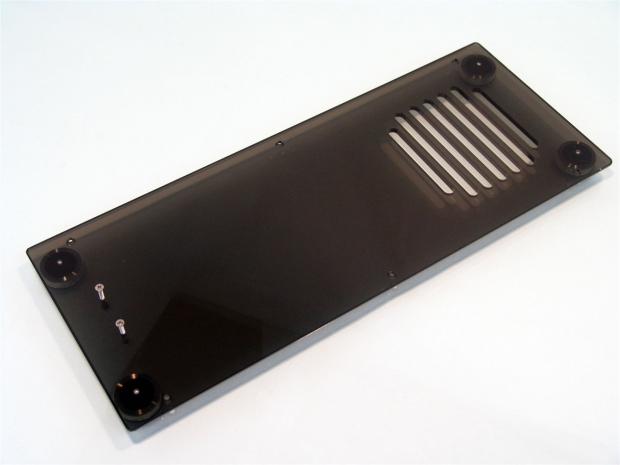
47Taking you through step by step as the instructions tell me to build the chassis I figured is the best way to cover any fit or finish issues I happen to run into. Step one was to take the floor of the chassis and add the four aluminum feet with rubber soles for anti-skid traction, I placed the pair of screws in the front just to help me keep it straight.
 47
47After adding the risers to the motherboard tray, using three nuts and screws, you align this panel with the floor of the chassis and loosely fasten the trio of screws. This will allow you to "move" things a bit as you build to help make aligning other panels much easier.
 47
47Similarly with the opposing side of the chassis, it is a trio of nuts and screws that mount this side to the floor at this step in the build.
 47
47Using four screws and nuts, the three pieces can be assembled together to make the hard drive rack for the Q20.
 47
47You are then instructed to grab the rear panel of the chassis and add the hard drive cage you just assembled along with the rear I/O and expansion slot combo piece. I'm sure you notice I am leaving the paper on, and I am to a certain extent. Leaving the paper on sides that it doesn't need removed from yet will keep the protection on the easily scratched acrylic as long as possible.
 47
47With the rear panel assembled, you are now instructed to add it to the floor and right and left sides of the chassis.
 47
47Danger Den then says to spin the case around and address the radiator support. My Q20 came with a triple 120 shroud for the case which I will be filling here in just a little bit.
The Danger Den Q20 Assembly - Continued
 47
47Danger Den then says to install the pair of clear acrylic 5.25" bay mounting pieces into the Q20. Two screws near the front hold these into the frame of the chassis while leaving eight holes to fit a pair of 5.25" devices in this particular version of the Q20.
 47
47At this point we put on the front panel of the chassis. I left the removable cover with the film on it to help break up the outline. Of course later on this will be removed as well.
 47
47There isn't much left once we put the top of the chassis on. One thing I did find out here was one screw was too long and is why it isn't in the top yet. A few seconds with the Dremmel later, the screw is trimmed down enough to not bottom out in the acrylic.
 47
47We are getting very close to finished, and it is now time to add the wiring to the back of the power plug and install it to the back of this chassis. I do believe if you get the one 5.25" bay option, the power button is on the front. With my dual bay version, it's on the back.
 47
47Removing the pair of screws I used to keep the front of the case marked in the early stages is now replaced with a pair of riser to allow me to install the front I/O.
 47
47I learned while installing this that the radiator shroud we installed earlier needs to be removed to allow the I/O panel to slide into the front of the chassis and over the risers. Once screwed into place, the shroud can easily be repositioned back into the chassis.
 47
47You have to get pretty low to see the front I/O panel from outside of the chassis, and if you had plans to set this chassis on the floor, it's going to make usage a bit tougher. Keep in mind this is like a showcase for your hardware, and setting it on the floor rather than on a shelf next to angels singing as they point at your chassis is just a shameful thing to do. The Q20 is made to be a show stopper or head turner chassis.
The Build and Finished Product
 47
47Now comes the joy of adding the hardware to the chassis! Since the shroud was out when I added the front I/O to the chassis, I went ahead and bolted up the triple 120 radiator and fans as well as press fitting the reservoir into the dual bays at the top.
 47
47At this point I have the Z68 with my 2600K in the case with the block, tubing, reservoir, and radiator all plumbed and ready for action.
 47
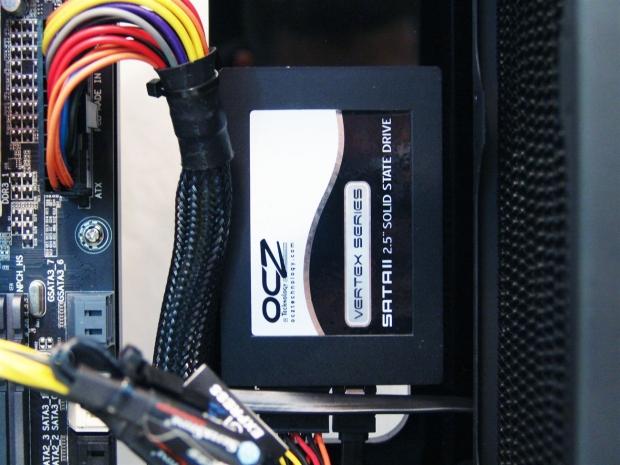
47In this build I wanted to show off the SSD mounting on the tray so I used this OCZ I have laying around. On the flip side of it, I didn't have any SATA cables long enough to make the journey from the top left corner of the chassis to the ports on the motherboard either. Something you need to think of when getting the components list together for case accessories.
 47
47After a bit of bleeding the loop, I added a dye bomb of red to match the memory installed on the board. I also at this stage went ahead and completed the build. One other thing I noticed too late. The PSU needs to be installed before the ATX motherboard is, once the board is installed the PSU will not fit into the chassis.
 47
47If you only have mechanical discs, or need a Raid array, the top left corner is where they will go. Keep in mind not only are you going to need longer SATA cables, you also need to device a good looking way to run power up there too.
 47
47On the outside, behind the hard drives, the reason for the removable panel is more obvious now. Removing this small panel will allow for you to swap drives without needing to open the sides of the chassis!
 47
47I would have thought that there would be a gasket of some form here to keep the PSU vibrations off the acrylic, but the sheer thickness of this acrylic must be enough. I was able to tighten the screws really well without feeling like I was going to damage the acrylic.
 47
47Just though I should step back a bit and show all of the rear of the Q20 in one shot before we move onto the better looking sides of the chassis.
The Build and Finished Product - Continued
 47
47Behind the motherboard tray there are countersunk holes drilled into the tray. The screws provided are pan head screws, but the countersink in the hole is enough so the screws won't rub on the clear cover we add here in a moment.
 47
47Looking at the back before we apply the clear panel shows that I did absolutely no wiring behind the tray, but it does leave something worth getting a look at.
 47
47Behind the tray to the outside edge of the chassis is only offset enough for the panel to be applied and screwed into place. As you can see, with this sort of design, it is still even attractive from the back.
 47
47Taking a look at the left side of the case before I install its clear covering you can see even with this loop installed there is plenty of room. I could easily see a tube res being installed onto the tray and helping to cover some of the wiring that is left exposed.
 47
47With the clear acrylic in place, you really wanted to be sure you have every last detail figured out, and is why I have the power cord already in. I wanted to be sure the PC would boot before I sealed the chassis with these last four screws.
 47
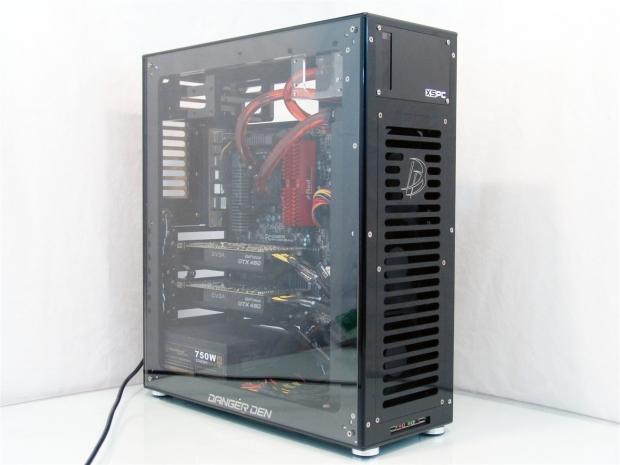
47In this image the Q20 and my rig is running full steam, but there are no LEDs or anything to aid you in knowing what is going on. While this case is for more advanced users, a LED postcode reader and LEDs on the board are very helpful in this chassis.
 47
47I wanted to get one last angle from the top down to help accentuate the smoked acrylic pieces that came with my Q20, this case if set on a glass table could be viewed from any angle while still keeping the clear and black theme allowing my build to do all the showing off inside of this acrylic showcase!
Final Thoughts
For a beginner, the Q20 may be a bit daunting at first glance, but kudos goes to Danger Den with their step by step, simple to follow instructions. If you can read and turn a screw driver, there is no reason anyone shouldn't be able to assemble this. Taking that one step further, as long as you only take what you need at the moment from the hardware bags, the parts are always labeled as you go through the build, making things that much easier for you. I already looked at the Black 21 which is the same basic idea in case building, and I have to say that the Q20 went together much smoother and it seemed the alignment of the panels while building the Q20 were less of an issue as I remember with the Black 21. With this build I wasn't constantly loosening the screws every time I added a new component during the build, and that alone keeps the frustration levels down. So not only can the beginner handle this chassis, but it's something the advanced users can really appreciate, even the assembly.
To be honest, I only had one issue which was easily remedied with a Dremmel, and I have one thing I would have liked in a case such as this. I really would have liked a bit of an offset behind the tray before the clear panel. This would allow users to wire back here instead of blocking the view through the left side of the chassis. As my "extras" pile got better, a modular PSU and a spare water cooling loop were on hand to make this build top notch and utilize the chassis for what it was meant to be, a true showcase of the components inside. If I had the room, extra components and a shelf sturdy enough, I would assemble a build in here and set it on my wall like a trophy. I almost feel bad running this rig as I know the dust in my house will start to invade as soon as I power it up. Even after the build and running the rig for testing, the acrylic still held a charge and will attract dust to the outside even if it is just sitting there, so keep in mind this chassis will require a lot of maintenance to keep it in "show ready" status as you see it in these images.
Availability is limited, as these chassis' are made to order as you select the options for your specific build. That inst to say they don't have a bunch of parts already cut and ready to go, but custom grills or any fancy etching you may want will take a bit of time to produce, and is why Danger Den states it may take ten days to ship, giving them time to accomplish what you require of them to customize your chassis. Options are endless really; you can add a company name, an image of your dog, your favorite Transformer or Thundercat, or even a tribal design like a tramp stamp if that is what you are into.
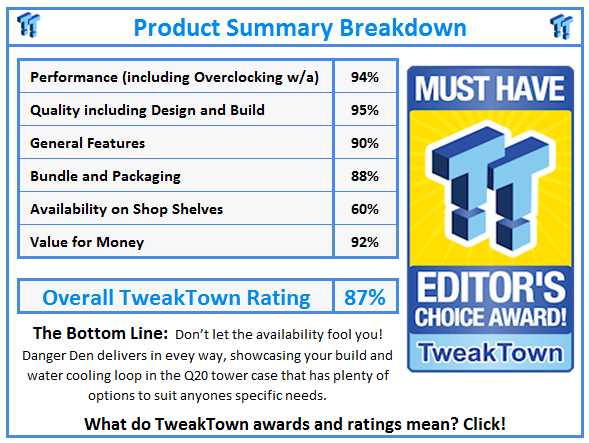
When you sit back and think of the pricing, as mine was shipped it's near $300; you wouldn't expect to have to assemble the chassis, but I found that building the case was a lot of fun and gives you a much better feeling with the hardware installed, that you not only built a really clean rig inside, but you built the entire thing! - Once completed, you are left with a very user specific chassis that looks terrific completed and raises the level of the components inside as it displays your components like an exhibit at the Rock and Roll Hall of Fame, visible from all directions, and something that will make your friends and LAN event kills very green with envy. For those still interested in obtaining your own, visit the Danger Den Store, as they are the only place to buy the $269.99 Q20 chassis.
 United
States: Find other tech and computer products like this
over at
United
States: Find other tech and computer products like this
over at  United
Kingdom: Find other tech and computer products like this
over at
United
Kingdom: Find other tech and computer products like this
over at  Australia:
Find other tech and computer products like this over at
Australia:
Find other tech and computer products like this over at  Canada:
Find other tech and computer products like this over at
Canada:
Find other tech and computer products like this over at  Deutschland:
Finde andere Technik- und Computerprodukte wie dieses auf
Deutschland:
Finde andere Technik- und Computerprodukte wie dieses auf  Dubai government responds to claims cloud seeding caused historic flooding
 Elgato announces new Neo range that includes plug-and-play Wave, Facecam, Stream Deck, and more
 Meta's next-gen Llama3 LLM is here and the Intel Arc A770 outperforms the GeForce RTX 4060
 Boston Dynamics unveils its next-gen humanoid robot in a very disturbing way
 Turtle Beach unveils redesigned versions of its Stealth Wireless Gaming Headsets
 FlexiSpot C7B-Mesh Ergonomic Office Chair Review
 Samsung G8 34-inch QD-OLED Gaming Monitor Review - 175Hz for $900
 ASRock NUCBOX-155H Mini PC Review
 NuPhy Air96 V2 Wireless Mechanical Keyboard Review
 TEAM T-FORCE Siren DUO360 RGB Liquid CPU Cooler Review
 AVerMedia Live Streamer ULTRA HD Review
 AVerMedia Live Gamer 4K 2.1 Review
 XPG Invader X Mid-Tower Chassis Review
 Intel Core i9-14900KS CPU Review
 Arbiter Polar 65 Magnetic Gaming Keyboard Review
 Everything you need to know about the latest ASUS NUC Mini PCs - NUC 14 Pro and ROG NUC
 How to Overclock Your GPU and Boost Your PC Gaming with ASUS GPU Tweak III
 ASUS's AMD Radeon RX 7000 Series GPU lineup has something for every gamer
 ASUS OLED Premium Care defends the ROG Swift OLED PG32UCDM gaming monitor from burn-in
 Patriot Viper Xtreme 5 Engineering Prototype 48GB Dual-Channel Memory Kit Preview