









Introduction and Package
Introduction

The Rampage IV Extreme. We've already looked at it in preview form and the board looks the goods. It's also been the main board that's behind our 3960X launch coverage for the simple reason it looks to be one of the best available come launch day.
Since everything is already sitting so nicely in the Rampage IV Extreme, it seemed like the perfect motherboard to look at first up. The ROG line of boards have a strong past and having already previewed the Rampage IV Extreme, it's pretty fair to say that they're going to have a strong future.
Unfortunately in our preview we couldn't look at everything that was included in the board with the main thing we missed out on being the included bundle and a break down on the PCIe expansion slots. Normally what we'd do is just quickly cover them and move on and while in the coming pages they're really the only two things we will cover, we have included all the pictures of the board in case you didn't get a chance to look at our preview.
If you're interested in getting a bit more specific on the controllers used throughout the board, then I'd highly recommend that you check out our original preview linked above, if you're not too worried about that, though, and instead just want to see the bundle and see what's going on in the PCIe department, you may as well just stay here, enjoy some more sexy photos of the Rampage IV Extreme before we get into the BIOS and cover the overclocking side of things.
The Package


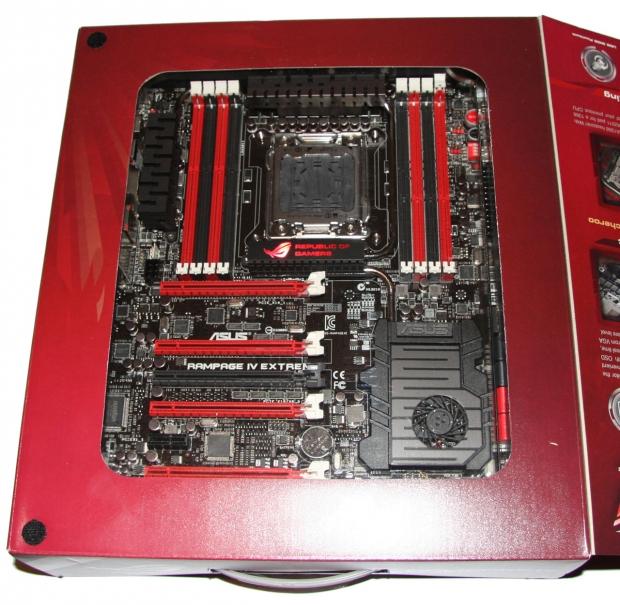

The bundle for the Rampage IV Extreme is actually huge and there's some real stand out inclusions. Looking above, you see a lot of the things we're used to seeing; manual, Driver CD, eight SATA cables, I/O back plate and EZ Connectors. We've got a couple of cables that also let us monitor the voltage of the board in certain areas and in the far right bottom corner we've got a 1366 back plate.
Our Latest Socket LGA 2011 Review Coverage
What this back plate does for is, if you're using LN2 pots, a serious Water Cooling solution or anything like that, you're able to replace the back plate on the current board and use this one. In turn your 1366 socket coolers will then be compatible. If you've paid loads of money for really high end cooling equipment on your X58 platform, the inclusion of just a simple bracket is going to be so appreciated.


On the VGA connector front we've got four included. Along with a SLI and CrossFire one, we've got a 3-Way and 4-Way SLI connector included in the package. Above you can also see we've got our white USB cable which is used for ROG Connect if that's something you want to make use of.

Another set of cables included are the VGA Hotwire Cables and these allow you to adjust the core clock and monitor areas of your VGA card. This is something that most users aren't going to use. Instead it's more designed for LN2 overclockers wanting to get the most out of everything. Normally you'd be using separate devices for this kind of stuff. ASUS has instead implemented it all into the motherboard.


Finally, the biggest addition to the package is the new "OC Key" from ASUS. Connecting to your motherboard and working through your monitor, the new "OC Key" brings a completely new way of overclocking to the table. We're not going to go heaps into this here, as honestly there's a heap to say about it, so we'll go into it in more detail in just a moment.
The Motherboard
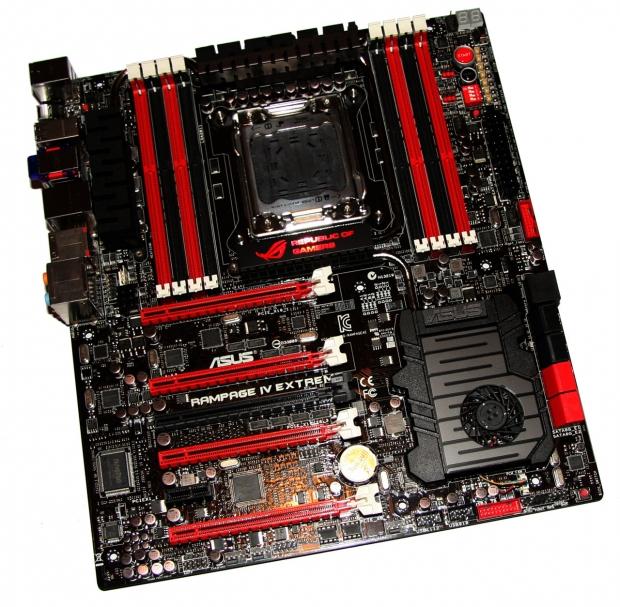
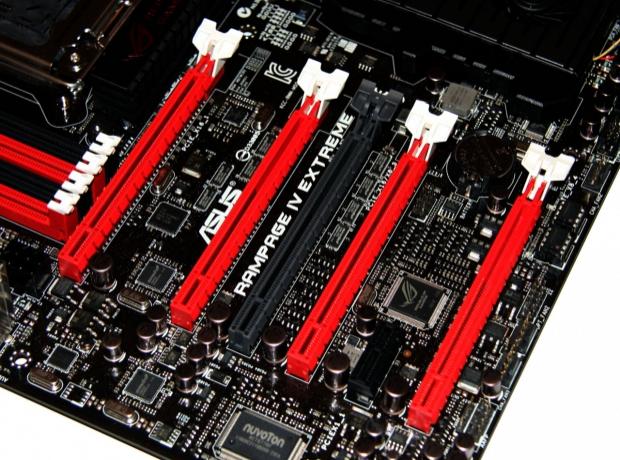
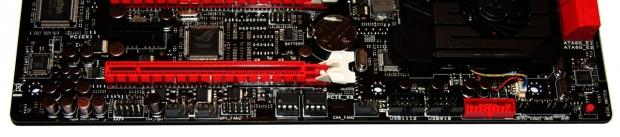


As we mentioned in our introduction, we've covered most of the motherboard in great detail when we did our original preview. For that reason we won't rehash the information we've already written. Originally we didn't include the PCIe specifications, though, so we'll quickly go into detail of that here.
A few images up you can see we've got a total of five PCIe x16 slots and a single PCIe x1 slot. Obviously the layout indicates that the board will of course support four way SLI thanks to the dual slot spacing between our four main red PCIe x16 slots.
All five PCIe x16 slots are PCIe 3.0. Unfortunately Sandy Bridge-E processors don't offer us PCIe 3.0 yet. Instead we'll have to wait for support later, or wait for Ivy Bridge-E to hit. Either way, though, the Rampage IV Extreme is PCIe 3.0 ready.
The single grey slot runs at x8, the other four run at x16 or x8 depending on the configuration of cards installed. If you're using a single PCIe x16 video card, that will run at x16. If you install two cards, they will run also at x16 - this compares to the non NF200 based Z68 boards which run at x8 / x8 when two cards are thrown into the mix.
If you're going for Tri-SLI or three card CrossFireX, you're looking at a x16 / x8 / x16 setup. If you're going all out and you'll be making use of all four red PCIe x16 slots on the board for a massive Quad-SLI or four card CrossFireX setup, then you're looking at the cards running at x16 / x8 / x8 / x8.
Of course, in an ideal world a four card setup would be x16 / x16 / x16 / x16, but numerous testing on x16 and x8 performance has shown very little difference in performance. This is the absolute best setup we can hope for when it comes to having PCIe lanes running natively through the Intel chipset.
The Motherboard Continued
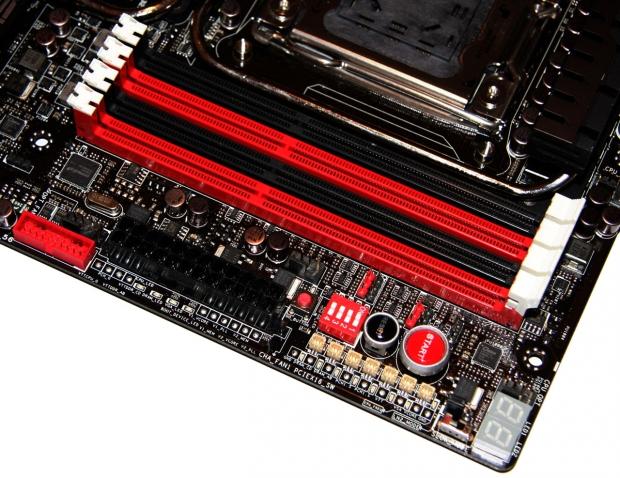


Moving onto the other half of the board, there's again not much that has to be said here as most of it was covered in our preview coverage. The only thing we can really say is that the eight DDR3 DIMM slots are of course "Quad Channel", but really, while Intel wouldn't let us say that, everyone knew it.
BIOS
If you can ever be scared of a BIOS, this is going to be one of them. The options here are just ridiculous and really let you know exactly what the board is about. While we've got screenshots of all the main sections, we'll cover just some of the bigger areas. Straight off the bat, though, you can see our "EZ Mode" option.

Like all ROG boards, "EZ Mode" is included, but when you go into the BIOS it's not the one you're greeted with. Instead you'll be looking at Advanced mode.
"Extreme Tweaker" is where you're going to spend most of your time and the word "Extreme" isn't just being thrown around by ASUS. The options here are just insane. Straight up you've got three preset profiles for overclocking; one is just a "Normal OC Profile" and is designed for day in and day out running. What this pushes our CPU to we'll cover in our overclocking side of things, but if you want to get a bit of extra performance and don't want to be stressing about anything, the chances are this is what you'll want.
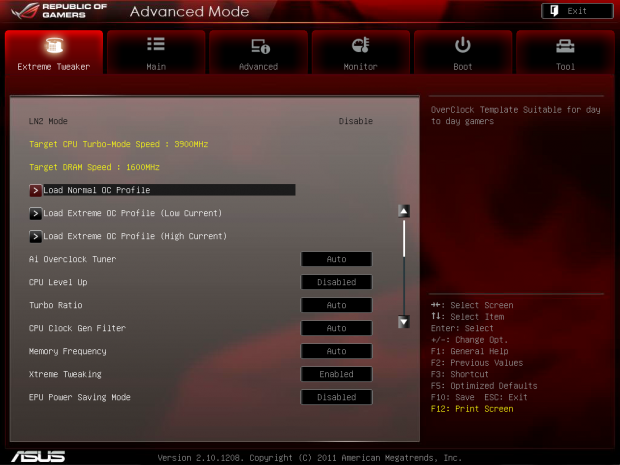
The "Extreme OC Profiles" are designed for people with higher end cooling options with the "High Current" one being for LN2 overclockers. Loading the profile does stuff like disable a lot of the extras on the board like your NIC cards, USB 3.0 controller and more. Doing so in turn helps you achieve the highest overclock possible.

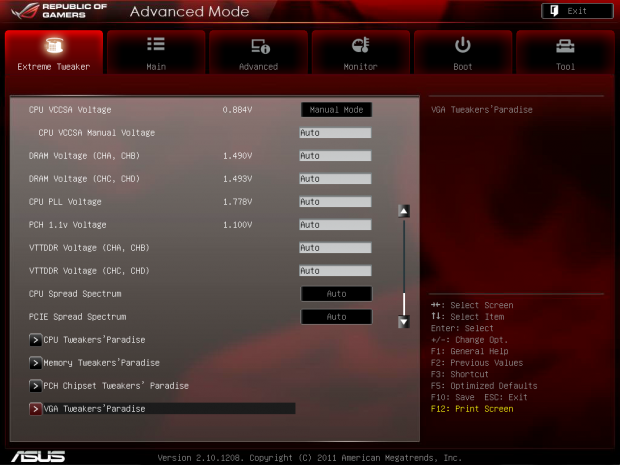
Moving throughout the rest of the page, you can see we've got settings for our memory and CPU along with all the voltage options you'd expect from a ROG board. At the very bottom, though, we've got even more options which are labeled as "Tweakers Paradise".

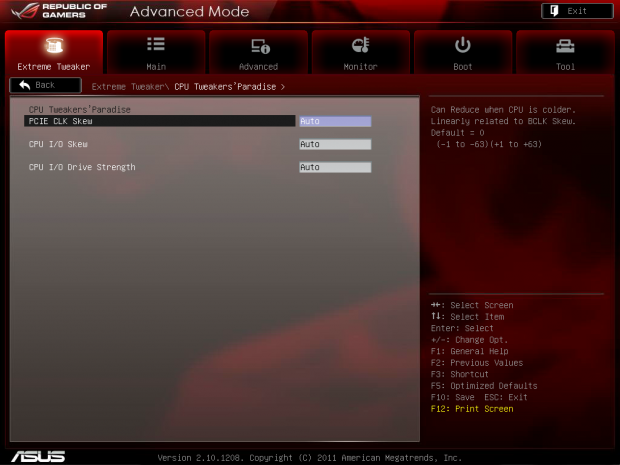


You can see throughout the "Tweakers Paradise" section that overclocking options just go crazy and for the most part a large amount of the user base will be avoiding this area as it's designed for only the most hardcore of users. The overclocking options are just utterly insane on the board and you can see that the mind of a mad overclocker is behind it.


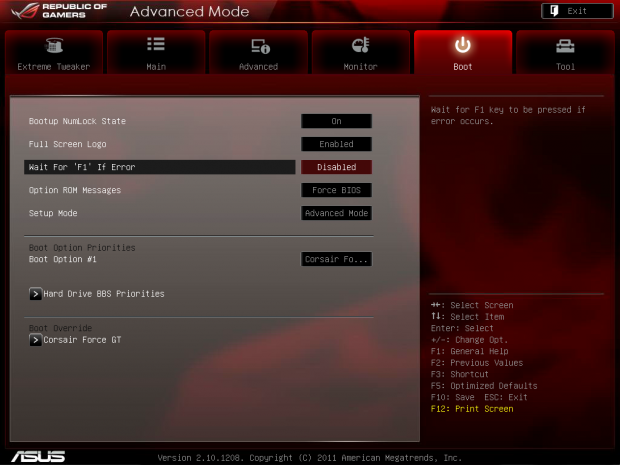


Moving away from the "Extreme Tweaker" section of the BIOS and through the rest, there's not a lot that is too out of the ordinary. We've got all the typical options you'd expect to see on any ASUS board. The BIOS is all about the "Extreme Tweaker" section, though, and the customizable options that are on offer with in it. The profiles, though, for easy overclocking are indeed going to be something that people will appreciate, especially if you find yourself overwhelmed in the BIOS.
The OC Key
So, OC Key didn't get off to a good start with me as I stomped around my office all annoyed by the fact that it didn't work on my 30" monitor. I knew it wouldn't because of the Dual-Link connectivity, but it didn't make it any less annoying when it came to trying it out.
After some hunting around and getting a really grubby looking 24" Dell monitor I had, we got up and running with OC Key and this thing is awesome!

The setup process is really easy - you use the included cable to link between the OC Key and a spot on your motherboard and the actual OC Key itself plugs into your DVI port on your video card, while then the normal DVI cable you'd use plugs into the other end of the OC key.


Once you've hooked it up, you hold the "ROG Connect" button on the back of the board which you saw on the last page for 3 seconds and the OSD shows up. With a PS/2 keyboard plugged in, we're able to move around and adjust the settings of things before we've even turned the system on.


We've got loads of options and it's all really easy to use. You can use the + and - buttons on your keyboard to adjust settings like voltages and the BCLK before your system is even up and running. You can then Remote start the system which is always fun.


Once you turn the system on, another window pops up with the "OSD Poster" and it's essentially a Debug meter on steroids as it gives you a rundown of where it's at during the boot process. From a debugging point of view this is great and because we've got the area it's at written, you don't have to resort to the manual to find out what some two digit code means.


Once you're in Windows, you continue to have it on screen. It can be turned off at any point, though, so don't worry about it getting in the way. You don't have to unplug and plug the OC Key in every time you want to use it.
If you want to make moving around the OC Key in Windows, though, you'll need a second keyboard, otherwise the PS/2 keyboard will just simply default to being used in Windows. With a USB keyboard plugged in to do our normal Windows movement, we use the PS/2 keyboard to go in the options. While we're running a 32M Hyper PI, we push our BCLK up to 102 and apply that. We then move over to the Ratio area and push that to x41 and within a few seconds we're running at 4181.9MHz as you can see in the images above.

While you're doing that stuff, you can head on over to the "OSD Monitor" section and look at the temperature of components on the board. Few people are probably really going to use it, but for people who do the most extreme overclocking, it's something that is going to come in really handy.
Say you're trying to break a 3DMark 11 world record and during one test the overclock on offer causes a crash, while 3DMark 11 is running, you could at the end of one test quickly drop the clocks back so it passes it, then push the clocks back up again once the test was over. It's going to allow for the absolute most fine tuning of overclocking options.
Outside of all that, though, in the end it's just another feature that ASUS offer to help them stand out from the pack. The bundle here today clearly does that.
Test System Setup
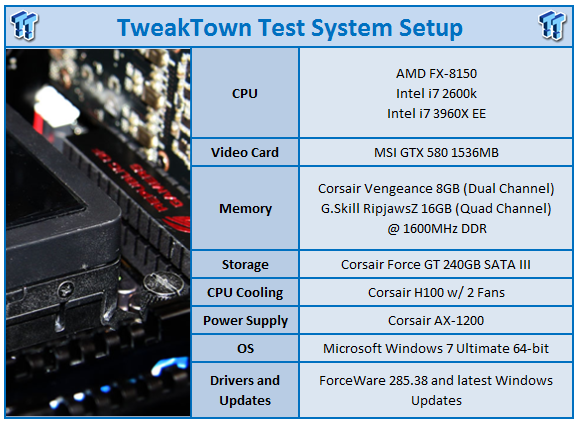
We would like to thank the following companies for supplying and supporting us with our test system hardware and equipment: Intel, ASUS, MSI, Western Digital and Corsair.
From the X79 side of things there's nothing we can compare the ASUS Rampage IV Extreme against as it's our first X79 motherboard we've ran through the gauntlet. For that reason we'll be checking our Rampage IV Extreme with the 3960X installed against our beloved Maximus IV Extreme-Z which has the stellar 2600k in it. More so because we can, we've also included the ASRock Fata1ty 990FX Professional motherboard with the FX-8150 installed in it.
The main thing we want to do, though, is get into the overclocking side of things on the board. In our original launch coverage on the 3960X we ended up running our system at 4.99GHz which was achieved by the "Load Extreme OC Profile (Low Current)" option. We also mentioned that we wanted to run at over 5GHz, so we just used that profile as a bit of a jumping point.
Before we get into that, though, the "Load Normal OC Profile" was the other profile I wanted to try. ASUS label this in the BIOS as "OverClock Template Suitable for day to day gamers", so it's the kind of overclock you'd use, well, for day to day gaming!

Selecting that profile, you can see we get into Windows at 4.37GHz which is a nice overclock from the stock 3.3GHz or even 3.9GHz with turbo. This clock pushes our voltage to just under 1.4v and brings our RAM up to 2000MHz DDR.
Doing all our testing at that speed, though, we headed back to the BIOS and used the Extreme OC profile as a jumping point to get over 5GHz. We could get into Windows as high as 5.2GHz and could start some benchmarks as high as 5.1GHz.

We ended up getting everything running smoothly at just over 5GHz with the final clock speed coming in at 5006MHz. This also pushed our memory speed up to just over 2100MHz DDR.
Because we already have a really good idea of how the CPU side of things performs against so many other models due to the fact we covered all this kind of stuff in our original launch article, we'll instead be mainly looking at the overclocking side of things.
Considering the voltage is pushed up to 1.576v and often times spikes over 1.6v when the Extreme OC Profile is set, the chances are the "Normal OC Profile" is going to be a good jumping point for a lot of people at just shy of 4.2GHz.
That really, though, just about covers everything that needs to be covered, so I think we're about ready to get into the performance side of things to see exactly what's going on.
Let's get started!
CPU Benchmarks
HyperPi 0.99
Version and / or Patch Used: 0.99
Developer Homepage: www.virgilioborges.com.br
Product Homepage: www.virgilioborges.com.br
HyperPi is a front end for SuperPi that allows for multiple concurrent instances of SuperPi to be run on each core recognized by the system. It is very dependent on CPU to memory to HDD speed. The faster these components, the faster it is able to figure out the number Pi to the selected length.
For our testing we use the 32M run. This means that each of the four physical and four logical cores for the i7 and the four physical cores of the i5 is trying to calculate the number Pi out to 32 million decimal places. Each "run" is a comparative to ensure accuracy and any stability or performance issues in the loop mentioned above will cause errors in calculation.

Moving from the stock speeds to 4.37GHz really sees a nice boost in overall performance. You can see that when we go from 4.37GHz to 5GHz we again see a nice chunk of time come off, but it's not quite as significant as our initial overclock.
AIDA64
Version and / or Patch Used: 1.00.1035BETA
Developer Homepage: http://www.aida64.com
Product Homepage: http://www.AIDA64.com
Replacing Everest in our labs is AIDA64. This new testing suite is from the core development team from Lavalys and continues that tradition. The guys have thrown in better support for multithreaded CPUs as well as full 64 bit support. We use this to test memory and HDDs for now, but may find ourselves opening this up to other areas of the motherboard.


Looking at AIDA64 performance, we can see that L1 and L2 Cache performance is good against our other offerings. Of course, overclocked sees those numbers improved even more. The L3 side of things is where we see the 3960X sit just a little behind when overclocked for some reason.
System Benchmarks
PCMark 7
Version and / or Patch Used: 1.04
Developer Homepage: http://www.pcmark.com
Product Homepage: http://www.pcmark.com
PCMark 7 includes a range of tests that give different views of your system's performance. In the Advanced Edition you can choose which tests to run. The common use and hardware component tests are unavailable in the Basic Edition.
Overall system performance is measured by the PCMark test. This is the only test that returns an official PCMark score. The Lightweight test measures the system capabilities of entry-level systems and mobility platforms unable to run the PCMark test, but it does not generate a PCMark score. Common use performance is measured by the scenario tests - Entertainment, Creativity and Production - each of which results in a scenario score. Hardware component performance is measured by the hardware tests - Computation and Storage - each of which results in a hardware score.
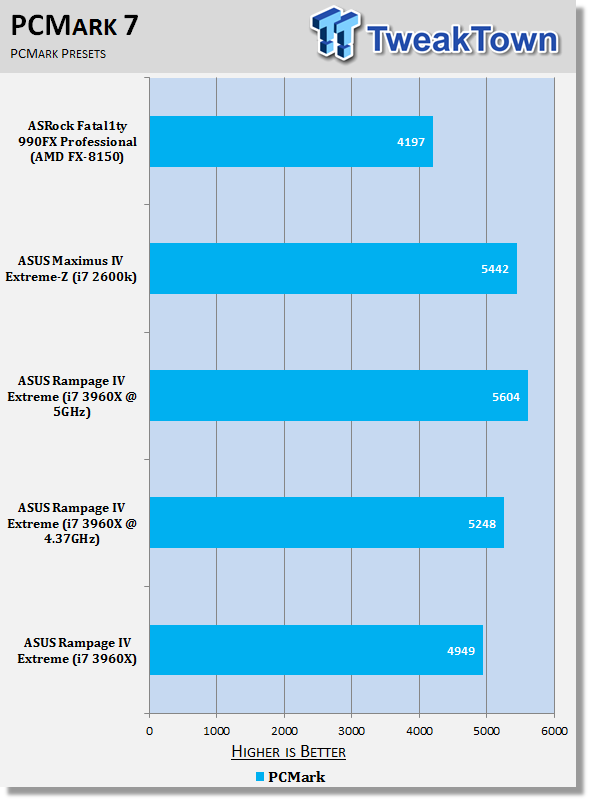
PCMark 7 has been spitting out some weird results all over the place; this was also seen in our original launch coverage which saw some scores go backwards. You get an idea of performance here, but PCMark 7 isn't something we're putting too much emphasis on at the moment. I think we'll probably see a patch for the program come out in the near future.
MediaEspresso
Version and / or Patch Used: 6.5
Developer Homepage: http://www.cyberlink.com/
Product Homepage: http://www.cyberlink.com/products/mediaespresso/overview_en_AU.html?fileName=overview&r=1
MediaEspresso is a blazingly fast media universal converter that can transcode your videos, photos and music files and out put them to a huge range of portable devices including mobile phones, portable media players and even game consoles. With technologies like Smart Detect, Direct Sync and CyberLink's TrueTheater™ video enhancements, you can not only forget about complicated format, resolution and output settings, but your converted file will come out the other side looking better than when it went in!

MediaEspresso paints a really good picture of what's going on in the performance department. You can see as our clock speeds increase the kind of time that is shaved off. We see a reduction in 2 minutes at every level of overclock. At the 4.37GHz clock, we see compared to the 2600k, we're coming in almost 5 minutes quicker.
USB 2.0 and 3.0 Benchmarks
AIDA64
Version and / or Patch Used: 1.70.1400
Developer Homepage: http://www.aida64.com
Product Homepage: http://www.AIDA64.com
Replacing Everest in our labs is AIDA64. This new testing suite is from the core development team from Lavalys and continues that tradition. The guys have thrown in better support for multithreaded CPUs as well as full 64 bit support. We use this to test memory and HDDs for now, but may find ourselves opening this up to other areas of the motherboard.

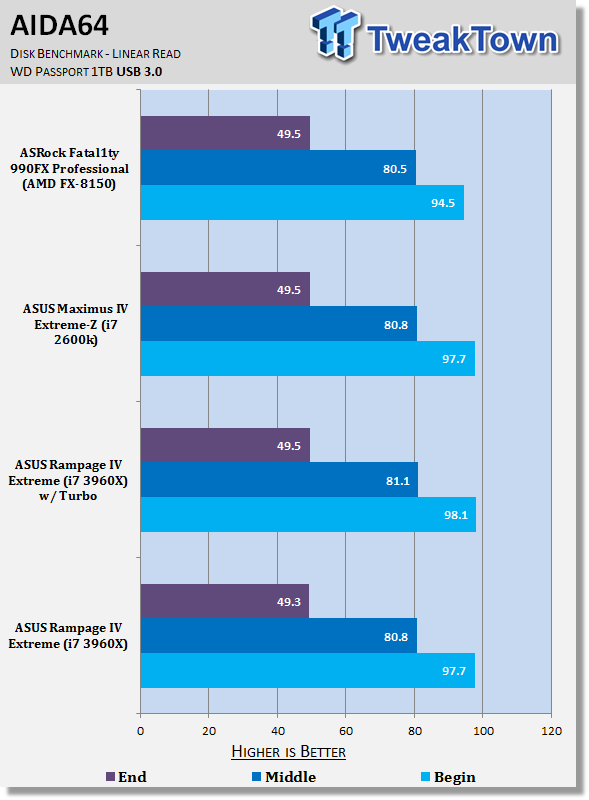
ASUS have implemented a new feature to boost performance of USB devices - we can see that compared to the speed when Turbo is off we get a little bit of a boost with the best being seen in the USB 2.0 side of things. On the USB 3.0 front, we see the performance is pretty much the same as all our other setups with really nothing separating them, even with Turbo on.
This isn't the first time we've seen this kind of technology. ASRock use XFast in a lot of their motherboard models and it also does a good job of boosting performance. Like the ASUS offering, though, we see that the best gains are seen in the USB 2.0 side of things verse USB 3.0.
SSD Benchmarks
AIDA64
Version and / or Patch Used: 1.70.1400
Developer Homepage: http://www.aida64.com
Product Homepage: http://www.AIDA64.com
Replacing Everest in our labs is AIDA64. This new testing suite is from the core development team from Lavalys and continues that tradition. The guys have thrown in better support for multithreaded CPUs as well as full 64 bit support. We use this to test memory and HDDs for now, but may find ourselves opening this up to other areas of the motherboard.

HD Tune Pro
Version and / or Patch Used: 4.61
Developer Homepage: http://www.hdtune.com
Product Homepage: http://www.hdtune.com
HD Tune Pro gives us accurate read, write and access time results and for the last couple of years has been gaining popularity amongst reviewers. It is now considered a must have application for storage device testing.

Looking at our SSD performance, we can see that performance between both our ASUS boards is extremely close with little difference being seen in AIDA64. We see a bit of a dip in minimum performance under HD Tune Pro and this was consistent, but performance lined up just fine under AIDA64.
Memory Benchmarks
AIDA64
Version and / or Patch Used: 1.00.1035BETA
Developer Homepage: http://www.aida64.com
Product Homepage: http://www.AIDA64.com
Replacing Everest in our labs is AIDA64. This new testing suite is from the core development team from Lavalys and continues that tradition. The guys have thrown in better support for multithreaded CPUs as well as full 64 bit support. We use this to test memory and HDDs for now, but may find ourselves opening this up to other areas of the motherboard.

Memory Bandwidth has probably been one of the most surprising areas with the new X79 line up. AIDA64 just doesn't paint a good picture for it at stock. We do see a nice boost as we climb up the table, but at stock there's just not the MB/s rates we'd expect to see from the new Quad Channel technology.
Performance Test has painted a little bit of a different picture, and Sandra is also supposed to favor the new Quad Channel platform more. We're not sure if it's AIDA at fault here or what, but I'm sure we'll soon see all memory benchmarking programs line up with each other.
Gaming Benchmarks
3DMark 11
Version and / or Patch Used: 1.0
Developer Homepage: http://www.futuremark.com
Product Homepage: http://www.3dmark.com/3dmark11/
3DMark 11 is the latest version of the world's most popular benchmark. Designed to measure your PC's gaming performance 3DMark 11 makes extensive use of all the new features in DirectX 11 including tessellation, compute shaders and multi-threading. Trusted by gamers worldwide to give accurate and unbiased results, 3DMark 11 is the best way to consistently and reliably test DirectX 11 under game-like loads.

Metro 2033
Version and / or Patch Used: Latest Steam Update
Timedemo or Level Used: Built in Benchmark
Developer Homepage: http://www.4a-games.com//
Product Homepage: http://www.thqnordic.com/
Metro 2033 is an action-oriented video game with a combination of survival horror and first-person shooter elements. The game is based on the novel Metro 2033 by Russian author Dmitry Glukhovsky. It was developed by 4A Games in Ukraine and released in March 2010 for Microsoft Windows and Xbox 360.[3] In March 2006, 4A Games announced a partnership with Glukhovsky to collaborate on the game.[4] The game was announced at the 2009 Games Convention in Leipzig;[5] a first trailer came along with the announcement.[6] A sequel was announced, currently titled Metro: Last Light.

On the gaming side of things we can see that in the performance preset under 3DMark 11 we see a bit of a boost in performance as we move up in the MHz. There's nothing too major and it's the same kind of thing we saw when we benched in our original launch article. You can see in the gaming side of things there's not much that has to be said. Like both our Intel platforms there's little difference; the only time we see a little bit of fluctuation is on the FX-8150.
Temperature and Power
Power Draw Tests

Power draw is something we brought up a fair bit in our original launch article and the new X79 platform is indeed a power hungry beast. The good news is, though, that when we move to 4.37GHz, power draw is boosted only slightly. For people looking at an everyday machine, this isn't too bad considering the performance a machine of this specification puts out.
You can see when we move to 5GHz, though, and all our voltages start to head north, there's quite a big increase in overall power draw. 533Watt under load really is a lot for just a single video card. We're not worried, but with an idle of 267 Watt as well, there's no denying that this is a power hungry system.
Core Temperature
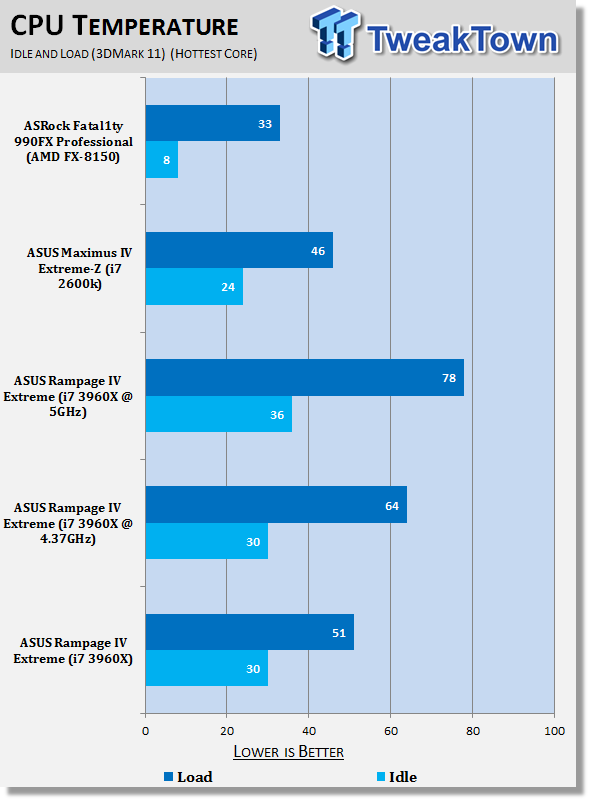
The heat side of things is the other bit that was brought up a bit - it's just natural that with something that draws this much power, there's going to be decent heat that goes along with it. That 4.37GHz mark really seems to be the sweet spot, though. We can see that idle temp remains unchanged and at load we're only coming in at 64c which is pretty easy to swallow.
Moving up to 5GHz, though, brings with it a 20% increase in idle temp and a big 26c jump in load temperature. It's not too bad - we see the 2600k when at 5.2GHz get around the 75 - 80c mark, but like our 2600k, these probably aren't numbers you want to be hitting every day.
Final Thoughts
Describe the ASUS Rampage IV Extreme in two words? Love it! I really just do love this board - it's amazing, it's simply one of the best motherboards I've ever had the pleasure of using and the joy it brings is like that of the MARS II video card we looked at a while ago.
This board was built with purpose. It was built by people who love what they do and people who want to make sure you can get the absolute best performance out of the products that run in it. You don't have to look at a dozen other X79 boards to know that this is going to be one of, if not the best one on the market when it comes to getting the absolute most performance out of your platform.
The only gripe you can say with the board is that it's too over the top for us mere mortals who use high end air cooling or just basic water cooling solutions. The BIOS is scary, and when we say scary, we mean like, 'you're 5 years old and you think the boogey man is in your wardrobe'. The options are overwhelming, but the best thing is that you're able to yield these really strong overclocks in a press of a simple button.
Not only that, though, the profiles give you a really good jumping point to start with, especially when it comes to the Normal OC one - it doesn't set the voltages to anything insane. Once you're at the level that ASUS are showing us is safe, you can then start to mess around with settings like BCLK, Multiplier and RAM speeds. It just gives you this really nice starting point.
The same goes if you want to get some benchmarking going on, try and beat your mates scores, or those on local forums. You can move to that Low Current Extreme OC profile, see how everything goes and then again do a bit of tweaking. We could get into Windows as high as 5.2GHz when we started off at that profile, but as soon as we started to encode a video, our system would fall over. With some more time and tweaking, though, you'd find you'd be able to run 3DMark 11 higher than what we did today and that's because the overclock we want to show needs to be able to run everything including the super intensive encoding process. You won't need that, though, if you're just trying to have some benchmarking fun under 3DMark 11 or something similar.
There's just some things that this board offers that people simply don't need. The OC Key isn't going to be for everyone, the Hotwire VGA cables, 1366 back plate and Subzero temperature monitor. But what's our problem with the board? It's got too many features? How can that be an issue?
The price is going to be a little on the scary side, but we knew that the second we looked at the board. We knew that when we knew the board was coming - it's a top of the line ASUS ROG board, so of course it's going to be expensive. It's going to be so feature packed and offer us killer performance. It's hardly a shock.
Considering the cost associated with the 3960X, the board price isn't going to be too bad. Sure, if you're looking at a cheaper CPU option, then it might be a bit of a shock. The last thing you probably want is a board that's more expensive than your CPU.
The price isn't something I can harp on about too much, though. There's enough here to justify the cost of the board. There's also the options where little nublet overclockers can get decent performance out of the board without having to do anything much.
The only thing we don't know 100% is the price of the board, but the numbers we've kind of heard actually put it about $100 US cheaper than I thought it would be. Considering it's the most feature packed ROG board we've seen to date, the last thing I expected was for it to be cheaper than what I thought.
I think in the end, though, you look at the Rampage IV Extreme and you don't just see some dudes in white coats throwing ideas around, you see these people that live and breathe performance and have this unmatched passion for the products they make. When it all comes together, you have this board that just yells "I am ASUS, hear me ROAR!".
If you're a fan of ROG, you won't be disappointed. If you're a fan of Performance, you won't be disappointed. If you're a fan of computers, you won't be disappointed. The Rampage IV Extreme won't disappoint. Well, maybe it will disappoint the other half when they see what you spent powering this platform. When you're sitting behind the beast of your system that is powered by the Rampage IV Extreme and you're all wiggly and giggly, I'm sure they will understand.....I'm sure!

 ASRock Z890 Taichi Aqua Motherboard Review - Flagship features without the flagship price
 GIGABYTE Z890I AORUS Ultra Motherboard Review - Mini-ITX with surprisingly good thermals
 GIGABYTE Z890 AORUS Elite WiFi7 Plus Motherboard Review - Right in the sweet spot
 ASUS ROG Strix X870E-E Gaming WiFi7 NEO - A Crosshair by any other name
 MSI MAG B850 Tomahawk Max WiFi II Motherboard Review - Leveling up
 Xbox doesn't want to 'cram ads into everything,' still sees advertising as new opportunity
 YouTuber tests SteamOS on an Intel-based MSI Claw 8 AI+ handheld, SteamOS now supports Intel handheld gaming PCs in new beta
 Microsoft promises to deliver at least one Xbox console exclusive game per year
 NVIDIA RTX 5000 Super GPU refreshes could arrive Q4 2026, complete with 5060 Super - but don't expect RTX 6000 until 2028
 KIOXIA SSD technology will power data centers on the lunar surface
 Xbox needs help launching next-gen Helix console
 Xbox confirms hardware costs are exploding, and that's bad news for the next Xbox and PS6
 Ubisoft is closing two studios with hundreds of employees on the chopping block
 AMD says its next-gen EPYC 'Venice' processor is over 3X faster than NVIDIA Vera
 Fable's new 30-minute gameplay deep dive shows you how to buy property, fancy clothes, and get a date
 MOAIPLAY ORA PRO G1 850W ATX 3.1 PSU Review: high efficiency and 10-year warranty for $119.99
 Navman MiVue Smart True 4K Surround Dashcam Review - Seeing In All Directions At Once
 IQUNIX Magi96 Pro Aluminum Low Profile Mechanical Keyboard Review - Premium Build, Satisfying Sound
 Asetek Forte S-Series Racing Simulator Bundle Review
 Razer Pro Type Ergo Wireless Split Ergonomic Keyboard Review - Built for Comfort and Support
 ASUS ROG Strix Morph 96 Wireless Gaming Keyboard Review - Great Performance, More Affordable
 SAPPHIRE Radeon RX 9070 GRE PULSE OC Review - A New 1440p Challenger Has Arrived
 NZXT H6 RGB+ Compact Dual-Chamber Chassis Review
 ASRock Radeon RX 9070 GRE Steel Legend Review - The RDNA 4 Mid-Range Reshuffle
 Quick Assist is the only remote-support tool I open when a relative calls about their PC
 The PowerToys utilities I keep enabled on every Windows 11 PC, and the ones I turned off within a week
 TweakTown's Best of Computex 2026 Awards - The Best Hardware, Gaming Gear, and AI
 Phison E37T SSD Controller Exclusive Preview - The Fastest DRAMless SSD Platform Yet
 USB Ports Not Working in Windows 11? Try These Fixes
 ASUS WiFi Routers and Networking Solutions Deliver Long-term Security and Reliability with No Additional Cost
 Second Monitor Not Detected in Windows 11? Try These Fixes
 Turn Your Old Smartphone Into a Dedicated Webcam for Your Windows PC
 The Send To menu is the right-click feature on Windows 11 that nobody bothers to customize
 Windows 11 will not let you pin a folder to the taskbar, but a 30-second workaround does