

 9
9Everyone's done it, they've bought something or gotten something with the impression it does one thing, to then discover that it doesn't do what you thought and instead does something completely different. Welcome to the Dr.Power II and my world.
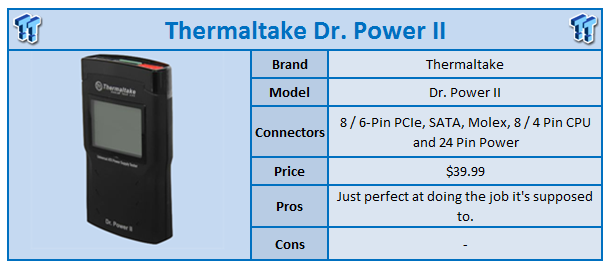
When I first saw the press release for the Dr.Power II, I thought that it gave the ability to get the power draw off certain lines. Well, let's just say it doesn't do that. Instead, the Dr.Power II is a power supply 'tester'.
Of course, the sample came and as always, it's my job to cover it, so let's find out just how the Dr.Power II is when it comes to doing the task it has indeed been designed for. Looking at the Dr.Power II, it's a pretty simple looking device. The front has a screen that gives us the important information in regards to your power supply.
 9
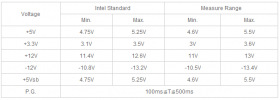
9Those numbers include 5v, 3,3v, +12v, -12v and +5vsb and you can see below the information and the numbers you're looking for. For example, you can see that the Dr.Power II is capable of measuring the +12v between 11v and 13v. You can see the Intel Standard is between 11.4v and 12.6v.
 9
9Before we get around to looking all over the Dr.Power II, I thought we'd plug in our Corsair AX1200 to see just what kind of numbers showed up. To be honest, I'm the biggest fanboy when it comes to the Corsair line of power supplies; I only use AX1200s and consider them to be one of the best PSUs on the market.
 9
9So with our AX1200 plugged into the Dr.Power II, you can see the numbers we got, and they are almost perfect with only the -12v being out by a single .1v. It really just goes to show the quality of the unit.
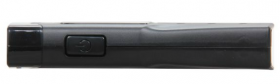
Having looked at the front in detail, let's just take the time to move around the unit to see what's going on. The only button that's present on the Dr.Power II is the Power / Check button on the left hand side.
 9
9The Dr.Power II is really easy to use as you essentially just plug your connectors in, press this button and wait a few seconds for all the information to be displayed on the screen.
 9
9The other two main areas on the Dr.Power II are at either end and consist of connectors. The bottom has our main 24-Pin power connector while the top has a total of four connectors.
 9
9Starting from the left, we've got our 8-Pin PCIe power connector and at the same time it supports the 6-Pin version as well, next to that we've got two connectors; the top one is fairly obvious of course, being a standard 4-Pin molex connector, while below that we have a SATA power connector. The final black connector is our CPU one and it supports both the 8-Pin and 4-Pin connector.
The Dr.Power II is a bit of a funny device; it's really good at what it's supposed to do, but let's be honest, most people aren't sitting back going, "I really want to get a PSU tester so I can test the one or two PSUs that sit in my house". This just isn't the kind of device that people are going to have lying around, because their use would be limited.
On the other hand, anyone who does tech work should have one. Especially when it comes to testing those older dodgy power supplies that you know your parents friend has. You know that you're going to get the call, "Come on son, I need you to visit Mary and look at her PC, it's not working and she knows how wonderful you are at computers."
You know that you don't have a choice and you know that you're just going to get a piece of cake out of the situation. Old power supplies are indeed an issue and this kind of device is great for testing the said PSU in seconds.
Outside of just those guys that do the odd job, every computer store should have something like this. If a customer comes in and says my PSU isn't working, you can plug a power cable into the PSU, hook up a few connectors and again in seconds know if the PSU is dead or not.
 9
9While unfortunately the Dr.Power II didn't do what I thought it would, because I simply choose to look at the pretty pictures and ignore the words in the press release, the Dr.Power II does a fantastic job at what it's supposed to do and while it's not going to have the biggest market, for anyone working in the tech industry, this kind of item is a must.

 United
States: Find other tech and computer products like this
over at
United
States: Find other tech and computer products like this
over at  United
Kingdom: Find other tech and computer products like this
over at
United
Kingdom: Find other tech and computer products like this
over at  Australia:
Find other tech and computer products like this over at
Australia:
Find other tech and computer products like this over at  Canada:
Find other tech and computer products like this over at
Canada:
Find other tech and computer products like this over at  Deutschland:
Finde andere Technik- und Computerprodukte wie dieses auf
Deutschland:
Finde andere Technik- und Computerprodukte wie dieses auf  Don't miss out: GEEKOM Mini IT12 Mini PC on sale for $440 off - grab yours today!
 Apple TV+ hit Silo is getting a third and fourth season according to someone who should know
 The iPhone 16 and iPhone 16 Pro just leaked again, this time with new dummy units
 WhatsApp's new feature should make it easier to find chats
 Apple TV+ is getting For All Mankind season 5 plus a whole new spinoff series
 Samsung G8 34-inch QD-OLED Gaming Monitor Review - 175Hz for $900
 ASRock NUCBOX-155H Mini PC Review
 NuPhy Air96 V2 Wireless Mechanical Keyboard Review
 TEAM T-FORCE Siren DUO360 RGB Liquid CPU Cooler Review
 AVerMedia Live Streamer ULTRA HD Review
 AVerMedia Live Gamer 4K 2.1 Review
 XPG Invader X Mid-Tower Chassis Review
 Intel Core i9-14900KS CPU Review
 Arbiter Polar 65 Magnetic Gaming Keyboard Review
 ASUS ROG Falchion RX Low Profile Keyboard Review
 Everything you need to know about the latest ASUS NUC Mini PCs - NUC 14 Pro and ROG NUC
 How to Overclock Your GPU and Boost Your PC Gaming with ASUS GPU Tweak III
 ASUS's AMD Radeon RX 7000 Series GPU lineup has something for every gamer
 ASUS OLED Premium Care defends the ROG Swift OLED PG32UCDM gaming monitor from burn-in
 Patriot Viper Xtreme 5 Engineering Prototype 48GB Dual-Channel Memory Kit Preview