

Introduction and Package
Introduction
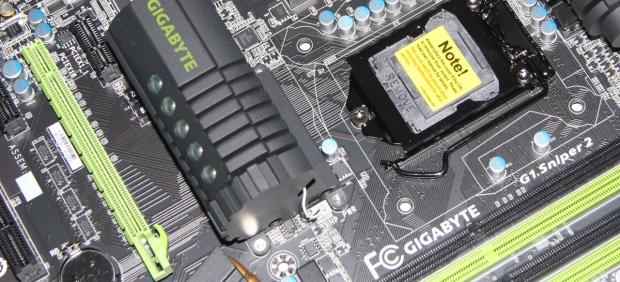
 43
43I'm just going to come out and say it. When GIGABYTE released the G1 line-up, I hated it. I was really bummed that they decided to concentrate on the X58 chipset and ignore the P67 chipset. By the time the G1 line came out the 2600k had well and truly established itself as the processor to buy thanks to its strong overclocking potential and excellent price point.
In retrospect, the decision to skip the P67 ended up probably being the better idea, but I was none the less disappointed at launch because it looked like a strong feature packed board. In the end, though, it doesn't matter now.
The G1 series has finally graced the LGA 1155 platform in the form of the G1.Sniper2; a name I'm a little iffy about. It makes sense, but I would've loved to have seen it called the G1.SniperZ to represent the fact that it's based on the Z68 chipset. The fact that initially I also thought it was called the Sniper Z due to the way they've done the 2, means that I grew even more attached to the name.
In the end, though, I'm just being a bit nit-picky and to be honest, it's probably got more to do with the fact that when GIGABYTE launched the board it really looked the part. I was just a little sad that they chose to ignore the LGA 1155 platform initially. That no longer matters, though, as they've now got it on the newer Z68 platform and I've got my fingers crossed the board lives up to my expectations.
The Package
 43
43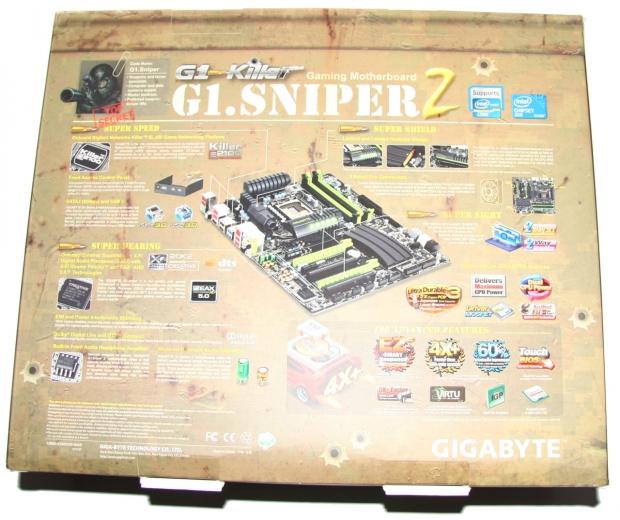 43
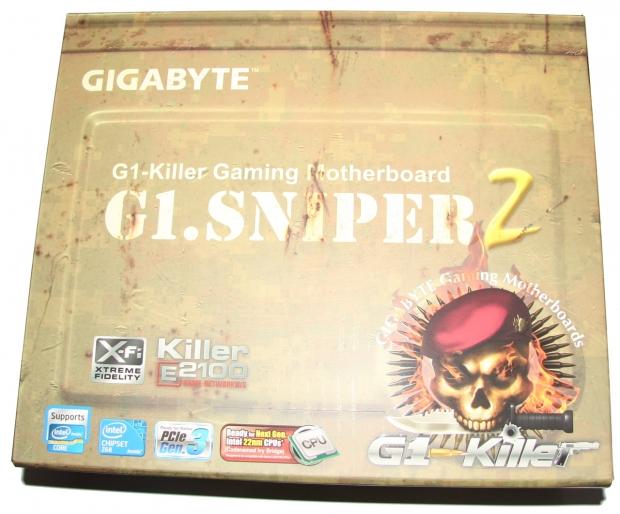
43Like most higher end GIGABYTE boards, the Sniper2 sits in quite a large box. Unlike the UD7, though, it doesn't open up and instead we only have a front and back. You can also see above how one could think the 2 is a Z. The box is really detailed and you get a great idea of the features that are on offer, especially on the back where the main features are really detailed.
 43
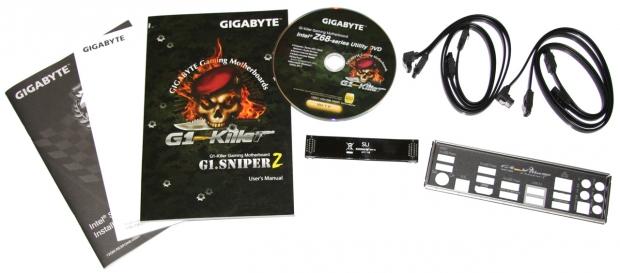
43Moving inside the package, we've got some paperwork, driver CD, four SATA cables, SLI cable and a back I/O plate which has the G1 Killer branding.
 43
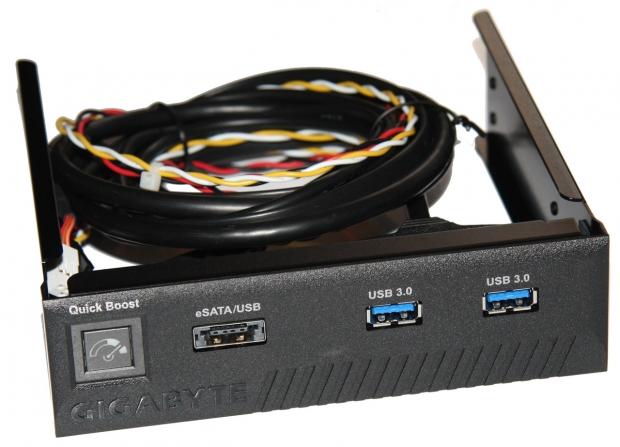
43Along with those normal kinds of extras, we've got a front panel extra that offers us two USB 3.0 ports, an eSATA / USB port and a "Quick Boost" button which we'll talk about later. The difference between this panel and a lot of others is that it's a 5.25" one verses the typical 3.5" we normally see companies offer.
 43
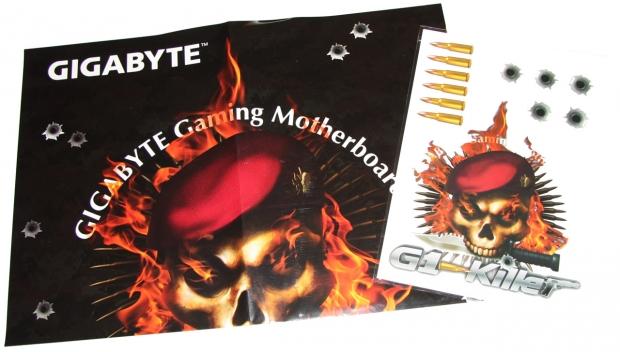
43Before we get onto the motherboard side of things, the last piece in the bundle includes a double sided GIGABYTE poster and a bunch of stickers. It's not a lot, but these little extras help the board stand out from other companies which is always a good thing.
The Motherboard
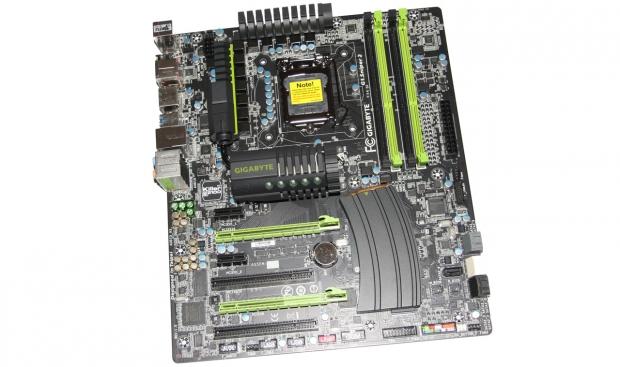
Looking at the board, you can see the black / lime green color combination that's going on. To be honest, I wasn't a huge fan of the lime green combination originally, but when you look at the board when it hasn't got direct light on it, the green isn't as bright and it blends in really nice with the board. The black PCB is what really stands out, though, and we're seeing higher end boards opt for it as it looks great.
 43
43We can also see other little stand out bits and pieces with the ammunition clip being one of the trademark features of the G1 Killer line of motherboards. It looks pretty funky and you can see a bullet coming out the top of it for some extra attention to detail. It's nice they added that little bit and it helps actually show us what it is, instead of some weird shaped heatsink.
 43
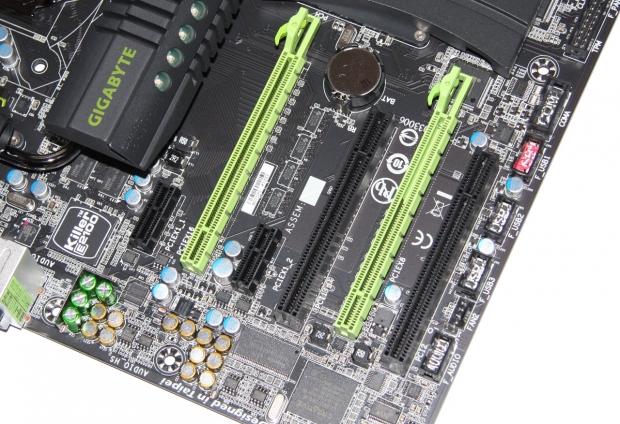
43Before we move into the expansion side of things, two stand out chips around this area are the Killer E2100 chip to the left and the Creative chip to the bottom right. We'll get into these more when we look at the I/O side of things.
As for the connectivity side of things, we've got two legacy PCI slots and two PCIe x1 slots along with two PCIe x16 slots. You can see that the PCIe x16 slot on the right is wired for only x8 and shares the bandwidth with the left slot which is x16 when one card is installed, or x8 when two are installed.
 43
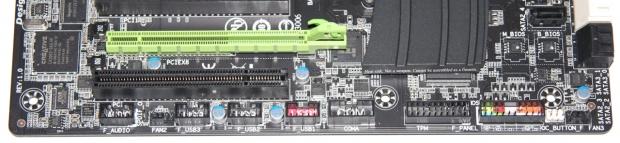
43Moving away from the PCIe connectors, we look at the bottom of the board and starting from the left we've got our audio header followed by three USB 2.0 headers. Next to that we've got our COM and TPM header along with our front panel header. Next to that you can see our "OC Button" header and that works in conjunction with the front panel device which has that "Quick Boost" button we mentioned.
 43
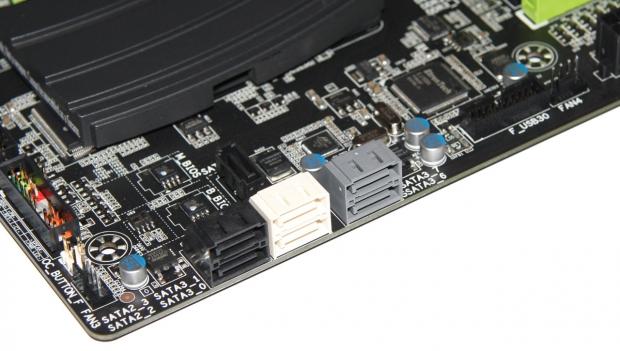
43Turning the corner, we've got seven SATA ports. Our three black ones which have one hidden just behind the main six are all SATA II controlled via the Intel chip. The two white ones also controlled by the Intel chip are SATA III and the final two grey ones which are SATA III are controlled via the Marvell 88SE9172 chip. A little further up to the right we can also see another header which is our USB 3.0 one.
The Motherboard Continued
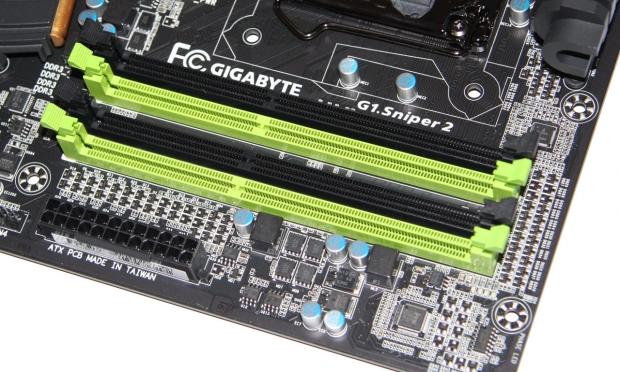
Moving north on the board, we get up to the four RAM slots which support up to 32GB of DDR3 at speeds ranging from 1066MHz DDR to 2133MHz DDR. Apart from the RAM slots, the only other real stand out around here is of course that 24-Pin ATX power connector that sits just below.
 43
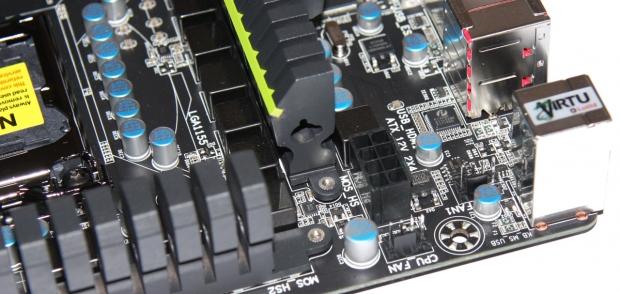
43Moving around to the CPU area, you can see our 8-Pin CPU connector which sits just between a couple of 4-Pin fan headers.
 43
43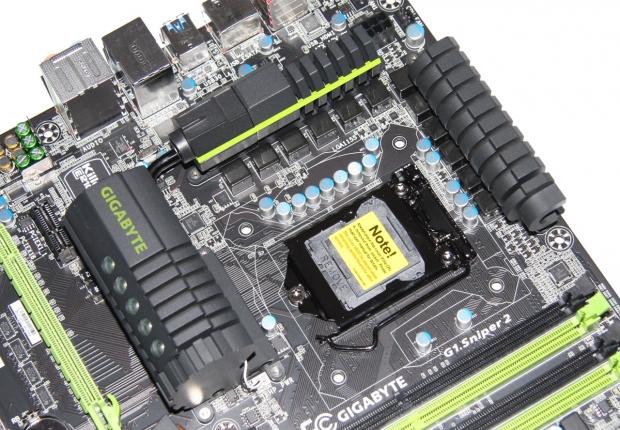 43
43The CPU area itself is really clean and you can see the beefy heatsink setup that's present on the board. The heatsink looks and feels great and the far left one has got some green LEDs in it that light up when the board is up and running. It adds a nice bit of contrast to the board on a whole and looks great.
 43
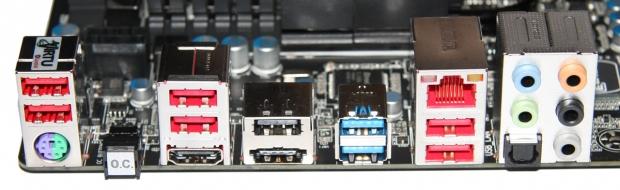
43The I/O side of things is where the board gets really interesting. We've got normal things like a combo PS/2 port, seven USB 2.0 ports and a combo eSATA / USB port. Being a Z68 based board, like most companies we've got some form of video output and in this case it's HDMI. We've also got two USB 3.0 ports shown in blue which run off the Etron EJ168 controller.
The three stand outs here, though, are the Gigabit networking port that runs off the Bigfoot Killer E2100 chip. We've seen a lot of graphs showing how much better a Killer based NIC is verse your typical onboard NIC. I'm not 100% sure how this actually affects you in game, but now that we're seeing it embedded in boards it's a really nice addition. What I don't doubt is that it's better than your typical onboard Realtek NIC.
The next stand out feature is on the audio side of things. While five auxiliary ports and an optical one aren't too surprising, the fact that the controller behind these ports is the Creative CA20K2 chip means that the onboard X-Fi and EAX Advanced HD 5.0 make it one of the best on board audio options available.
Finally, the last stand out is that OC button which simply automatically overclocks your CPU. I'm not sure what it pushes your CPU to, but we'll find out what it takes our i7 2600k to when we get up and running.
BIOS
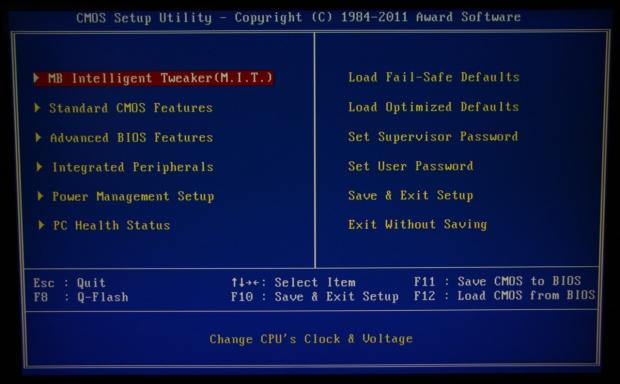
Going into the BIOS side of things, you're not going to see anything here that you haven't seen on other GIGABYTE boards we've looked at recently. When it comes to the overclocking side of things, you'll find everything under the M.I.T. section.
 43
43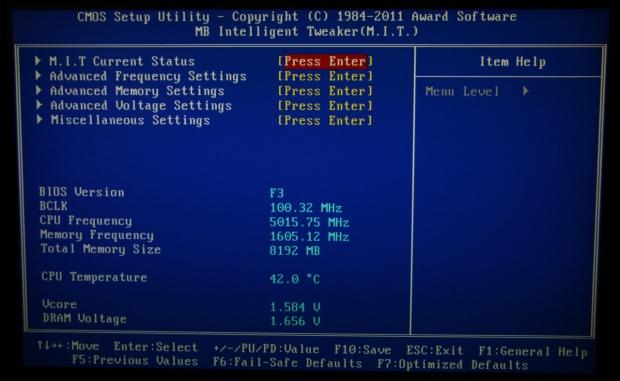 43
43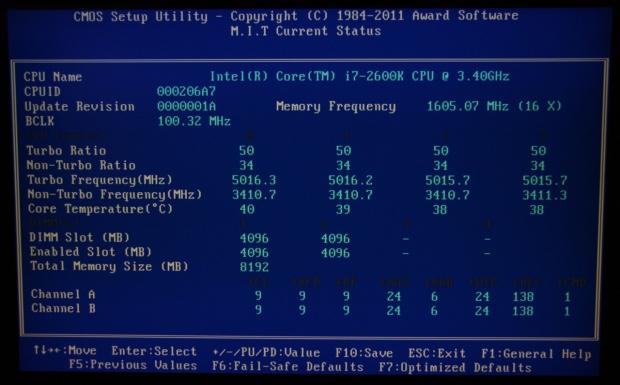 43
43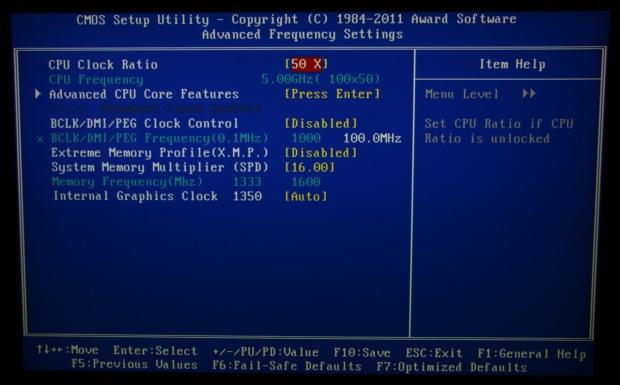 43
43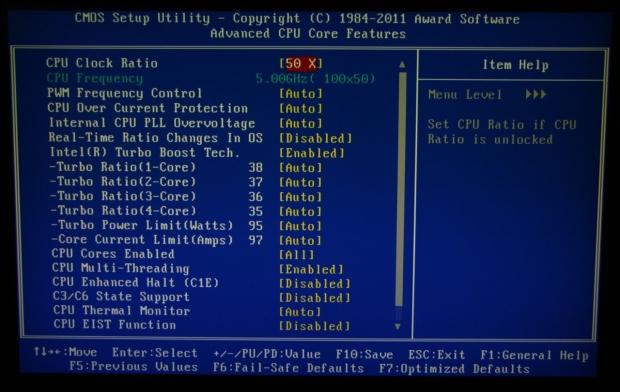 43
43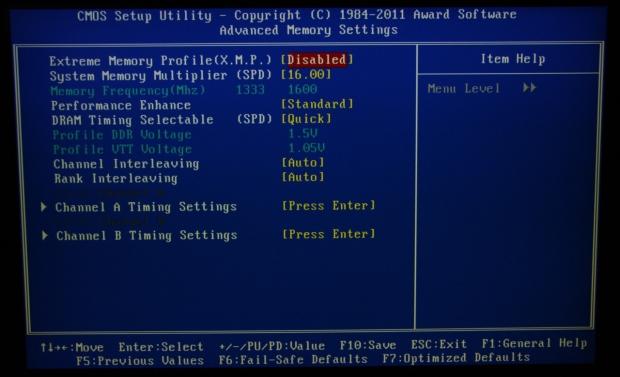 43
43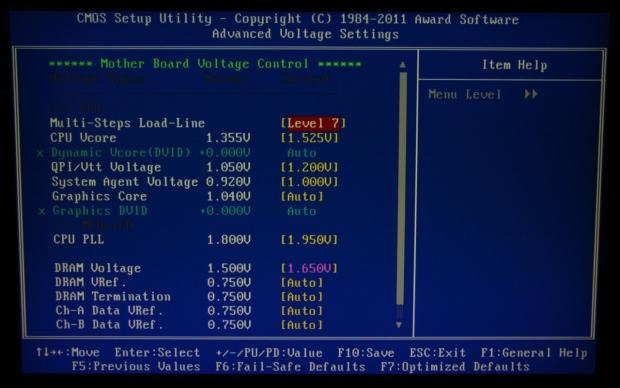 43
43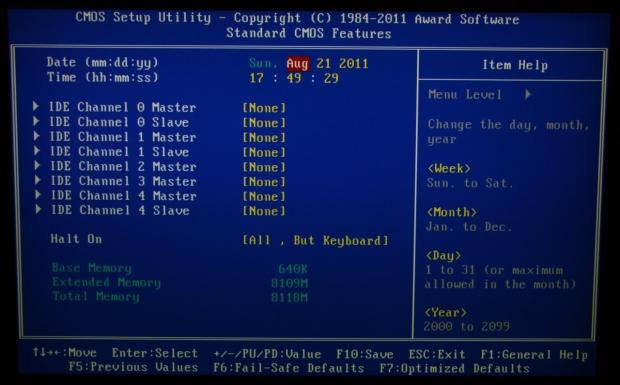 43
43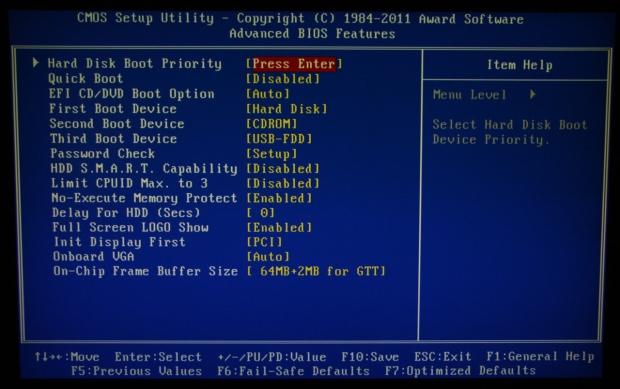 43
43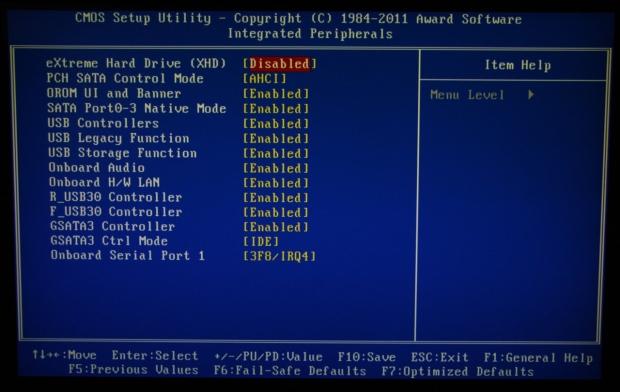 43
43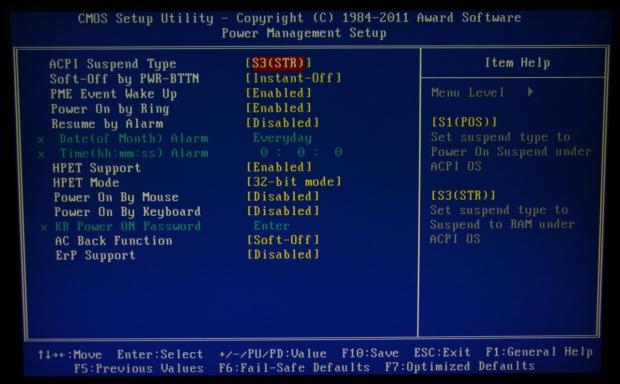 43
43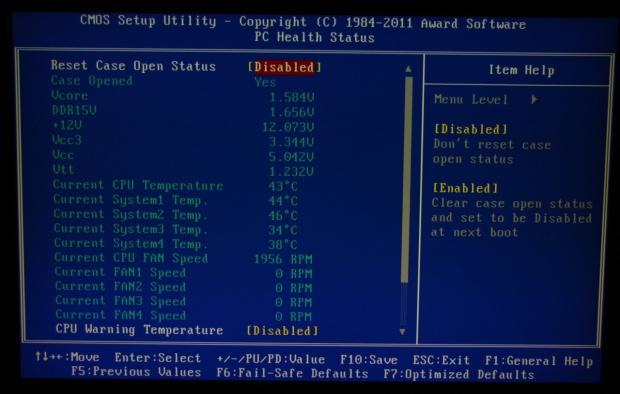 43
43Working through the rest of the BIOS, you'll find those normal abilities to disable features and look at the status of certain items. The chances are, though, if you're heading into the BIOS you'll spend most of your time in the MB Intelligent Tweaker section which of course gives us all our options when it comes to overclocking.
Test System Setup and Overclocking
 43
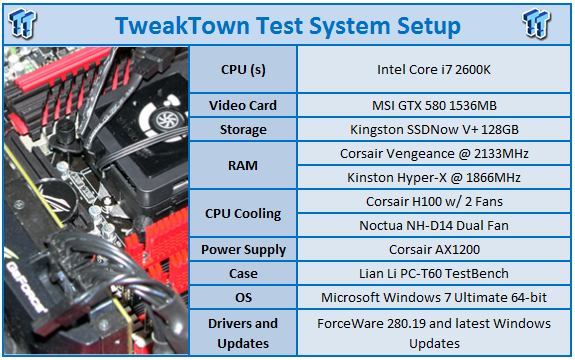
43We would like to thank the following companies for supplying and supporting us with our test system hardware and equipment: Intel, ASUS, MSI, Western Digital and Corsair.
On the testbed side of things there's nothing out of the ordinary, so we won't really get into that. Instead, you can see all the main information above. We'll now just get into the overclocking side of things to see how we went with the board.
The first thing we want to cover is the little OC button at the back of the I/O panel. On our 2600k, when we were in Windows that instantly pushed our CPU from a default clock of 3.4GHz to 4.2GHz. It's a really easy process and an 800MHz boost with a bush of a button is always appreciated.
There doesn't seem to be anything scientific to the whole method with it just instantly happening via a change to the multiplier, but again it's not something we're going to complain about and if you're a gamer, it's nice to know that at a push of a button you can get a bit more breathing room on your whole rig.
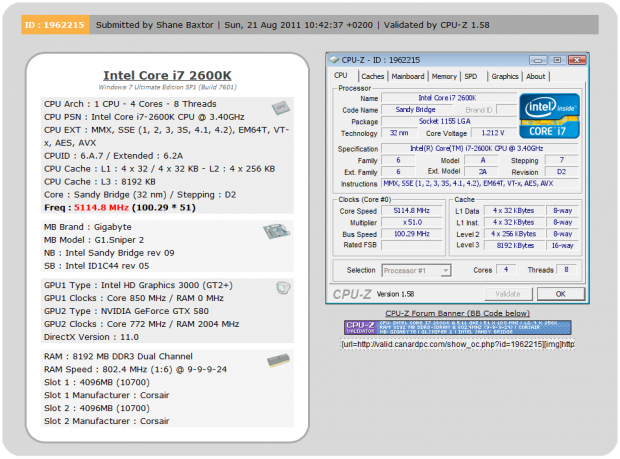
As for getting into the BIOS and getting a bit down and dirty, after a bit of mucking around and playing with voltages we finally ended up with our 2600k running at a 51x multiplier.
 43
43As you can see from the above image, that resulted in a final clock speed of 5114MHz or 5.11GHz as represented in our graphs.
Let's get started!
CPU Benchmarks
HyperPi 0.99
Version and / or Patch Used: 0.99
Developer Homepage: www.virgilioborges.com.br
Product Homepage: www.virgilioborges.com.br
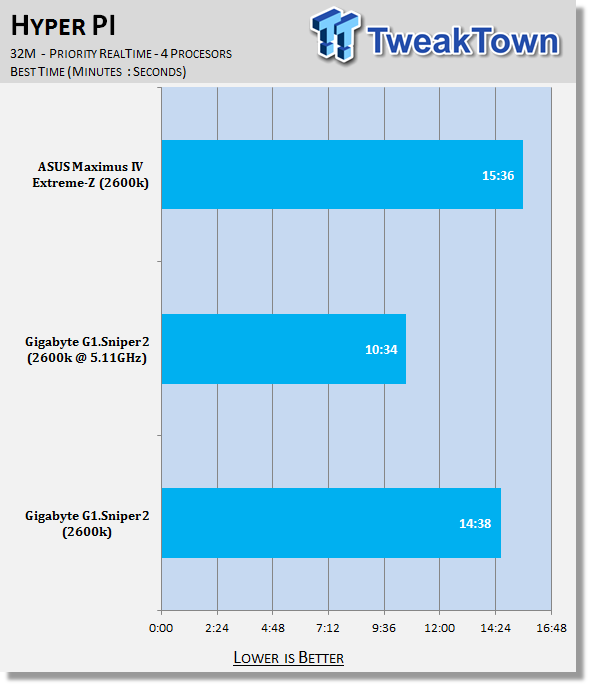
HyperPi is a front end for SuperPi that allows for multiple concurrent instances of SuperPi to be run on each core recognized by the system. It is very dependent on CPU to memory to HDD speed. The faster these components, the faster it is able to figure out the number Pi to the selected length.
For our testing we use the 32M run. This means that each of the four physical and four logical cores for the i7 and the four physical cores of the i5 is trying to calculate the number Pi out to 32 million decimal places. Each "run" is a comparative to ensure accuracy and any stability or performance issues in the loop mentioned above will cause errors in calculation.
 43
43Out the gate we can see strong Hyper Pi performance from our G1.Sniper2 motherboard. You can see, though, when we crank those clock speeds up, we get a really strong boost in performance which manages to shave a good 4 minutes off the total time, bringing it down to the 10 minute region.
AIDA64
Version and / or Patch Used: 1.00.1035BETA
Developer Homepage: http://www.aida64.com
Product Homepage: http://www.AIDA64.com
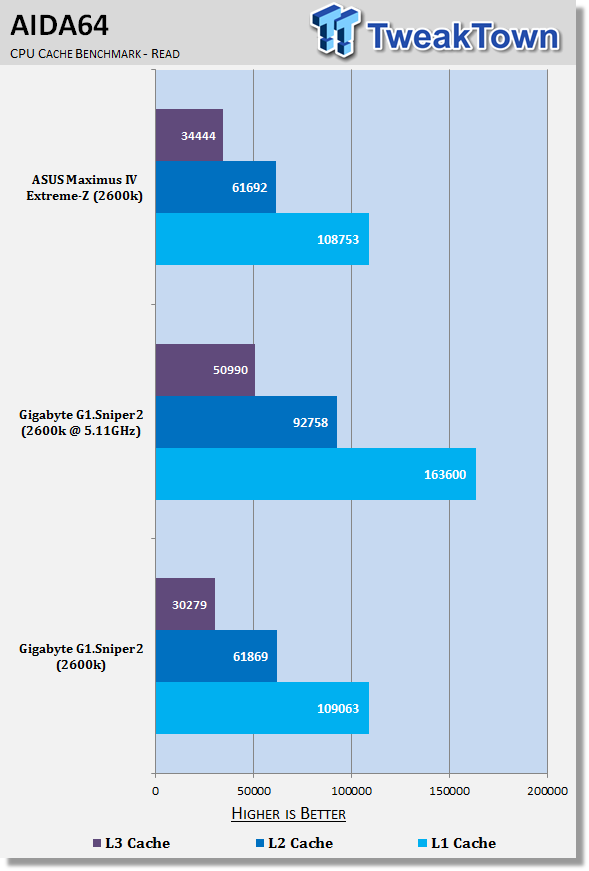
Replacing Everest in our labs is AIDA64. This new testing suite is from the core development team from Lavalys and continues that tradition. The guys have thrown in better support for multithreaded CPUs as well as full 64 bit support. We use this to test memory and HDDs for now, but may find ourselves opening this up to other areas of the motherboard.
 43
43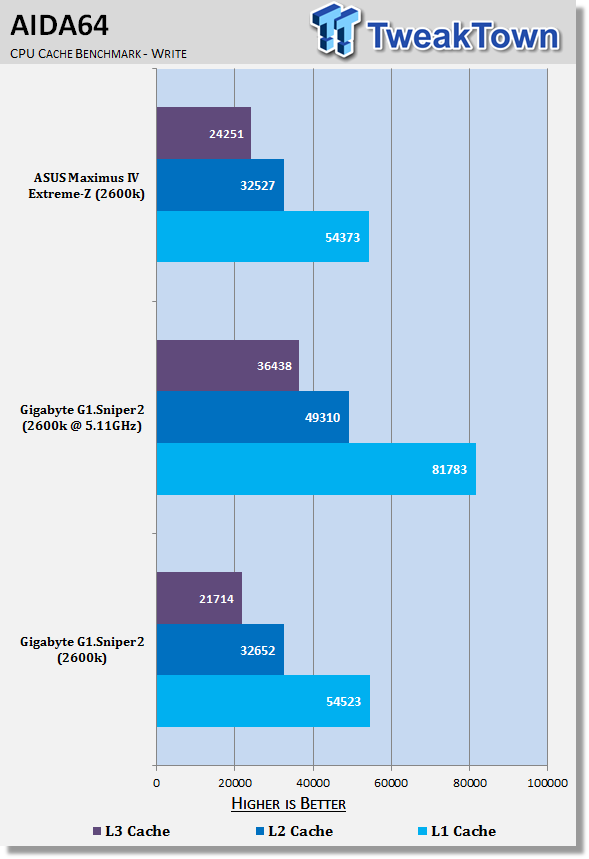 43
43Checking out CPU performance under AIDA64, we can see that stock performance is in line with our other Z68 board on offer here today. We again see when we crank up the clock speed on our CPU to over 5GHz, though; we see a really strong boost in overall performance.
System Benchmarks
PCMark 7
Version and / or Patch Used: 1.04
Developer Homepage: http://www.pcmark.com
Product Homepage: http://www.pcmark.com
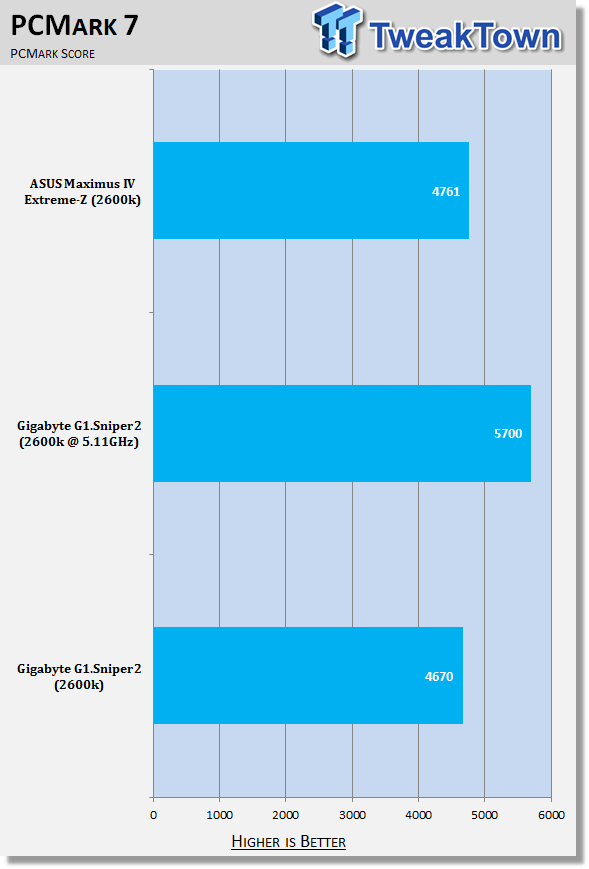
PCMark 7 includes a range of tests that give different views of your system's performance. In the Advanced Edition you can choose which tests to run. The common use and hardware component tests are unavailable in the Basic Edition.
Overall system performance is measured by the PCMark test. This is the only test that returns an official PCMark score. The Lightweight test measures the system capabilities of entry-level systems and mobility platforms unable to run the PCMark test, but it does not generate a PCMark score. Common use performance is measured by the scenario tests - Entertainment, Creativity and Production - each of which results in a scenario score. Hardware component performance is measured by the hardware tests - Computation and Storage - each of which results in a hardware score.
 43
43PCMark 7 performance is similar to that of our other Z68 board and we again see that strong performance increase when we crank up those clock speeds with an increase equating to just over 20%.
MediaEspresso
Version and / or Patch Used: 6.5
Developer Homepage: http://www.cyberlink.com/
Product Homepage: http://www.cyberlink.com/products/mediaespresso/overview_en_AU.html?fileName=overview&r=1
MediaEspresso is a blazingly fast media universal converter that can transcode your videos, photos and music files and out put them to a huge range of portable devices including mobile phones, portable media players and even game consoles. With technologies like Smart Detect, Direct Sync and CyberLink's TrueTheater™ video enhancements, you can not only forget about complicated format, resolution and output settings, but your converted file will come out the other side looking better than when it went in!
 43
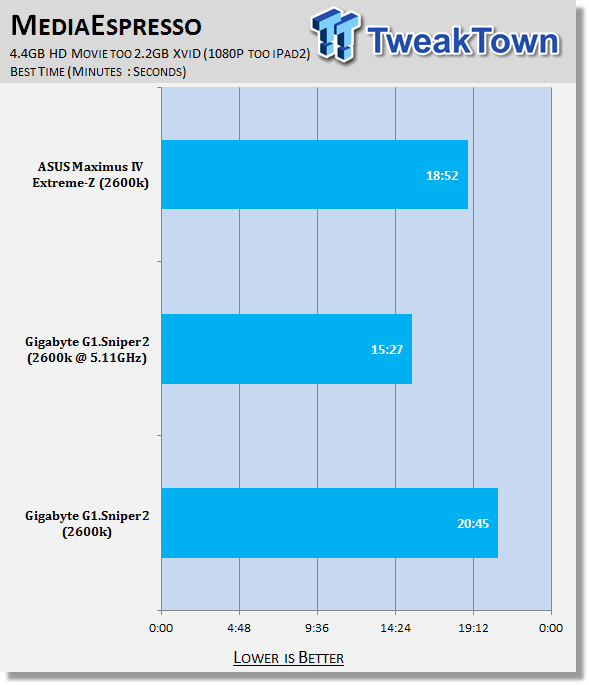
43Out of the box the encode time on the G1.Sniper2 comes in at just over 20 minutes. Start to overclock, though, and you can see a nice 25% is shaved off that total time with the encode process taking just over 15 minutes.
USB 2.0 and 3.0 Benchmarks
AIDA64
Version and / or Patch Used: 1.70.1400
Developer Homepage: http://www.aida64.com
Product Homepage: http://www.AIDA64.com
Replacing Everest in our labs is AIDA64. This new testing suite is from the core development team from Lavalys and continues that tradition. The guys have thrown in better support for multithreaded CPUs as well as full 64 bit support. We use this to test memory and HDDs for now, but may find ourselves opening this up to other areas of the motherboard.
 43
43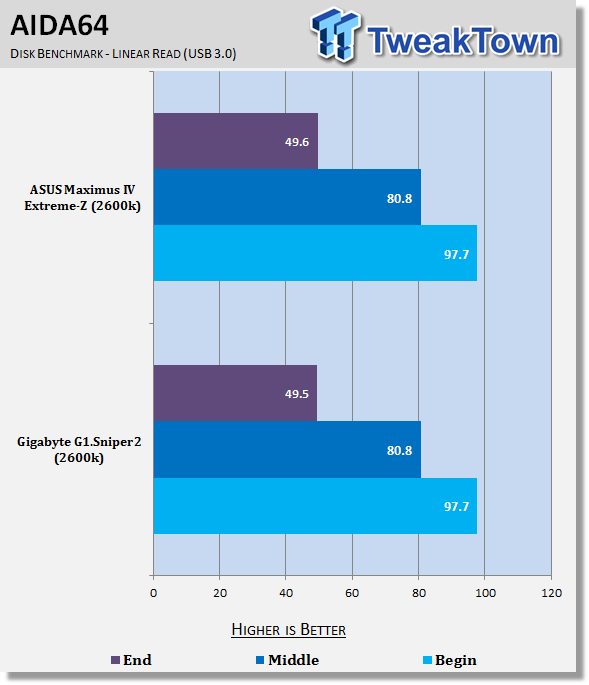 43
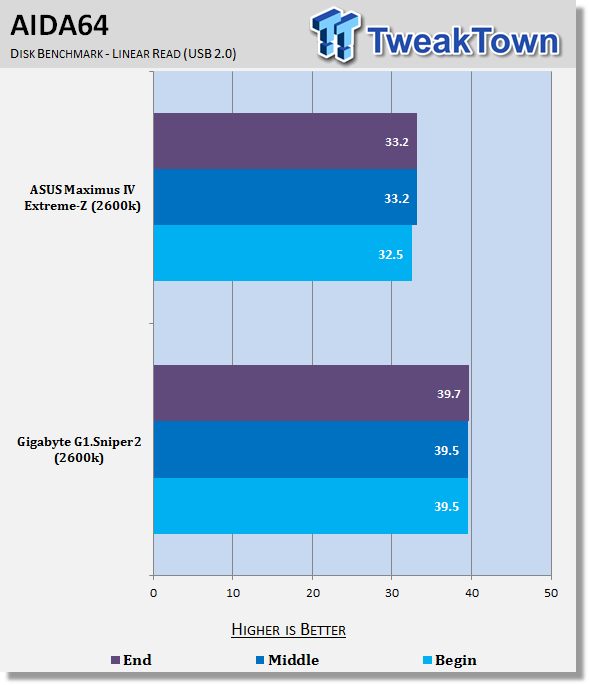
43USB 2.0 performance on the board is strong while USB 3.0 performance lines up with our other Z68 board almost MB/s for MB/s.
SSD Benchmarks
AIDA64
Version and / or Patch Used: 1.70.1400
Developer Homepage: http://www.aida64.com
Product Homepage: http://www.AIDA64.com
Replacing Everest in our labs is AIDA64. This new testing suite is from the core development team from Lavalys and continues that tradition. The guys have thrown in better support for multithreaded CPUs as well as full 64 bit support. We use this to test memory and HDDs for now, but may find ourselves opening this up to other areas of the motherboard.
 43
43HD Tune Pro
Version and / or Patch Used: 4.61
Developer Homepage: http://www.hdtune.com
Product Homepage: http://www.hdtune.com
HD Tune Pro gives us accurate read, write and access time results and for the last couple of years has been gaining popularity amongst reviewers. It is now considered a must have application for storage device testing.
 43
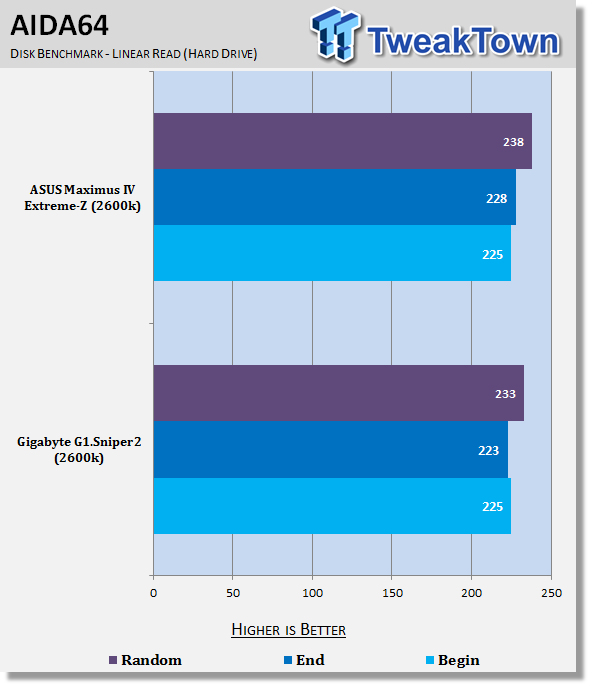
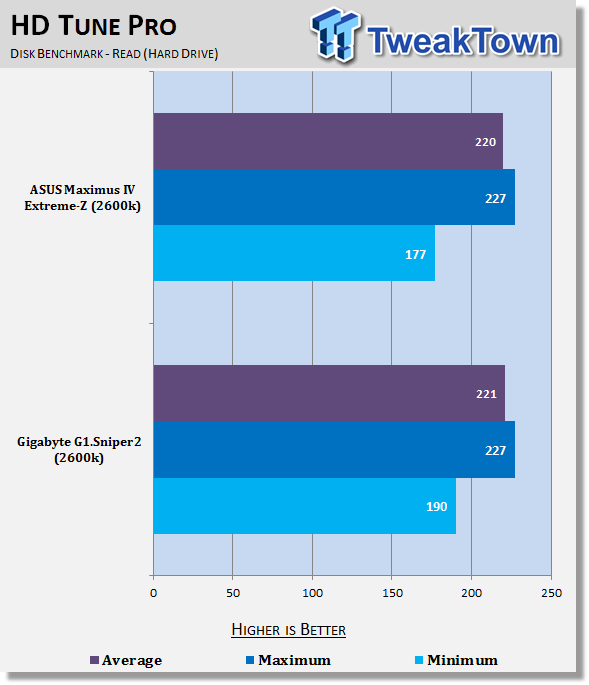
43Hard drive performance between both boards is very similar with a little bit of fluctuation. Nothing major that would affect your overall experience on the board, though.
Memory Benchmarks
AIDA64
Version and / or Patch Used: 1.00.1035BETA
Developer Homepage: http://www.aida64.com
Product Homepage: http://www.AIDA64.com
Replacing Everest in our labs is AIDA64. This new testing suite is from the core development team from Lavalys and continues that tradition. The guys have thrown in better support for multithreaded CPUs as well as full 64 bit support. We use this to test memory and HDDs for now, but may find ourselves opening this up to other areas of the motherboard.
 43
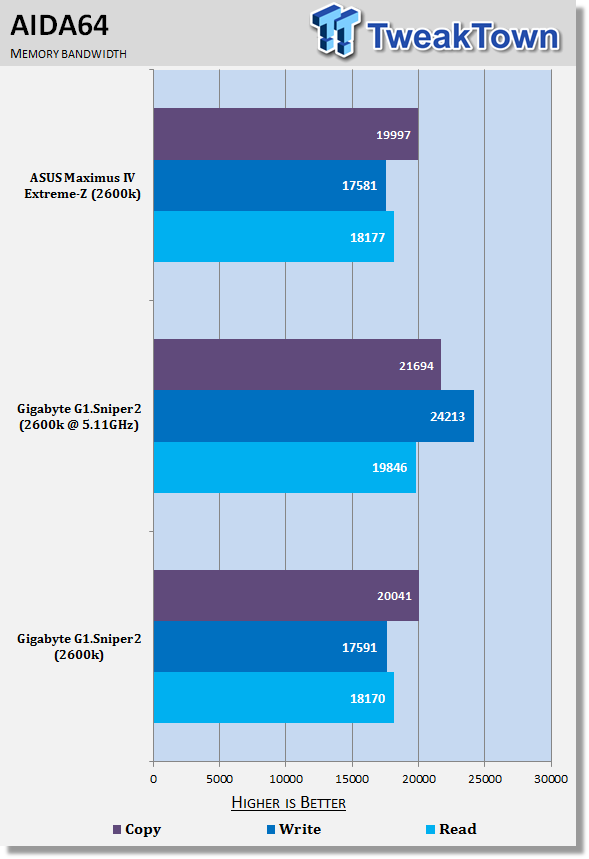
43While memory speed isn't increased when overclocked, you can see that overall performance does improve thanks to the extra CPU speed that's available.
Gaming Benchmarks
3DMark 11
Version and / or Patch Used: 1.0
Developer Homepage: http://www.futuremark.com
Product Homepage: http://www.3dmark.com/3dmark11/
3DMark 11 is the latest version of the world's most popular benchmark. Designed to measure your PC's gaming performance 3DMark 11 makes extensive use of all the new features in DirectX 11 including tessellation, compute shaders and multi-threading. Trusted by gamers worldwide to give accurate and unbiased results, 3DMark 11 is the best way to consistently and reliably test DirectX 11 under game-like loads.
 43
43Metro 2033
Version and / or Patch Used: Latest Steam Update
Timedemo or Level Used: Built in Benchmark
Developer Homepage: http://www.4a-games.com//
Product Homepage: http://www.thqnordic.com/
Metro 2033 is an action-oriented video game with a combination of survival horror and first-person shooter elements. The game is based on the novel Metro 2033 by Russian author Dmitry Glukhovsky. It was developed by 4A Games in Ukraine and released in March 2010 for Microsoft Windows and Xbox 360.[3] In March 2006, 4A Games announced a partnership with Glukhovsky to collaborate on the game.[4] The game was announced at the 2009 Games Convention in Leipzig;[5] a first trailer came along with the announcement.[6] A sequel was announced, currently titled Metro: Last Light.
 43
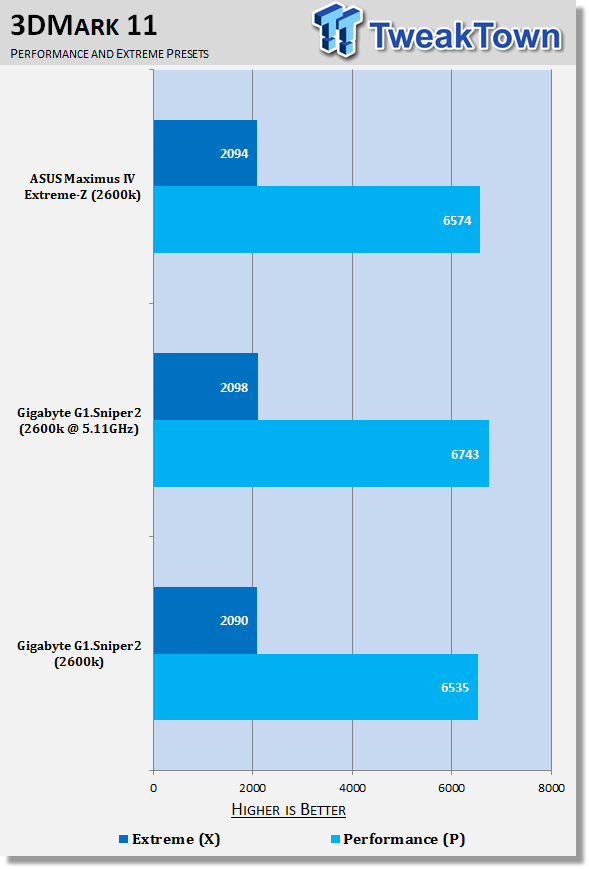
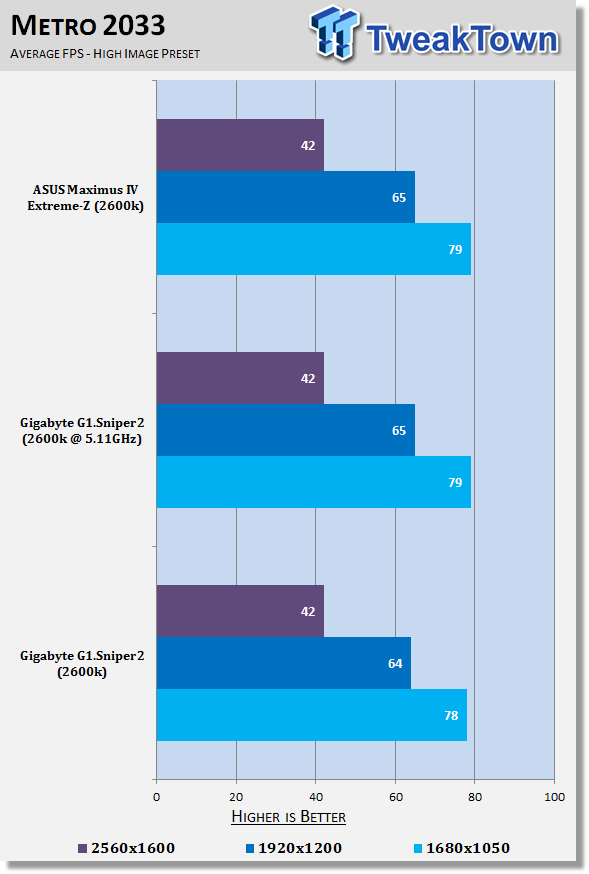
43While 3DMark 11 sees a nice little boost in the Performance preset thanks to the overclock, we can see for the most part overclocking really has no effect on overall gaming performance due to the fact that our GTX 580 doesn't experience a CPU limitation.
Temperature and Power
Power Draw Tests
 43
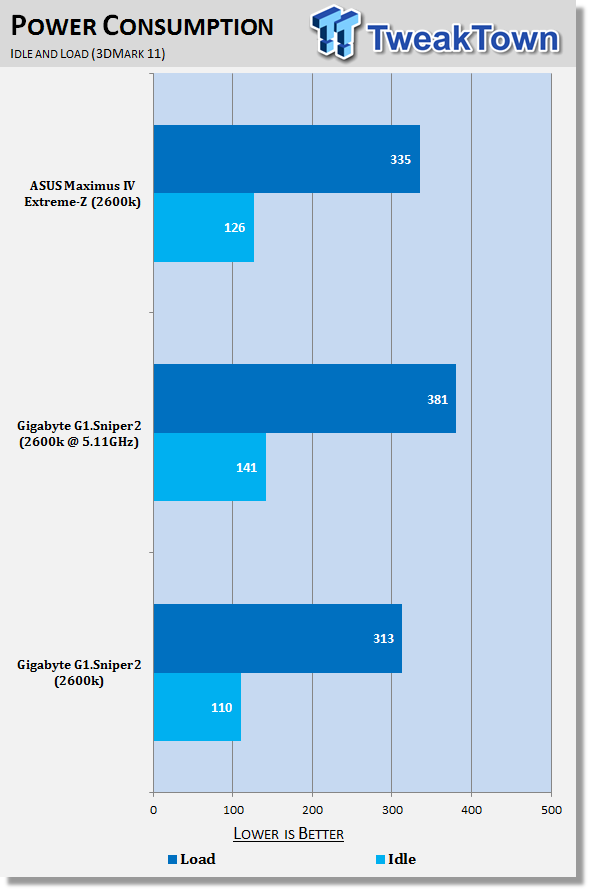
43Power draw on our GIGABYTE board at stock is a little lower at both idle and at load. Overclocked, while we see a big boost in overall power draw, it's nothing too major and any good 600 Watt power supply would handle a system like this.
Core Temperature
 43
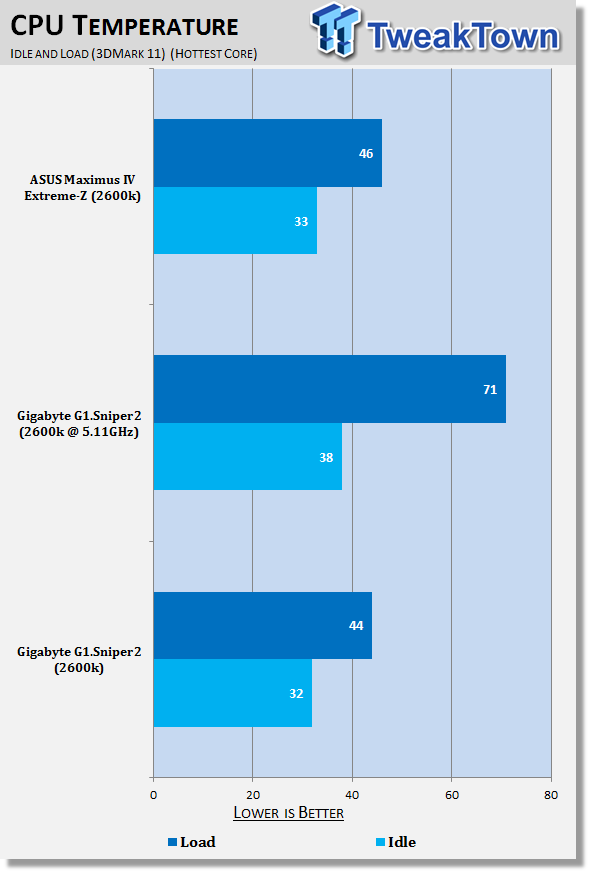
43CPU Temperature is pretty standard at stock; you do see when we start pumping more voltage through it that we do unsurprisingly get quite a big boost in load temperature.
Final Thoughts
I'm really a fan of this board when it all comes down to it. Initially I was little iffy on the color scheme due to the fact I'm personally not a huge fan of the color of green, but it does look better in person over the pictures I feel, and really once you install your RAM and a video card, the majority of the green is covered up if you don't like it, so it's not an issue really.
What I like about the board on a whole, though, is the fact that it caters to a market that isn't really catered to much. The gamer! While of course there are so many boards out there that suit gamers, it's the extras like the X-Fi audio and Killer networking that makes it stand out more than other boards. The overall look is also very gamer friendly with no doubt one of the largest, if not the largest genre of PC Gaming being First Person Shooters.
Most of the time we see companies offer all these features that make it this fantastic overclocking board that can be used to set world records with via the help of LN2 cooling. The G1.Sniper2 doesn't do that, it doesn't have a power and reset button on the board, it's not necessary. The person who owns a board like this will install it into their case, they won't be putting it on a testbed.
The board just feels like it's been designed for a certain kind of user group, in this case gamers, and that's a huge user group. The simple "Quick Boost" or "OC" buttons are also another nice little touch. Sure, if you're comfortable in the BIOS, happy to mess around with voltages and that, the option is there. But if you're just someone who loves to play games and don't really understand the technical side of what's going on inside your computer, it's great to know that at a touch of a button you can give your video card setup some more breathing room thanks to a CPU clock speed increase.
I'm glad to see GIGABYTE finally spread the G1 love to the more main stream 1155 platform and it will be interesting to see if they expand on the Sniper board with the X58 platform getting both an Assassin and Guerrilla and the Sniper sitting between the two when it came to features. I think in conjunction with the NF200 chip, GIGABYTE have plenty of opportunity to do an Assassin version and it will be interesting to see if the company does so in the near future.
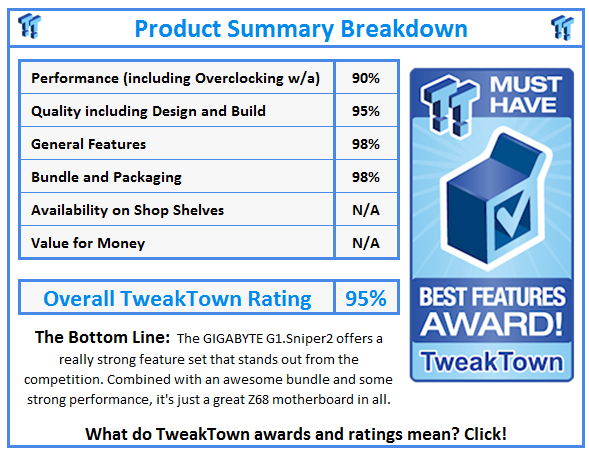
The G1.Sniper2, though, is just a really good performing board that has features that separate it from a lot of its competition on the market. Again, though, it's just nice to see GIGABYTE expand this G1.Killer series of boards onto another chipset.
 United
States: Find other tech and computer products like this
over at
United
States: Find other tech and computer products like this
over at  United
Kingdom: Find other tech and computer products like this
over at
United
Kingdom: Find other tech and computer products like this
over at  Australia:
Find other tech and computer products like this over at
Australia:
Find other tech and computer products like this over at  Canada:
Find other tech and computer products like this over at
Canada:
Find other tech and computer products like this over at  Deutschland:
Finde andere Technik- und Computerprodukte wie dieses auf
Deutschland:
Finde andere Technik- und Computerprodukte wie dieses auf  Call of Duty Vanguard, the one that missed expectations, still sold 30 million copies
 PS5 Pro will have an 'ultra-boost' mode that increases graphics and framerate
 New NVIDIA GPU driver supports Steam's most-wanted game Manor Lords, and No Rest for the Wicked
 Canceled Tomb Raider-style game for the Nintendo 64 finds its way online, and you can play it
 Own a GIGABYTE AORUS Z790 motherboard? Steer clear of the new beta BIOS whatever you do
 ASRock NUCBOX-155H Mini PC Review
 NuPhy Air96 V2 Wireless Mechanical Keyboard Review
 TEAM T-FORCE Siren DUO360 RGB Liquid CPU Cooler Review
 AVerMedia Live Streamer ULTRA HD Review
 AVerMedia Live Gamer 4K 2.1 Review
 XPG Invader X Mid-Tower Chassis Review
 Intel Core i9-14900KS CPU Review
 Arbiter Polar 65 Magnetic Gaming Keyboard Review
 ASUS ROG Falchion RX Low Profile Keyboard Review
 MSI MPG 321URX QD-OLED Gaming Monitor Review - 4K gaming at its best
 Everything you need to know about the latest ASUS NUC Mini PCs - NUC 14 Pro and ROG NUC
 How to Overclock Your GPU and Boost Your PC Gaming with ASUS GPU Tweak III
 ASUS's AMD Radeon RX 7000 Series GPU lineup has something for every gamer
 ASUS OLED Premium Care defends the ROG Swift OLED PG32UCDM gaming monitor from burn-in
 Patriot Viper Xtreme 5 Engineering Prototype 48GB Dual-Channel Memory Kit Preview