

Introduction and The Package
Introduction
 33
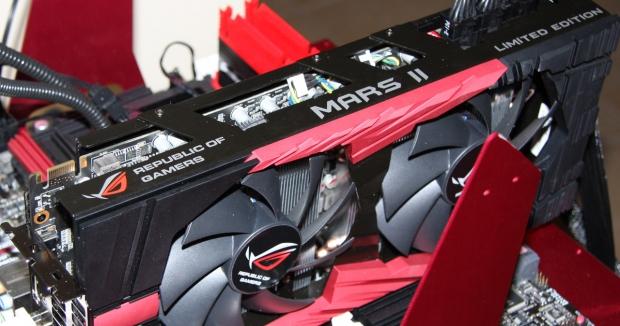
33In 2009 we saw ASUS bring us the first in what would become a line of limited edition graphics card beasts. The MARS sporting the power of two GTX 285 cores brought us excellent performance. 2010 saw ASUS jump on the AMD side of things and release the ARES which sported two HD 5870 cores. A new year and a new card sees ASUS jump back on to the NVIDIA side to release the sexiest looking card we've ever seen; the MARS II.
There's not a lot that has to be said about the MARS II to be honest. We saw ASUS show it off at Computex and show us the kind of performance the card was able to offer. It will be the first card to use our updated testbed along with our updated benchmark line-up.
Of course, before we get into all the fun stuff like the performance of the card, the first thing we need to do is check out the package to see what's going on inside and out. Once that's done, we'll of course be checking out the card itself and the specifications of the MARS II. Then we'll take a quick look at our testbed and what we'll be comparing the MARS II against before pitting it against the other cards we've got on hand.
The Package
 33
33 33
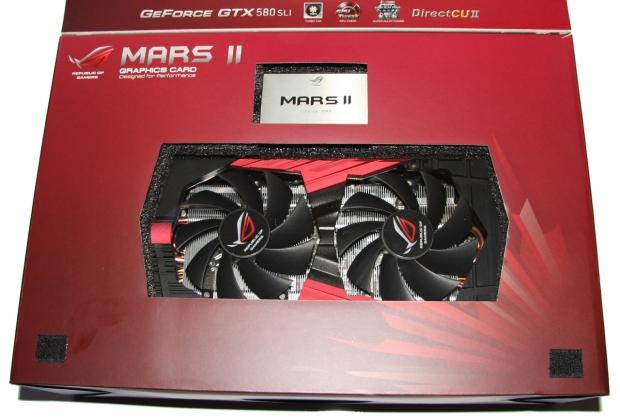
33The box of the MARS II is big, as you'd expect, and it follows that very Republic of Gamers look. The front doesn't tell us too much, but it does make mention that we're essentially dealing with GTX 580s in SLI here. Opening the box up, we can see a bit more about the card and some of the main features.
 33
33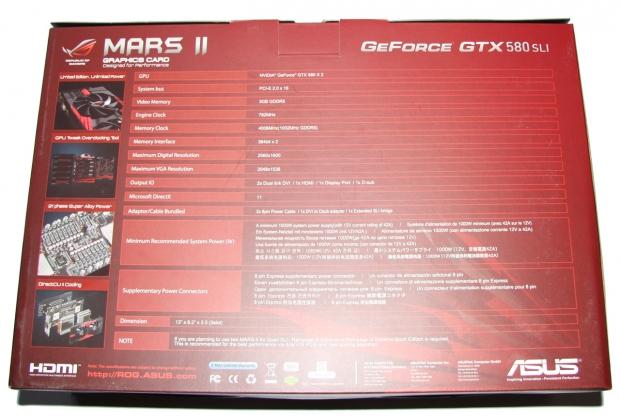 33
33Across the bottom of the box we've got our first look at the card and just above it you can see our limited edition plaque that's individually numbered. As for the back of the box, you can see a run down on the specifications and some more information of the features that are on offer.
 33
33Moving inside the box, we've got a quick setup guide, driver CD, two dual 6-Pin to 8-Pin PCIe power connectors, longer SLI bridge, ROG sticker, DVI to VGA connector and two little black strips. These two strips actually mount to the bottom of the cooler and the idea is when the card goes in your case, these strips provide some padding and let the card rest safety on the other PCIe slots.
 33
33To be honest, it's all a little hard to explain, so let's just instead use the page from the media kit that covers exactly how it works. It's funny that something quite simple is missed by so many companies, but ASUS manage to find an easy way to prevent any damage to the card or PCIe slot once it's installed.
 33
33The only other thing left in the package is the limited edition plaque itself. It's only the one plaque; the above image is just the front and back of it in a single image. It's funny to hear why ASUS opted for the plaque instead of having it on the card itself like the original MARS. If the card went in for warranty and the cooler was replaced, the person would lose their limited edition numbering. Considering the large cost of the card, it's a little disappointing, so instead this time ASUS have opted for this aluminum plaque which looks great.
The Card & Specifications
The Card
 33
33This card is HOT! Pictures just don't do it justice and to be honest, there's so much more to the look of the card than just the front here. The triple slot size and extra height combined with the heavy weight and the massive 120mm fans that are present; it just looks and feels fantastic. In fact, it's scary just how good it looks.
 33
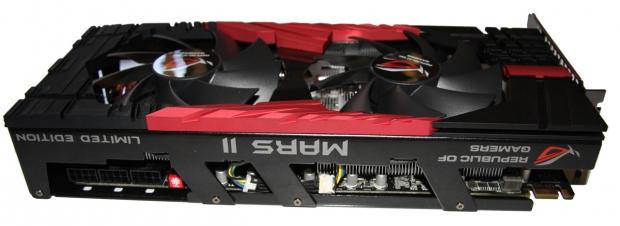
33It's not just the look of the card, though, it's the quality as well. It feels like it's built just so well and you can see how it's bolted together. Honestly, you feel so mesmerized by it when it's in your hands. It's probably the best looking video card I've ever seen.
 33
33Moving away from the overall look of the card and just taking the time to have a closer look around the card, you can see at the back we've got a total of three 8-Pin PCIe power connectors. That's a lot of power connectors and gives us the indication that the card will draw quite the power. I'd like to think if you're spending this kind of money, though, you've bought yourself something like a Corsair AX1200.
Along with the power connectors, you can see we've got a little red switch. We first saw this in the GTX 580 MATRIX. At the press of a button you can increase the fan speed up to 100%. It's a cool little feature for people who are overclocking, especially if you're using an open case or maybe a testbed.
 33
33Closer to the front of the card we've got just a single SLI connector. No surprise there as we're only able to get a maximum of four GPUs up and running for SLI. Considering the card has two GTX 580 cores on board, the single SLI connector is exactly what we'd expect.
 33
33In the I/O side of things we've got two Dual-Link DVI connectors along with a DisplayPort and HDMI connector. Being a dual GPU card means that we're able to run three monitors off the single card and make use of Surround Vision, which is also one of the more appealing options of the GTX 590 compared to its single GPU counterparts. Here, though, we also get a really good view of just how big the card is.
Specifications
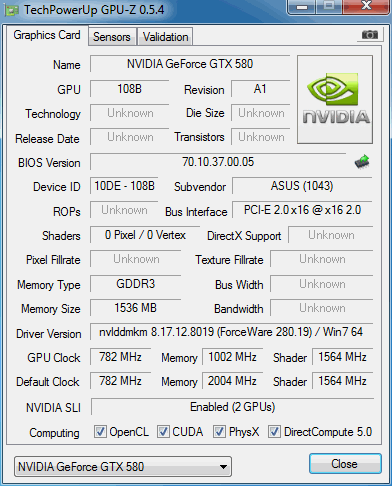
The big "thing" about the MARS II is of course the fact it's a dual GPU card, but not an "official" NVIDIA one like the GTX 590. The MARS II uses two GTX 580 cores that run at GTX 580 speeds. Well, they actually run slightly above GTX 580 speeds with the core clock on each core coming in at 782MHz. This is actually 10MHz up on the standard GTX 580. This also means that the Shader is slightly up at 1564MHz.
 33
33As for the memory, we're dealing with essentially a "3GB" card, but it's of course two lots of 1536MB because of the way it works. As for clocks, though, it comes in at 4008MHz QDR which is the same speed we see on the GTX 580. From the looks of it, this is what everyone thought the GTX 590 would be. While we don't have that card on hand anymore, let's just cover a comparison of them on the specifications front.
Between the GTX 590 and the MARS II, there are a lot of similarities. Both cards offer 512 x2 CUDA cores, 384-bit x2 Memory Bus and 3GB of GDDR5. What lets the GTX 590 down, though, was the fact the core clock on both cores was only 607MHz and the memory came in at 3414MHz QDR. Both numbers are significantly lower than what the MARS II offers us. While you could throw the "overclocking" argument in to the mix, the GTX 590 simply wasn't a good overclocker and that's what separates the GTX 590 and the MARS II.
Test System Setup
 33
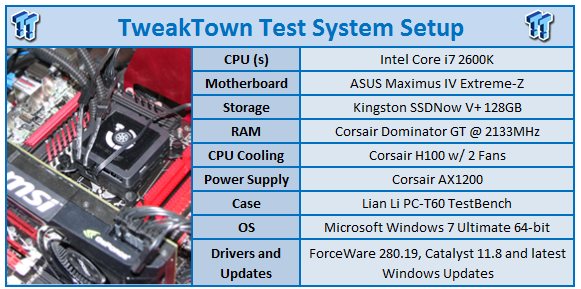
33We would like to thank the following companies for supplying and supporting us with our test system hardware and equipment: Intel, ASUS, MSI, Western Digital and Corsair.
Today will be the first time we see our new Z68 testbed for a video card review. The MARS II seemed like the perfect card to use it on, though, as our 5.2GHz 2600k gives the card plenty of breathing room making sure the highest performance is able to be offered.
As for the cards we're going to be comparing the MARS II against, we're a little limited because of the update in our testbed, meaning all our old results are invalid, but we've included the two most important setups. The first is the GTX 580 in SLI which is essentially what the MARS II is, just in its original two card setup. The other card we've got today is the HD 6990 which is the fastest card on the market at the moment. It's truly the biggest competition for the MARS II and it will be interesting to see how the HD 6990 and MARS II match up.
We would've liked to have had the GTX 590, but our original one died and we don't have a spare on hand. We also know it's slower than both the HD 6990 and GTX 580 SLI setup, so it's not the most important card to include, unlike the ones we have got here today.
Before we get into the swing of things, though, I just want to quickly say that we're using a new benchmark line up which gets rid of some of our less intensive games and introduces some more intensive ones, even if some of them are a little old. Games like Metro 2033 and Just Cause 2 are extremely intensive and a great addition to the line up. With some massive releases coming out in the next few months as well, we hope to see some more built in benchmarks which will see them added to our line up here.
The other thing I want to mention as I know it's going to come up, is the fact we're using a Z68 x8 / x8 system instead of an X58 x16 / 16 one. There's of course a method to our madness and if you want to find out exactly why we've made the move to the Z68 platform over the X58 one for our video card benchmarks, I highly recommend you check out our recent article; Z68 vs X58 - Which is The Better Gaming Platform. I think that covers just about everything.
Let's get started!
The FPS Numbers Explained
When we benchmark our video cards and look at the graphs, we aim to get to a certain level of FPS which we consider playable. While many may argue that the human eye can't see over 24 FPS or 30 FPS, any true gamer will tell you that as we climb higher in Frames Per Seconds (FPS), the overall gameplay feels smoother. There are three numbers we're looking out for when it comes to our benchmarks.
30 FPS - It's the minimum number we aim for when it comes to games. If you're not dropping below 30 FPS during games, you're going to have a nice and smooth gaming experience. The ideal situation is that even in a heavy fire fight, the minimum stays above 30 FPS making sure that you can continue to aim easily or turn the corner with no dramas.
60 FPS - It's the average we look for when we don't have a minimum coming at us. If we're getting an average of 60 FPS, we should have a minimum of 30 FPS or better and as mentioned above, it means we've got some smooth game play happening.
120 FPS - The new number that we've been hunting down over recent months. If you're the owner of a 120 Hz monitor, to get the most out of it you want to get around the 120 FPS mark. Moving from 60 FPS / 60 Hz to 120 FPS / 120 Hz brings with it a certain fluidity that can't really be explained, but instead has to be experienced. Of course, if you're buying a 120 Hz monitor to take advantage of 3D, an average of 120 FPS in our benchmark means that in 3D you will have an average of 60 FPS, which again means you should expect some smooth gameplay.
3DMark 11
Version and / or Patch Used: 1.1
Developer Homepage: http://www.futuremark.com
Product Homepage: http://www.3dmark.com/3dmark11/
3DMark 11 is the latest version of the world's most popular benchmark. Designed to measure your PC's gaming performance 3DMark 11 makes extensive use of all the new features in DirectX 11 including tessellation, compute shaders and multi-threading. Trusted by gamers worldwide to give accurate and unbiased results, 3DMark 11 is the best way to consistently and reliably test DirectX 11 under game-like loads.
 33
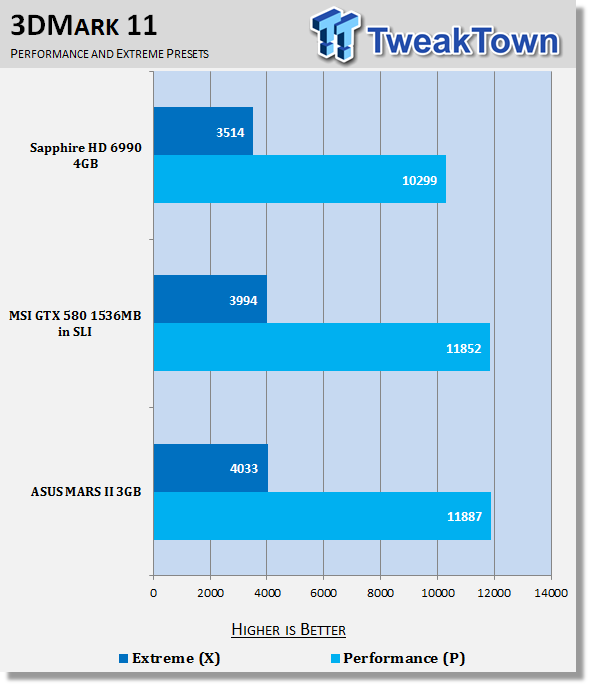
33Under 3DMark 11 we see some strong performance out the gate for the MARS II which sees performance similar to that of the dual card GTX 580 setup. We're slightly ahead, though, on the MARS II and that's no doubt thanks to the extra 10MHz that's on offer on the core.
Unigine Heaven Benchmark
Version and / or Patch Used: 2.5
Developer Homepage: http://www.unigine.com
Product Homepage: http://unigine.com/press-releases/091022-heaven_benchmark//
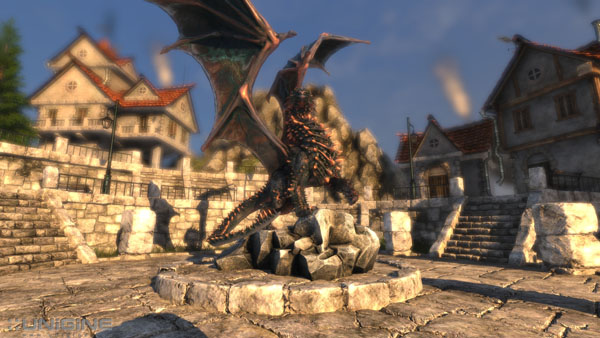
New benchmark grants the power to unleash the DirectX 11 potential in the gift wrapping of impressively towering graphics capabilities. It reveals the enchanting magic of floating islands with a tiny village hidden in the cloudy skies. With the interactive mode emerging experience of exploring the intricate world is ensured within reach. Through its advanced renderer, Unigine is one of the first to set precedence in showcasing the art assets with tessellation, bringing compelling visual finesse, utilizing the technology to the full extend and exhibiting the possibilities of enriching 3D gaming.
 33
33Under Heaven we can see strong performance again from the MARS II and performance that probably separates itself from the SLI setup a bit more than our 3DMark 11 results. Compared to the HD 6990, though, we see just how strong the NVIDIA offerings continue to be under these heavy tessellation situations.
Benchmarks - Tom Clancy's H.A.W.X. 2
Tom Clancy's H.A.W.X.2
Version and / or Patch Used: Benchmark Demo
Timedemo or Level Used: Built-in Test
Developer Homepage: http://www.ubi.com/UK/default.aspx
Product Homepage: http://www.hawxgame.com/
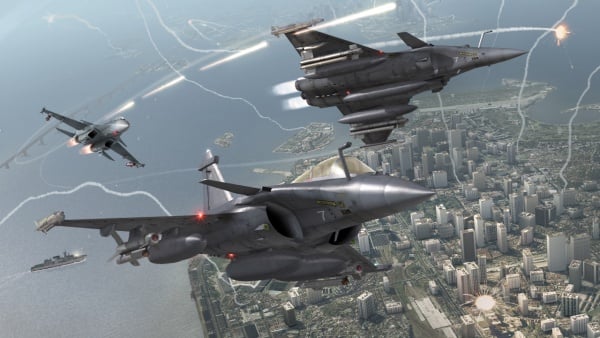
Tom Clancy's H.A.W.X. 2 is an arcade-style flight action game developed by Ubisoft Romania and published by Ubisoft. The game is the sequel to Tom Clancy's H.A.W.X., released in 2009.
The game begins with Colonel David Crenshaw participating in a routine patrol mission in the Middle East. After halting an insurgent attack, a volley of missiles is fired at the Air Force base that Crenshaw was stationed at, with one of the missiles disabling Crenshaw's aircraft, resulting Crenshaw being in enemy captivity. A joint strike force composed of the U.S. Navy, U.S. Air Force, and a Ghost Recon squad executes an operation to rescue Crenshaw. In Scotland, Royal Navy Pilot Colin Munro encounters an unidentified passenger aircraft that explodes from an on-board bomb when undergoing training exercise. In Russia, an air force squadron led by Colonel Denisov and Captain Dmitri Sokov engages separatist aircraft but is ordered to retreat from the region after numerous Russian military installations have been attacked.
 33
33Getting into H.A.W.X. 2, we can see some very strong performance from the MARS II. At the highest resolution we see that the MARS II manages to get a good 40 FPS jump on the GTX 580 SLI setup and almost 25 FPS on the HD 6990. It doesn't matter which way you look at it, though, there's just some massive performance coming out of the card at any resolution.
Benchmarks - Mafia II
Mafia II
Version and / or Patch Used: Latest Steam Update
Timedemo or Level Used: Built in Benchmark
Developer Homepage: http://www.2kczech.com/
Product Homepage: http://www.mafia2game.com/
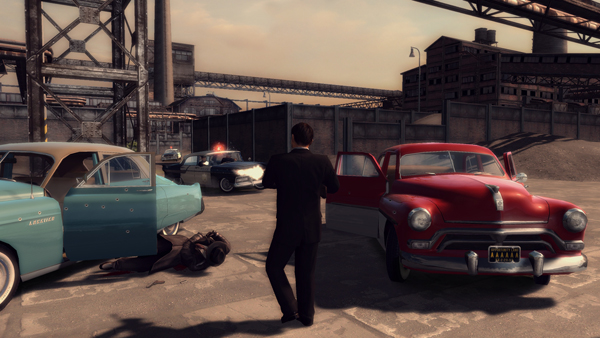
Mafia II is a third-person action-adventure video game, the sequel to Mafia: The City of Lost Heaven. It is developed by 2K Czech, previously known as Illusion Softworks, and is published by 2K Games. The game is set from 1943 to 1951 in Empire Bay (the name is a reference to New York's state nickname "The Empire State"), a fictional city based on San Francisco and New York City, with influences from Chicago and Detroit. The game features a completely open-ended game map of 10 square miles. No restrictions are included from the start of the game. There are around 50 vehicles in the game, as well as licensed music from the era.
 33
33Looking at Mafia II, we can see some strong performance from the MARS II card again. Compared to the HD 6990, we can see the MARS II has a good extra 20% performance at the highest resolution.
Benchmarks - Lost Planet 2
Lost Planet 2
Version and / or Patch Used: Benchmark Demo
Timedemo or Level Used: Built in Benchmark - Test A Scene 1
Developer Homepage: http://www.capcom.com/
Product Homepage: http://www.lostplanet2game.com/
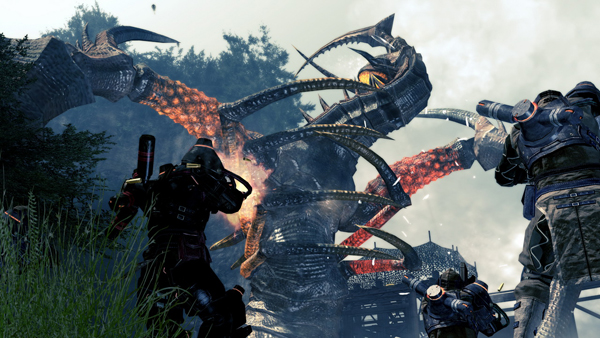
Lost Planet 2 is a third-person shooter video game developed and published by Capcom. The game is the sequel to Lost Planet: Extreme Condition which is also made by Capcom, taking place ten years after the events of the first game, on the same fictional planet. The story takes place back on E.D.N. III 10 years after the events of the first game. The snow has melted to reveal jungles and more tropical areas that have taken the place of more frozen regions. The plot begins with Mercenaries fighting against Jungle Pirates. After destroying a mine, the Mercenaries continue on to evacuate the area, in which a Category-G Akrid appears and attacks them. After being rescued, they find out their evacuation point (Where the Category-G appeared) was a set-up and no pick up team awaited them. The last words imply possible DLC additions to the game, "There's nothing to be gained by wiping out snow pirates... unless you had some kind of grudge."
 33
33Lost Planet 2 is super intensive, but you can see our MARS II again just has no problem dealing with it with the in-game settings maxed out. We can again see that performance is also very strong compared to the HD 6990, especially at the highest resolution which is an area that AMD have always been stronger in.
Benchmarks - Aliens vs. Predator
Aliens vs. Predator
Version and / or Patch Used: Standalone Benchmark
Timedemo or Level Used: Built in Benchmark
Developer Homepage: http://www.rebellion.co.uk/
Product Homepage: http://www.sega.com/games/aliens-vs-predator/
Aliens vs. Predator is a science fiction first-person shooter video game, developed by Rebellion Developments, the team behind the 1999 original PC game, and published by Sega for Microsoft Windows, the PlayStation 3 and the Xbox 360. The game is based on the Alien vs. Predator franchise, a combination of the characters and creatures of the Alien franchise and the Predator franchise. There are three campaigns in the game, one for each race/faction (the Predators, the Aliens and the Colonial Marines), that, while separate in terms of individual plot and gameplay, form one overarching storyline.
Following the storyline of the campaign modes comes the multiplayer aspect of the game. In this Multiplayer section of the game, players face off in various different gametypes in various different ways.
 33
33We see under another very intensive game the MARS II performs exceptionally strong with very playable FPS across the board. While the HD 6990 closes the gap a bit, it still isn't able to outperform the new beast from ASUS that is the MARS II.
Benchmarks - Just Cause 2
Just Cause 2
Version and / or Patch Used: 1.0.0.2
Timedemo or Level Used: Dark Tower
Developer Homepage: http://www.eidos.com/
Product Homepage: http://www.justcause.com/
Just Cause 2 employs the Avalanche Engine 2.0, an updated version of the engine used in Just Cause. The game is set on the other side of the world from the original Just Cause, on the fictional island of Panau in Southeast Asia. Panau has varied terrain, from desert to alpine to rainforest. Rico Rodriguez returns as the protagonist, aiming to overthrow the evil dictator Pandak "Baby" Panay and confront his former mentor, Tom Sheldon.
 33
33A lot like Aliens vs. Predator, we can see that the HD 6990 manages to close the gap a bit on the MARS II, but we still continue to see across the board that the MARS II is the fastest card at all resolutions.
Benchmarks - Metro 2033
Metro 2033
Version and / or Patch Used: Latest Steam Update
Timedemo or Level Used: Built in Benchmark
Developer Homepage: http://www.4a-games.com/
Product Homepage: http://www.thqnordic.com/
Metro 2033 is an action-oriented video game with a combination of survival horror and first-person shooter elements. The game is based on the novel Metro 2033 by Russian author Dmitry Glukhovsky. It was developed by 4A Games in Ukraine and released in March 2010 for Microsoft Windows and Xbox 360.[3] In March 2006, 4A Games announced a partnership with Glukhovsky to collaborate on the game.[4] The game was announced at the 2009 Games Convention in Leipzig;[5] a first trailer came along with the announcement.[6] A sequel was announced, currently titled Metro: Last Light.
 33
33Under Metro 2033 we see that the HD 6990 is able to finally come out just slightly ahead. It's only at 2560 x 1600, though, and the MARS II continues to give us very strong FPS across the board with that 60 FPS average we aim for not being an issue.
Benchmarks - Dirt 3
Dirt 3
Version and / or Patch Used: Latest Steam Update
Timedemo or Level Used: Built in Benchmark
Developer Homepage: http://www.codemasters.com/
Product Homepage: http://www.dirt3game.com/
DiRT 3 boasts more cars, more locations, more routes and more events than any other game in the series, including over 50 rally cars representing the very best from five decades of the sport. With more than double the track content of 2009's hit, DiRT 3 will see players start at the top as a professional driver, with a top-flight career in competitive off-road racing complimented by the opportunity to express themselves in Gymkhana-style showpiece driving events.
 33
33Firing up Dirt 3, we see the same pattern we've seen for the most part with the MARS II just offering us fantastic performance across the board that puts it ahead of the AMD offerings. AMD are no doubt stronger at the higher resolution and you can see the HD 6990 is able to close the gap when compared to the lower resolution performance. Unfortunately for the HD 6990, with the amount of power on offer from the MARS II, it manages to have a good 16 FPS on it still at 2560 x 1600.
Benchmarks - Total War: Shogun 2
Total War: Shogun 2
Version and / or Patch Used: Latest Steam Update
Timedemo or Level Used: Built in Benchmark
Developer Homepage: http://www.creative-assembly.co.uk/
Product Homepage: http://www.totalwar.com/shogun2
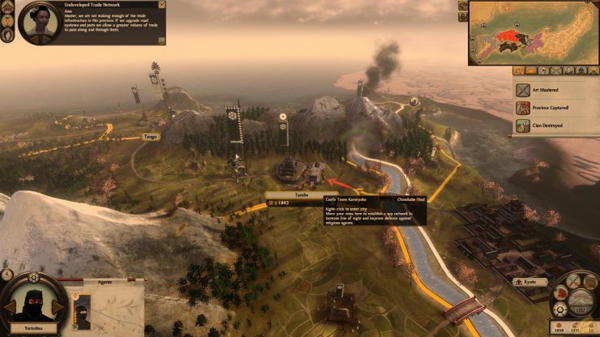
Shogun 2 is set in 16th-century feudal Japan, in the aftermath of the Onin War. The country is fractured into rival clans led by local warlords, each fighting for control. The player takes on the role of one of these warlords, with the goal of dominating other factions and claiming his rule over Japan. The standard edition of the game will feature a total of eight factions (plus a ninth faction for the tutorial), each with a unique starting position and different political and military strengths.
 33
33We see that the 60 FPS average we aim for continues to be no problem across the board. Compared to the HD 6990, performance is very close. At the highest resolution it's dead even. At 1920 x 1200 and 1680 x 1050, though, we see that the MARS II manages to come out ahead.
Benchmarks - Far Cry 2
Far Cry 2
Version and / or Patch Used: 1.01
Timedemo or Level Used: Ranch Long
Developer Homepage: http://www.ubi.com/
Product Homepage: http://www.farcry2.com/
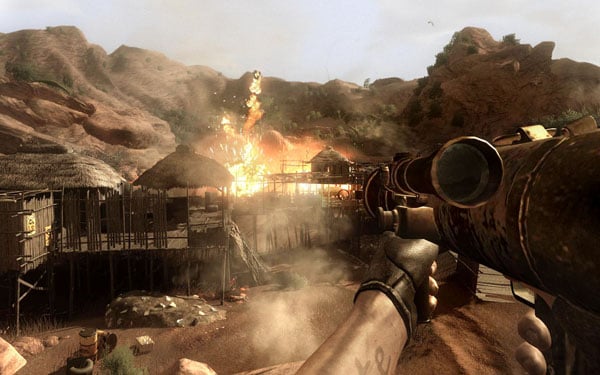
The Dunia Engine was built specifically for Far Cry 2 by the award-winning Ubisoft Montreal development team. It delivers the most realistic destructible environments, amazing special effects such as dynamic fire propagation and storm effects, real-time night-and-day cycle, dynamic music system, non-scripted enemy A.I. and so much more.
 33
33Looking at Far Cry 2, we can just see across the board all our setups have no issue dealing with the game here. As for a clear winner, you can see that most of the cards sit quite close to each other.
Benchmarks - High Quality AA and AF
High Quality AA and AF
Our high quality tests let us separate the men from the boys and the ladies from the girls. If the cards weren't struggling before they will start to now.
 33
33 33
33 33
33Cranking up the detail, we can just continue to see really strong performance out of our MARS II. Even under really intensive games like Aliens vs. Predator, an average of 90 FPS is fantastic.
Temperature Test
Temperature Tests

The temperature of the core is pulled from MSI Afterburner with the max reading used after a completed run off 3DMark Vantage and the Performance preset.
 33
33It's nice to see that huge cooler and massive fans work for us with some awesome temperature numbers coming out of the card. Considering the amount of power that's on offer, these are fantastic numbers.
Sound Test
Sound Tests

Pulling out the TES 1350A Sound Level Meter we find ourselves quickly yelling into the top of it to see how loud we can be.
After five minutes of that we get a bit more serious and place the device two CM away from the fan on the card to find the maximum noise level of the card when idle (2D mode) and in load (3D mode).
 33
33This graph paints such a good picture for what exactly we're dealing with. In typical high end ASUS fashion, we've got this huge amount of power on offer at just an extremely low noise level. Compared to the HD 6990, the MARS II seems silent.
Power Consumption Tests

Using our new PROVA Power Analyzer WM-01 or "Power Thingy" as it has become quickly known as to our readers, we are now able to find out what kind of power is being used by our test system and the associated graphics cards installed. Keep in mind; it tests the complete system (minus LCD monitor, which is plugged directly into AC wall socket).
There are a few important notes to remember though; while our maximum power is taken in 3DMark06 at the same exact point, we have seen in particular tests the power being drawn as much as 10% more. We test at the exact same stage every time; therefore tests should be very consistent and accurate.
The other thing to remember is that our test system is bare minimum - only a SSD hard drive is used with a single CD ROM and minimal cooling fans.
So while the system might draw 400 watts in our test system, placing it into your own PC with a number of other items, the draw is going to be higher.
 33
33Power Draw on the card is high; it's probably a little higher than I thought it would be. I thought that it might come in around the GTX 580 SLI point or slightly lower. To be honest, though, it doesn't really matter. If you're buying a card like this you're going to have a good quality power supply. If you don't, then that's your own fault for buying such a high end graphics card and not having the power supply to support it. 650 Watt isn't all that crazy either to be honest.
Final Thoughts
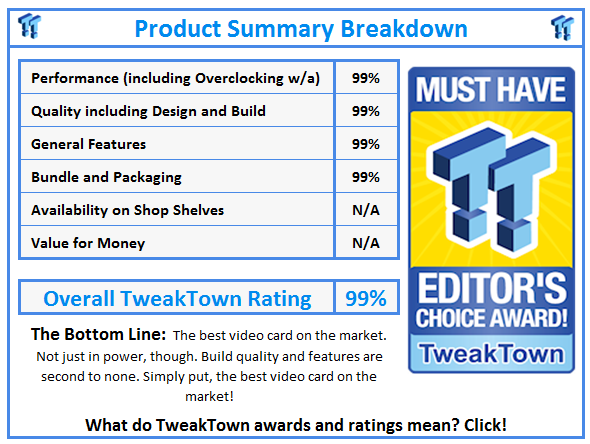
Over the recent months I've expanded the categories I look after here at TweakTown, but nothing brings me nerd chills like a good graphics card. The problem? This isn't a good graphics card; it's not even a great one. It's simply put; the best graphics card on the market.
Look, it's going to cost an arm and a leg, and probably a little bit of your foot; but, it's the fastest single video card on the market, it's a limited edition model, and my god, it looks and feels unreal. To say this card is a beast just seems like an understatement.
It's what we had hoped the GTX 590 would be. It's what NVIDIA probably wanted the GTX 590 to be. It's just awesome. I really struggle to find words on just how good this card is and I think, again, it's due to the quality of the card. We've seen fast cards, but the quality behind the MARS II is just second to none and I wish and hope you have the chance to experience it. It doesn't matter if you're the biggest AMD fanboy in the world, you pick up the MARS II and it's just an engineering masterpiece.
The quality of the card is just the one thing that I can't get over. The cooler and build quality is just so far above every other card we've used. There's real weight to the card and real power behind it. You then turn it on and start to play a game and find yourself wondering if the fans working because it's so quiet.
The Lightning cards from MSI are on another level to so many others. The same goes for the MATRIX from ASUS. The MARS II is just a level above them, though, and you can understand why there's going to be a large price tag associated with the card. For so many people it's going to be out of reach. For others, they will simply go down the path of buying two GTX 580s and running them in SLI. GTX 580 SLI while maybe offering similar performance, though, just has nothing on this card, because the MARS II creates a different atmosphere with in your case, with in our testbed, with in our office.
I feel like a 14 year old girl who's just touched Justin Biebers hand. This much power, at this ridiculously low noise level just makes you feel all giddy inside. The MARS II just makes such a big statement to other companies and for the most part it says "Oh, you can put a fancy cooler on a reference card? That's nice....I'm sure your grandmother would like that card".
The MARS II is just a work of art. It's the nerdy version of the Mona Lisa; and we love it.
 United
States: Find other tech and computer products like this
over at
United
States: Find other tech and computer products like this
over at  United
Kingdom: Find other tech and computer products like this
over at
United
Kingdom: Find other tech and computer products like this
over at  Australia:
Find other tech and computer products like this over at
Australia:
Find other tech and computer products like this over at  Canada:
Find other tech and computer products like this over at
Canada:
Find other tech and computer products like this over at  Deutschland:
Finde andere Technik- und Computerprodukte wie dieses auf
Deutschland:
Finde andere Technik- und Computerprodukte wie dieses auf 


 Samsung unveils world's fastest LPDDR5X memory: 10.7Gbps speeds, 32GB capacities per package
 SK hynix and TSMC to work together with HBM4 and next-gen semiconductor packaging technology
 Intel finishes assembly of ASML's first High-NA EUV tool, ready for Intel 14A process in 2025
 Intel Granite Rapids-AP CPU: LGA 7529 socket, up to 128 cores, up to 500W power
 Blizzard praises Microsoft's 'let it be' hands-off approach to management
 FlexiSpot C7B-Mesh Ergonomic Office Chair Review
 Samsung G8 34-inch QD-OLED Gaming Monitor Review - 175Hz for $900
 ASRock NUCBOX-155H Mini PC Review
 NuPhy Air96 V2 Wireless Mechanical Keyboard Review
 TEAM T-FORCE Siren DUO360 RGB Liquid CPU Cooler Review
 AVerMedia Live Streamer ULTRA HD Review
 AVerMedia Live Gamer 4K 2.1 Review
 XPG Invader X Mid-Tower Chassis Review
 Intel Core i9-14900KS CPU Review
 Arbiter Polar 65 Magnetic Gaming Keyboard Review
 Everything you need to know about the latest ASUS NUC Mini PCs - NUC 14 Pro and ROG NUC
 How to Overclock Your GPU and Boost Your PC Gaming with ASUS GPU Tweak III
 ASUS's AMD Radeon RX 7000 Series GPU lineup has something for every gamer
 ASUS OLED Premium Care defends the ROG Swift OLED PG32UCDM gaming monitor from burn-in
 Patriot Viper Xtreme 5 Engineering Prototype 48GB Dual-Channel Memory Kit Preview