

Introduction
 27
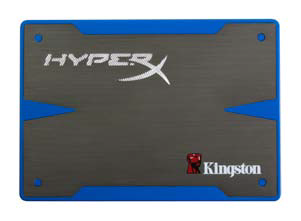
27When it comes to high performance SSDs, Kingston has been lingering in the shadows for quite a while. You really have to go all the way back to Kingston's variant of the Intel X25-M to find a true performance leader coming from their stable. Instead of focusing on expensive, bleeding edge, ultra performance drives, Kingston targeted the high volume market where good enough at a great price is the winning combination. This strategy has served Kingston well in many of their endeavors, but just like their other product lines, sometimes the lion just doesn't want to be tamed.
HyperX is Kingston Technology's enthusiast product line. This is where you'll find the cutting edge products that are used to break benchmark performance records. The HyperX brand is also an oddity in the enthusiast market for two reasons. The first is that Kingston does a lot of validation and because of this they are rarely the first to market with a new technology, often months behind the typical curve. Those waiting for Kingston to roll out their HyperX enthusiast products are able to take advantage of the next oddity, pricing. Kingston does a really good job delivering their HyperX products at prices that undercut the competition.
There have been rumors of Kingston joining Team SandForce for some time and those were confirmed at CES back in January when Kingston reps released the news. Kingston's entry into this market should be a real game changer with lower cost products entering the market and a higher reliability.
Specifications, Pricing and Availability
 27
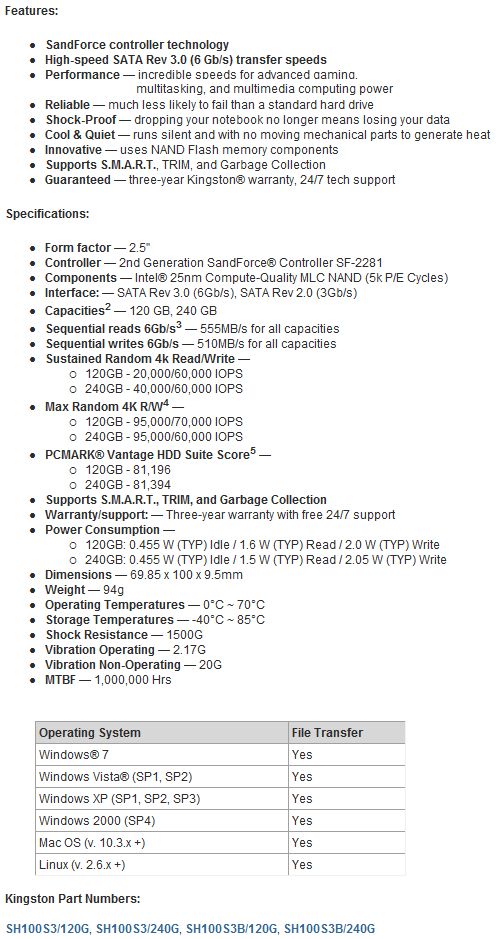
27Kingston's specification list is quite extensive, but we aren't going to focus on their professionalism today. The HyperX branded SSD is offered in two capacity sizes; 120GB and 240GB. We'll be looking at the latter in our review. At this time we don't have specific pricing information, but these products should hit the market in the coming weeks. I expect Kingston to come out with aggressive price points right from the start and keep making micro adjustments as time passes.
As much as I'd like to make this a full on review that weighs price, performance and accessory package, I'm limited on the pricing information. That leaves performance and the add-on accessory package and both are excellent. Kingston claims their HyperX branded SandForce SF-2281 / 25nm synchronous flash product is capable of delivering 555MB/s read speed and 510MB/s write speed. These are at the upper tier of the new SandForce SF-2000 products and that shows by the PC Mark Vantage numbers quoted. To date we've flirted with 75,000 Marks in the Vantage HDD tests, but never achieved anything close to 80,000, the stated performance from Kingston. If this number is possible with a single 2.5" SSD, it'll be the highest we've recorded to date.
When it comes to accessories and add-on package, users have two routes they can take, a bare drive solution and an upgrade kit that includes all the goodies you could ever ask for. We'll show you the upgrade kit in detail later in this review. The standard three year Kingston warranty applies to the HyperX SSD.
The Packaging
 27
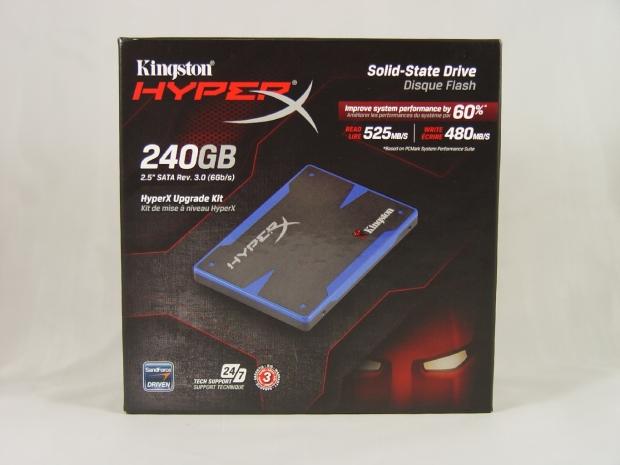
27Kingston put together an attractive package for their HyperX SSD. It should be noted that Kingston and SandForce managed to pull even more performance out of the drive after the first run of boxes were printed, so the media samples were shipped with the older, 525MB/s read and 480MB/s write numbers listed. The final retail drives should have the correct numbers or at least be covered with a sticker showing the correct specifications.
 27
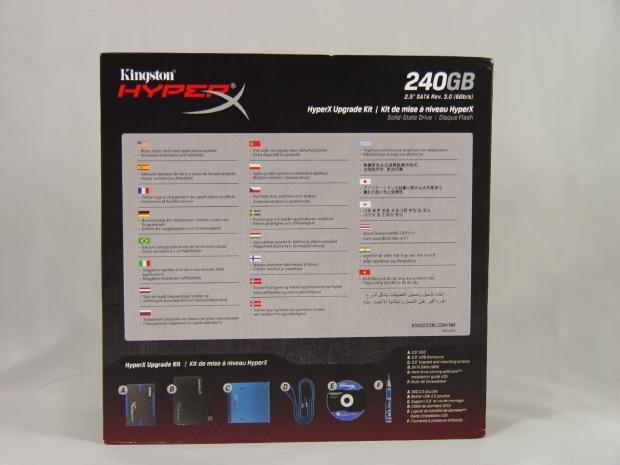
27On the back of the HyperX Upgrade Kit package we found some general information about SSDs and a detailed list of what is included in the package.
 27
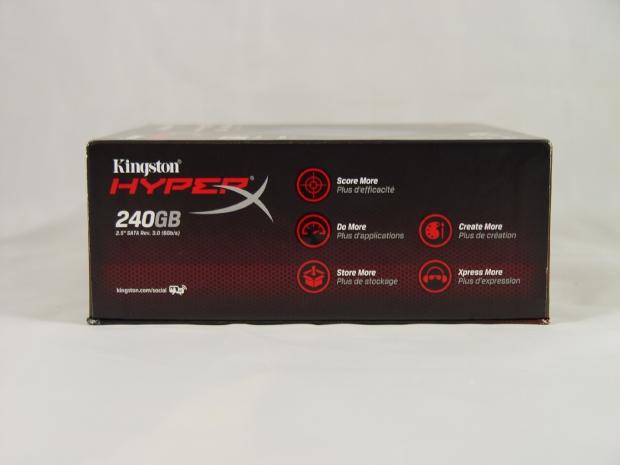
27The side lists some marketing slag on the side of the package.
 27
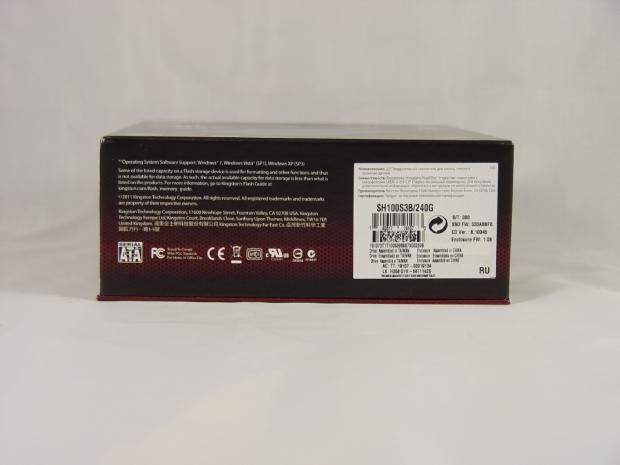
27On the bottom you can find the product number. Our 240GB HyperX Upgrade Kit has the model number SH100S3B/240G. When looking at previous models where Kingston has offered an Upgrade Kit, I'd say this is the one to get since the price difference between the bare drive and the full kit model is usually less than 10 USD.
 27
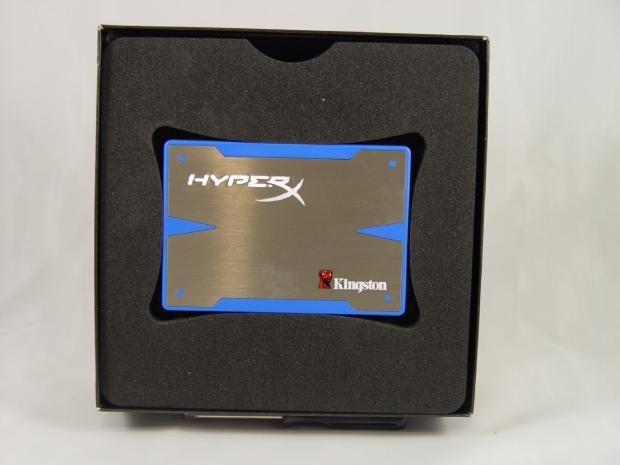
27The inner package keeps the drive secure in the middle of the box and away from the accessory add-ons.
 27
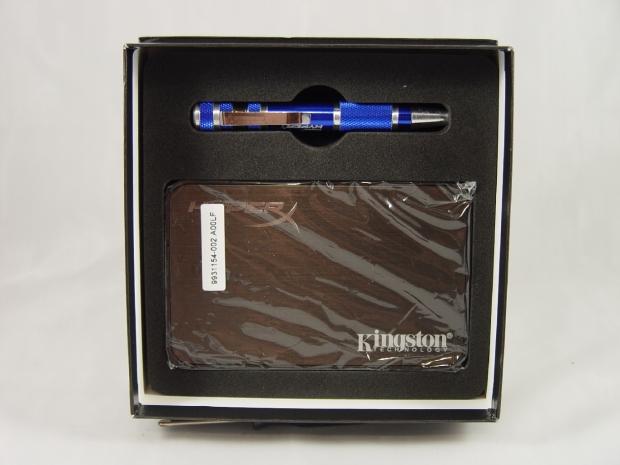
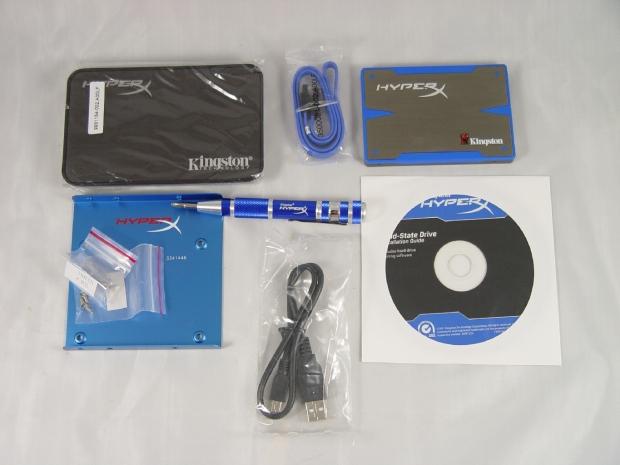
27There are three layers of foam, the second is shown here and holds the 2.5" HDD/SSD USB external case that is used in conjunction with the included Acronis software to quickly and easily clone your existing drive. After the HyperX SSD holds the software from the original, you just simply swap the two drives.
 27
27With the full package laid out, we see everything. Kingston has the most extensive add-on package on the market at this time.
The Kingston HyperX 240GB SSD
 27
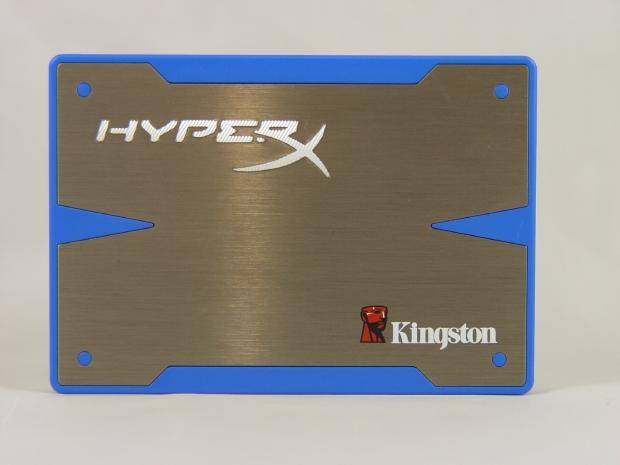
27Ah, our first look at the HyperX and she is a looker. A majority of the case is made of aluminum, but as you can see, Kingston has added a nice touch of blue to the drive.
 27
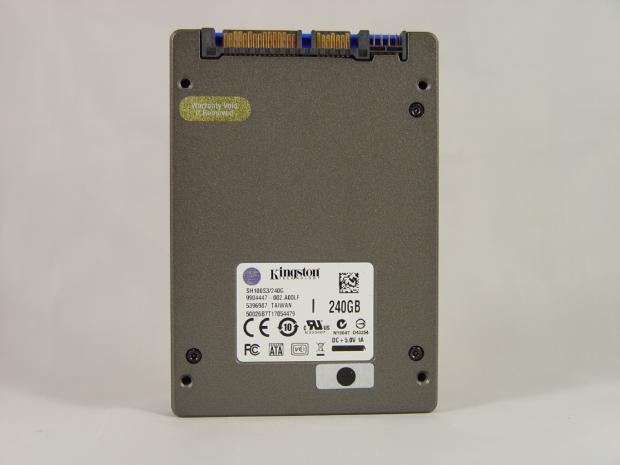
27The back of the drive has the model number and capacity size listed on the sticker. The four mounting points are present and where they should be. Also, it pains me to say it but I couldn't get the drive apart. Kingston used security screws with this drive and I don't have any 1.5mm Torx security tools - they'll be here next week.
 27
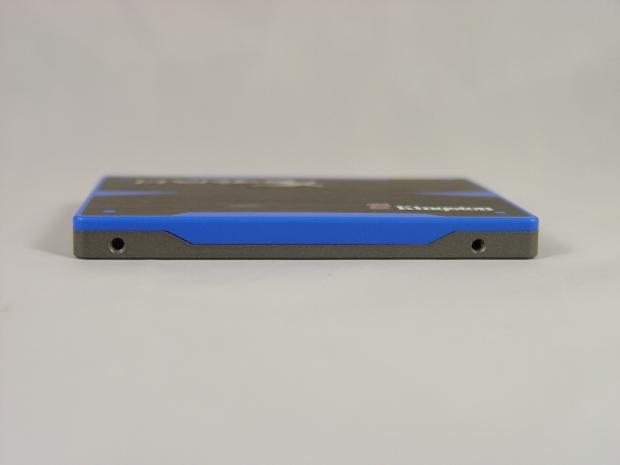
27The side mountings are where they should be.
 27
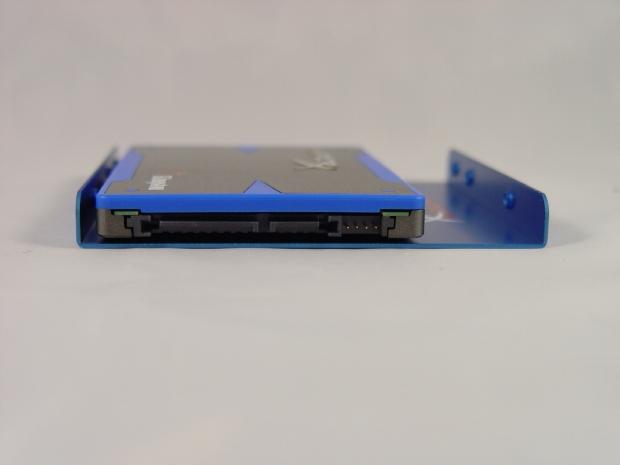
27The SATA power and data mounts are where they should be and the included 2.5" to 3.5" offsets the drive so these points line up with standard drive bays that are in workstations or desktops.
Test System Setup and ATTO Baseline Performance
 27
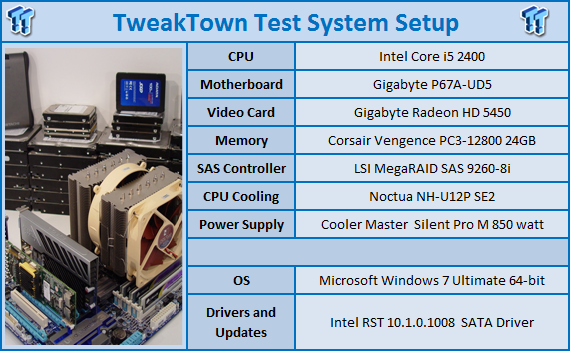
27We would like to thank the following companies for supplying and supporting us with our test system hardware and equipment: AVADirect, GIGABYTE, Cooler Master, LSI, Corsair and Noctua.
You can read more about TweakTown's Storage Product Testing Workstation and the procedures followed to test products in this article.
In order to get the most performance out of your HyperX or for that matter any other SATA III SSD, you need a motherboard with native SATA III built into the chipset. At this time your best performance will come from P67 and Z68 motherboards. I'm currently using a GIGABYTE P67A-UD5 and am very impressed with its performance.
ATTO Baseline Performance
Version and / or Patch Used: 2.34
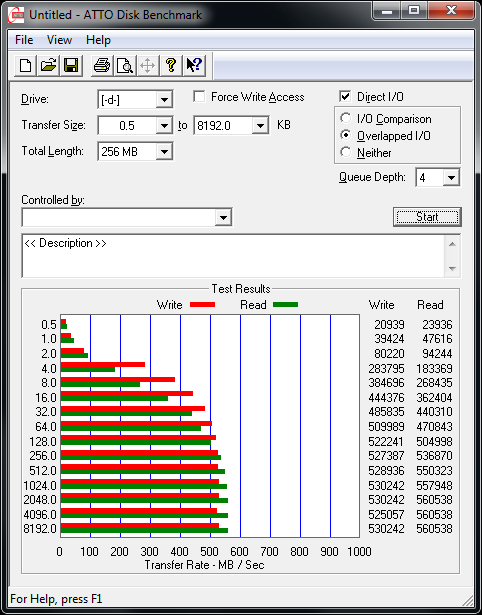
ATTO is used by many disk manufacturers to determine the read and write speeds that will be presented to customers.
 27
27Even though Kingston has the highest SandForce SF-2281 controlled drive speed claims, they are also being conservative. Our testing revealed a read speed of 560MB/s and a write speed of 530MB/s, the highest we've ever recorded!
Benchmarks - HD Tune Pro
HD Tune Pro
Version and / or Patch Used: 4.00
Developer Homepage: http://www.efdsoftware.com
Product Homepage: http://www.hdtune.com
HD Tune is a Hard Disk utility which has the following functions:
Benchmark: measures the performance
Info: shows detailed information
Health: checks the health status by using SMART
Error Scan: scans the surface for errors
Temperature display
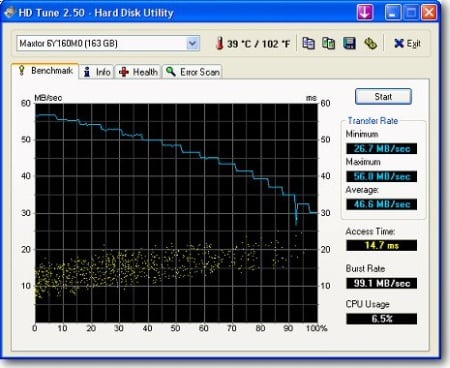
HD Tune Pro gives us accurate read, write and access time results and for the last couple of years has been gaining popularity amongst reviewers. It is now considered a must have application for storage device testing.
 27
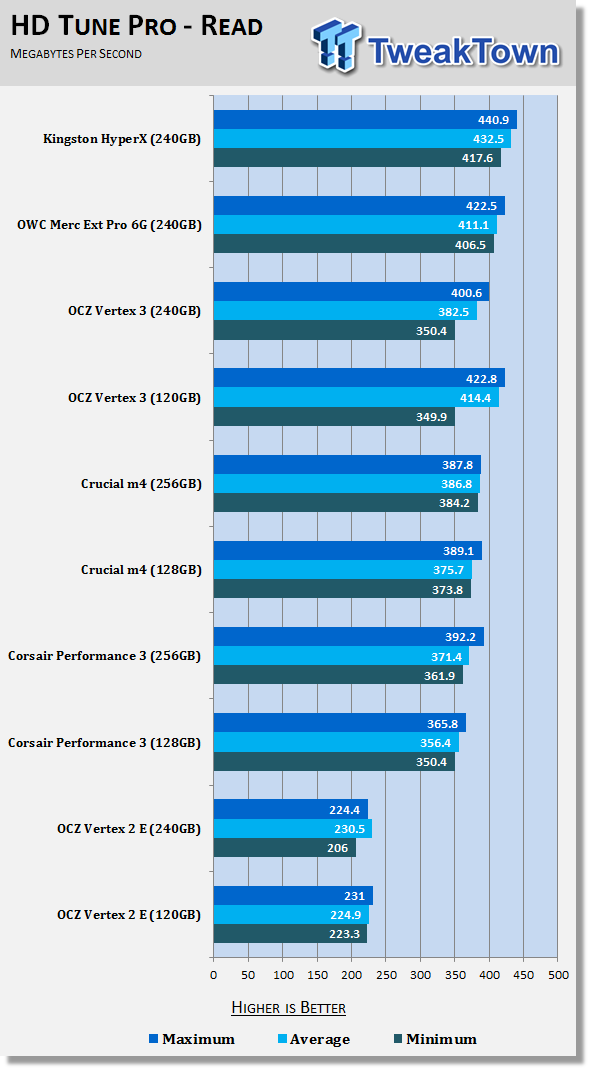
27We have our standard cast of characters lined up for this review and added the OWC Mercury Extreme Pro 6G to the mix since it was the fastest SSD we've tested to date thanks to a firmware update from SandForce. The Kingston HyperX has even newer firmware and as you can see here, SandForce and Kingston have made the SF-2281 controller paired with synchronous flash even faster. So far this is the fastest single drive we've tested when measuring read speed across the drive.
 27
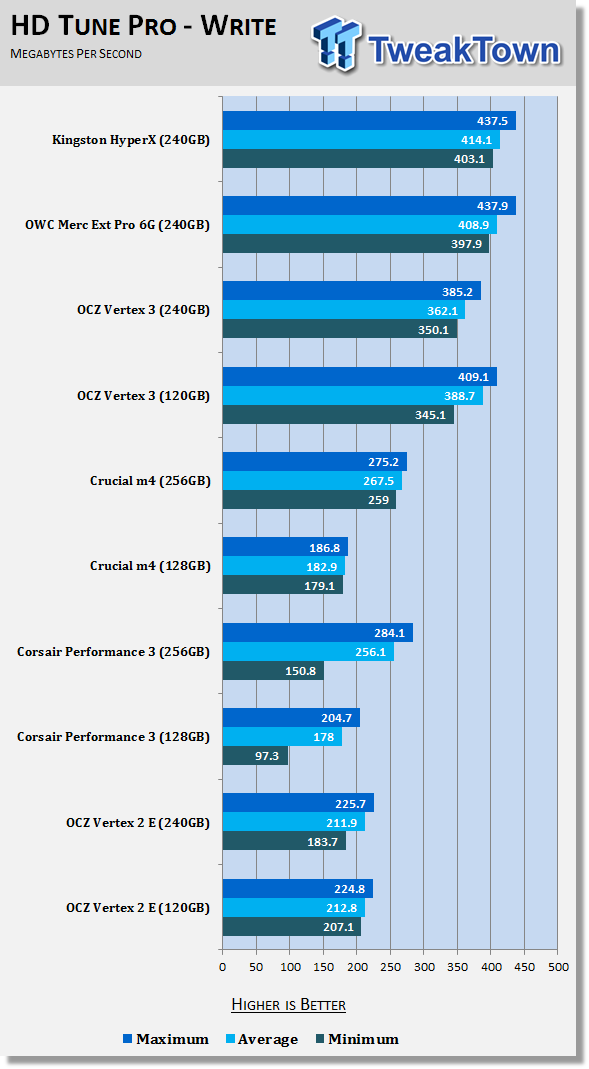
27The write speed across the drive was also impressive, the fastest recorded so far.
Benchmarks - AIDA64 Random Access Time
AIDA64 Random Access Time
Version and / or Patch Used: 1.60
Developer Homepage: http://www.aida64.com
Product Homepage: http://www.aida64.com
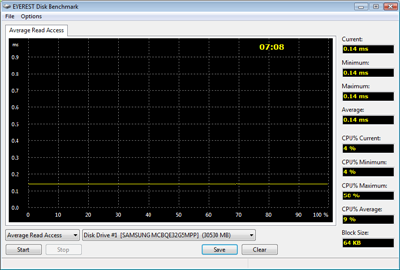
AIDA64 offers several different benchmarks for testing and optimizing your system or network. The Random Access test is one of very few if not only that will measure hard drives random access times in hundredths of milliseconds as oppose to tens of milliseconds.
Drives with only one or two tests displayed in the write test mean that they have failed the test and their Maximum and possibly their Average Scores were very high after the cached fills. This usually happens only with controllers manufactured by JMicron and Toshiba.
 27
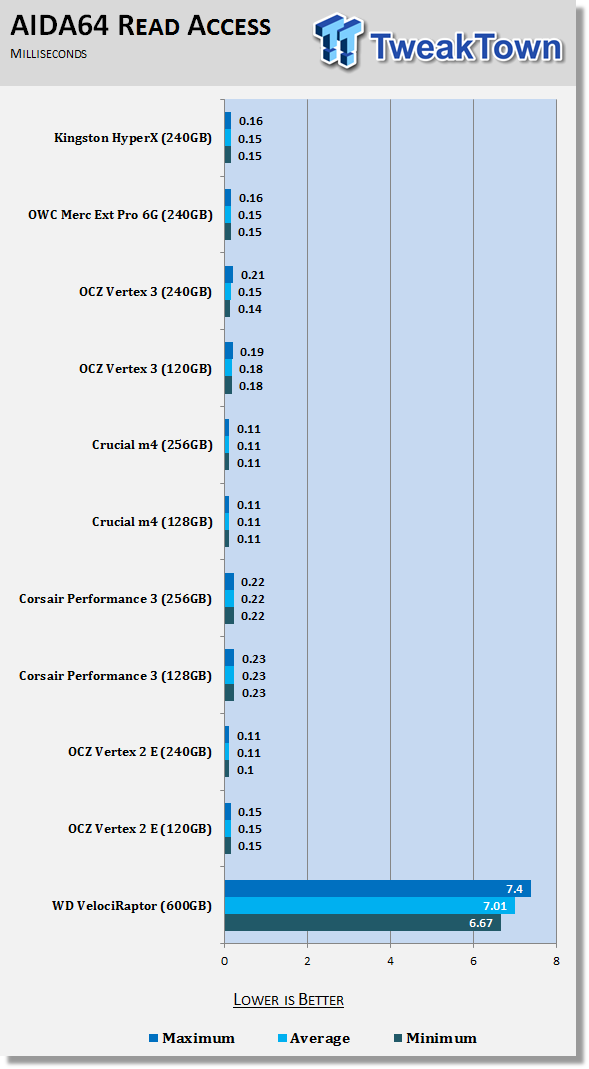
27Usually when we start seeing performance go up like this, the access time goes up a bit as well - not what you want to see. That doesn't seem to be the case this time as the HyperX is right in line with the other SF-2281 controlled drives we've tested.
 27
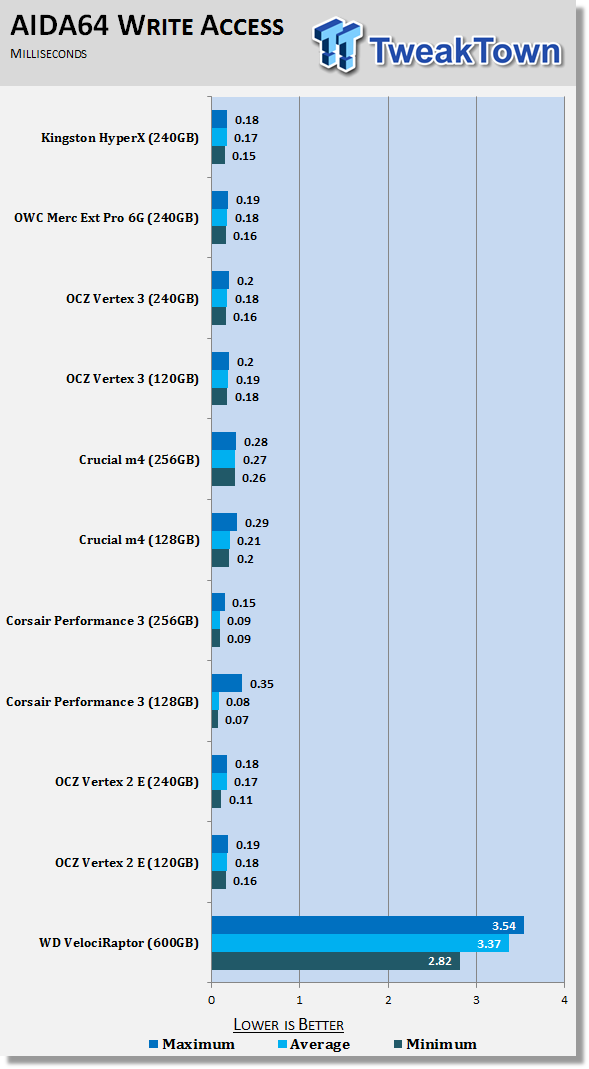
27The same is true for the write access time; the HyperX is fast and quick at the same time!
It should be noted that access time is what makes SSDs feel fast when you use your computer in day to day programs. Companies like to talk about big numbers, but when dealing with access time, the lower the better.
Benchmarks - CrystalDiskMark
CrystalDiskMark
Version and / or Patch Used: 3.0 Technical Preview
Developer Homepage: http://crystalmark.info
Product Homepage: http://crystalmark.info/software/CrystalDiskMark/index-e.html
Download here: http://crystaldew.info/category/software/crystaldiskmark
CrystalDiskMark is a disk benchmark software that allows us to benchmark 4K and 4K queue depths with accuracy.
Key Features:-
* Sequential reads/writes
* Random 4KB/512KB reads/writes
* Text copy
* Change dialog design
* internationalization (i18n)
Note: Crystal Disk Mark 3.0 Technical Preview was used for these tests since it offers the ability to measure native command queuing at 4 and 32.
 27
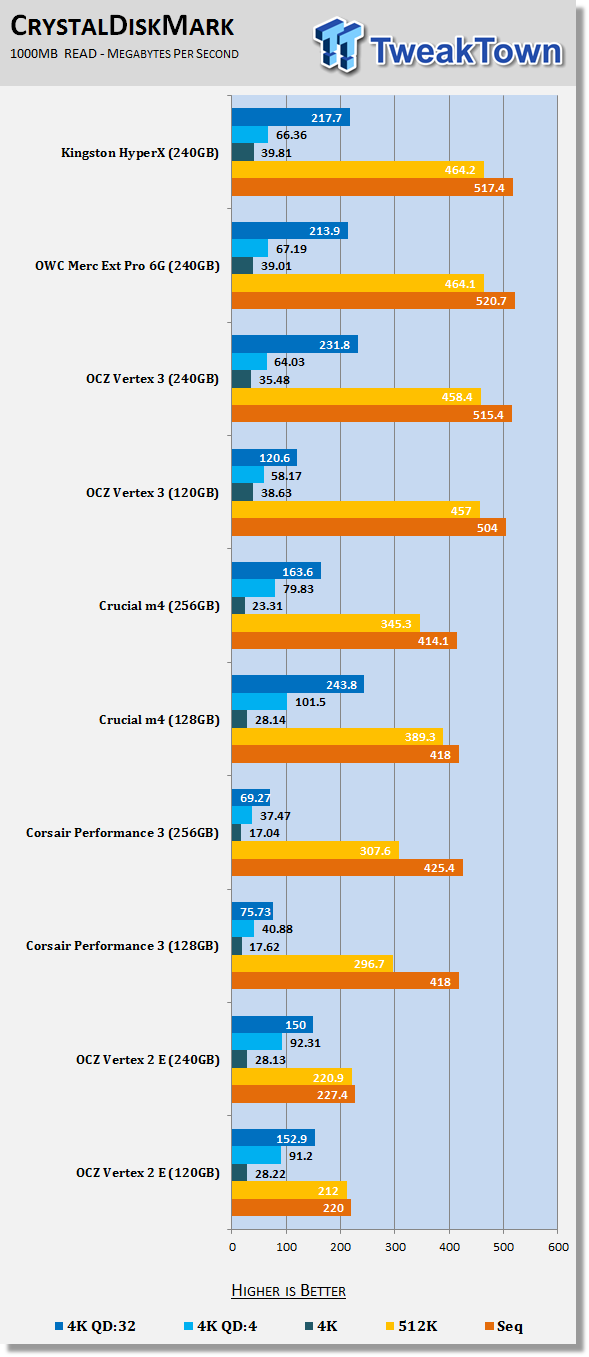
27In CDM we see good 4K performance and good native command queuing performance that scales very well. CDM also tests with incompressible data and we see very good performance since the HyperX uses synchronous flash.
 27
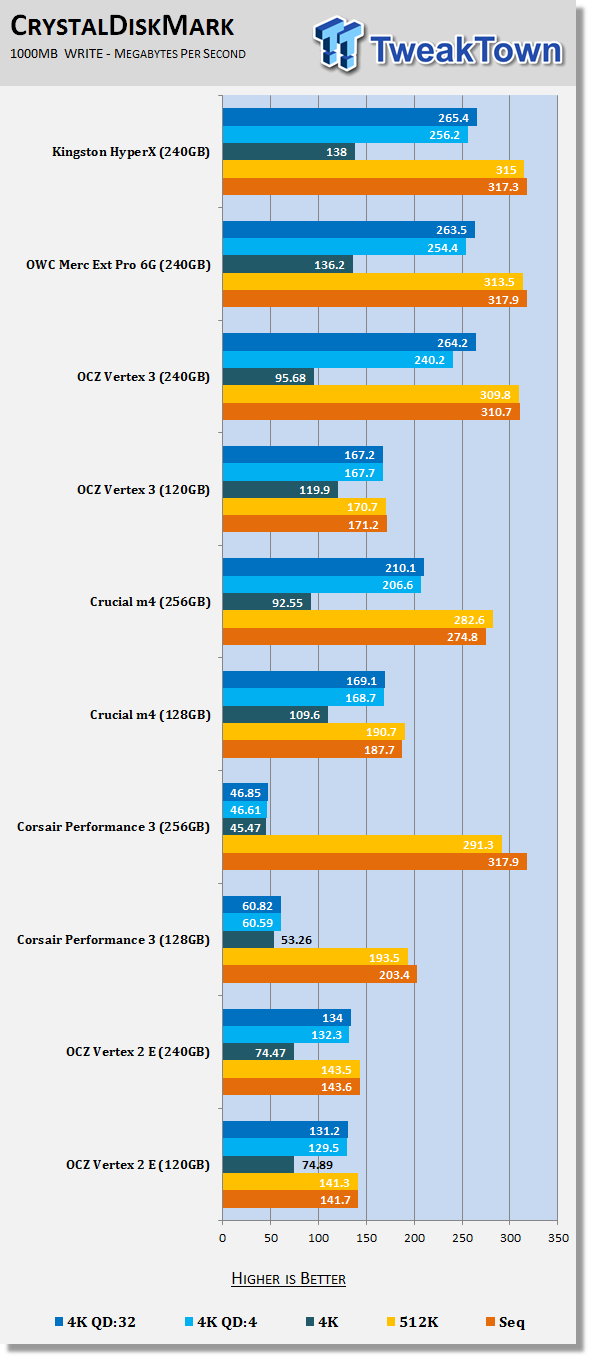
27The 4K write performance is also very fast and scales well with NCQ.
Benchmarks - PCMark Vantage Hard Disk Tests
PCMark Vantage - Hard Disk Tests
Version and / or Patch Used: 1.0.0
Developer Homepage: http://www.futuremark.com
Product Homepage: http://www.futuremark.com/benchmarks/pcmark-vantage/

PCMark Vantage is the first objective hardware performance benchmark for PCs running 32 and 64 bit versions of Microsoft Windows Vista. PCMark Vantage is perfectly suited for benchmarking any type of Microsoft Windows Vista PC from multimedia home entertainment systems and laptops to dedicated workstations and high-end gaming rigs. Regardless of whether the benchmarker is an artist or an IT Professional, PCMark Vantage shows the user where their system soars or falls flat, and how to get the most performance possible out of their hardware. PCMark Vantage is easy enough for even the most casual enthusiast to use yet supports in-depth, professional industry grade testing.
FutureMark has developed a good set of hard disk tests for their PCMark Vantage Suite. Windows users can count on Vantage to show them how a drive will perform in normal day to day usage scenarios. For most users these are the tests that matter since many of the old hat ways to measure performance have become ineffective to measure true Windows performance.
 27
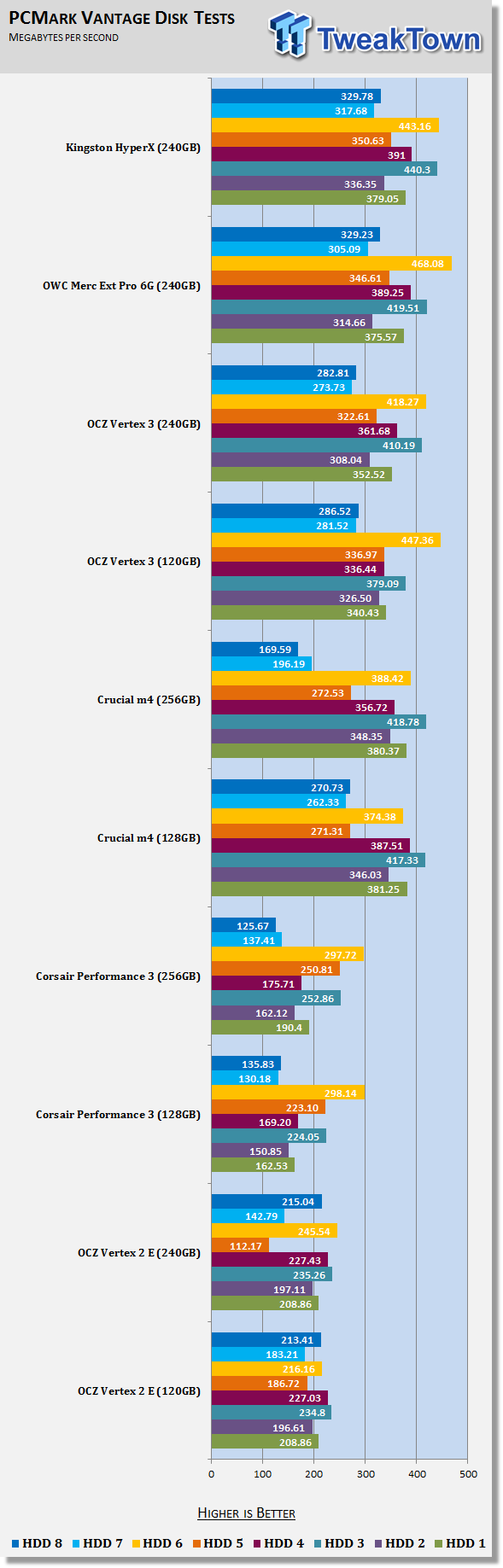
27HDD1 - Windows Defender
HDD2 - Gaming
HDD3 - Windows Photo Gallery
HDD4 - Vista Startup
HDD5 - Windows Movie Maker
HDD6 - Windows Media Center
HDD7 - Windows Media Player
HDD8 - Application Loading
In our testing we achieved an overall score of 79,590. This was the fastest score recorded to date for a 2.5" drive in this real world test and it almost matched the score produced by the OCZ RevoDrive 3 480GB I tested a few hours after the HyperX (review coming very soon!).
PCMark Vantage - Drives with Data Testing
For a complete breakdown on the Drives with Data Testing please read this article. You will be able to perform this test at home with the files provided in the article - full instructions are included.
Brief Methodology
SSDs perform differently when used for a period of time and when data is already present on the drive. The purpose of the Drives with Data testing is to show how a drive performs in these 'dirty' states. SSDs also need time to recover, either with TRIM or onboard garbage collection methods.
Drives with Data Testing - 25%, 50%, 75% Full States and Dirty / Empty Test
Files needed for 60 (64GB), 120 (128GB), 240 (256GB)
60GB Fill - 15GB, 30GB, 45GB
120GB Fill - 30GB, 60GB, 90GB
240GB Fill - 60GB, 120GB, 160GB
Empty but Dirty - a test run just after the fill tests and shows if a drive needs time to recover or if performance is instantly restored.
 27
27HDD1 - Windows Defender
HDD2 - Gaming
HDD3 - Windows Photo Gallery
HDD4 - Vista Startup
HDD5 - Windows Movie Maker
HDD6 - Windows Media Center
HDD7 - Windows Media Player
HDD8 - Application Loading
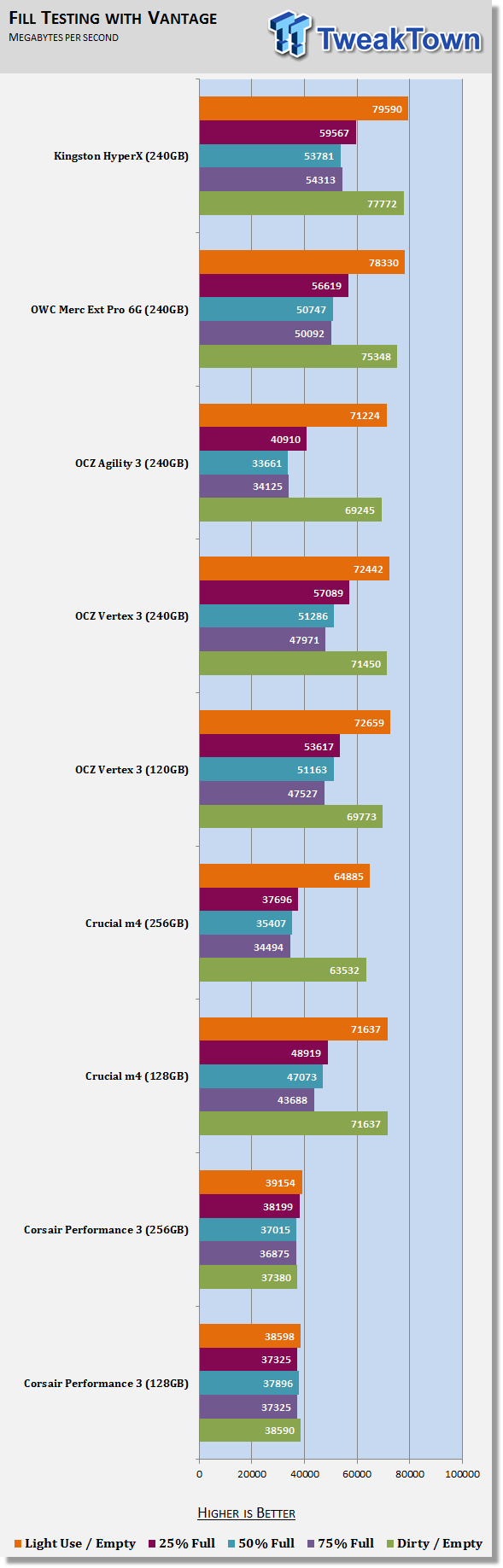
I don't know anyone who spends north of 300 USD for an SSD and only uses it to run benchmarks (OK, I actually do know some people, but not many). The point is that SSDs are normally used in systems, with data on them and because of that, we've come up with a real, real world test that shows a drive's performance measured at 25%, 50% and 75% full.
The HyperX uses synchronous flash so it doesn't slow down as much as drives using asynchronous flash like the Agility 3, Patriot Pyro, OWC Electra and a host of others. With the drive half full, the Kingston HyperX delivered the highest performance to date, just over 53,000 Marks.
With SandForce SF-2281 products quickly approaching the limits of SATA III, I feel this is the next area for companies to make improvements.
Benchmarks - AS SSD
AS SSD Benchmark
Version and / or Patch Used: 1.2.3577.40358
Developer Homepage: Alex Intelligent Software
Product Homepage: Alex Intelligent Software
Download here: http://www.alex-is.de/PHP/fusion/downloads.php?cat_id=4&download_id=9
AS determines the performance of Solid State Drives (SSD). The tool contains four synthetic as well as three practice tests. The synthetic tests are to determine the sequential and random read and write performance of the SSD. These tests are carried out without the use of the operating system caches.
In all synthetic tests the test file size is 1GB. AS can also determine the access time of the SSD, the access of which the drive is determined to read through the entire capacity of the SSD (Full Stroke). The write access test is only to be met with a 1 GB big test file. At the end of the tests three values for the read and write as well as the overall performance will be issued. In addition to the calculated values which are shown in MB/s, they are also represented in IO per seconds (IOPS).
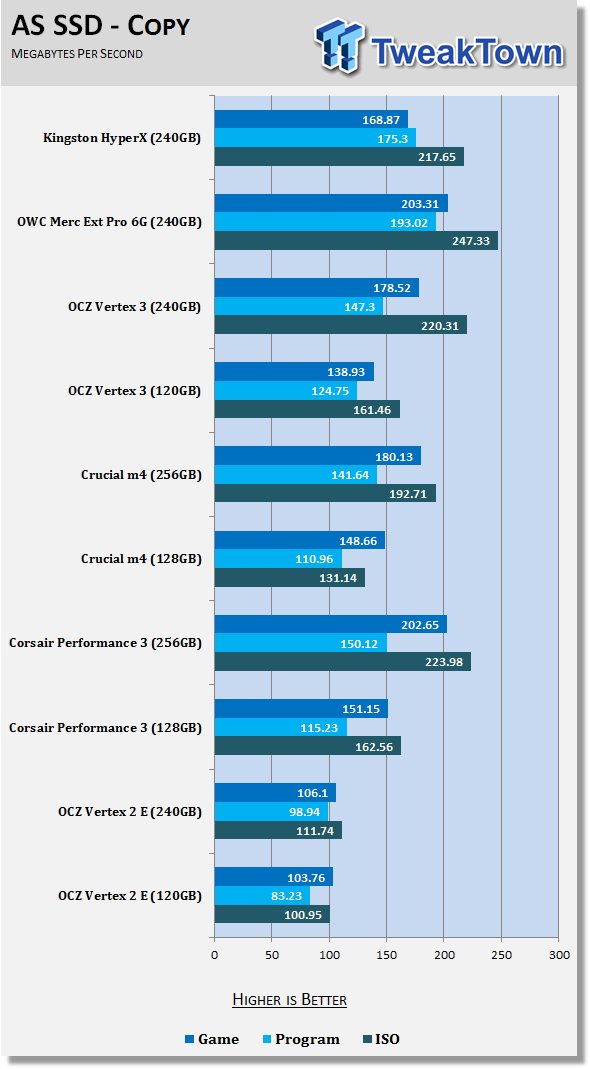
Note: AS SSD is a great benchmark for many tests, but since Crystal Disk Mark covers a broader range of 4K tests and HD Tune Pro covering sequential speeds, we will only use the Copy Benchmark from AS SSD.
- Copy Benchmark
 27
27I have to admit I was a bit surprised by the Copy tests and the fact that the HyperX fell behind the OWC and OCZ drives with similar configurations.
Benchmarks - Passmark
Passmark Advanced Multi-User Tests
Version and / or Patch Used: 6.1
Developer Homepage: http://www.passmark.com
Test Homepage: http://www.passmark.com
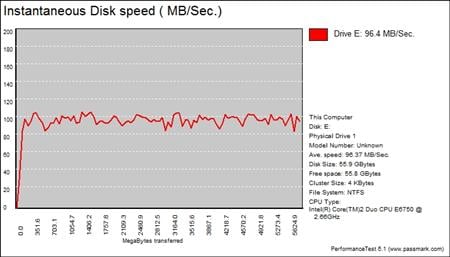
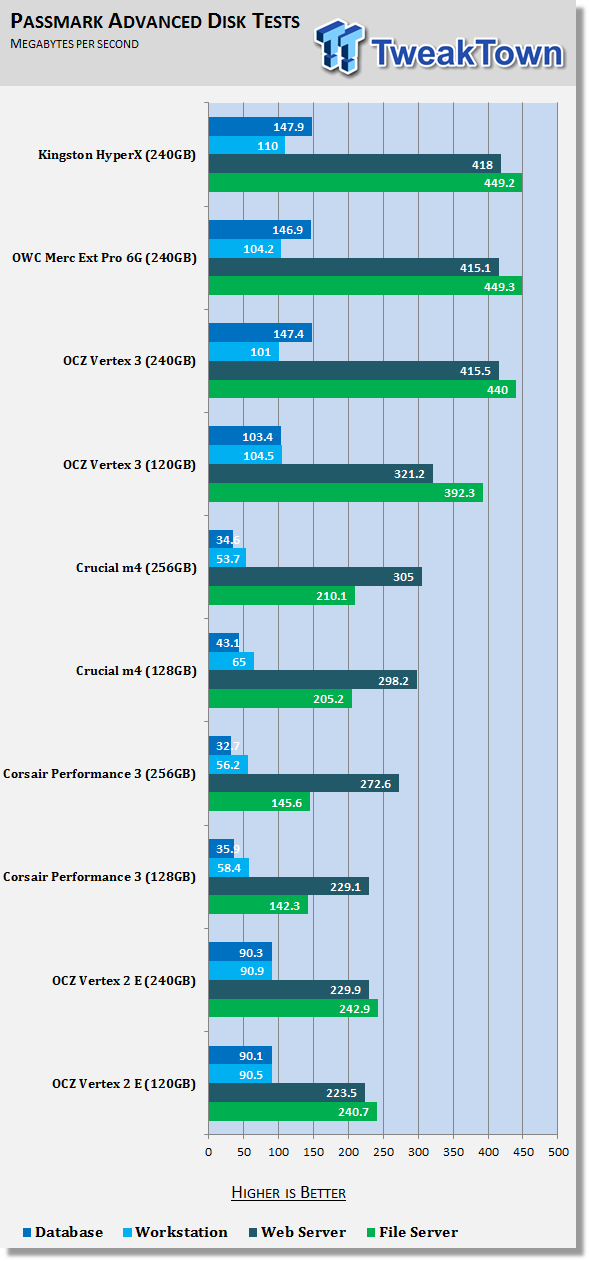
Many users complain that I/O Meter is too complicated of a benchmark to replicate results so my quest to find an alternative was started. Passmark has added several multi-user tests that measure a hard drives ability to operate in a multi-user environment.
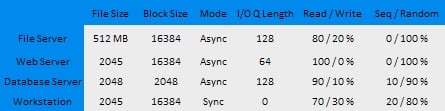
The tests use different settings to mimic basic multi-user operations as they would play out on your server. Variances is read / write percentage as well as random / sequential reads are common in certain applications, Web Servers read nearly 100% of the time while Database Servers write a small amount of data.
The Workstation test is the only single user environment and will be similar to how you use your system at home.
 27
27At one point Kingston's marketing papers stated that end users would be able to change the overprovisioning size on their drives, but since then they've downplayed that claim. If it was possible to change the overprovisioning size the HyperX might have become a low cost enterprise drive after users changed the user capacity to 200GB instead of 240GB.
The HyperX is still considered a consumer product, so we're not going into a lot of detail on these tests. I just like to run them to see how changes to the firmware affect performance.
Final Thoughts
Pricing Update:
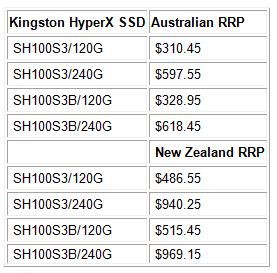
Over the weekend we received word from Kingston about pricing.
 27
27Kingston HyperX SSDs are now available at Newegg in the US as well. The Newegg prices are still very close to MSRP, but we expect to see Kingston push the HyperX SSD to compete with the Vertex 3 soon.
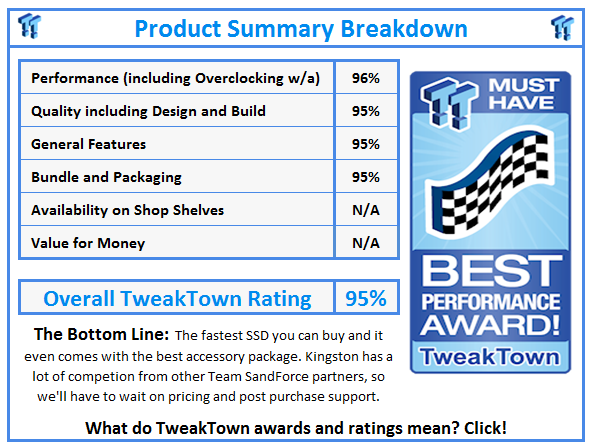
The Kingston HyperX SSD is the fastest available on the market today. Kingston and SandForce have worked wonders with the firmware, but it won't take too long for other companies to start shipping drives with the same firmware and for companies to make the firmware available to end users. OCZ already lists a new 2.11 firmware that I have yet to install on my collection of drives - we'll have to run some numbers later in the week. It really doesn't matter what other companies do, though, the HyperX is fast and has the potential to be the 'it' drive for 2011.
In order for that to happen, Kingston has a few marks to hit and we don't have all of the information needed just yet. Let's run down the list and see where the HyperX SSD stands. The ability to outperform all other drives on the market, check, the HyperX is right there with the best combination of hardware to deliver superior performance. The HyperX SSD also ships with a desktop adapter bracket when you purchase the HyperX Upgrade Kit (and possibly the standard drive kit, we'll confirm). So you get the accessory needed for easy desktop installation, but Kingston doesn't stop there, they get bonus points for the USB enclosure for easy notebook installation since it also includes drive cloning software. If the enclosure is the icing, then the included SATA III data cable and 4-pin Molex to SATA power cable is like having your name on the cake, a nice icing picture and the correct number of candles. That's what the Kingston HyperX has confirmed.
On the other side of the coin are the unknowns. The first is pricing and this one is very important. As you know, you can include all kinds of goodies, but the price goes a long way in end users buying decisions. I wish you all would just follow what I write and buy what I say, but when push comes to shove, the final price plays a big role. If Kingston is able to compete with the other Team SandForce players in the low cost arena then the added value goodies we talked about in the last paragraph should push the HyperX to the top of the list and anyone buying a competing product is making the wrong decision.
This next part doesn't get a lot of play in the media, but it should. As you can see from the benchmark scores today, firmware makes a world of difference and SandForce is working on making their drives faster and even more reliable. There are a number of Team SandForce companies churning out drives, but failing on giving end users the tools needed to update the firmware. Some companies are even making end users ship drives back to the factory to get the latest firmware. This is unacceptable for power users looking to pull the most performance out of their products. At this time, we don't know how Kingston will tackle the firmware update issue; let's hope they make the right decision and give power users and enthusiasts the tools needed to make performance improvements possible without the hassle of shipping a drive back to the factory.
Even without knowing the pricing information, the Kingston HyperX is at the least eligible for a Performance Award. If Kingston manages to deliver the HyperX at a wallet pleasing price then this will quickly turn into an Editor's Choice Award. I guess we'll have to wait until the 120GB drive arrives and the drives go on sale. We'll follow up in a couple of weeks and see how things fall into place.
 United
States: Find other tech and computer products like this
over at
United
States: Find other tech and computer products like this
over at  United
Kingdom: Find other tech and computer products like this
over at
United
Kingdom: Find other tech and computer products like this
over at  Australia:
Find other tech and computer products like this over at
Australia:
Find other tech and computer products like this over at  Canada:
Find other tech and computer products like this over at
Canada:
Find other tech and computer products like this over at  Deutschland:
Finde andere Technik- und Computerprodukte wie dieses auf
Deutschland:
Finde andere Technik- und Computerprodukte wie dieses auf 


 AMD's top Strix Point Halo APU could have 16 Zen 5 cores in 2 x CCDs, mirroring Ryzen 9000 CPUs
 FBI confirms Chinese hackers have infested US water and energy systems
 Microsoft's new Windows 11 'AI Explorer' feature set to anger AMD and Intel
 High-end PC maker gives advice that could fix Intel Core i9 CPUs crashing in games
 Windows 10 users: Get ready to be bugged about creating a Microsoft Account
 ASUS ROG Swift Pro PG248QP Gaming Monitor Review - Frames, frames, and more frames
 FlexiSpot C7B-Mesh Ergonomic Office Chair Review
 Samsung G8 34-inch QD-OLED Gaming Monitor Review - 175Hz for $900
 ASRock NUCBOX-155H Mini PC Review
 NuPhy Air96 V2 Wireless Mechanical Keyboard Review
 TEAM T-FORCE Siren DUO360 RGB Liquid CPU Cooler Review
 AVerMedia Live Streamer ULTRA HD Review
 AVerMedia Live Gamer 4K 2.1 Review
 XPG Invader X Mid-Tower Chassis Review
 Intel Core i9-14900KS CPU Review
 Everything you need to know about the latest ASUS NUC Mini PCs - NUC 14 Pro and ROG NUC
 How to Overclock Your GPU and Boost Your PC Gaming with ASUS GPU Tweak III
 ASUS's AMD Radeon RX 7000 Series GPU lineup has something for every gamer
 ASUS OLED Premium Care defends the ROG Swift OLED PG32UCDM gaming monitor from burn-in
 Patriot Viper Xtreme 5 Engineering Prototype 48GB Dual-Channel Memory Kit Preview