

Introduction and Package
Introduction
 39
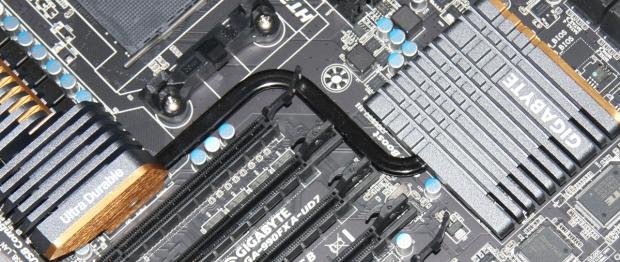
39Over the coming months as we build up towards finally getting our hands on the Bulldozer platform, we'll no doubt be looking at plenty of 990FX based motherboards from companies. Having already looked at what ASUS offered us in their ROG Crosshair V Formula board, today we'll take the time to check out the GIGABYTE option.
While GIGABYTE do have a few 990FX options, we've gone straight to the top today and will be checking out the 990FXA-UD7 which carries with it those lovely aesthetics we're used to seeing from the UD7 series.
With the full package on hand, we'll get stuck into the box and what's inside before taking a closer look at the board itself. Once that's done, we'll venture into the BIOS to see what's going on before we take a closer look at our testbed, overclocking and then of course, performance.
The Package
 39
39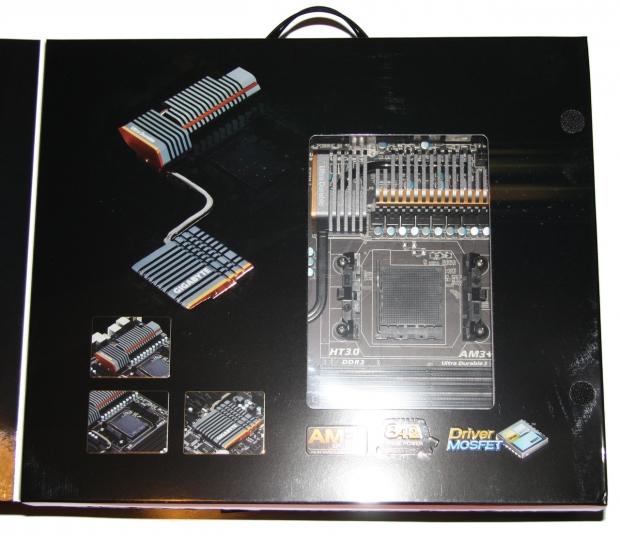 39
39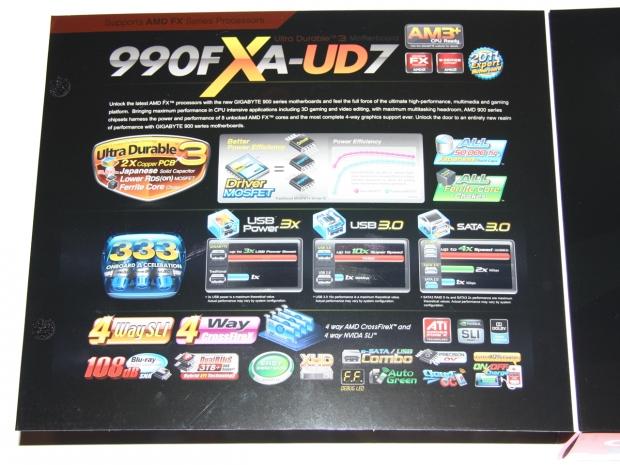 39
39 39
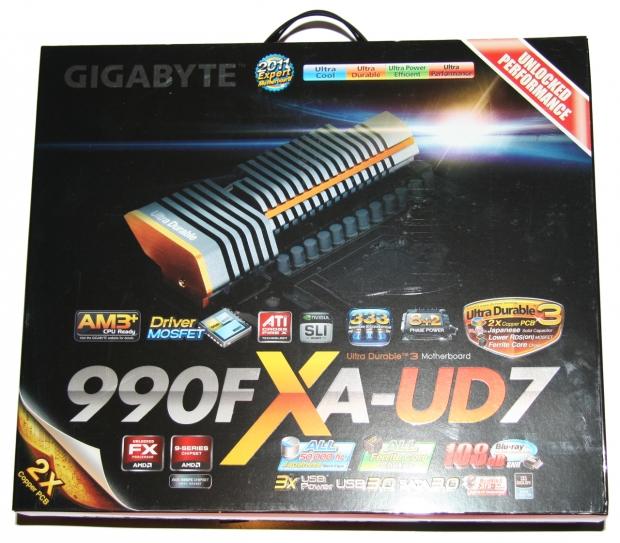
39In typical UD7 fashion we've got a really big box that opens up and shows us part of the board itself, and gives us an absolute wealth of information that shows us a bunch of the features that the UD7 version of the 990FX based board offers us.
 39
39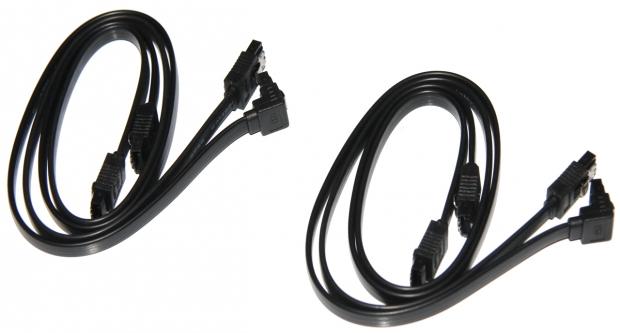 39
39Most of the bundle is fairly standard; we've got some paperwork, sticker, driver CD and I/O shield, along with four SATA cables.
 39
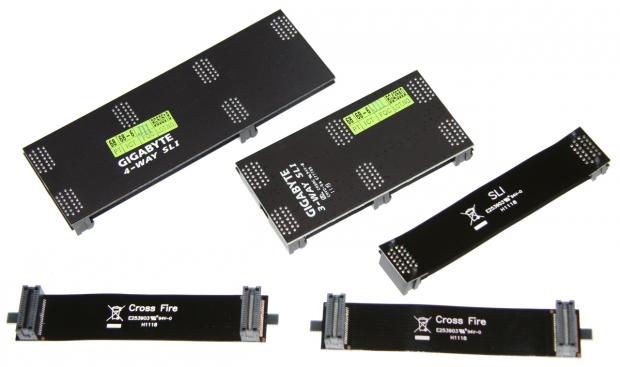
39Also included are a bunch of SLI and CrossFire cables in the package. We've got a 4-Way and 3-Way SLI bracket, a single SLI bridge and two CrossFire bridges.
The Motherboard
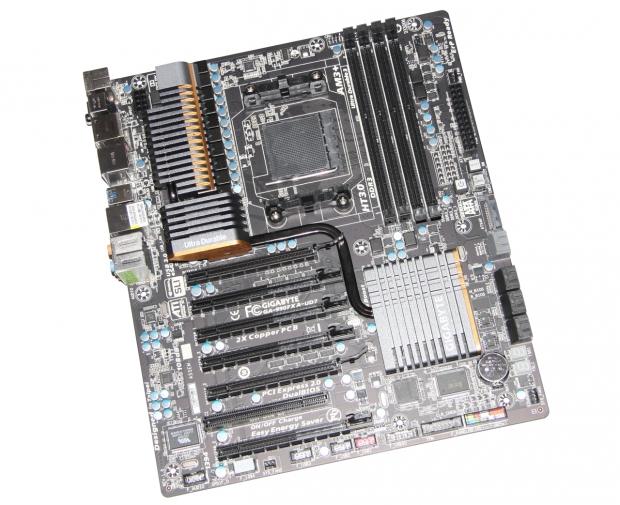
Looking at the board, you could instantly tell it's part of the UD7 series with that all black PCB and that great looking heatsink setup that has those gold accents on it which make the board look great. You can get a pretty good idea of the board itself, but let's move in closer to see what exactly we're dealing with today.
 39
39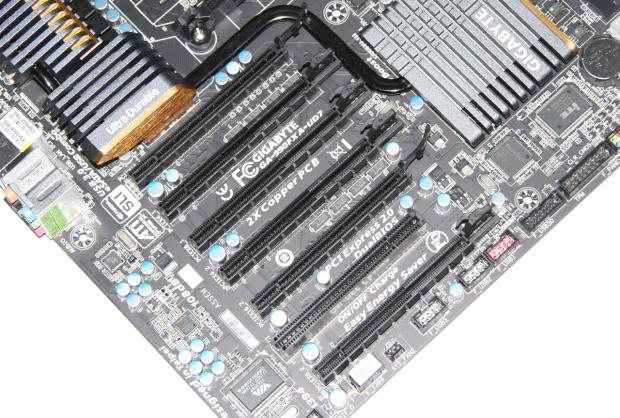 39
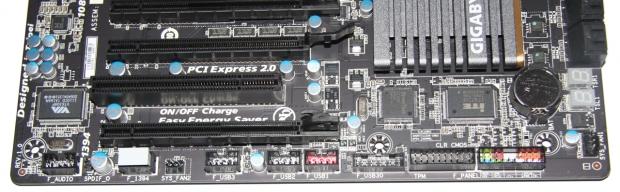
39Apart from a single legacy PCI slot, we've got six PCI-E x16 slots which is just huge. Of course, not all of them run at x16, so let's take a closer look. We've got two slots that run at x16, two that run at x8 and two that run at x4.
If you're using one card, you'll use the top most slot which is x16. If you're going for two cards, you'll use the top slot and the fifth slot and then both your cards will run at x16. If you're going down the path of three cards, you'll use the two slots we just mentioned along with the third slot; that means you'll have a x16 / x8 / x8 setup. If you throw a fourth card into the mix, you'll put that in the most bottom slot and that will mean all your cards will be running at x8.
Of course, you can put x4 and x1 devices in the x16 slots and they will just run at the appropriate speed. If you go down the path of four video cards, it won't be an option and if you go three cards you'll be limited, but still have some options as GIGABYTE have just offered us so many PCI-Express slots.
 39
39Moving away from the PCI-E slots, we can check out the bottom of the motherboard and see all the headers that are on offer. We've got our front Audio, 1394 FireWire, three USB 3.0 headers, USB 3.0 header and our main system header.
 39
39Moving around the corner, we can see our Debug LED and next to that we have eight SATA ports. All eight ports are SATA III, but the six black ones run off the AMD SB950 South Bridge. As for the two grey ones, they run off the Marvel 88SE9172 controller.
Next to these SATA ports you can also see a SATA power connector. This works the same as the Molex or PCI-E power connectors we've seen on high end boards in the past. If you're opting for a multiple VGA setup, it's recommend that you plug a SATA power cable into this position to make sure everything runs nice and stable.
The Motherboard Continued
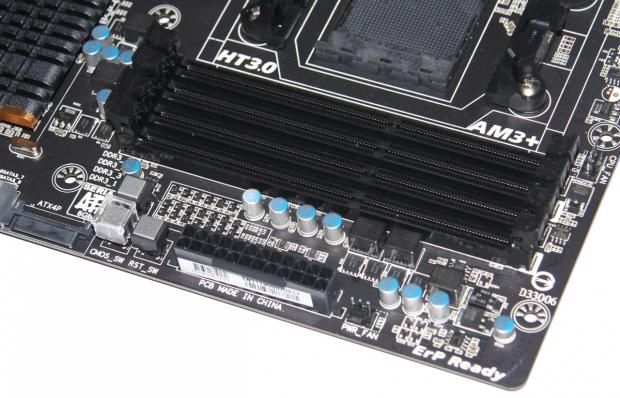
As we leave the bottom of the board and start to head towards the top corner, we can see our four RAM slots. We've got support for up to 32GB of DDR3 memory in Dual Channel mode. GIGABYTE offer support for 1066 / 1333 / 1600 / 1866 / 2000MHz DDR with 2000MHz DDR being achieved when overclocking your CPU.
 39
39Below our RAM slots we've got our main 24-Pin power connector and next to that we've got three little switches that make turning your PC on, off and resetting it easy. The third button which has a little cap over it gives us the ability to reset the CMOS easily in case you go a little too crazy when overclocking.
 39
39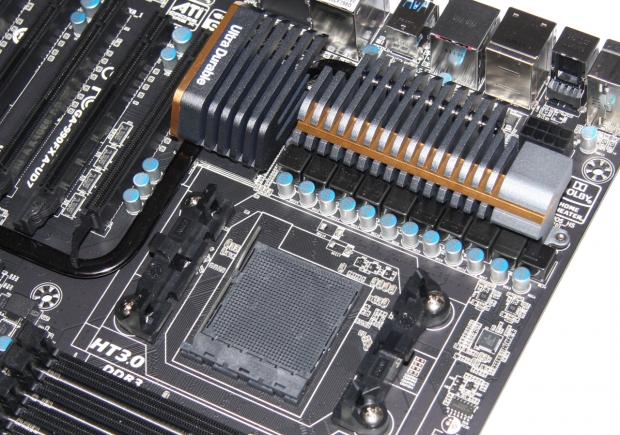 39
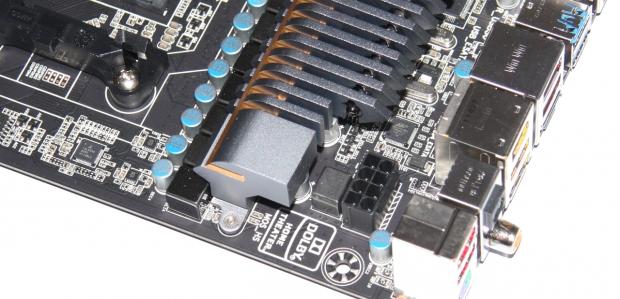
39Moving around the CPU area, we can see our main 8-Pin power connector tucked between one of the main heatsinks. As for the CPU area, we can see the socket itself and plenty of room for those large coolers.
 39
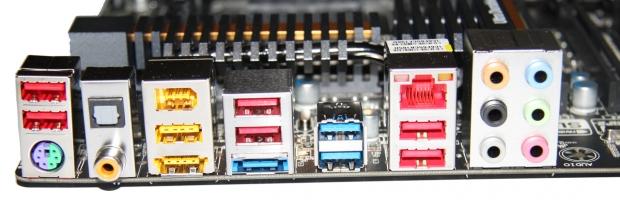
39Looking at the connectivity side of things, we've got a PS/2 combo port, seven USB 2.0 ports controlled by the AMD South Bridge, two USB 3.0 ports in blue which are controlled by the Etron EJ168 chip, and a 1394 FireWire port running off the VIA VT6308 chip. There are also two eSATA ports with one being a eSATA / USB combo one controlled via the Marvell 88SE9172. There's a strong lineup of audio connectivity as well, which runs of the Realtek ALC889 codec and supports HD Audio, 7.1 and Dolby Home Theater.
BIOS
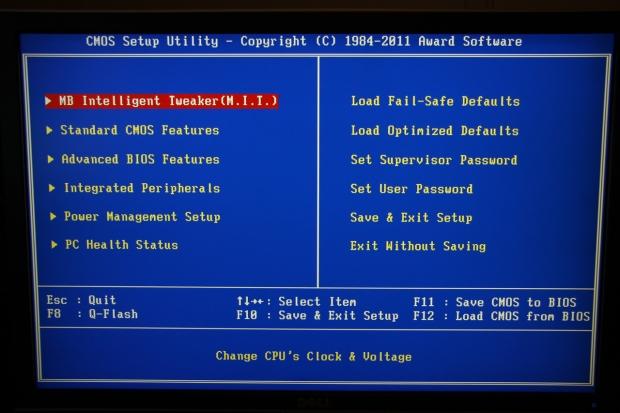
Looking at the BIOS, you're not going to see anything too out of the ordinary thanks to the Award system being used. Going through all the areas, you're going to find your main overclocking features under the MB Intelligent Tweaker section.
 39
39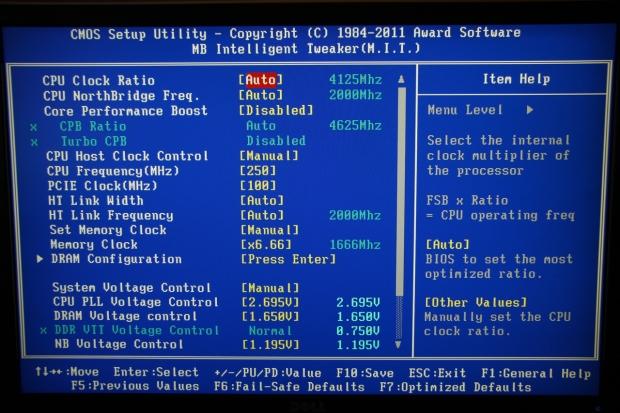 39
39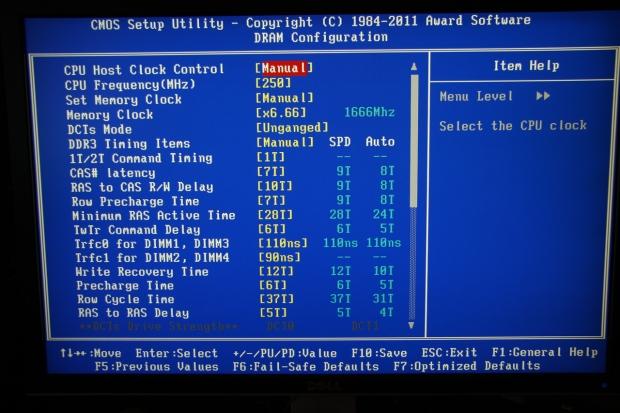 39
39 39
39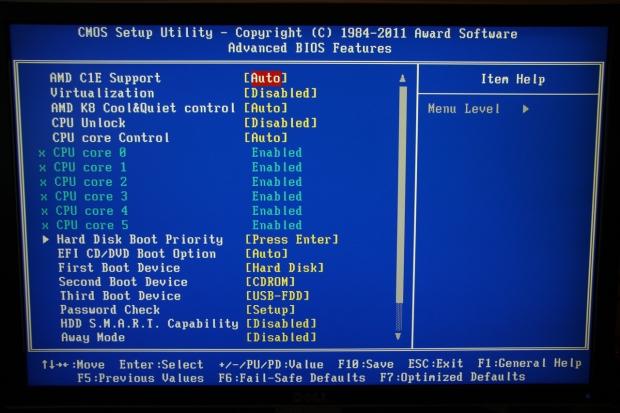 39
39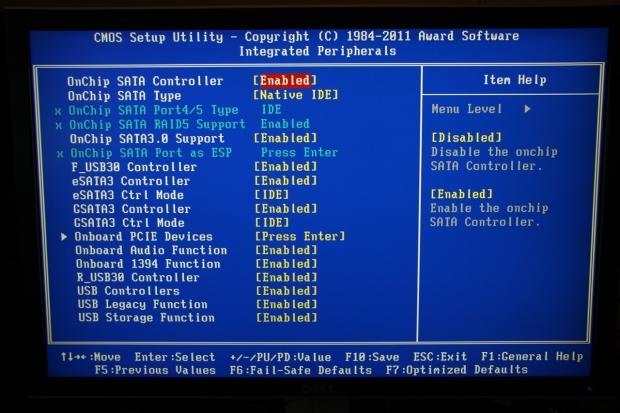 39
39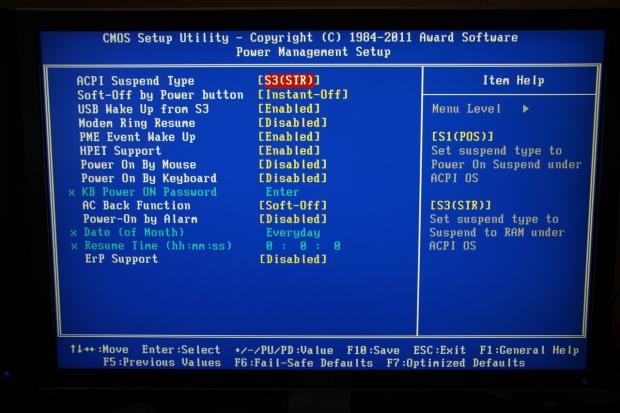 39
39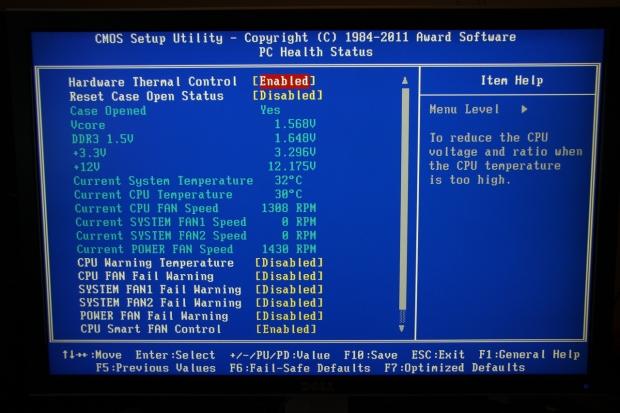 39
39Moving through the rest of the categories, you've got a lot of the onboard features, peripherals, PC Health and all that other stuff you're really used to seeing. You can get a good idea of everything from the pictures above, but really, you shouldn't be too out of your comfort zone if you've used a GIGABYTE BIOS in the last few years.
Test System Setup and Overclocking
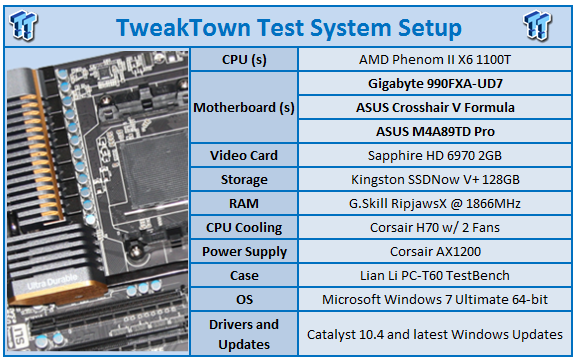 39
39We would like to thank the following companies for supplying and supporting us with our test system hardware and equipment: Intel, ASRock, Kingston, Mittoni, Noctua and Corsair.
As for the testbed itself, nothing has changed since the last 990FX board we looked at with our trusty Phenom II X6 1100T being used today. Before we get into the performance side of things, though, the first thing we need to do is look at overclocking and see how we went with our GIGABYTE 990FXA-UD7.
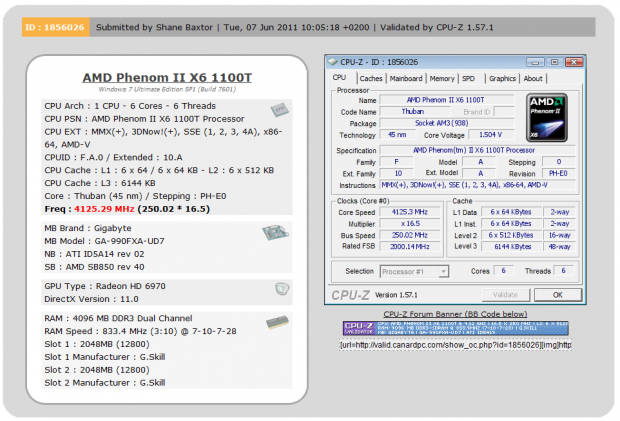 39
39We ended up getting our 1100T to just over 4.1GHz with the final clock coming in at 4125MHz via a 250MHz FSB. This was a strong overclock and one of the better we've achieved with our 1100T.
With everything up and running, it's time to see just what kind of performance we can achieve with the GIGABYTE 990FXA-UD7 at both stock and overclocked against a couple of other extra AMD boards we've been using recently.
Let's get started!
CPU Benchmarks
AIDA64
Version and / or Patch Used: 1.00.1035BETA
Developer Homepage: http://www.aida64.com
Product Homepage: http://www.AIDA64.com
Buy It Here
Replacing Everest in our labs is AIDA64. This new testing suite is from the core development team from Lavalys and continues that tradition. The guys have thrown in better support for multithreaded CPUs as well as full 64 bit support. We use this to test memory and HDDs for now, but may find ourselves opening this up to other areas of the motherboard.
 39
39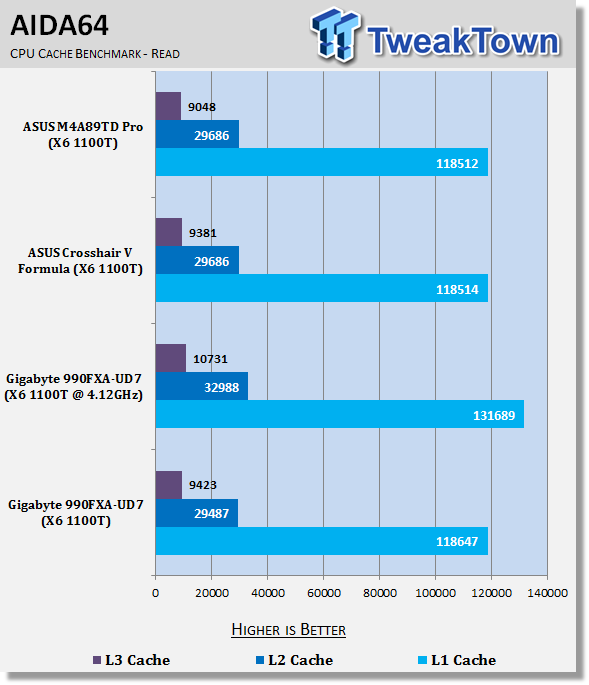 39
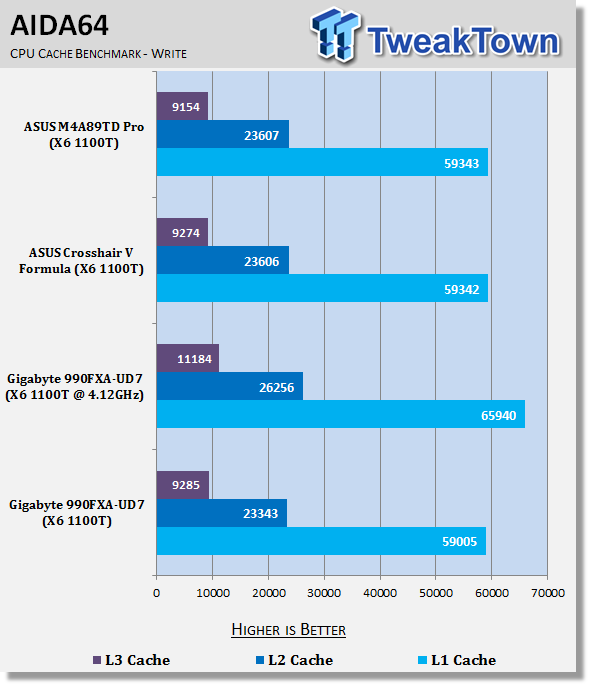
39Under AIDA64 we can see some strong CPU performance coming from our 1100T here. When overclocked, though, you can see a really nice performance boost in both write and read cache speeds.
CPU Benchmarks Continued
HyperPi 0.99
Version and / or Patch Used: 0.99
Developer Homepage: www.virgilioborges.com.br
Product Homepage: www.virgilioborges.com.br
Download It Here
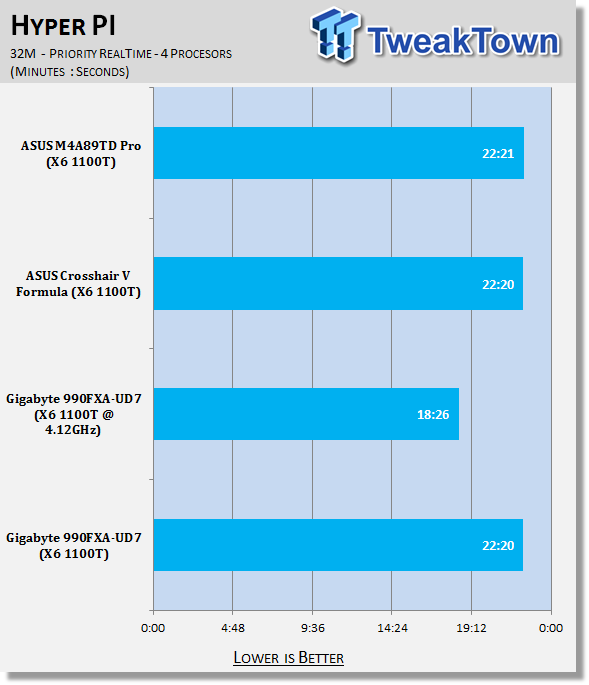
HyperPi is a front end for SuperPi that allows for multiple concurrent instances of SuperPi to be run on each core recognized by the system. It is very dependent on CPU to memory to HDD speed. The faster these components, the faster it is able to figure out the number Pi to the selected length.
For our testing we use the 32M run. This means that each of the four physical and four logical cores for the i7 and the four physical cores of the i5 is trying to calculate the number Pi out to 32 million decimal places. Each "run" is a comparative to ensure accuracy and any stability or performance issues in the loop mentioned above will cause errors in calculation.
 39
39At stock Hyper PI performance doesn't hold any surprises. You can see we get a really strong boost in performance when it comes to overclocking, with a much improved time on our 32M test.
AutoGK
Version and / or Patch Used: 2.55
Developer Homepage: http://www.autogk.me.uk/
Product Homepage: http://www.autogk.me.uk/
Download It Here
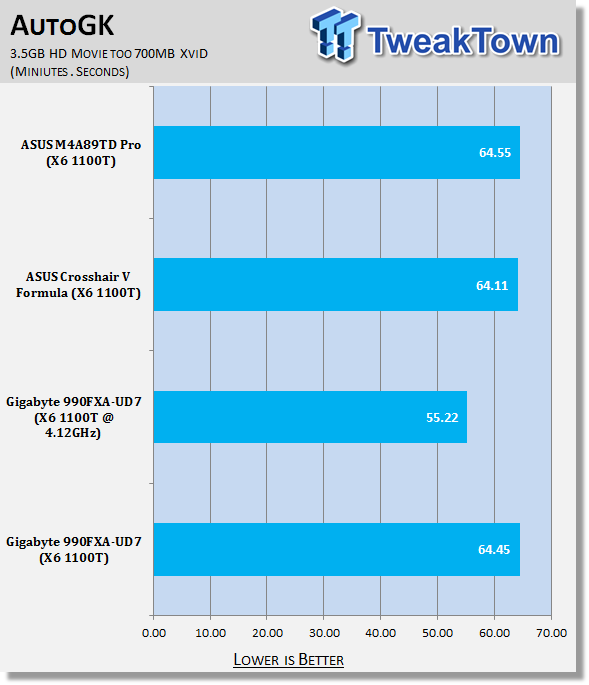
AutoGK stands for Auto Gordian Knot; it is a suite of transcoding tools that are compiled into an easy to install and use utility. It allows you to transcode non-protected DVDs and other media to Xvid or Divx format. For our testing purposes we use a non-DRM restricted movie that is roughly 2 hours in length. This is transcoded to a single Xvid AVI at 100% quality.
 39
39Looking at AutoGK, we can see that reference performance performs where we would expect it to. Cranking up the clock speeds, though, you can see we're able to shave almost 10 minutes off our encoding time.
Storage Benchmarks
AIDA64
Version and / or Patch Used: 1.00.1035BETA
Developer Homepage: http://www.aida64.com
Product Homepage: http://www.AIDA64.com
Buy It Here
Replacing Everest in our labs is AIDA64. This new testing suite is from the core development team from Lavalys and continues that tradition. The guys have thrown in better support for multithreaded CPUs as well as full 64 bit support. We use this to test memory and HDDs for now, but may find ourselves opening this up to other areas of the motherboard.
 39
39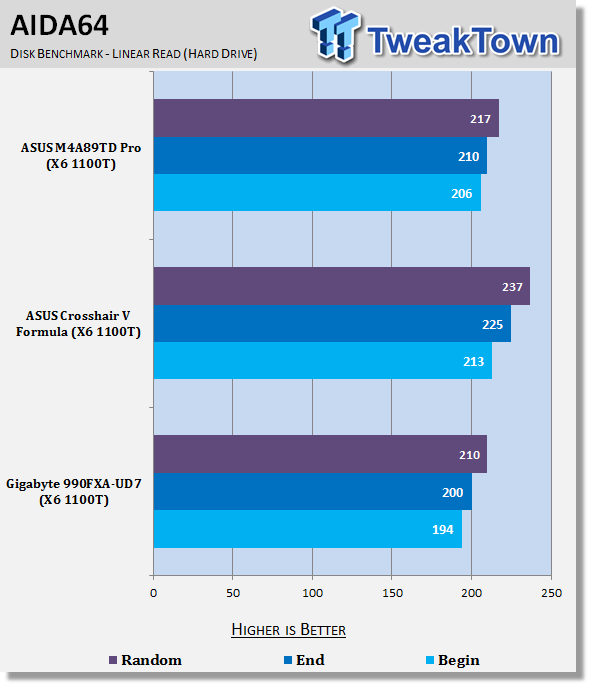 39
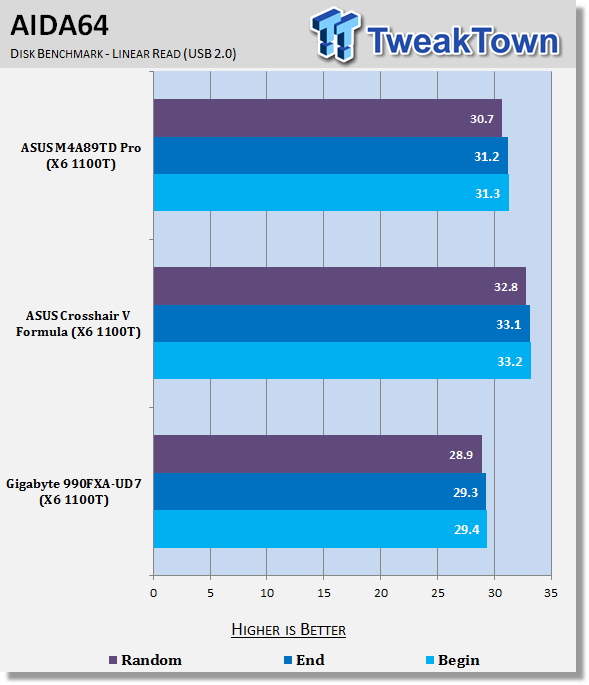
39SSD performance is strong, but sits a little behind our Crosshair V offering. The same can be seen with our USB 2.0 performance which sits a little behind. It's nothing too major, but something indeed worth noting.
Note: We've just updated as to the reason GIGABYTE's HDD performance is a little lower. By default they offer IDE mode instead of AHCI. While it's a little slower, it does add a wider range of compatibility. Of course, the option to change to AHCI is available.
Memory Benchmarks
Sisoft Sandra
Version and / or Patch Used: 2011
Developer Homepage: http://www.sisoftware.net
Product Homepage: http://www.sisoftware.net
Buy It Here
 39
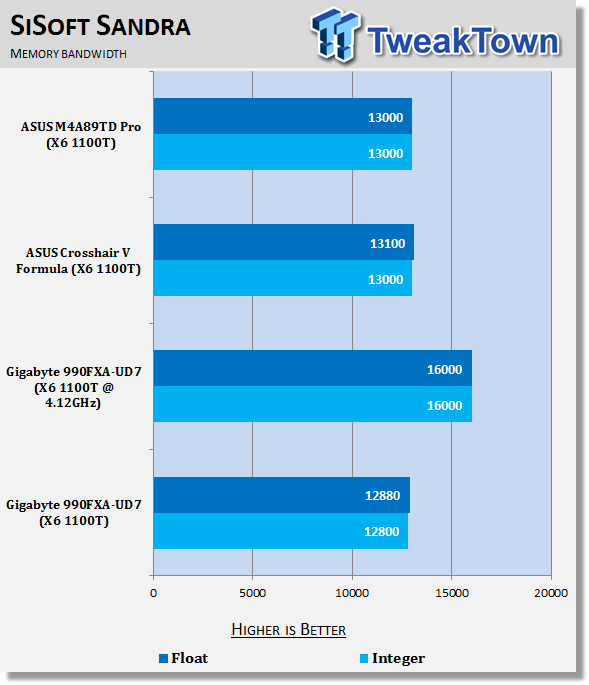
39Looking at memory performance, you can see when overclocked we get a really strong boost in performance.
AIDA64
Version and / or Patch Used: 1.00.1035BETA
Developer Homepage: http://www.aida64.com
Product Homepage: http://www.AIDA64.com
Buy It Here
Replacing Everest in our labs is AIDA64. This new testing suite is from the core development team from Lavalys and continues that tradition. The guys have thrown in better support for multithreaded CPUs as well as full 64 bit support. We use this to test memory and HDDs for now, but may find ourselves opening this up to other areas of the motherboard.
 39
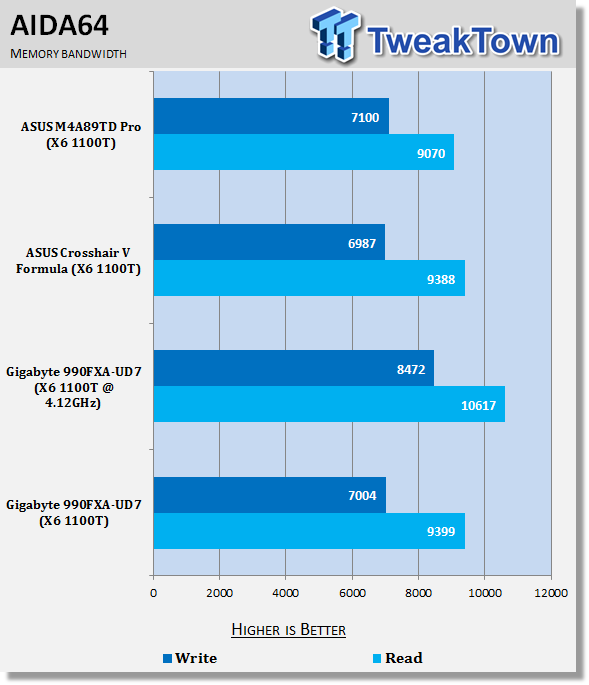
39Looking under AIDA64, you can see just the kind of performance boost we're able to get when overclocking. Even with the memory speed dropped a little to achieve a higher clock speed, you can see overall performance is very strong because of the strong overclock we've managed to achieve.
Gaming Benchmarks
3DMark 11
Version and / or Patch Used: 1.0
Developer Homepage: http://www.futuremark.com
Product Homepage: http://www.3dmark.com/3dmark11/
Buy It Here
3DMark 11 is the latest version of the world's most popular benchmark. Designed to measure your PC's gaming performance 3DMark 11 makes extensive use of all the new features in DirectX 11 including tessellation, compute shaders and multi-threading. Trusted by gamers worldwide to give accurate and unbiased results, 3DMark 11 is the best way to consistently and reliably test DirectX 11 under game-like loads.
 39
39Aliens vs. Predator
Version and / or Patch Used: Standalone Benchmark
Timedemo or Level Used: Built in Benchmark
Developer Homepage: http://www.rebellion.co.uk/
Product Homepage: http://www.sega.com/games/aliens-vs-predator/

Aliens vs. Predator is a science fiction first-person shooter video game, developed by Rebellion Developments, the team behind the 1999 original PC game, and published by Sega for Microsoft Windows, the PlayStation 3 and the Xbox 360. The game is based on the Alien vs. Predator franchise, a combination of the characters and creatures of the Alien franchise and the Predator franchise. There are three campaigns in the game, one for each race/faction (the Predators, the Aliens and the Colonial Marines), that, while separate in terms of individual plot and gameplay, form one overarching storyline.
Following the storyline of the campaign modes comes the multiplayer aspect of the game. In this Multiplayer section of the game, players face off in various different gametypes in various different ways.
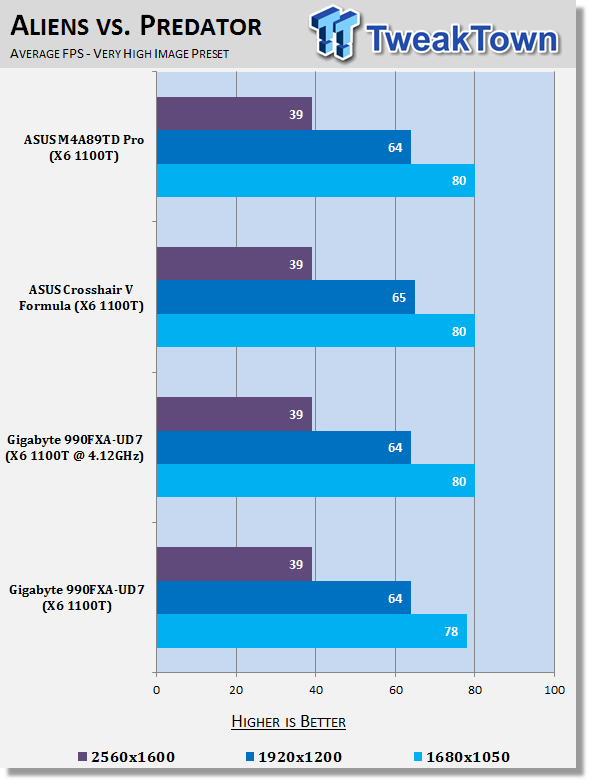 39
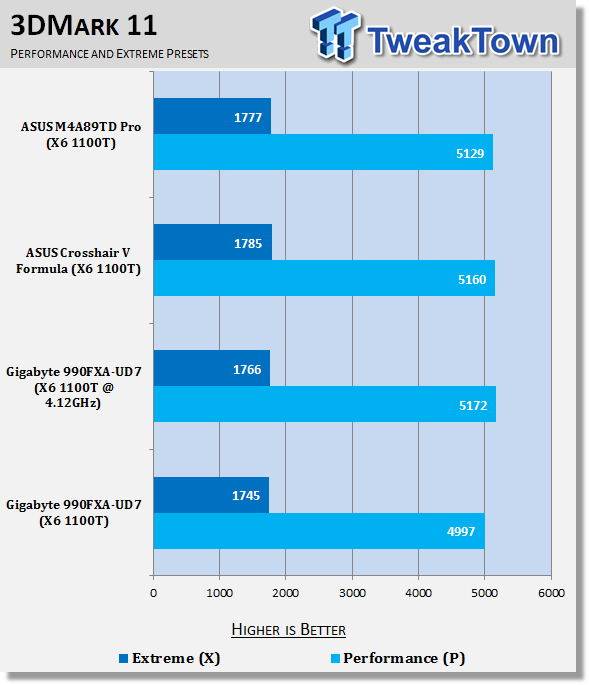
39Firing up some 3D benchmarks, you can see that performance between all the setups is very similar with not much separating them. Overclocking helps boost our Performance 3DMark 11 score slightly, but it's nothing major.
Temperature and Power
Core Temperature
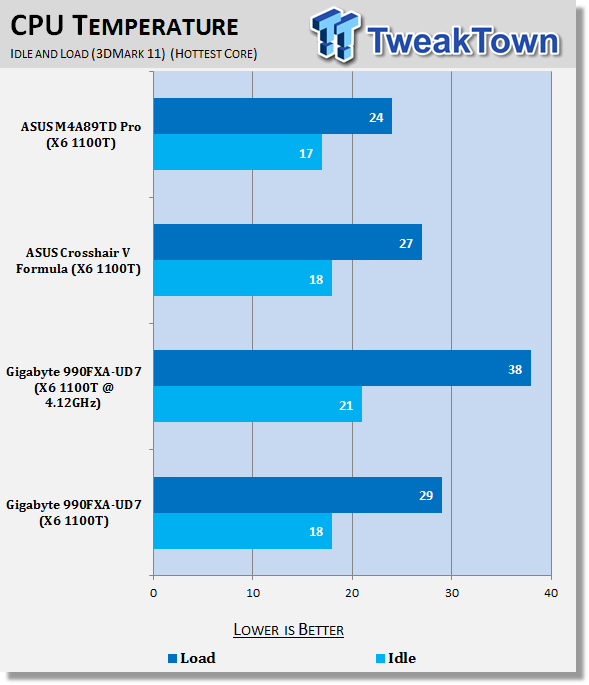 39
39CPU temperatures look pretty good. At stock it lines up with our other setups with not much changing between them. Overclocked, we can see our temps do indeed rise, but they're still at a very good level and our Corsair H70 cooler does a good job on it.
Power Draw Tests
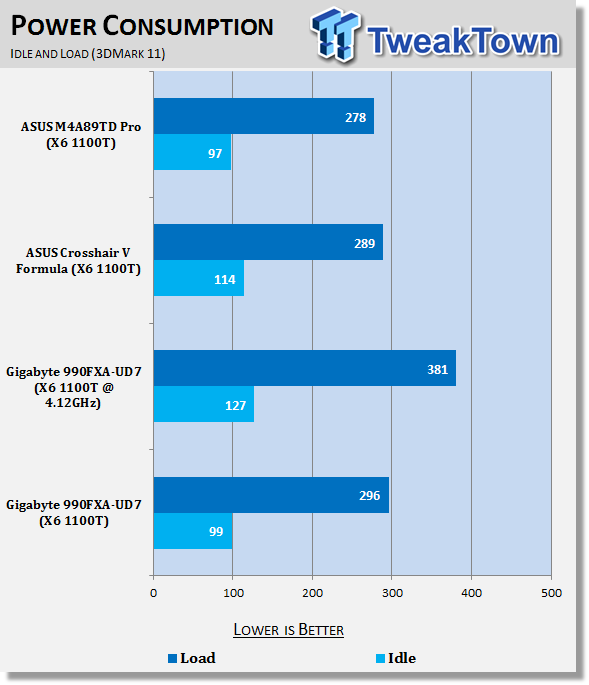 39
39At stock power draw is where you'd expect it to be. When overclocked we see power draw indeed jump up, but it's nothing worrying and anyone interested in overclocking should have a decent 600 Watt PSU as it is.
Final Thoughts
While we still find ourselves waiting for the Bulldozer CPU from AMD, we can start to have some fun with part of the platform that will make up the Bulldozer platform a little later in the year. The 990FX chipset doesn't offer heaps over the 890FX chipset, but does offer a couple of extra features and tweaks. Probably a bit like the Z68 chipset from Intel does over the P67 one.
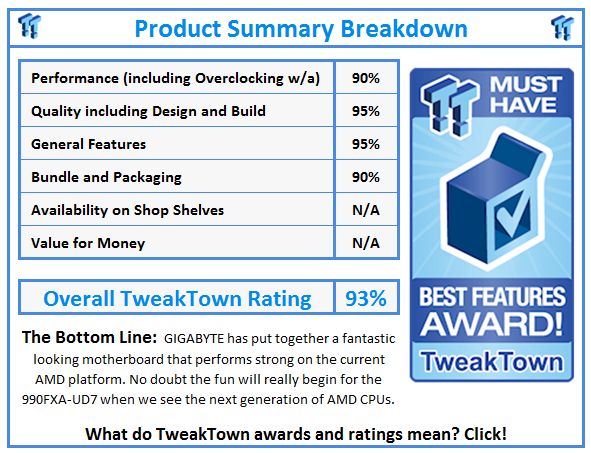
Getting a bit more specific on the board we have here today, the 990FXA-UD7 from GIGABYTE is a great board. Performance is strong, we've got a bunch of stuff in the bundle and the board itself just looks fantastic. GIGABYTE knows how to create a good looking board and considering how shallow most of us are these days, it's indeed very appreciated.
The decision to go down the mass x16 path when it comes to the PCI-E slots is also a good one since the slots can of course handle cards that are smaller and run off PCI-E x4 or x1 connectivity. The layout gives us the option to install up to four video cards, though, and while that ability may feel a little wasted at the moment on the current AMD architecture, it's going to be appreciated later down the track when we see new CPUs from AMD.
All in all, GIGABYTE have put together a really good board here and if you're a GIGABYTE fan you're going to appreciate the styling that we're used to seeing on their Intel based boards. Not only does the UD7 perform well with good out of the box performance and also a strong overclock, it really looks the part too. There's not a whole lot more we could ask for from a motherboard.
 United
States: Find other tech and computer products like this
over at
United
States: Find other tech and computer products like this
over at  United
Kingdom: Find other tech and computer products like this
over at
United
Kingdom: Find other tech and computer products like this
over at  Australia:
Find other tech and computer products like this over at
Australia:
Find other tech and computer products like this over at  Canada:
Find other tech and computer products like this over at
Canada:
Find other tech and computer products like this over at  Deutschland:
Finde andere Technik- und Computerprodukte wie dieses auf
Deutschland:
Finde andere Technik- und Computerprodukte wie dieses auf  NVIDIA and Foxconn expect results this year for AI factories, smart manufacturing, AI smart EVs
 ASML ships its second High-NA EUV lithography machine to a mystery client, Intel was first
 NVIDIA's new SFF gaming PC ecosystem could be a test for a GeForce-powered console
 DLSS comes to three new games, Manor Lords sees a 47% average boost to performance in 4K
 Razer Firefly V2 Pro announced, 'the world's first LED backlit gaming mouse mat'
 Samsung G8 34-inch QD-OLED Gaming Monitor Review - 175Hz for $900
 ASRock NUCBOX-155H Mini PC Review
 NuPhy Air96 V2 Wireless Mechanical Keyboard Review
 TEAM T-FORCE Siren DUO360 RGB Liquid CPU Cooler Review
 AVerMedia Live Streamer ULTRA HD Review
 AVerMedia Live Gamer 4K 2.1 Review
 XPG Invader X Mid-Tower Chassis Review
 Intel Core i9-14900KS CPU Review
 Arbiter Polar 65 Magnetic Gaming Keyboard Review
 ASUS ROG Falchion RX Low Profile Keyboard Review
 Everything you need to know about the latest ASUS NUC Mini PCs - NUC 14 Pro and ROG NUC
 How to Overclock Your GPU and Boost Your PC Gaming with ASUS GPU Tweak III
 ASUS's AMD Radeon RX 7000 Series GPU lineup has something for every gamer
 ASUS OLED Premium Care defends the ROG Swift OLED PG32UCDM gaming monitor from burn-in
 Patriot Viper Xtreme 5 Engineering Prototype 48GB Dual-Channel Memory Kit Preview