

Introduction

Back in the days of the Conroe CPUs, I compared Intel to a charging rhino. They are a big company that has a lot of weight and momentum behind them. Often there are times it can be hard for them to change direction, but once they are on a course they can build up quite the momentum.
If you have ever seen a rhino charge and hit something squarely (even on TV), you will also know they can have quite an impact. Ever since the launch of Conroe Intel has been building up momentum behind their CPU designs and just like that rhino they have hit the market with quite an impact. On the heels of Conroe came Nehalem, then Lynnfield, then Clarkdale, and now we have a new name to drop on the market.
Sandy Bridge brings a few new things to the table along with a new socket and chipset. Some may be annoyed at the need for a completely new motherboard to support the new chip (AMD will especially like to point this out), but others will see it as a continued evolution in the process. No matter where you sit on this one, you will be looking at a new P67 or H67 if you plan to pick up a Sandy Bridge CPU.
But in addition to the new chipset, Sandy Bridge also brings some new innovations; the GPU is no longer an add-on but has become a part of the CPU itself. We also see improved instructions, a closed power gate (which has a few side effects) and more that we will cover in detail later in the review.
Will Sandy Bridge have the same impact as the others? - That is something we will find out now as we introduce both the socket 1155 Core i7-2600K and the Core i5-2500K CPUs to you.
What's New
As a part of Intel's "Tick Tock", the new Core i5-2500K and Core i7-2600K are a new design on a tested process. What does that mean? Well, Intel typically moves to a new process or die shrink with an existing design (with some improvements) to help alleviate problems that could arise from trying to reduce transistor size AND build a new CPU. The first CPUs built on the 32nm process that Sandy Bridge will use were the Nehalem based Westmere CPUs. Again, this was an extension of the Nehalem microarchitecture while Sandy Bridge is something new.


The first new item on the list (besides the 32nm process) is the inclusion of a GPU right inside the CPU die. This is not like the Clarkdale CPUs where the GPU was tacked onto the CPU packaging. Here we see the GPU as an integrated part of the CPU (it even shares the same cache as the CPU cores). The new HD 2000/3000 GPU is capable of supporting 3D Stereoscopic Blu-ray playback at 1080p over HDMI along with the usual HD audio. You also get DX10.1 (sorry no DX11 just yet) and Open GL 3.0 support and 3D gaming support.

The HD 2000/3000 not only shares the cache of the CPU, but also is directly connected to the CPU cores. This allows for much faster response and processing of data between the two components as well as fast access to the shared system memory. For those of you thinking about OpenCL and GPU processing, we are not sure if you will be getting that at this stage. After all, you do not get full OpenCL support until DX11. That does not mean you are not getting some in hardware processing, though.
Looking things over, it seems that Intel has made some significant changes to the way certain items are handled by the GPU. On the Clarkdale most of your video processing was done by software. With Sandy Bridge everything is moved into hardware; Intel calls this Quick Sync Video. This new GPU bound technology will be available in more than a few software titles this year.


Another new feature (and one we expect from new CPUs) is an improved power design. Intel has created a new power algorithm that allows them to combine the CPU, GPU and many functions of the Northbridge into a single monolithic die that still fits into a 95W TDP envelope (even less on the mobile CPUs). This new power algorithm is tied into the Turbo Boost 2.0 feature and can dynamically allocate power to both the CPU and GPU as needed. This comes into play with single threaded applications that may be graphics intensive (like some older games), but does have a small drawback.
If you remember with Clarkdale there were certain issues with overclocking if you were using the built-in graphics. This was due to the way the CPU allocated power between the two separate pieces (CPU and GPU). With Sandy Bridge the CPU and GPU are part of one monolithic die. They share cache and also power gates. Because of this Intel has had to lock the power gates to the BCLK; this prevents almost all BLCK overclocking as any adjustment to the 100MHz BCLK can throw the power system into disarray.
That does not mean you can't overclock, it just means that you will have to stick with kicking up the multiplier instead of adjusting the internal BCLK. We will show you what we mean a little later in our overclocking section.

Next up on the "new" list is a new set of instructions called AVX or Advanced Vector Extension. This new set of instructions allows for "enhanced floating point intensive application performance". This is an extension of the existing x86 instruction set and pushes the SMID registers from 128 to 256-bits. Additional features of this new set of instructions are the ability to combine two operands (instructions) to be combined into a three part group where the destination or outcome is a completely different register than exists in the original two instruction group.
For example, if you have X:=X+Y, AVX can change this to Q:=X+Y. This maintains the integrity of the operands in the original two registers. This type of instruction is great for workloads that require intensive number crunching. It also happens to be great for multi-media and content creation; both of which happen to be about number crunching when you boil everything else away.

There are other items that are in the new Sandy Bridge, things like a new socket where they've moved from the 1156 to 1155 (because of the inclusion of the GPU). But when it all comes down to it, Sandy Bridge is all about multi-media. Whether it is watching a Blu-ray movie, encoding video for YouTube, or playing a game, Intel has built this new CPU with those features and market demands in mind. Even the new AVX instructions are aimed at content consumption and creation. Now it is up to us to see if it can live up to Intel's claims.
Overclocking
We have told you before (even before this article) that you will not be able to overclock the new Socket 1155 CPU by BLCK. This is because of the way the power gates and the power system in general is designed. That does not mean you cannot kick up the multiplier, though.
When we took our Core i7-2600K for its initial spin we were able to push it up to 4.7GHz (47x100). This was accomplished at 1.425 Volts and everything was rock solid. In fact, it was not that hard to get this speed. We were able to do a full OC using the stock Multiplier and then again adjusting the individual cores to a 48 Multi. Not much to it really. Memory clocking was much simpler as we were able to just set it at 1600MHz and run instead of trying to find the right divider for stable memory performance.


The Core i5-2500K was just as simple to kick into high gear. We started out with the same voltage settings and tried for a 50 multiplier. However, at this speed and voltage we could not even post and had to reset the BIOS to go on. After we were finished with that we tried for something a little lower (47). This proved to be our max on this CPU as anything over that speed resulted in blue screens and reboots. Still, going from 3.3GHz to 4.7GHz is nothing to be sneezed at.
You can check out the validation link for the new i5 2500K here and the Core i7-2600K here.
Important Editor Note: Our maximum overclocking result is the best result we managed in our limited time of testing the motherboard. Due to time constraints we weren't able to tweak the motherboard to the absolute maximum and find the highest possible FSB, as this could take days to find properly. We do however spend at least a few hours overclocking every motherboard to try and find the highest possible overclock in that time frame. You may or may not be able to overclock higher if you spend more time tweaking or as new BIOS updates are released. "Burn-in" time might also come into play if you believe in that.
Test System Setup and Comments
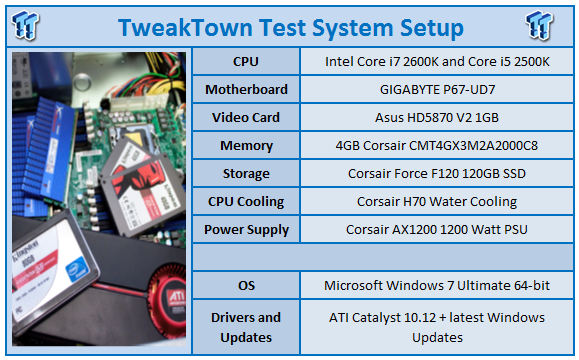
We would like to thank the following companies for supplying and supporting us with our test system hardware and equipment: GIGABYTE, ASUS, Intel, Corsair and Sceptre.
The new 1155 socket CPUs are interesting to work with. Dropping them in, you can see a pretty healthy boost in performance over some of the existing CPUs right out of the gate. But then again, that is to be expected when you are looking at a new CPU design. In fact, we would be slamming Intel right now if there was no performance gain to be seen.
Of course, there is more to the story than just the CPUs. As we have talked about in early coverage of the new chipset, we are seeing a few nice features added into the P67 chipset. It is these in combination with the 1155 CPUs that are responsible for the performance increases. But, there are some draw backs.
Our test platform (the GIGABYTE P67-UD7) seemed a little immature as far as the BIOS went. We also noticed that we had memory issues when we ran our Corsair DDR3 memory at over 1.62 volts on many of the P67 boards we have in the lab. These are items that will be resolved in time with work on the BIOS' that control these boards. But for now, they are something to be aware of.
As for overclocking, we have already told you that we had to use the multiplier to get the speeds we did. We had to re-learn to overclock with these new CPUs. Thankfully, they are very easy to OC. After all, in a little less than 30 minutes per CPU we had them running at 4.7GHz. In all we hope to see some improvements on the platform to take advantage of the speed and performance potential of the Sandy Bridge CPUs.
Synthetic Tests - Part I
With any system you will want to see a combination of synthetic testing and real-world. Synthetics give you a static, easily repeatable testing method that can be compared across multiple platforms. For our synthetic tests we use Everest Ultimate, Sisoft Sandra, FutureMark's 3DMark Vantage and PCMark Vantage, Cinebench as well as HyperPi. Each of these covers a different aspect of performance or a different angle of a certain type of performance.
Memory Bandwidth
Memory is a big part of current system performance. In most systems slow or flakey memory performance will impact almost every type of application you run. To test memory we use a combination of Sisoft Sandra and HyperPi 0.99.
Sisoft Sandra
Version and / or Patch Used: 2011
Developer Homepage: http://www.sisoftware.net
Product Homepage: http://www.sisoftware.net
Buy It Here

Well, look at what we found here. The new Core i7 2600K and Core i5 2500K have some impressive memory performance. We see them at the top of the pack for stock speeds and even manage to pass up some of the overclocked CPUs we tested.

We also see a rather impressive showing from the new Sandy Bridge CPUs here. Even the stock 2500K gives the 875K a run for its money in many of our tests.
HyperPi 0.99
Version and / or Patch Used: 0.99
Developer Homepage: www.virgilioborges.com.br
Product Homepage: www.virgilioborges.com.br
Download It Here
HyperPi is a front end for SuperPi that allows for multiple concurrent instances of SuperPi to be run on each core recognized by the system. It is very dependent on CPU to memory to HDD speed. The faster these components, the faster it is able to figure out the number Pi to the selected length.
For our testing we use the 32M run. This means that each of the four physical and four logical cores for the i7 and the four physical cores of the i5 is trying to calculate the number Pi out to 32 million decimal places. Each "run" is a comparative to ensure accuracy and any stability or performance issues in the loop mentioned above will cause errors in calculation.
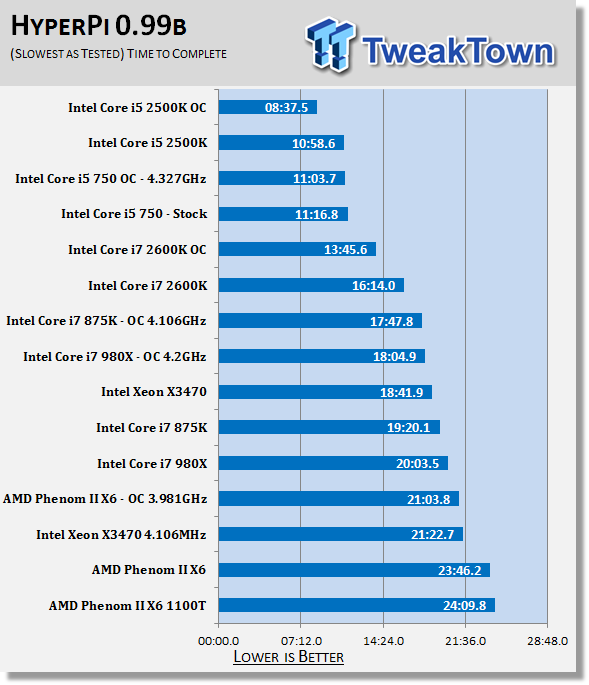
HyperPi is one of those tests that doesn't seem to make any sense. After all, it is only calculating the number Pi out to a certain number of decimal places, right? That is a fairly simple math when you think about it. However, what we see here with the Core i7 and Core i5 Sandy Bridge CPUs is that they are more than up to the higher level calculations.
Before with the HT enabled Lynnfield and even Nehalem CPUs HyperPi would drag them down fairly quickly, as each CPU core tried to calculate the number Pi out to 32 million decimal places twice. Here we see this trend begin to vanish as the HT enabled 2600K performs exceptionally well. This could be a good indication of performance later on, especially with items like ray tracing and rendering.
Synthetic Tests - Part II
Here is where we dig out the FutureMark tests.
PCMark Vantage
Version and / or Patch Used: 1.0.2.0
Developer Homepage: http://www.futuremark.com/
Product Homepage: www.futuremark.com
Buy It Here
For overall system performance we use PCMark Vantage. This is run in both x86 and x64 mode to give the best indication of performance.
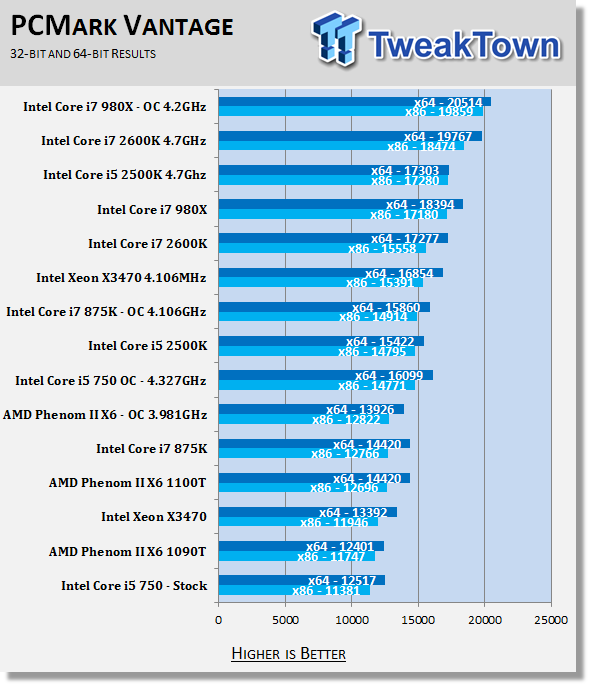
Once again, all I can say is, impressive! - This showing is an indication that the new Sandy Bridge CPUs are more than up to the task of performing general computing. As there are also some encryption/decryption and encoding tasks running here, we can be fairly certain that Intel has geared this new CPU towards the top market demands. In other words, the new Core i5 and Core i7 CPUs are already set to do the things that people want, such as encrypt their files, decrypt movies (for viewing) and also transcoding video and audio to different formats.
3DMark 11
Version and / or Patch Used: 1.0.1
Developer Homepage: http://www.futuremark.com/
Product Homepage: http://www.3dmark.com
Buy It Here
For synthetic gaming tests we used the industry standard and overlockers bragging tool 3DMark 11. This is a test that strives to mimic the impact modern games have on a system. Futuremark went a long way to change from the early days of graphics driven tests to a broader approach including physics, AI and more advanced graphics simulations.
3DMark 11 uses the DX11 API in addition to having support for Physics run from the CPU, not PhysX. This puts things on a semi neutral ground as neither GPU can gain an advantage from proprietary code. .
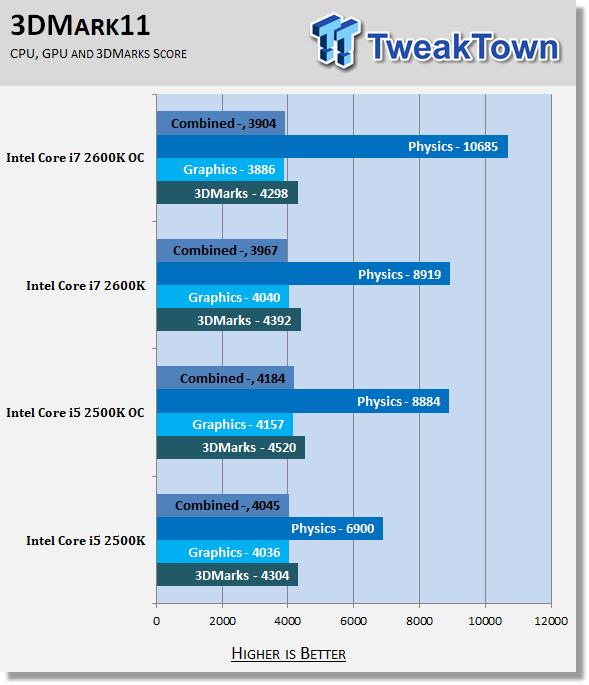
The numbers here are not bad at all. They would appear to indicate that the Sandy Bridge Core i5 and Core i7 will not give you any grief in terms of gaming. We also do want to note that this review does not cover the GPU side of Sandy Bridge. That will be handled later in other reviews for the H67 chipset and will also be covered by Shane Baxtor, our resident GPU reviewer.
Cinebench R11.5 x64
Version and / or Patch Used: R11.5 x64
Developer Homepage: http://www.maxon.net/
Product Homepage: www.maxon.net
Download It Here
Cinebench is a synthetic rendering tool developed by Maxon. Maxon is the same company that developed Cinema4D, another industry leading 3D Animation application. Cinebench R11.5 tests your systems ability to render across a single and multiple CPU cores. It also tests your systems ability to process OpenGL information.
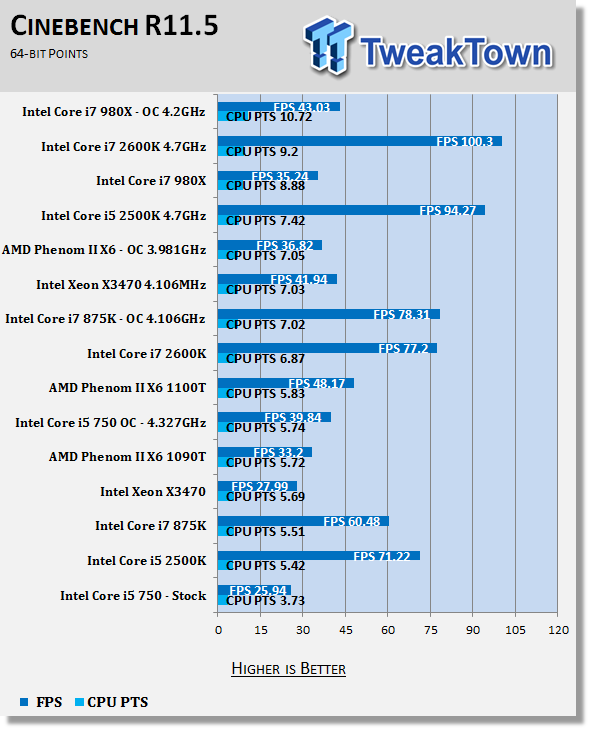
With Cinebench we see that the new Sandy Bridge CPUs can still do quite well. The 2500K is not in the lead, but the 2600K shows up in front of all but the 980X at stock speeds and right behind the 980X at 4.7GHz.
Real-World Tests - Part I
Real-world testing allows us to see how well a product will perform when used in the same manner as it would be in your house or office. It is an important side to performance testing as it can uncover hidden glitches in the way a product performs.
It is especially true when testing a mainboard; there are so many components of a board that have to interact that any problems between parts can cause a failure of the whole.
For real-world testing we use some common applications and functions. We test with LightWave 3D for rendering performance, AutoGK for transcoding from DVD to AVI and two games for gaming testing.
Rendering
Rendering of 3D Animation is a system intensive endeavor. You need a good CPU, memory and HDD speed to get good rendering times. For our testing we use LightWave 3D. This software from Newtek is an industry standard and has several pre-loaded scenes for us to use.
LightWave 3D
Version and / or Patch Used: 9.6
Developer Homepage: http://www.newtek.com
Product Homepage: http://www.newtek.com/lightwave/
Buy It Here
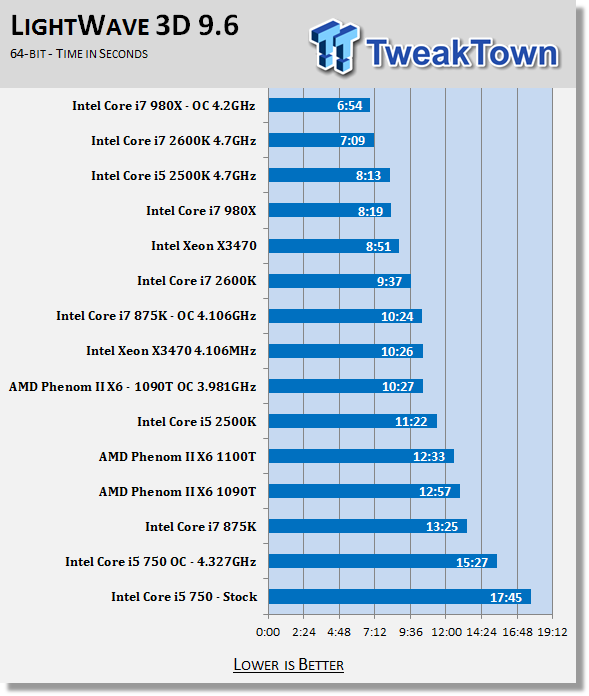
This is one of those times when all you can say is "wow". The new 2600K and 2500K perform very well here with LightWave and the ray tracing heavy frame we use for testing. Much of this has to do with memory and inter core efficiency. To see the 2600K only 5 seconds behind the 980X in this test is simply impressive.
AutoGK
Version and / or Patch Used: 2.55
Developer Homepage: http://www.autogk.me.uk/
Product Homepage: http://www.autogk.me.uk/
Download It Here
AutoGK stands for Auto Gordian Knot; it is a suite of transcoding tools that are compiled into an easy to install and use utility. It allows you to transcode non-protected DVDs and other media to Xvid or Divx format. For our testing purposes we use a non-DRM restricted movie that is roughly 2 hours in length. This is transcoded to a single Xvid AVI at 100% quality.
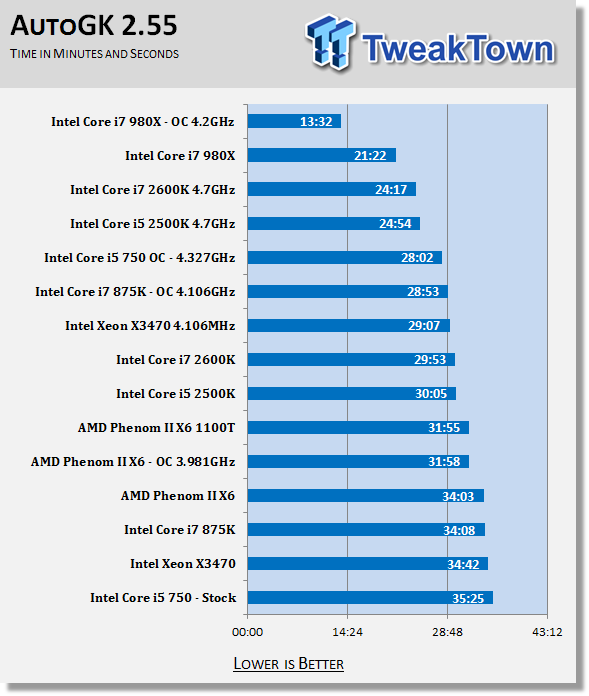
Once again we see the computational power (plus improved memory and inter core performance) show its head. Even without Intel's Quick Sync Video instructions running (AutoGK does not support them) we get a very nice improvement over the older CPUs in the mid-range class.
We will be diving into Quick Sync in a future article to see what we can get out of it, but for now it is nice to know that you will still get a decent performance boost with current transcoding apps from either of these two CPUs.
Adobe Lightroom 2.7 x64
Version and / or Patch Used: 2.7
Developer Homepage: http://www.adobe.com/
Product Homepage: http://www.adobe.com/products/photoshoplightroom/?promoid=DJGSN_P_US_FP2_LR_MN&tt=P_US_FP2_LR_MN/
Buy It Here

This is a new test to TweakTown for CPUs, but it is one that we have been asked about by readers and also OEMs; using Adobe's Lightroom (or another application) to convert large RAW images to JPEG.
For our testing we converted 100 15.1 Megapixel image files (just over 2GB of data) to the JPEG format (1280x853 resolution 72DPI) and timed how long it took to complete this. This test is a good real world test as more people take high resolution images and convert them for e-mail and the web.


Once more, very nice performance here by the Core i7-2600K and Core i5-2500K. Intel has really gotten things together for a wide range of consumers.
Final Thoughts
Intel is certainly on the right path with Sandy Bridge. They used the information gained from both Lynnfield and Clarksdale to build a much better CPU/GPU combination. We are seeing the advantages of a monolithic die design with the CPU and GPU combined, while we also find some of the limitations from both Lynnfield and Clarksdale resolved.
But even taking the GPU out of the picture, Intel has a pretty awesome CPU to offer to the market. I mean, we saw performance increases across the board. True, this is something you would (and should) expect from a new CPU, but the norm has become to show very minor performance gain and hardly ever across all testing categories like this.
Sandy Bridge is a great step in a new direction and one that does not appear to hinder performance for the enthusiast that might not want to use an IGP. We found no problems with running Sandy Bridge on the P67 chipset and a discrete GPU. We hope to take a close look at the HD 2000/3000 and what it brings to the table on the H67 in the very near future. For now we can say that Intel has dropped a serious bomb on the market and it is one that AMD is ill prepared to defend against. This is even more so true when you consider the pricing range.
The Core i7-2600K will sell at $317 (in 1,000 unit lots), while the Core i5-2500K will run for $205. This should put the retail range at $400 for the 2600K and $300 for the 2500K. Both are excellent value for the performance they show.

 United
States: Find other tech and computer products like this
over at
United
States: Find other tech and computer products like this
over at  United
Kingdom: Find other tech and computer products like this
over at
United
Kingdom: Find other tech and computer products like this
over at  Australia:
Find other tech and computer products like this over at
Australia:
Find other tech and computer products like this over at  Canada:
Find other tech and computer products like this over at
Canada:
Find other tech and computer products like this over at  Deutschland:
Finde andere Technik- und Computerprodukte wie dieses auf
Deutschland:
Finde andere Technik- und Computerprodukte wie dieses auf 


 TT Show Episode 31 - AI-Powered iPhone and PS5 Pro and an AI-Generated Romantic Comedy
 NASA is about to make Treasure Planet real with a solar sail mission
 AI discovers famous painting wasn't entirely painted by the credited artist
 Dubai government responds to claims cloud seeding caused historic flooding
 Elgato announces new Neo range that includes plug-and-play Wave, Facecam, Stream Deck, and more
 FlexiSpot C7B-Mesh Ergonomic Office Chair Review
 Samsung G8 34-inch QD-OLED Gaming Monitor Review - 175Hz for $900
 ASRock NUCBOX-155H Mini PC Review
 NuPhy Air96 V2 Wireless Mechanical Keyboard Review
 TEAM T-FORCE Siren DUO360 RGB Liquid CPU Cooler Review
 AVerMedia Live Streamer ULTRA HD Review
 AVerMedia Live Gamer 4K 2.1 Review
 XPG Invader X Mid-Tower Chassis Review
 Intel Core i9-14900KS CPU Review
 Arbiter Polar 65 Magnetic Gaming Keyboard Review
 Everything you need to know about the latest ASUS NUC Mini PCs - NUC 14 Pro and ROG NUC
 How to Overclock Your GPU and Boost Your PC Gaming with ASUS GPU Tweak III
 ASUS's AMD Radeon RX 7000 Series GPU lineup has something for every gamer
 ASUS OLED Premium Care defends the ROG Swift OLED PG32UCDM gaming monitor from burn-in
 Patriot Viper Xtreme 5 Engineering Prototype 48GB Dual-Channel Memory Kit Preview