

Introduction
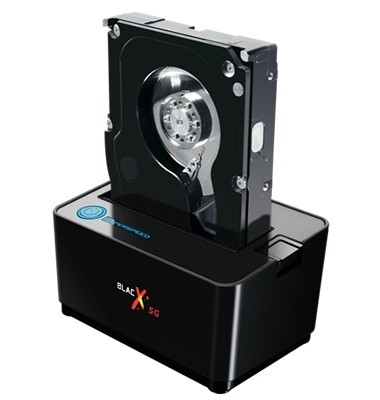
Desktop docks are nothing new. We first looked at the Thermaltake BlacX two years ago and love the idea of being able to use raw HDDs without opening our computer cases. If you are someone like me with several drives sitting around, the idea is brilliant.
The early models had a few shortfalls, though; mainly their reliance on the aging USB 2.0 protocol and placing the power button on the back of the dock. The later issue was due to the urge to save money at the R&D level. With the button at the back you had to reach around the dock which was kind of a pain in the butt.
Today we are looking at a desktop dock that uses USB 3.0 and has the power button in a place that makes sense. The MUKii TransImp HDD Dock on the surface has everything going for it, but we will need to dig deeper into pricing (next page) and the performance of the unit before giving it a thumbs up or thumbs down.
Let's take a look at the specs.
Specifications, Pricing and Availability

There isn't a whole lot to these desktop docking stations. They sit on your desk, you plug drives into them, hit a power button and within a few seconds your computer is ready to read and write data to the drive. The main variables are the interface; eSATA, USB 2.0 or USB 3.0, and how easy it is to turn the dock on and off.
Thermaltake's BlacX product line has been around since the start of the desktop docking station craze started and along the way they learned a few things. The first is ease of use. By putting the power button at the front of the docking station users can turn the system on or off much easier than they could if the power button was placed at the back of the unit where the connecting wires are located. It might not sound like a big deal while reading about it, but when you are using the docking station it makes all of the difference. There are many desktop docking stations that put the button on the back.
The BlacX is Thermaltake's first run at a USB 3.0 desktop docking station. They are claiming compatibility with SATA versions 1, 2 and 3. Today we will be putting those claims to the test and testing the BlacX 5G with Crucual's RealSSD C300, the fastest 256GB SSD in the world. The BlacX 5G works with both 3.5 and 2.5" form factors as long as the drive is serial ATA.
When it comes to cost, Newegg currently lists the Thermaltake BlacX 5G at 49.49. This is actually quite a bit more than the two other USB 3.0 desktop docking stations we reviewed last month. The MUKii TransImp TIP-D180U3 was selling for just 38.40 when reviewed and it also has a front mounted power button. The ineo Technology I-NA317U+ was even cheaper selling for just 29.99 when reviewed, but its power button was located on the back with the cable connectors.
The Packaging

The BlacX 5G package closely resembles the other BlacX products we've reviewed. You can easily distinguish the USB 3.0 enabled 5G by the USB 3.0 sticker on the front of the package. Also prominently shown is the 3 Year Warranty sticker.

The back of the package lists several features of the BlacX 5G in many languages.

The feature list for the English language is on the side of the box.

The full list of specifications is shown on the other side.

When we opened the package we imminently started finding accessories. Shown here are the two paper manuals and the two rubber HDD covers that will aid in protecting your drives when used in the enclosure and eliminate vibration noise.
The Thermaltake BlacX 5G

The meat of the package consists of the main components to the system, the dock itself, a power brick and the USB 3.0 cable. Thermaltake included a longer cable than what came with the ineo and MUKii docking stations, something we complained about those products for lacking. The longer cable will allow you to pull your computer out from under a desk and not need to disconnect the docking station before doing so.

Here we get our first look at the dock itself. The BlacX 5G logo is right on the front and as you can see the power button, a very important feature to include, is at the top.

A top down look shows with more detail the power button that lights up when the docking station is turned on. There is also a hard drive mechanical Eject button on the top and of course you plug your 2.5 or 3.5" HDD into the top of the docking station.
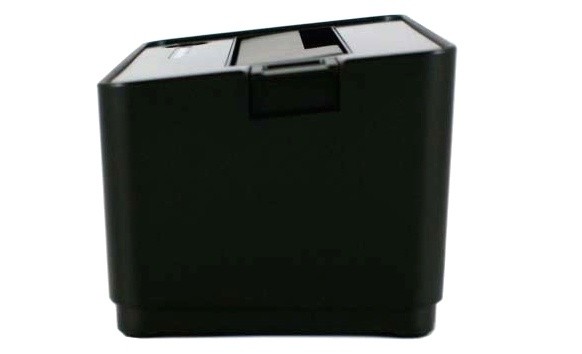
The side view shows that the BlacX 5G has a slanted top. This makes it easier to install a hard drive into the dock.
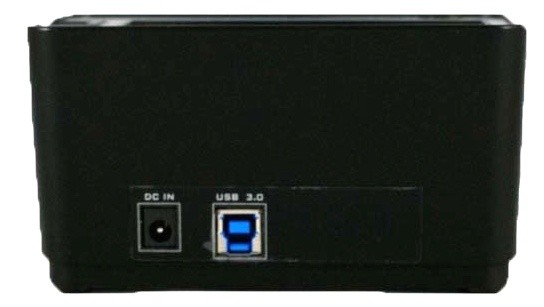
The back of the BlacX 5G is simple enough. There are only two connections; one for power and the other for USB 3.0.
Test System Setup and ATTO Baseline Performance
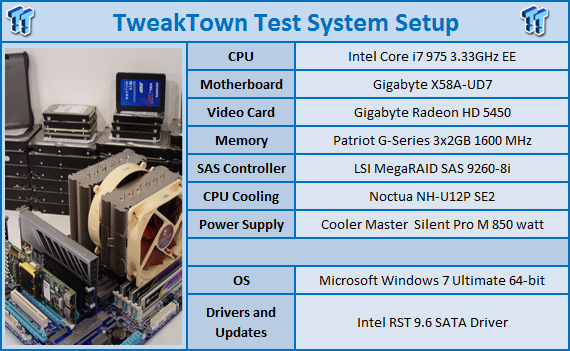
We would like to thank the following companies for supplying and supporting us with our test system hardware and equipment: AVADirect, GIGABYTE, Cooler Master, LSI and Noctua.
You can read more about TweakTown's Storage Product Testing Workstation and the procedures followed to test products in this article.
Currently USB 3.0 is a touchy subject. Most onboard USB 3.0 solutions only allow read speeds to around 200MB/s and write speeds of 180MB/s. A few PCIe aftermarket cards are delivering faster results, but not much faster at this time. We use the onboard USB 3.0 port that comes on the remarkable GIGABYTE X58A-UD7 motherboard.
For testing we will use the Crucial RealSSD C300, the world's fastest 256GB SSD. Crucial has graced us with several of these drives for use in all of our storage product reviews. You can learn more about the Crucial RealSSD C300 256GB SSD here.
ATTO Baseline Performance
Version and / or Patch Used: 2.34
ATTO is used by many disk manufacturers to determine the read and write speeds that will be presented to customers.
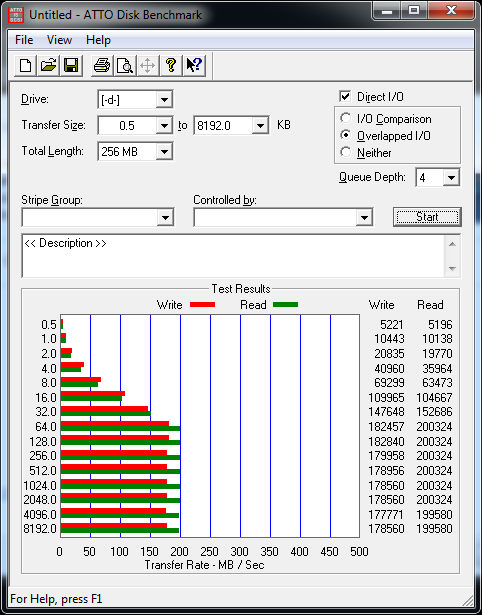
Using ATTO we see that the Thermaltake's electronics are not limiting the drives performance when compared to the other USB 3.0 enclosures we've tested. The GIGABYTE X58A-UD7 has right around a 200MB/s limit and we see the Thermaltake BlacX 5G running into this wall maxing out the motherboards potential.
Benchmarks - HD Tune Pro
HD Tune Pro
Version and / or Patch Used: 4.60
Developer Homepage: http://www.efdsoftware.com
Product Homepage: http://www.hdtune.com
HD Tune is a Hard Disk utility which has the following functions:
Benchmark: measures the performance
Info: shows detailed information
Health: checks the health status by using SMART
Error Scan: scans the surface for errors
Temperature display
HD Tune Pro gives us accurate read, write and access time results and for the last couple of years has been gaining popularity amongst reviewers. It is now considered a must have application for storage device testing.
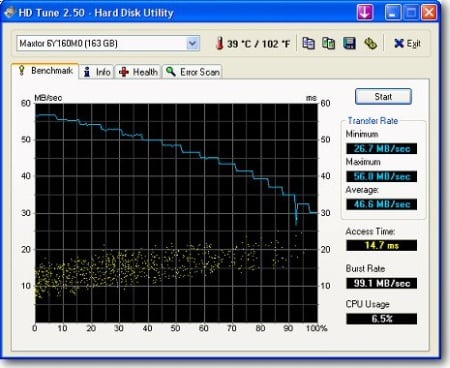
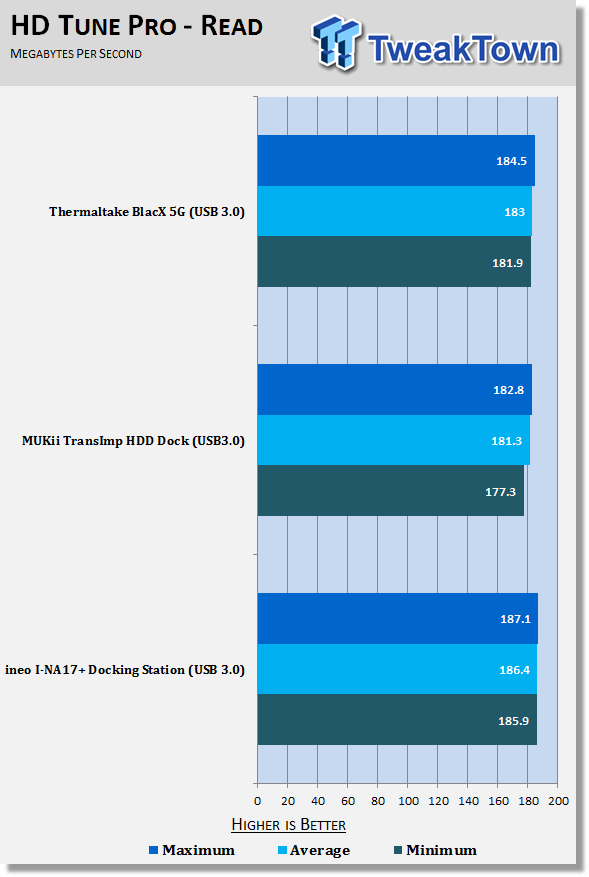
We are starting to get a collection of USB 3.0 desktop docking stations. The two previous models tested were both very fast, so the BlacX will have to perform even better considering its higher cost. There really isn't any chance of that happening, though, since we are limited by the motherboards USB 3.0 speed and not the SSDs or docking station.
The read tests show that all three docking stations read data between 180 and 190MB/s. The Thermaltake BlacX 5G is right in the mix with the two challengers.
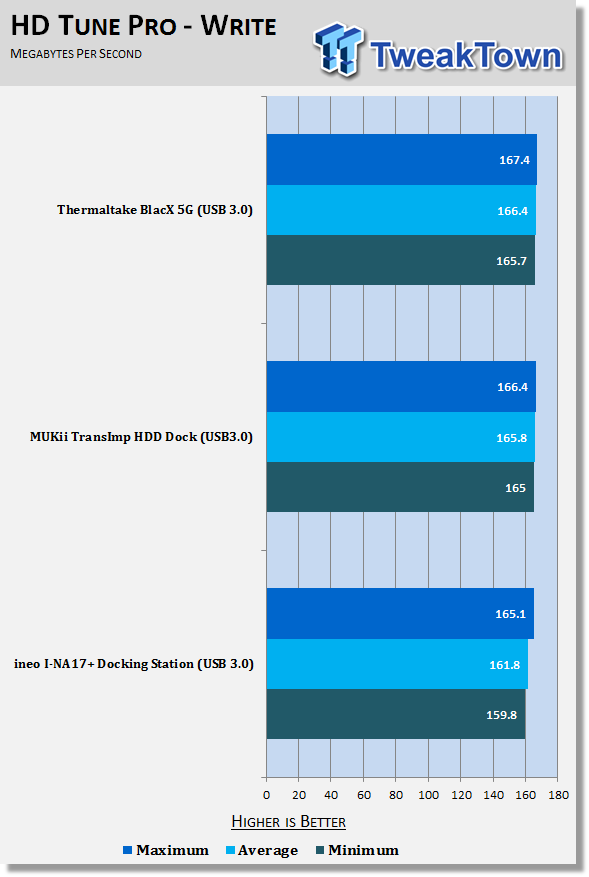
The write test shows the BlacX 5G writing data at the same rate as the other two docking stations we've previously tested.
Benchmarks - Everest Random Access Time
Everest Random Access Time
Version and / or Patch Used: 4.60
Developer Homepage: http://www.lavalys.com
Product Homepage: http://www.lavalys.com
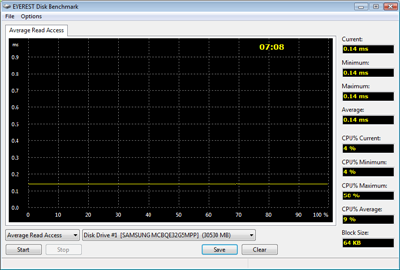
Everest Ultimate and Corporate Edition offer several different benchmarks for testing and optimizing your system or network. The Random Access test is one of very few if not only that will measure hard drives random access times in hundredths of milliseconds as oppose to tens of milliseconds.
Drives with only one or two tests displayed in write the write test mean that they have failed the test and their Maximum and possibly their Average Scores were very high after the cached fills. This usually happens only with controllers manufactured by JMicron.
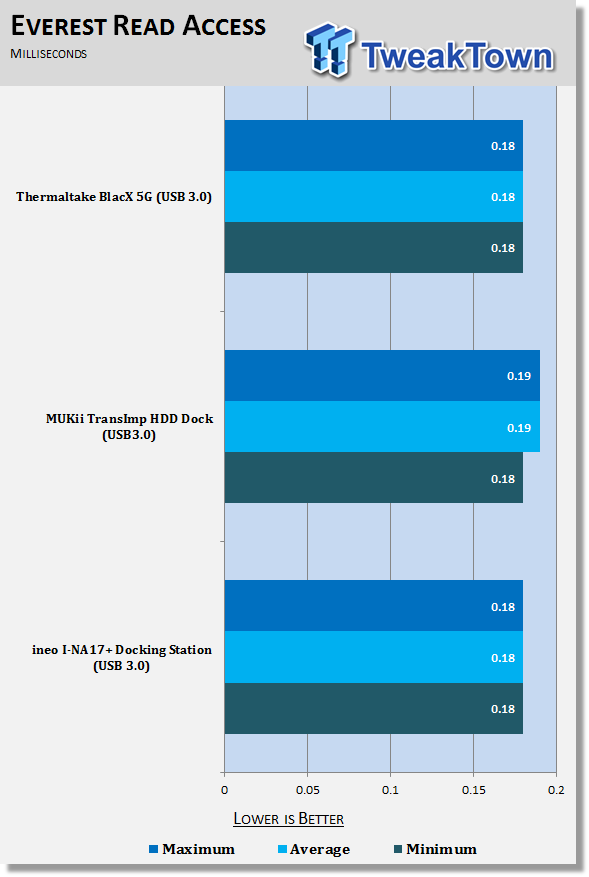
With SSDs being measured in microseconds now for latency, it is important for a docking station not to induce additional delays in data moving to and from the drive. Here we see that the BlacX 5G keeps our C300 reading just as fast as it does on a SATA interface.
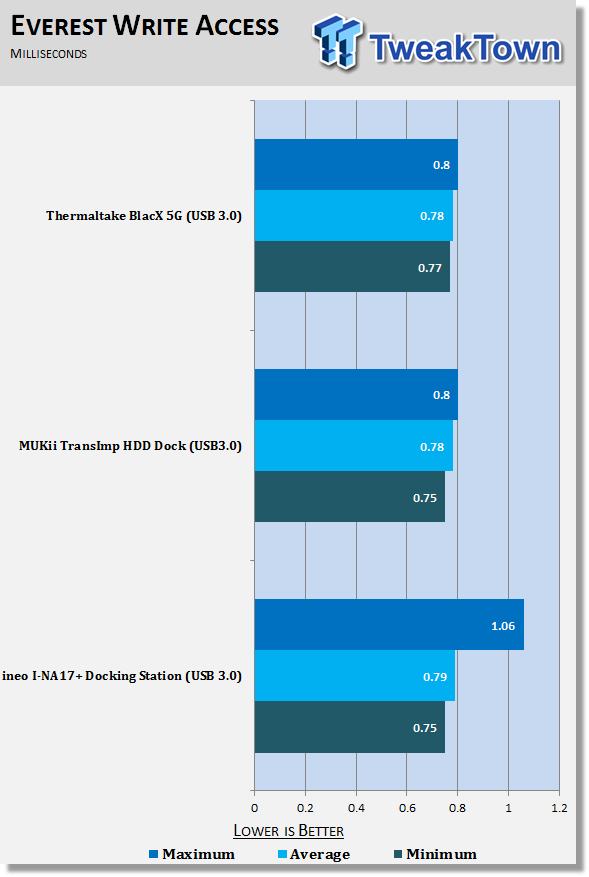
The same is true for the write test; here we see that the BlacX 5G is transparent to the system as far as latency is concerned.
Benchmarks - AS SSD
AS SSD Benchmark
Version and / or Patch Used: 1.2.3577.40358
Developer Homepage: Alex Intelligent Software
Product Homepage: Alex Intelligent Software
Download here: http://www.alex-is.de/PHP/fusion/downloads.php?cat_id=4&download_id=9
AS determines the performance of Solid State Drives (SSD). The tool contains four synthetic as well as three practice tests. The synthetic tests are to determine the sequential and random read and write performance of the SSD. These tests are carried out without the use of the operating system caches.
In all synthetic tests the test file size is 1GB. AS can also determine the access time of the SSD, the access of which the drive is determined to read through the entire capacity of the SSD (Full Stroke). The write access test is only to be met with a 1 GB big test file. At the end of the tests three values for the read and write as well as the overall performance will be issued. In addition to the calculated values which are shown in MB/s, they are also represented in IO per seconds (IOPS).
Note: AS SSD is a great benchmark for many tests, but since Crystal Disk Mark covers a broader range of 4K tests and HD Tune Pro covering sequential speeds, we will only use the Copy Benchmark from AS SSD.
- Copy Benchmark
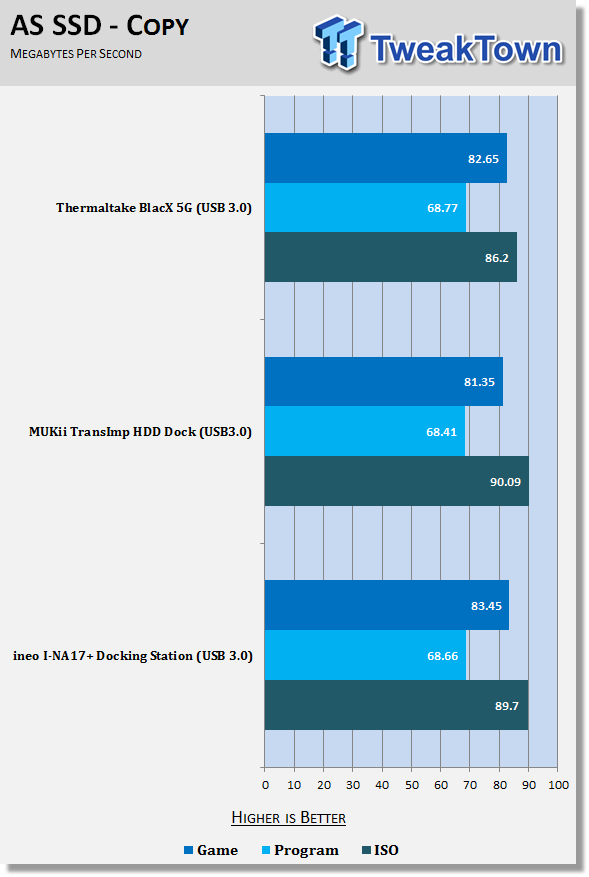
Most users will use their desktop docking station to transfer files to and from temporarily connected drives. In this test we get to see how fast a USB 3.0 device can move data. The Thermaltake BlacX 5G performed very well in all of the tests.
Final Thoughts
Thermaltake has a nearly perfect product with the BlacX 5G. The accessory package is one of the best we've seen with the longer USB 3.0 cable being the standout and the drive covers being the first we've seen to combat drive acoustics. Thermaltake's brand name is also attached to the BlacX 5G, so we don't have any doubts about its long term use. The final piece to the physical puzzle is the transfer speeds associated with USB 3.0 and the BlacX 5G delivers on this front as well with very good USB 3.0 performance that matches the other USB 3.0 products we've tested.
The only real issue we found is the price. The BlacX 5G comes with more accessories and a longer cable, but the price also increases as well. Personally I would pay more for the BlacX 5G since it has a longer USB 3.0 cable. At some point you are going to pull your computer out from under your desk, but will you remember to disconnect the HDD dock with a short cable? - Most likely you will forget and the dock, possibly with a drive installed, will come crashing to the floor. If you have a mechanical drive installed then you can kiss it goodbye nine out of ten times.
When it comes down to making a purchasing decision, you might want to ask yourself just how absent minded you are and how often you will pull your computer out. It's difficult to imagine your purchasing decision coming down to this, but I speak these words from experience.

 United
States: Find other tech and computer products like this
over at
United
States: Find other tech and computer products like this
over at  United
Kingdom: Find other tech and computer products like this
over at
United
Kingdom: Find other tech and computer products like this
over at  Australia:
Find other tech and computer products like this over at
Australia:
Find other tech and computer products like this over at  Canada:
Find other tech and computer products like this over at
Canada:
Find other tech and computer products like this over at  Deutschland:
Finde andere Technik- und Computerprodukte wie dieses auf
Deutschland:
Finde andere Technik- und Computerprodukte wie dieses auf 


 Dragon's Dogma 2 patch delivers some important fixes - but not the one everyone wants
 AMD's top Strix Point Halo APU could have 16 Zen 5 cores in 2 x CCDs, mirroring Ryzen 9000 CPUs
 FBI confirms Chinese hackers have infested US water and energy systems
 Microsoft's new Windows 11 'AI Explorer' feature set to anger AMD and Intel
 High-end PC maker gives advice that could fix Intel Core i9 CPUs crashing in games
 ASUS ROG Swift Pro PG248QP Gaming Monitor Review - Frames, frames, and more frames
 FlexiSpot C7B-Mesh Ergonomic Office Chair Review
 Samsung G8 34-inch QD-OLED Gaming Monitor Review - 175Hz for $900
 ASRock NUCBOX-155H Mini PC Review
 NuPhy Air96 V2 Wireless Mechanical Keyboard Review
 TEAM T-FORCE Siren DUO360 RGB Liquid CPU Cooler Review
 AVerMedia Live Streamer ULTRA HD Review
 AVerMedia Live Gamer 4K 2.1 Review
 XPG Invader X Mid-Tower Chassis Review
 Intel Core i9-14900KS CPU Review
 Everything you need to know about the latest ASUS NUC Mini PCs - NUC 14 Pro and ROG NUC
 How to Overclock Your GPU and Boost Your PC Gaming with ASUS GPU Tweak III
 ASUS's AMD Radeon RX 7000 Series GPU lineup has something for every gamer
 ASUS OLED Premium Care defends the ROG Swift OLED PG32UCDM gaming monitor from burn-in
 Patriot Viper Xtreme 5 Engineering Prototype 48GB Dual-Channel Memory Kit Preview