

Introduction
Introduction, Specifications, Pricing and Availability
Desktop docks are nothing new. We first looked at the ThermalTake BlacX two years ago and love the idea of being able to use raw HDDs without opening our computer cases. If you are someone like me with several drives sitting around, the idea is brilliant. The early models had a few shortfalls, though, mainly their reliance on the aging USB 2.0 protocol and placing the power button on the back of the dock. The latter issue was due to the urge to save money at the R&D level. With the button at the back you had to reach around the dock which was kind of a pain in the butt.
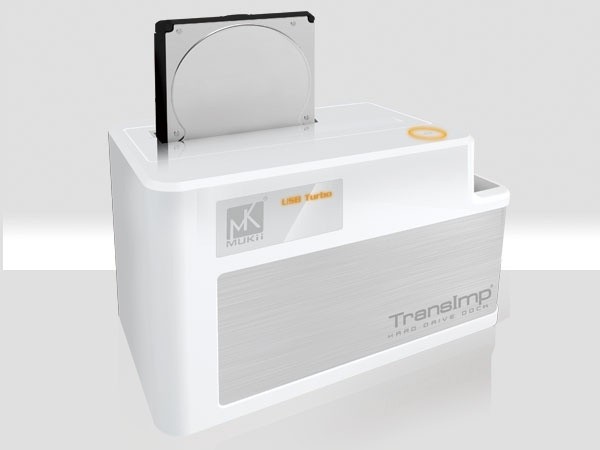
Today we are looking at a desktop dock that uses USB 3.0 and has the power button in a place that makes sense. The MUKii TransImp HDD Dock on the surface has everything going for it, but we will need to dig deeper into pricing and the performance of the unit before giving it a thumbs up or thumbs down.
Let's take a look at the specs.
Specifications, Pricing and Availability
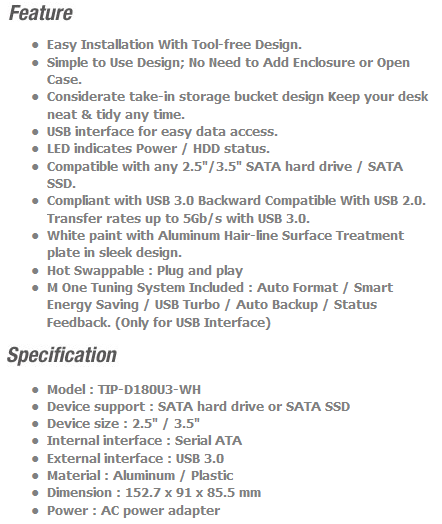
There isn't a whole lot to these desktop docking stations. They sit on your desk, you plug drives into them, hit a power button and within a few seconds your computer is ready to read and write data to the drive. The main variables are the interface; eSATA, USB 2.0 or USB 3.0 and how easy it is to turn the dock on and off. MUKii is giving you a couple of other variables; they make both black and white units. From experience the black desktop docks show dust a lot more than the white models; just fair warning.
The MUKii TransImp Dock uses either USB 3.0 or 2.0 depending on what you have available. MUKii also makes a USB 2.0 / eSATA model if you are just not ready to jump on the 3.0 train just yet. When it comes to availability, we were not able to find the TIP-D180U3 model that we are testing today at Newegg, but after a quick search we found the unit at Mwave.com for 38.40 USD. This is around 8 Dollars more than the ineo Tech Dock we tested last month.
The Packaging

The MUKii TransImp Hard Drive Dock comes in an attractive package that lists quite a bit of information. On the front users will see a picture of the product and a short description of what it does.

On the back we found specifications and additional features listed. At the bottom left side MUKii also shows some generic performance information.

Additional details and specifications are listed on the side of the retail box as well as a list of included accessories.

MUKii includes a software tuning system that allows you to setup auto backup instances as well as hand format and other duties.

The inner packaging keeps all of the accessories separate from the main unit and everything is individually bagged.
The MUKii TransImp Hard Drive Dock

The MUKii TransImp Hard Drive Dock isn't just a plain desktop docking station like we are used to seeing. The shiny area at the top left is a secret window that illuminates when the drive is reading and writing. The front also has a thin brushed aluminum strip that wraps around to the side.

Looking at the dock from the top we see the door system that allows 2.5" drives to stay in place. The door opens when you insert a 3.5" desktop drive. My favorite feature is the power button that is conveniently placed at the top of the dock. A small storage slot is located on the side of the dock as well. This slot is large enough to hold another 2.5" drive.

The back of the dock is fairly straight forward; you have a USB port and power plug.

On the side we see how the brushed aluminum wraps around one side.

MUKii includes a nice accessory kit with the unit. There is a quick install guide, the software disc, power plug and a USB 3.0 cable that is backwards compatible with USB 2.0. The only real issue that I see so far is in the length of the USB 3.0 cable; it should be longer for users who don't want to mount their dock on the edge of the desk.
Test System Setup and ATTO Baseline Performance
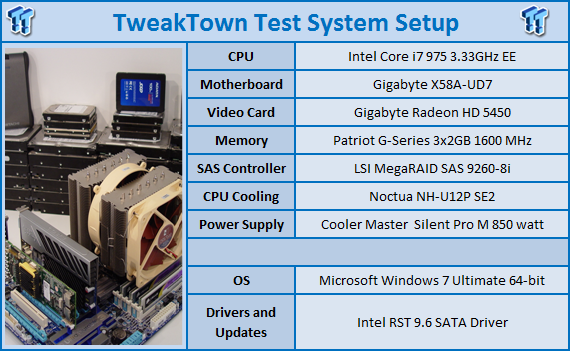
We would like to thank the following companies for supplying and supporting us with our test system hardware and equipment: AVADirect, GIGABYTE, Cooler Master, LSI and Noctua.
You can read more about TweakTown's Storage Product Testing Workstation and the procedures followed to test products in this article.
Currently USB 3.0 is a touchy subject. Most onboard USB 3.0 solutions only allow read speeds to around 200MB/s and write speeds of 180MB/s. A few PCIe aftermarket cards are delivering faster results, but not much faster at this time.
For testing we will use the Crucial RealSSD C300, the world's fastest 256GB SSD. Crucial has graced us with several of these drives for use in all of our storage product reviews. You can learn more about the Crucial RealSSD C300 256GB SSD here.
ATTO Baseline Performance
Version and / or Patch Used: 2.34
ATTO is used by many disk manufacturers to determine the read and write speeds that will be presented to customers.
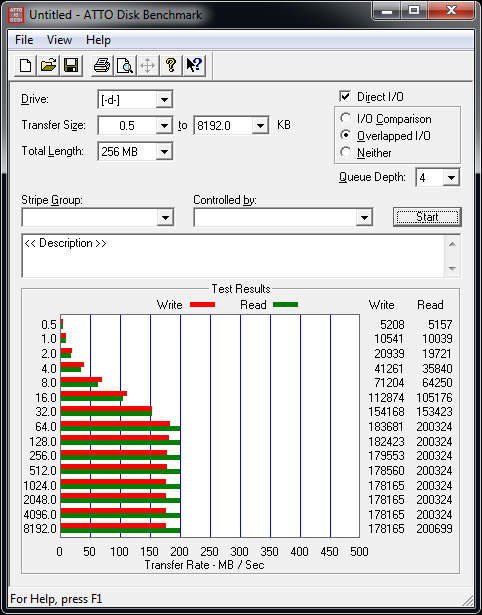
Using ATTO we see that the MUKii electronics are not limiting the drives performance when compared to the other USB 3.0 enclosures we've tested. The GIGABYTE X58A-UD7 has right around a 200MB/s limit and we see the MUKii HDD Dock running into this wall, maxing out the motherboards potential.
Benchmarks - HD Tune Pro
HD Tune Pro
Version and / or Patch Used: 4.60
Developer Homepage: http://www.efdsoftware.com
Product Homepage: http://www.hdtune.com
HD Tune is a Hard Disk utility which has the following functions:
- Benchmark: measures the performance
- Info: shows detailed information
- Health: checks the health status by using SMART
- Error Scan: scans the surface for errors
- Temperature display
HD Tune Pro gives us accurate read, write and access time results and for the last couple of years has been gaining popularity amongst reviewers. It is now considered a must have application for storage device testing.
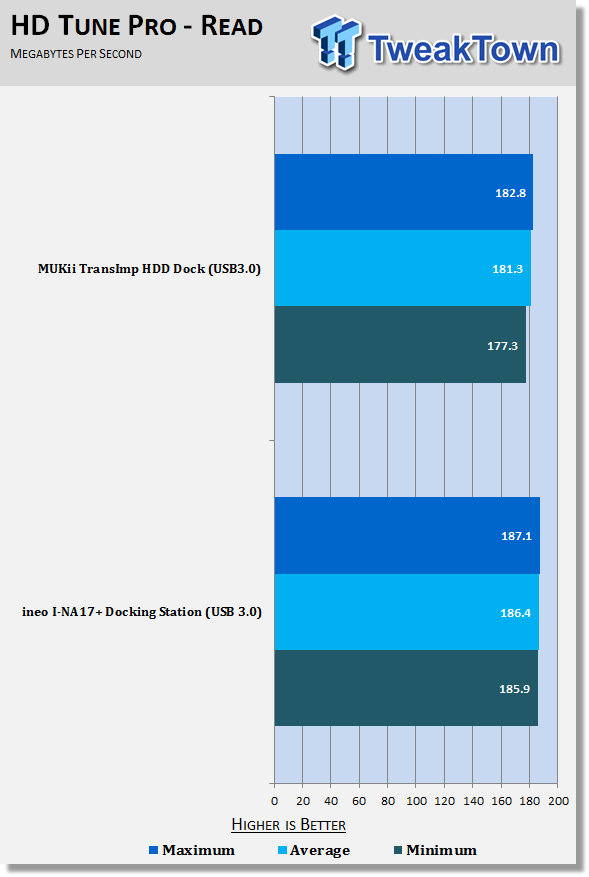
Today we are going to have a battle between the two USB 3.0 Desktop Docking Stations that we have on hand. In one corner (err, the bottom of the chart) is the ineo Technology I-NA17+ that costs 8 Dollars less than our challenger, but has the power button on the back. At the top of the chart is the MUKii TransImp HDD Dock that costs a little more, but has a better looking enclosure and a power button that is placed where we can get to it easily. We expect most of the benchmark results to be the same, but then again that is what we are here to test in the first place.
As predicted, both units perform nearly the same with our Crucial RealSSD C300 256GB SSD. The ineo has a slight read speed jump in this test, but there are a few factors that can be the cause, mainly SSD wearing.
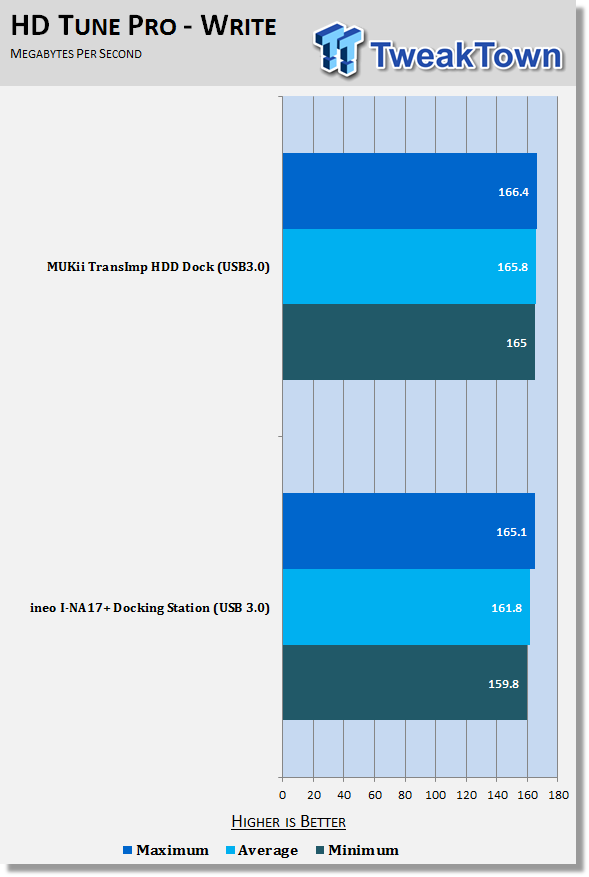
The write speed test goes to the MUKii Dock. Here we see a 4MB/s difference, but once again the two are close enough to call this test a draw.
Benchmarks - Everest Random Access Time
Everest Random Access Time
Version and / or Patch Used: 4.60
Developer Homepage: http://www.lavalys.com
Product Homepage: http://www.lavalys.com
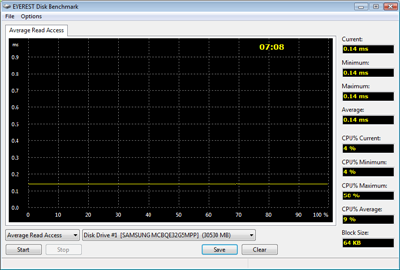
Everest Ultimate and Corporate Edition offer several different benchmarks for testing and optimizing your system or network. The Random Access test is one of very few if not only that will measure hard drives random access times in hundredths of milliseconds as oppose to tens of milliseconds.
Drives with only one or two tests displayed in write the write test mean that they have failed the test and their Maximum and possibly their Average Scores were very high after the cached fills. This usually happens only with controllers manufactured by JMicron.
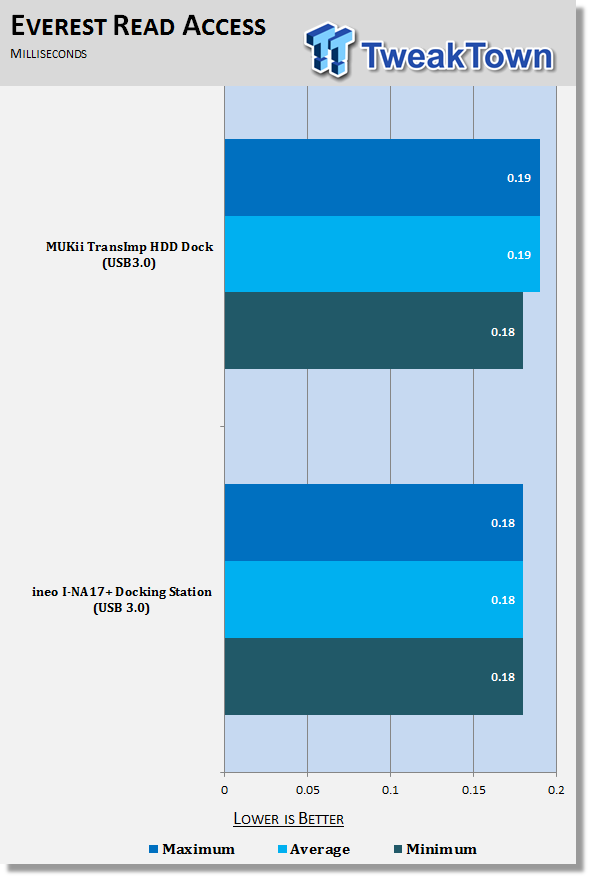
In the Read Access test we are looking to see if one product adds undue latency in the reading process. Both docks performed within a thousandth of a millisecond of the drive running on its native SATA connector, so there is very little latency added.
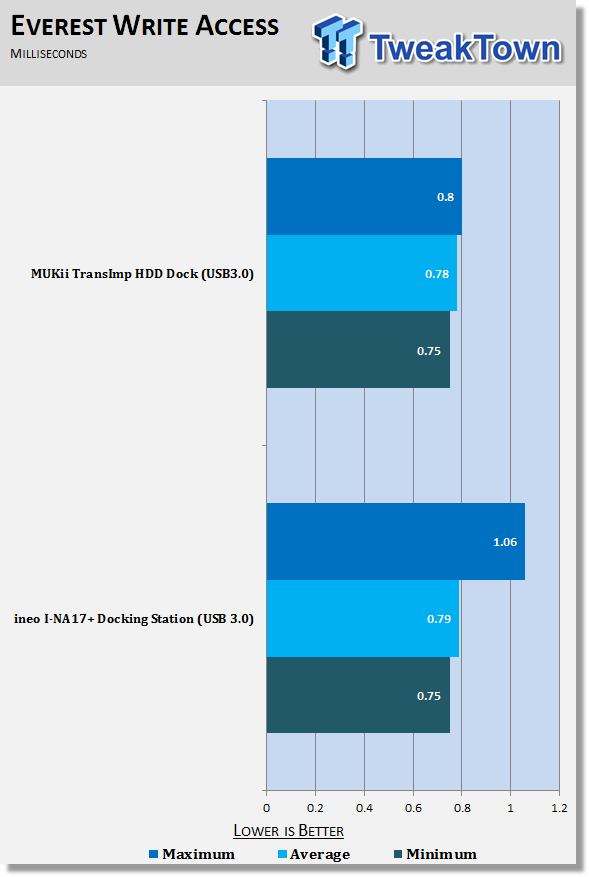
The Write Access test shows identical minimum and average scores, but the ineo had a small spike that must have been drive related, most likely due to wear leveling or a TRIM command. Both units scored within 3ms of the drive running on a SATA 6Gb connection.
Benchmarks - AS SSD
AS SSD Benchmark
Version and / or Patch Used: 1.2.3577.40358
Developer Homepage: Alex Intelligent Software
Product Homepage: Alex Intelligent Software
Download here: http://www.alex-is.de/PHP/fusion/downloads.php?cat_id=4&download_id=9
AS determines the performance of Solid State Drives (SSD). The tool contains four synthetic as well as three practice tests. The synthetic tests are to determine the sequential and random read and write performance of the SSD. These tests are carried out without the use of the operating system caches.
In all synthetic tests the test file size is 1GB. AS can also determine the access time of the SSD, the access of which the drive is determined to read through the entire capacity of the SSD (Full Stroke). The write access test is only to be met with a 1 GB big test file. At the end of the tests three values for the read and write as well as the overall performance will be issued. In addition to the calculated values which are shown in MB/s, they are also represented in IO per seconds (IOPS).
Note: AS SSD is a great benchmark for many tests, but since Crystal Disk Mark covers a broader range of 4K tests and HD Tune Pro covering sequential speeds, we will only use the Copy Benchmark from AS SSD.
- Copy Benchmark
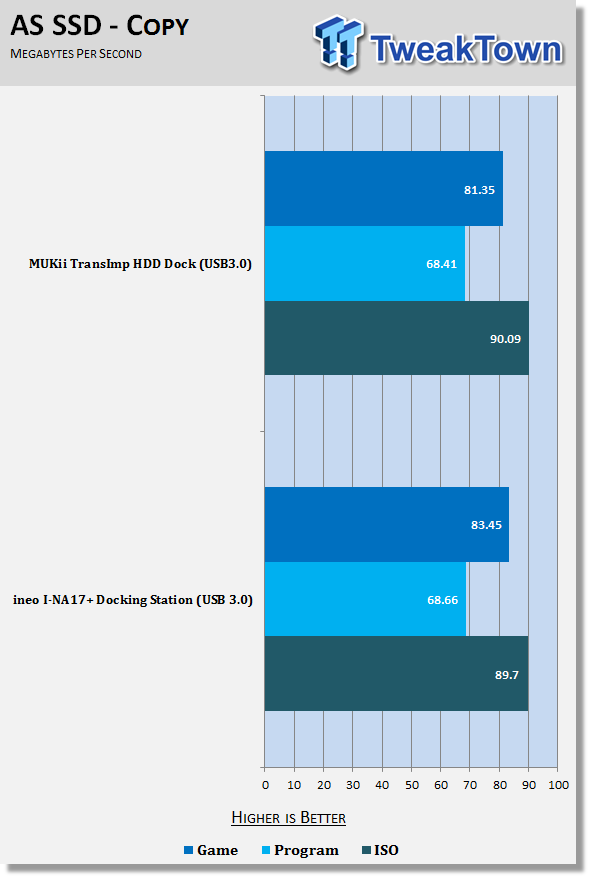
Most users will use their desktop docking station for transferring files to and from their drive and these tests show us how well a product handles these tasks. Here we once again see nearly identical performance.
Final Thoughts
It's not very often I give out an Editor's Choice Award, but as I write this I am considering it. The TransImp HDD Dock USB 3.0 has a lot going for it when it comes to the design. The power button location was the obvious one and it stuck out as soon as I opened the box. The next thing that caught my eye was the attractive design; you will want to display this unit on your desk. Then again, there are also two issues I found and really don't like.
The first has to do with the price compared to some of the other docking stations that are on the market, mainly the ineo Technology unit we tested just last month. The ineo Tech unit was by far the lowest priced desktop docking station that we could find in the US, but nonetheless it is what it is, a very low cost unit and that throws a wrench in the MUKii scoring. The second thing I didn't like was the length of the USB cable that came with the Dock. I really would like to have another foot or two so I can pull my PC out from under the table and not have to worry about pulling a bare hard drive off my desk if I forget to unplug the unit.
When it comes to the performance, the MUKii USB 3.0 Dock is able to take advantage of every last drop available from our GIGABYTE X58A-UD7's USB 3.0 port. That is obviously a very strong point, but one that has been equally matched by several USB 3.0 devices to date.
The only real question left is if the MUKii TransImp HHD Dock is the best USB 3.0 desktop docking station on the market right now. To be honest, I really can't answer that question right now since we have only tested two to date. Since I have some down time from SSD reviews until January, this may just become a project to get into; finding the absolute best desktop docking station made. As it sits right now, though, the MUKii TransImp is a strong contender for the title.

 United
States: Find other tech and computer products like this
over at
United
States: Find other tech and computer products like this
over at  United
Kingdom: Find other tech and computer products like this
over at
United
Kingdom: Find other tech and computer products like this
over at  Australia:
Find other tech and computer products like this over at
Australia:
Find other tech and computer products like this over at  Canada:
Find other tech and computer products like this over at
Canada:
Find other tech and computer products like this over at  Deutschland:
Finde andere Technik- und Computerprodukte wie dieses auf
Deutschland:
Finde andere Technik- und Computerprodukte wie dieses auf 


 SK hynix plans $14.6 billion on new chip fab in South Korea to meet 'soaring demand' of HBM
 You can pick up AMD's flagship RDNA 3 GPU, the Radeon RX 7900 XTX, for $850
 Tesla unveils new Model 3 Performance: 0-60 mph in 2.9 seconds, 163 mph top speed
 GIGABYTE confirms AMD Ryzen 9000 Series processors are coming soon
 Qualcomm details its Snapdragon X Elite: all SKUs have NPU with 45 TOPS for AI workloads
 ACEMAGIC AD08 "Core i9 11900H" Mini PC Review
 Lenovo ThinkPad X1 Carbon Gen 12 Review
 ASUS ROG Swift Pro PG248QP Gaming Monitor Review - Frames, frames, and more frames
 FlexiSpot C7B-Mesh Ergonomic Office Chair Review
 Samsung G8 34-inch QD-OLED Gaming Monitor Review - 175Hz for $900
 ASRock NUCBOX-155H Mini PC Review
 NuPhy Air96 V2 Wireless Mechanical Keyboard Review
 TEAM T-FORCE Siren DUO360 RGB Liquid CPU Cooler Review
 AVerMedia Live Streamer ULTRA HD Review
 AVerMedia Live Gamer 4K 2.1 Review
 Everything you need to know about the latest ASUS NUC Mini PCs - NUC 14 Pro and ROG NUC
 How to Overclock Your GPU and Boost Your PC Gaming with ASUS GPU Tweak III
 ASUS's AMD Radeon RX 7000 Series GPU lineup has something for every gamer
 ASUS OLED Premium Care defends the ROG Swift OLED PG32UCDM gaming monitor from burn-in
 Patriot Viper Xtreme 5 Engineering Prototype 48GB Dual-Channel Memory Kit Preview