

Introduction, Specifications, Pricing and Availability

Introduction
Everyone has a cool laser memory. If you are my age the most common is from the 1985 movie starring Val Kilmer titled Real Genius. One movie that has always stuck out in my mind was the 1997 film, Air Force One, where a marine uses a small hand held laser to melt the plastic covering to expose a wire. If you deal with electronics for a living, how handy would a tool like that be? Whether you want to admit it or not, chances are you have an attraction to lasers.
Wicked Lasers, long known for their ultra-powerful, compact and expensive lasers made mainstream news a few weeks ago by advertising the world's most powerful hand held laser. As if making a 1 watt laser wasn't enough to grab headlines, the media coverage soon turned into a frenzy when George Lucas thought the new Wicked Lasers S3 Arctic looked a little too much like the famous Light Sabers from Star Wars.
Today we are going to thumb our nose at George for his arrogance, check out the new Arctic 1 watt blue laser and see if we can burn some stuff!
Specifications, Pricing and Availability
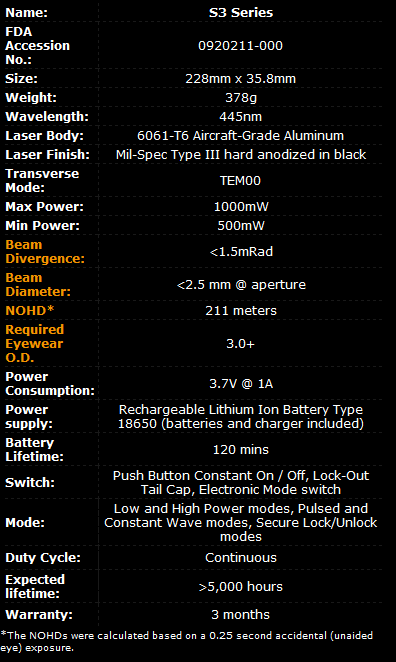
Before we can get started setting things on fire, let's take a look at the specs and then get into some safety tips that will keep you from seeing blue for two days.
The S3 Series is the world's first 1 watt consumer laser. The beam emitted is a deep shade of cobalt blue and as you will see later in this article, it can be seen a long way from the source. Wicked is claiming a battery life of 120 minutes before charging is needed and luckily for us the S3 comes with a handy charger, so you will have not be cycling through double A batteries every 15 minutes.
Just as impressive as the laser beam is the housing it comes from. Wicked Lasers came up with an aluminum case that not only looks military grade, but it is truly military grade. Built into the lasers housing is a new feature that Wicked is calling a Smart Switch. This will keep your laser safe from accidental discharge if it were to fall into the wrong hands.
At the launch Wicked Lasers advertised the S3 Arctic with a 199 USD price point, but the demand was so great that they needed to raise the price to 299 USD. It also might have been the money needed to pay all of those lawyers to fight the Lucas lawyers, but either way it went, you are going to have to shell out 299 Dollars to get the world's more powerful handheld laser.
The Packaging and Accessories
The Packaging

The outside package is pretty basic, but since there is not a retail store in the US looking to have their pants sued off, you are not going to find the Arctic on the shelf.

Things start to heat up once we open the package. Here we see the laser is kept secure in a separate partition away from the add-on filter kit.
The Accessory Package

The most important accessory I found in our sample kit was the safety glasses. These aren't your workshop safety glasses that keep wood chips out of your eyes, but they are just as, if not more important. There are two different versions that shipped with our kit. The more aggressive kit is on the left and it will block out the most blue laser light. The pair on the right will allow you to see the beam while shooting the laser, but it will not offer as much protection.

Thinking back to the movie Real Genius, it is important to keep your optics clean. The Arctic S3 isn't going to catch fire in your hand, but you will get a much better beam with a clear lens. Wicked includes two lint free wipes and a really useful cleaning tool.
We also get to see the standard charger for the lithium ion battery that comes with the kit.

The second most important accessory is the literature that explains that you are not playing with a toy. You do know this isn't a toy, right?
The Wicked Lasers S3 Arctic Spyder III 1 Watt Laser

The Wicked Lasers S3 Arctic breaks down into separate parts. From the left to the right we see the end cap, the main body, the lithium ion battery and the FDA approved battery cover that more than meets the eye.

I already stated that the laser housing is impressive and now I can show you the proof. You may want to mount it in a display since the craftsmanship is so good.

This is the Smart Switch button. With the master power switched on you have to use a key combination to turn the laser on. The sequence is just like dot, dot, dot, dash, dash. On the other side three small LED lights let you know where you are in the sequence.

You may have caught that FDA approved end cap. What kind of a world do we live in where the Food and Drug Administration gets to tell us what kind of safety features need to be on our laser pointers?
With or without the FDAs approval, the Wicked Lasers end cap has some nice features that I welcome since I have two younger sons running around with super hero personalities.
The easiest way to disable the laser is to simply pull out the pin. With the pin displaced your laser will not fire.

If you have kids like mine who will figure out in five minutes or less that they need to find something metal and jam it into the hole, Wicked Lasers has a more secure disabling method. You can remove the two screws and take out another piece that will disable the laser.
Night Performance

The first thing you will notice when discharging the laser outside at night is just how much crap is in the air we breathe. The next thing you're going to notice is that you can reach out and hit just about anything in sight with a blue dot. Well, just about everything; the moon is just a couple of miles out of reach. Maybe with a 2 watt laser...

There are a lot of ways to manipulate cameras to make dim light appear brighter, but none of that was done in this article. Here we see a beam being sent down a lit road and if anything, the beam appears dimmer in the picture than it does in person. The beam is very bright. If you have ever been to a club or laser light show you understand just how bright a bright laser is. If my memory serves me correctly, this laser is just as bright, but now all that power is in the palm of your hand.

Here is another shot down the lit road with the laser being fired upwards. I lit a cigarette to get the smoke effect close to the laser. The refection off of the smoke actually made it so the laser was brighter than the sign a 100 yards away.

In this image we see the laser bursting off of a concrete walk way about 10 feet away. The light is so bright the laser bounces off of the ridges in the surface and lights up everything around the area.

The final night image was taken while being shot at a parked car around 50 yards away. I zoomed the camera in so you could see the size of the beam on impact.
Now, let's see if we can burn the plastic sleeve off of a wire!
Burning with 1 Watt of Laser Power
Burning with 1 Watt of Laser Power - Safety First

Before we start testing indoors with the Wicked Lasers S3 Arctic Spyder III 1 watt laser, let's take a second and see what kind of power we are working with. The above image was taken inside my photo box that was in a room void of white light. The laser not only lit up the box AND the room, but If you look closely at the image you will see that the laser reflects off of the wall of the photo box and shines a beam on the next surface. If you ever played the game Portal, you understand this effect, only this time that reflection can blind you.

In this image we left the laser in the same spot, but shielded the camera lens with the aggressive filter glasses. This reduced the lasers intensity and made it much easier to aim the beam to what we wanted to burn.
Burning Stuff!

The first burn test is very simple; find the nearest thing that you have on hand and wouldn't mind putting a small hole in. I started with a game box.

This test is very easy to do; put a beam on it and let the laser do its thing.

After three minutes we had burnt through the outside clear plastic layer, the paper cover and even the main case.

We went through the main case as you can see here, and we're starting to go through the other side as well.
More Burning - Lasers as Tools

The next test is right out of the movies. In Air Force One with Harrison Ford a marine took a hand held laser out of a tool bag and burnt right through the plastic that covered a wire. If this one works then the S3 Arctic will have a permanent spot in my tool box.

It didn't take long for the laser to start working on the wire sleeve; we had smoke coming from the wire within five seconds.

After two minutes I pulled the wire and was disappointed; no movie magic here. The wire did take some damage, but nothing to lead me to believe it would be possible to remove the sleeve with the S3 Arctic in enough time to be considered efficient.
Final Thoughts
If you are a male aged 5 to 45, you think lasers are uber cool. The question is whether or not you think they are cool enough to shell out 300 Dollars for one. This is the question I have been mulling over for the last couple of days. On the surface the Wicked Lasers S3 Arctic is a really neat toy that you will get some enjoyment out of, but like many toys, you will eventually outgrow it. When it comes to long term usefulness, you may want to ask yourself how often you will need the ability to shine a blue light on an object...even if it is a mile away. This really isn't a question for me to answer for you, but something you will need to decide for yourself.
Taking the cost and your financial situation out of the equation, I can attest to the Arctic 1 watt laser being by far the brightest, most powerful and coolest laser I have seen. I won't be using the laser every day or carrying it with me, but it is going to be fun to have around and use from time to time. I know all of my friends like coming over and playing with it before we get down to some serious first person shooter action. My boys are now convinced that their dad is a real jedi in training too, which allows me to use my jedi mind trick to get them to clean their rooms. Who wouldn't spend 300 Dollars to make that last for a month or more?
The Wicked Lasers S3 Arctic 1 watt blue laser is available at wickedlasers.com for 299.99 with three lenses. For an additional 29.99 you can get the full lens pack that adds additional beam types (like flashlight, crosshairs, lines and more). The quality of the construction is better than you could imagine and the beam is brighter than you would think possible.

 United
States: Find other tech and computer products like this
over at
United
States: Find other tech and computer products like this
over at  United
Kingdom: Find other tech and computer products like this
over at
United
Kingdom: Find other tech and computer products like this
over at  Australia:
Find other tech and computer products like this over at
Australia:
Find other tech and computer products like this over at  Canada:
Find other tech and computer products like this over at
Canada:
Find other tech and computer products like this over at  Deutschland:
Finde andere Technik- und Computerprodukte wie dieses auf
Deutschland:
Finde andere Technik- und Computerprodukte wie dieses auf 


 Dragon's Dogma 2 patch delivers some important fixes - but not the one everyone wants
 AMD's top Strix Point Halo APU could have 16 Zen 5 cores in 2 x CCDs, mirroring Ryzen 9000 CPUs
 FBI confirms Chinese hackers have infested US water and energy systems
 Microsoft's new Windows 11 'AI Explorer' feature set to anger AMD and Intel
 High-end PC maker gives advice that could fix Intel Core i9 CPUs crashing in games
 ASUS ROG Swift Pro PG248QP Gaming Monitor Review - Frames, frames, and more frames
 FlexiSpot C7B-Mesh Ergonomic Office Chair Review
 Samsung G8 34-inch QD-OLED Gaming Monitor Review - 175Hz for $900
 ASRock NUCBOX-155H Mini PC Review
 NuPhy Air96 V2 Wireless Mechanical Keyboard Review
 TEAM T-FORCE Siren DUO360 RGB Liquid CPU Cooler Review
 AVerMedia Live Streamer ULTRA HD Review
 AVerMedia Live Gamer 4K 2.1 Review
 XPG Invader X Mid-Tower Chassis Review
 Intel Core i9-14900KS CPU Review
 Everything you need to know about the latest ASUS NUC Mini PCs - NUC 14 Pro and ROG NUC
 How to Overclock Your GPU and Boost Your PC Gaming with ASUS GPU Tweak III
 ASUS's AMD Radeon RX 7000 Series GPU lineup has something for every gamer
 ASUS OLED Premium Care defends the ROG Swift OLED PG32UCDM gaming monitor from burn-in
 Patriot Viper Xtreme 5 Engineering Prototype 48GB Dual-Channel Memory Kit Preview