

Introduction, Specifications, Pricing and Availability

Introduction
USB 3.0 is being weaved into the marketplace one motherboard and notebook at a time. My last three motherboards have included at least two USB 3.0 ports and my new Lenovo mobile workstation also includes a single USB 3.0 port. Next year we should see the eradication of USB 2.0 all together; a move that I support not only because it will give me more products to write about, but because transferring data five times as fast saves everyone a lot of time.
At the same time USB 3.0 is gaining market share, solid state drives and their spin off products are being adapted by users for their superior reliability, speed and robust construction. Like USB 3.0, SSDs are superior to their predecessor technology by an order of magnitude.
OCZ Technology has taken both USB 3.0 and solid state to a new level by combining the two and delivered a product worthy of the SuperSpeed namesake. The OCZ Enyo is a sleek portable storage product that is small enough to hide in your shirt pocket, but is large enough to store up to 256GB of data, or the equivalent of 32 full on DVD rips.
Let's take a look at the OCZ Enyo and see how OCZ successfully merged two emerging technologies to make one super storage product that can change the way you access your data.
Specifications, Pricing and Availability
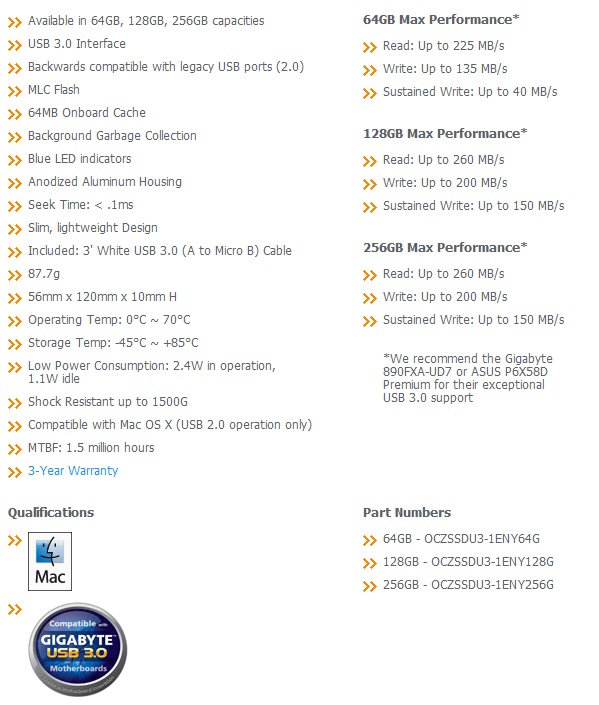
It might not look like it, but there is actually quite a lot to talk about on the graph above. OCZ has three models on the market at the time of writing; 64, 128 and 256GB. All three use the same configuration; an Indilinx controller, 64mb cache module and sixteen flash modules. Indilinx was able to squeeze more performance out of their larger drives, so we see the 128 and 256GB drives reading at 260MB/s and writing data at 200MB/s. The 64GB model reads at 225MB/s and writes at 135MB/s peak with a sustained of up to 40MB/s. These numbers look nearly identical to the SATA II drives we tested all last year with the Indilinx Barefoot controller.
You may notice that OCZ is making some specific motherboard recommendations in their spec sheet. Later in this article you will see why. Let's come back to that one and talk about the GIGABYTE USB 3.0 logo and work our way back. GIGABYTE isn't the God Father of USB 3.0, but it is the hit man that fired the machine gun that started the assault on USB 2.0. GIGABYTE has done everything humanly possible to get USB 3.0 in your hands just short of coming to your house and swapping your motherboard for you. Every motherboard GIGABYTE now sells includes USB 3.0; this is a top down strategy that leads all the way to the sub 100 Dollar products.
If you are not aware, USB 3.0 is currently implemented by an NEC USB 3.0 to PCIe chip, but many motherboards run short on the number of PCIe lanes available. That means some motherboards are getting USB 3.0, but may not be getting the number of PCIe lanes sent to the NEC USB 3.0 bridge chip to achieve maximum performance. Our GIGABYTE X58A-UD7 is limited to around 200MB/s, a number just short of OCZ's 260MB/s and the reason why OCZ choose to make the disclaimer about performance.
When it comes to pricing and availability, we were able to find the OCZ Enyo 64GB drive at Newegg for 179, the 128GB drive that we are reviewing here today for 285 and the massive 256GB drive for 696 USD. The cost may appear high, but once you start to consider the research and development costs, the lack of competing products on the market and quality of craftsmanship, the numbers start to come full circle.
Let's take a look at the OCZ Enyo and see if the dollars involved make sense for you to upgrade your portable storage.
The Packaging

The OCZ Technology Enyo package can only be called elegant; a theme that will carry over to the drive itself as well.

All of the product information is listed on the back of the package and here you will find a quick paragraph on the features and uses of a USB 3.0 SSD.

The inner packaging of the OCZ Enyo keeps the drive secure in the middle of the box and all of the accessories in a separate area.

Here we see everything laid out. OCZ includes a small manual, USB 3.0 cable, some bragging material for you to put in your friends faces and of course, the Enyo itself.
The OCZ Technology Enyo 128GB USB 3.0 SSD

The OCZ Enyo itself has a textured case that will keep it from slipping from your hand or off of a flat surface. The drive is a bit of an odd bird when it comes to the shape since it is long and thin as opposed to the standard 2.5" form factor shape that we see with internal drives.

On the back we found the model and serial number on the label at the top.

The Enyo is very thin, much thinner than your current notebook drive. The Enyo is also very light, so carrying the unit will not be an issue unless you wear spandex shorts regularly.

The Enyo was a custom design for OCZ and here we see the custom PCB used. The Indilinx Barefoot controller is the heart of the Enyo and takes care of the SSD portion. A USB 3.0 to SATA II bridge chip allows the Barefoot to interface with USB 3.0, but the Enyo is also backwards compatible with USB 2.0 as well.

There are sixteen Intel flash modules on our 128GB sample; this allows the Indilinx Barefoot to run all of its channels at full speed.
Test System Setup and ATTO Baseline Performance
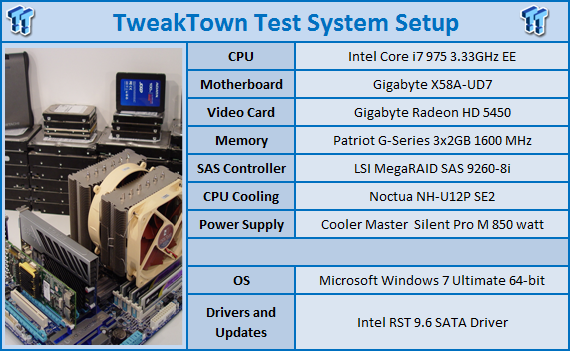
We would like to thank the following companies for supplying and supporting us with our test system hardware and equipment: AVADirect, GIGABYTE, Cooler Master, LSI and Noctua.
You can read more about TweakTown's Storage Product Testing Workstation and the procedures followed to test products in this article.
For the most part USB 3.0 will read and write data just as fast as SATA II. There is one feature that USB 3.0 lacks and that is native command queuing. When reading or writing large files you will not notice the missing feature, but when dealing with several smaller files, NCQ would be a welcome feature.
The next thing to keep in mind while we are testing is the way USB 3.0 is currently implemented in many of the motherboards on the market. The marketing claims of 480MB/s isn't the reality at this time, but next year we should see motherboards that can meet these claims.
ATTO Baseline Performance
Version and / or Patch Used: 2.34
ATTO is used by many disk manufacturers to determine the read and write speeds that will be presented to customers.
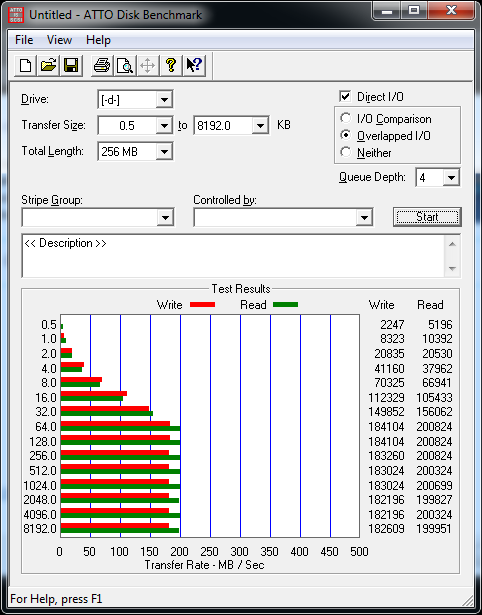
Using ATTO, we see that our GIGABYTE X58A-UD7 when paired with the OCZ Enyo is only able to achieve 200MB/s read and just over 180MB/s write. This is a motherboard limit and not an Enyo limit. We use the same motherboard for all storage product testing and do so to keep the performance numbers on an even playing field.
Benchmarks - HD Tach
HD Tach
Version and / or Patch Used: 3.0
Developer Homepage: http://www.simplisoftware.com
Product Homepage: http://www.simplisoftware.com/Public/index.php?request=HdTach
Buy It Here
HD Tach has been around for a long time and is excellent when it comes to testing hard drive performance. It is also a very handy program when it comes to testing the controller used on particular motherboards. Tests such as Read, CPU Utilization and Burst are available at a click of the button and give you a good idea of how the hard drive can perform from system to system.

Here we see the performance across the drive. The OCZ Enyo keeps the reads and writes very steady and the internal garbage collection will keep the performance at these high levels over the life of the drive.
Benchmarks - Crystal Disk Mark
CrystalDiskMark
Version and / or Patch Used: 3.0 Technical Preview
Developer Homepage: http://crystalmark.info
Product Homepage: http://crystalmark.info/software/CrystalDiskMark/index-e.html
Download here: http://crystaldew.info/category/software/crystaldiskmark
CrystalDiskMark is a disk benchmark software.
Key Features:-
* Sequential reads/writes
* Random 4KB/512KB reads/writes
* Text copy
* Change dialog design
* internationalization (i18n)
Note: Crystal Disk Mark 3.0 is not available to the public yet, but the Technical Preview does allow us to test 4K performance at queue depths of 4 and 32 in addition to 1. The current release Crystal Disk Mark only shows us QD 1.
Crystal Disk Mark Tests
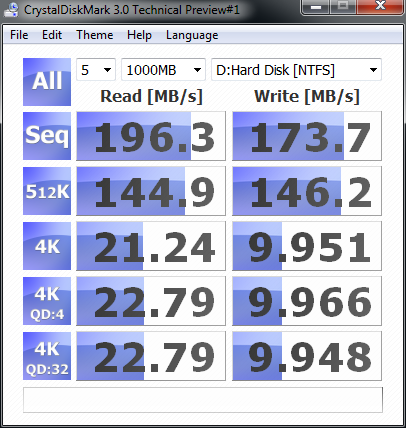
In a recent announcement the makers of CDM stated that they were making the 1000MB test the default benchmark so we have changed over from the 100MB test and started using the 1000MB test in our reviews.
In CDM we focus on the 4K performance and here we see solid 20+MB/s read and near 10MB/s write speeds. The Western Digital VelociRaptor is able to achieve night around 2MB/s in this area, so the Enyo is easily faster than the fastest consumer platter drives in this area. When you are dealing with smaller files, the 4K performance makes a huge difference.
Benchmarks - AS SSD
AS SSD Benchmark
Version and / or Patch Used: 1.2.3577.40358
Developer Homepage: Alex Intelligent Software
Product Homepage: Alex Intelligent Software
Download here: http://www.alex-is.de/PHP/fusion/downloads.php?cat_id=4&download_id=9
AS determines the performance of Solid State Drives (SSD). The tool contains four synthetic as well as three practice tests. The synthetic tests are to determine the sequential and random read and write performance of the SSD. These tests are carried out without the use of the operating system caches.
In all synthetic tests the test file size is 1GB. AS can also determine the access time of the SSD, the access of which the drive is determined to read through the entire capacity of the SSD (Full Stroke). The write access test is only to be met with a 1 GB big test file. At the end of the tests three values for the read and write as well as the overall performance will be issued. In addition to the calculated values which are shown in MB/s, they are also represented in IO per seconds (IOPS).
Note: AS SSD is a great benchmark for many tests, but since Crystal Disk Mark covers a broader range of 4K tests and HD Tune Pro covering sequential speeds, we will only use the Copy Benchmark from AS SSD.
- Copy Benchmark
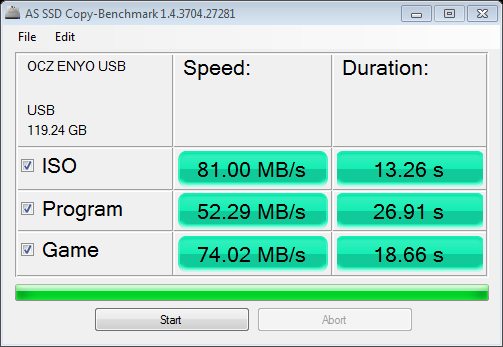
If you read our SSD reviews regularly then you may be aware that SandForce drives have an issue when dealing with compressed data. The transfer rates are reduced. I only bring this up because a few readers may be put off by OCZ's choice of controller in the Enyo.
Here we see transfer rate performance. If you compare that data to the data gathered from a SandForce drive, you will see that the OCZ Enyo with the Indilinx Barefoot controller is actually as fast and in some cases faster than the SandForce SF-1200 drives, even when they are tested with SATA II.
OCZ's choice of Barefoot over the SF-1200 in this application not only produces a faster drive when dealing with compressed data, but it also helps reduce the cost.
Final Thoughts
USB 3.0, solid state drive technology, together in one attractive package ...How cool is that? If you take data back and forth between the office and home or from one system to another, then the OCZ Enyo isn't just cool; it is a must have! As you can imagine, I move a lot of data and am always gathering more every day. It is actually now to the point where I have so many thumb drives, external drives and even internal drives with data that I need to consolidate everything and just pick one device to rule them all. The OCZ Technology Enyo is that device. To say I like the OCZ Enyo is really an understatement. Saying that this is my new all-in-one portable storage is saying a bit more from me than if it was said from any ol' Joe Sixpack. I did write the very first USB 3.0 product review on the web and have at least 30 USB 3.0 products here at the office. The Enyo is the best of the best, offering the highest speeds and in a form factor that I can live with.
When it comes to the competing products that I have on hand, it would be difficult to compare them all, but the Super Talent SuperCrypt is most likely also on your list of products in the same class. The SuperCrypt is smaller than the Enyo, offers enterprise class encryption, but is also made of plastic. Just the other day I dropped a 6 pound motorcycle wheel on my notebook while slamming on the brakes to avoid something in the road. There have also been a few times where my thumb drives were dropped at the exact same time I was closing a car door; you would think that could only happen once, right? The Enyo is made to survive and the SuperCrypt is made to perform. Obviously I need survival over performance because a dead drive means I lose the data that is important enough to keep with me at all times.
The price is really the only limiting factor and something that you are going to have to overcome on your own. OCZ has done a really good job of making the Enyo look the part; this is a high end piece of tech and when you have one in your hand you can tell that this is a high quality part. Any company can slap together an Indilinx Barefoot SSD and a USB 3.0 bridge chip, put it in a 2.5" form factor part and call it portable. We have already seen that, but it took real engineering to get the Enyo in a package that is truly portable. Our sample 128GB drive costs just under 300 USD at Newegg now. Personally, just looking at it online, I wouldn't be all that willing to make the purchase, but after having the drive in my hand and using it every day, that changed and it didn't take more than a couple of hours to reach that conclusion.
If you keep or move data often then the OCZ Enyo should be your portable storage. It might take a leap of faith to get it in your possession, but once you have one, buyer's remorse isn't a thought that will come to mind.

 United
States: Find other tech and computer products like this
over at
United
States: Find other tech and computer products like this
over at  United
Kingdom: Find other tech and computer products like this
over at
United
Kingdom: Find other tech and computer products like this
over at  Australia:
Find other tech and computer products like this over at
Australia:
Find other tech and computer products like this over at  Canada:
Find other tech and computer products like this over at
Canada:
Find other tech and computer products like this over at  Deutschland:
Finde andere Technik- und Computerprodukte wie dieses auf
Deutschland:
Finde andere Technik- und Computerprodukte wie dieses auf 


 PS5 Pro CPU upgrade to be more hype than performance
 Microsoft wants you to use AI to jazz up images in Windows 11 Photos app - but there's a twist
 Ready for Zen 5? MSI has dropped a heavy hint that AMD's next-gen Ryzen CPUs could arrive soon
 Microsoft mulls a way of punishing inactivated Windows 11 installations using its Edge browser
 Scientists are now using cheap NVIDIA chips to control hypersonic weapons
 FlexiSpot C7B-Mesh Ergonomic Office Chair Review
 Samsung G8 34-inch QD-OLED Gaming Monitor Review - 175Hz for $900
 ASRock NUCBOX-155H Mini PC Review
 NuPhy Air96 V2 Wireless Mechanical Keyboard Review
 TEAM T-FORCE Siren DUO360 RGB Liquid CPU Cooler Review
 AVerMedia Live Streamer ULTRA HD Review
 AVerMedia Live Gamer 4K 2.1 Review
 XPG Invader X Mid-Tower Chassis Review
 Intel Core i9-14900KS CPU Review
 Arbiter Polar 65 Magnetic Gaming Keyboard Review
 Everything you need to know about the latest ASUS NUC Mini PCs - NUC 14 Pro and ROG NUC
 How to Overclock Your GPU and Boost Your PC Gaming with ASUS GPU Tweak III
 ASUS's AMD Radeon RX 7000 Series GPU lineup has something for every gamer
 ASUS OLED Premium Care defends the ROG Swift OLED PG32UCDM gaming monitor from burn-in
 Patriot Viper Xtreme 5 Engineering Prototype 48GB Dual-Channel Memory Kit Preview