

Introduction

ASUS is usually known for its motherboards and GPUs. However, they are becoming more and more known for the peripherals they are making, too. Their monitors are growing in popularity and in performance, as are their wireless routers and access points.
Today we are taking a look at a brand new one coming off the shelf. This is the ASUS RT-N16 multi-function wireless router. It is multi-function because you can choose the mode you want it to operate and because it has the ability to wirelessly share printers and USB HDDs as well. With a price tag of $92.00 from NewEgg.com (with an $18 price cut), the RT-N16 could be a steal if it can produce what it promises.
The Box and What's Inside
Package and Contents
The RT-N16 comes in a box that is fairly clean. ASUS has kept the clutter down to a minimum. You do get a nice image of the product on the front along with some big claims.

Some of the claims are interesting and also give us some pause. It looks like ASUS has moved away from the low power processors for their networking gear. They are also now offering support for the NTFS file system. This is an excellent move as it opens up a lot of room with external HDDs.

The back of the box has a much more informative style. ASUS is showing you all of the things that you can do with the RT-N16. They also go into a brief explanation of the EZQoS system. We will also talk about this a little later in the review.

Inside the box we find all of the things you absolutely need to get going and one that is just nice to have. The VIP Member warranty registration is a nice little item, although it is not much more than a registration for an e-mail listing. With it you do get notifications when there is a new firmware available etc.
One thing we wish we would find in all wireless router boxes is more than one Cat5 cable; but that is probably wishful thinking.

The RT-N16
The ASUS RT-N16 is quite a beast. It is large, bulky and reminiscent of much older routers. In fact, it looks a lot like my old 802.11b router from D-Link that I have. But while the RT-N16 might be bulky, it is certainly not old.
As with most modern routers you get a few blue-LEDs to indicate activity. These are all on the front of the bezel. Interestingly enough, the WiFi light on the front says 2.4GHz, but there are no other bands available on the RT-N16.


Along the backside we find four GBe LAN ports, One GBe WAN port, two USB ports, a reset button and a WPS button. Outside of the USB ports is your typical fair. Also visible in this shot are the three antenna ports for a total of three spatial streams. These three antennas are part of the setup that allows the 300Mbps theoretical transfer rate.

The bottom has a couple of venting areas and the default login information. This is only handy for the first time you set up the RT-N16 as one of the first things you should do is to change the password.

Setup and WebUI
While there is a setup wizard of sorts on the RT-N16, it is only to help you establish a connection. For everything else you have to get into the WebUI.


But if you ever have an outage at the other end (cable or DSL) the RT-N16 will be sure to let you know.

Once in the WebUI you will find that ASUS has made this a very easy to navigate piece of software. Even if you have never worked with a router before you can quickly understand what is happening on your network with this UI.

From the home page (called the Network Map) you can get anywhere in a couple of ways. The first is the menu along the left side while the second method is a little drop down menu in the lower right hand corner. Both will get you where you need fast.

Moving down the left side menu in order, our first stop is the UPNP media server. This combined with a USB HDD can turn the RT-N16 into a media storage hub. From there you can share audio and video files out to other devices on your network. We did this with our 1TB Seagate FreeAgent + and streamed video files to both a PC and to a Seagate FreeAgent Theater + both worked without issue (as we will cover below).

The AiDisk function allows you to setup more than just video file sharing. Here you can setup your own FTP and turn the RT-N16 into a NAS with only the cost of an external HDD.

ASUS gives you multiple options for security right from this simple wizard. You can also head into the Advanced section for more granular control.

If you are looking to setup an FTP ASUS also offers a Dynamic DNS service for you to use.

For Quality of Service, ASUS is giving you a very visual way to shape your traffic. All you have to do is click the icon of the items you want to give priority to and you are set.

Of course, you cannot get by on the simple wizards alone. ASUS has made sure to include more advanced options for greater control over your RT-N16 and also to allow the more experienced users to feel at home, too.

Again, following the menu we kick things off with the Wireless setup. While you can also configure this right from the Network Map page, here you have more options to give greater security and control over your wireless network.

On the Bridge page you can setup a WDS (Wireless Distribution System) network. This allows you to connect multiple wireless access points without the need to cable your house of office.

The RT-N16 has quite a bit of security built in and more options to add to it. You can filter systems on your wireless network by MAC (Media Access Control) Address to ensure that only systems you want are on the network. You can also establish security using a RADIUS (Remote Authentication Dial In User Service) server (in a more professional network).
Setup and WebUI - Continued

Strangely enough, the Professional page looks more like the Advanced wireless settings on most other routers.


On the LAN page you can control all of the functions of your internal LAN including the DHCP server (if you use one) and the routes used by the device.

The WAN pages are a little more complex. These control the outward face of your network. Here you have the controls for things like the DMZ (a place for a system or systems to sit outside the protections of your firewall), Advanced QoS features, Port triggers, Virtual Servers (port mapping for specific functions) and more.


With the Virtual Servers page you get a couple of drop down menus to make things much easier to setup. You can select common (for some reason the UI says Famous) games and services that will let the RT-N16 do most of the work for you.


As we mentioned above, in addition to the basic controls over your AiDisk you have some extra options down here in the Advanced section.


Under the Firewall section you have the basic set of rules and options you would have on most other routers. They are perhaps a little better laid out, but still the same.


The Admin pages are just what they say. Here is where you should head very soon after you power on your RT-N16 for the first time so you can change your Admin Password.


Performance
Bandwidth
We used PerformanceTest 6.1 by PassMark which you can find out more information about here. It has a handy Advanced Networking section which is perfect for our testing.
Doing our best to emulate a real-world performance scenario, I setup a server running Windows 2008 R2 (x64) Server, (2x Xeon Quad Core 3.0 GHz 1333MHz FSB, 4GB DDR2 FB-DIMMS, 2x 146GB SAS drives in RAID 1) and the client PC was an MSI Wind 200 with built-in Intel 802.11n (Intel WiFi Link 5100 AGN) adapter.
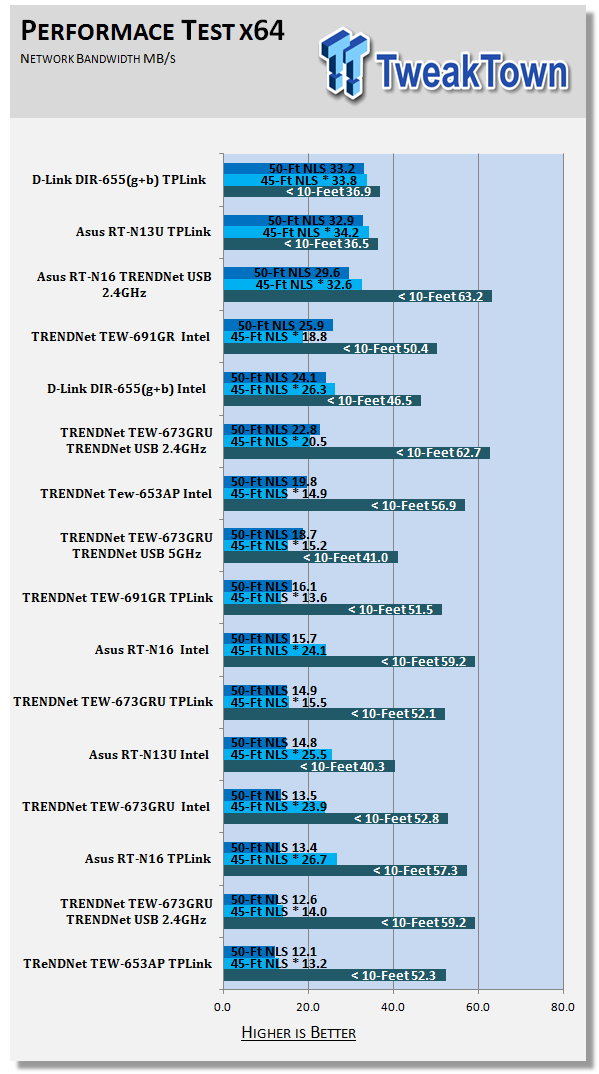
The results were gathered by sending data from the MSI netbook to the server at different distances with the built-in adapter, a TPLink TL-WN821N and then a TRENDnet TEW-644UB adapter. Average transmission speeds were recorded for each.
Connection Speed
The connection speeds are about what you would expect from an N spec router running AES encryption. We saw them stay right around 120-150Mbps with a major drop down to 60Mbps when we hit the edge of the stable range. We found our optimal range (including outside) was right around 60 Feet. At this distance the connection speed dropped well below 100Mbps and the connection seemed a little spotty.
For bandwidth we found the ASUS RT-N16 to run fairly well. With its three antennas even with signal disruption from the electrical panel and the wet wall we still managed more than acceptable speeds.
*signal travelling through wet wall and main house electrical panel
Gaming
The problem with testing ping times and gaming performance is that even using the same server multiple times you can get different results. To help alleviate this we tested the RT-N16 at four time intervals. The first was on Friday at 8PM EST (US Eastern time), the next was on Saturday at 12Noon EST, then again at 4PM, and the final was at 9am on Sunday. We took the pings registered and created an average of them to see where we were in general.
The RT-N16 did well with average to low pings and very good response to what was going on in the games we played. It certainly would not slow your gaming performance any if you chose to drop it in your system.
Multi-Media
As we mentioned earlier in our review, we attached a Seagate FreeAgent 1TB drive to the RT-N16. We then streamed a couple of different movies to both a PC running Windows 7 x64 Media Center (wireless) and then to the Seagate FreeAgent Theater + (wired). Both had no problems picking up the video and audio information, even when run concurrently.
Final Thoughts
ASUS is certainly coming along with their home networking products. We are very impressed with how they have improved both their UI and the overall performance. There are still some items that need to be addressed, though.
On the RT-N16 there was no way to change the MCS to get more performance or to correct for interference of other nearby wireless equipment. We also would like to see the ability to change the alternate channel in the wireless settings.
But other than that, the RT-N16 is a great follow on to the older multi-function wireless routers from ASUS. It was even able to keep up with the big boys on the block like TRENDnet and D-Link.
With a $92.00 price tag from NewEgg.com, this is a product that you should certainly take a look at if you want good solid performance and multi-function usage.

 United
States: Find other tech and computer products like this
over at
United
States: Find other tech and computer products like this
over at  United
Kingdom: Find other tech and computer products like this
over at
United
Kingdom: Find other tech and computer products like this
over at  Australia:
Find other tech and computer products like this over at
Australia:
Find other tech and computer products like this over at  Canada:
Find other tech and computer products like this over at
Canada:
Find other tech and computer products like this over at  Deutschland:
Finde andere Technik- und Computerprodukte wie dieses auf
Deutschland:
Finde andere Technik- und Computerprodukte wie dieses auf 


 AI startup: AMD Instinct MI300X is 'far superior' option to NVIDIA Hopper H100 AI GPU
 Samsung unveils world's fastest LPDDR5X memory: 10.7Gbps speeds, 32GB capacities per package
 SK hynix and TSMC to work together with HBM4 and next-gen semiconductor packaging technology
 Intel finishes assembly of ASML's first High-NA EUV tool, ready for Intel 14A process in 2025
 Intel Granite Rapids-AP CPU: LGA 7529 socket, up to 128 cores, up to 500W power
 FlexiSpot C7B-Mesh Ergonomic Office Chair Review
 Samsung G8 34-inch QD-OLED Gaming Monitor Review - 175Hz for $900
 ASRock NUCBOX-155H Mini PC Review
 NuPhy Air96 V2 Wireless Mechanical Keyboard Review
 TEAM T-FORCE Siren DUO360 RGB Liquid CPU Cooler Review
 AVerMedia Live Streamer ULTRA HD Review
 AVerMedia Live Gamer 4K 2.1 Review
 XPG Invader X Mid-Tower Chassis Review
 Intel Core i9-14900KS CPU Review
 Arbiter Polar 65 Magnetic Gaming Keyboard Review
 Everything you need to know about the latest ASUS NUC Mini PCs - NUC 14 Pro and ROG NUC
 How to Overclock Your GPU and Boost Your PC Gaming with ASUS GPU Tweak III
 ASUS's AMD Radeon RX 7000 Series GPU lineup has something for every gamer
 ASUS OLED Premium Care defends the ROG Swift OLED PG32UCDM gaming monitor from burn-in
 Patriot Viper Xtreme 5 Engineering Prototype 48GB Dual-Channel Memory Kit Preview