

Introduction

ASRock makes a return to our test bench with their latest creation. This is the 880G Extreme3. The 3 stands for all of those "3" labelled options that are available now; USB 3.0 and SATA 3.0. ASRock mentions another one; this is eSATA 3.0, although I really do not know what that means. This new board also features support for up to three way Crossfire and hybrid Crossfire.
ASRock is also boasting support for the 125 Watt, Sexa Core, Phenom II X6. This is a nice feature to have as there are more than a few 880G based boards that do not support more than a 90 Watt CPU. You get all of this for only $105.99 at NewEgg.com.
Well, let's get to testing and see if the Extreme name really fits.
The Box and What's Inside
Package and Contents
The 880G Extreme3 comes in a box that is, well, let's face it, this box is pretty ugly. I tried to think of something clever to say about how it could possibly be attractive, but I just couldn't.

The combination of a black background and the rainbow colored reflective overlay, make this eye watering. Of course, you do get some useful information. ASRock has placed a large logo to make sure you know the 880G Extreme3 has "True 333". Along the bottom edge is a row of logos that flash out the rest of the details for you.

The back is very much like the front, only a little more cluttered with information.

The loot inside the box is rather light, but then again, the price tag is, too.
The Motherboard
The Board
As with almost all boards out today (with a few minor exceptions) the ASRock 880G Extreme3 is built around the ATX layout. Interestingly enough, although most of the ASRock boards we have played with have had gold highlights, this one looks very familiar. It has a very distinctive blue and white design.
The upper half of the 880G Extreme3 looks like most other AMD motherboards. You still have the big plastic collar for the CPU heatsink. The RAM slots are not staggered like they are on other boards, so to have dual channel you will fill ether the blue or the white slots (or of course, all four). There are a nice amount of fan headers here, with two close to the CPU socket and one next to the RAM slots.

In the image below you will see one of our favorite pet peeves about the modern ATX board, the 8-pin Aux power socket. I know the reasons for it and I understand why it is here, but it makes me wonder if the need for this is not an indication that we have outgrown the ATX layout?

The lower half of the board has our three PCIe x16 mechanical slots. Of course, all are not capable of x16 electrical performance. The two blue slots are each capable of x16 when used singly. When used together they are capable of x8 each while the white slots are only x4. Looking at the second blue slot, there is an interesting hold-down mechanism for your GPU. It slides back and forth to lock the card into place or release it.


Opposite the peripheral slots are the six SATA 3.0 ports. We also find the handy board mounted power and reset button along with a pair of diagnostic LEDs.

The I/O ports are what we have come to expect from a motherboard with an IGP. The addition of USB 3.0 and a back mounted Clear CMOS button are even becoming common.

Wrapping up our walk around the 880G Extreme3, is pretty standard fare as far as layout goes. It does have support for three-way Crossfire, but as the third slot is only going to be x4 it is something of a waste for enthusiasts.
BIOS and Overclocking
BIOS

The BIOS on the ASRock 880G Extreme3 is simple, yet powerful. They stuffed almost everything onto one single page. This page is the OC Tweaker page (hmmm, sounds a lot like AI Tweaker).


The Turbo50 profile is located right at the top.

There are also a couple of overclock methods. The one we used was the async.


The ASRock 880G Extreme3 has some nice features for letting you adjust the multiplier (and overall clock speed) of each CPU core.


The RAM dividers are a little limited, but it is nice to be able to store OC profiles.

There were some odd settings in the memory configuration, but they did not seem to affect anything.


The rest of the BIOS is pretty straight forward and has the typical options you would expect.
Overclocking
Overclocking the 880G Extreme3 was fairly easy. ASRock has made sure that the board is responsive to the demands of pushing the system. However, it does seem rather picky on the RAM front. I have been able to push the Kingston RAM to a little over 1600MHz before, but not on the 880G Extreme3. For some reason when I pushed the RAM close to 1600MHz the board would drop the video. I could be sitting at the desktop and the screen would go blank.
I also noticed that the voltage listings for RAM seemed to be a little off. To get an even 1.65V for the RAM I had to set it to 1.659. In the end at my stable clock of 251x16 I backed the RAM only down to 1338MHz which keeps it right around the default speed.

You can see the validation for the Phenom II X6 on the 880G Extreme3 here.
OC Tuner
The ASRock OC Tuner software looks quite cheesy. You would think that in this day of computer graphics they could have come up with something a little better looking.

One of the issues that I did run into using this software was that pushing the system to 251MHz clocked the RAM over 1600MHz. This caused the system to fail (again) as the graphics relying on a combination of sideport memory and the installed RAM could not deal with that speed.


Still, you do have options to do some minor tinkering with this software. However, it is not an enthusiast level overclocking tool.

As all overclocking results are dependent on the hardware you use, your results may vary (even using the same exact same hardware configuration). Results of our overclocking tests are included in the performance section with the stock scores.
Important Editor Note: Our maximum overclocking result is the best result we managed in our limited time of testing the motherboard. Due to time constraints we weren't able to tweak the motherboard to the absolute maximum and find the highest possible FSB, as this could take days to find properly. We do however spend at least a few hours overclocking every motherboard to try and find the highest possible overclock in that time frame. You may or may not be able to overclock higher if you spend more time tweaking or as new BIOS updates are released. "Burn-in" time might also come into play if you believe in that.
Test System Setup and Comments

We would like to thank the following companies for supplying and supporting us with our test system hardware and equipment ASRock, AMD, Kingston and Cooler Master and Sceptre.
Working with the ASRock 880G Extreme3 was not bad. There were a few issues, though. The memory performance problem (not being able to run at 1600MHz) was an issue. If I had to make an educated guess I would have to say that the IGP cannot handle the memory at that speed (either with Sideport or on its own). This could be a tracing issue that is causing graphical data to become corrupted when it is taken from the RAM for video, or it could be an incorrect skew in the BIOS. It is something that should be resolved, though.
The IGP/RAM issue was so bad that during our overclocking session we ended up with double digit scores for 3DMark and Far Cry 2 would not load! We hope that ASRock is able to correct this in short order with a BIOS update as even at the entry level it could be a huge problem. If you are not concerned with using the IGP then the board is stable and quick.
Synthetic Tests - Part I
With any system you will want to see a combination of synthetic testing and real-world. Synthetics give you a static, easily repeatable testing method that can be compared across multiple platforms. For our synthetic tests we use Everest Ultimate, Sisoft Sandra, FutureMark's 3DMark Vantage and PCMark Vantage, Cinebench as well as HyperPi. Each of these covers a different aspect of performance or a different angle of a certain type of performance.
Memory Bandwidth
Memory is a big part of current system performance. In most systems slow or flakey memory performance will impact almost every type of application you run. To test memory we use a combination of Sisoft Sandra, Everest and HyperPi 0.99.
Sisoft Sandra
Version and / or Patch Used: 2010c 1626
Developer Homepage: http://www.sisoftware.net
Product Homepage: http://www.sisoftware.net
Buy It Here

The ASRock 880G Extreme3 is up at the top of the group here. This is somewhat marred by the fact that the difference between 1st and 2nd place is so small.
Everest Ultimate
Version and / or Patch Used: 5.30.1983
Developer Homepage: http://www.lavalys.com
Product Homepage: http://www.lavalys.com
Buy It Here
Everest Ultimate is a suite of tests and utilities that can be used for system diagnostics and testing. For our purposes here we use their memory bandwidth test and see what the theoretical performance is.

Stock Memory Performance

Overclocked Memory Performance
Everest shows us more excellent memory performance.
HyperPi 0.99
Version and / or Patch Used: 0.99
Developer Homepage: www.virgilioborges.com.br
Product Homepage: www.virgilioborges.com.br
Download It Here
HyperPi is a front end for SuperPi that allows for multiple concurrent instances of SuperPi to be run on each core recognized by the system. It is very dependent on CPU to memory to HDD speed. The faster these components, the faster it is able to figure out the number Pi to the selected length.
For our testing we use the 32M run. This means that each of the four physical and four logical cores for the i7 and the four physical cores of the i5 is trying to calculate the number Pi out to 32 million decimal places. Each "run" is a comparative to ensure accuracy and any stability or performance issues in the loop mentioned above will cause errors in calculation.
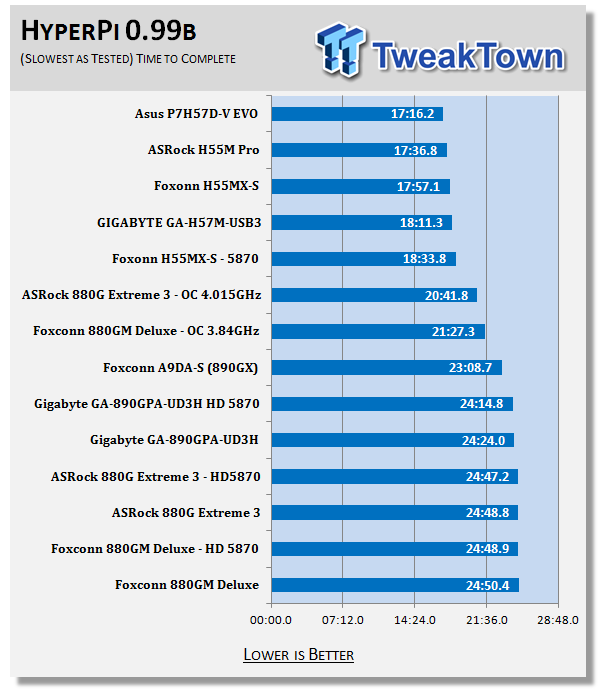
HyperPi (or SuperPi for that matter) is not an AMD strong suit. The numbers here show that when we compare the 8xx series boards against the H5x series. Of course, for a 8xx board the 880G Extreme3 does a great job; it even beats out a few 890 based boards.
Synthetic Tests - Part II
Disk Drive Controller
The system drive controller is an important part of system performance. In most modern boards your drive controller will run off of the PCI-e bus. The PCI-e bus performance can be affected by poor trace layout as well as many other design choices that show up on different boards.
For testing we use Sisoft's Sandra and Everest.
SiSoft Sandra
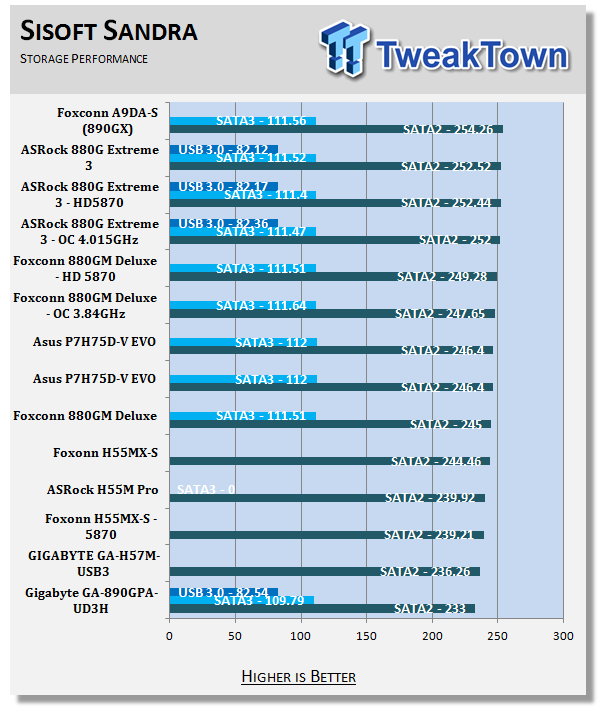
HDD performance presents us with some interesting numbers. When we overclocked the CPU the performance actually went down a little.
Everest

Stock HDD Performance

Overclocked HDD Performance

Stock USB 3.0 Performance

Overclocked USB 3.0 Performance
Everest shows us a similar story to our Sandra numbers. For some reason things slow down when we overclock the CPU.
Synthetic Tests - Part III
Here is where we dig out the FutureMark tests.
PCMark Vantage
Version and / or Patch Used: 1.0.0.0
Developer Homepage: http://www.futuremark.com/
Product Homepage: www.futuremark.com
Buy It Here
For overall system performance we use PCMark Vantage. This is run in both x86 and x64 mode to give the best indication of performance.

The PCMark Vantage scores are sort of all over the place. On the one hand the performance with the IGP was not that good, however, once we remove that from the equation we see it take off. Then the overclocked scores are at the top of the list, at least for x86.
3DMark Vantage
Version and / or Patch Used: 1.0.1
Developer Homepage: http://www.futuremark.com/
Product Homepage: www.futuremark.com
Buy It Here
For synthetic gaming tests we used the industry standard and overlockers bragging tool 3DMark Vantage. This is a test that strives to mimic the impact modern games have on a system. Futuremark went a long way to change from the early days of graphics driven tests to a broader approach including physics, AI and more advanced graphics simulations.
3DMark Vantage uses the DX10 API in addition to having support for PhysX. As we are no longer using an NVIDIA GPU for testing (at least until we can get a GTX 4xx card) you will only see the CPU based PhysX results in the scores. For testing we use the Performance test run.

Ok, now this one hurts. As we mentioned before, we saw that when we overclocked the CPU the IGP took a serious performance hit. Here we see the beginnings of this. We ran the overclocked tests a total of ten times and 22 was the highest score with a CPU score of only 16.
Cinebench R11.5 x64
Version and / or Patch Used: R11.5 x64
Developer Homepage: http://www.maxon.net/
Product Homepage: www.maxon.net
Download It Here
Cinebench is a synthetic rendering tool developed by Maxon. Maxon is the same company that developed Cinema4D, another industry leading 3D Animation application. Cinebench R11.5 tests your systems ability to render across a single and multiple CPU cores. It also tests your systems ability to process OpenGL information.

The ASRock 880G Extreme3 shows off its stuff with some excellent scores.
Real-World Tests - Part I
Real-world testing allows us to see how well a product will perform when used in the same manner as it would be in your house or office. It is an important side to performance testing as it can uncover hidden glitches in the way a product performs.
It is especially true when testing a mainboard; there are so many components of a board that have to interact that any problems between parts can cause a failure of the whole.
For real-world testing we use some common applications and functions. We test with LightWave 3D for rendering performance, AutoGK for transcoding from DVD to AVI and two games for gaming testing.
Rendering
Rendering of 3D Animation is a system intensive endeavor. You need a good CPU, memory and HDD speed to get good rendering times. For our testing we use LightWave 3D. This software from Newtek is an industry standard and has several pre-loaded scenes for us to use.
LightWave 3D
Version and / or Patch Used: 9.6
Developer Homepage: http://www.newtek.com
Product Homepage: http://www.newtek.com/lightwave/
Buy It Here
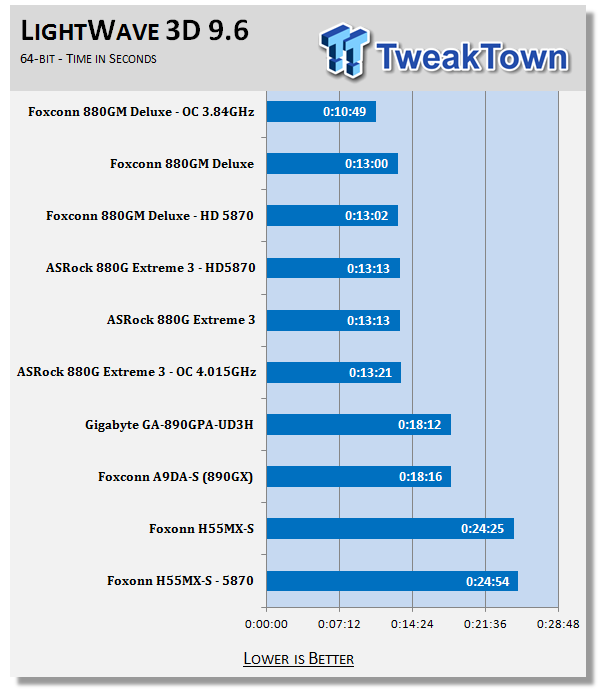
The Lightwave scores are also a little off. For some reason the overclocked scores are behind the stock scores and even the discrete GPU scores.
AutoGK
Version and / or Patch Used: 2.55
Developer Homepage: http://www.autogk.me.uk/
Product Homepage: http://www.autogk.me.uk/
Download It Here
AutoGK stands for Auto Gordian Knot; it is a suite of transcoding tools that are compiled into an easy to install and use utility. It allows you to transcode non-protected DVDs and other media to Xvid or Divx format. For our testing purposes we use a non-DRM restricted movie that is roughly 2 hours in length. This is transcoded to a single Xvid AVI at 100% quality.

The ASRock 880G Extreme3 is a great product for transcoding. It simply trounces on all the others in the test group.
Real-World Tests - Part II
Here we have our real gaming tests. Each of the games we chose use multiple cores and GPUs. They are able to stress the system through use of good AI. Both have decent positional audio that adds impact to the sound subsystem of the board. We ran each game through the level or parts listed and recorded frames per second using FRAPS. This brings the whole game into play.
As most IGPs are not meant for high-end gaming we have swapped out one of our First Person Shooters for a more mainstream game. We have also adjusted down the testing resolution from 1920x1200 to 1280x960. In order to keep full measure of the board we return to 1920x1200 when we test the board with our HD 5870.
SIMS 3
Version and / or Patch Used: 1.0
Timedemo or Level Used: Ten Minutes of Game Play in Sunset Valley
Developer Homepage: http://www.ea.com/
Product Homepage: http://www.thesims3.com/
The SIMS 3 is the third complete edition of this popular game. In it you create a personality for use in a virtual world. The town we chose was Sunset Valley; we created a basic character and off we went. We performed as many actions as we were able to in order to give the board and GPU as much to think about as we could. The settings we used are shown below.

Settings for IGP testing at 1280x960

Settings for the HD 5870 testing at 1920x1200
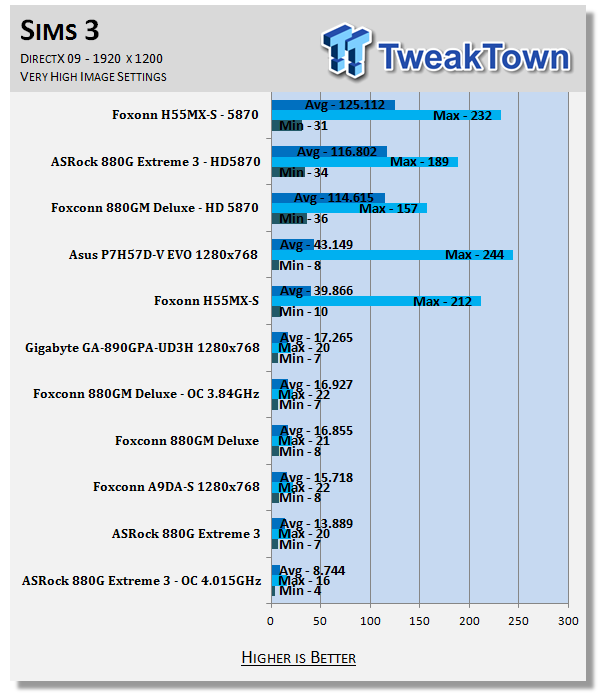
Gaming is not a strong point of the ASRock 880G Extreme3, at least not with the IGP. When we put this into play things were not very good. This was especially true when we overclocked the CPU.
Far Cry 2
Version and / or Patch Used: V1.00
Timedemo or Level Used: Clearing the Safe house through to the Rescue
Developer Homepage: http://www.ubi.com
Product Homepage: http://farcry.us.ubi.com
Far Cry 2 is a large sandbox style game. There are no levels here so as you move about the island you are on you do not have to wait for the "loading" sign to go away. It is mission driven so each mission is what you would normally think of as the next "level".
In the game you take the role of a mercenary who has been sent to kill the Jackal. Unfortunately your malaria kicks in and you end up being found by him. Long story short, you become the errand boy for a local militia leader and run all over the island doing his bidding. The settings we used for testing are shown below.

Settings for IGP testing at 1280x960

Settings for the HD 5870 testing at 1920x1200

Ok, here things got really ugly. The IGP on the motherboard simply did not perform while we had it overclocked. It simply refused to load the game at all.
Gaming Conclusion
If you are buying the ASRock 880G Extreme3, you are not getting it for the IGP. It is simply not going to put anything on the table for high-end graphics. It will do ok for basic graphics, but the chance of gaming or much video/picture editing is small. Still, if you drop in a discrete GPU you can get some great performance.
Power Usage and Heat Tests
Power Consumption
We are now able to find out what kind of power is being used by our test system and the associated graphics cards installed. Keep in mind; it tests the complete system (minus LCD monitor, which is plugged directly into an AC wall socket).
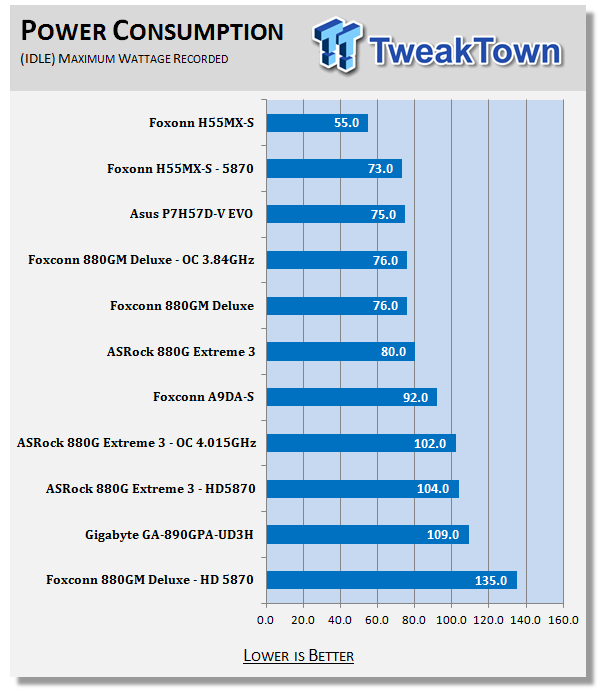

The power consumption here was quite high. In fact, it was much higher than we would have thought from an AMD chipset.
Heat Generation
As a new measure, we are now monitoring the heat generation from the key components on the motherboard; this being the Northbridge, Southbridge (if it contains one) as well as the Mosfets around the CPU. The results are recorded at idle and load during the power consumption tests.


Heat was not too bad until we put the HD 5870 into the system. From there it rose significantly.
Final Thoughts
The ASRock 880G Extreme3 was a good performing board. We saw solid performance for most tasks with a few exceptions that were more related to the CPU used than anything else.
We did have some issues with memory and getting the voltages dialed in right for the type of memory we were using. We also saw the IGP have problems with overclocking. We have a feeling that this will be resolved with a future BIOS update. For now, you can get good clocks on air cooling with little trouble if you are using an Add-in GPU.
At only $105.99 at the time of writing over at NewEgg.com, the 880G Extreme3 is a good deal. When you add the performance with SATA 3.0, USB 3.0 and Tri Crossfire support, the pennies do add up.

 United
States: Find other tech and computer products like this
over at
United
States: Find other tech and computer products like this
over at  United
Kingdom: Find other tech and computer products like this
over at
United
Kingdom: Find other tech and computer products like this
over at  Australia:
Find other tech and computer products like this over at
Australia:
Find other tech and computer products like this over at  Canada:
Find other tech and computer products like this over at
Canada:
Find other tech and computer products like this over at  Deutschland:
Finde andere Technik- und Computerprodukte wie dieses auf
Deutschland:
Finde andere Technik- und Computerprodukte wie dieses auf  Dragon's Dogma 2 patch delivers some important fixes - but not the one everyone wants
 AMD's top Strix Point Halo APU could have 16 Zen 5 cores in 2 x CCDs, mirroring Ryzen 9000 CPUs
 FBI confirms Chinese hackers have infested US water and energy systems
 Microsoft's new Windows 11 'AI Explorer' feature set to anger AMD and Intel
 High-end PC maker gives advice that could fix Intel Core i9 CPUs crashing in games
 ASUS ROG Swift Pro PG248QP Gaming Monitor Review - Frames, frames, and more frames
 FlexiSpot C7B-Mesh Ergonomic Office Chair Review
 Samsung G8 34-inch QD-OLED Gaming Monitor Review - 175Hz for $900
 ASRock NUCBOX-155H Mini PC Review
 NuPhy Air96 V2 Wireless Mechanical Keyboard Review
 TEAM T-FORCE Siren DUO360 RGB Liquid CPU Cooler Review
 AVerMedia Live Streamer ULTRA HD Review
 AVerMedia Live Gamer 4K 2.1 Review
 XPG Invader X Mid-Tower Chassis Review
 Intel Core i9-14900KS CPU Review
 Everything you need to know about the latest ASUS NUC Mini PCs - NUC 14 Pro and ROG NUC
 How to Overclock Your GPU and Boost Your PC Gaming with ASUS GPU Tweak III
 ASUS's AMD Radeon RX 7000 Series GPU lineup has something for every gamer
 ASUS OLED Premium Care defends the ROG Swift OLED PG32UCDM gaming monitor from burn-in
 Patriot Viper Xtreme 5 Engineering Prototype 48GB Dual-Channel Memory Kit Preview