

Introduction
Less than 24 hours ago I was sound asleep dreaming about spending time in the lab testing solid state drives. You know that you really enjoy your job when you start envisioning the day that is to come. Like clockwork, I was awakened by the friendly horn of my favorite USP guy and it was time to start living my dreams.
Just hours before, I had finished playing twenty questions with the Western Digital media rep. Western Digital is what I would consider an old school HDD company. At the turn of the century affluent families with long standing status would consider themselves as coming from old money and WD is defiantly an old money company in the HDD world. In recent times the old money HDD companies have found themselves under an assault by new money and the companies that are modernizing while globalizing the storage market. New money companies like RunCore, OCZ Technology and Corsair are playing on a court that encompasses the globe with suppliers, products and even manufacturers playing a larger role in the new money product lines.
When it comes to solid state drives the controller is the heart of the drive. There are SSDs on the market that are using bottom of the barrel, slow as molasses NAND flash, but their controller is able to make it all come together. Most of the time we are able to find out what controller is in a product and have a very good idea about the drives performance.
As it sits right now I have no idea what controller is in the Western Digital SiliconEdge Blue. To further aid to the confusion the cache is larger than anything we have tested before. The good thing is that when we buy SSDs we are rarely buying a name or the laser etches found on the controller. Pricing, performance, overall value between the two, length of warranty and a company's reputation on standing behind their products is what we are breaking our wallets out for.
Let's take a look at the published specifications and some of the information we were able to find on our own.
Specifications, Pricing and Availability

Judging from the specifications, WD is ready to take on the SSD market like a HDD manufacturer. Here we see a lot of information presented in typical fashion, for traditional platter drives. Just like Seagate and their presentation of the Pulsar, we see nothing about the controller type, number of channels, ONFI rating for the flash or really anything that tells us how the SiliconEdge is going to perform in the real world. We do know that the new SiliconEdge supports Windows 7 TRIM, Native Command Queuing and SMART. No word on an internal garbage collection mechanism yet.
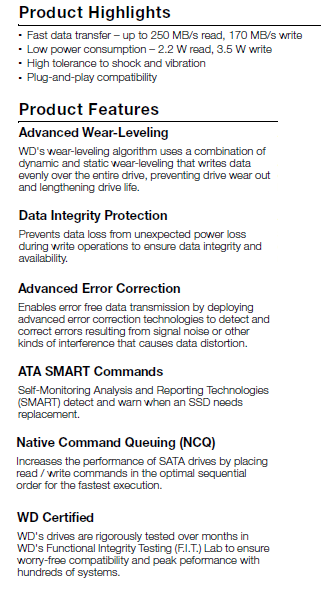
Reading between the lines, we can see that Western Digital has one of the very best names for their SSD line, SiliconEdge. That's right up there for SSD Name of the Year, but it is going to have to compete with Patriot's SandForce 1200 controlled Inferno that will ship with a red enclosure. The shock rating of the new SiliconEdge Blue is higher than most SSDs we have looked at in recent months. As with all SSDs, the power draw is much less than their platter based cousins. WD is supporting the new Blue with a three year warranty. The last obvious part from the information provided by Western Digital is found right in the name.
For years the company has used a naming scheme that reflects where the drive stands performance wise in their product line up. For those concerned about power consumption and other environmental matters, the Green Series was made to satisfy your needs. In the middle is the Blue Series, generally a collection of mainstream products that satisfy users looking for a nice balanced mix between capacity and performance. The enthusiast level products are found in the Black Series, an area that Western Digital has been very successful in for quite some time. That leaves our SiliconEdge drive that we are looking at today right in the middle since it comes with the Blue name. It also has us really excited to think what WD might have in the works for their SiliconEdge Black Series!
Moving beyond the name and the information provided, we found that the SiliconEdge Blue has a controller that is labeled by WD as a WD chip. We have been told by the company that they co-developed the firmware and that the drive has successfully completed over 250,000 hours in their Functional Integrity Testing (FIT) lab. That is over 1000 days of testing. I really hope they didn't do that with just one drive. Even with 100 drives that is still over 100 days of testing.
On the inside of the drive we found a massive DDR II 512MB buffer chip from ESMT. Just a few weeks ago we were surprised to see a 256MB buffer on the Crucial RealSSD C300. On its own this leads us to believe that the SiliconEdge Blue needs quite a bit of assistance buffering data being written to the drive or a tracking system that isn't very efficient. That is all right though, we are about real world performance and not all of the tech that goes into making the magic happen, as long as it works.
The press release for the SiliconEdge Blue goes live at the same time of this article and availability should follow shortly after. At the start there will be three different capacities; 64GB, 128GB and 256GB. In the press release Western Digital also lists the MSRP; those are 279.00 (64GB), 529.00 (128GB) and finally 999.00 (256GB) with all pricings being USD. We will talk more about the cost structure in the Final Thoughts page at the end. I am excited to dig into the new Western Digital SiliconEdge Blue. Follow me!
The Western Digital SiliconEdge Blue

Our 256GB sample SiliconEdge Blue arrived in brown box fashion, but I am confident WD will put together a great package for the retail units. Here we see the front of the drive. All of the information is listed on the front label. It is kind of nice to see the Product Of the USA statement on the drive; something we do not see very often.

I really like the finish of the drive. Even though it is in the Blue Series, it could easily pass as an industrial product. The metal case was very sturdy and offers a lot of protection. The bottom mounting holes are present so you will not have a problem mounting the SiliconEdge in most of the notebooks on the market.

On the side we also found the mounting holes where they should be.

The SATA power and data connections were also where they should be, making the Blue ready for just about any installation.

On the front side of the PCB we get a good look at the controller, DDR II Buffer and half of the flash. The Samsung flash is double stacked and we can see that there are a lot more little components on the board than a typical Indilinx Barefoot drive.

Here we see the Western Digital labeled controller and the massive 512MB buffer DRAM.

Samsung has been known to make very high quality flash memory. Western Digital didn't do any dumpster diving here.

On the back we see the rest of the flash. In a double stacked configuration that means there are 32 flash chips on the board for the 256GB model. Certainly these can't be cheap to build.
Test System Setup and ATTO Baseline Performance
Test System
Motherboard: ASUS P6T7 WS SuperComputer (Supplied by ASUS)
Processors: Intel 975 EE (Supplied by AVADirect)
Memory: Corsair Dominator 1600 MHz Triple Channel Kit
Graphics Card: Leadtek Quadro FX1700 (Supplied by Leadtek)
Enclosure: Lian Li V2000
Cooling: Noctua NH-U12P SE2 (Supplied by Noctua)
SAS Controller: LSI MegaRAID SAS 9260-8i (Supplied by LSI)
Operating System: Microsoft Windows 7 Ultimate X64
You can read more about TweakTown's Storage Product Testing Workstation and the procedures followed to test products in this article.
Today we are looking at the Western Digital SiliconEdge Blue 256GB solid state drive and compare its performance against some of the more recent SSDs we have tested.
Those of you who have been asking to see Intel X25-M G2 numbers can now stop emailing me. A drive passed through my office and before I let it set sail for Australia it took the opportunity to get a standard round of tests in.
Now that other manufacturers are releasing their next generation flagship models for the performance market, WD will have to use the SiliconEdge Blue to compete with a slew of Indilinx Barefoot controlled drives that have taken over the market. The X25-M is also a player here, but with only 80GB of space I am still holding firm to my belief that it is too small for enthusiasts and notebook users. RAID 0 is still not a very good option for most SSDs since there are not any controllers that are able to pass along the TRIM command.
ATTO Baseline Performance
Version and / or Patch Used: 2.34
ATTO is used by many disk manufacturers to determine the read and write speeds that will be presented to customers.
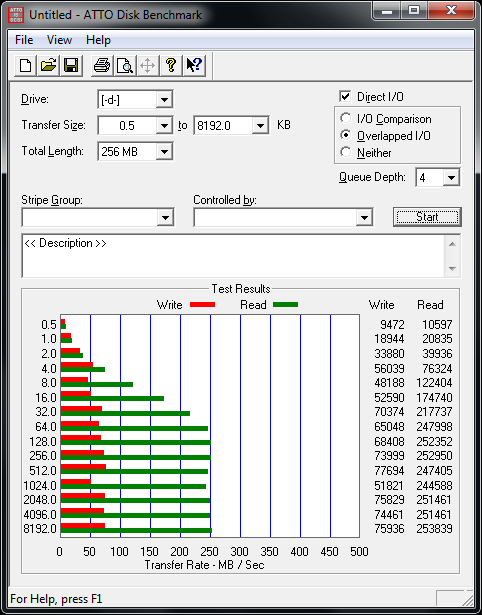
In ATTO we see quite a bit of difference between WD's PR write numbers and what we came up with. ATTO is closer to the middle of our testing schedule, but surely the drive has not been hit so hard that the write numbers would take this big of a hit with only a handful of tests being ran before ATTO.
Benchmarks - HD Tune Pro
HD Tune Pro
Version and / or Patch Used: 4.00
Developer Homepage: http://www.efdsoftware.com
Product Homepage: http://www.hdtune.com
HD Tune is a Hard Disk utility which has the following functions:
- Benchmark: measures the performance
- Info: shows detailed information
- Health: checks the health status by using SMART
- Error Scan: scans the surface for errors
- Temperature display
HD Tune Pro gives us accurate read, write and access time results and for the last couple of years has been gaining popularity amongst reviewers. It is now considered a must have application for storage device testing.
Read Tests
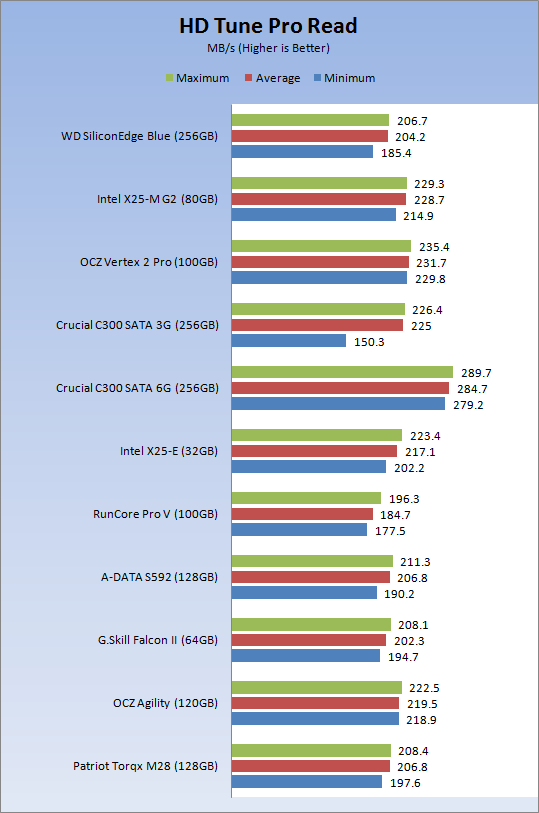
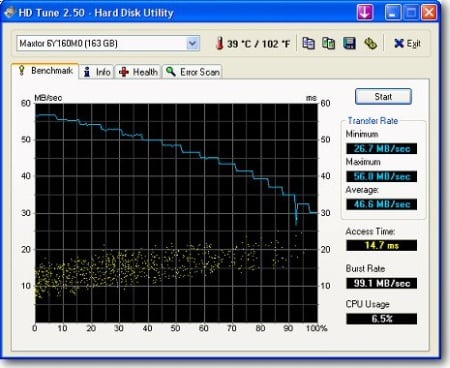
Our STR read numbers look really good and line up perfectly with the Indilinx Barefoot drives.
Write Tests
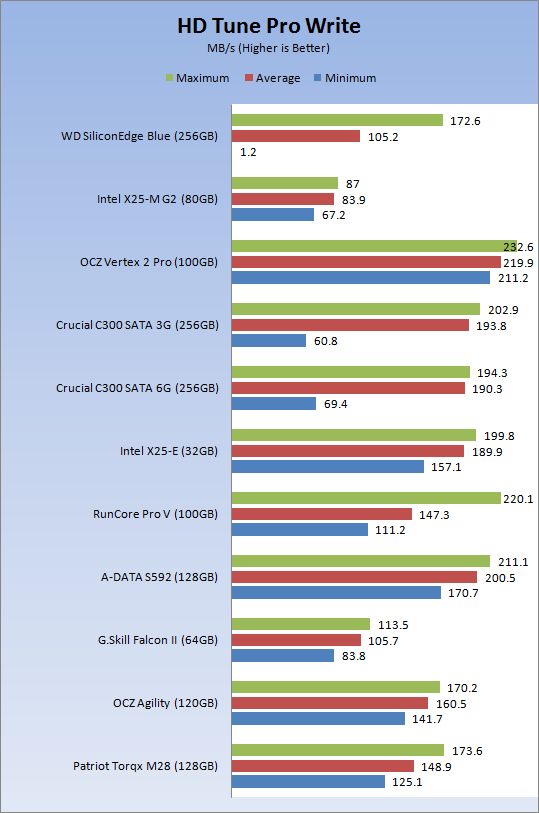
I wish I could say the same for the write test. Here we see all kinds of madness. Let's take a closer look.

Taking a closer look at the Write Speed, we see a massive drop off at the 60% mark. This same anomaly was observed on three different systems and all between the 60 and 63% mark. This is not the level of performance we would like to see from a product that has over 250,000 hours of testing under its belt. Also, since solid state drives have their own wear leveling algorithm, we can't see how a couple of bad flash modules would cause this type of issue.
Let's hang tight and see if any of this appears once the drive handles real world application testing.
Benchmarks - Everest Random Access Time
Everest Random Access Time
Version and / or Patch Used: 4.60
Developer Homepage: http://www.lavalys.com
Product Homepage: http://www.lavalys.com
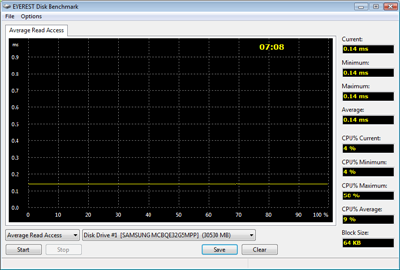
Everest Ultimate and Corporate Edition offer several different benchmarks for testing and optimizing your system or network. The Random Access test is one of very few if not only that will measure hard drives random access times in hundredths of milliseconds as oppose to tens of milliseconds.
Read Tests
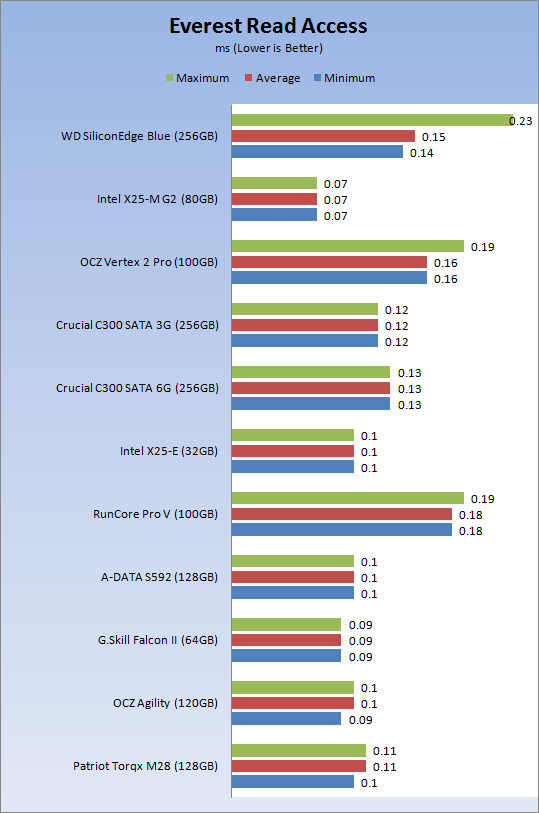
The read access times were pretty good, but there were a few spikes that we didn't really like to see. When compared to platter based drives, well, there really isn't a comparison and that is why we don't include them in the graph. The SiliconEdge Blue, even with a couple of spikes is still able to access data faster than a platter drive can handle a cache hit.
Write Tests
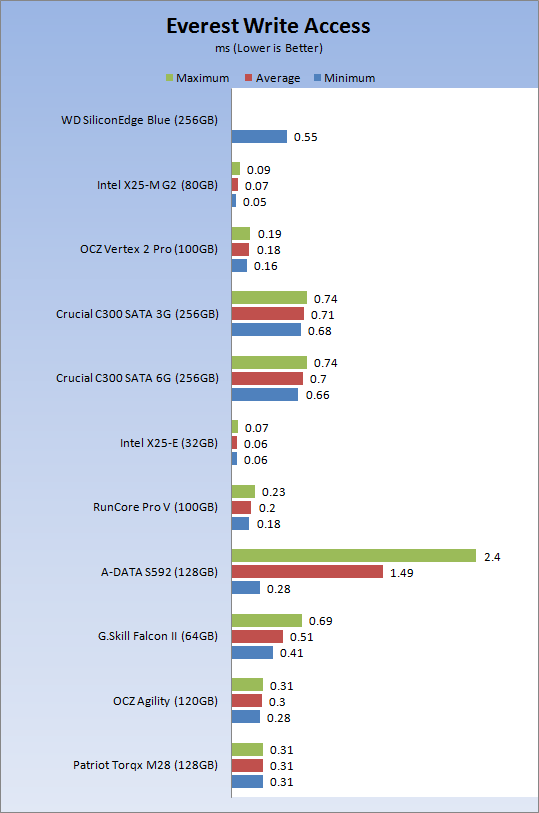
The write test is also a problem in the access area. Here I listed the minimum but didn't want to destroy my chart by listing the average and max.

It is pretty clear at this point that either we have a bad sample or that there are major issues with the SiliconEdge Blue's ability to write data to the drive. We can see that the first portion of the test goes very well, but it appears that after a short while there is hell to pay. We are still in early testing and with synthetic benchmarks, so let's keep going and see what turns up in additional tests.
Benchmarks - Crystal Disk Mark
CrystalDiskMark
Version and / or Patch Used: 3.0 Technical Preview
Developer Homepage: http://crystalmark.info
Product Homepage: http://crystalmark.info/software/CrystalDiskMark/index-e.html
Download here: http://crystaldew.info/category/software/crystaldiskmark
CrystalDiskMark is a disk benchmark software.
Key Features:-
* Sequential reads/writes
* Random 4KB/512KB reads/writes
* Text copy
* Change dialog design
* internationalization (i18n)
Note: Crystal Disk Mark 3.0 is not available to the public yet, but the Technical Preview does allow us to test 4K performance at queue depths of 4 and 32 in addition to 1. The current release Crystal Disk Mark only shows us QD 1.
Read Tests
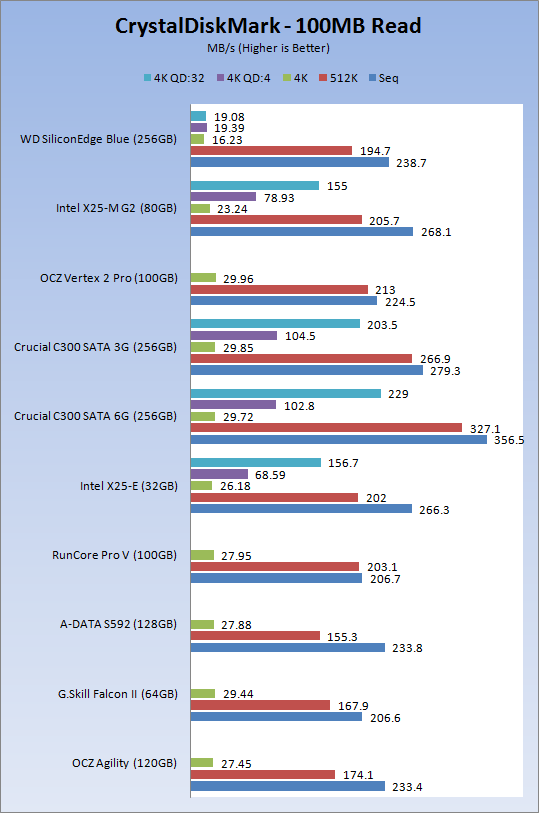
The sequential numbers are once again pretty good for a mainstream drive. Even the 512K test is where it should be. Once we get to 4K reads we see that the queue depth of one is on the low side and once you start piling up the QD there's nothing left for the SiliconEdge to give in performance gains like some of the other drives.
Write Tests
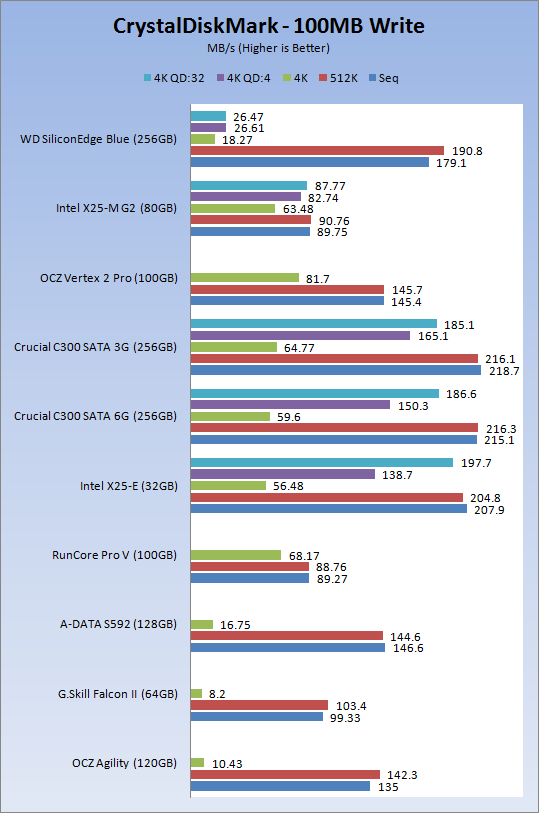
Here we see normal seq and 5K performance and the 4K QD1 numbers are faster than the Indilinx Barefoot performance, but once again we saw no performance improvement when going to higher queue depths.
Benchmarks - PCMark Vantage Hard Disk Tests
PCMark Vantage - Hard Disk Tests
Version and / or Patch Used: 1.0.0
Developer Homepage: http://www.futuremark.com
Product Homepage: http://www.futuremark.com/benchmarks/pcmark-vantage/
Buy It Here
PCMark Vantage is the first objective hardware performance benchmark for PCs running 32 and 64 bit versions of Microsoft Windows Vista. PCMark Vantage is perfectly suited for benchmarking any type of Microsoft Windows Vista PC from multimedia home entertainment systems and laptops to dedicated workstations and high-end gaming rigs. Regardless of whether the benchmarker is an artist or an IT Professional, PCMark Vantage shows the user where their system soars or falls flat, and how to get the most performance possible out of their hardware. PCMark Vantage is easy enough for even the most casual enthusiast to use yet supports in-depth, professional industry grade testing.
FutureMark has developed a good set of hard disk tests for their PCMark Vantage Suite. These tests are based on real world applications that many of us use daily.
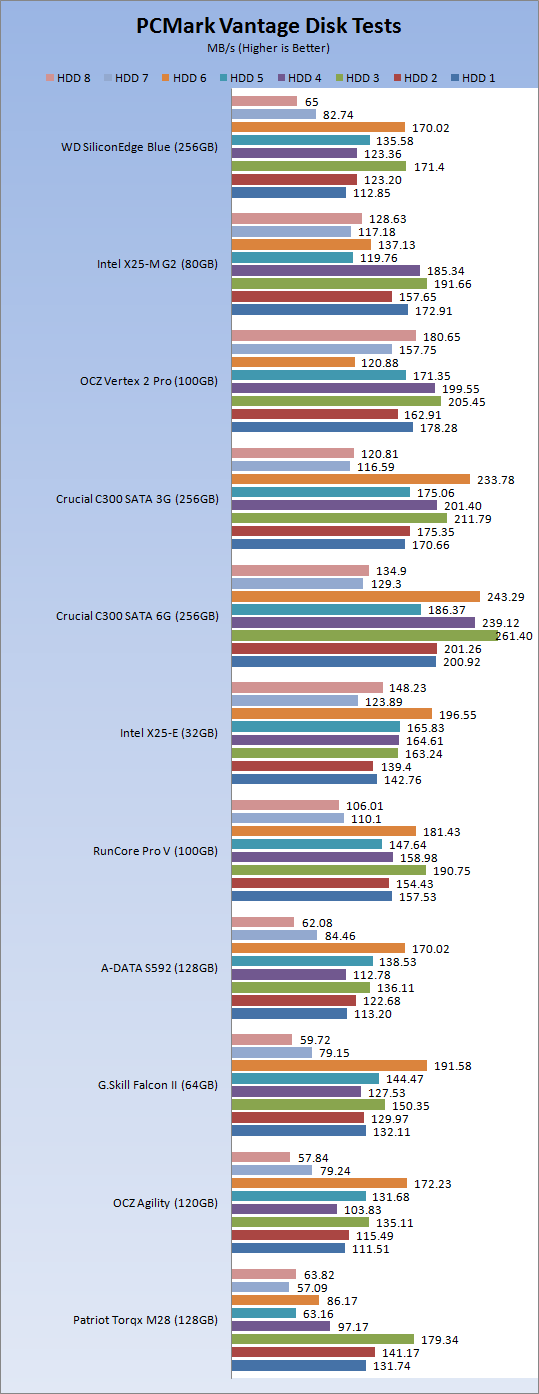
HDD1 - Windows Defender
HDD2 - Gaming
HDD3 - Windows Photo Gallery
HDD4 - Vista Startup
HDD5 - Windows Movie Maker
HDD6 - Windows Media Center
HDD7 - Windows Media Player
HDD8 - Application Loading
Western Digital's press kit for the SiliconEdge Blue stated that they were achieving Vantage HDD Test Overall Scores of 25,000. Our tests scored very close to theirs and came in at 25,333. To be honest, this is the test that kept me from calling the launch day review off with the thought in mind of receiving a bad sample.
When comparing the SiliconEdge Blue to the OCZ Technology Agility, we see that the numbers are very close to each other. If I hadn't later taken the drive apart to obtain pictures of the inner workings and only saw this test, I would feel confident in thinking that we are testing an Indilinx Barefoot controlled drive.
Benchmarks - AS SSD
AS SSD Benchmark
Version and / or Patch Used: 1.2.3577.40358
Developer Homepage: Alex Intelligent Software
Product Homepage: Alex Intelligent Software
Download here: http://www.alex-is.de/PHP/fusion/downloads.php?cat_id=4&download_id=9
AS determines the performance of Solid State Drives (SSD). The tool contains four synthetic as well as three practice tests. The synthetic tests are to determine the sequential and random read and write performance of the SSD. These tests are carried out without the use of the operating system caches.
In all synthetic tests the test file size is 1GB. AS can also determine the access time of the SSD, the access of which the drive is determined to read through the entire capacity of the SSD (Full Stroke). The write access test is only to be met with a 1 GB big test file. At the end of the tests three values for the read and write as well as the overall performance will be issued. In addition to the calculated values which are shown in MB/s, they are also represented in IO per seconds (IOPS).
Note: AS SSD is a great benchmark for many tests, but since Crystal Disk Mark covers a broader range of 4K tests and HD Tune Pro covering sequential speeds, we will only use the Copy Benchmark from AS SSD.
- Copy Benchmark
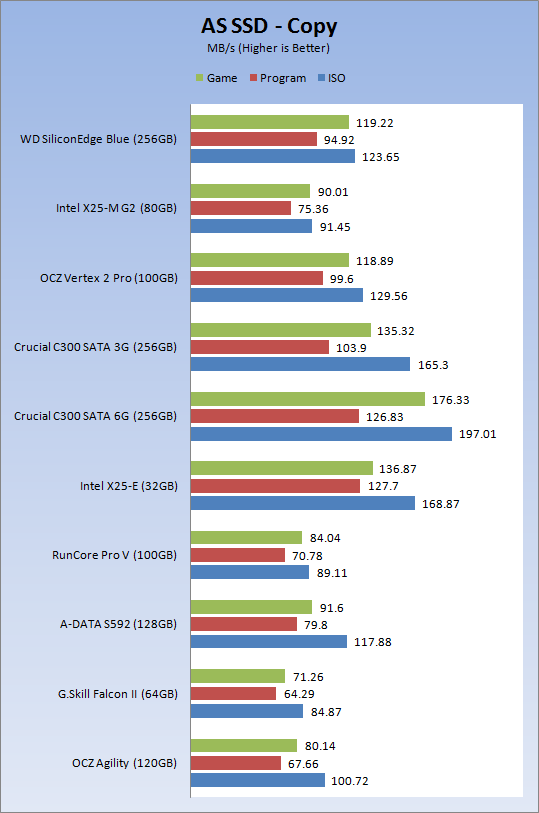
Our Copy Benchmark shows solid performance for the Western Digital SiliconEdge Blue. It is faster than the Indilinx drives we have tested and even faster than the X25-M G2. This product appears to have really strong performance when used in real world tasks. Look at the numbers compared to OCZ's Vertex 2 Pro SandForce 1500 / MLC, they are nearly identical in this test.
Benchmarks - Passmark
Passmark Advanced Multi-User Tests
Version and / or Patch Used: 6.1
Developer Homepage: http://www.passmark.com
Test Homepage: http://www.passmark.com
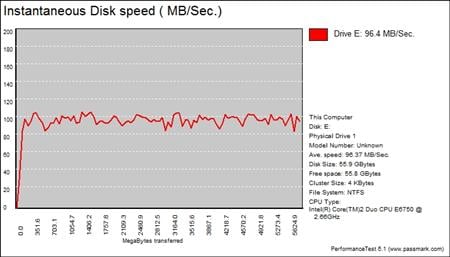
Many users complain that I/O Meter is too complicated of a benchmark to replicate results so my quest to find an alternative was started. Passmark has added several multi-user tests that measure a hard drives ability to operate in a multi-user environment.
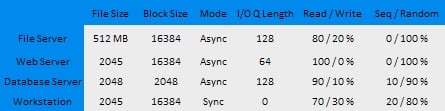
The tests use different settings to mimic basic multi-user operations as they would play out on your server. Variances is read / write percentage as well as random / sequential reads are common in certain applications, Web Servers read nearly 100% of the time while Database Servers write a small amount of data.
The Workstation test is the only single user environment and will be similar to how you use your system at home.
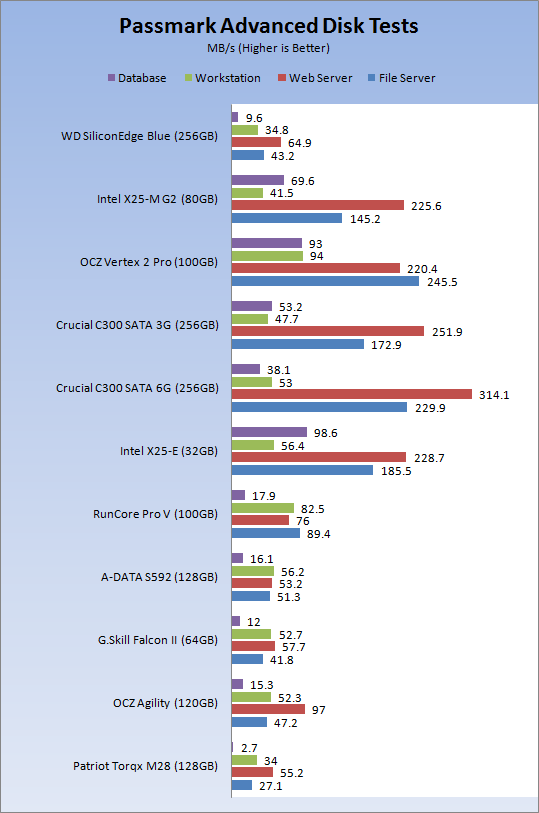
The server tests show that the SiliconEdge Blue is not really a competitor to the SF 1500 in the racks, but the Blue is able to compete with some of the Indilinx Barefoot drives in some situations. All of the SSDs shown in the chart are able to run circles around platter drives, even the very fast Seagate 15K.7.
Final Thoughts
So, what do we really have going on with the Western Digital SiliconEdge Blue? Let's start with the easy stuff; pricing and availability. Western Digital has a vast network of resellers and I wouldn't be surprised to see the SiliconEdge Blue sitting on a shelf at Best Buy in the next couple of weeks. You can pretty much insert the name of the shop where you buy computer parts and get a wide range of WD parts there, the distribution is that good. When it comes to the cost, we have a little something to worry about, because as it sits right now the MSRP is in line with the Indilinx Barefoot drives....when they were released last year! - We all know that MSRPs don't hold their water for most products after the first week or two of the product being on the market, but the real question comes down to how fast e-tailers will be in selling the drives at midrange Barefoot levels.
Everyone's biggest competitor, OCZ Technology has already released the Solid 2 with Agility parts still on the market, both selling for quite a bit less than the MSRP of the SiliconEdge Blue. With next generation SSDs like those powered by the SandForce 1200 and Marvell SATA 6G, getting near the mid range is going to get a performance boost and Barefoot prices are going to drop even lower.
It wasn't that long ago when I reviewed the WD Caviar Green 2TB shortly after it was released and gave it a poor score in the value category because of its selling price at the time of the review. By the time the WD GP4 2TB was released the Caviar Green had dropped in price by nearly 50%. At that time the Caviar Green was one of the best buys on the market. All of this took place within a few short months. With the knowledge from that experience it is difficult to really say where the SiliconEdge is going to end up by June.
One really nice thing we have found with SSDs is that their performance is often increased with age. Companies dedicate entire teams of engineers who are consistently revising firmware allowing consumers to get performance improvements every few months. At this time Western Digital does not get the benefit of a track record following this model since the SiliconEdge Blue is their first solid state release after acquiring an SSD dept.
I feel that WD is a straight shooter from many years of reviewing their products and they will fall in line with this "new money" way of doing things. If not, then I don't think WD will have much of a future in the SSD market. I can already sense a super duper VelociRaptor like bite out of my behind coming in a few years since as a company WD has the ability to eventually take over the high performance solid state drive market. WD bought their way into this market and didn't simply start rebranding other manufacturers parts and rely on others to do the difficult tasks that lead to early Jmicron like issues.
As we have seen in the past and I am sure we will see more of in the future, the advanced solid state products are going to turn our synthetic benchmarks into useless bits that only take up space. Our real world tests of the SiliconEdge Blue shows what the drive is capable of, but there is still a little concern when it comes to write operations. At the time of writing the SiliconEdge Blue has been in our lab for less than 24 hours and it has yet to have an OS installed on it. That will come in the morning and allow us to literally feel the drive out for issues when writing data.
As for performance, we were able to determine that in real world use the SiliconEdge Blue is able to compete and in a few cases perform better than Indilinx Barefoot drives. At this point the Barefoot firmware can be considered mature and really close to the best we can get from the controller. The SiliconEdge Blue is fresh and just starting its lifecycle. With WD engineers there is no telling just how fast the drive can become once the final chapters are written.
Look for a follow up article in the coming weeks with a full report on how the Western Digital SiliconEdge Blue performed in our daily use notebook. I will be removing the Crucial RealSSD M225 256GB Indilinx Barefoot drive and replacing it with the Blue.

 United
States: Find other tech and computer products like this
over at
United
States: Find other tech and computer products like this
over at  United
Kingdom: Find other tech and computer products like this
over at
United
Kingdom: Find other tech and computer products like this
over at  Australia:
Find other tech and computer products like this over at
Australia:
Find other tech and computer products like this over at  Canada:
Find other tech and computer products like this over at
Canada:
Find other tech and computer products like this over at  Deutschland:
Finde andere Technik- und Computerprodukte wie dieses auf
Deutschland:
Finde andere Technik- und Computerprodukte wie dieses auf 


 No Rest for the Wicked launch trailer presents a stunning take on the Diablo-style action RPG
 TSMC helped Taiwan avoid power outage: 200MW of power provided with diesel power generators
 NVIDIA's new Blackwell AI GPUs drives TSMC to increase CoWoS output by over 150% in 2024
 Take-Two layoffs: Over 570 workers affected, multiple games cancelled
 Intel uses in-house AI tools to optimize SoC layouts from 6 weeks, to just 'minutes'
 ASRock NUCBOX-155H Mini PC Review
 NuPhy Air96 V2 Wireless Mechanical Keyboard Review
 TEAM T-FORCE Siren DUO360 RGB Liquid CPU Cooler Review
 AVerMedia Live Streamer ULTRA HD Review
 AVerMedia Live Gamer 4K 2.1 Review
 XPG Invader X Mid-Tower Chassis Review
 Intel Core i9-14900KS CPU Review
 Arbiter Polar 65 Magnetic Gaming Keyboard Review
 ASUS ROG Falchion RX Low Profile Keyboard Review
 MSI MPG 321URX QD-OLED Gaming Monitor Review - 4K gaming at its best
 Everything you need to know about the latest ASUS NUC Mini PCs - NUC 14 Pro and ROG NUC
 How to Overclock Your GPU and Boost Your PC Gaming with ASUS GPU Tweak III
 ASUS's AMD Radeon RX 7000 Series GPU lineup has something for every gamer
 ASUS OLED Premium Care defends the ROG Swift OLED PG32UCDM gaming monitor from burn-in
 Patriot Viper Xtreme 5 Engineering Prototype 48GB Dual-Channel Memory Kit Preview