

Introduction
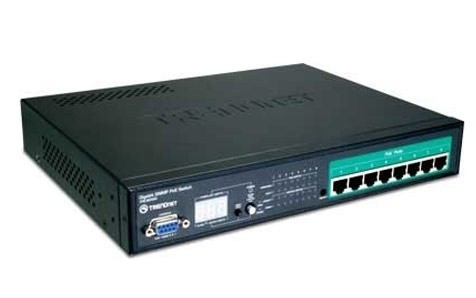
We recently talked about how to put Power over Ethernet (PoE) into your home and even showed you how simple it can be to get this great technology up and running with a home security system. But how does the other half live? Have you ever wondered how PoE is implemented in the enterprise? Well, if you have then we have a nice treat for you. We have had the chance to take a look at TRENDnet's TPE-80WS 8-Port Web Smart PoE Switch and see just how powerful and functional this switch is in an enterprise setting.
As with all enterprise class products, you are going to pay more for each device. However, you are also going to get a higher class of product. As enterprise products simply have to work 24/7, they need higher quality cooling, better components and better features. This is why the TPE-80WS will set you back a cool $250 U.S. Dollars, but this is not a bad price for the features and performance TRENDnet is advertising.
With the TPE-80WS you get a maximum of 15 Watts per port (120 Watts total on the device), PoE over current protection, Web Smart Management UI, Spanning Tree Protocol (802.1D), V-Lan Support, Trunking, 802.3ad Link Aggregation , 802.1p QoS (Quality of Service), Flow Control and 16GB of switching bandwidth.
Not a bad haul on paper, so let's see if the TPE-80WS can deliver in person.
The Package

As we have commented before, TRENDnet has an excellent grasp on what needs to be on a product's package and what does not. The front has an image of the product you are getting along with a few details on what it can do.

The back has more detail about the features and where the TPE-80WS fits into your network.

Inside the box TRENDnet provides everything you need to get running. This includes rack mount brackets for the TPE-80WS to fit into an existing 19-inch rack. The provided serial cable is for direct management using terminal and command line functions.
The Switch

The TRENDnet TPE-80WS is a small switch, relatively speaking. The front looks a little chaotic, but once you become familiar with everything you can tell the status at a glance.

On the left side of the front face we find a single 9-pin Serial port for a terminal connection. This is really used very little with the WebSmart UI, but is handy if you are unable to access the UI. Next to this is a three-digit LED display; this display has multiple functions. In normal mode it shows the available power remaining on the switch. With no PoE devices attached it will read 120. In PoE Status mode it will show the status of a single port. You can move between ports with the small button labelled "Next Port".
Switching between modes is accomplished by a two position button just to the right of the display.
To the right of the mode button are a series of LEDs. These display link and PoE status at a glance. Between these and the RJ-45 ports is a small indented switch that allows for a default reset of the TPE-80WS.

On the right hand side of the face we find the eight ports available on the TPE-80WS. Each of these is PoE enabled and can support up to 15.4 Volts of PoE power to a single device. Each is also a full 10/100/1000MB Auto-MDX port.

The back is plain and boring. The only part that is of any interest to a normal user is the power outlet.
The WebSmart UI
The WebSmart UI embedded in the TPE-80WS is very well laid out. All of the settings are grouped into easy to identify categories, as are the monitoring pages. Administrative functions like Firmware updates etc. have also been given their own little spot.

As you can see, the "home" or system page has some basic information about your TPE-80WS. Here is where you can change the IP address (including HTTP access Port), Subnet, Default Gateway and login information. You can also setup SNMP if you have an SNMP trap setup on your network.

On the ports page you can quickly view and configure the speed the port operates at as well as the Maximum Frame size allowed. This Per-Port adjustment is nice as it allows you to adjust each port to its best setting.

For V-LAN options you can chose from Port Based or Tag Based. With Port Based you simply choose the ports you want to be in the new VLAN group. Once you do that they are segregated and cannot communicate with each other. However, Port Based V-LANs are only segregated on the same device. These types of VLANs do not bridge multiple devices.

With Tag Based VLANs you can span these across multiple devices as long as you have the same Tag number setup on each device. You have greater flexibility with Tag Based VLANs as you can filter traffic based on the Tag as well as the VID to ensure that your frames are only VLAN traffic and not flood. You can also have the switch strip the VLAN tag from received frames and insert the Tag to transmitted frames. In general Tagged VLANs are more flexible and secure than Port Based VLANs, while Port Based are easier to setup.

Another nice feature of the TPE-80WS is the ability to combine ports into single aggregated trunks. This allows you to designate a larger amount of bandwidth for specific devices. Port Mirroring is self explanatory; it allows you to mirror the data from one port onto another. This is helpful for diagnostic testing. It can allow you to capture all frames and packets sent without interrupting traffic flow.

QoS, or Quality of Service is a way to make sure that high-priority traffic can take precedence over other non essential traffic. There are three modes of operation on the TPE-80WS. One is Port Based, 802.1p and DSCP (Differentiated Service Code Point).
Per Port is the simplest to setup and allows you to adjust the priority of the traffic to each port.
802.1p is a more advanced type of QoS and allows for mapping of priority types to classes of service. 802.1p gets the information from the IP header when 802.1Q is used in the network.
DSCP allows you to set service codes to types of traffic. These codes are part of the IP header and require a much more extensive knowledge of the way IP headers are laid out. DSCP allows for the most flexibility in QoS as it is not port or protocol dependent, but traffic dependent.
The WebSmart UI - Part II

Storm Control is a method for preventing a single port from saturating the switch with too much data. You can set this by three parameters; Broadcast, Multicast and Flooded Uncast. Each is set to a certain number of frames per second. If a particular port exceeds this rate it is disabled to prevent impacting the rest of the network.

LACP stands for Link Aggregation Control Protocol. This is pretty much equal to 802.3ad. This type of link aggregation is a higher level than standard port trunking and allows for a more seamless combination of ports for aggregated bandwidth and throughput. In the TPE-80WS you can manually setup your link Key Values or allow the system to assign them automatically.

RSTP (Rapid Spanning Tree Protocol) is a newer version of the Spanning Tree Protocol that allows for a faster method of reorganizing the topology map of your network in the event of changes. In setting up RSTP it is important to know which ports are "Edge" and which are not. An Edge port is one that does not connect to another link in the network, but to an end device. This means that any port that connects to another switch or router in the chain is not an edge port and should not be setup that way. You also need to make sure that your root switch has the lowest priority number in the network so that there are no issues with reconfiguration when RSTP becomes active due to changes.
RSTP is an excellent feature when you have multiple switches in a high availability and high bandwidth network.

IGMP stands for Internet Group Management Protocol. This protocol allows for groups of multicast devices to be identified and controlled by a switch or router for the most efficient network traffic flow. The most common types of IGMP traffic is from streaming video and game servers. IGMP multicasts are also used by Windows Vista and 7 Media Center to identify available media sources. With the TPE-80WS you can enable IGMP support and even limit the ports that can accept this traffic. As you can see, we have limited IGMP frames to ports 5-8. In this configuration those are the only ports that IGMP traffic will be forwarded to.

802.1X is a security feature that works with a RADIUS (Remote Authentication Dial In User Service) server. This is a means of protecting your network from unauthorized systems. Any system connected to the LAN would be required to authenticate its self. If this fails then the system will not be allowed access to the LAN. RADIUS server can be setup to run on a certificate and password or certificate based access allowing for not only hardware (system authentication), but user authentication as well. It is a very powerful security system for protecting network access.

The PoE page is very interesting; it not only allows you to disable PoE on a per port basis but also gives you a great deal of information at a glance. As you can see in the screen shot, ports 1, 2, 7 and 8 are PoE Disabled, while port 4 is pulling 5.9 Watts from the system and is a class 0 PoE device. Just below this you can see the overall system power status and the power class table.
As I mentioned above, the TPE-80WS splits the configuration pages and the status pages into two distinct sections. Below are screen shots of them as they are listed in the menu. Each page is self explanatory.
Overall Switch activity

You can even view detailed information about each port

Link Aggregation details

RSTP details and data

IGMP Status

Testing
We used PerformanceTest 6.1 by PassMark which you can find out more information about here. It has a handy Advanced Networking section which is perfect for our testing.
Doing our best to emulate a real-world performance scenario, I setup a server running Windows 2008 (x64) Server, (Core i7 965 12GB DDR3 1333 2x 147GB 15k RPM SAS HDDs) which was connected directly to the TPE-80WS. The client PCs were a HTPC system running over a 100Mb Powerline adapter, a Dell Latitude D930 With built-in Intel 802.11n adapter (which connected to a D-Link DIR-655) and single desktop system running directly into the TPE-80WS . The results were gathered by sending data from the client PCs to the server and determining the average transmission speed.
- Bandwidth
When you have a switch in your network its sole purpose is to keep your traffic flowing. With the TPE-80WS we have 16GB of switching power to help us maintain a high-traffic level. On the other side we were also able to hook up a NAS device with 802.3ad Link Aggregation as well as the rest of our test systems and two PoE devices (2x TRENDnet TV-IP422W using TPE 112GS PoE Splitters).
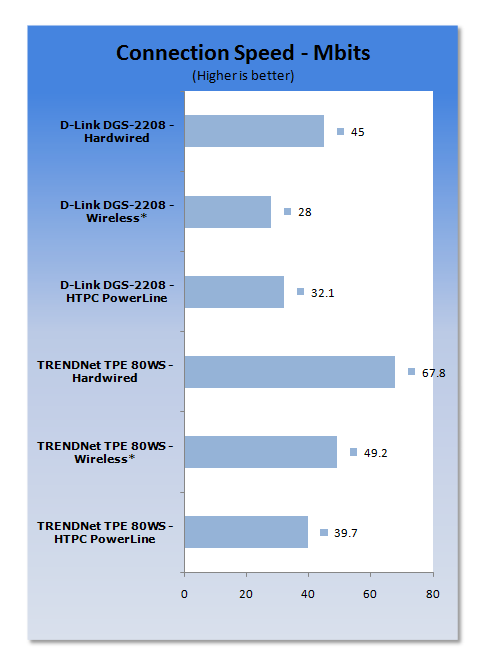
As you can see, the TPE-80WS is a very healthy switch. It handles multiple speed traffic and PoE functions without missing a beat.
The proper support for 802.3ad means that my NAS can push out 2GB of bandwidth for multimedia requests. Even 1080p HD video seems snappier on the TPE-80W. Working on my HTPC I saw the video library screens pop up faster as the Media Center inside Windows 7 was able to access the available files much quicker.
When the TPE-80WS was connected to the TEG-240WS using RSTP, my overall network speed improved when dealing with HD and SD video served over the network. This was due to being able to run my Thecus N5200 Pro NAS using 802.3ad on the TPE-80WS and allowing the RSTP to fix the topology between the switches properly. I was also able to trunk the connection between the two switches to allow for faster transfer between the two.
Final Thoughts
The TPE-80WS is an extremely capable switch. There are advanced functions that you would not normally expect from a PoE switch. I found that it fit into my existing high-bandwidth network quite nicely. In fact, I allowed it to be the root bridge for the RSTP setup. The PoE support is outstanding and is very simple to use since it auto detects the power draw from any PoE device connected.
The WebSmart UI is also nicely laid out and provides configuration for all of the features in intuitive screens. TRENDnet also separated the status pages from the settings pages to allow for easy monitoring without the need to view the existing settings options.
Breaking out 802.3ad link aggregation from the standard trunking page is also a nice touch. Many devices might support trunking, but not the full 820.3ad protocol and vice versa. With the TPE-80WS you can enable the proper link aggregation support for each of your devices. This is something that not even the TEG-240WS can do as it only supports trunking. IGMP, Broadcast Storm and SNMP support round out this excellent product.
In all, as an IT Manager I would consider the TPE-80WS a bargain at $250.

 United
States: Find other tech and computer products like this
over at
United
States: Find other tech and computer products like this
over at  United
Kingdom: Find other tech and computer products like this
over at
United
Kingdom: Find other tech and computer products like this
over at  Australia:
Find other tech and computer products like this over at
Australia:
Find other tech and computer products like this over at  Canada:
Find other tech and computer products like this over at
Canada:
Find other tech and computer products like this over at  Deutschland:
Finde andere Technik- und Computerprodukte wie dieses auf
Deutschland:
Finde andere Technik- und Computerprodukte wie dieses auf  Forget the PS5 Pro, Sony's neck-based air conditioner is the invention turning heads right now
 Windows 11 Settings gets another Control Panel feature as painfully slow migration continues
 Sony's PlayStation 5 Pro is expected to fix critical issues in select games
 Microsoft continues with plan to roll out controversial Windows 11 update
 Scientists close in on new technology that uses lasers to propel submarines
 ACEMAGIC AD08 "Core i9 11900H" Mini PC Review
 Lenovo ThinkPad X1 Carbon Gen 12 Review
 ASUS ROG Swift Pro PG248QP Gaming Monitor Review - Frames, frames, and more frames
 FlexiSpot C7B-Mesh Ergonomic Office Chair Review
 Samsung G8 34-inch QD-OLED Gaming Monitor Review - 175Hz for $900
 ASRock NUCBOX-155H Mini PC Review
 NuPhy Air96 V2 Wireless Mechanical Keyboard Review
 TEAM T-FORCE Siren DUO360 RGB Liquid CPU Cooler Review
 AVerMedia Live Streamer ULTRA HD Review
 AVerMedia Live Gamer 4K 2.1 Review
 Everything you need to know about the latest ASUS NUC Mini PCs - NUC 14 Pro and ROG NUC
 How to Overclock Your GPU and Boost Your PC Gaming with ASUS GPU Tweak III
 ASUS's AMD Radeon RX 7000 Series GPU lineup has something for every gamer
 ASUS OLED Premium Care defends the ROG Swift OLED PG32UCDM gaming monitor from burn-in
 Patriot Viper Xtreme 5 Engineering Prototype 48GB Dual-Channel Memory Kit Preview