

Introduction
When Jason at DVNation told me that the new PhotoFast G-Monster V5 was approaching the limits of the SATA 3.0 spec, I really didn't know what to think. PhotoFast has made a big marketing push over the last couple of months and there was a time when it seemed that every other day a new press release hit my inbox. Hitting my email inbox is quite a bit different than hitting my door step and over the years I have pretty much come to the realization that press releases aren't worth much more than the paper they could be printed on. Three days ago my initial thoughts of PhotoFast change. This was the day I finally put one of the companies solid state drives in my test system.
The PhotoFast G-Monster V5 might have a funny name, but don't let it fool you. When this drive is installed the only thing funny is the goofy grin on your face. The drive does approach the limits of the SATA 3.0 spec; it also managed to saturate my aging nForce 3500 workstation SATA controller. This level of performance doesn't come cheap but we will get into the pricing on the next page because the technology involved is way more important to worry about the price just yet.
Inside of the traditional 2.5 inch form factor drive rests two solid state drives attached to an internal RAID controller. Everything fits very snug inside the case and I couldn't even begin to imagine the amount of engineering time involved to make this product possible. Let's take a look at the specifications and see what is inside!
Specifications, Availability and Pricing
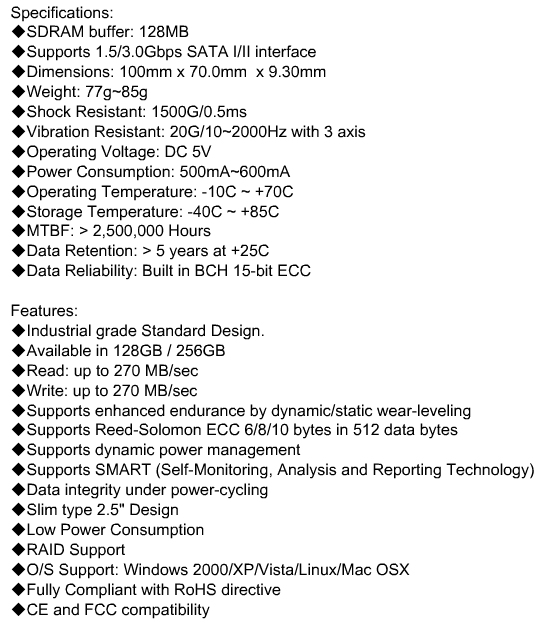
At the heart of the G-Monster V5 is a product that PhotoFast sells on its own called the G-Monster Evolution. Essentially it is a JMicron RAID controller that is able to take two 2.5 inch or 1.8 inch drives running at the typical 5 volts and put them in a RAID 0 or 1 array. The individual drives on the inside are G-Monster V3 models that have been modified to fit the enclosure. One PhotoFast employee said, "it is like two miniature Vertex's inside."
The G-Monster V3 drives use the Indilinx barefoot controller with 64MB of Elpida cache. Since the G-Monster V5 uses two of these drives PhotoFast takes the liberty to claim the total cache size of 128MB. I am sure there were more than a couple of people roll their eyes as soon as they saw the JMicron portion above, but let me assure you that the RAID controller has nothing to do with the solid state controller and therefore you will not be pulling your hair out while your drive stutters along.
Before we get too far along there are a few things that we should really discuss first. If you recall the review of the Corsair P64 drives in RAID 0 article that we published last week, I talked about the inability of the Indilinx drives to run the cleaning software while in RAID. Milton at PhotoFast confirmed my worst fears in a brief discussion.
Chris Ramseyer (TweakTown) says (4:21 AM):
...the only real bad position I see the V5 falling into, no way to run the software to clean the drive up.
Maybe I am wrong?
Milton (PhotoFast) says (4:21 AM):
You're correct. The only solution is to open up [the drive] and run wiper on both individual SSDs but with firmware 1571 the performance fall down would be less and last longer.
So, as you can see, not everything is peaches and cream once you dig past the surface. Without extensive testing it would be impossible to say how long the drive will last without reaching a condition where the drive would benefit significantly from a cleanup. Another question that we have to consider is how Windows 7's built in cleaning will work with arrays of solid state drives. I can only speculate on this one and we will all have to wait a couple more weeks to find out for sure.
Clean up aside, the real limitation of the G-Monster V5 has to be its cost. DVNation is currently selling the 256GB drive that we are reviewing here today for 999.00 USD. The flashy graphics lead us to believe that this product is targeted towards the enthusiast and power user crowd, but the price screams enterprise. DVNation also carries the 64GB model for 449 USD and the 128GB for 609. We just reviewed the Crucial M225 256GB Indilinx drive with 64MB cache and it had an MSRP of 599 USD, so you are definitely paying a premium for the built in RAID controller and two V3 drives.
DVNation is also the exclusive PhotoFast distributer in the U.S. and they have put together a website for resellers. If you fall into this category be sure to check out Photofastssd.com for more information. Let's move on and check out the PhotoFast G-Monster V5.
Packaging and External View

Our drive came to us as a press sample, so it did not include a retail box or fancy manual. But this is not a big deal since the drive was just released and at this level of performance who really cares about getting a fancy box or paper that tells you what an SSD is.

On the surface the G-Monster V5 looks like just about every other 2.5" form factor solid state drive.

I was surprised to find that the Warranty Void if Removed sticker was blocking access to the screw hole that would be used to mount the drive in many notebooks. The product identification label blocks the adjacent hole as well. This is really kind of a rookie mistake on PhotoFasts part and the company should address this issue in the future.

Here we see the power and data SATA connectors and they are where they should be .

On the side we found the mounting holes to be unobstructed and ready for installation.
The PhotoFast G-Monster V5 Internals
The PhotoFast G-Monster V5 SSD Internals

Just scratching the surface, we can see that there is definitely something different about the G-Monster V5. Normally when we open up solid state drives we are presented with a single PCB that has all of the controllers, memory and cache drives laid out as once piece. The section where the external power and data connectors on the V5 is actually the RAID control area that PhotoFast sells by itself as the G-Monster Evolution.

After removing a couple of screws we were able to disassemble the entire unit and break it down into three pieces. Here we see the Evolution RAID controller that takes two standard SSDs and connects them to a single SATA data cable. Below the controller we see the two modified G-Monster V3 cards. The cards are identical but we have flipped one over to show the front and back side.
Now let's see how the drive performs!
Test System Setup and ATTO Baseline
Test System
Processors: AMD Opteron 2356 (2.3GHz Quad-Core) x2
Motherboard: Tyan S2915-E (Supplied by Tyan)
Memory: Kingston KVR667D2S4P5/2G x4 (Supplied by Kingston)
Graphics Card: XFX 8800 GTX (Supplied by XFX USA)
Enclosure: Lian Li V2000
Cooling: Noctua NH-U12DO (Supplied by Noctua)
SATA Controller: Areca ARC-1231ML (Supplied by Areca)
SAS Controller: Areca ARC-1680i (Supplied by Areca)
Operating System: Microsoft Windows Vista Ultimate X64
Today we are comparing the PhotoFast G-Monster V5 dual MLC Barefoot controlled SSD to other 2.5 inch drives that we reviewed in the past.
All of the drives tested were performed on the listed system under identical conditions to ensure true apples to apples performance results for comparison. But this time there is a catch.
ATTO Baseline Performance
Version and / or Patch Used: 2.34
ATTO is used by many disk manufactures to determine the read and write speeds that will be presented to customers.
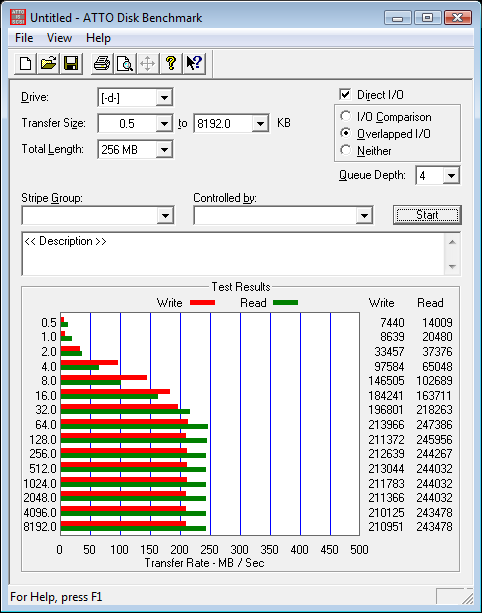
I knew this day was coming but I didn't realize that it would get here this fast. After playing around with the G-Monster V5 in a couple of different systems it is clear that my Tyan S2915-E has finally been given its last call. Here we see the G-Monster V5 reaching nearly 250 MB/s read speeds and 210MB/s write speeds.
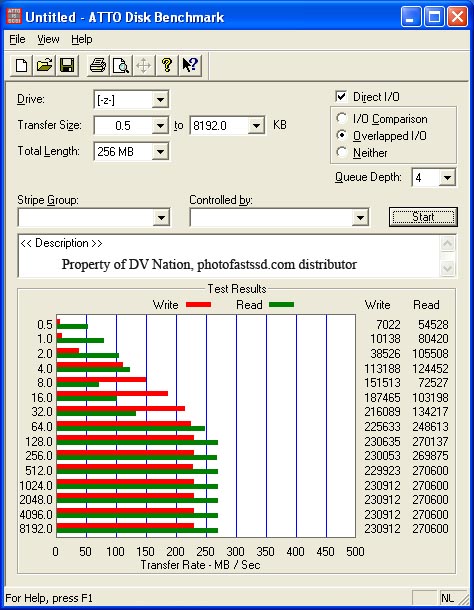
DVNation was able to achieve just over 270 MB/s read speeds and 230 MB/s write speeds with the same drive as I am testing here today. After fiddling with drivers, BIOS, firmware and just about everything else, it appears that the PhotoFast G-Monster V5 is able to max the nForce 3500 chipset's SATA controller. How is that for impressive? The current high end AMD Opteron workstation chipset is now the bottleneck to a solid state drive. I was hoping to hold out until SATA 6.0 is released in the near future before updating the storage testing rig, but that may not be a viable option.
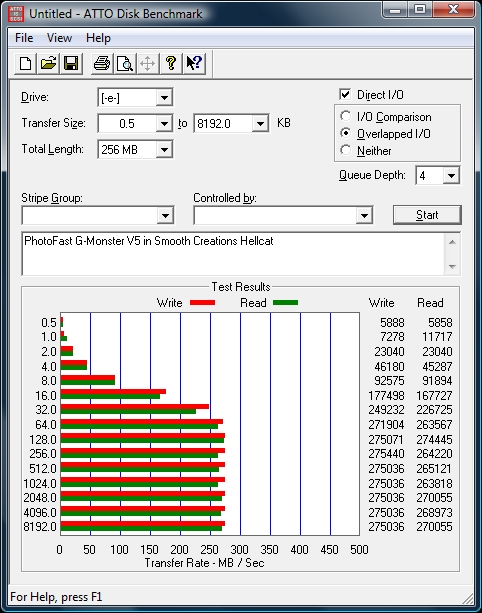
If you have ever wondered what happened to the Smooth Creations Hellcat after its media service was finished, you will be pleased to know that my five and six year old have been playing Call of Duty 4 Modern Warfare on it for several months now. To give the PhotoFast G-Monster V5 its fair shake, I decided to test the drive on the Hellcat and see what the drive had to offer at its full potential.
In the ATTO Benchmark graph above you can see that the Hellcat was able to really make the drive come alive and even gave us performance numbers that beat the DVNation scores. In this review we will present two sets of benchmarks for the G-Monster V5, the first set on our standard test bed and the second in the Smooth Creations Hellcat. The Hellcat performance numbers will be marked with an HC next to the name.
Benchmarks - HD Tune Pro
HD Tune Pro
Version and / or Patch Used: 3.00
Developer Homepage: http://www.efdsoftware.com/
Product Homepage: http://www.hdtune.com/>
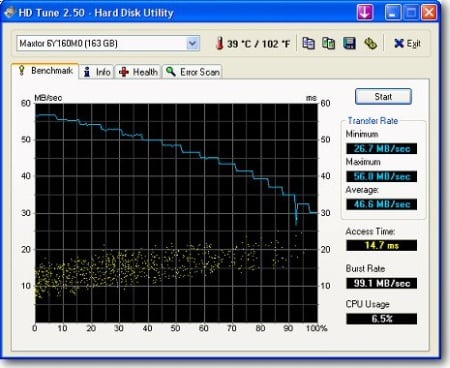
HD Tune is a Hard Disk utility which has the following functions:
- Benchmark: measures the performance
- Info: shows detailed information
- Health: checks the health status by using SMART
- Error Scan: scans the surface for errors
- Temperature display
HD Tune Pro gives us accurate read, write and access time results and for the last couple of years has been gaining popularity amongst reviewers. It is now considered a must have application for storage device testing.
Read Tests
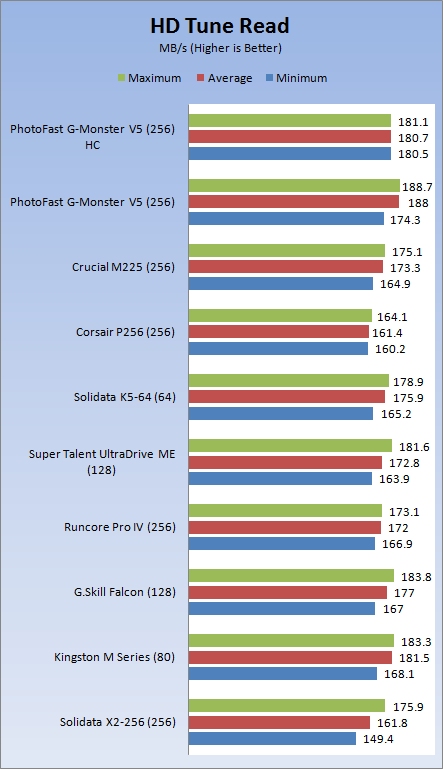
It looks like the Hellcat system gets to take a back seat in the STR test and that the Opteron system is a hair faster. Both systems show the G-Monster V5 as being very fast and beating nearly all of the other drives shown on the chart.
Write Tests
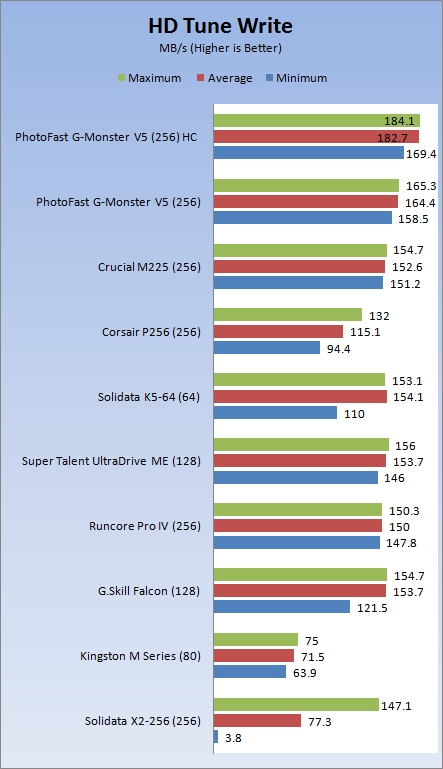
The write test is where we really see the improvement to the performance numbers of the G-Monster V5 in a fast system. Here we see the V5 walking away from everyone.
Benchmarks - EVEREST Random Access Time
EVEREST Random Access Time
Version and / or Patch Used: 4.60
Developer Homepage: http://www.lavalys.com
Product Homepage: http://www.lavalys.com
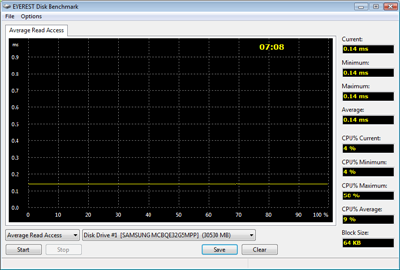
EVEREST Ultimate and Corporate Edition offer several different benchmarks for testing and optimizing your system or network. The Random Access test is one of very few if not only that will measure hard drives random access times in hundredths of milliseconds as oppose to tens of milliseconds.
Read Tests
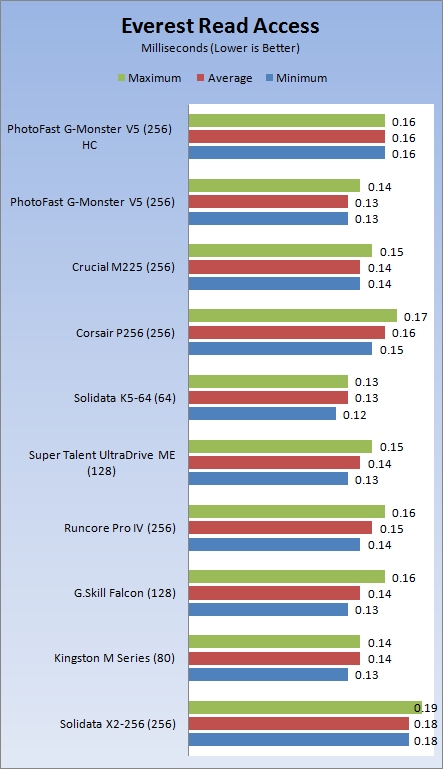
The read access time of the V5 appears to be right around the same as other solid state drives.
Write Tests
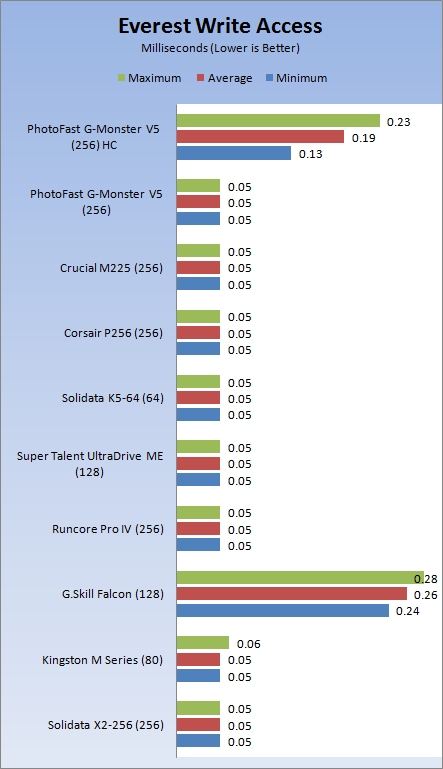
The write access times are quite a bit different. In the Hellcat, the V5 went from around .14 to .23 right at the 38% mark.
Let's see how all of these synthetic benchmarks relate to real world applications.
Benchmarks - PCMark Vantage Hard Disk Tests
PCMark Vantage - Hard Disk Tests
Version and / or Patch Used: 1.0.0
Developer Homepage: http://www.futuremark.com
Product Homepage: http://www.futuremark.com/benchmarks/pcmark-vantage/
Buy It Here

PCMark Vantage is the first objective hardware performance benchmark for PCs running 32 and 64 bit versions of Microsoft Windows Vista. PCMark Vantage is perfectly suited for benchmarking any type of Microsoft Windows Vista PC from multimedia home entertainment systems and laptops to dedicated workstations and high-end gaming rigs. Regardless of whether the benchmarker is an artist or an IT Professional, PCMark Vantage shows the user where their system soars or falls flat, and how to get the most performance possible out of their hardware. PCMark Vantage is easy enough for even the most casual enthusiast to use yet supports in-depth, professional industry grade testing.
FutureMark has developed a good set of hard disk tests for their PCMark Vantage Suite. These tests are based on real world applications that many of us use daily.
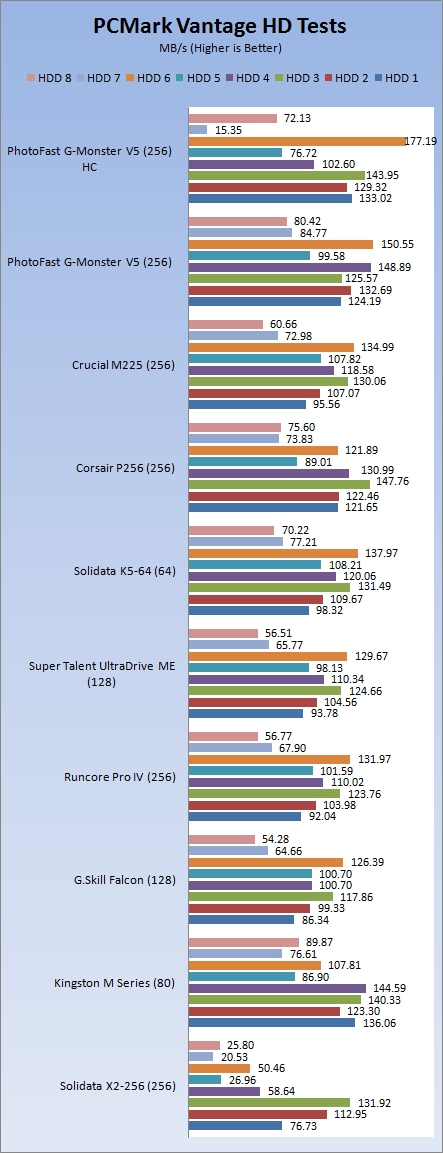
HDD1 - Windows Defender
HDD2 - Gaming
HDD3 - Windows Photo Gallery
HDD4 - Vista Startup
HDD5 - Windows Movie Maker
HDD6 - Windows Media Center
HDD7 - Windows Media Player
HDD8 - Application Loading
In the real world Windows tests we start to see all kinds of silliness between the two test systems that we tested the PhotoFast G-Monster V5 in. Here we see the drive running with the Intel X25-M and beating it in a few of the benchmarks.
Benchmarks - Passmark
Passmark Advanced Multi-User Tests
Version and / or Patch Used: 6.1
Developer Homepage: http://www.passmark.com
Test Homepage: http://www.passmark.com
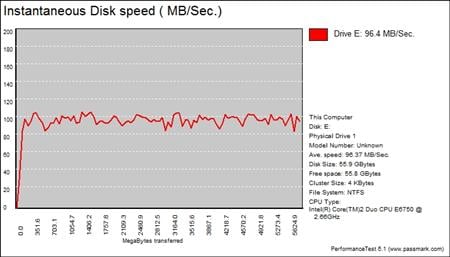
Many users complain that I/O Meter is too complicated of a benchmark to replicate results so my quest to find an alternative was started. Passmark has added several multi-user tests that measure a hard drives ability to operate in a multi-user environment.
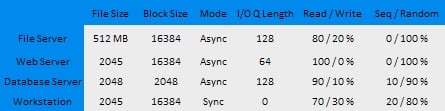
The tests use different settings to mimic basic multi-user operations as they would play out on your server. Variances is read / write percentage as well as random / sequential reads are common in certain applications, Web Servers read nearly 100% of the time while Database Servers write a small amount of data.
The Workstation test is the only single user environment and will be similar to how you use your system at home.
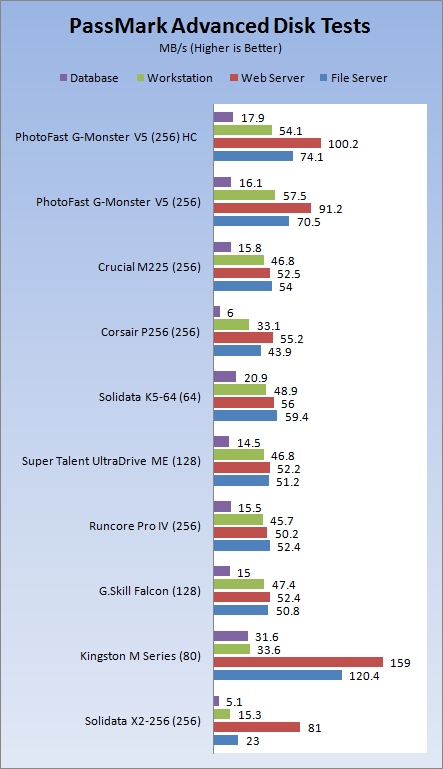
For most power users the workstation test is pretty much the only benchmark to really pay attention to. Here we see that the G-Monster V5 does a really good job multi tasking.
Final Thoughts
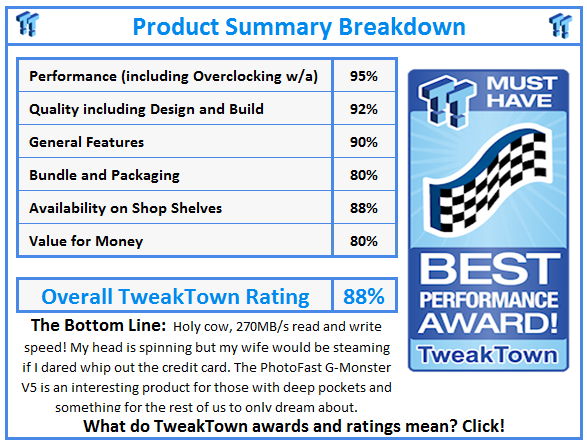
Let me first start off by saying that it is pretty ridiculous that I had to change my test system because the PhotoFast G-Monster V5 makes an 8-core dual socket AMD Opteron workstation a bottleneck. I mean really, come on...you have to be kidding me right? It is safe to say that the G-Monster V5 is currently in a class of its own right now. The synthetic performance results we have seen today shouldn't be broken until we start to see SATA III products. Only time will tell if we are able to improve upon the real world numbers. With new Intel drives just around the corner and the JMicron RAID bridge available, who knows what type of combinations we may see in the coming weeks.
The high cost of the PhotoFast G-Monster V5 is really going to hold the product back from mass adaption. It is actually so high that it reminds me of all those times ASUS has released a single PCB SLI graphics card in limited edition trim. The only difference is that you can actually find the V5 if you really have the cash to splurge on one. Availability shouldn't be a problem since DVNation.com has always done a good job of keeping the products they sell in stock.
Just like those ASUS limited edition graphics cards, the G-Monster V5 is best kept as a novelty product for those with enough money to accept an unforeseen future. Since we still don't know all of the details about Windows 7's TRIM tool or if it will work with RAID arrays, spending a grand on a hard drive that may become a burden in just a few months is kind of senseless. Still, the devil sitting on your shoulder is anxiously stabbing me to say the hell with it and buy one for the present time and we can figure out what to do with it later. This temptation is very strong!
 United
States: Find other tech and computer products like this
over at
United
States: Find other tech and computer products like this
over at  United
Kingdom: Find other tech and computer products like this
over at
United
Kingdom: Find other tech and computer products like this
over at  Australia:
Find other tech and computer products like this over at
Australia:
Find other tech and computer products like this over at  Canada:
Find other tech and computer products like this over at
Canada:
Find other tech and computer products like this over at  Deutschland:
Finde andere Technik- und Computerprodukte wie dieses auf
Deutschland:
Finde andere Technik- und Computerprodukte wie dieses auf 


 AMD teams with Vindral to showcase 8K 10-bit HDR live streaming with ultra-low latency
 Star Wars Outlaws does a great job upselling Ubisoft+ subscriptions
 Roblox charges users a 'publishing fee' to sell custom creations
 Is Square Enix preparing a Final Fantasy series subscription?
 NVIDIA wants to take the pain out of compact PC builds with 'SFF Enthusiast GeForce' GPU scheme
 ASRock NUCBOX-155H Mini PC Review
 NuPhy Air96 V2 Wireless Mechanical Keyboard Review
 TEAM T-FORCE Siren DUO360 RGB Liquid CPU Cooler Review
 AVerMedia Live Streamer ULTRA HD Review
 AVerMedia Live Gamer 4K 2.1 Review
 XPG Invader X Mid-Tower Chassis Review
 Intel Core i9-14900KS CPU Review
 Arbiter Polar 65 Magnetic Gaming Keyboard Review
 ASUS ROG Falchion RX Low Profile Keyboard Review
 MSI MPG 321URX QD-OLED Gaming Monitor Review - 4K gaming at its best
 Everything you need to know about the latest ASUS NUC Mini PCs - NUC 14 Pro and ROG NUC
 How to Overclock Your GPU and Boost Your PC Gaming with ASUS GPU Tweak III
 ASUS's AMD Radeon RX 7000 Series GPU lineup has something for every gamer
 ASUS OLED Premium Care defends the ROG Swift OLED PG32UCDM gaming monitor from burn-in
 Patriot Viper Xtreme 5 Engineering Prototype 48GB Dual-Channel Memory Kit Preview