

Introduction

The Dominator series of memory from Corsair is one name that comes to mind when you're thinking of performance memory. While out of reach for many people due to the price the modules tend to be at, if you wanted performance they're a set worth looking at.
Expanding the lineup we see that Corsair has added a PC3-16000 kit which offers a stock clock of 2000MHz. This for most people is simply unnecessary. But if you're serious about your benchmarking or simply want the fastest stuff on the market, they could be worth looking at.
What we'll do is have a look at the package before checking out the modules and see what exactly they're capable of before seeing what 2000MHz looks like and what it means in the performance department.
The Package and Modules
The Package
The Dominator GT kit doesn't really come in any retail packaging, rather just some white boxes, so we haven't bothered taking any photos of that. Instead we'll just get stuck into what we find inside the package.
Inside the box there are two sections, three clear packs for each module and another white box that has the cooler included.


Inside that box we find the cooler along with two brackets and some screws. In a bit of a do it yourself kind of job you have to put these together to create the cooler that can be used with the memory. While there aren't any instructions the task is hardly confusing and within moments you should end up with something that resembles what you can see below.

The cooler is a good size and this is mainly due to the fact that it has to cover three modules instead of two like the older dual channel kits. Noise levels are pretty good and it's really recommended that you use it due to the fact that you do run a bit of voltage through the modules to achieve 2000MHz.
As you would expect there isn't heaps in the package, but that's not really a surprise with it being a memory kit. It is nice to see a good quality fan setup, but really we don't expect anything less from the Dominator series.
The Modules
In typical fashion we've got a pretty big module on our hands which has a heatsink protruding out the top. We can clearly see that the modules are Corsair and that they're part of the Dominator GT series.

On the other side we have the Corsair logo along with some information on the modules. Looking below we can see the main specifications; it is a 2000MHz module and is a 2GB stick which is part of a 3 x 2GB setup. The timings are 8-8-8-24 and this is achieved with the voltage of 1.65.

One thing that has to be mentioned about these modules is with regard to the quality of the heatsink. While a bit painful upon installation due to the sharpness, the overall build quality on the heatsinks is simply fantastic.

This combined with the fan sink that Corsair has included in the package would have to make these one of the highest quality memory modules I've ever had the pleasure of dealing with. There's no denying that the memory game is pretty competitive these days, but it's good to see that Corsair is sticking out some excellent quality products that seem to be worthy of the price tag.
Overclocking
Getting to 2000MHz wasn't an issue for us. At 4GHz on our CPU we used the dividers to achieve 2000MHz exactly and also set the timings correctly. During our testing we didn't have a single issue with the modules, which is fantastic.

Getting higher wasn't easy, however. While we did get into Windows at 2010MHz - 2020MHz performance was a bit flakey and we opted to not bother pushing any more voltage to try and achieve any higher.
Important Editor Note: Our maximum overclocking result is the best result we managed in our limited time of testing the memory. Due to time constraints we weren't able to tweak the motherboard to the absolute maximum and find the highest possible FSB, as this could take days to find properly. We do however spend at least a few hours overclocking every motherboard to try and find the highest possible overclock in that time frame. You may or may not be able to overclock higher if you spend more time tweaking, or as new BIOS updates are released. "Burn-in" time might also come into play if you believe in that.
Test System Setup and wPrime
Test System Setup
Processor(s): Intel i7 920 @ 4GHz (200MHz x 20)
Cooling: Noctua NH-U12P (Supplied by Noctua)
Motherboard(s): GIGABYTE EX58-UD5 (Supplied by GIGABYTE)
Graphics Card(s): ASUS GTX 285 (Supplied by ASUS)
Hard Disk(s): Western Digital 300GB Velicorapter (Supplied by Western Digital)
Operating System: Windows Vista SP1 64-Bit
Drivers: ForceWare 185.65
With a new CPU in hand that we organized specifically for our new memory testbed along with a new graphics card that's going to be used in all our memory articles, we were ready to go.
What we've done today is set the modules to their default 2000MHz setup which is 8-8-8-24; we've also clocked them down to 1600MHz while using the same CPU speed and moved to the JEDEC timings which are 9-9-9-24. We'll see what the extra MHz does for overall performance. This is a good setup since the CPU speed is exactly the same and the only difference is the memory speed.
wPrime
Version and / or Patch Used: 1.62
Developer Homepage: http://www.wprime.net/
Product Homepage: http://www.wprime.net/
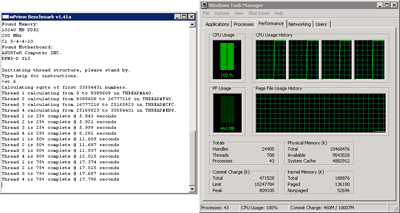
wPrime uses a recursive call of Newton's method for estimating functions, with f(x)=x2-k, where k is the number we're sqrting, until Sgn(f(x)/f'(x)) does not equal that of the previous iteration, starting with an estimation of k/2. It then uses an iterative calling of the estimation method a set amount of times to increase the accuracy of the results. It then confirms that n(k)2=k to ensure the calculation was correct. It repeats this for all numbers from 1 to the requested maximum.
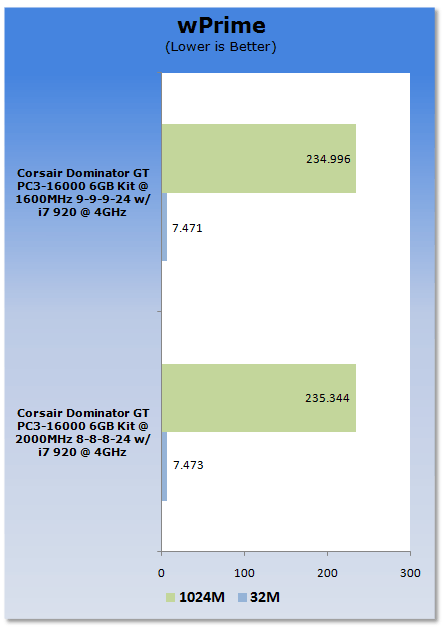
wPrime is quite CPU orientated so what we see here is no real difference between the two setups.
Benchmarks - EVEREST Ultimate Edition
EVEREST
Version and / or Patch Used: Ultimate Edition
Developer Homepage: http://www.lavalys.com/
Product Homepage: http://www.lavalys.com/products/overview.php?pid=3&ps=UE&lang=en
Buy It Here
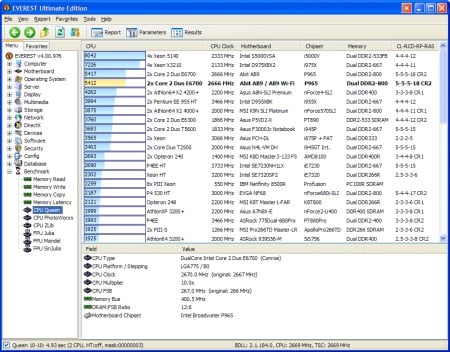
EVEREST Ultimate Edition is an industry leading system diagnostics and benchmarking solution for enthusiasts PC users, based on the award-winning EVEREST Technology. During system optimizations and tweaking it provides essential system and overclock information, advanced hardware monitoring and diagnostics capabilities to check the effects of the applied settings. CPU, FPU and memory benchmarks are available to measure the actual system performance and compare it to previous states or other systems. Furthermore, complete software, operating system and security information makes EVEREST Ultimate Edition a comprehensive system diagnostics tool that offers a total of 100 pages of information about your PC.
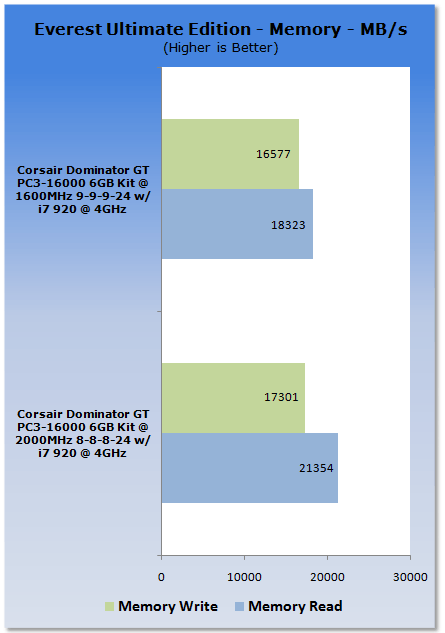
Under EVEREST what we see is that the extra MHz on the memory offers a serious jump in performance with the best gains being seen in the read department. The results above really speak for themselves when it comes to overall performance.
Benchmarks - SiSoft Sandra
SiSoft Sandra
Version and / or Patch Used: Professional Home
Developer Homepage: http://www.sisoftware.co.uk
Product Homepage: http://sisoftware.jaggedonline.com/index.php?location=home&a=TTA&lang=en
Buy It Here
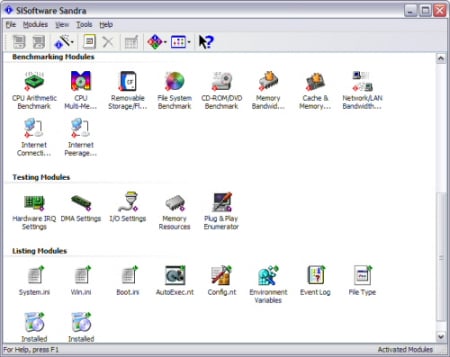
SiSoft Sandra (System ANalyser, Diagnostic and Reporting Assistant) is a synthetic Windows benchmark that features different tests used to evaluate different PC subsystems.
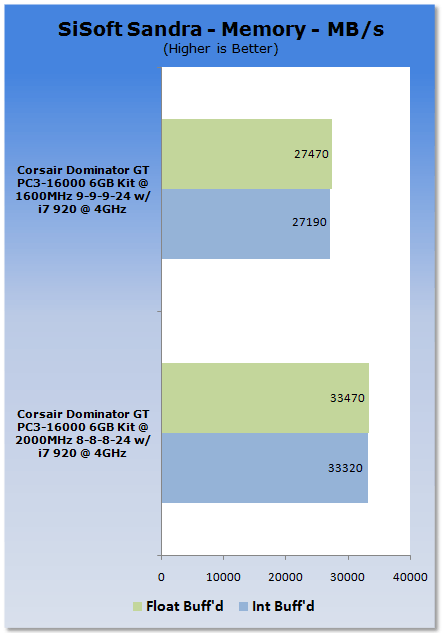
Like EVEREST we're purely testing the memory here and what we get is some serious numbers. Compared to the 1600MHz setup at 9-9-9-24 the 8-8-8-24 setup at 2000MHz is considerably faster.
Benchmarks - Sciencemark
ScienceMark 2.0
ScienceMark 2.0 is a mathematical program designed to stress the memory subsystems of both desktop/workstation and server environments to determine the read/write latency as well as the overall memory bandwidth available between the CPU and the memory controller.
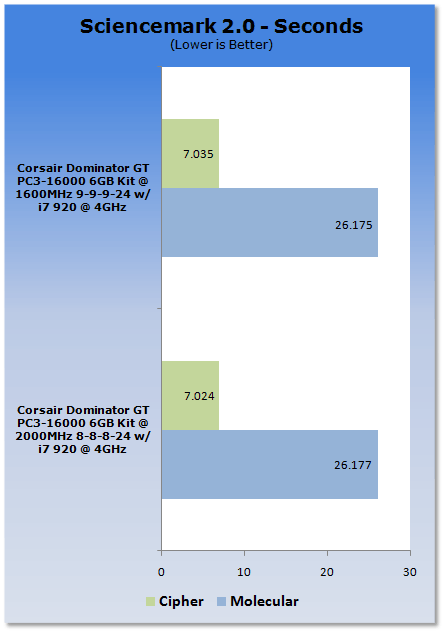
Under Sciencemark we see that the two setups perform quite similar with almost nothing separating them.
Benchmarks - Far Cry 2
Far Cry 2
Version and / or Patch Used: 1.01
Timedemo or Level Used: Ranch Long
Developer Homepage: http://www.ubi.com/
Product Homepage: http://www.farcry2.com/
Buy It Here

The Dunia Engine was built specifically for Far Cry 2 by the award-winning Ubisoft Montreal development team. It delivers the most realistic destructible environments, amazing special effects such as dynamic fire propagation and storm effects, real-time night-and-day cycle, dynamic music system, non-scripted enemy A.I. and so much more.
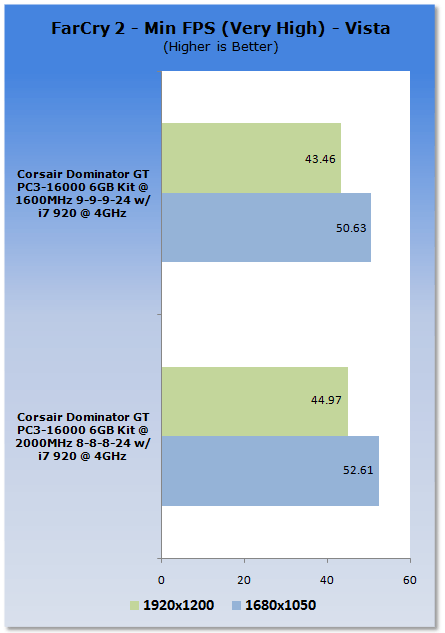
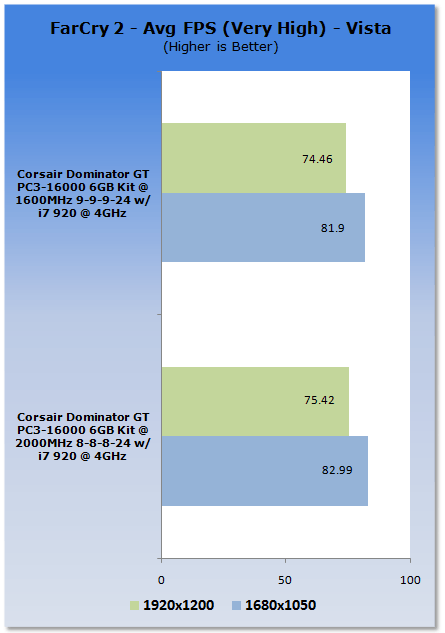
Looking at a real world environment like gaming we can see the extra MHz is giving us a bump in both the minimum and average department at both resolutions.
Final Thoughts
At well over 300 U.S. Dollars, the Corsair Dominator GT kit we have here today is far from cheap. For most people this kind of money doesn't have to be spent for them to be happy with their system. With that said, though, if you're serious about performance, really want to get into benchmarking or simply want to own some of the fastest modules on the market, these are a serious set of modules.
What makes them really shine is not only the performance of the modules, but the quality of them. As we already mentioned, the quality of the heatsink and the fan sink are second to none and while there might not be any fancy retail packaging, these are just an all out quality set of modules.
For most it's going to come down to the money and the problem is value is going to be completely dependent on the user and what they want. If you're going to run your system at stock these are terrible value. On the other hand, if you want some fast high quality modules that look and perform great, the overall value of them is excellent.
This kit here today continues to let us know that the Dominator GT name gives us the highest quality of memory. If you want to spend money and need to see some serious MHz then take a serious look at these Corsair Dominator GT modules.

 United
States: Find other tech and computer products like this
over at
United
States: Find other tech and computer products like this
over at  United
Kingdom: Find other tech and computer products like this
over at
United
Kingdom: Find other tech and computer products like this
over at  Australia:
Find other tech and computer products like this over at
Australia:
Find other tech and computer products like this over at  Canada:
Find other tech and computer products like this over at
Canada:
Find other tech and computer products like this over at  Deutschland:
Finde andere Technik- und Computerprodukte wie dieses auf
Deutschland:
Finde andere Technik- und Computerprodukte wie dieses auf  TT Show Episode 31 - AI-Powered iPhone and PS5 Pro and an AI-Generated Romantic Comedy
 NASA is about to make Treasure Planet real with a solar sail mission
 AI discovers famous painting wasn't entirely painted by the credited artist
 Dubai government responds to claims cloud seeding caused historic flooding
 Elgato announces new Neo range that includes plug-and-play Wave, Facecam, Stream Deck, and more
 FlexiSpot C7B-Mesh Ergonomic Office Chair Review
 Samsung G8 34-inch QD-OLED Gaming Monitor Review - 175Hz for $900
 ASRock NUCBOX-155H Mini PC Review
 NuPhy Air96 V2 Wireless Mechanical Keyboard Review
 TEAM T-FORCE Siren DUO360 RGB Liquid CPU Cooler Review
 AVerMedia Live Streamer ULTRA HD Review
 AVerMedia Live Gamer 4K 2.1 Review
 XPG Invader X Mid-Tower Chassis Review
 Intel Core i9-14900KS CPU Review
 Arbiter Polar 65 Magnetic Gaming Keyboard Review
 Everything you need to know about the latest ASUS NUC Mini PCs - NUC 14 Pro and ROG NUC
 How to Overclock Your GPU and Boost Your PC Gaming with ASUS GPU Tweak III
 ASUS's AMD Radeon RX 7000 Series GPU lineup has something for every gamer
 ASUS OLED Premium Care defends the ROG Swift OLED PG32UCDM gaming monitor from burn-in
 Patriot Viper Xtreme 5 Engineering Prototype 48GB Dual-Channel Memory Kit Preview