

Introduction
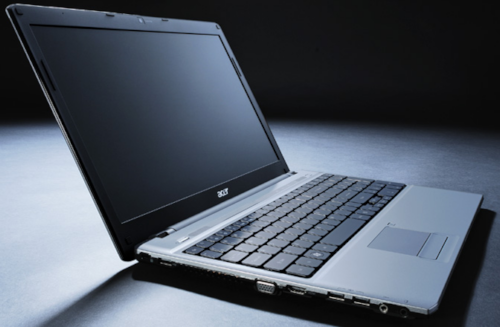
I knew when Steve Jobs pulled that MacBook Air out of the envelope on stage at WWDC that the new wave of popular notebooks would be thin machines. It took a few months after we first laid eyes on the MacBook Air, but eventually we saw Windows machines that were thin and sexy start to trickle onto the market.
Today we have the thin, sexy and expensive Dell Adamo, but with the current economy, who wants to spend thousands of dollars on a notebook? - Acer has unveiled a line of its own thin notebooks that have great battery life and a wealth of other features.
Today we are looking at the Acer Aspire Timeline 4810T-8480, which we will just call the Timeline from here on out. Acer promises all day computing on a single charge and the machine is thin and nicely designed as well. If you are in the market for a thin and sexy notebook that won't break the bank, the Timeline we are checking out today may be just what you need. Read on for all the details.
Specifications, Availability, and Pricing
The Timeline 4810 series has multiple configurations that are available. The config I am reviewing is priced right at about $700 U.S. online and has enough power to do just about anything you want.
Check out the list below for full specifications of the Timeline. The notebook I am testing has an Intel Core 2 Solo SU3500 CPU, 4GB of RAM and a 320GB HDD.

Packaging and Notebook Shots

Open the lid to the box and the Timeline is packed away well along with its AC adapter and battery.

Pull the thin little notebook from its wrapping and you are greeted with the first glimpse of the silver plastic top. It looks rather like aluminum, but isn't.

This is a shot of the rear of the notebook. That rounded black bit you see there is the battery.

The right side of the notebook is nice and thin, but still includes the VGA out, HDMI out and a pair of USB ports along with the audio and mic ports.

There is nothing to see on the front of the notebook other than the release for the screen and a light that glows blue when the notebook is powered up.

The left side of the little machine has the optical drive, USB port, AC port and the RJ-45 jack along with the Kensington lock port.

Flip the lid of the notebook up and the keyboard awaits. The keyboard is strange looking, not ugly mind you, but different from any other notebook I have tried.

This is a close up of the keyboard. It's hard to tell in these shots, but the keys are flat on top.

The screen has a glossy coating, which is more common today than the matte finish meaning lots of glare in bright environments from this screen.

This is a shot of the profile of the machine so you can get an idea of how thin the Timeline is.
Benchmarks - PCMark Vantage, iTunes Encoding & Battery Life
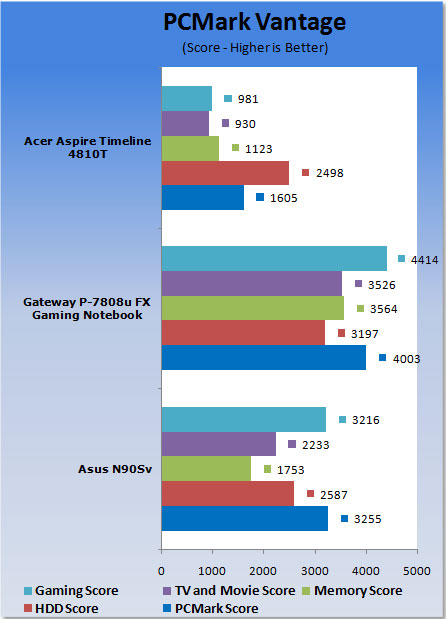
With the relatively low resolution of the smaller 14-inch LCD on the Timeline, 3DMark Vantage refused to run. For this review I will be testing the Timeline with PCMark Vantage, iTunes encoding, movie encoding and Battery Eater Pro. First up is PCMark Vantage.
PCMark Vantage
Version and / or Patch Used: 1.0.0
Developer Homepage: http://www.futuremark.com
Product Homepage: http://www.futuremark.com/benchmarks/pcmark-vantage//
Buy It Here
Checkout the screen shot below for the PCMark Vantage results for the Aspire Timeline.

iTunes Encoding
Version and / or Patch Used: 7.1.1.5
Developer Homepage: http://www.apple.com
Product Homepage: http://www.apple.com/itunes
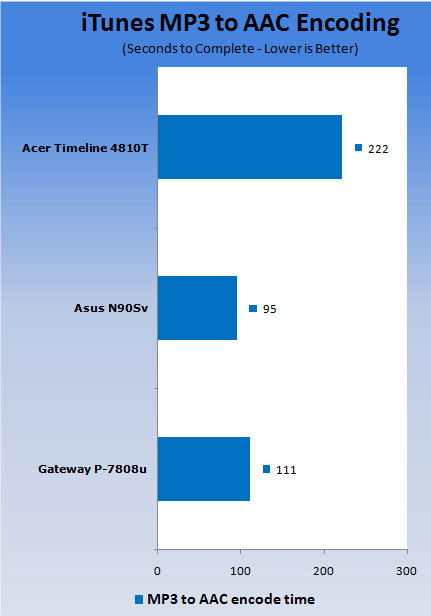
For the iTunes encoding test I used iTunes to encode my STP album from MP3 to AAC format. I timed the process with a stopwatch to get the score. Check out the chart below to see the time for the Aspire Timeline and compare it to the other notebooks I have reviewed.
Movie encoding
Version and / or Patch Used: 9
Developer Homepage: http://www.microsoft.com
Product Homepage: http://www.microsoft.com/windows/windowsmedia/forpros/encoder/default.mspx
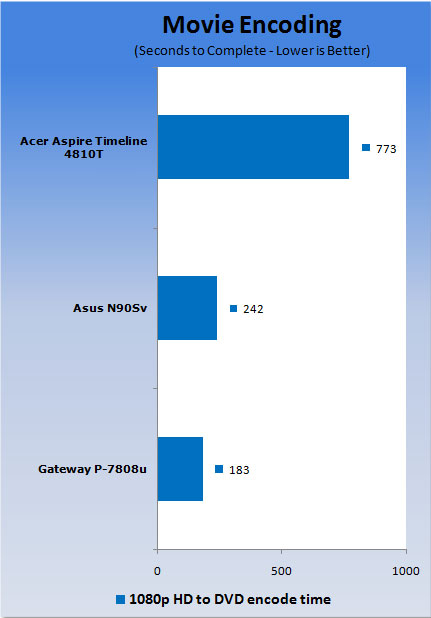
I used WME to encode the HD format Wonder of Flight video to DVD quality video and CD quality audio for playback on a PC. Check out the screen shot and chart below for the results of the test.

Battery Eater Pro
Version and / or Patch Used: 2.70
Developer Homepage: http://batteryeater.com/development.html
Product Homepage: http://batteryeater.com
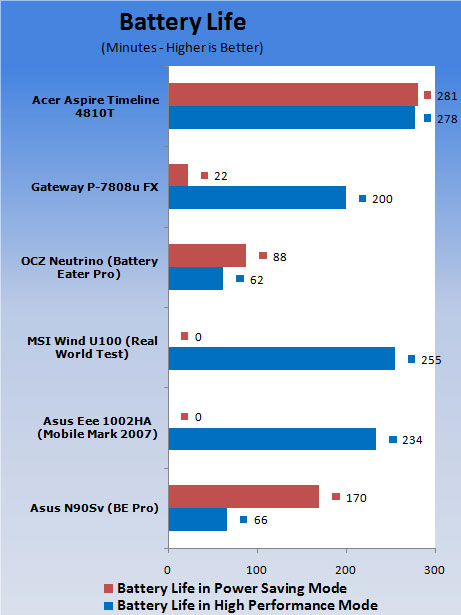
To test the battery life of the Timeline notebook I will be using Battery Eater Pro. Battery Eater puts more of a strain on the battery of a notebook than real world usage, so your battery life may be better than the time Battery Eater gives. Check out the chart below for the battery life of the Timeline notebook.
Hands On Use
The thing that was most impressive at first glance with the Timeline notebook is how thin the machine is. I really like the thin design and the notebook is very lightweight as well. The machine is well built and doesn't look like the budget notebook that it really is. The notebook has a rather strange looking keyboard. I call it strange because it's not really ugly or hard to use, it's just odd. The keys are highly glossy and appear to float over the underlying keyboard tray.
The key tops are very glossy, smooth and flat making for a different feel than I am used to with most keyboards that have a slight concavity to the tops of the keys. Typing feel for the odd keyboard is good with a tactile feel and a decent click when keys are pressed. After a while, you do forget that the keys are flat.
The 14-inch screen of the notebook is definitely geared more towards multimedia use than general productivity with its glossy finish. I have said it before; I am not a big fan of highly glossy screens because of the glare you have to deal with. You are in for some grief if you try and use the notebook outdoors. The screen works well, though, and has good color reproduction and no major issues with smearing or tearing when watching video online.
One of the big claims that Acer makes with the Timeline is all day computing from a single charge. Acer figures that the battery is good for a full eight hours of use per charge. If you read the benchmark section you know that with Battery Eater Pro and the Timeline set to 50% brightness and Wi-Fi and Bluetooth off I was able to squeeze over four and a half hours from the battery. That is almost half the runtime that Acer promises, but as I said before, Battery Eater Pro is harder on batteries than most people will be in the real world. The battery life of the little machine is very impressive.
To get that impressive battery life you do have to give up some performance, though; the Intel Core 2 Solo processor sips power, but is slower performing than other machines. You do make a tradeoff when you go with a thin machine like the Timeline, but the trade off for the portability and style is one that many notebook users will be more than willing to make.
The machine has a decent onboard sound system that offers enough volume to hear the audio in your music or video from across the room. I was also impressed that the thin machine still offers an optical drive, which is something that you don't find on netbooks that weigh almost as much.
Final Thoughts
Looking back at my time with the Acer Aspire Timeline 4810T, I came away impressed by the little machine. The Timeline will win no awards for performance, but it is top notch when it comes to portability and battery life. The machine has the longest battery life of any notebook I have tested so far and has a very portable design.
Mobile pros that are in the market for an ultraportable notebook and can stand to make a tradeoff of performance in exchange for portability will find that the Timeline is a very good notebook. The machine offers a fantastic combination of looks, portability, price and battery life that is very hard to match, much less beat, at the $700 asking price the machine can be purchased for.

 United
States: Find other tech and computer products like this
over at
United
States: Find other tech and computer products like this
over at  United
Kingdom: Find other tech and computer products like this
over at
United
Kingdom: Find other tech and computer products like this
over at  Australia:
Find other tech and computer products like this over at
Australia:
Find other tech and computer products like this over at  Canada:
Find other tech and computer products like this over at
Canada:
Find other tech and computer products like this over at  Deutschland:
Finde andere Technik- und Computerprodukte wie dieses auf
Deutschland:
Finde andere Technik- und Computerprodukte wie dieses auf 


 AMD's top Strix Point Halo APU could have 16 Zen 5 cores in 2 x CCDs, mirroring Ryzen 9000 CPUs
 FBI confirms Chinese hackers have infested US water and energy systems
 Microsoft's new Windows 11 'AI Explorer' feature set to anger AMD and Intel
 High-end PC maker gives advice that could fix Intel Core i9 CPUs crashing in games
 Windows 10 users: Get ready to be bugged about creating a Microsoft Account
 ASUS ROG Swift Pro PG248QP Gaming Monitor Review - Frames, frames, and more frames
 FlexiSpot C7B-Mesh Ergonomic Office Chair Review
 Samsung G8 34-inch QD-OLED Gaming Monitor Review - 175Hz for $900
 ASRock NUCBOX-155H Mini PC Review
 NuPhy Air96 V2 Wireless Mechanical Keyboard Review
 TEAM T-FORCE Siren DUO360 RGB Liquid CPU Cooler Review
 AVerMedia Live Streamer ULTRA HD Review
 AVerMedia Live Gamer 4K 2.1 Review
 XPG Invader X Mid-Tower Chassis Review
 Intel Core i9-14900KS CPU Review
 Everything you need to know about the latest ASUS NUC Mini PCs - NUC 14 Pro and ROG NUC
 How to Overclock Your GPU and Boost Your PC Gaming with ASUS GPU Tweak III
 ASUS's AMD Radeon RX 7000 Series GPU lineup has something for every gamer
 ASUS OLED Premium Care defends the ROG Swift OLED PG32UCDM gaming monitor from burn-in
 Patriot Viper Xtreme 5 Engineering Prototype 48GB Dual-Channel Memory Kit Preview