

Pocket Library, indeed!
Introduction
I love to read; do you love to read? - Of course you love to read. You are reading this right now, aren't you? - Unless you have subscribed to our direct brain RSS feed!
But aren't you tired of squinting at tiny PDA screens? - Your eyes being strained by the headache inducing backlit display.
Well, here comes Sony to answer the call! - Say hello to their new e-ink display e-book reader featuring long battery life, excellent readability and a ton of extra features that make it highly appealing.

So, why should you give a damn about these new fangled displays and why haven't you heard more about them? - Well, they're a new type of display designed to fill a niche in the market for displays that don't require constant refreshing, unlike a monitor.
E-ink and e-paper displays have been subtly infiltrating our lives in a much more interesting way as well. Because of their incredibly low power drain, they make great static signs in just about every environment, from supermarket price tags, to mobile phone displays.
The reason e-ink displays have been picked up for the e-book reader market is because of their low power consumption ability, the fact that the screen does not need to refresh until you turn a page and also their excellent readability in any lighting conditions.
Before we move on to the features list and usage of the Sony PRS-505, check out this video walkthrough demonstrating its flexibility and ease of use.
Solid and Sexy
Here's the low down on the features for the PRS-505:
Screen size (inch): 6
Resolution: 170 pixels per inch
Grey scale: 8-level grey scale
Battery Type: Rechargeable lithium-ion
Battery Life (reading EPUB eBooks): Approx 6800 page turns
Unsecured / free eBooks & text files: EPUB eBook, BBeB Book, Adobe PDF, Microsoft Word, TXT, RTF
DRM (Secure / purchased) eBooks and text files: EPUB eBooks (Adept) BBeB eBooks (Marlin)
Unsecured Audio files: mp3, AAC (not most DRM audio)
Image & Photo files: JPEG, GIF, PNG, BMP
This desirable hunk of aluminium, while only 8mm thick, sports an SD and Memory Stick Pro Duo slot to allow you some upgrade space as well as easy transferring of files to and from your reader.

With all this crammed into a neat piece of Sony-candy, what's stopping you running out right now and buying one for everyone in the family in order to save the rainforests and finally put to rest the dead tree format?

Money! Money-money-money-money - This thing will set you back roughly 270 U.S. Dollars and make you cry tears of poorness. This is due in fact to three main things; the relative immaturity of e-ink displays, the sheer amount of technology and open format support jammed into its thin sexy one piece aluminium shell and lastly, it's Sony; which if you haven't noticed, is a love/hate relationship of desirability and your money.
Literary Therapy
Enough about my love life; I shelled out of my own pocket to get one of these babies because I like to read a phenomenal amount of books and have managed to already accumulate a small plantations worth of wood pulp. Time to bring things into the 21st century!

Jacking this in with the supplied mini-USB cable to my computer and installing the supplied Sony software, I can register my e-book purchase with their online store which grants me the 100 free classic novel titles to choose out of over 900 (limited time offer at the time of writing).
The software is easy enough to use, but lacks the flow of something like iTunes purchase management. I have found it is easier to transfer any open format reading material using a memory card over using the software.
Once the reader was charged up and loaded with some reading material, it was time to hit the hay with my new sleek and silver beauty.
Bedside lamp reading conditions usually spell doom for any non-backlit device with awkward glare and poor contrast ratios, but not for the e-ink display! This thrives in just about any lighting condition, thanks to the completely different way in which e-ink and e-paper displays work.
If you want to find out more details on how it works, check out these sites:
- How It Works - E-Ink
- E-ink official website

I'll spare the technicals with regard to how the screen operates here, but I will tell you it looks like you are reading a printed page! The background of the display is off-white with a clear crisp black text on top, making it easy on the eyes and feeling just like reading a paperback.
Easy On The Eyes
A great feature of the firmware on board the reader is the ability to select from three different zoom levels on the text to suit your eye-comfort-zone, which can come in handy when you start importing all kinds of strange font-sized PDFs and have to zoom right in to make the text readable.

8-bit greyscale means that images are supported in the reader and you can view images in PDFs as well as regular images. This makes the e-reader also perfect for technical documentation and datasheets (as an electronics engineer, I am constantly referring to them).
After a few good books, it was time to charge the reader. I think the 6800 page-turns was a bit optimistic of Sony and realistically i'd say you are more likely to get about 4000 pages if you are doing nothing but flicking forward through them.
This is still a vast improvement over my Palm TX PDA which managed about 300 pages before giving up the ghost. And long before that, it would bitch to me about low battery every 5 minutes or so, like the world was going to end unless I find an electrical socket in time.

The bottom of the reader hides a few surprises, too. Alongside the mini-USB socket lies a power plug socket, 3.5mm headphone jack and volume rocker switch. Now, you are probably thinking... "wait, a 3.5mm headphone jack? - this thing plays music?!" - That's right, it plays non DRM'd MP3s and AAC files! - The inclusion of this feature is not superfluous either, as people often like to listen to e-books in bed and some like to listen to music while they read.
Talk To Me
A feature that the newly released Amazon Kindle 2 is sporting is the ability to turn text into spoken words, essentially turning any text you have into some easy listening audio. This is a feature that will broaden the market for the device by including people who have literacy related handicaps such as dyslexia or trouble reading from computerised displays. I am hoping that Sony will follow suit quickly by releasing improved firmware for the device, allowing me to play back whole books in spoken format, or even just single pages (hint hint Sony).

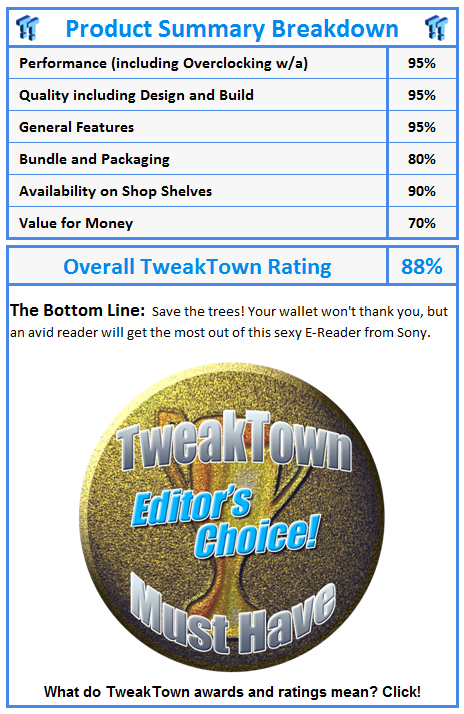
There is not a lot more I can say about this device and that is not a bad thing, considering the intended functionality of the device. It does exactly what it says with no excess features and it's all wrapped up in a quality Sony-design.

Despite my love/hate relationship of Sony products, I continue to buy them because they are a brand that I have been pleased with time and time again and they induce a certain gadget lust in me. Understated and minimal designs are apparent with the e-book reader; a sleek one piece aluminium shell and matching buttons provide all the functionality you could need.
I recommend this reader for anyone who, like me, gets through a lot of books. Most avid readers could justify the cost of it inside two years, especially when taking into account the purchase of a consistent amount of paper backs and the occasional hardback release per a year.
Join the 21st century and save the rainforest in a completely geeky way!
 United
States: Find other tech and computer products like this
over at
United
States: Find other tech and computer products like this
over at  United
Kingdom: Find other tech and computer products like this
over at
United
Kingdom: Find other tech and computer products like this
over at  Australia:
Find other tech and computer products like this over at
Australia:
Find other tech and computer products like this over at  Canada:
Find other tech and computer products like this over at
Canada:
Find other tech and computer products like this over at  Deutschland:
Finde andere Technik- und Computerprodukte wie dieses auf
Deutschland:
Finde andere Technik- und Computerprodukte wie dieses auf  Unreal Engine 5.4 brings significant updates to ray tracing and rendering for 60 FPS gaming
 SK hynix plans $14.6 billion on new chip fab in South Korea to meet 'soaring demand' of HBM
 You can pick up AMD's flagship RDNA 3 GPU, the Radeon RX 7900 XTX, for $850
 Tesla unveils new Model 3 Performance: 0-60 mph in 2.9 seconds, 163 mph top speed
 GIGABYTE confirms AMD Ryzen 9000 Series processors are coming soon
 ACEMAGIC AD08 "Core i9 11900H" Mini PC Review
 Lenovo ThinkPad X1 Carbon Gen 12 Review
 ASUS ROG Swift Pro PG248QP Gaming Monitor Review - Frames, frames, and more frames
 FlexiSpot C7B-Mesh Ergonomic Office Chair Review
 Samsung G8 34-inch QD-OLED Gaming Monitor Review - 175Hz for $900
 ASRock NUCBOX-155H Mini PC Review
 NuPhy Air96 V2 Wireless Mechanical Keyboard Review
 TEAM T-FORCE Siren DUO360 RGB Liquid CPU Cooler Review
 AVerMedia Live Streamer ULTRA HD Review
 AVerMedia Live Gamer 4K 2.1 Review
 Everything you need to know about the latest ASUS NUC Mini PCs - NUC 14 Pro and ROG NUC
 How to Overclock Your GPU and Boost Your PC Gaming with ASUS GPU Tweak III
 ASUS's AMD Radeon RX 7000 Series GPU lineup has something for every gamer
 ASUS OLED Premium Care defends the ROG Swift OLED PG32UCDM gaming monitor from burn-in
 Patriot Viper Xtreme 5 Engineering Prototype 48GB Dual-Channel Memory Kit Preview