


Today we were invited out to the Acer headquarters here in Taipei, Taiwan where we were given an introduction to the company's take on cloud storage which they named AcerCloud.
Acer's cloud system is different ones such as Apple's iCloud, Google's Drive or Dropbox. Instead of sending your data up into the cloud, AcerCloud is more personal in nature. In technical terms, that means that your data is not stored on servers on the web. The data is instead accessed from your PC or laptop which has AcerCloud software installed and is of course connected to the internet.
AcerCloud launched towards the end of last year, but it was our first chance to go hands-on with it today, and it's quite good. Within AcerCloud are separate applications including clear.fi Media, clear.fi Photo, clear.fi Music, clear.fi Video. Each app handles different files and allows you to view saved files on any device with AcerCloud - that is a PC running Windows 7 or Windows 8, and iOS device running OS version 5.0.1 or above and any Android device running OS version 2.3 and above.
 4
4What makes AcerCloud quite good is the AcerCloud Docs app. With the Docs app anytime you save a Word doc, PowerPoint file or Excel file, and no matter where they are saved on your PC, they will automatically be accessible by devices connected to your AcerCloud. There is no need to save the file to a certain location - it's just ready to go. That was one of the big impressions we got about AcerCloud, it's designed to be very easy for anyone to use.
AcerCloud software is free and can be run on any computer, however to sign-up to the AcerCloud service, you do need at least one Acer device be it an Acer computer, laptop or tablet. You are able to link up to 32 total Acer devices to your AcerCloud service. You have the ability to link up to eight non-Acer devices such as iPads, iPods and iPhones or Android tablets from competitor brands such as Samsung. To make that very clear, you could have eight non-Acer devices connected and that would leave room for a remainder 24 Acer devices to be connected.
 4
4Acer has security covered, too. If you happen to suffer theft or you lose one of your devices, you can simply use any computer or mobile device connected to the Internet, login to your AcerCloud account, and remove that device from your service. When they device gets internet access, all of your data will be removed and the user will not be able to access your other connected AcerCloud devices. We asked Acer if they had cloud storage options available, but at this time all data is stored on your devices. Acer is currently looking into offering paid cloud storage due to customer demand.
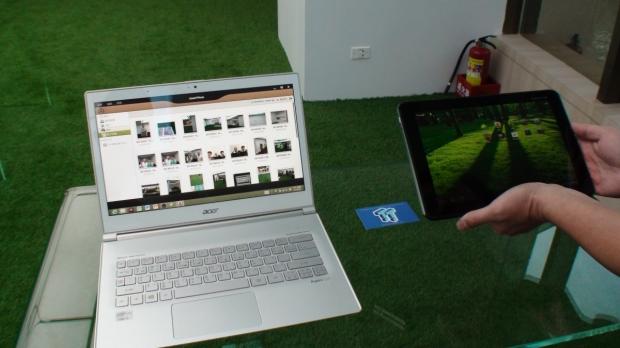
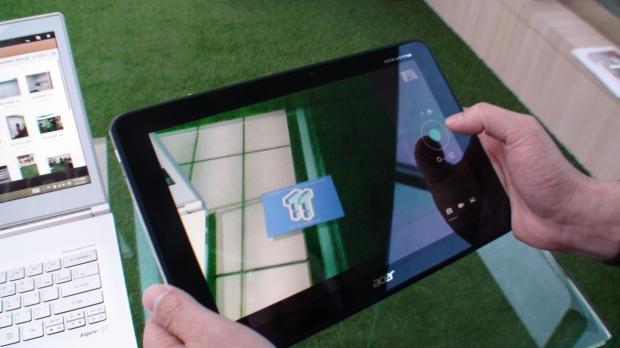
Above you can get a quick hands-on look at the service in the video where we take a look at clear.fi Photo. While not entirely new, it was cool to see a photo taken on the nearby Acer tab and see it appear almost instantly on the Acer laptop next to it - and in a nice visual way, which was also very easy to use.


 Apple has made a new visionOS 1.2 Apple Vision Pro beta available to developers
 Apple's latest iOS 17.5 beta is now available for download
 New Razer Viper V3 Pro is an esports gaming mouse with a 35K sensor that weighs just 54 grams
 Xbox is finally creating a VR headset, but it's not what you think
 Sega Toys suspends robot cat sales and issues recall in Japan after reports of a burning smell
 Lenovo ThinkPad X1 Carbon Gen 12 Review
 ASUS ROG Swift Pro PG248QP Gaming Monitor Review - Frames, frames, and more frames
 FlexiSpot C7B-Mesh Ergonomic Office Chair Review
 Samsung G8 34-inch QD-OLED Gaming Monitor Review - 175Hz for $900
 ASRock NUCBOX-155H Mini PC Review
 NuPhy Air96 V2 Wireless Mechanical Keyboard Review
 TEAM T-FORCE Siren DUO360 RGB Liquid CPU Cooler Review
 AVerMedia Live Streamer ULTRA HD Review
 AVerMedia Live Gamer 4K 2.1 Review
 XPG Invader X Mid-Tower Chassis Review
 Everything you need to know about the latest ASUS NUC Mini PCs - NUC 14 Pro and ROG NUC
 How to Overclock Your GPU and Boost Your PC Gaming with ASUS GPU Tweak III
 ASUS's AMD Radeon RX 7000 Series GPU lineup has something for every gamer
 ASUS OLED Premium Care defends the ROG Swift OLED PG32UCDM gaming monitor from burn-in
 Patriot Viper Xtreme 5 Engineering Prototype 48GB Dual-Channel Memory Kit Preview